automatic transmission MAZDA MODEL 3 SEDAN 2019 Owner's Manual
[x] Cancel search | Manufacturer: MAZDA, Model Year: 2019, Model line: MODEL 3 SEDAN, Model: MAZDA MODEL 3 SEDAN 2019Pages: 592, PDF Size: 75.35 MB
Page 179 of 592
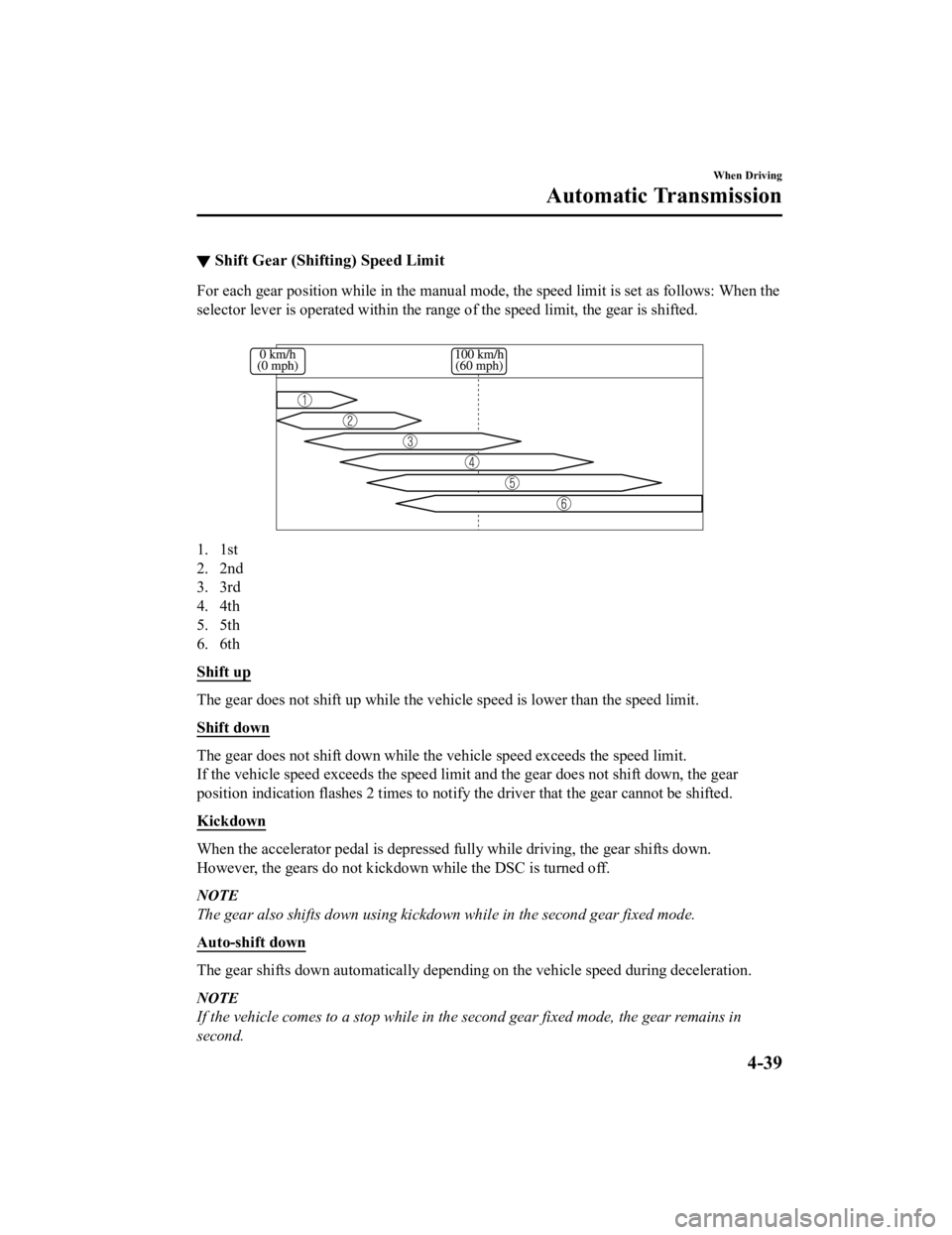
▼Shift Gear (Shifting) Speed Limit
For each gear position while in the manual mode, the speed limi
t is set as follows: When the
selector lever is operated within the range of the speed limit, the gear is shifted.
1. 1st
2. 2nd
3. 3rd
4. 4th
5. 5th
6. 6th
Shift up
The gear does not shift up while the vehicle speed is lower tha n the speed limit.
Shift down
The gear does not shift down while the vehicle speed exceeds th e speed limit.
If the vehicle speed exceeds the speed limit and the gear does not shift down, the gear
position indication flashes 2 tim es to notify the driver that the gear cannot be shifted.
Kickdown
When the accelerator pedal is de pressed fully while driving, the gear shifts down.
However, the gears do not kickdown while the DSC is turned off.
NOTE
The gear also shifts down using kickdown while in the second gear fixed mode.
Auto-shift down
The gear shifts down automatically depending on the vehicle spe ed during deceleration.
NOTE
If the vehicle comes to a stop while in the second gear fixed mode, the gear remains in
second.
When Driving
Automatic Transmission
4-39
Mazda3_8HE9-EA-18K_Edition3 2018-11-21 14:31:58
Page 180 of 592

▼Recommendations for Shifting
Upshifting
For normal acceleration and cruising, Mazda recommends these sh
ift points:
(U.S.A. and Canada)
Gear Vehicle speed*1
M1 to M224 km/h (15 mph)
M2 to M3 40 km/h (25 mph)
M3 to M4 65 km/h (40 mph)
M4 to M5 73 km/h (45 mph)
M5 to M6 81 km/h (50 mph)
*1 Always observe local speed limit regulations.
Downshifting
When you must slow down in heavy traffic or on a steep upgrade, downshift before the
engine starts to overwork. This gives better acceleration when you need more speed.
On a steep downgrade, downshifting helps maintain safe speed an d prolongs brake life.
When Driving
Automatic Transmission
4-40
Mazda3_8HE9-EA-18K_Edition3 2018-11-21 14:31:58
Page 181 of 592

Direct Mode*
▼Direct Mode
Direct mode can be used for temporarily
switching gears by operating the steering
shift switch while the vehicle is being
driven with the selector lever in the D
position.
While in direct mode, the D and M
indication illuminate and the gear position
in use is illuminated.
1. Direct mode indication
2. Gear position indication
Direct mode is canceled (released) under
the following conditions.
The UP switch (+/OFF) is pulled
rearward for a certain amount of time or
longer.
The vehicle is driven for a certain
amount of time or longer (time differs
depending on the driving conditions
while operating).
The vehicle is stopped or moving at a
slow speed.
NOTE
Shifting up and down while in direct mode
may not be possible depending on the
vehicle speed. In addition, because direct
mode is canceled (released) depending on
the rate of acceleration or if the
accelerator is fully depressed, use of the
manual shift mode is recommended if you
need to drive the vehicle in a particular
gear for long periods.
When Driving
Automatic Transmission
*Some models.4-41
Mazda3_8HE9-EA-18K_Edition3 2018-11-21 14:31:58
Page 182 of 592

Driving Tips
▼Driving Tips
WA R N I N G
Do not let the vehicle move in a direction
opposite to the direction selected by the
selector lever:
Do not let the vehicle move backward with
the selector lever in a forward position, or
do not let the vehicle move forward with
the selector lever in the reverse position.
Otherwise, the engine may stop, causing
the loss of the power brake and power
steering functions, and make it
difficult to
control the vehicle which could result in an
accident.
Passing
For extra power wh en passing another
vehicle or climbing steep grades, depress
the accelerator fully. The transmission will
shift to a lower gear, depending on vehicle
speed.
NOTE
The accelerator pedal may initially feel
heavy as it is being depressed, then feel
lighter as it is depressed further. This
change in pedal force aids the engine
control system in determining how much
the accelerator pedal has been
depressed for performing kickdown, and
functions to control whether or not
kickdown should be performed.
While the selector lever is in the M
position and the DSC is turned off,
manual shift mode does not switch to
automatic shift mode even if the
accelerator pedal is completely
depressed. Operate the selector lever.
Climbing steep gra des from a stop
To climb a steep grade from a stopped
position:
1. Depress the brake pedal.
2. Shift to D or M1, depending on the load weight and grade steepness.
3. Release the brake pedal while gradually accelerating.
Descending steep grades
When descending a steep grade, shift to
lower gears, depending on load weight and
grade steepness. Descend slowly, using the
brakes only occasionally to prevent them
from overheating.
When Driving
Automatic Transmission
4-42
Mazda3_8HE9-EA-18K_Edition3 2018-11-21 14:31:58
Page 205 of 592

NOTE
To release the parking brake when the
ignition is switched OFF, it is necessary to
cancel the parking brake auto operation.
For details, refer to Canceling the parking
brake automatic operation.
Releasing the parking brake
automatically
If the accelerator pe dal is depressed with
the parking brake applied and all of the
following conditions met, the parking
brake is released automatically. When the
parking brake is released, the EPB
indicator light in the instrument cluster
and the EPB switch indicator light turn
off.
The engine is running.
The driver's door is closed.
The driver's seat belt is fastened.
(Manual transmission vehicle)
The shift lever is in a position other
than neutral.
The clutch pedal is depressed halfway.
(Automatic transmission vehicle)
The selector lever is in the D, M, or R
position.
NOTE
If something such as the driver's foot
contacts the accelerator pedal with the
engine running and the parking brake
applied, the parking brake might be
released automatically. If you do not
intend to start driving the vehicle
immediately, shift the shift lever to the
neutral position for a manual
transmission, or shift the selector lever to
the P or N position for an automatic
transmission.
Canceling the parking brake automatic
operation
The parking brake automatic operation can
be canceled by doing any of the following
after switching the ignition from ON to
OFF.
Auto operation cancel method 1
1. Switch the ignition ON.
2. Turn off the AUTOHOLD.
3. Press the EPB switch continuously for 2 seconds or longer (until a sound is
activated).
4. Release the EPB switch and switch the ignition OFF within 5 seconds after the
sound was activated.
After the auto opera tion is canceled, a
sound is activated one time, and the
EPB switch indicator light switches
from illumination to flashing, and then
turns off after 3 seconds.
Auto operation cancel method 2
1. Switch the ignition ON.
2. Turn off the AUTOHOLD.
3. Switch the ignition OFF with the EPB switch pressed.
When the auto operation is canceled, a
sound is activated one time, and the
EPB switch indicator light from
normal flashing to faster flashing, and
then turns off after 3 seconds.
NOTE
When canceling the parking brake auto
operation and parking the vehicle, shift
the shift lever to the 1st gear or the R
position for a manual transmission, or
shift the selector lever to the P position
for an automatic transmission, and then
use wheel blocks.
When Driving
Brake
4-65
Mazda3_8HE9-EA-18K_Edition3 2018-11-21 14:31:58
Page 208 of 592

AUTOHOLD
▼AUTOHOLD
The AUTOHOLD function automatically holds the vehicle stopped,
even if you take your
foot off the brake pedal. This function can be best used while stopped in traffic or at a traffic
light. The brakes are released when you resume driving the vehi cle such as by releasing the
clutch pedal with the shift leve r shifted to a position other than the neutral position (manual
transmission vehicle) or depressing the accelerator pedal (automatic transmission vehicle).
WA R N I N G
Do not rely completely on the AUTOHOLD function:
The AUTOHOLD function is only designed to assist the brake operation while the vehicle is
stopped. Neglecting to operate the brakes and relying only on the AUTOHOLD system is
dangerous and could result in an unexpected a ccident if the vehicle were to suddenly move.
Operate the brakes appropriatel y in accordance with the road and surrounding conditions.
Do not release your foot from the brake pedal while the vehicle is stopped on a steep grade:
Because there is a possibility of the vehicle not being held in the stopped position by the
AUTOHOLD function, the vehicle may move un expectedly and result in an accident.
Do not use the AUTOHOLD function on slippery roads such as icy or snow-covered roads, or
unpaved roads:
Even if the vehicle is held in the stopped posi tion by the AUTOHOLD function, the vehicle may
move unexpectedly and result in an accident . Operate the accelerator pedal, brakes, or
steering wheel approp riately as necessary.
Immediately depress the brake pedal in the following cases:
Because the AUTOHOLD function is canceled forcibly, the vehicle may move unexpectedly
and result in an accident.
“Depress Brake Pedal. Brake Hold Disabled” is displayed in the multi-information display
and the warning sound is activated at the same time.
Always apply the parking brake when parking the vehicle:
Not applying the parking brake when parking the vehicle is dangerous as the vehicle may
move unexpectedly and result in an accident. When parking the vehicle, shift the selector
lever to the P position (automatic transmission vehicle) and apply the parking brake.
When Driving
Brake
4-68
Mazda3_8HE9-EA-18K_Edition3 2018-11-21 14:31:58
Page 210 of 592

▼AUTOHOLD System is Turned On
Press the AUTOHOLD switch and when
the AUTOHOLD standby indicator light
turns on, the AUTOHOLD function turns
on.
1. AUTOHOLD standby indicator light
NOTE
When all of the following conditions are
met, the AUTOHOLD standby indicator
light turns on when the AUTOHOLD
switch is pressed and the AUTOHOLD
function turns on.
The ignition is switched ON (engine is
running).
The driver's seat belt is fastened.
The driver's door is closed.
There is no problem with the
AUTOHOLD function.
To operate AUTOHOLD and hold the
brakes
1. Depress the brake pedal and bring the vehicle to a complete stop.
2. The AUTOHOLD active indicator light in the instrume nt cluster turns on
and the brakes are held.
3. The vehicle is held in its stopped position even with the brake pedal
released.
NOTE
When all of the following conditions are
met, the AUTOHOLD operates and the
brakes are held.
The ignition is switched ON (engine is
running).
The vehicle is stopped.
The brake pedal is being depressed.
The AUTOHOLD active indicator light
turns on.
The accelerator pedal is not depressed.
The driver's seat belt is fastened.
The driver's door is closed.
There is no problem with the
AUTOHOLD function.
The parking brake is released.
There is no problem with the Electric
Parking Brake (EPB) function.
(Automatic transmission vehicle)
The selector lever is in a position other
than R position or the vehicle tilts
forward with the selector lever in the R
position.
To release AUTOHOLD and start
driving the vehicle
If you do any of the following actions to
resume driving the vehicle, the brakes
release automatically and the
AUTOHOLD active indicator light turns
off.
(Manual transmission vehicle)
You start to release the clutch pedal with
the shift lever shifted to a position other
than the neutral position
(Automatic transmission vehicle)
The accelerator pedal is depressed.
When Driving
Brake
4-70
Mazda3_8HE9-EA-18K_Edition3 2018-11-21 14:31:58
Page 211 of 592
The vehicle tilts rearward or the
selector lever is shifted to the R
position on level ground.
NOTE
If the Electric Parking Brake (EPB)
switch is pulled while the AUTOHOLD
is operating, the parking brake is
applied and the AUTOHOLD is
released. In addition, if the parking
brake is released under this condition,
the AUTOHOLD operates to hold the
brakes.
Under the following conditions, the
parking brake is automatically applied
and the AUTOHOLD is released. The
AUTOHOLD is re-enabled when the
conditions before the AUTOHOLD is
released are restored.
The driver’s seat belt is unfastened.
The driver’s door is opened.
When about 10 minutes or longer have
passed since the AUTOHOLD operation
started, the parking brake is
automatically applied. Because the
AUTOHOLD is restored when releasing
the parking brake, the hold on the
brakes by AUTOHOLD function
resumes.
(Manual transmission vehicle)
When starting to drive the vehicle
forward or in reverse on a down slope,
depress the clutch pedal and shift the
shift lever to the appropriate position for
driving in the desired direction, and then
depress the accelerator pedal to release
the AUTOHOLD.
The AUTOHOLD can be canceled
forcibly by fully depressing the
accelerator pedal for 1 second or longer
while the AUTOHOLD is operating.
Forcibly cancel the AUTOHOLD only
when the AUTOHOLD cannot be
canceled due to a system malfunction or
it is necessary to cancel the
AUTOHOLD in an emergency.
▼AUTOHOLD System is Turned Off
Depress the brake pedal and press the
AUTOHOLD switch. The AUTOHOLD is
turned off and the AUTOHOLD standby
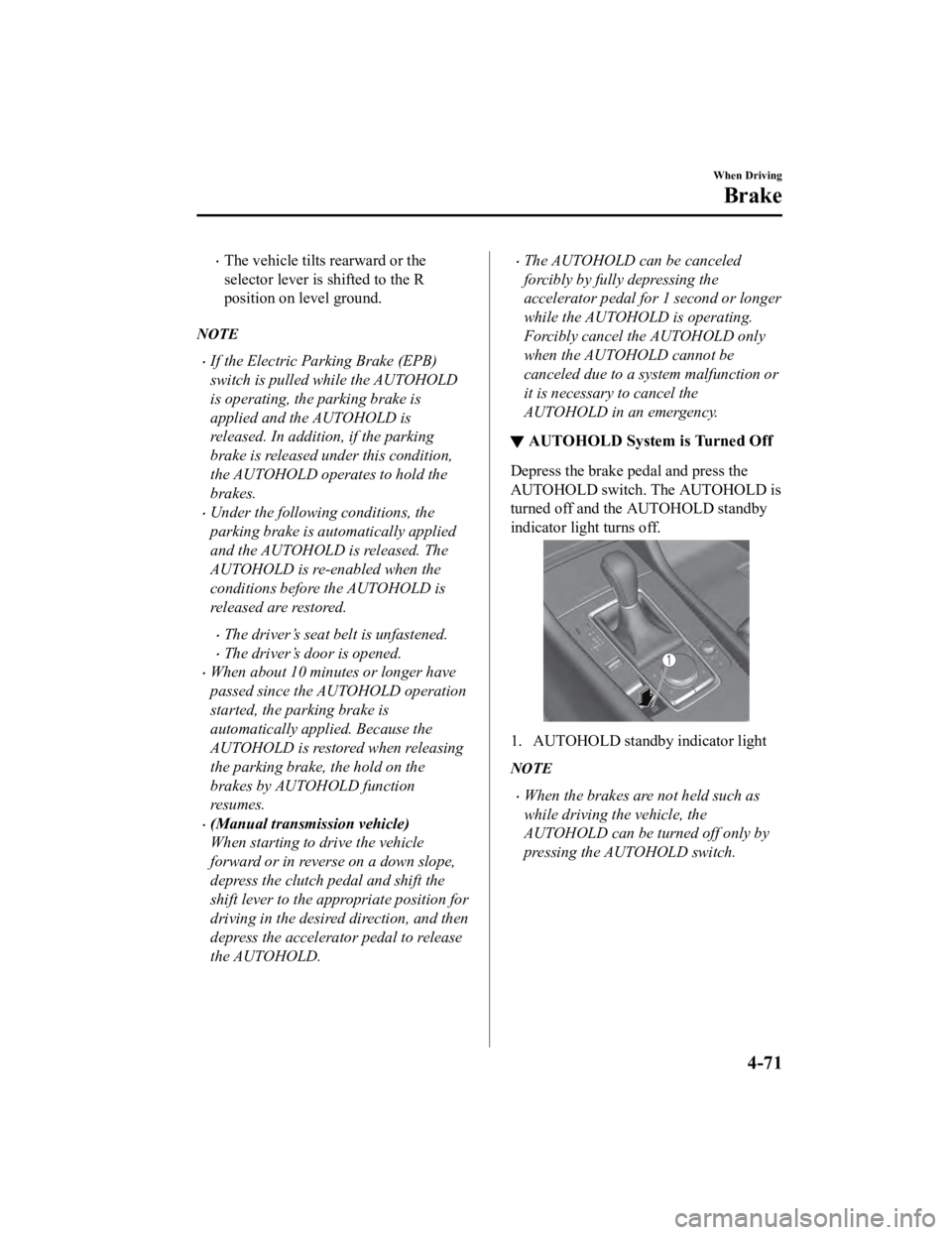
indicator light turns off.
1. AUTOHOLD standby indicator light
NOTE
When the brakes are not held such as
while driving the vehicle, the
AUTOHOLD can be turned off only by
pressing the AUTOHOLD switch.
When Driving
Brake
4-71
Mazda3_8HE9-EA-18K_Edition3
2018-11-21 14:31:58
Page 212 of 592

If the AUTOHOLD switch is pressed
without depressing the brake pedal
while AUTOHOLD is operating
(AUTOHOLD active indicator light in
instrument cluster is turned on), the
message “Depress Brake Pedal and
Operate Switch to Release” is indicated
on the multi-information display to
notify the driver to depress the brake
pedal.
If any of the following conditions occurs
while the AUTOHOLD function is
operating (AUTOHOLD active indicator
light is turned on), the parking brake is
applied automatically and the
AUTOHOLD function turns off. For the
Electric Parking Brake (EPB)
operation, refer to the Electric Parking
Brake (EPB) on page 4-63.
The ignition is switched OFF.
There is a problem with the
AUTOHOLD function.
Hill Launch Assist (HLA)
▼ Hill Launch Assist (HLA)
The HLA functions to assist in
accelerating the vehicle from a stop on
slopes. When releasing the brake pedal
and depressing the accelerator pedal to
accelerate the vehicle from a stop while on
a slope, the function prevents the vehicle
from rolling. The HLA also operates when
reversing on a slope.
The braking force is maintained
automatically after releasing the brake
pedal on a steep slope.
For manual transmission vehicles, the
HLA operates when the vehicle is tilted
rearward with the shif
t lever in a forward
gear, and operates when the vehicle is
tilted forward with the shift lever in the R
position.
For automatic transmission vehicles, the
HLA operates when the vehicle is tilted
rearward with the selector lever in a
forward gear, and operates when the
vehicle is tilted forwa rd with the selector
lever in the R position.
WA R N I N G
Do not rely completely on HLA:
HLA is an auxiliary device for accelerating
from a stop on a slope. The system only
operates for about 2 seconds and
therefore, relying only on the system, when
accelerating from a stop is dangerous
because the vehicle may move (roll)
unexpectedly and cause an accident.
When Driving
Brake
4-72
Mazda3_8HE9-EA-18K_Edition3 2018-11-21 14:31:58
Page 234 of 592
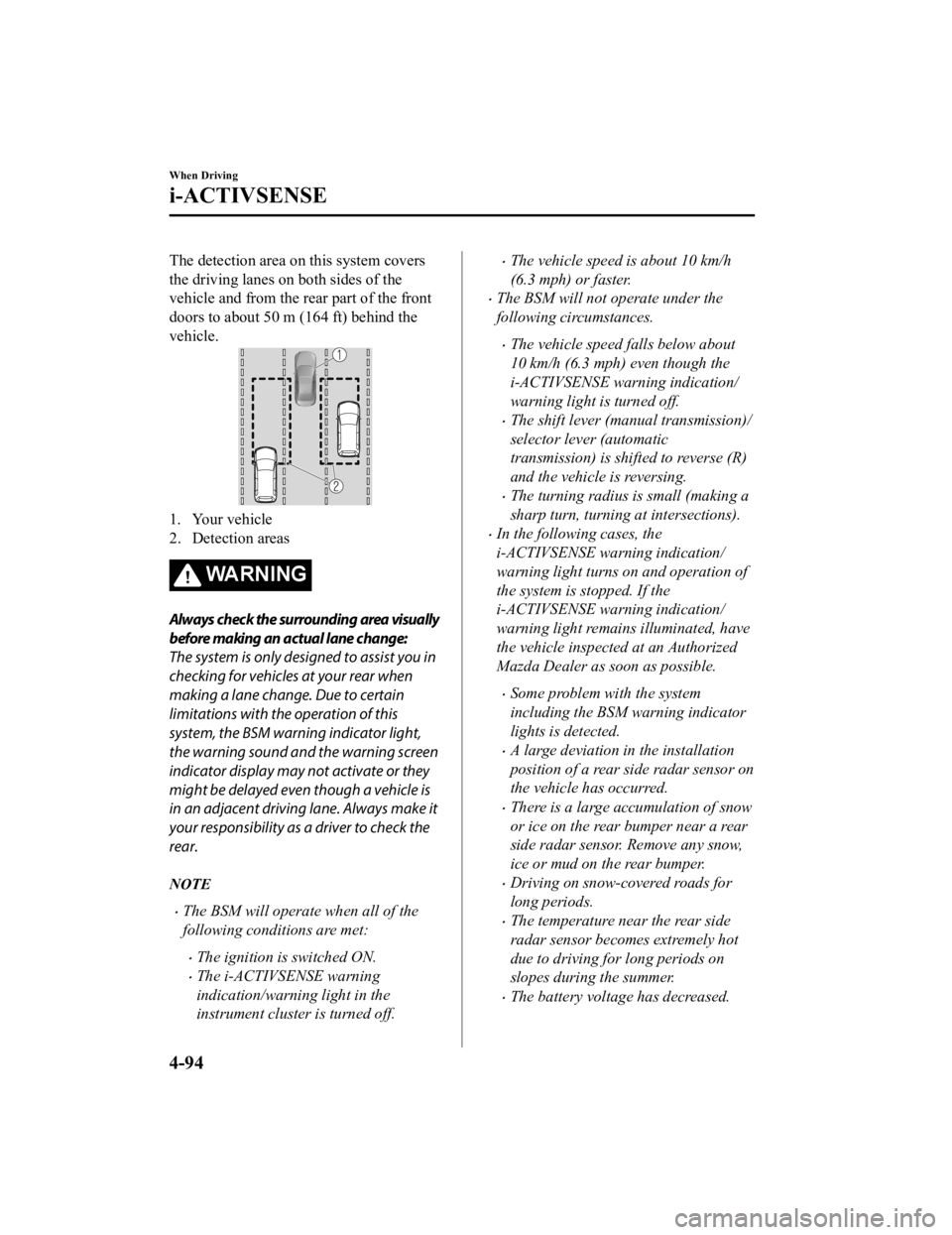
The detection area on this system covers
the driving lanes on both sides of the
vehicle and from the rear part of the front
doors to about 50 m (164 ft) behind the
vehicle.
1. Your vehicle
2. Detection areas
WA R N I N G
Always check the surrounding area visually
before making an actual lane change:
The system is only designed to assist you in
checking for vehicles at your rear when
making a lane change. Due to certain
limitations with the operation of this
system, the BSM warning indicator light,
the warning sound and the warning screen
indicator display may not activate or they
might be delayed even though a vehicle is
in an adjacent driving lane. Always make it
your responsibility as a driver to check the
rear.
NOTE
The BSM will operate when all of the
following conditions are met:
The ignition is switched ON.
The i-ACTIVSENSE warning
indication/warning light in the
instrument cluster is turned off.
The vehicle speed is about 10 km/h
(6.3 mph) or faster.
The BSM will not operate under the
following circumstances.
The vehicle speed falls below about
10 km/h (6.3 mph) even though the
i-ACTIVSENSE warning indication/
warning light is turned off.
The shift lever (manual transmission)/
selector lever (automatic
transmission) is shifted to reverse (R)
and the vehicle is reversing.
The turning radius is small (making a
sharp turn, turning at intersections).
In the following cases, the
i-ACTIVSENSE warning indication/
warning light turns on and operation of
the system is stopped. If the
i-ACTIVSENSE warning indication/
warning light remains illuminated, have
the vehicle inspected at an Authorized
Mazda Dealer as soon as possible.
Some problem with the system
including the BSM warning indicator
lights is detected.
A large deviation in the installation
position of a rear side radar sensor on
the vehicle has occurred.
There is a large accumulation of snow
or ice on the rear bumper near a rear
side radar sensor. Remove any snow,
ice or mud on the rear bumper.
Driving on snow-covered roads for
long periods.
The temperature near the rear side
radar sensor becomes extremely hot
due to driving for long periods on
slopes during the summer.
The battery voltage has decreased.
When Driving
i-ACTIVSENSE
4-94
Mazda3_8HE9-EA-18K_Edition32018-11-21 14:31:58