trunk MAZDA MODEL 3 SEDAN 2019 Owner's Manual
[x] Cancel search | Manufacturer: MAZDA, Model Year: 2019, Model line: MODEL 3 SEDAN, Model: MAZDA MODEL 3 SEDAN 2019Pages: 592, PDF Size: 75.35 MB
Page 131 of 592

Theft-Deterrent System*
▼Theft-Deterrent System
If the theft-deterren
t system detects an
inappropriate entry in to the vehicle, which
could result in the veh icle or its contents
being stolen, the alarm alerts the
surrounding area of an abnormality by
sounding the horn and flashing the hazard
warning lights.
The system will not function unless it's
properly armed. So when you leave the
vehicle, follow the arming procedure
correctly.
▼ Operation
System triggering conditions
The horn sounds intermittently and the
hazard warning lights flash for about 30
seconds when the system is triggered by
any one of the following:
Unlocking a door with the auxiliary key,
door lock switch, or an inside door-lock
knob.
Forcing open a door, the hood or the
liftgate/trunk lid.
Opening the hood by operating the hood
release handle.
Switching the ignition ON without using
the push button start.
If the system is triggered again, the lights
and horn will activat e until the driver's
door or the liftgate/trunk lid is unlocked
with the transmitter.
(With the advanced keyless function)
The lights and horn can also be
deactivated by touching the sensing area
of the door release touch sensor.
NOTE
If the battery goes dead while the
theft-deterrent system is armed, the horn
will activate and the hazard warning
lights will flash when the battery is
charged or replaced.
▼ How to Arm the System
1. Close the windows and the moonroof*
securely.
2. Switch the ignition OFF.
3. Make sure the hood, the doors, and the liftgate/trunk lid are closed.
4. Press the lock button on the transmitter.
The hazard warning lights will flash
once.
The following method will also arm
the theft-deterrent system:
Press the door-lock switch “
” while
any door is open and then close all of
the doors.
(With the advanced keyless function)
Touch the sensing area of the door lock
touch sensor.
The security indicator light in the
instrument cluster flashes twice per
second for 20 seconds.
5. After 20 seconds, the system is fully armed.
Before Driving
Security System
*Some models.3-41
Mazda3_8HE9-EA-18K_Edition3 2018-11-21 14:31:58
Page 132 of 592

NOTE
The theft-deterrent system can also be
armed by activating the auto relock
function with all the doors, the liftgate/
trunk lid and the hood closed.
Refer to Transmitter on page 3-5.
The system will disarm if one of the
following operations takes place within
20 seconds after pressing the lock
button:
Unlocking any door.
Opening any door.
Opening the hood.
Switching the ignition ON.
To rearm the system, do the arming
procedure again.
When the doors are locked by pressing
the lock button on the transmitter while
the theft-deterrent system is armed, the
hazard warning lights will flash once to
indicate that the system is armed.
▼ To Turn Off an Armed System
An armed system can be turned off using
any one of the following methods:
Pressing the unlock button on the
transmitter.
Starting the engine with the push button
start.
(With the advanced keyless function)
Touching the sensing area of the door
release touch sensor.
The hazard warning lights will flash twice.
NOTE
When the doors are unlocked by pressing
the unlock button on the transmitter while
the theft-deterrent system is turned off, the
hazard warning lights will flash twice to
indicate that the system is turned off.
▼ To Stop the Alarm
A triggered alarm can be turned off using
any one of the following methods:
Pressing the unlock button or the trunk
button (4–door) on the transmitter.
Starting the engine w
ith the push button
start.
(With the advanced keyless function)
Touching the sensing area of the door
release touch sensor.
Pressing the electric liftgate/trunk lid
opener while the key is being carried.
The hazard warning ligh ts will flash twice.
Before Driving
Security System
3-42
Mazda3_8HE9-EA-18K_Edition3 2018-11-21 14:31:58
Page 154 of 592
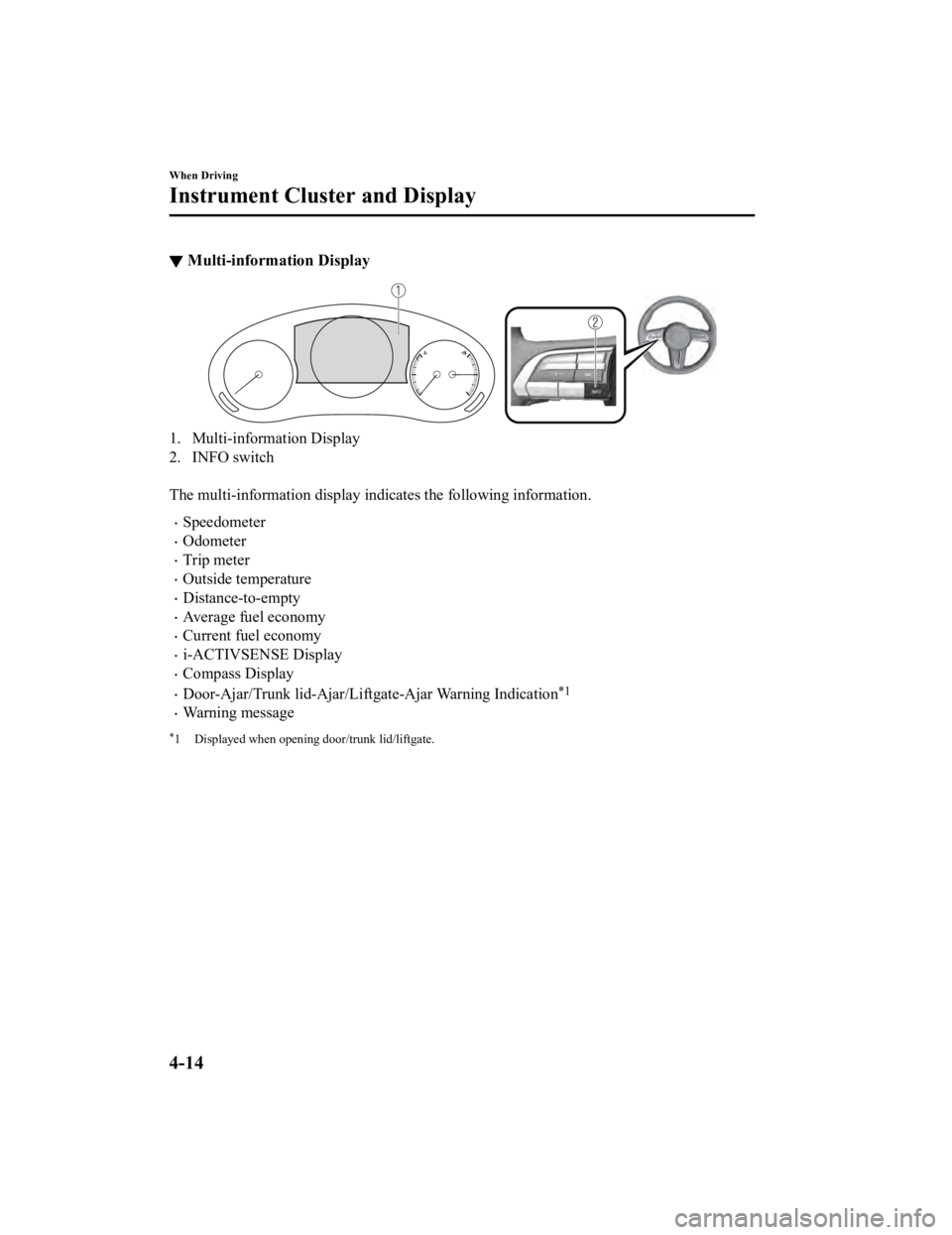
▼Multi-information Display
1. Multi-information Display
2. INFO switch
The multi-information display in
dicates the following information.
Speedometer
Odometer
Trip meter
Outside temperature
Distance-to-empty
Average fuel economy
Current fuel economy
i-ACTIVSENSE Display
Compass Display
Door-Ajar/Trunk lid-Ajar/Liftgate-Ajar Warning Indication*1
Warning message
*1 Displayed when opening door/trunk lid/liftgate.
When Driving
Instrument Cluster and Display
4-14
Mazda3_8HE9-EA-18K_Edition3 2018-11-21 14:31:58
Page 163 of 592
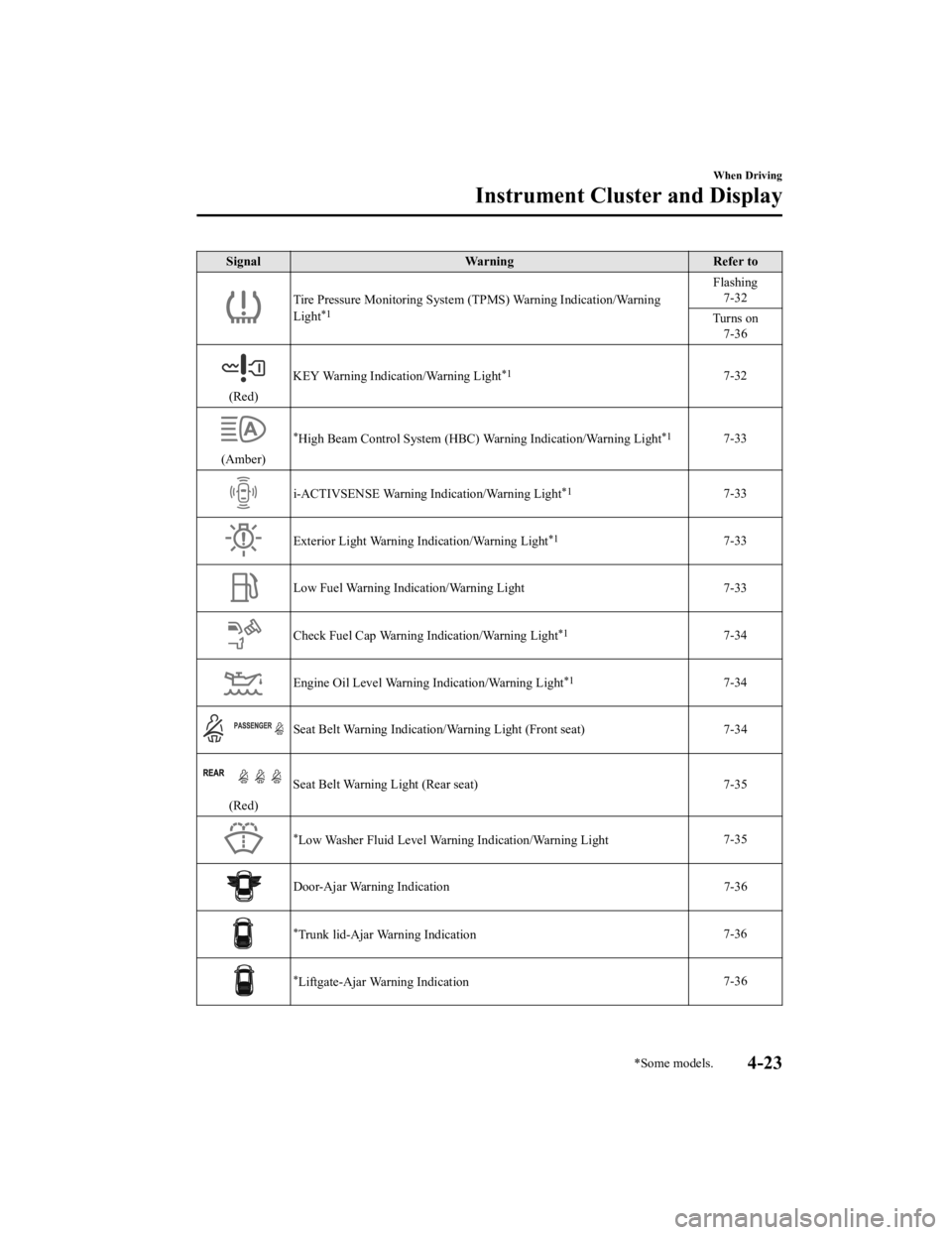
SignalWarning Refer to
Tire Pressure Monitoring System (TPMS) Warning Indication/Warni ng
Light*1
Flashing 7-32
Turns on 7-36
(Red) KEY Warning Indication/Warning Light
*17-32
(Amber)
*High Beam Control System (HBC) Warning Indication/Warning Light*17-33
i-ACTIVSENSE Warning Indication/Warning Light*17-33
Exterior Light Warning I
ndication/Warning Light*17-33
Low Fuel Warning Indication/Warning Light 7-33
Check Fuel Cap Warning Indication/Warning Light*17-34
Engine Oil Level Warning Indication/Warning Light*17-34
Seat Belt Warning Indication/Warning Light (Front seat) 7-34
(Red)Seat Belt Warning Light (Rear seat) 7-35
*Low Washer Fluid Level Warning Indication/Warning Light
7-35
Door-Ajar Warning Indication
7-36
*Trunk lid-Ajar Warning Indication 7-36
*Liftgate-Ajar Warning Indication 7-36
When Driving
Instrument Cluster and Display
*Some models.4-23
Mazda3_8HE9-EA-18K_Edition3
2018-11-21 14:31:58
Page 343 of 592

CAUTION
Heed the following precautions to assure
correct operation of each system.
Do not adhere stickers (including
transparent stickers) to the surface of the
radiator grille and front emblem in and
around the front radar sensor, and do
not replace the radiator grille and front
emblem with any product that is not a
genuine product designed for use with
the front radar sensor.
The front radar sensor includes a
function for detecting soiling of the radar
sensor's front surface and informing the
driver, however, depending on the
conditions, it may require time to detect
or it may not detect plastic shopping
bags, ice or snow. If this occurs, the
system may not operate correctly,
therefore always keep the front radar
sensor clean.
Do not install a grille guard.
If the front part of the vehicle has been
damaged in a vehicle accident, the
position of the front radar sensor may
have moved. Stop the system
immediately and always have the vehicle
inspected at an Authorized Mazda
Dealer.
Do not use the front bumper to push
other vehicles or obstructions such as
when pulling out of a parking space.
Otherwise, the front radar sensor could
be hit and its position deviated.
Do not remove, disa ssemble, or modify
the front radar sensor.
For repairs, replacement or paint work
around the front radar sensor, consult an
Authorized Mazda Dealer.
Do not modify the suspension. If the
suspension are modified, the vehicle's
posture could change and the front
radar sensor may not be able to correctly
detect a vehicle ahead or an obstruction.
NOTE
Under the following co nditions, the front
radar sensor may not be able to detect
vehicles ahead or obstructions correctly
and each system may not operate
normally.
The rear surface of a vehicle ahead
does not reflect radio waves
effectively, such as an unloaded
trailer or an automobile with a
loading platform covered by a soft
top, vehicles with a hard plastic
tailgate, and round-shaped vehicles.
Vehicles ahead with low vehicle height
and thus less area for reflecting radio
waves.
Visibility is reduced due to a vehicle
ahead casting off water, snow, or sand
from its tires and onto your
windshield.
The trunk/luggage compartment is
loaded with heavy objects or the rear
passenger seats are occupied.
Ice, snow, or soiling is on the front
surface of the front emblem.
During inclement weather such as
rain, snow, or sand storms.
When driving near facilities or objects
emitting strong radio waves.
Under the following co nditions, the front
radar sensor may not be able to detect
vehicles ahead or obstructions.
The beginning and end of a curve.
Roads with continuous curves.
When Driving
i-ACTIVSENSE
4-203
Mazda3_8HE9-EA-18K_Edition3 2018-11-21 14:31:58
Page 417 of 592
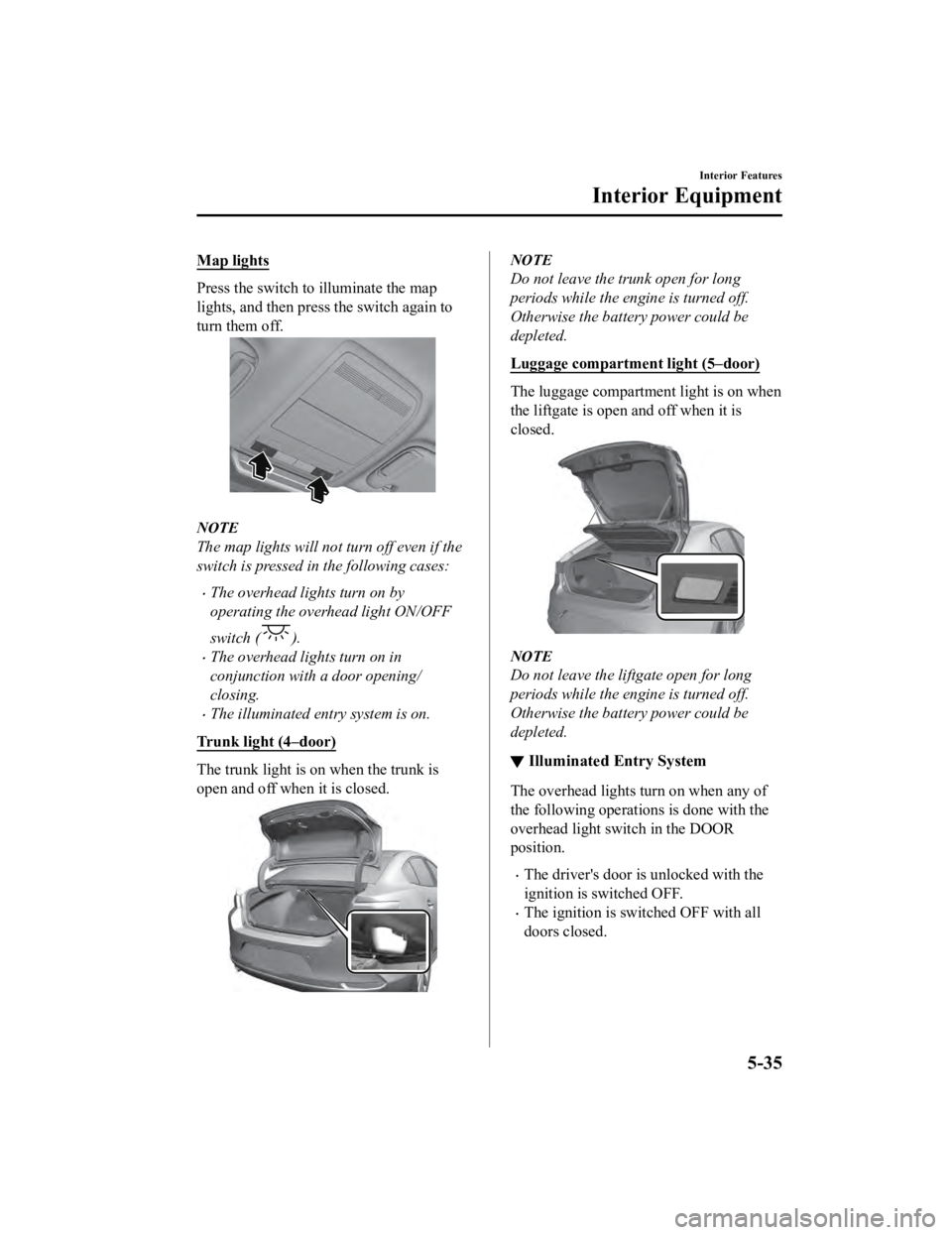
Map lights
Press the switch to illuminate the map
lights, and then press the switch again to
turn them off.
NOTE
The map lights will not turn off even if the
switch is pressed in the following cases:
The overhead lights turn on by
operating the overhead light ON/OFF
switch (
).
The overhead lights turn on in
conjunction with a door opening/
closing.
The illuminated entry system is on.
Trunk light (4–door)
The trunk light is on when the trunk is
open and off when it is closed.
NOTE
Do not leave the trunk open for long
periods while the engine is turned off.
Otherwise the battery power could be
depleted.
Luggage compartment light (5–door)
The luggage compartment light is on when
the liftgate is open and off when it is
closed.
NOTE
Do not leave the lift gate open for long
periods while the engine is turned off.
Otherwise the battery power could be
depleted.
▼ Illuminated Entry System
The overhead lights turn on when any of
the following operations is done with the
overhead light switch in the DOOR
position.
The driver's door is unlocked with the
ignition is switched OFF.
The ignition is sw
itched OFF with all
doors closed.
Interior Features
Interior Equipment
5-35
Mazda3_8HE9-EA-18K_Edition3 2018-11-21 14:31:58
Page 424 of 592
NOTE
The lid can be opened/closed while it is
slid to the 1st and 2nd stages, but if the
rear seatback is folded, the lid cannot be
opened/closed while it is slid to the 2nd
stage because the rear seat (head
restraint) will contact it.
Center console divider
Small items can be placed using the center
console divider.
▼Luggage Compartment
NOTE
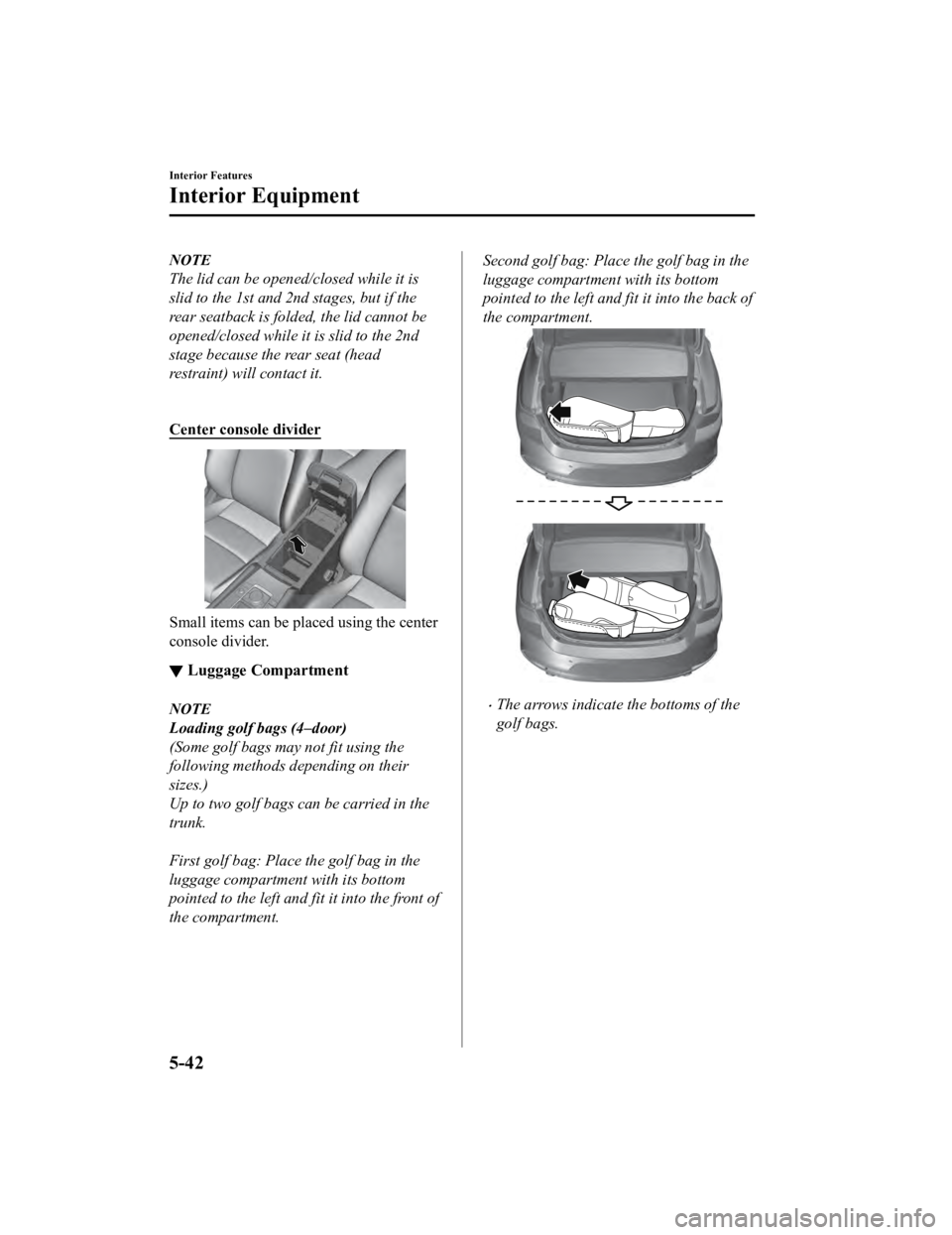
Loading golf bags (4–door)
(Some golf bags may not fit using the
following methods depending on their
sizes.)
Up to two golf bags can be carried in the
trunk.
First golf bag: Place the golf bag in the
luggage compartment with its bottom
pointed to the left and fit it into the front of
the compartment.
Second golf bag: Place the golf bag in the
luggage compartment with its bottom
pointed to the left and fit it into the back of
the compartment.
The arrows indicate the bottoms of the
golf bags.
Interior Features
Interior Equipment
5-42
Mazda3_8HE9-EA-18K_Edition3
2018-11-21 14:31:58
Page 458 of 592
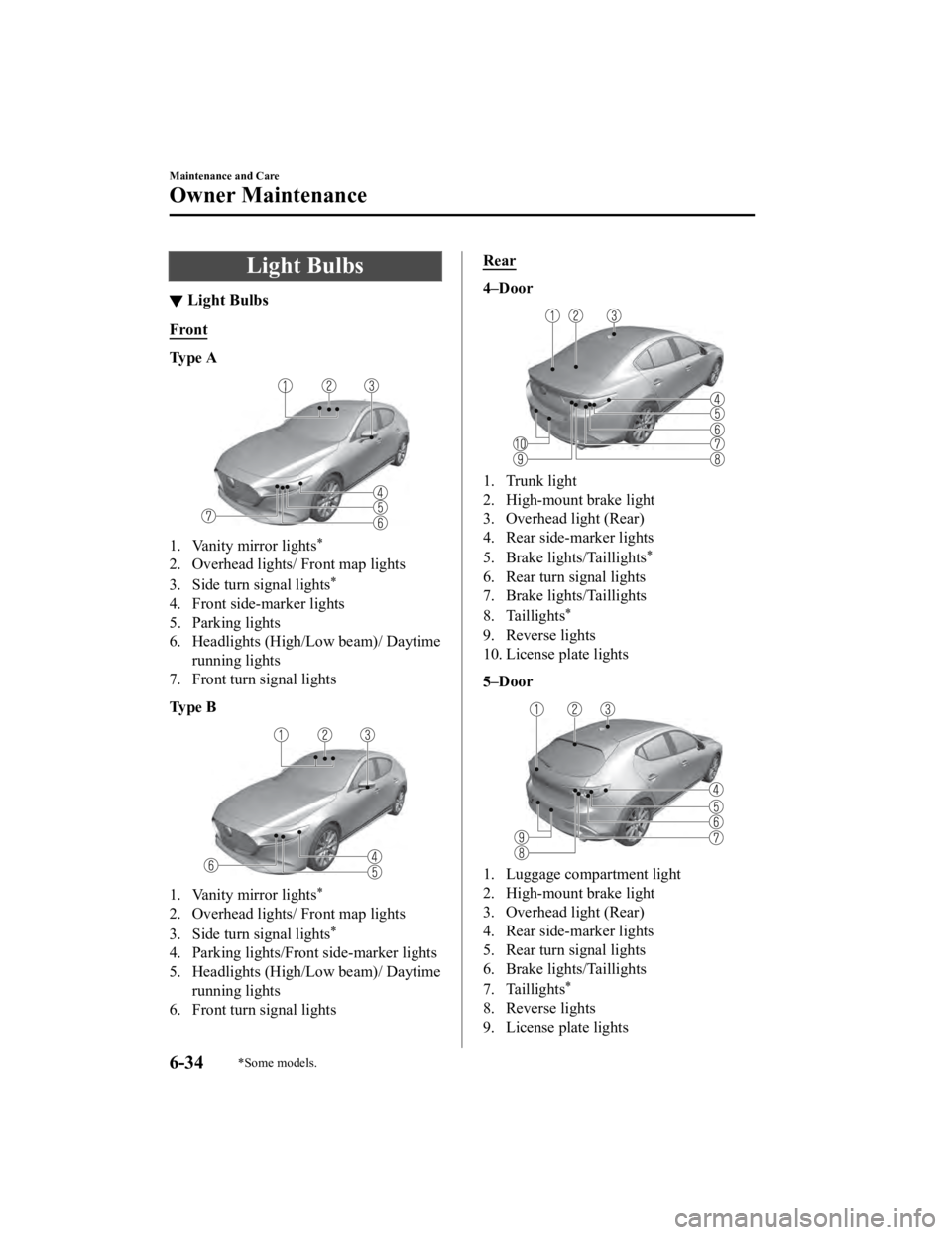
Light Bulbs
▼Light Bulbs
Front
Ty p e A
1. Vanity mirror lights*
2. Overhead lights/ Front map lights
3. Side turn signal lights
*
4. Front side-marker lights
5. Parking lights
6. Headlights (High/Low beam)/ Daytime
running lights
7. Front turn signal lights
Ty p e B
1. Vanity mirror lights*
2. Overhead lights/ Front map lights
3. Side turn signal lights
*
4. Parking lights/Front side-marker lights
5. Headlights (High/Low beam)/ Daytime running lights
6. Front turn signal lights
Rear
4–Door
1. Trunk light
2. High-mount brake light
3. Overhead light (Rear)
4. Rear side-marker lights
5. Brake lights/Taillights
*
6. Rear turn signal lights
7. Brake lights/Taillights
8. Taillights
*
9. Reverse lights
10. License plate lights
5–Door
1. Luggage compartment light
2. High-mount brake light
3. Overhead light (Rear)
4. Rear side-marker lights
5. Rear turn signal lights
6. Brake lights/Taillights
7. Taillights
*
8. Reverse lights
9. License plate lights
Maintenance and Care
Owner Maintenance
6-34*Some models.
Mazda3_8HE9-EA-18K_Edition3 2018-11-21 14:31:58
Page 459 of 592
CAUTION
When removing the lens or lamp unit using
a flathead screwdriver, make sure that the
flathead screwdriver does not contact the
interior terminal. If the flathead screwdriver
contacts the terminal, a short circuit may
occur.
NOTE
When replacing a bulb, contact an
Authorized Mazda Dealer if necessary.
Use the protective cover and carton for
the replacement bulb to dispose of the
old bulb promptly and out of the reach
of children.
For details regarding the installation
positions of the interior lights, refer to
the following:
Vanity mirror lights
Refer to Vanity Mirrors on page 5-33.
Overhead Lights/front map lights,
overhead light (rear), trunk light, and
luggage compartment light
Refer to Interior Lights on page 5-34.
▼ Replacing Exterior Light Bulbs
The exterior lights have either LEDs or
normal bulbs.
Only the bulb for a parking lights/front
side-marker lights (type B) can be
replaced.
LED type
Headlights
Daytime running lights
Parking lights (Type A)
Front turn signal lights
Front side-marker lights (Type A)
Side turn signal lights*
High-mount brake light
Rear turn signal lights
Rear side-marker lights
Brake lights
Taillights
Reverse lights
License plate lights
The LED bulb cannot be replaced as a
single unit because it is an integrated unit.
The LED bulb has to be replaced with the
unit. We recommend an Authorized
Mazda Dealer when the replacement is
necessary.
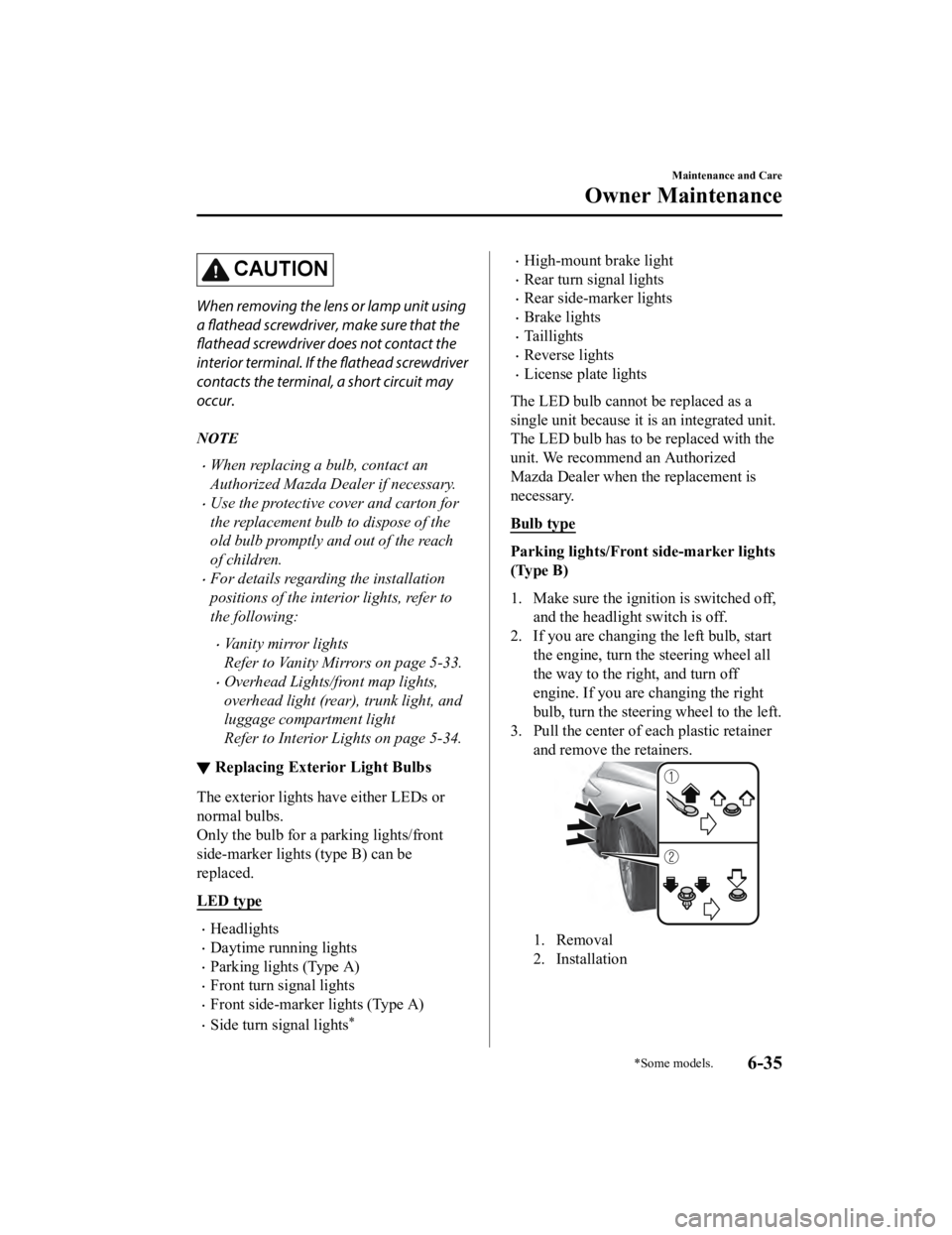
Bulb type
Parking lights/Front side-marker lights
(Type B)
1. Make sure the ignition is switched off, and the headlight switch is off.
2. If you are changing the left bulb, start
the engine, turn the steering wheel all
the way to the right, and turn off
engine. If you are changing the right
bulb, turn the steering wheel to the left.
3. Pull the center of each plastic retainer
and remove the retainers.
1. Removal
2. Installation
Maintenance and Care
Owner Maintenance
*Some models.6-35
Mazda3_8HE9-EA-18K_Edition3 2018-11-21 14:31:58
Page 460 of 592
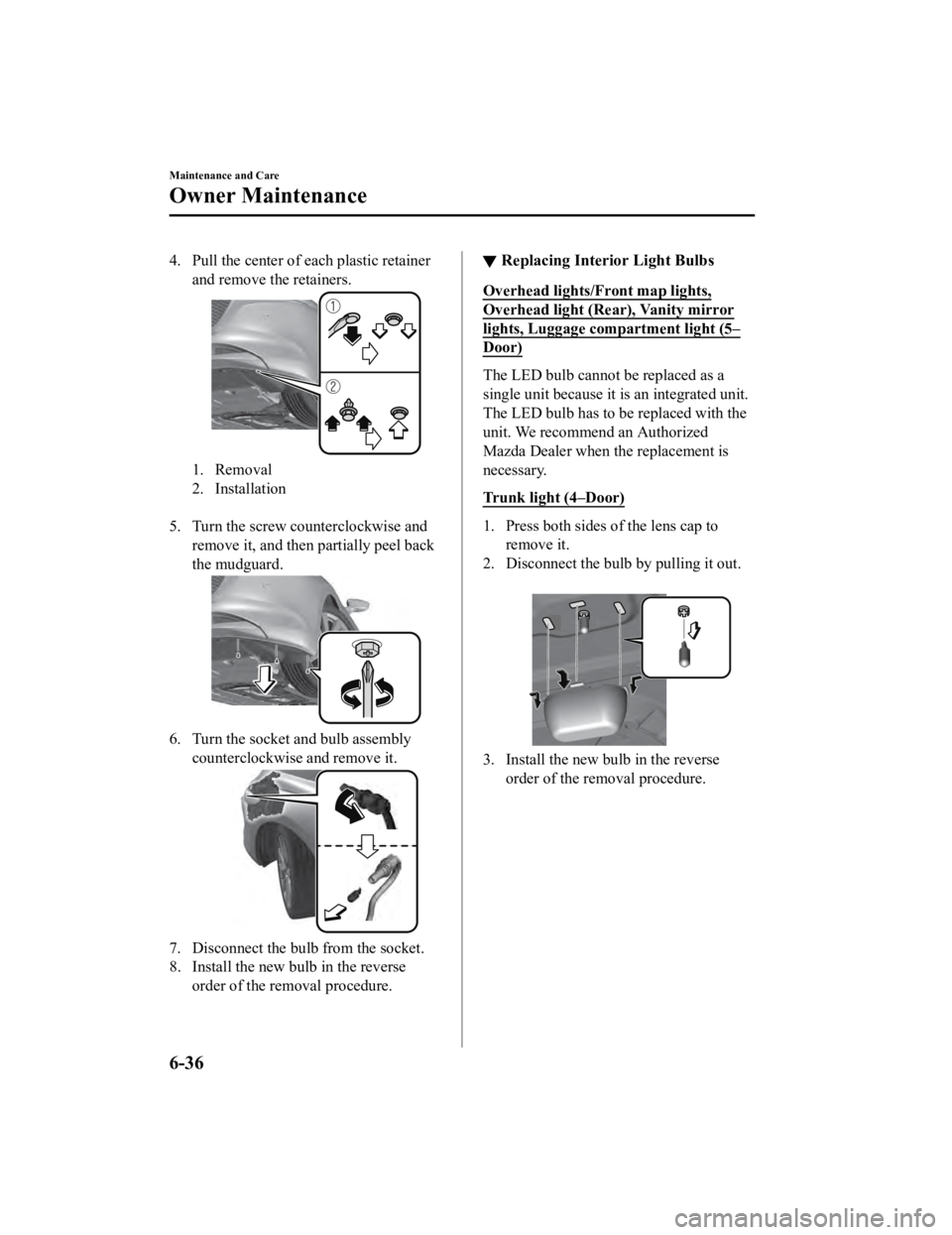
4. Pull the center of each plastic retainer
and remove the retainers.
1. Removal
2. Installation
5. Turn the screw counterclockwise and remove it, and then partially peel back
the mudguard.
6. Turn the socket and bulb assembly
counterclockwise and remove it.
7. Disconnect the bulb from the socket.
8. Install the new bulb in the reverseorder of the removal procedure.
▼Replacing Interior Light Bulbs
Overhead lights/Front map lights,
Overhead light (Rear), Vanity mirror
lights, Luggage compartment light (5–
Door)
The LED bulb cannot be replaced as a
single unit because it is
an integrated unit.
The LED bulb has to be replaced with the
unit. We recommend an Authorized
Mazda Dealer when the replacement is
necessary.
Trunk light (4–Door)
1. Press both sides of the lens cap to remove it.
2. Disconnect the bulb by pulling it out.
3. Install the new bulb in the reverse
order of the removal procedure.
Maintenance and Care
Owner Maintenance
6-36
Mazda3_8HE9-EA-18K_Edition3 2018-11-21 14:31:58