warning MAZDA MODEL 3 SEDAN 2022 Owners Manual
[x] Cancel search | Manufacturer: MAZDA, Model Year: 2022, Model line: MODEL 3 SEDAN, Model: MAZDA MODEL 3 SEDAN 2022Pages: 627, PDF Size: 92.03 MB
Page 255 of 627

The BSM will not operate under the
following circumstances.
The vehicle speed falls below
about 10 km/h (6.3 mph) even
though the i-ACTIVSENSE warning
indication/warning light is turnedoff.
The shift lever (manual
transmission)/selector lever
(automatic transmission) is shifted
to reverse (R) and the vehicle is
reversing.
The turning radius is small (making
a sharp turn, turning at
intersections).
In the following cases, the
i-ACTIVSENSE warning indication/
warning light turns on and operation
of the system is stopped. If the
i-ACTIVSENSE warning indication/
warning light remains illuminated,
have the vehicle inspected at an
Authorized Mazda Dealer as soon as
possible.
Some problem with the system
including the BSM warning
indicator lights is detected.
A large deviation in the installation
position of a rear side radar sensor
on the vehicle has occurred.
There is a large accumulation of
snow or ice on the rear bumper
near a rear side radar sensor.
Remove any snow, ice or mud on
the rear bumper.
Driving on snow-covered roads for
long periods.
The temperature near the rear side
radar sensor becomes extremely
hot due to driving for long periods
on slopes during the summer.
The battery voltage has decreased.Under the following conditions, the
rear side radar sensor cannot detect
target objects or it may be difficult to
detect them.
The rear bumper around the rear
side radar sensor is deformed.
Radio wave interference from a
radar sensor equipped on a nearby
vehicle.
The approaching vehicle is any of
the following shapes.
a) The size of the vehicle body is extremely small.
b) The vehicle height is extremely low or high.
c) A special type of vehicle with a complex shape.
A vehicle is in the detection area at
the rear in an adjacent driving lane
but it does not approach. The BSM
determines the condition based on
radar detection data.
A vehicle is traveling alongside
your vehicle at nearly the same
speed for an extended period of
time.
Vehicles approaching in the
opposite direction.
A vehicle in an adjacent driving
lane is attempting to pass your
vehicle.
A vehicle is in an adjacent lane on
a road with extremely wide driving
lanes. The detection area of the
rear side radar sensor is set at the
road width of expressways.
In the following case, the flashing of
the BSM warning indicator light, and
the activation of the warning sound
and the warning screen indicator
display may not occur or they may be
delayed.
A vehicle makes a lane change
from a driving lane two lanes over
to an adjacent lane.
Driving on steep slopes.Crossing the summit of a hill or
mountain pass.
When Driving
i-ACTIVSENSE
4-108
Mazda3_8KH1-EA-21K_Edition1_new 2021-7-27 16:02:22
Page 256 of 627

When there is a difference in the
height between your driving lane
and the adjacent lane.
Directly after the BSM system
becomes operable by changing the
setting.
If the road width is extremely
narrow, vehicles two lanes over may
be detected. The detection area of
the rear side radar sensor is set
according to the road width of
expressways.
The BSM warning indicator light may
turn on and the vehicle detection
screen may be displayed in the
display in reaction to stationary
objects (guardrails, tunnels,
sidewalls, and parked vehicles) on
the road or the roadside.
1. Objects such as guardrails andconcrete walls running alongside
the vehicle.
1. Places where the width between guardrails or walls on each side of
the vehicle narrows.
1. The walls at the entrance and exits of tunnels, turnouts.
A BSM warning indicator light may
flash or the warning beep may be
activated several times when making
a turn at a city intersection.
Tu r n off the BSM while pulling a
trailer or while an accessory such as a
bicycle carrier is installed to the rear
of the vehicle. Otherwise, the radar’s
radio waves will be blocked causing
the system to not operate normally.
In the following cases, it may be
difficult to view the
illumination/
flashing of the BSM warning
indicator lights equipped on the
door mirrors.
Snow or ice is adhering to the door
mirrors.
The front door glass is fogged or
covered in snow, frost or dirt.
When Driving
i-ACTIVSENSE
4-109
Mazda3_8KH1-EA-21K_Edition1_new 2021-7-27 16:02:22
Page 257 of 627

The rear side radar sensor of the BSM
may be regulated under the radio
wave related laws of the country
where the vehicle is driven. If this
system is used abroad, it may be
necessary to turn off the system.
Refer to Rear Side Radar Sensor on
page 4-220.
The system switches to the Rear
Cross Traffic Alert (RCTA) function
when the shift lever (manual
transmission) or the selector lever
(automatic transmission) is shifted to
the reverse (R) position.
Refer to Rear Cross Traffic Alert
(RCTA) on page 4-127.
▼ Blind Spot Monitoring (BSM)
Warning Indicator Lights/Display
Indicator/Blind Spot Monitoring
(BSM) Warning Beep
The BSM system notifies the driver of
the presence of vehicles in adjacent
lanes or at the rear of the vehicle using
the BSM warning indicator light, the
warning sound and the display
indicator while the systems are
operational.
BSM warning indicator lights
The BSM warning indicator lights are
equipped on the left and right door
mirrors. The warning indicator lights
turn on when a vehicle approaching
from the rear in an adjacent lane is
detected.
When the ignition is switched ON, the
warning indicator light turns on
momentarily and then turns off after a
few seconds.
Function for canceling illumination
dimmer
If the BSM warning indicator lights turn
on when the parking lights are turned
on, the brightness of the BSM warning
indicator lights is dimmed.
If the BSM warning indicator lights are
difficult to see due to glare from
surrounding brightness when traveling
on snow-covered roads or under foggy
conditions, press the dimmer
cancellation button to cancel the
dimmer and increase the brightness of
BSM warning indicator lights when
they turn on.
Refer to Dashboard Illumination on
page 4-24.
Display indicator
The detected approaching vehicle and
warning are displayed in the
multi-information display and active
driving display (vehicles with active
driving display).
Multi-information Display
When Driving
i-ACTIVSENSE
4-110
Mazda3_8KH1-EA-21K_Edition1_new
2021-7-27 16:02:22
Page 258 of 627

Active Driving Display (vehicles with
active driving display)
The detected direction is displayed
with a detection indicator (white)
when an approaching vehicle is
detected. In addition, if the turn signal
lever is operated to signal a lane
change while the vehicle is detected,
the display changes the color (amber)
of the warning indicator.
BSM warning beep
The BSM warning beep is activated
simultaneously with the flashing of a
BSM warning indicator light.
▼ Canceling Operation of Blind Spot
Monitoring (BSM)
The BSM system can be set to
inoperable.
(If only the BSM is turned off)
Refer to the Settings section in the
Mazda Connect Owner's Manual.
(If the BSM is turned
off by
operating the i-ACTIVSENSE OFF
switch)
Refer to i-ACTIVSENSE OFF Switch
on page 4-100.
NOTE
If the ignition is switched OFF while
you have canceled the system using the
i-ACTIVSENSE OFF switch, the system
is automatically enabled the next time
the ignition is switched ON. However,
if the system is canceled using the
personalization features, the system is
not automatically enabled.
When Driving
i-ACTIVSENSE
4-111
Mazda3_8KH1-EA-21K_Edition1_new 2021-7-27 16:02:22
Page 259 of 627

Traffic Sign Recognition System (TSR)*
▼Tra ffi c
Sign Recognition System (TSR)
The TSR helps prevent the driver from overlooking traffic signs, and provides support
for safer driving by displaying traffic sign
s on the active driving display/instrument
cluster which are recognized by the Forward Sensing Camera (FSC) or recorded in
the navigation system while the vehicle is driven.
The TSR displays the speed limit (including auxiliary signs), do not enter, and traffic
stop signs.
If the vehicle speed exceeds the speed limi t sign indicated in the active driving
display/instrument cluster while the vehicle is driven, the system notifies the driver
using the indication in the active drivin g display/instrument cluster and a warning
sound.
Speed limit and do not enter signs
1. Sign recognized
2. Sign displayed
3. Active driving display indication
When Driving
i-ACTIVSENSE
4-112*Some models.
Mazda3_8KH1-EA-21K_Edition1_new 2021-7-27 16:02:22
Page 260 of 627
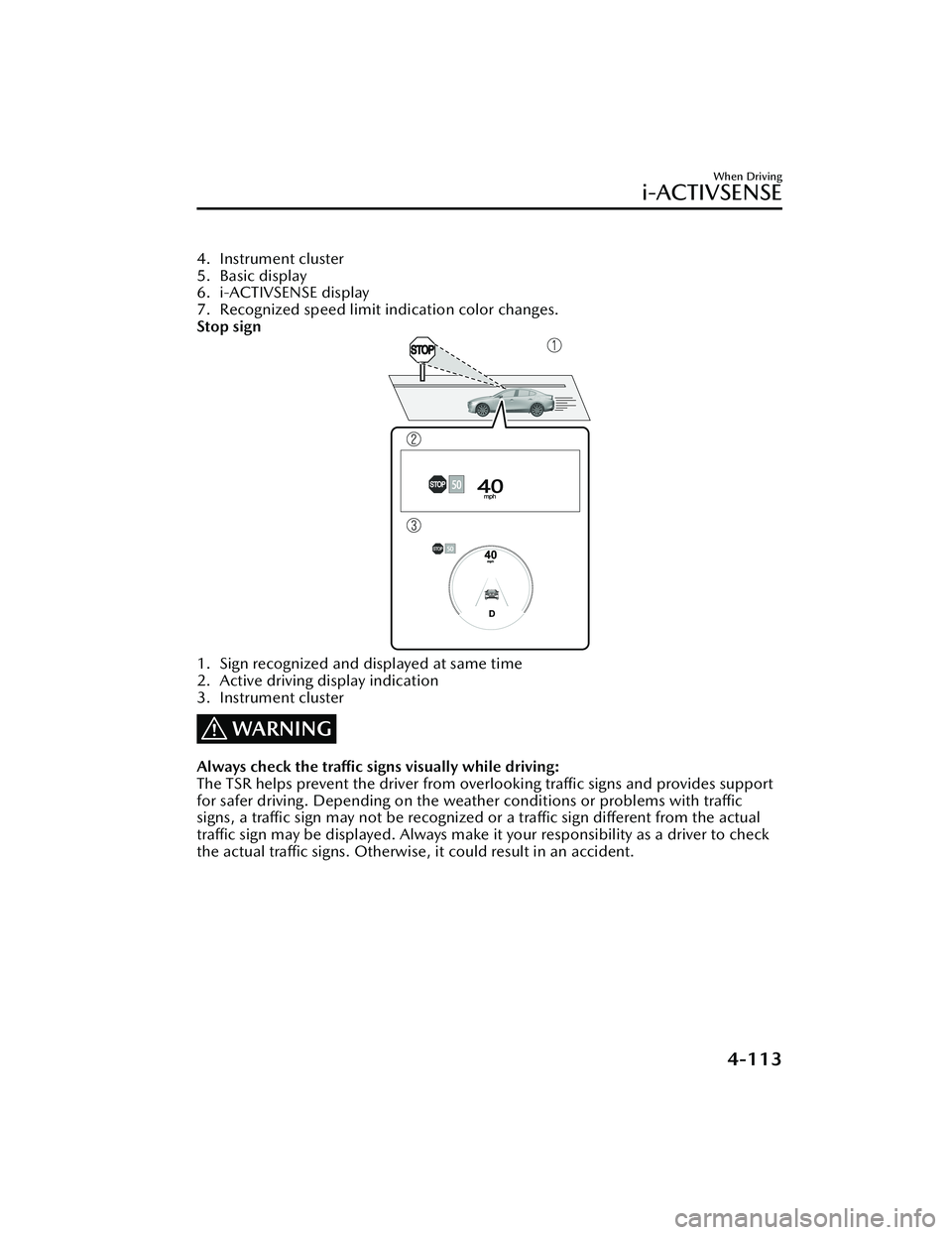
4. Instrument cluster
5. Basic display
6. i-ACTIVSENSE display
7. Recognized speed limit indication color changes.
Stop sign
1. Sign recognized and displayed at same time
2. Active driving display indication
3. Instrument cluster
WARNING
Always check the traffic signs visually while driving:
The TSR helps prevent the driver from overlooking traffic signs and provides support
for safer driving. Depending on the weather conditions or problems with traffic
signs, a traffic sign may not be recognized or a traffic sign different from the actual
traffic sign may be displayed. Always make it your responsibility as a driver to check
the actual traffic signs. Otherwise, it could result in an accident.
When Driving
i-ACTIVSENSE
4-113
Mazda3_8KH1-EA-21K_Edition1_new 2021-7-27 16:02:22
Page 264 of 627

▼Excessive Speed Warning
If the vehicle speed exceeds the speed limit sign displayed in the active driving
display/instrument cluster, the area around
the speed limit sign flashes in amber and
the warning sound is activated at the same time. If the vehicle speed continues to
exceed the displayed speed limit sign, the indication stops flashing and remains on.
Check the surrounding conditions and adjust the vehicle speed to the legal speed
using the appropriate operation such as depressing the brake pedal.
1. Vehicle is doing 55 mph when 50 mph speed limit sign is recognized.
2. Vehicle continues to do 55 mph after 50 mph speed limit sign is recognized.
3. Active driving display indication
4. Instrument cluster
The excessive speed warning is initially set to inoperable. If you want to activate the
excessive speed warning, change the setting in the personalization features. In
addition, the warning pattern and the warn ing activation timing differ depending on
the setting contents.
Refer to the Settings section in the Mazda Connect Owner's Manual.
When Driving
i-ACTIVSENSE
4-117
Mazda3_8KH1-EA-21K_Edition1_new 2021-7-27 16:02:22
Page 265 of 627

Speed Limit Sign Alert setting
Off: The excessive speed warning is not activated.Visual: The area around the speed limit sign displayed in the display flashes in
amber, and if the vehicle speed continues to exceed the displayed speed limit
sign, the indication stops flashing and remains on.
Visual + Audible: The area around the speed limit sign displayed in the displayflashes in amber and the warning sound is activated at the same time. If the
vehicle speed continues to exceed the di splayed speed limit sign, the indication
stops flashing and remains on. The warning sound is activated continuously until
the vehicle speed decreases below the speed limit sign.
Speed Limit Sign Threshold setting
+ 0 km/h (+ 0 mph): If the vehicle speed exceeds the speed limit sign displayed in
the display, the excessive speed warning is activated.
+ 5 km/h (+ 3 mph): If the vehicle speed exceeds the speed limit sign displayed in
the display by 5 km/h (3 mph), the excessive speed warning is activated.
+ 10 km/h (+ 5 mph): If the vehicle speed exceeds the speed limit sign displayed
in the display by 10 km/h (5 mph), the excessive speed warning is activated.
NOTE
In the following cases, the excessi ve speed warning stops operating.
The vehicle speed is less than the speed of the displayed speed limit sign. (If the
activation timing for the excessive speed warning is changed in the
personalization features, the excessive speed warning stops operating when the
vehicle speed is less than the changed vehicle speed.
A speed limit sign indication has been updated and the vehicle speed is lower
than the updated indication.
Display of the speed limit sign stops.The warning indication is displayed at the same time the excessive speed warning
sound is activated if the vehicle speed exceeds the speed indicated on the speed
limit sign.
Refer to Excessive Speed Warning on page 7-48.
If the Forward Sensing Camera (FSC) or data recorded in the navigation system
incorrectly recognizes the actual speed li mit sign at a lower speed, the excessive
speed alarm is activated even if the vehicle is driven at the legal speed.
When Driving
i-ACTIVSENSE
4-118
Mazda3_8KH1-EA-21K_Edition1_new 2021-7-27 16:02:22
Page 266 of 627

Distance & Speed Alert(DSA)
*
▼Distance & Speed Alert (DSA)
The DSA is a system which provides
advice for maintaining the appropriate
distance between vehicles and
notifies
the driver of the recommended, safe
distance to maintain with a vehicle
ahead. The system measures the
distance between your vehicle and a
vehicle ahead while the vehicle speed
is about 30 km/h (19 mph) or faster. If
the distance between your vehicle and
a vehicle ahead is close, the system
alerts the driver of a possible collision
using an indication on the display.
WARNING
Do not rely completely on the DSA:
The ability of the system to detect a
vehicle ahead is limited depending on
the type of vehicle ahead, weather
conditions, or traffic conditions. In
addition, the system is not for
maintaining the distance between your
vehicle and a vehicle ahead. If you
neglect to operate the accelerator and
brake pedals correctly, it could lead to
an accident. Always check the safety of
the surrounding area and depress the
brake pedal or accelerator pedal while
keeping a safe distance from vehicles
ahead or on-coming vehicles.
Operation conditions
The DSA operates when the following
conditions are all met.
The ignition is switched ON.The DSA is turned on.The shift lever (manual transmission
vehicle) or the selector lever
(automatic transmission vehicle) is in
a position other than R.
The vehicle speed is about 30 km/h
(19 mph) or faster.
i-ACTIVSENSE status symbol
(warning/risk av oidance support
system) (green) is displayed.
NOTE
The objects which activate the
system are four-wheeled vehicles.
The DSA may also operate in the
presence of motorcycles and
bicycles.
The DSA may not operate normally
when the speed of a vehicle ahead is
too slow.
The system does not operate with
the following objects.
Vehicles approaching in the
opposite direction.
Stationary objects (stopped
vehicles, obstructions)
The DSA can be set to inoperable.
(If only the DSA is turned off)
Refer to the Settings section in the
Mazda Connect Owner's Manual.
(If the DSA is turned off by
operating the i-ACTIVSENSE OFF
switch)
Refer to i-ACTIVSENSE OFF Switch
on page 4-100.
When Driving
i-ACTIVSENSE
*Some models.4-119
Mazda3_8KH1-EA-21K_Edition1_new 2021-7-27 16:02:22
Page 267 of 627

If the ignition is switched OFF while
you have canceled the system using
the i-ACTIVSENSE OFF switch, the
system is automatically enabled the
next time the ignition is switched
ON. However, if the system is
canceled using the personalization
features, the system is not
automatically enabled.
▼Vehicle Ahead Close Proximity
Warning
When the system determines that the
distance between your vehicle and a
vehicle ahead is close, the
i-ACTIVSENSE status symbol (warning/
risk avoidance support system)
changes from green to amber and the
warning indication is displayed on the
multi-information display. While
checking the safety of the surrounding
area, depress the brake pedal while
keeping a safe distance from the
vehicle ahead.
Driver Attention Alert
(DAA)
*
▼Driver Attention Alert (DAA)
The DAA is a system which detects
driver fatigue and decreased
attentiveness, and encourages the
driver to take a rest.
When the vehicle is driven inside traffic
lane lines at about 65 to 140 km/h
(41 to 86 mph), the DAA estimates the
amount of accumulated fatigue and
decreased attentiveness of the driver
based on the information from the
Forward Sensing Camera (FSC) and
other vehicle information, and
encourages the driver to take a rest
using an indication on the
multi-information display and a
warning sound.
Use the DAA on expressways or
highways.
Refer to Forward Sensing Camera
(FSC) on page 4-212.
When Driving
i-ACTIVSENSE
4-120*Some models.
Mazda3_8KH1-EA-21K_Edition1_new
2021-7-27 16:02:22