warning MAZDA MODEL 3 SEDAN 2022 Owners Manual
[x] Cancel search | Manufacturer: MAZDA, Model Year: 2022, Model line: MODEL 3 SEDAN, Model: MAZDA MODEL 3 SEDAN 2022Pages: 627, PDF Size: 92.03 MB
Page 337 of 627
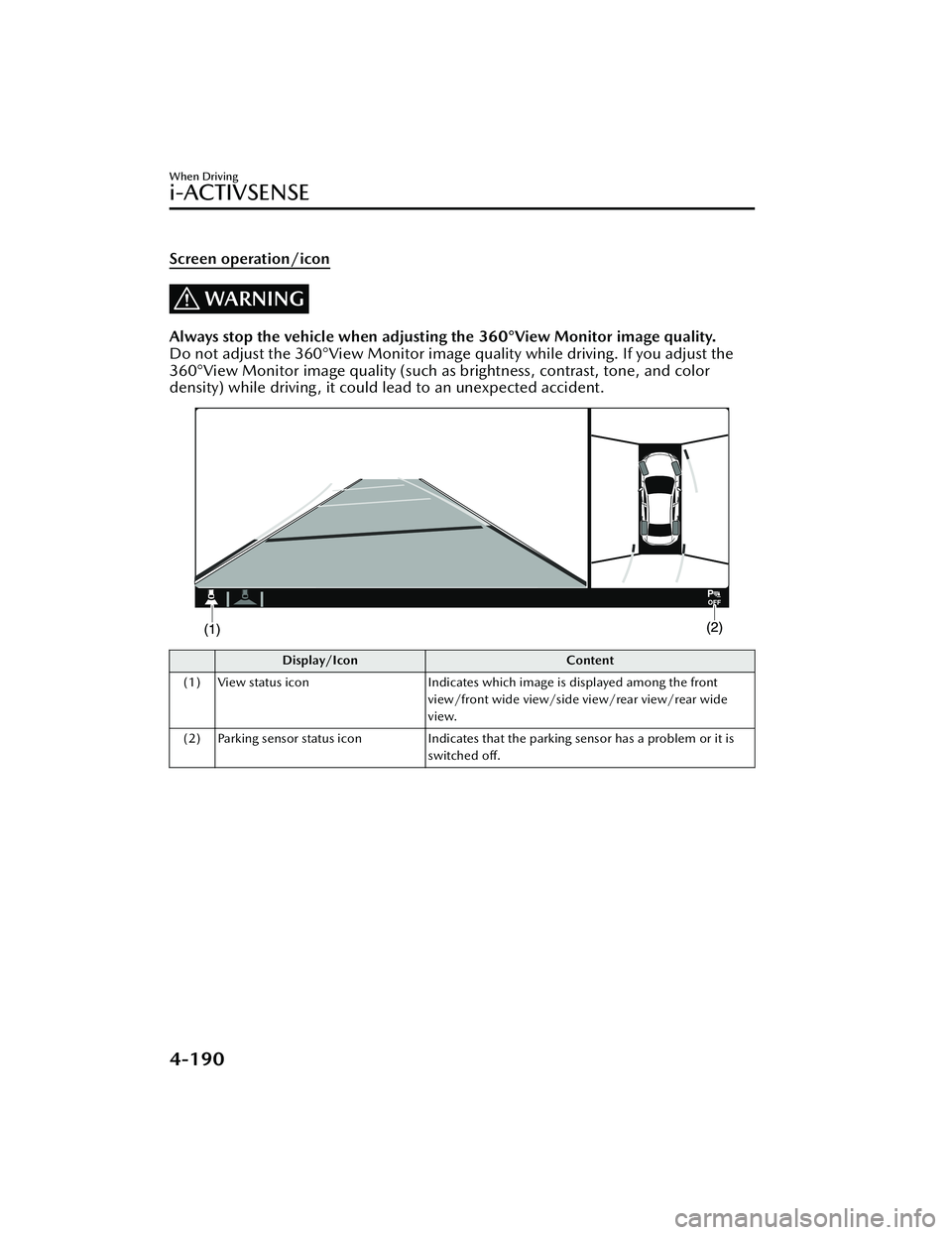
Screen operation/icon
WARNING
Always stop the vehicle when adjusting the 360°View Monitor image quality.
Do not adjust the 360°View Monitor image quality while driving. If you adjust the
360°View Monitor image quality (such as brightness, contrast, tone, and color
density) while driving, it could lead to an unexpected accident.
Display/Icon Content
(1) View status icon Indicates which image is displayed among the front
view/front wide view/side view/rear view/rear wide
view.
(2) Parking sensor status icon Indicates that the parking sensor has a problem or it is
switched off.
When Driving
i-ACTIVSENSE
4-190
Mazda3_8KH1-EA-21K_Edition1_new 2021-7-27 16:02:22
Page 339 of 627
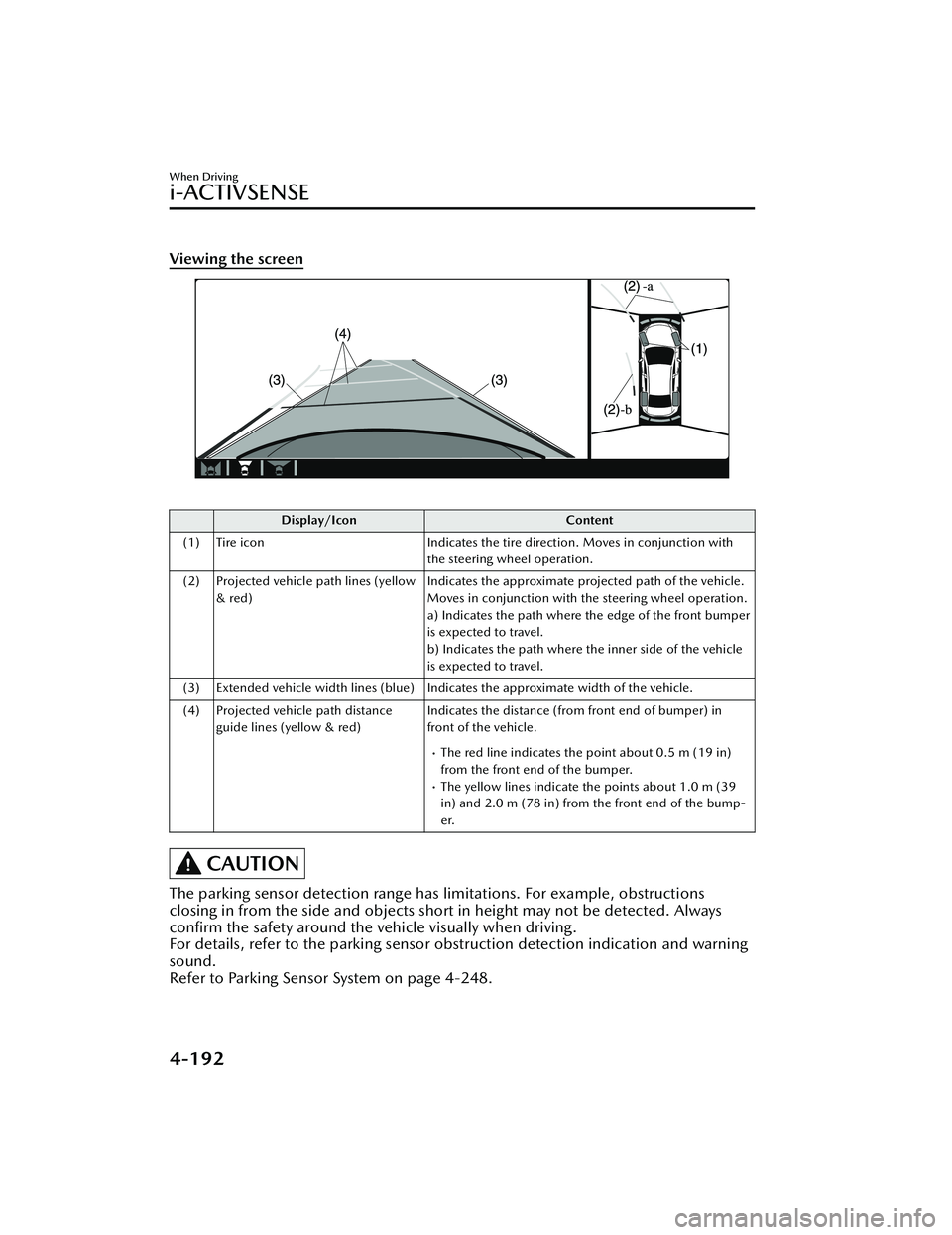
Viewing the screen
Display/IconContent
(1) Tire icon Indicates the tire direction. Moves in conjunction with
the steering wheel operation.
(2) Projected vehicle path lines (yellow & red) Indicates the approximate projected path of the vehicle.
Moves in conjunction with the steering wheel operation.
a) Indicates the path where the edge of the front bumper
is expected to travel.
b) Indicates the path where the inner side of the vehicle
is expected to travel.
(3) Extended vehicle width lines (blue) Indicates the approximate width of the vehicle.
(4) Projected vehicle path distance guide lines (yellow & red) Indicates the distance (from front end of bumper) in
front of the vehicle.
The red line indicates the point about 0.5 m (19 in)
from the front end of the bumper.
The yellow lines indicate the points about 1.0 m (39
in) and 2.0 m (78 in) from the front end of the bump-
er.
CAUTION
The parking sensor detection range has limitations. For example, obstructions
closing in from the side and objects shor
t in height may not be detected. Always
confirm the safety around the vehicle visually when driving.
For details, refer to the parking sensor obstruction detection indication and warning
sound.
Refer to Parking Sensor System on page 4-248.
When Driving
i-ACTIVSENSE
4-192
Mazda3_8KH1-EA-21K_Edition1_new 2021-7-27 16:02:22
Page 345 of 627

How to use the projected vehicle path line function
1. (Screen display)
2. (Actual condition)
Make sure that there are no obstructions within the projected vehicle path lines.
Turn the steering wheel so that the projected vehicle path lines travel inside of the
obstruction (A), and drive the vehicle forward until it passes the obstruction.
If the projected vehicle path lines are on an obstruction (B) or outside of the
obstruction (C), the vehicle may contact the obstruction when turning the vehicle
sharply.
CAUTION
The parking sensor detection range has limitations. For example, obstructions
closing in from the side and objects short in height may not be detected. Always
confirm the safety around the vehicle visually when driving.
For details, refer to the parking sens or obstruction detection indication and
warning sound.
Refer to Parking Sensor System on page 4-248.
Do not turn the steering wheel any mo re until the vehicle has passed the
obstruction, even if the obstruction is no t visible on the side view image. If the
steering wheel is turned even more, the ve hicle may contact the obstruction if it is
turned sharply.
When Driving
i-ACTIVSENSE
4-198
Mazda3_8KH1-EA-21K_Edition1_new 2021-7-27 16:02:22
Page 348 of 627

How to use the projected vehicle path line function
CAUTION
The front of the vehicle swings out wide when turning the steering wheel while
reversing. Maintain sufficient distance between the vehicle and an obstruction.
The parking sensor detection range has limitations. For example, obstructions
closing in from the side and objects short in height may not be detected. Always
confirm the safety around the vehicle visually when driving.
For details, refer to the parking sensor obstruction detection indication and
warning sound.
Refer to Parking Sensor System on page 4-248.
NOTE
Because there might be a
difference between the image displayed on the screen,
such as indicated in the following , and the actual conditions when parking, always
check the safety at the rear of the vehicle and the surrounding area directly with
your eyes.
Even though the back end of the parking space (or garage) displayed on the
screen and distance guide lines appear parallel, they may not actually be
parallel.
When parking in a space with a division line on only one side of the parking
space, even though the division line and the vehicle width guide line appear
parallel, they may not actually be parallel.
The following shows an example of vehicle parking with the steering wheel turned
to the left while backing up the vehicle. When backing into a parking space from
the opposite direction, the steering operation is reversed.
When Driving
i-ACTIVSENSE
4-201
Mazda3_8KH1-EA-21K_Edition1_new 2021-7-27 16:02:22
Page 359 of 627
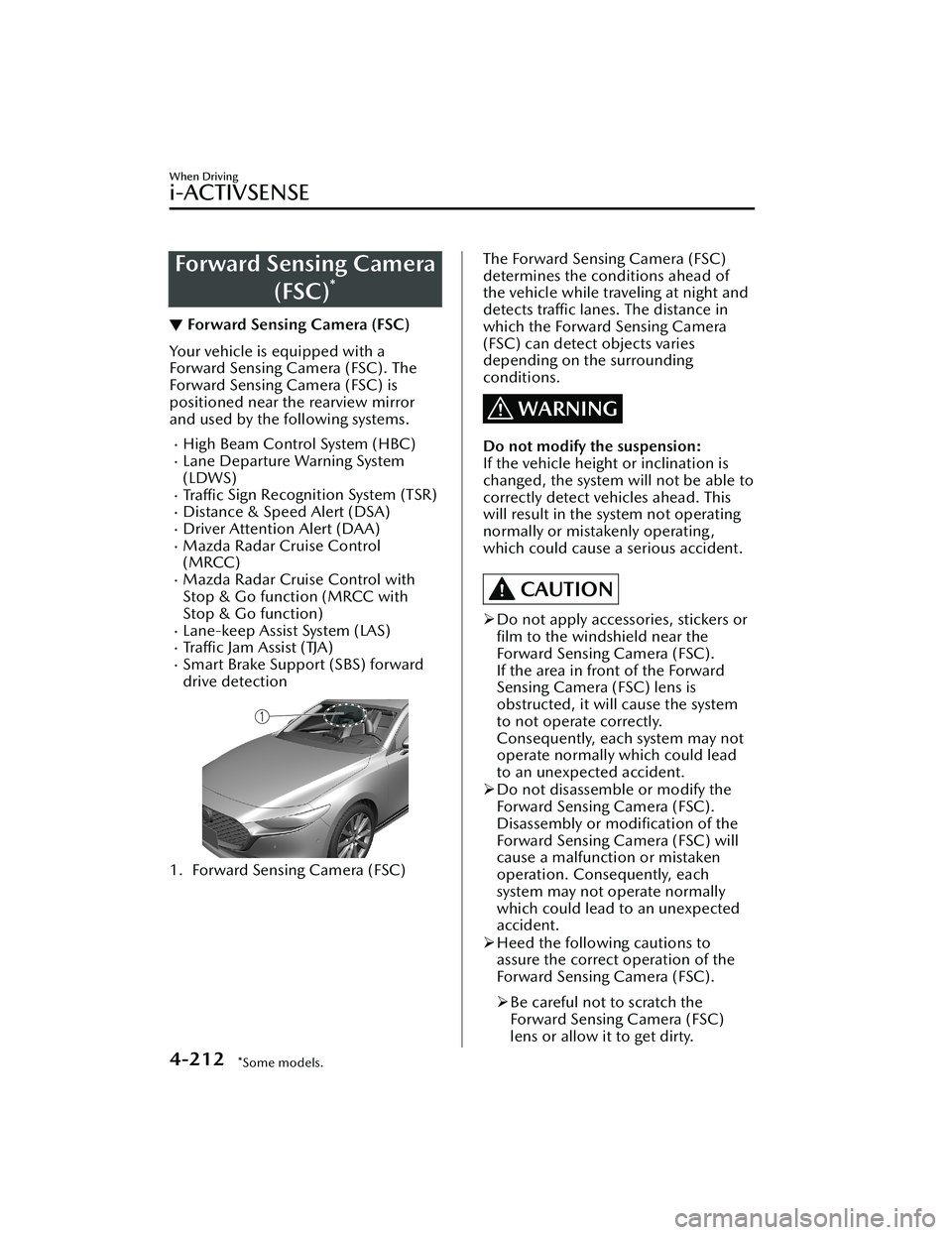
Forward Sensing Camera(FSC)
*
▼Forward Sensing Camera (FSC)
Your vehicle is equipped with a
Forward Sensing Camera (FSC). The
Forward Sensing Camera (FSC) is
positioned near the rearview mirror
and used by the following systems.
High Beam Control System (HBC)Lane Departure Warning System
(LDWS)
Tra ffi c
Sign Recognition System (TSR)Distance & Speed Alert (DSA)Driver Attention Alert (DAA)Mazda Radar Cruise Control
(MRCC)
Mazda Radar Cruise Control with
Stop & Go function (MRCC with
Stop & Go function)
Lane-keep Assist System (LAS)Tra ffi c Jam Assist (TJA)Smart Brake Support (SBS) forward
drive detection
1. Forward Sensing Camera (FSC)
The Forward Sensing Camera (FSC)
determines the conditions ahead of
the vehicle while traveling at night and
detects traffic lanes. The distance in
which the Forward Sensing Camera
(FSC) can detect objects varies
depending on the surrounding
conditions.
WARNING
Do not modify the suspension:
If the vehicle height or inclination is
changed, the system will not be able to
correctly detect vehicles ahead. This
will result in the system not operating
normally or mistakenly operating,
which could cause a serious accident.
CAUTION
Do not apply accessories, stickers or
film to the windshield near the
Forward Sensing Camera (FSC).
If the area in front of the Forward
Sensing Camera (FSC) lens is
obstructed, it will cause the system
to not operate correctly.
Consequently, each system may not
operate normally which could lead
to an unexpected accident.
Do not disassemble or modify the
Forward Sensing Camera (FSC).
Disassembly or
modification of the
Forward Sensing Camera (FSC) will
cause a malfunction or mistaken
operation. Consequently, each
system may not operate normally
which could lead to an unexpected
accident.
Heed the following cautions to
assure the correct operation of the
Forward Sensing Camera (FSC).
Be careful not to scratch the
Forward Sensing Camera (FSC)
lens or allow it to get dirty.
When Driving
i-ACTIVSENSE
4-212*Some models.
Mazda3_8KH1-EA-21K_Edition1_new 2021-7-27 16:02:22
Page 360 of 627

Do not remove the Forward
Sensing Camera (FSC) cover.
Do not place objects on the
dashboard which reflect light.
Always keep the windshield glass
around the camera clean by
removing dirt or fogging. Use the
windshield defroster to remove
fogging on the windshield.
Consult an Authorized Mazda
Dealer regarding cleaning the
interior side of the windshield
around the Forward Sensing
Camera (FSC).
Consult an Authorized Mazda
Dealer before pe rforming repairs
around the Forward Sensing
Camera (FSC).
The Forward Sensing Camera (FSC)
is installed to the windshield.
Consult an Authorized Mazda
Dealer for windshield repair and
replacement.
When cleaning the windshield, do
not allow glass cleaners or similar
cleaning fluids to get on the
Forward Sensing Camera (FSC)
lens. In addition, do not touch the
Forward Sensing Camera (FSC)
lens.
When performing repairs around
the rearview mirror, consult an
Authorized Mazda Dealer.
Consult an Authorized Mazda
Dealer regarding cleaning of the
camera lens.
Do not hit or apply strong force to
the Forward Sensing Camera (FSC)
or the area around it. If the
Forward Sensing Camera (FSC) is
severely hit or if there are cracks or
damage caused by flying gravel or
debris in the area around it, stop
using the following systems and
consult an Authorized Mazda
Dealer.High Beam Control System
(HBC)
Lane Departure Warning System
(LDWS)
Traffic Sign Recognition System
(TSR)
Distance & Speed Alert (DSA)
Driver Attention Alert (DAA)
Mazda Radar Cruise Control
(MRCC)
Mazda Radar Cruise Control
with Stop & Go function (MRCC
with Stop & Go function)
Lane-keep Assist System (LAS)
Traffic Jam Assist (TJA)
Smart Brake Support (SBS)
forward drive detection
The direction in which the Forward
Sensing Camera (FSC) is pointed
has been
finely adjusted. Do not
change the installation position of
the Forward Sensing Camera (FSC)
or remove it. Otherwise, it could
result in damage or malfunction.
Always use tires for all wheels that
are of the specified size, and the
same manufacturer, brand, and tread
pattern. In addition, do not use tires
with significantly different wear
patterns on the same vehicle as the
system may not operate normally.
The Forward Sensing Camera (FSC)
includes a function for detecting a
soiled windshield and informing the
driver, however, depending on the
conditions, it may not detect plastic
shopping bags, ice or snow on the
windshield. In such cases, the system
cannot accurately determine a
vehicle ahead and may not be able
to operate normally. Always drive
carefully and pay attention to the
road ahead.
When Driving
i-ACTIVSENSE
4-213
Mazda3_8KH1-EA-21K_Edition1_new 2021-7-27 16:02:22
Page 362 of 627

Tire chains or a temporary spare
tire is installed.
The vehicle ahead has a special
shape. For example, a vehicle
towing a trailer house or a boat, or
a vehicle carrier carrying a vehicle
with its front pointed rearward.
If the Forward Sensing Camera (FSC)
cannot operate normally due to rain,
backlight, or fog, the system
functions related to the Forward
Sensing Camera (FSC) are
temporarily stopped and the
following warning lights turn on.
However, this does not indicate a
malfunction.
High Beam Control System (HBC)
warning indication/warning light
(amber)
i-ACTIVSENSE warning indication/
warning light
If the Forward Sensing Camera (FSC)
cannot operate normally due to high
temperatures, the system functions
related to the Forward Sensing
Camera (FSC) are temporarily
stopped and the following warning
lights turn on. However, this does
not indicate a malfunction. Cool
down the area around the Forward
Sensing Camera (FSC) such as by
turning on the air conditioner.
High Beam Control System (HBC)
warning indication/warning light
(amber)
i-ACTIVSENSE warning indication/
warning light
If the Forward Sensing Camera (FSC)
detects that the windshield is dirty or
foggy, the system functions related to
the Forward Sensing Camera (FSC)
are temporarily stopped and the
following warning lights turn on.
However, this does not indicate a
problem. Remove the dirt from the
windshield or press the defroster
switch and defog the windshield.
High Beam Control System (HBC)
warning indication/warning light
(amber)
i-ACTIVSENSE warning indication/
warning light
If there are recognizable cracks or
damage caused by flying gravel or
debris on the windshield, always
have the windshield replaced.
Consult an Authorized Mazda Dealer
for replacement.
The Forward Sensing Camera (FSC)
recognizes pedestrians when all of
the following conditions are met:
The height of a pedestrian is about
1 to 2 meters.
An outline such as the head, both
shoulders, or the legs can be
determined.
In the following cases, the Forward
Sensing Camera (FSC) may not be
able to detect target objects
correctly:
Multiple pedestrians are walking,
or there are groups of people.
A pedestrian is close to a separate
object.
A pedestrian is crouching , lying , or
slouching.
A pedestrian suddenly jumps into
the road right in front of the
vehicle.
A pedestrian opens an umbrella, or
is carrying large baggage or
articles.
When Driving
i-ACTIVSENSE
4-215
Mazda3_8KH1-EA-21K_Edition1_new2021-7-27 16:02:22
Page 370 of 627

5–Door
1. Side cameras
2. Front camera
3. Rear camera
Driver MonitoringCamera
*
▼Driver Monitoring Camera
The driver monitoring camera detects
changes in the driver's facial features
and estimates the amount of
accumulated fatigue and sleepiness of
the driver.
1. Driver monitoring camera
NOTE
Driver Monitoring (DM) and the
earlier collision warning may not
operate normally under the following
conditions.
The driver monitoring camera is
covered with something.
You are driving the vehicle while
leaning on the steering wheel.
You are wearing glasses or
sunglasses.
A cap or hat you are wearing
partially blocks the driver
monitoring camera's view of your
eyes, you have long bangs partially
covering your eyes, or a part of
your face is invisible due to a face
mask.
The lighting conditions change
significantly (such as backlight,
light from the side, or direct light
from the setting sun, and the
headlights of on-coming vehicles).
When Driving
i-ACTIVSENSE
*Some models.4-223
Mazda3_8KH1-EA-21K_Edition1_new 2021-7-27 16:02:22
Page 372 of 627
Cruise Control*
▼Cruise Control
With cruise control, you can set and
automatically maintain any speed of
more than about 30 km/h (19 mph).
WARNING
Do not use the cruise control under
the following conditions:
Using the cruise control under the
following conditions is dangerous and
could result in loss of vehicle control.
Hilly terrain
Steep inclines
Heavy or unsteady traffic
Slippery or winding roads
Similar restrictions that require
inconsistent speed
The vehicle speed may exceed the
set speed during sudden acceleration
or on steep down slopes.
In this case, depress the brake pedal
to adjust the vehicle speed.
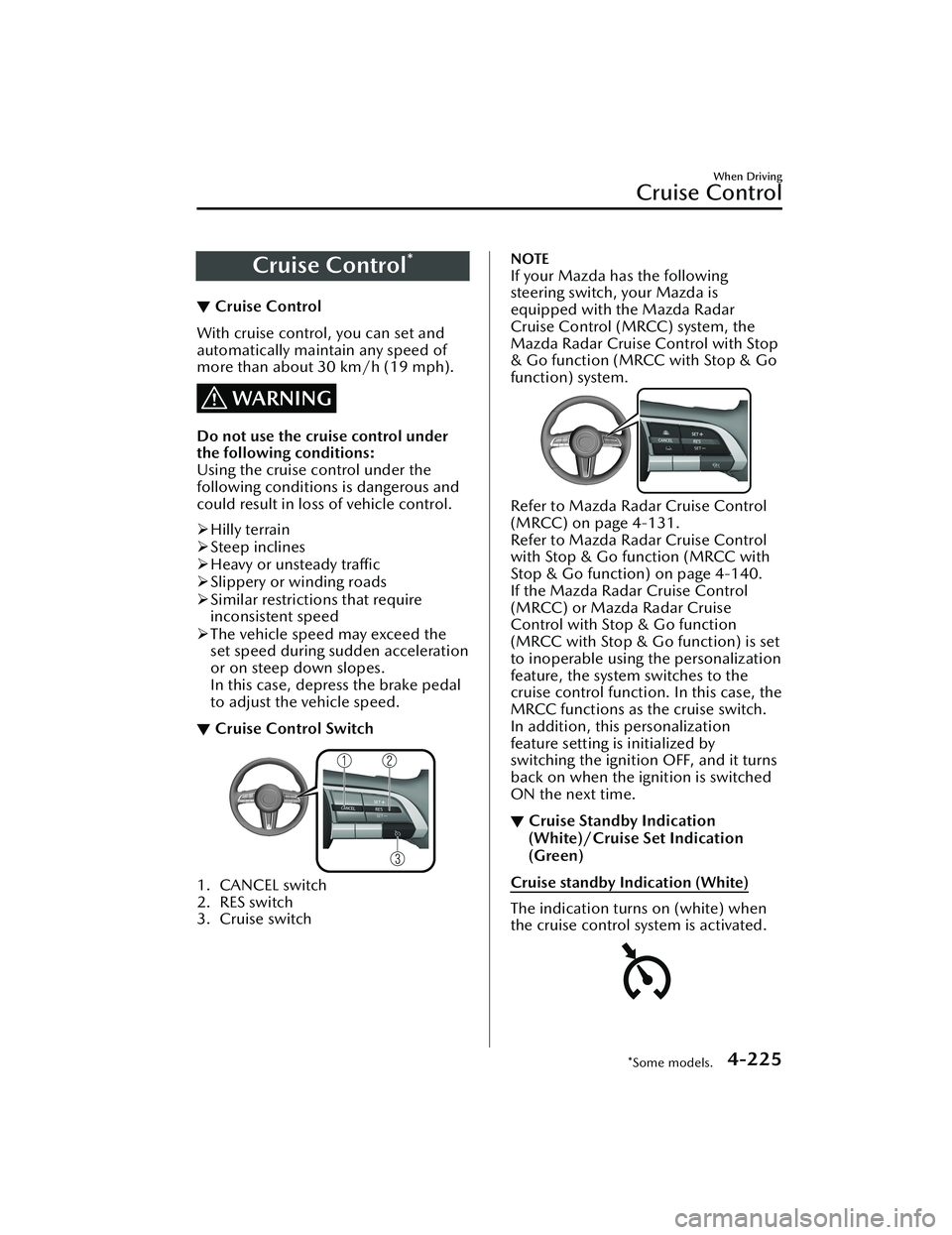
▼ Cruise Control Switch
1. CANCEL switch
2. RES switch
3. Cruise switch
NOTE
If your Mazda has the following
steering switch, your Mazda is
equipped with the Mazda Radar
Cruise Control (MRCC) system, the
Mazda Radar Cruise Control with Stop
& Go function (MRCC with Stop & Go
function) system.
Refer to Mazda Radar Cruise Control
(MRCC) on page 4-131.
Refer to Mazda Radar Cruise Control
with Stop & Go function (MRCC with
Stop & Go function) on page 4-140.
If the Mazda Radar Cruise Control
(MRCC) or Mazda Radar Cruise
Control with Stop & Go function
(MRCC with Stop & Go function) is set
to inoperable using the personalization
feature, the system switches to the
cruise control function. In this case, the
MRCC functions as the cruise switch.
In addition, this personalization
feature setting is initialized by
switching the ignition OFF, and it turns
back on when the ignition is switched
ON the next time.
▼Cruise Standby Indication
(White)/Cruise Set Indication
(Green)
Cruise standby Indication (White)
The indication turns on (white) when
the cruise control system is activated.
When Driving
Cruise Control
*Some models.4-225
Mazda3_8KH1-EA-21K_Edition1_new
2021-7-27 16:02:22
Page 373 of 627
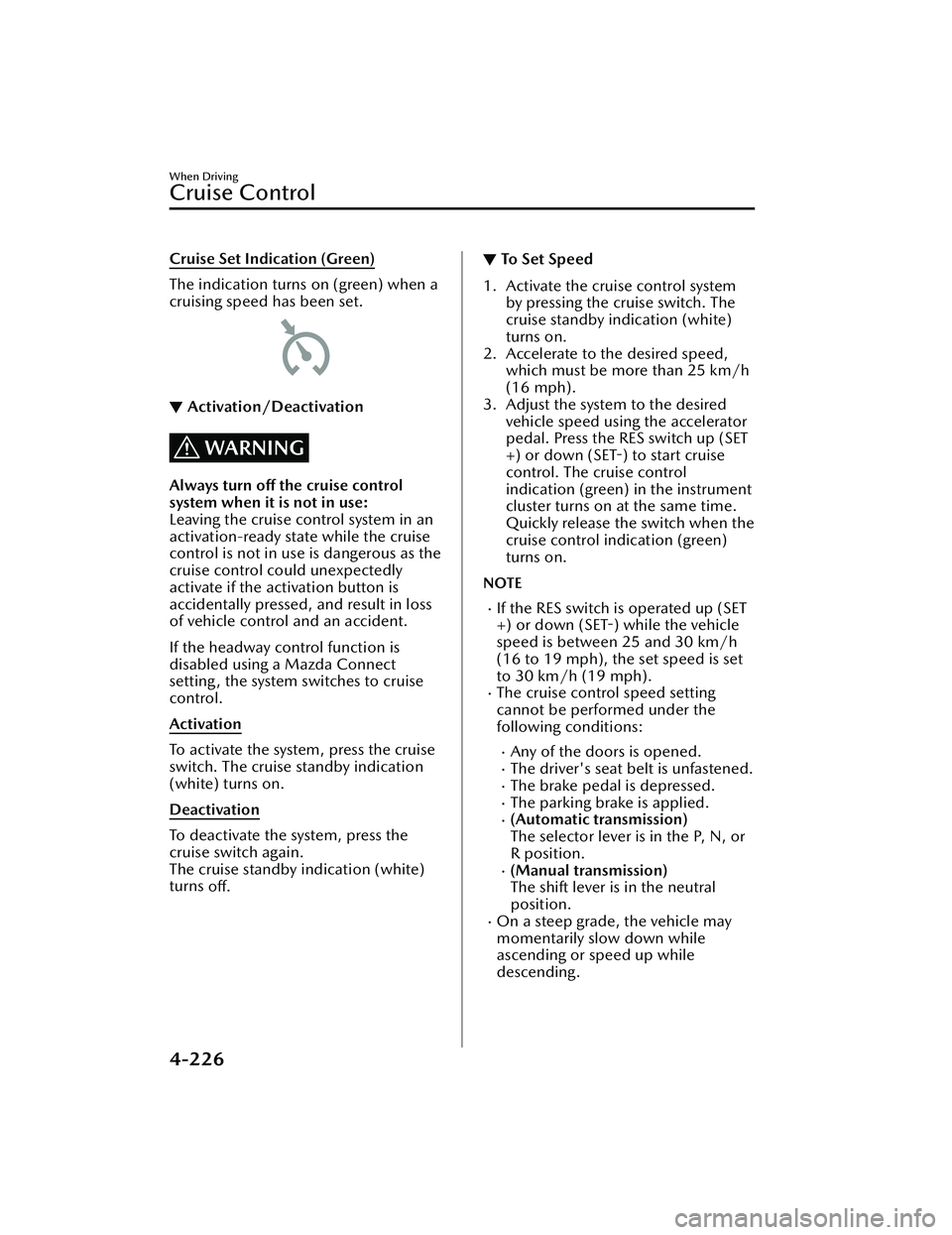
Cruise Set Indication (Green)
The indication turns on (green) when a
cruising speed has been set.
▼Activation/Deactivation
WARNING
Always turn off the cruise control
system when it is not in use:
Leaving the cruise control system in an
activation-ready state while the cruise
control is not in use is dangerous as the
cruise control could unexpectedly
activate if the activation button is
accidentally pressed, and result in loss
of vehicle control and an accident.
If the headway control function is
disabled using a Mazda Connect
setting, the system switches to cruise
control.
Activation
To activate the system, press the cruise
switch. The cruise standby indication
(white) turns on.
Deactivation
To deactivate the system, press the
cruise switch again.
The cruise standby indication (white)
turns
off.
▼To Set Speed
1. Activate the cruise control system
by pressing the cruise switch. The
cruise standby indication (white)
turns on.
2. Accelerate to the desired speed, which must be more than 25 km/h
(16 mph).
3. Adjust the system to the desired vehicle speed using the accelerator
pedal. Press the RES switch up (SET
+) or down (SET-) to start cruise
control. The cruise control
indication (green) in the instrument
cluster turns on at the same time.
Quickly release the switch when the
cruise control indication (green)
turns on.
NOTE
If the RES switch is operated up (SET
+) or down (SET-) while the vehicle
speed is between 25 and 30 km/h
(16 to 19 mph), the set speed is set
to 30 km/h (19 mph).
The cruise control speed setting
cannot be performed under the
following conditions:
Any of the doors is opened.The driver's seat belt is unfastened.The brake pedal is depressed.The parking brake is applied.(Automatic transmission)
The selector lever is in the P, N, or
R position.
(Manual transmission)
The shift lever is in the neutral
position.
On a steep grade, the vehicle may
momentarily slow down while
ascending or speed up while
descending.
When Driving
Cruise Control
4-226
Mazda3_8KH1-EA-21K_Edition1_new 2021-7-27 16:02:22