lock MAZDA MODEL 5 2006 Owners Manual
[x] Cancel search | Manufacturer: MAZDA, Model Year: 2006, Model line: MODEL 5, Model: MAZDA MODEL 5 2006Pages: 426, PDF Size: 7.18 MB
Page 415 of 426
43
Navigation Set Up
select
.
ou are heading,
ent position that
is complete.
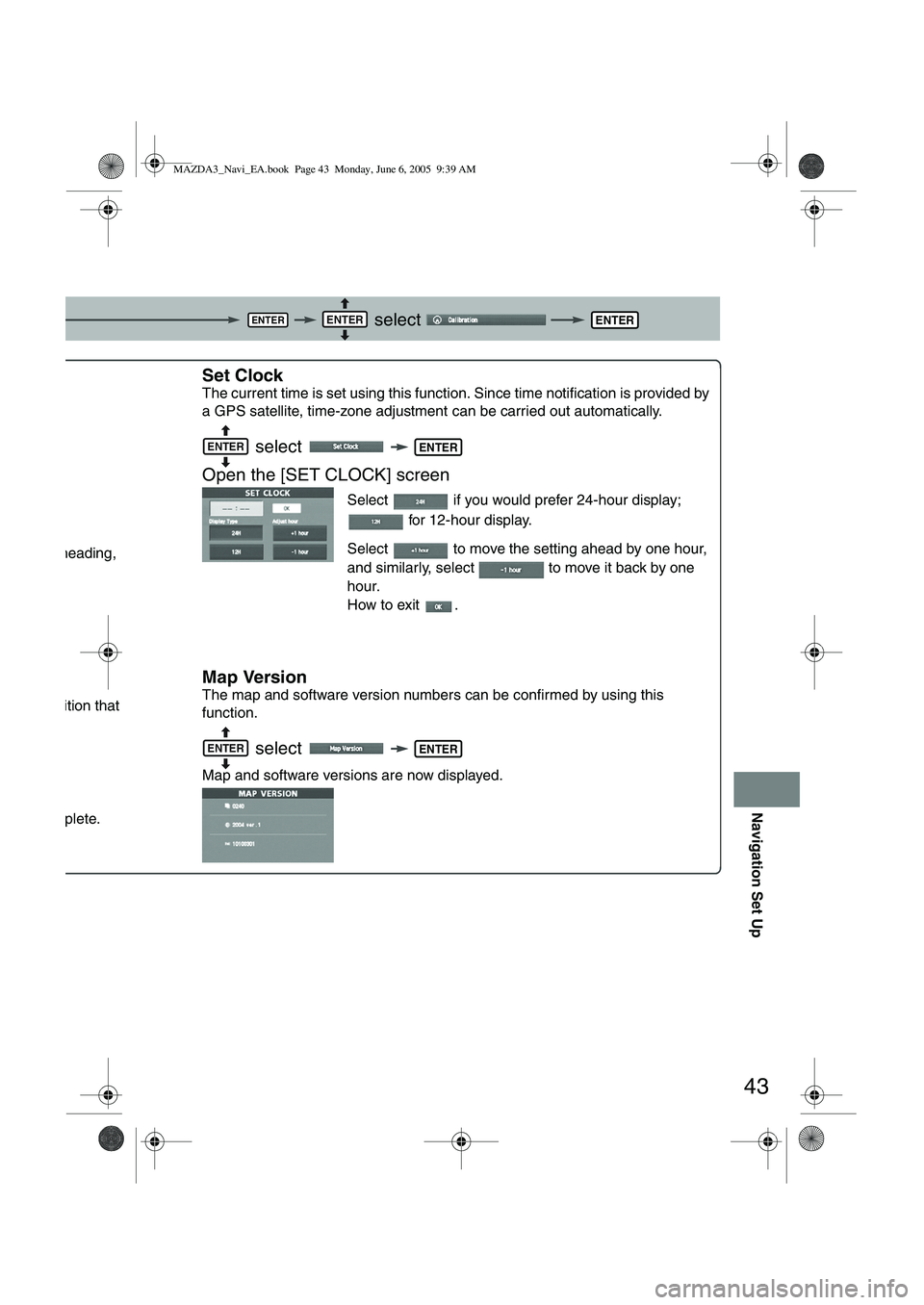
Set Clock
The current time is set using this functi on. Since time notification is provided by
a GPS satellite, time-zone adjustment can be carried out automatically.
select
Open the [SET CLOCK] screen
Select if you would prefer 24-hour display; for 12-hour display.
Select to move the setting ahead by one hour,
and similarly, select to move it back by one
hour.
How to exit .
Map Version
The map and software version numbers can be confirmed by using this
function.
select
Map and software versions are now displayed.
ENTERENTERENTER
NTER
ENTERENTER
ENTERENTER
MAZDA3_Navi_EA.book Page 43 Monday, June 6, 2005 9:39 AM
Page 416 of 426
![MAZDA MODEL 5 2006 Owners Manual 44
Navigation Set Up
Navigation Set Up
This function replaces all the settings in the mobile navigation system with the initial default
settings.
[Default List]
Restore System Defaults
Before Steps](/img/28/41037/w960_41037-415.png "MAZDA MODEL 5 2006 Owners Manual 44
Navigation Set Up
Navigation Set Up
This function replaces all the settings in the mobile navigation system with the initial default
settings.
[Default List]
Restore System Defaults
Before Steps")
44
Navigation Set Up
Navigation Set Up
This function replaces all the settings in the mobile navigation system with the initial default
settings.
[Default List]
Restore System Defaults
Before Steps
select
select
MENUENTERENTER
ENTERENTER
Open the [SYSTEM DEFAULTS] screen
Select .
:Restores the average speed setting to the initial
value upon factory setting.
If you execute Restore System Defaults, all of your Stored setting data will be deleted.
ItemInitial condition
Menu names
For maps (one screen and dual screen) North up
Map display mode single-screen display
Map Display scale/Map scale for Dual-screen is not object of backup.Single-screen: 10,000 map (1/16 mi)Dual-screen: 40,000 map (1/4 mi)Display guidance languageEnglish
Q-POI map display All Off
Q-POI Selection A : Gas station
B : ATM
C : Parking
D : Grocery store
E : All Restaurant
F : Hotel
Search Area U9 (including Washington DC)
Map Color 1
Day/Night/Auto Setting Auto
Distance Units (Miles/KM) (Global setting) Miles
Volume Presets 4 (1 to 7)
Right Screen Setting, POI On
Time display change (12h/24h)24h
Keyboard layout ABC
Arrival Time Time
Navigation Setup (Clock) Off
Navigation Setup (Beep) On
Map display
freeway Information Off
Guidance Screen ON
MAZDA3_Navi_EA.book Page 44 Monday, June 6, 2005 9:39 AM
Page 419 of 426
47
As necessary
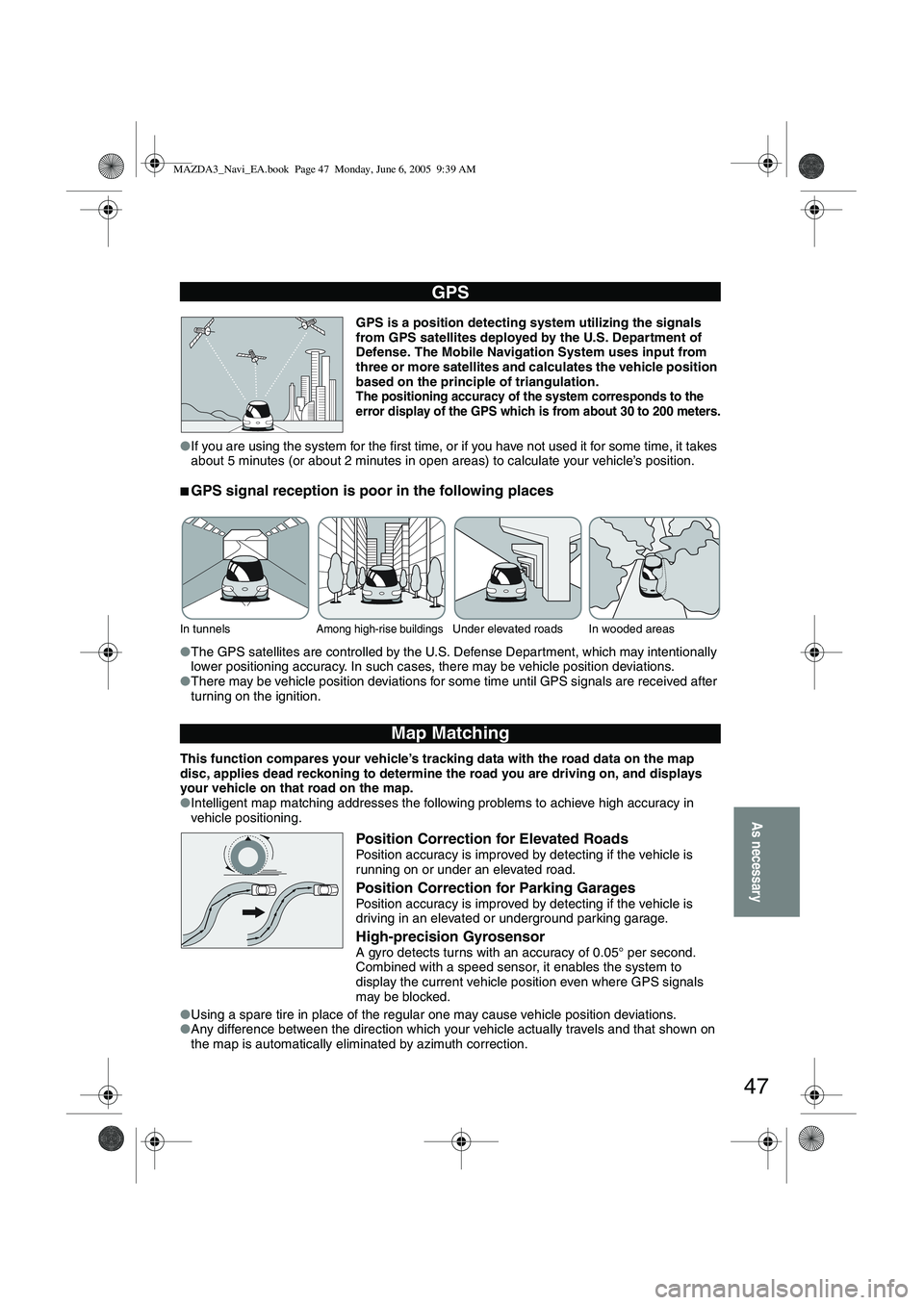
GPS is a position detecting system utilizing the signals
from GPS satellites deployed by the U.S. Department of
Defense. The Mobile Navigation System uses input from
three or more satellites and calculates the vehicle position
based on the principle of triangulation.
The positioning accuracy of the system corresponds to the
error display of the GPS which is from about 30 to 200 meters.
● If you are using the system for the first time, or if you have not used it for some time, it takes
about 5 minutes (or about 2 minutes in open areas) to calculate your vehicle’s position.
■GPS signal reception is poor in the following places
●The GPS satellites are controlled by the U.S. Defense Department, which may intentionally
lower positioning accuracy. In such cases, there may be vehicle position deviations.
● There may be vehicle position deviations for some time until GPS signals are received after
turning on the ignition.
This function compares your vehicle’s tracking data with the road data on the map
disc, applies dead reckoning to determine the road you are driving on, and displays
your vehicle on that road on the map.
● Intelligent map matching addresses the following problems to achieve high accuracy in
vehicle positioning.
Position Correction for Elevated RoadsPosition accuracy is improved by detecting if the vehicle is
running on or under an elevated road.
Position Correction for Parking GaragesPosition accuracy is improved by detecting if the vehicle is
driving in an elevated or underground parking garage.
High-precision GyrosensorA gyro detects turns with an accuracy of 0.05° per second.
Combined with a speed sensor, it enables the system to
display the current vehicle position even where GPS signals
may be blocked.
● Using a spare tire in place of the regular one may cause vehicle position deviations.
● Any difference between the direction which your vehicle actually travels and that shown on
the map is automatically eliminated by azimuth correction.
GPS
In tunnelsAmong high-rise buildingsUnder elevated roads In wooded areas
Map Matching
MAZDA3_Navi_EA.book Page 47 Monday, June 6, 2005 9:39 AM