phone MAZDA MODEL 5 2006 User Guide
[x] Cancel search | Manufacturer: MAZDA, Model Year: 2006, Model line: MODEL 5, Model: MAZDA MODEL 5 2006Pages: 426, PDF Size: 7.18 MB
Page 331 of 426

Black plate (331,1)
Cell Phones Warning
WARNING
Use of Cell Phones and Other Devices by Driver:
Use of any electrical devices such as cell phones, computers, portable radios, vehicle
navigation or other devices by the driver while the vehicle is moving is dangerous.
Dialing a number on a cell phone while driving also ties-up the driver's hands. Use of
these devices will cause the driver to be distracted and could lead to a serious accident.
If a passenger is unable to use the device, pull off the right-of-way to a safe area
before use. If use of a cell phone is necessary despite this warning, use a hands-free
system to at least leave the hands free to drive the vehicle. Never use a cell phone or
other electrical devices while the vehicle is moving and, instead, concentrate on the
full-time job of driving.
Please comply with the legal regulations concerning the use of communication
equipment in vehicles in your country.
Customer Information and Reporting Safety Defects
Cell Phones
9-17
Mazda3_8U55-EA-05G_Edition3 Page331
Tuesday, September 13 2005 10:45 AM
Form No.8U55-EA-05G
Page 356 of 426

Black plate (356,1)
Reporting Safety Defects (Canada)
Canadian customers who wish to report a safety-related defect to Transport Canada, Defect
Investigations and Recalls, may telephone the toll free hotline 1-800-333-0510, or contact
Transport Canada by mail at: Transport Canada, ASFAD, Place de Ville Tower C, 330
Sparks Street, Ottawa ON K1A 0N5.
For additional road safety information, please visit the Road Safety website at:
http://www.tc.gc.ca/roadsafety/menu.htm
9-42
Customer Information and Reporting Safety Defects
Reporting Safety Defects
Mazda3_8U55-EA-05G_Edition3 Page356
Tuesday, September 13 2005 10:45 AM
Form No.8U55-EA-05G
Page 368 of 426
Black plate (368,1)
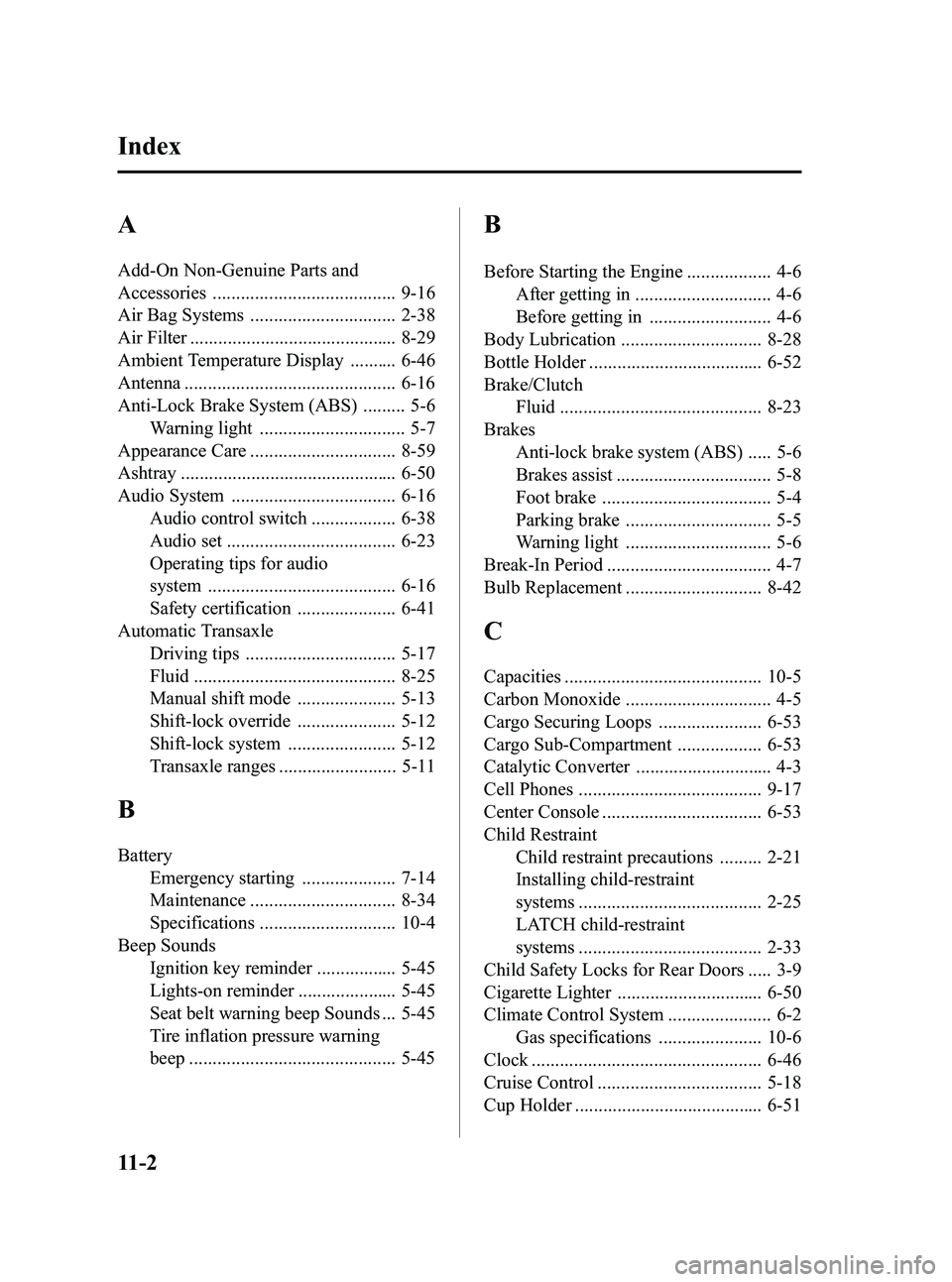
A
Add-On Non-Genuine Parts and
Accessories ....................................... 9-16
Air Bag Systems ............................... 2-38
Air Filter ............................................ 8-29
Ambient Temperature Display .......... 6-46
Antenna ............................................. 6-16
Anti-Lock Brake System (ABS) ......... 5-6Warning light ............................... 5-7
Appearance Care ............................... 8-59
Ashtray .............................................. 6-50
Audio System ................................... 6-16 Audio control switch .................. 6-38
Audio set .................................... 6-23
Operating tips for audio
system ........................................ 6-16
Safety certification ..................... 6-41
Automatic Transaxle Driving tips ................................ 5-17
Fluid ........................................... 8-25
Manual shift mode ..................... 5-13
Shift-lock override ..................... 5-12
Shift-lock system ....................... 5-12
Transaxle ranges ......................... 5-11
B
BatteryEmergency starting .................... 7-14
Maintenance ............................... 8-34
Specifications ............................. 10-4
Beep Sounds Ignition key reminder ................. 5-45
Lights-on reminder ..................... 5-45
Seat belt warning beep Sounds ... 5-45
Tire inflation pressure warning
beep ............................................ 5-45
B
Before Starting the Engine .................. 4-6After getting in ............................. 4-6
Before getting in .......................... 4-6
Body Lubrication .............................. 8-28
Bottle Holder ..................................... 6-52
Brake/Clutch Fluid ........................................... 8-23
Brakes Anti-lock brake system (ABS) ..... 5-6
Brakes assist ................................. 5-8
Foot brake .................................... 5-4
Parking brake ............................... 5-5
Warning light ............................... 5-6
Break-In Period ................................... 4-7
Bulb Replacement ............................. 8-42
C
Capacities .......................................... 10-5
Carbon Monoxide ............................... 4-5
Cargo Securing Loops ...................... 6-53
Cargo Sub-Compartment .................. 6-53
Catalytic Converter ............................. 4-3
Cell Phones ....................................... 9-17
Center Console .................................. 6-53
Child Restraint Child restraint precautions ......... 2-21
Installing child-restraint
systems ....................................... 2-25
LATCH child-restraint
systems ....................................... 2-33
Child Safety Locks for Rear Doors ..... 3-9
Cigarette Lighter ............................... 6-50
Climate Control System ...................... 6-2 Gas specifications ...................... 10-6
Clock ................................................. 6-46
Cruise Control ................................... 5-18
Cup Holder ........................................ 6-51
11-2
Index
Mazda3_8U55-EA-05G_Edition3 Page368
Tuesday, September 13 2005 10:46 AM
Form No.8U55-EA-05G
Page 375 of 426

3
Product
Accessories ...............................................................................................................2
Laser Product ............................................................................................................2
Contents ....................................................................................................................3
Safety Information......................................................................................................4
Introduction ................................................................................................................6
Names and Functions................................................................................................8
Before Use
Activation .................................................................................................................10
Screen names and functions ...................................................................................12
Screen change ........................................................................................................14●
Changing the Map Orientation/Scale ............................................ 15
Getting started
Destination Entry and Route Search........16
●Change (Change Search Area)●Address●Point of interest●Emergency●Memory Point●Home●Preset Destination●Previous Destination●Intersection●Freeway On/Off Ramp●Phone number●Coordinates●Select from map
Use POI........................................................................\
................22
Character Entry....................................................................23
Direct Destination Input..............................................................24
POI Icons on Maps / Delete Destination
.............................25
Route Options...............................................................................................26
Routing
Address Book ..........................................................................................................32Address Book
Navigation Set Up ....................................................................................................38Navigation
Set Up
Precautions/System Performance ...........................................................................46
●
Voice Guidance●GPS●Map Matching●Positioning Accuracy●Route Guide●Route SearchTroubleshooting .......................................................................................................52●
Verification First●Error MessagesMaintenance ............................................................................................................53
As
necessary
MAZDA3_Navi_EA.book Page 3 Monday, June 6, 2005 9:39 AM
Page 392 of 426
20
Routing
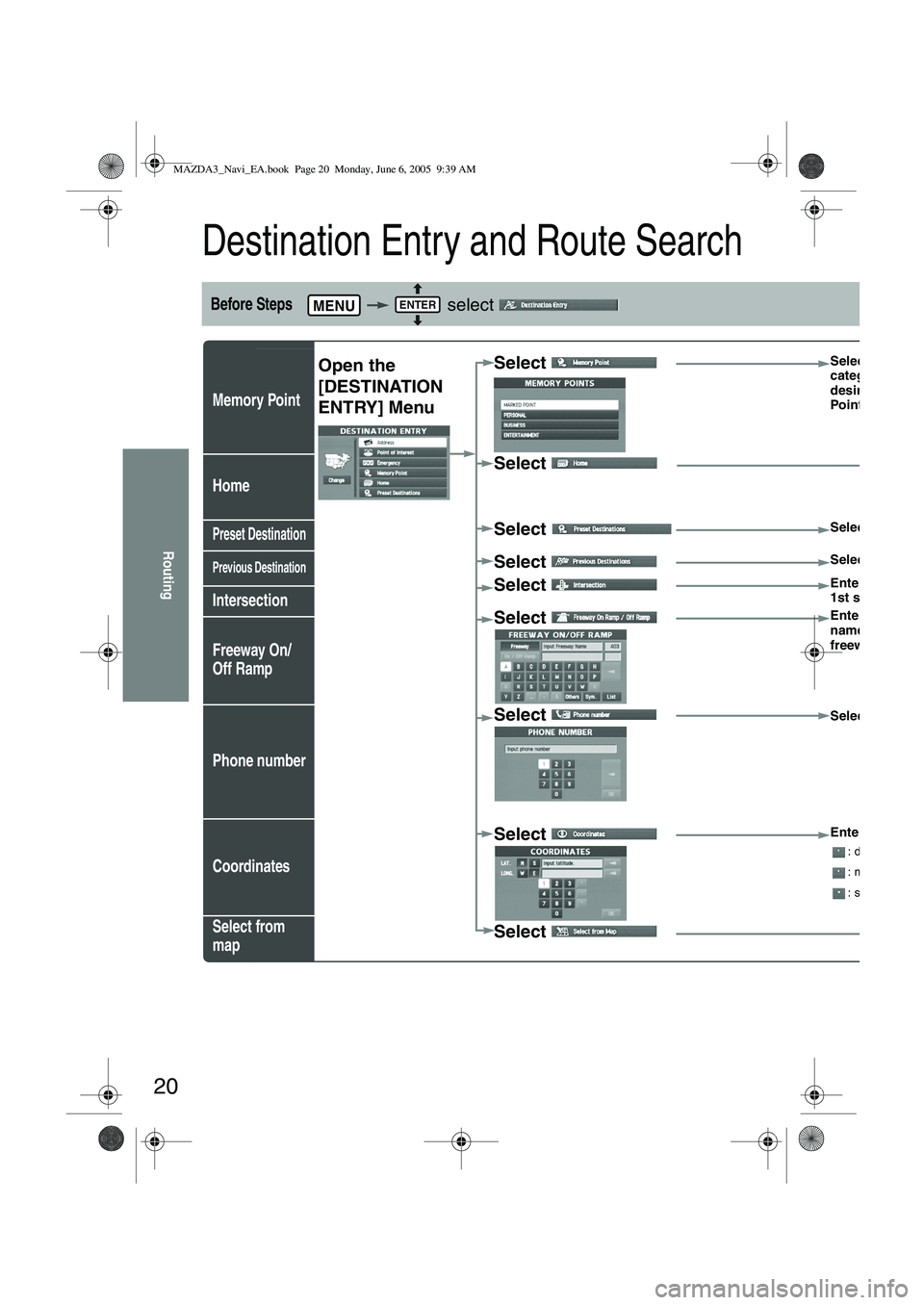
Destination Entry and Route Search
Before Steps select
Memory Point
Home
Preset Destination
Previous Destination
Intersection
Freeway On/
Off Ramp
Phone number
Coordinates
Select from
map
MENUENTER
Open the
[DESTINATION
ENTRY] MenuSelect Select the
category for
desired Mem
Point
Select
Select
Select the de
Select Select the P
Select Enter/Select
1st street na
Select
Enter/Select
name of the
freeway
Select
Select
Select
Enter the lat
: degrees
: minutes
: seconds
Select
MAZDA3_Navi_EA.book Page 20 Monday, June 6, 2005 9:39 AM
Page 393 of 426
21
Routing
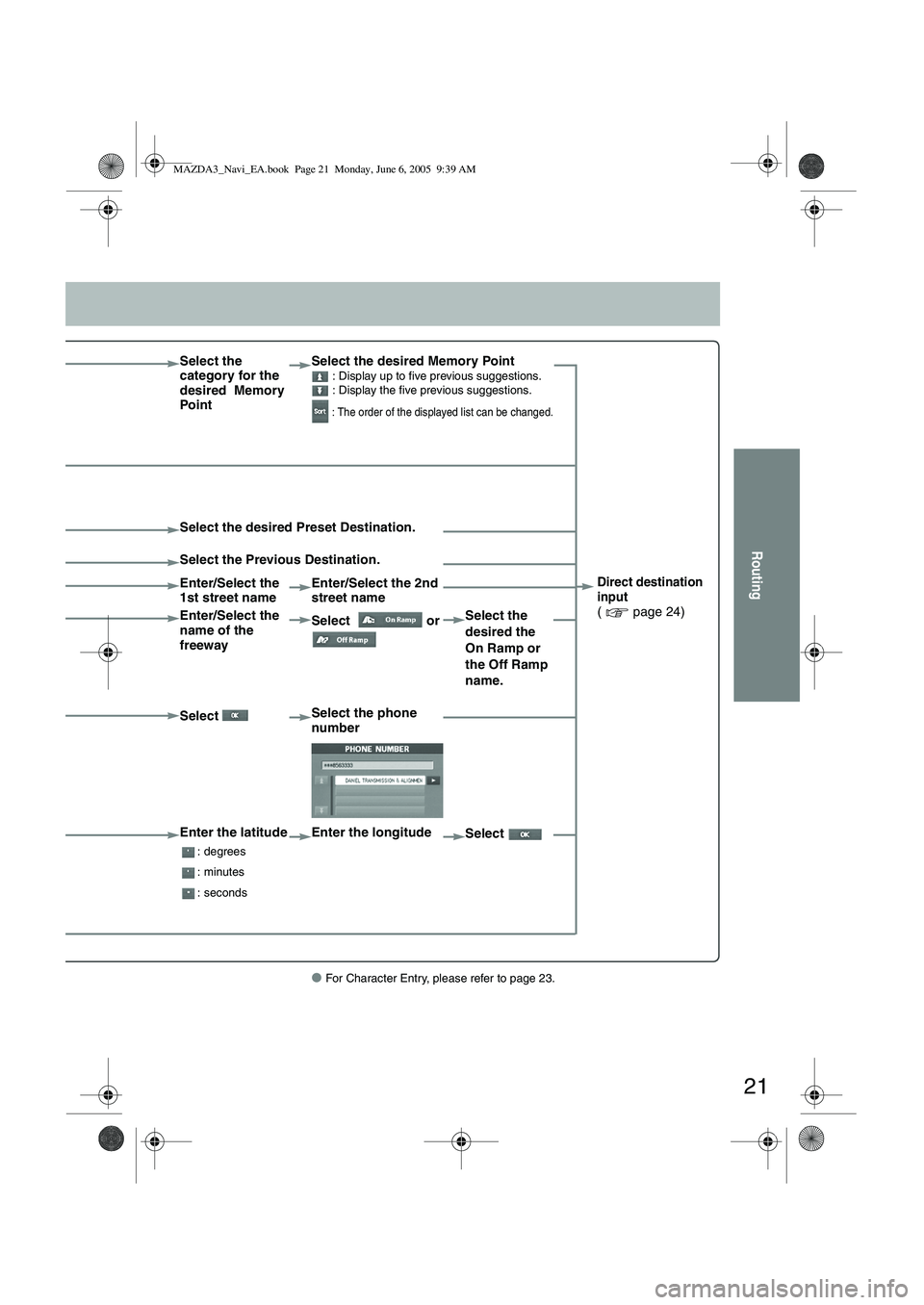
● For Character Entry, please refer to page 23.
Select the
category for the
desired Memory
PointSelect the desired Memory Point : Display up to five previous suggestions.
: Display the five previous suggestions.
: The order of the displayed list can be changed.
Direct destination
input
( page 24)
Select the desired Preset Destination.
Select the Previous Destination.
Enter/Select the
1st street name
Enter/Select the 2nd
street name
Enter/Select the
name of the
freeway Select
or Select the
desired the
On Ramp or
the Off Ramp
name.
Select Select the phone
number
Enter the latitude
: degrees
: minutes
: seconds
Enter the longitude
Select
MAZDA3_Navi_EA.book Page 21 Monday, June 6, 2005 9:39 AM
Page 395 of 426
23
Routing
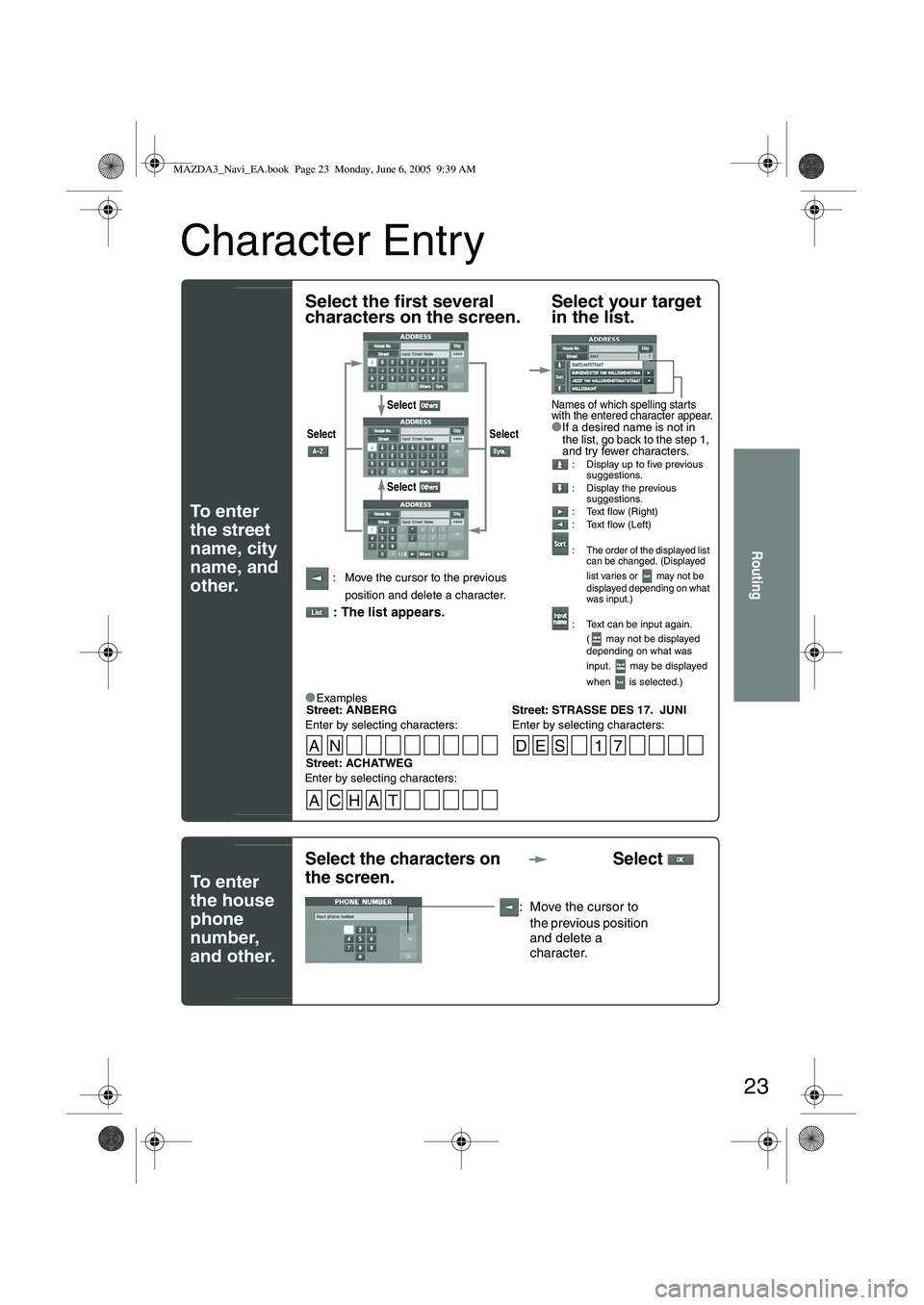
Character Entry
To e n t e r
the street
name, city
name, and
other.
To e n t e r
the house
phone
number,
and other.
Select the first several
characters on the screen.Select your target
in the list.
●If a desired name is not in
the list, go back to the step 1,
and try fewer characters.
: Display up to five previous
suggestions.
: Display the previous suggestions.
: Text flow (Right)
: Text flow (Left)
:
The order of the displayed list
can be changed. (Displayed
list varies or may not be
displayed depending on what
was input.)
: Text can be input again.
( may not be displayed
depending on what was
input. may be displayed
when is selected.)
: Move the cursor to the previous
position and delete a character.
: The list appears.
●
Examples-Street: ANBERG Street: STRASSE DES 17. JUNI
Enter by selecting characters: Enter by selecting characters:
Select Select
Select
Select
Names of which spelling starts
with the entered character appear.
-Street: ACHATWEG
Enter by selecting characters:
AN DES 1 7
ACHAT
Select the characters on
the screen. Select
: Move the cursor to
the previous position
and delete a
character.
MAZDA3_Navi_EA.book Page 23 Monday, June 6, 2005 9:39 AM
Page 405 of 426
33
Address Book
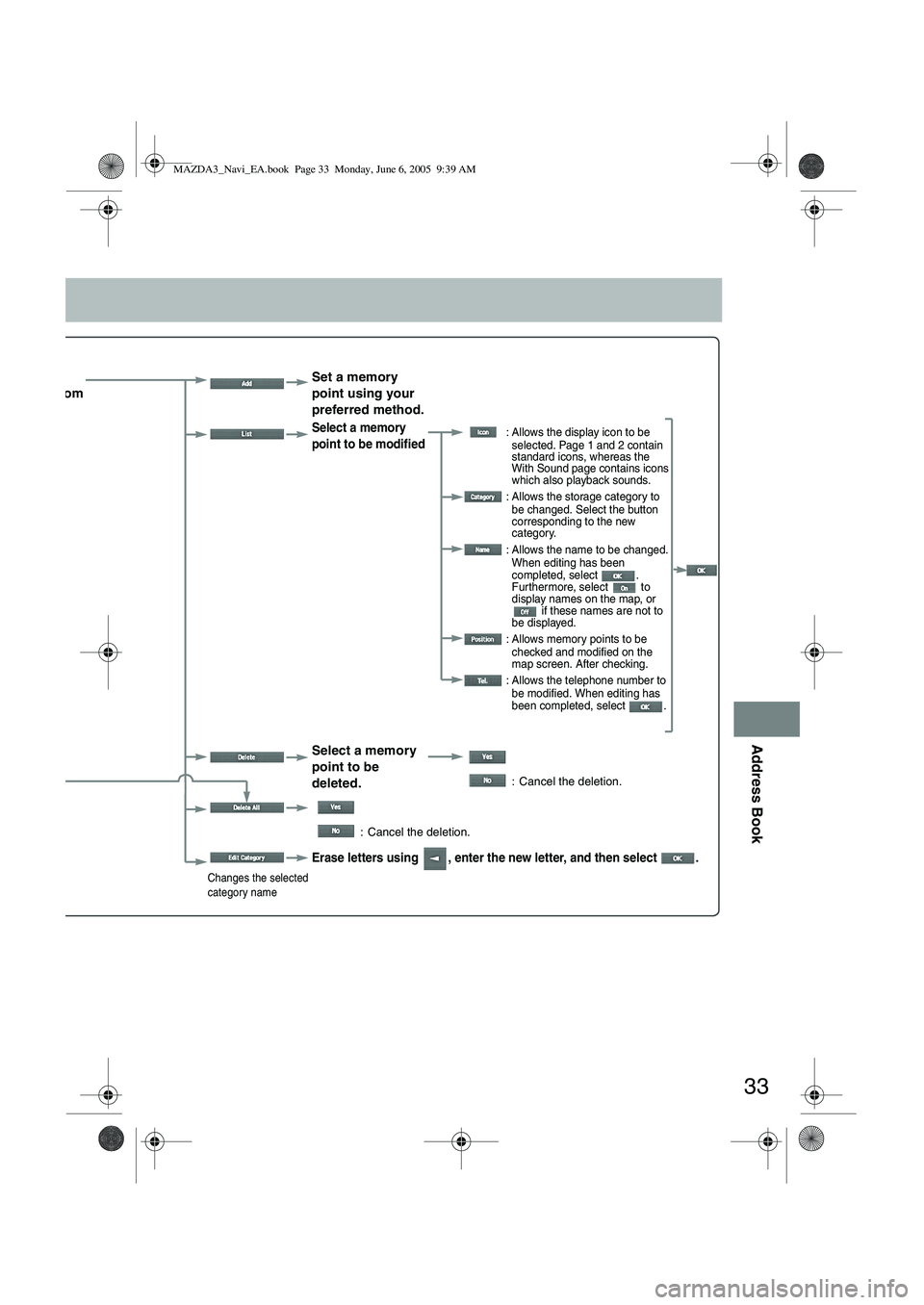
ect the
egory from
list. Set a memory
point using your
preferred method.
Select a memory
point to be modified : Allows the display icon to be
selected. Page 1 and 2 contain
standard icons, whereas the
With Sound page contains icons
which also playback sounds.
: Allows the storage category to be changed. Select the button
corresponding to the new
category.
: Allows the name to be changed. When editing has been
completed, select .
Furthermore, select to
display names on the map, or if these names are not to
be displayed.
: Allows memory points to be checked and modified on the
map screen. After checking.
: Allows the telephone number to be modified. When editing has
been completed, select .
Select a memory
point to be
deleted.
: Cancel the deletion.
: Cancel the deletion.
Changes the selected
category name
Erase letters using , enter the new letter, and then select .
MAZDA3_Navi_EA.book Page 33 Monday, June 6, 2005 9:39 AM