change time MAZDA MODEL 5 2012 User Guide
[x] Cancel search | Manufacturer: MAZDA, Model Year: 2012, Model line: MODEL 5, Model: MAZDA MODEL 5 2012Pages: 440, PDF Size: 5.51 MB
Page 188 of 440

Black plate (188,1)
Operating Tips
qOperating the Climate Control
System
Operate the climate control system with
the engine running.
NOTE
To prevent the battery from being discharged,
do not leave the fan control dial on for a long
period of time with the ignition switched ON
when the engine is not running.
qClearing the Air Inlet
Clear all obstructions such as leaves,
snow and ice from the hood and the air
inlet in the cowl grille to improve the
system efficiency.
qFoggy Windows
The windows may fog up easily in humid
weather. Use the climate control system to
defog the windows.
To help defog the windows, operate the
air conditioner to dehumidify the air.
NOTE
The air conditioner may be used along with the
heater to dehumidify the air.
qOutside/Recirculated Air Position
Use the outside air mode for ventilation or
windshield defrosting. The recirculate
mode should be used when the air inside
tunnels or while in traffic jams is polluted,
or you would like to shut off outside air
for quick cooling of the interior.
qParking in Direct Sunlight
If the vehicle has been parked in direct
sunlight during hot weather, open the
windows to let warm air escape, then run
the climate control system.
qNot Using for a Long Period
Run the air conditioner about 10 minutes
at least once a month to keep internal
parts lubricated.
qCheck the Refrigerant before the
Weather Gets Hot
Have the air conditioner checked before
the weather gets hot. Lack of refrigerant
may make the air conditioner less
efficient. Consult an Authorized Mazda
Dealer for refrigerant inspection.
The air conditioner is filled with
HFC134a (R134a), a refrigerant that will
not damage the ozone layer.
If the air conditioner is low on refrigerant
or has a malfunction, consult an
Authorized Mazda Dealer.
qReplacement of the Cabin Air Filter
If your vehicle is equipped with an air
filter for the air conditioner, it is necessary
to change the filter periodically as
indicated in scheduled maintenance (page
8-3). Consult an Authorized Mazda
Dealer for replacement of the cabin air
filter.
6-2
Interior Comfort
Climate Control System
Mazda5_8BR9-EA-10J_Edition3 Page188
Monday, February 21 2011 1:44 PM
Form No.8BR9-EA-10J
Page 199 of 440
Black plate (199,1)
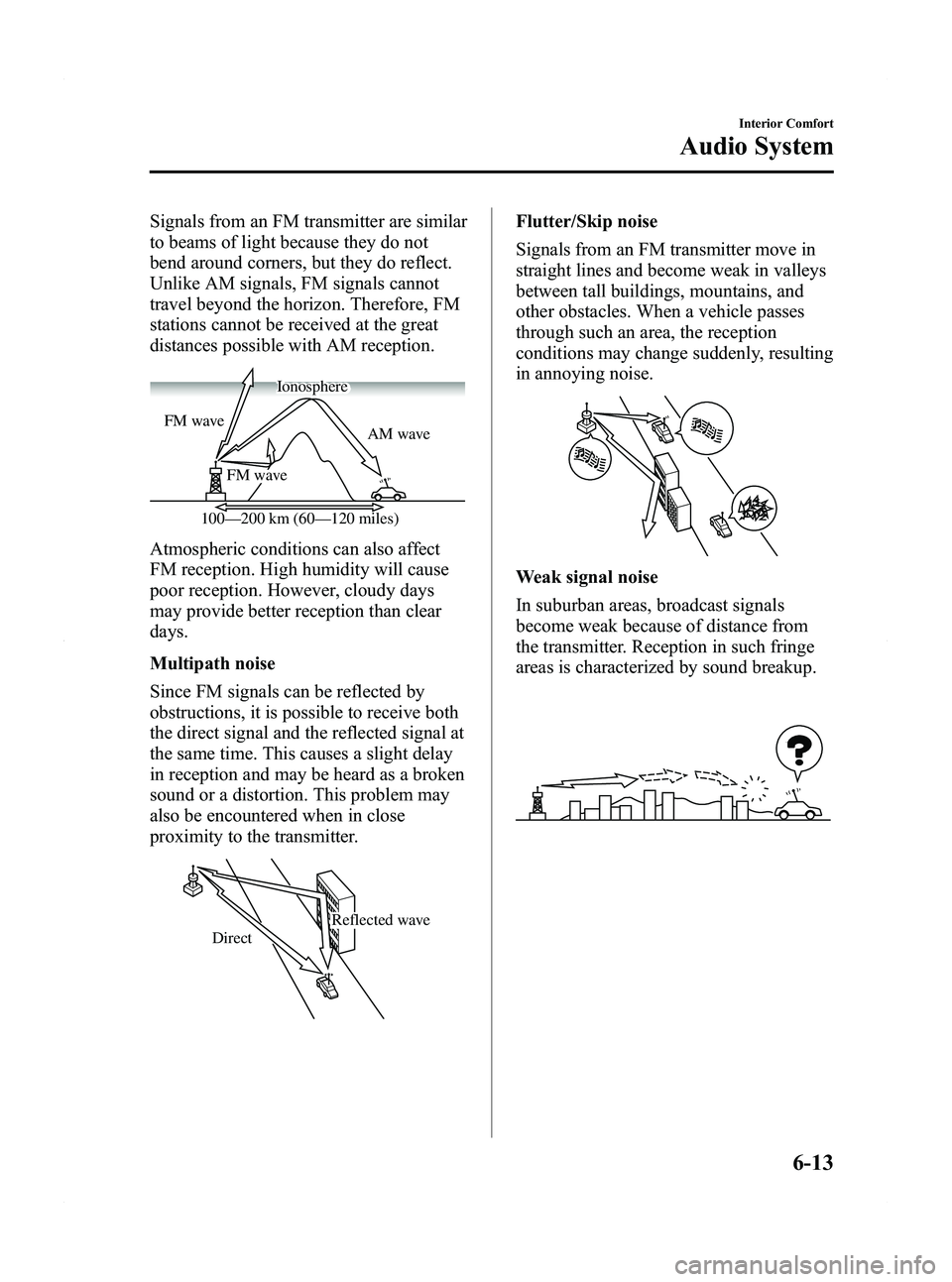
Signals from an FM transmitter are similar
to beams of light because they do not
bend around corners, but they do reflect.
Unlike AM signals, FM signals cannot
travel beyond the horizon. Therefore, FM
stations cannot be received at the great
distances possible with AM reception.
AM wave
FM wave
FM wave
100—200 km (60—120 miles) Ionosphere
Atmospheric conditions can also affect
FM reception. High humidity will cause
poor reception. However, cloudy days
may provide better reception than clear
days.
Multipath noise
Since FM signals can be reflected by
obstructions, it is possible to receive both
the direct signal and the reflected signal at
the same time. This causes a slight delay
in reception and may be heard as a broken
sound or a distortion. This problem may
also be encountered when in close
proximity to the transmitter.
Reflected wave
Direct
Flutter/Skip noise
Signals from an FM transmitter move in
straight lines and become weak in valleys
between tall buildings, mountains, and
other obstacles. When a vehicle passes
through such an area, the reception
conditions may change suddenly, resulting
in annoying noise.
Weak signal noise
In suburban areas, broadcast signals
become weak because of distance from
the transmitter. Reception in such fringe
areas is characterized by sound breakup.
Interior Comfort
Audio System
6-13
Mazda5_8BR9-EA-10J_Edition3 Page199
Monday, February 21 2011 1:44 PM
Form No.8BR9-EA-10J
Page 200 of 440

Black plate (200,1)
Strong signal noise
This occurs very close to a transmitter
tower. The broadcast signals are
extremely strong, so the result is noise and
sound breakup at the radio receiver.
Station drift noise
When a vehicle reaches the area of two
strong stations broadcasting at similar
frequencies, the original station may be
temporarily lost and the second station
picked up. At this time there will be some
noise from this disturbance.
Station 2
88.3 MHz
Station 1
88.1 MHz
q
Operating Tips for CD Player/In-
Dash CD Changer
Condensation phenomenon
Immediately after turning on the heater
when the vehicle is cold, the CD or
optical components (prism and lens) in the
CD player/In-dash CD changer may
become clouded with condensation. At
this time, the CD will eject immediately
when placed in the unit. A clouded CD
can be corrected simply by wiping it with
a soft cloth. Clouded optical components
will clear naturally in about an hour. Wait
for normal operation to return before
attempting to use the unit.
Handling the CD player/In-dash CD
changer
The following precautions should be
observed.
lDo not spill any liquid on the audio
system.
lDo not insert any objects, other than
CDs, into the slot.
6-14
Interior Comfort
Audio System
Mazda5_8BR9-EA-10J_Edition3 Page200
Monday, February 21 2011 1:44 PM
Form No.8BR9-EA-10J
Page 202 of 440

Black plate (202,1)
lThe CD player/In-dash CD changer has
been designed to play CDs bearing the
identification logo as shown below. No
other discs can be played.
lUse discs that have been legitimately
produced. If illegally-copied discs such
as pirated discs are used, the system
may not operate properly.
lBe sure never to touch the signal
surface when handling the CDs. Pick
up a CD by grasping the outer edge or
the edge of the hole and the outer edge.
lDo not stick paper or tape on the CD.
Avoid scratching the reverse side (the
side without a label). The disc may not
eject resulting in a malfunction.
lDust, finger smudges, and dirt can
decrease the amount of light reflected
from the signal surface, thus affecting
sound quality. If the CD should
become soiled, gently wipe it with a
soft cloth from the center of the CD to
the edge.
lDo not use record sprays, antistatic
agents, or household spray cleaners.
Volatile chemicals such as benzine and
thinner can also damage the surface of
the CD and must not be used. Anything
that can damage, warp, or fog plastic
should never be used to clean CDs.
lInsert discs one by one. If two discs are
inserted at the same time, the system
may not operate properly.
lThe CD player/In-dash CD changer
ejects the CD if the CD is inserted
upside down. Also dirty and/or
defective CDs may be ejected.
lDo not insert cleaning discs in the CD
player/In-dash CD changer.
lDo not insert any disc with a peel-off
seal affixed to it.
lThis unit may not be able to play
certain CD-R/CD-RWs made using a
computer or music CD recorder due to
disc characteristics, scratches,
smudges, dirt, etc., or due to dust or
condensation on the lens inside the
unit.
lStoring CDs in the vehicle exposed to
direct sunlight or high temperature may
damage the CD-R/CD-RWs, and make
them unplayable.
lCD-R/CD-RW exceeding 700 MB
cannot be played.
lThis unit may not be able to play
certain discs made using a computer
due to the application (writing
software) setting used. (For details,
consult the store where the application
was purchased.)
lIt is possible that certain text data, such
as titles, recorded on a CD-R/CD-RW
may not be displayed when musical
data (CD-DA) is playing.
lThe period from when a CD-RW is
inserted to when it begins playing is
longer than a normal CD or CD-R.
6-16
Interior Comfort
Audio System
Mazda5_8BR9-EA-10J_Edition3 Page202
Monday, February 21 2011 1:44 PM
Form No.8BR9-EA-10J
Page 208 of 440

Black plate (208,1)
qPower/Volume/Sound Controls
Audio control dialPower/Volume dial
Power ON/OFF
Switch the ignition to ACC or ON.
Press the power/volume dial to turn the
audio system on.
Press the power/volume dial again to turn
the audio system off.
NOTE
To prevent the battery from being discharged,
do not leave the audio system on for a long
period of time when the engine is not running.
Volume adjustment
To adjust the volume, turn the power/
volume dial.
Turn the power/volume dial to the right to
increase volume, to the left to decrease it.
Audio sound adjustment
1. Press the audio control dial to select the
function. The selected function will be
indicated.
*1 Depending on the mode selected, the indication changes.
*2 Depending on the model, this function, may not be available.
6-22
Interior Comfort
Audio System
Mazda5_8BR9-EA-10J_Edition3 Page208
Monday, February 21 2011 1:44 PM
Form No.8BR9-EA-10J
Page 216 of 440

Black plate (216,1)
SIRIUS service uses an ID code to
identify your radio. This code is needed to
activate SIRIUS service, and report any
problems.
To activate you SIRIUS radio tuner, call a
SIRIUS customer service specialist at 1-
888-539-7474 or you can visit SIRIUS
online at www.sirius.com.
Please have the following information
ready:
lSIRIUS ID (12-digit electronic serial
no., or ESN*)lValid credit card information (may not
be required at initial sign-up)
*ESN: Electronic Serial Number
Displaying the SIRIUS ID (ESN)
When the manual tuning dial is turned to
channel 0, a 12-digit Electronic Serial
Number (ESN) for the SIRIUS tuner is
displayed.
(If the SIRIUS ID (ESN) for the tuner
does not display)
If “ESN FAIL ”is displayed after channel
0 is selected by operating the manual
tuning dial, contact an Authorized Mazda
Dealer.
Be sure you are parked outside with a
clear view of open sky, you will be
instructed to turn on your radio (in SAT
mode and tuned to channel 184).
Activation typically takes only 2 ―5
minutes.
SIRIUS operation
All operations of the satellite radio are
conducted by means of the audio unit. SIRIUS radio mode selection
When the satellite button (
)is
pressed during ACC ON, it will play the
last SIRIUS channel in use before the
mode was switched over to another mode
or the power was turned off.
When the satellite button (
)is
pressed in a mode other than the SIRIUS
mode, the last channel in use will be
received.
Every time the satellite button (
)
is pressed, the bank changes in the order
shown below.
SR2
SR1
SR3
NOTE
SR1, SR2 and SR3: six stations can be stored
in each bank for convenient access to your
favorite stations.
Operation in the initial state
It may take some time to start up the
equipment when it is in the initial state,
when there is a change in the user's
subscription condition, or when the
SIRIUS channel map is changed.
6-30
Interior Comfort
Audio System
Mazda5_8BR9-EA-10J_Edition3 Page216
Monday, February 21 2011 1:45 PM
Form No.8BR9-EA-10J
Page 217 of 440

Black plate (217,1)
“UPDATING xx% ”is displayed when the
SIRIUS channel map is changed. If the
unit is initialized or the user contract
content is changed, “UPDATING ”is
displayed. Updating could take as long as
three minutes depending on the
geographical area. When the unit is in an
initialized state, channel 184 is displayed
after the display indicates
“ UPDATING 100% ”. If the SIRIUS
channel map or the user contract content
is changed, the channel prior to the
change is displayed after “UPDATING ”is
displayed. After the initialization display,
it may take as long as 12 seconds to
receive channel 184.
NOTE
Do not perform the following operation while
“ UPDATING ”is displayed. Otherwise, the
updating procedure will be cancelled.
lTurning off the audio powerlSwitching to other modeslSwitching the ignition off
When the SIRIUS mode is switched to
another mode, or when the power is
turned off, the present channel which is
being received is stored as the last
channel.
Channel selection
Turning the manual tuning dial allows you
to select the desired receiving channel.
lTurn the knob clockwise: Channel UplTurn the knob counterclockwise:
Channel Down
Unsubscribed channel
When a selected station has not been
subscribed to, the display indicates the
following:
After the channel number is displayed,
[CALL
888] and [539SIRI]
(Flashes alternately) is displayed. NOTE
When the subscription contract is canceled, all
of the channels including channel 184 appear
as unsubscribed.
Invalid channel
The display switches between [SR
(bank number)INVALID] and [SR
(bank number)CHANNEL] only when
a selected channel is not broadcasting.
NOTE
If the last channel selected has become
unavailable because of a channel update the
above indication is displayed until any button
is pressed.
Preset channel programming
(Programming with “channel number ”
display)
1. Select the desired channel to be programmed. At this point, the
following is displayed:
[SR
(bank number)(channel
number)]
2. Keep pressing the channel preset button for 1.5 seconds or more.
The programming process is complete
after the channel number flashes. Then,
[SR
(bank number)] is displayed
and a beep sound is heard at the same
time.
3. [SR
(bank number)CH
(preset number)(channel number)]
are displayed.
Interior Comfort
Audio System
6-31
Mazda5_8BR9-EA-10J_Edition3 Page217
Monday, February 21 2011 1:45 PM
Form No.8BR9-EA-10J
Page 218 of 440

Black plate (218,1)
(Programming with“text ”display (e.g.
channel name))
1. Select the desired channel to be programmed. At this point, the
following is displayed:
[SR
(bank number)(selected text
(e.g. channel name))]
2. Keep pressing the channel preset button for 1.5 seconds or more.
The programming process is complete
after the text (e.g. channel name)
flashes. Then, [SR
(bank number)]
is displayed and you will hear beep
sound at the same time.
3. [SR
(bank number)CH
(preset number)(channel number)]
are displayed.
4. Three seconds later, it returns to normal display. [SR
(bank number)(text
(e.g. channel name))]
NOTE
Six stations can be stored in each bank, SR1,
SR2, and SR3 for convenient access to your
favorite stations.
Preset channel call-up
Press and release the channel preset
button,
[SR
(bank number)CH(preset
number)
(channel number)] appears.
When the preset button is pressed during
text mode, its channel number is
displayed first for three second and then
its text is displayed.
NOTE
In the initial setting, all channels are preset to
184.
Category change
Press the category button (
or) and
select the desired category.
lPress the category button ():
Category up
lPress the category button ():
Category down
Every time the category button (
)is
pressed, the category is changed over in
the order shown below.
At this time, the lowest (smallest-number)
channel within the category indicated is
received.
When the highest (or lowest) category is
reached, the category is changed over in
the order shown below.
Highest category →All categories →
Lowest category
NOTE
While all categories are selected, all channels
covering a category can be accessed
(Category off condition).
Channel selection within a category
If you are in a selected category and the
channel number is displayed, turning the
manual tuning dial moves the channel
number up/down in that category.
lTurn the manual tuning dial clockwise:
Channel Up
lTurn the manual tuning dial
counterclockwise: Channel Down
NOTE
The channel number needs to be indicated in
the display to use manual tuning dial for this
function.
6-32
Interior Comfort
Audio System
Mazda5_8BR9-EA-10J_Edition3 Page218
Monday, February 21 2011 1:45 PM
Form No.8BR9-EA-10J
Page 219 of 440
Black plate (219,1)
Scan tuning
Press the scan button (
)to
automatically sample stations. Scanning
stops at each station for about five
seconds. To hold a station, press the scan
button (
) again during this interval.
NOTE
lUnsubscribed channels, invalid channels,
parental lock channels and channel 0 are
not subject to the scan, therefore these
channels will be skipped automatically.
lYou can scan all channels while all
categories are selected. If you are in a
selected category, you can only scan the
channels in that category.
Channel number, channel name,
category, artist, song titles and info
display
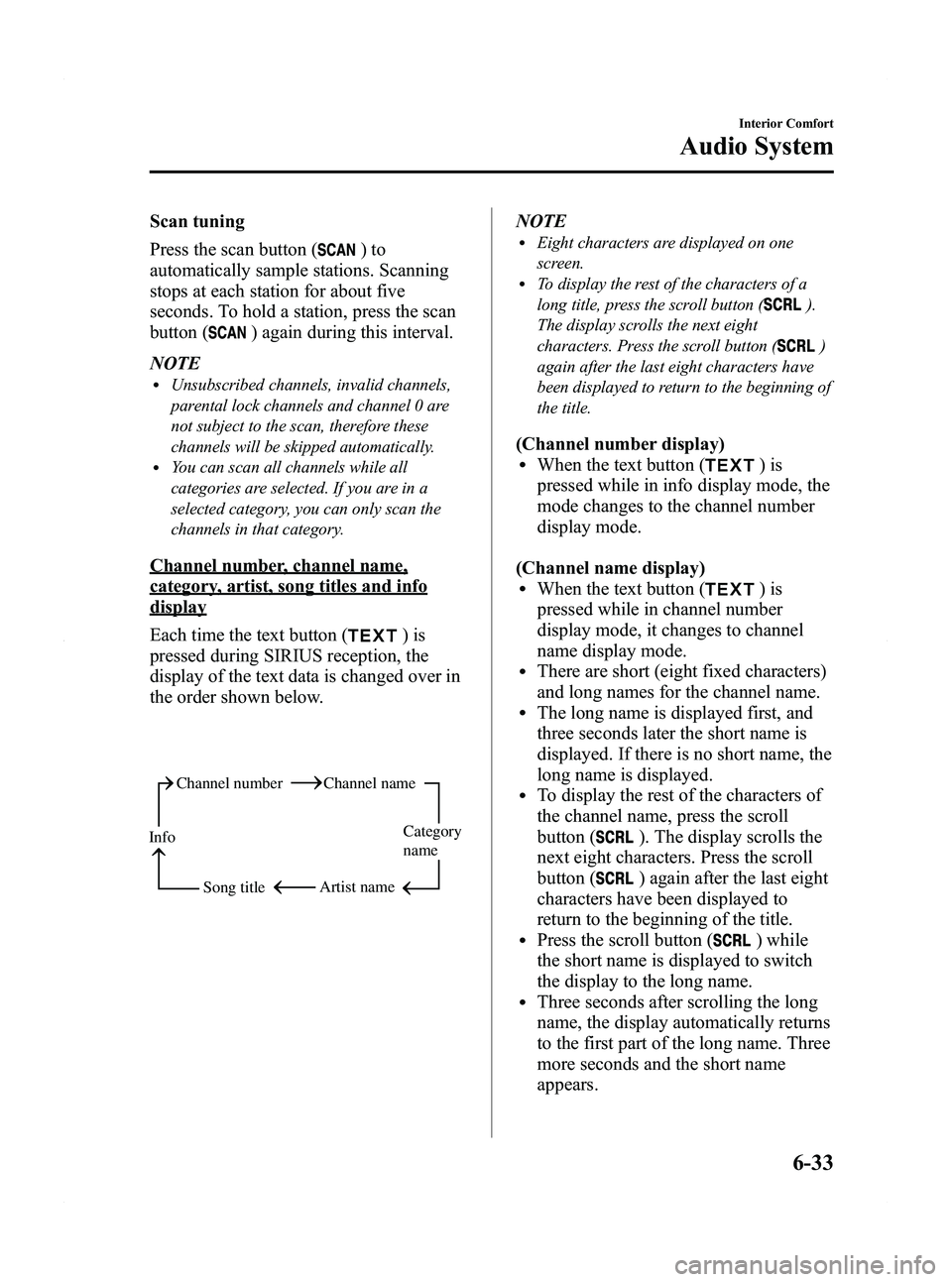
Each time the text button (
)is
pressed during SIRIUS reception, the
display of the text data is changed over in
the order shown below.
Channel number Channel name
Category
name
Artist name
Info
Song title
NOTElEight characters are displayed on one
screen.
lTo display the rest of the characters of a
long title, press the scroll button (
).
The display scrolls the next eight
characters. Press the scroll button (
)
again after the last eight characters have
been displayed to return to the beginning of
the title.
(Channel number display)lWhen the text button ()is
pressed while in info display mode, the
mode changes to the channel number
display mode.
(Channel name display)
lWhen the text button ()is
pressed while in channel number
display mode, it changes to channel
name display mode.
lThere are short (eight fixed characters)
and long names for the channel name.
lThe long name is displayed first, and
three seconds later the short name is
displayed. If there is no short name, the
long name is displayed.
lTo display the rest of the characters of
the channel name, press the scroll
button (
). The display scrolls the
next eight characters. Press the scroll
button (
) again after the last eight
characters have been displayed to
return to the beginning of the title.
lPress the scroll button () while
the short name is displayed to switch
the display to the long name.
lThree seconds after scrolling the long
name, the display automatically returns
to the first part of the long name. Three
more seconds and the short name
appears.
Interior Comfort
Audio System
6-33
Mazda5_8BR9-EA-10J_Edition3 Page219
Monday, February 21 2011 1:45 PM
Form No.8BR9-EA-10J
Page 221 of 440

Black plate (221,1)
Instant replay
This function allows you to rewind and
replay the program that you were
previously or are currently listening to.
Press the instant replay button (
).
When the seek tuning button (
)is
pressed (about 1.5 seconds), playback
starts from the beginning of the current
program.
When the seek tuning button (
)is
pressed twice, playback starts from the
beginning of the previous program.
When the seek tuning button (
)is
pressed for about 1.5 seconds or longer,
the program is reversed while the button
is being pressed.
When the seek tuning button (
)is
pressed (about 1.5 seconds), playback
starts from the beginning of the next
program. When the seek tuning button
(
) is pressed (about 1.5 seconds) while
the last program is being played, the
instant replay mode is cancelled.
When the seek tuning button (
)is
pressed for 1.5 seconds or longer, the
program is fast-forwarded while the
button is being pressed. When pressing
and holding the button until the end of the
program, the instant replay mode is
cancelled.
When the instant replay button (
)is
pressed again, playback is paused, or
playback starts if it has been paused.
Instant replay (PAUSE)
If the instant replay button (
)is
pressed while the instant replay mode is
off, instant replay mode is turned on in a
paused condition (PAUSE). Press the
instant replay button (
) again to
resume playback from the point at which
it was paused. NOTE
lIf the channel is changed, the instant replay
buffer data is deleted.
lAfter turning on the power and switching to
SIRIUS digital satellite radio mode, the
instant replay mode is not available for
several seconds after changing channels.
Initialization of ID code
If the registered ID code is forgotten,
return the ID code to the default [0000] by
performing the following steps:
Setting condition: SAT mode
(Master code input preparation)
1. Press and hold the scan button (
),
then press channel preset button 4.
Hold both buttons together for 1.5
seconds.
2. “ENTER PIN ”appears for three
seconds which indicates that it is in
code input mode.
3. “SR1 - - - - ”appears, which indicates
that it is ready for code input.
(Master code input)
4. Input the master code using the channel preset buttons 1-4.
(The master code is already set at the
time of factory shipment.)
(Master code input determination)
5. Determine the master code which has been input by pressing the scan button
(
).
6. “PIN CLEARED ”appears which
indicates that the master code input has
been completed.
7. The ID code is set to the default [0000] and the initialization process is
completed.
Interior Comfort
Audio System
6-35
Mazda5_8BR9-EA-10J_Edition3 Page221
Monday, February 21 2011 1:45 PM
Form No.8BR9-EA-10J