change time MAZDA MODEL 5 2012 Owner's Manual
[x] Cancel search | Manufacturer: MAZDA, Model Year: 2012, Model line: MODEL 5, Model: MAZDA MODEL 5 2012Pages: 440, PDF Size: 5.51 MB
Page 222 of 440
![MAZDA MODEL 5 2012 Owners Manual Black plate (222,1)
NOTE
Master code:
The Master Code is used to initialize or re-
initialize the ID code in the event that the code
is not set to [0000] and/or the personalized ID
code is not known.](/img/28/41011/w960_41011-221.png "MAZDA MODEL 5 2012 Owners Manual Black plate (222,1)
NOTE
Master code:
The Master Code is used to initialize or re-
initialize the ID code in the event that the code
is not set to [0000] and/or the personalized ID
code is not known.")
Black plate (222,1)
NOTE
Master code:
The Master Code is used to initialize or re-
initialize the ID code in the event that the code
is not set to [0000] and/or the personalized ID
code is not known. The initialization process
resets the ID code to [0000]. The master code
can potentially defeat the intent of the security
of the parental lock if it is located by persons
not authorized by the owner to access certain
channels.
SIRIUS Satellite Radio Master Code: [0913]
NOTElWhen a numeric value other than the
master code is input and the scan button
(
) is pressed,“SR1 Err ”is displayed
and then it returns to the “SR1---- ”
display again.
lIf an ID code is not input for ten seconds,
“ Err ”is displayed and it returns to the
former display.
lChannel preset buttons 1, 2, 3, 4 and the
scan button (
) are used for inputting
the ID code. Buttons 5 and 6 cannot be
used.
Change of ID code
Setting condition: SAT mode
When changing the ID code, the new ID
code is input after the previous one is
input first.
(Registered ID code input)
1. Press and hold the scan button (
),
then press channel preset button 5.
Hold both buttons together for 1.5
seconds.
2. “ENTER PIN ”appears for three
seconds which indicates that it is in
code input mode. 3.
“SR1 - - - - ”appears, which indicates
that it is ready for code input.
4. Input the registered ID code using channel preset buttons 1-4.
Example: When the registered ID code
is“2323 ”, input “2323 ”. At this time
“ SR1 2323 ”is displayed.
Press 1 for the first digit, 2 for the
second, 3 for the third, and 4 for the
last digit. For example, if your number
is 2323, press 1 three times (includes
0), 2 four times, 3 three times, and 4
four times. If the display goes off while
inputting, begin from Step 1.
NOTE
The registered ID code is the default [0000] at
the time of factory shipment. If [0000] results
in “Err ”on the display, go to the
“ INITIALIZATION OF ID CODE” section to
reset to [0000].
(Verification with the registered ID
code)
5. Determine the input code by pressing the scan button (
).
6. If it does not match with the previously registered code, “SR1 Err ”is displayed
and then it returns to “SR1 - - - - ”.
7. If it matches with the previously registered code, “ENTER PIN ”appears
again and it switches to code input
mode.
8. “SR1 - - - - ”appears, and it is ready for
input of the new ID code.
(New ID code input)
9. Input the new ID code using channel preset buttons 1-4.
Example: If “1234 ”is input as the new
code, “SR1 1234 ”is displayed.
6-36
Interior Comfort
Audio System
Mazda5_8BR9-EA-10J_Edition3 Page222
Monday, February 21 2011 1:45 PM
Form No.8BR9-EA-10J
Page 223 of 440
Black plate (223,1)
(New ID code input determination)
10. Determine the new ID code whichhas been input by pressing the scan
button (
).
11. “PIN CHANGED ”appears for three
seconds which indicates that the new
ID code input has been completed.
12. It returns to the former display.
NOTE
lIf an ID code is not input for ten seconds,
“ Err ”is displayed and it returns to the
former display.
lChannel preset buttons 1, 2, 3, 4 and the
scan button (
) are used for input of
the ID code. Buttons 5 and 6 cannot be
used.
Individual channel locking
If a channel is locked, the channel is
muted.
NOTE
If the registered ID code is forgotten, return
the ID code to the default [0000]. (See
“ INTIALIZATION OF ID CODE” section)
(Locking a channel)
1. Select a channel to be locked by
turning the manual tuning dial.
Example: Select channel 100
(Registered ID code input preparation)
2. Press and hold the scan button (
),
then press channel preset button 6.
Hold both buttons together for 1.5
seconds.
3. “ENTER PIN ”appears for three
seconds which indicates that it is in
code input mode.
4. “SR1 - - - - ”appears which indicates
that it is ready for code input. (Registered ID code input)
5. Input the registered ID code using
channel preset buttons 1-4. Example: If
the registered ID code is “2323 ”, input
“ 2323 ”. At this time “SR1 2323 ”is
displayed.
(Registered ID code input
determination)
6. Determine the code which has been input by pressing the scan button
(
).
7. If it does not match the registered code, “SR1 Err ”is displayed and then it
returns to “SR1 - - - - ”.
8. If it matches the registered code, “SR1 LOCK ”appears for three
seconds which indicates that the code
input has been completed.
9. “SR1 LOCK 100 ”appears which
indicates that the parental lock is
activated. At this time, mute is on and
no sound is heard.
NOTE
lIf an ID code is not input for ten seconds,
“ Err ”is displayed and it returns to the
former display.
lChannel preset buttons 1, 2, 3, 4 and the
scan button (
) are used for input of
the ID code. Buttons 5 and 6 cannot be
used.
Lock cancellation
Setting condition: SAT mode
(Releasing a locked channel)
1. Select a channel to be released by turning the manual tuning dial.
Example: Select the locked channel
(i.e. 100). At this time,
“SR1 LOCK 100 ”is displayed.
Interior Comfort
Audio System
6-37
Mazda5_8BR9-EA-10J_Edition3 Page223
Monday, February 21 2011 1:45 PM
Form No.8BR9-EA-10J
Page 230 of 440
Black plate (230,1)
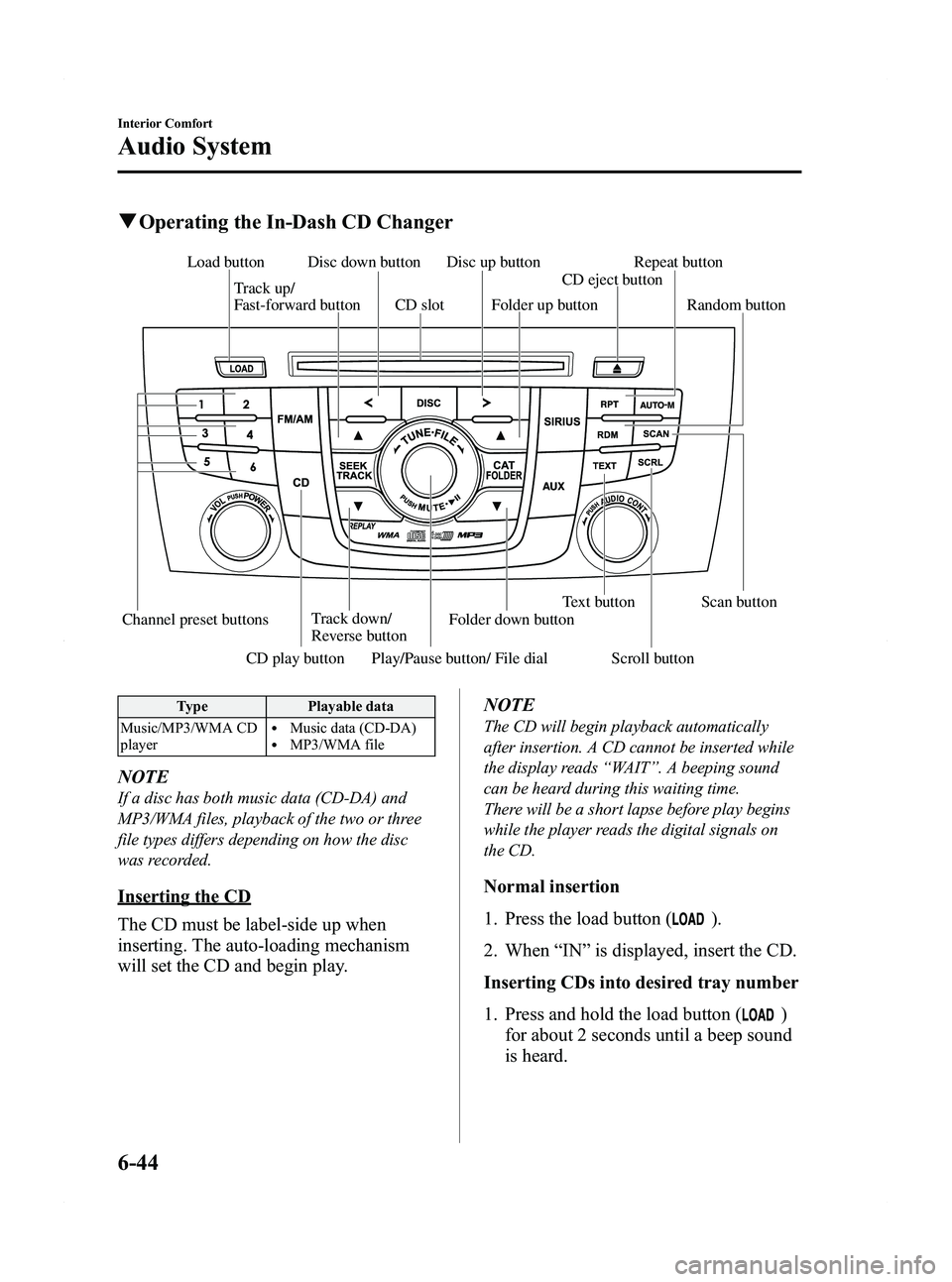
qOperating the In-Dash CD Changer
Channel preset buttons Track down/
Reverse button Text button Scan button
Play/Pause button/ File dial
Track up/
Fast-forward button
Disc down button Disc up button
Load button
CD play button Scroll button Folder down buttonCD eject button
Folder up button
CD slot Random button Repeat button
Type
Playable data
Music/MP3/WMA CD
player
lMusic data (CD-DA)lMP3/WMA file
NOTE
If a disc has both music data (CD-DA) and
MP3/WMA files, playback of the two or three
file types differs depending on how the disc
was recorded.
Inserting the CD
The CD must be label-side up when
inserting. The auto-loading mechanism
will set the CD and begin play. NOTE
The CD will begin playback automatically
after insertion. A CD cannot be inserted while
the display reads
“WAIT ”. A beeping sound
can be heard during this waiting time.
There will be a short lapse before play begins
while the player reads the digital signals on
the CD.
Normal insertion
1. Press the load button (
).
2. When “IN ”is displayed, insert the CD.
Inserting CDs into desired tray number
1. Press and hold the load button (
)
for about 2 seconds until a beep sound
is heard.
6-44
Interior Comfort
Audio System
Mazda5_8BR9-EA-10J_Edition3 Page230
Monday, February 21 2011 1:45 PM
Form No.8BR9-EA-10J
Page 244 of 440

Black plate (244,1)
qBluetooth Audio Preparation
Bluetooth audio device set-up
Bluetooth audio programming, changes,
deletions, and display of programmed
device information can be performed.
1. The mode changes as follows each
time the audio control dial is pressed.
Select “BT SETUP” .
* Depending on the mode selected, the
indication changes.
2. Turn the audio control dial and select a desired mode.
Display Mode Function
PAIR DEVICE Pairing
program modeBluetooth
audio device
programming
LINK CHANGE Link change
modeChanging link
to Bluetooth
audio device
PAIR DELETE Pairing
deletion modeDeleting link
to Bluetooth
audio device
DEVICE INFO Device
information
display modeDisplaying
vehicle's
Bluetooth unit
information
3. Press the audio control dial to
determine the mode.
Bluetooth audio device programming
Any Bluetooth audio device must be
programmed to the vehicle's Bluetooth
unit before it can be listened to over the
vehicle's speakers.
A maximum of seven devices including
Bluetooth audio devices and hands-free
mobile phones can be programmed to one
vehicle.
6-58
Interior Comfort
Bluetooth Audio
Mazda5_8BR9-EA-10J_Edition3 Page244
Monday, February 21 2011 1:45 PM
Form No.8BR9-EA-10J
Page 248 of 440

Black plate (248,1)
NOTElSome Bluetooth audio devices need a
certain amount of time before the“
”
symbol is displayed.
lIf a hands-free type mobile phone has been
the most recently programmed device, the
Bluetooth unit links this device. If you
would like to use a Bluetooth audio type
device which has been previously
programmed to the Bluetooth unit, the link
must be changed to this device.
lIf an error occurs while trying to link a
device, “Err ”flashes in the display for
three seconds, and the display returns to
“ LINK CHANGE ”. If this occurs, check the
programming status of the Bluetooth audio
device and the location of the device in the
vehicle (not in the trunk or a metal-type
box), and then try the link operation again.
lDevice selection can also be done using
voice recognition (page 6-81).
How to confirm the device currently
linked
Switch to the link-change mode. (Refer to
“ Changing the link to a Bluetooth audio
device ”)
The device name displayed first is the
device which is currently linked.
Deleting the link to a Bluetooth audio
device
1. Using the audio control dial, select the pairing delete mode “PAIR DELETE ”
in the “BT SETUP” mode. (Refer to
“ Bluetooth audio device set-up ”for
details.)
2. Press the audio control dial to determine the mode.
3. The name of the first device among the programmed devices is displayed. 4. Rotate the audio control dial and select
the name of the programmed device
you would like to delete.
Device name 1
Device name 2
Device name 3
Device name 4
Device name 5
Device name 6
Device name 7
NOTE
Only the names of programmed devices can be
displayed. If only one device is programmed,
only the name for this device is displayed.
5. If a selection other than “GO BACK ”
is made and the audio control dial is
pressed, “SURE ? NO ”is displayed.
6. Rotate the audio control dial clockwise and switch the display to “SURE ?
YES ”.
NOTE
The display changes as follows depending on
whether the audio control dial is rotated
clockwise or counterclockwise.
-Clockwise: “SURE ? YES ”displayed
-Counterclockwise: “SURE ? NO ”displayed
6-62
Interior Comfort
Bluetooth Audio
Mazda5_8BR9-EA-10J_Edition3 Page248
Monday, February 21 2011 1:45 PM
Form No.8BR9-EA-10J
Page 278 of 440

Black plate (278,1)
qClock
When the ignition is switched to ACC or
ON, the time is displayed.
Time setting
1. Switch the ignition to ACC or ON.
2. Adjust the time using the time setting
buttons (
,).
The hours advance while the time
setting button (
) is pressed.
The minutes advance while the time
setting button (
) is pressed.
Time resetting
1. Switch the ignition to ACC or ON.
2. Press the :00 button.
3. When the button is pressed, the time will be reset as follows:
(Example)
12:01 ―12:29 →12:00
12:30 ―12:59 →1:00
NOTE
When the button is pressed, the seconds will
start at “00 ”.
q Ambient Temperature Display
When the ignition is switched ON, the
ambient temperature is displayed.
NOTElUnder the following conditions, the ambient
temperature display may differ from the
actual ambient temperature depending on
the surroundings and vehicle conditions:
lSignificantly cold or hot temperatures.lSudden changes in ambient temperature.lThe vehicle is parked.lThe vehicle is driven at low speeds.lPress the AUTO switch(page 6-5) for 3
seconds or more to switch the display from
Fahrenheit to Centigrade or vice versa.
qClimate Control Display
The climate control system status is
displayed. To operate the climate control
system, refer to “Climate Control System ”
(page 6-2).
q Audio Display
The audio system status is displayed. To
operate the audio system, refer to
“Audio System ”(page 6-11).
6-92
Interior Comfort
Interior Equipment
Mazda5_8BR9-EA-10J_Edition3 Page278
Monday, February 21 2011 1:45 PM
Form No.8BR9-EA-10J
Page 281 of 440
Black plate (281,1)
NOTElEven though the distance-to-empty display
may indicate a sufficient amount of
remaining mileage before refueling is
required, refuel as soon as possible if the
fuel gauge needle nears E or the low fuel
warning light illuminates.
lThe display won't change unless you add
more than approximately 5 L (6 US qt, 5
Imp qt) of fuel.
Average vehicle speed mode
This mode displays the average vehicle
speed by calculating the distance and the
time traveled since connecting the battery
or resetting the data.
Average vehicle speed will be calculated
and displayed every 10 seconds.
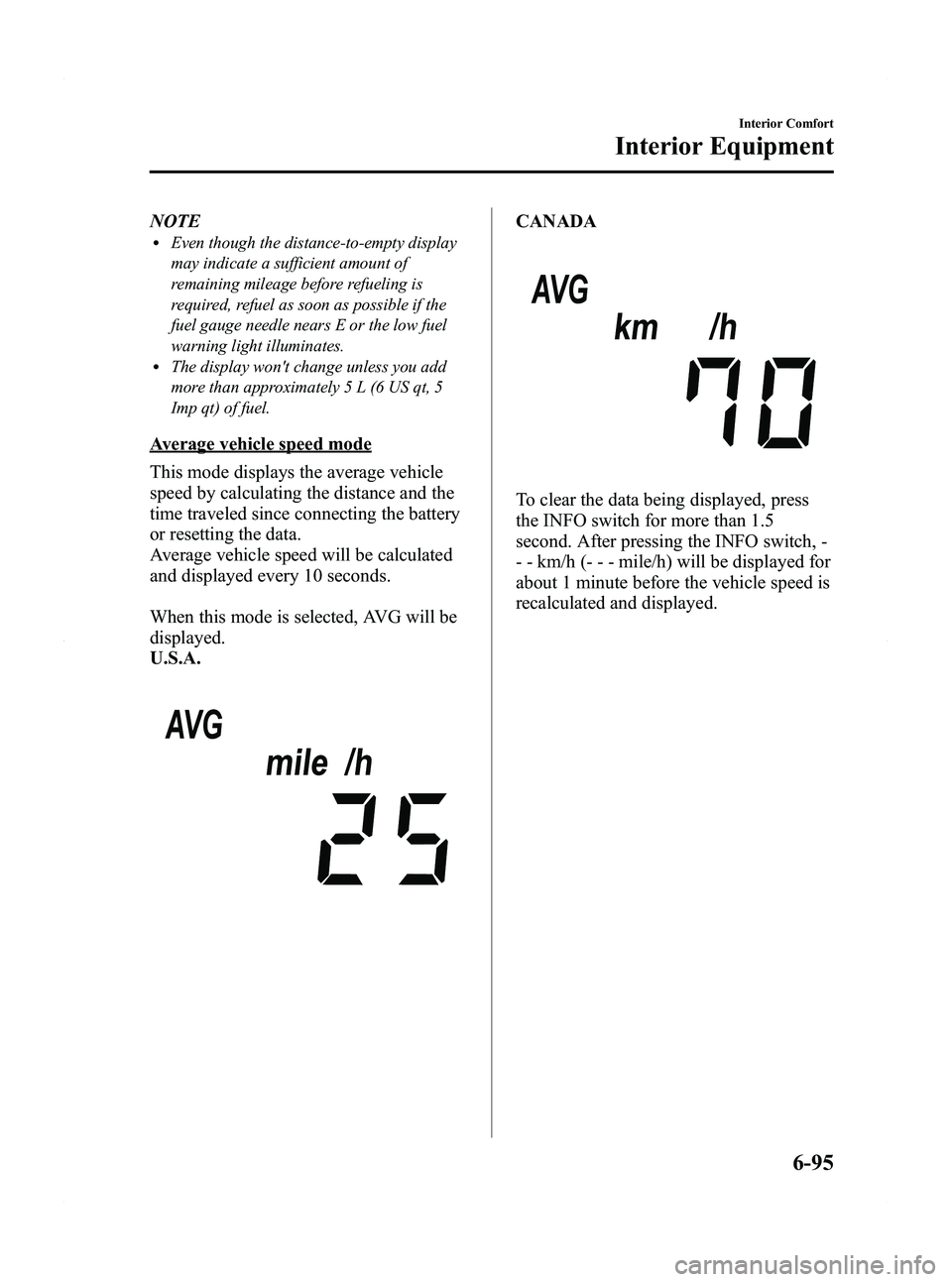
When this mode is selected, AVG will be
displayed.
U.S.A.
CANADA
To clear the data being displayed, press
the INFO switch for more than 1.5
second. After pressing the INFO switch, -
- - km/h (- - - mile/h) will be displayed for
about 1 minute before the vehicle speed is
recalculated and displayed.
Interior Comfort
Interior Equipment
6-95
Mazda5_8BR9-EA-10J_Edition3 Page281
Monday, February 21 2011 1:45 PM
Form No.8BR9-EA-10J
Page 343 of 440

Black plate (343,1)
Inspect fluid level in the washer fluid
reservoir; add fluid if necessary.
To inspect the washer fluid level in the
front reservoir, pull off the cap. Then,
holding your thumb over the hole in the
center of the cap, lift it straight up. The
fluid level can be seen from the fluid
column in the pipe. Add fluid if necessary.
Use plain water if washer fluid is
unavailable. But use only washer fluid in
cold weather to prevent it from freezing.
NOTE
Front and rear washer fluid is supplied from
the same reservoir.
Body Lubrication
All moving points of the body, such as
door and hood hinges and locks, should
be lubricated each time the engine oil is
changed. Use a nonfreezing lubricant on
locks during cold weather.
Make sure the hood's secondary latch
keeps the hood from opening when the
primary latch is released.
Maintenance and Care
Owner Maintenance
8-25
Mazda5_8BR9-EA-10J_Edition3 Page343
Monday, February 21 2011 1:45 PM
Form No.8BR9-EA-10J
Page 432 of 440

Black plate (432,1)
Personalization Features
The following“Personalization Features ”are available. These settings can only be changed by an Authorized
Mazda Dealer.
Setting Function Initial Setting After Setting Change
Key reminder
warning alarm The volume of the key reminder warning alarm
can be changed
High Low
Lights-on reminder
warning alarm The volume of the lights-on reminder warning
alarm can be changed
High Low/Deactivated
Turn indicator The beep volume level can be changed High Low/Deactivated
Illumination entry The time required for the interior lamp to turn
off automatically after all the doors are closed
can be changed
15 seconds 7.5/30/60 seconds
The time required for the interior lamp to
illuminate after unlocking any door can be
changed 30 seconds 7.5/15/60 seconds
The function that allows the interior lamp to
illuminate automatically when the doors are
unlocked can be changed Activated Deactivated
The function allowing the interior lamp to turn
off automatically when any door is opened
(or not securely closed) can be changed Activated Deactivated
The time required for the interior lamp to turn
off automatically can be changed
(prevents battery depletion when a door is
open/ajar) 30 minutes 10/60 minutes
Keyless entry The unlocking method using the retractable key
can be changed
Press × 2 Press × 1
The time required for the doors to relock
automatically after unlocking with the
transmitter can be changed 30 seconds 60/90 seconds
The flashing of the hazard warning lights when
the doors are locked/unlocked can be changed Activated Deactivated
The function allowing the horn to sound
automatically when the doors are locked by
pressing the transmitter two times consecutively
can be changed Activated Deactivated
Auto headlight on/off The headlight illumination on/off timing based
on surrounding lightness/darkness can be
changed Standard
(Illuminates under
average levels of darkness) Earlier/
Somewhat earlier/
Somewhat later/ Later
Two-step down
power window The two-step down power window function can
be changed
Activated Deactivated
10-8
Personalization Features
Mazda5_8BR9-EA-10J_Edition3 Page432
Monday, February 21 2011 1:46 PM
Form No.8BR9-EA-10J