wheel MAZDA MODEL 5 2012 Owner's Guide
[x] Cancel search | Manufacturer: MAZDA, Model Year: 2012, Model line: MODEL 5, Model: MAZDA MODEL 5 2012Pages: 440, PDF Size: 5.51 MB
Page 164 of 440
Black plate (164,1)
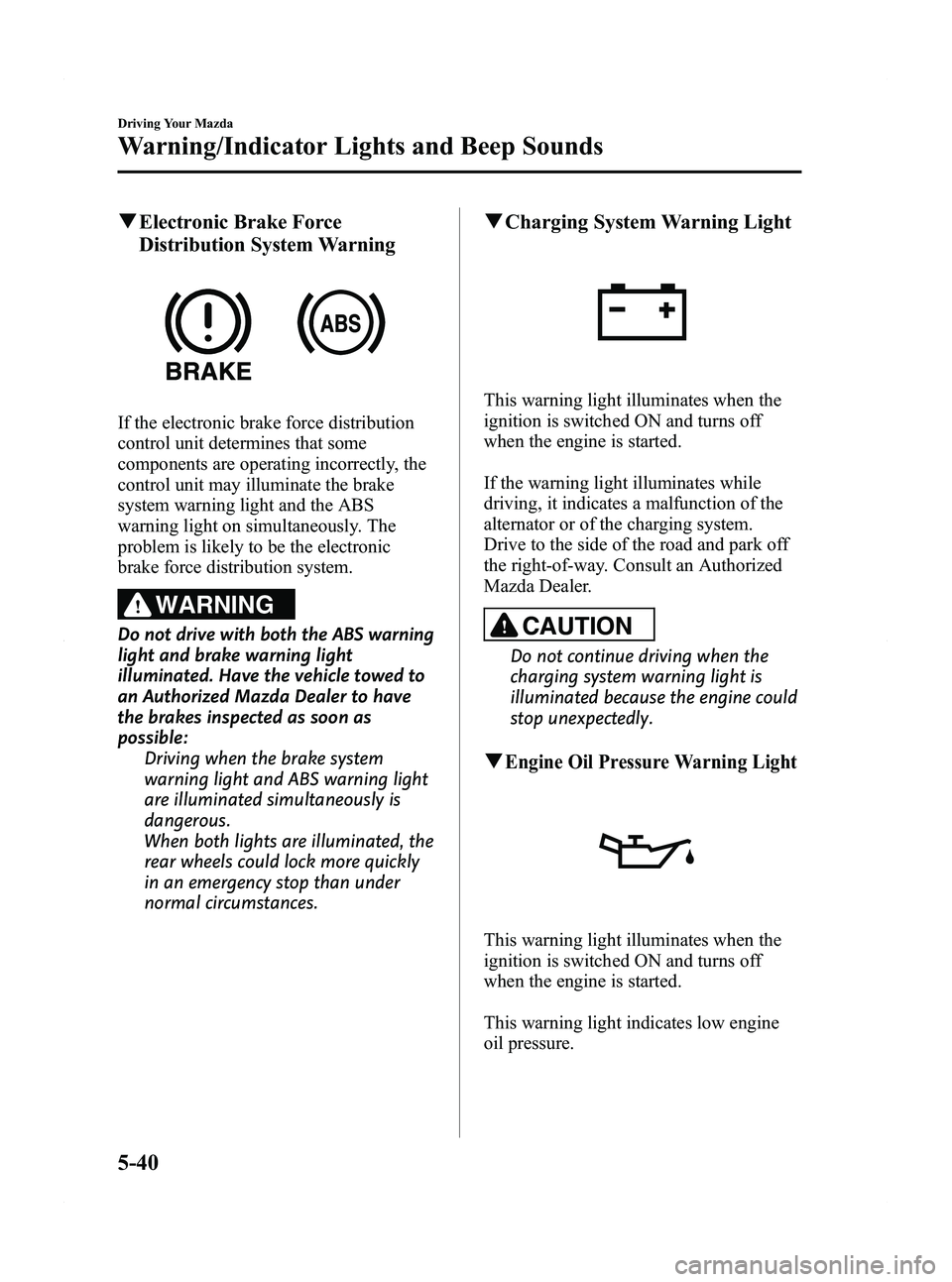
qElectronic Brake Force
Distribution System Warning
If the electronic brake force distribution
control unit determines that some
components are operating incorrectly, the
control unit may illuminate the brake
system warning light and the ABS
warning light on simultaneously. The
problem is likely to be the electronic
brake force distribution system.
WARNING
Do not drive with both the ABS warning
light and brake warning light
illuminated. Have the vehicle towed to
an Authorized Mazda Dealer to have
the brakes inspected as soon as
possible:
Driving when the brake system
warning light and ABS warning light
are illuminated simultaneously is
dangerous.
When both lights are illuminated, the
rear wheels could lock more quickly
in an emergency stop than under
normal circumstances.
qCharging System Warning Light
This warning light illuminates when the
ignition is switched ON and turns off
when the engine is started.
If the warning light illuminates while
driving, it indicates a malfunction of the
alternator or of the charging system.
Drive to the side of the road and park off
the right-of-way. Consult an Authorized
Mazda Dealer.
CAUTION
Do not continue driving when the
charging system warning light is
illuminated because the engine could
stop unexpectedly.
qEngine Oil Pressure Warning Light
This warning light illuminates when the
ignition is switched ON and turns off
when the engine is started.
This warning light indicates low engine
oil pressure.
5-40
Driving Your Mazda
Warning/Indicator Lights and Beep Sounds
Mazda5_8BR9-EA-10J_Edition3 Page164
Monday, February 21 2011 1:44 PM
Form No.8BR9-EA-10J
Page 169 of 440

Black plate (169,1)
Adjust the tire pressure to the correct tire
pressure. Refer to the specification charts
(page 10-6).
CAUTION
When replacing/repairing the tires or
wheels or both, have the work done
by an Authorized Mazda Dealer, or
the tire pressure sensors may be
damaged.NOTE
lPerform tire pressure adjustment when the
tires are cold. Tire pressure will vary
according to the tire temperature, therefore
let the vehicle stand for 1 hour or only drive
it 1.6 km (1 mile) or less before adjusting
the tire pressures. When pressure is
adjusted on hot tires to the cold inflation
pressure, the TPMS warning light/beep may
turn on after the tires cool and pressure
drops below specification.
Also, an illuminated TPMS warning light,
resulting from the tire air pressure dropping
due to cold ambient temperature, may turn
off if the ambient temperature rises. In this
case, it will also be necessary to adjust the
tire air pressures. If the TPMS warning
light illuminates due to a drop in tire air
pressure, make sure to check and adjust the
tire air pressures.
lAfter adjusting the tire air pressures, it may
require some time for the TPMS warning
light to turn off. If the TPMS warning light
remains illuminated, drive the vehicle at a
speed of at least 25 km/h (16 mph) for 10
minutes, and then verify that it turns off.
lTires lose air naturally over time and the
TPMS cannot tell if the tires are getting too
soft over time or you have a flat. However,
when you find one low tire in a set of four-
that is an indication of trouble; you should
have someone drive the vehicle slowly
forward so you can inspect any low tire for
cuts and any metal objects sticking through
tread or sidewall. Put a few drops of water
in the valve stem to see if it bubbles
indicating a bad valve. Leaks need to be
addressed by more than simply refilling the
trouble tire as leaks are dangerous - take it
to an Authorized Mazda Dealer which has
all the equipment to fix tires, TPMS systems
and order the best replacement tire for your
vehicle.
Driving Your Mazda
Warning/Indicator Lights and Beep Sounds
5-45
Mazda5_8BR9-EA-10J_Edition3 Page169
Monday, February 21 2011 1:44 PM
Form No.8BR9-EA-10J
Page 172 of 440

Black plate (172,1)
Cruise Main Indicator Light (Amber)
The indicator light illuminates amber
when the ON switch is pressed and the
cruise control system is activated.
Cruise Set Indicator Light (Green)
The indicator light illuminates green when
a cruising speed has been set.
qLights-On Indicator Light
This indicator light illuminates when the
exterior lights and dashboard illumination
are on.
qPower Steering Malfunction
Indicator Light
This indicator light illuminates when the
ignition is switched ON, and turns off
when the engine is started. If the light remains illuminated after the
engine is started, or illuminates while
driving, turn off the engine after parking
in a safe place, and then start the engine
again.
If the light does not illuminate after
restarting the engine, this indicates that
the power steering is restored and normal
steering is possible.
If the light remains illuminated, the power
steering is still inoperable. Consult an
Authorized Mazda Dealer.
NOTE
lThe power steering system is inoperable
when the power steering malfunction
indicator light illuminates. Steering is
possible, but requires more physical effort.
lRepeatedly jerking the steering wheel left
and right while the vehicle is stopped or
moving extremely slowly will cause the
power steering system to go into protective
mode which will make the steering feel
heavy, but this does not indicate a
malfunction. If this occurs, park the vehicle
safely and wait a few minutes for the system
to return to normal.
q
Turn Signal/Hazard Warning
Indicator Lights
When operating the turn signal lights, the
left or right turn signal indicator light
flashes to indicate which turn signal light
is operating (page 5-55).
5-48
Driving Your Mazda
Warning/Indicator Lights and Beep Sounds
Mazda5_8BR9-EA-10J_Edition3 Page172
Monday, February 21 2011 1:44 PM
Form No.8BR9-EA-10J
Page 186 of 440
Black plate (186,1)
Horn
To sound the horn, press themark on
the steering wheel.
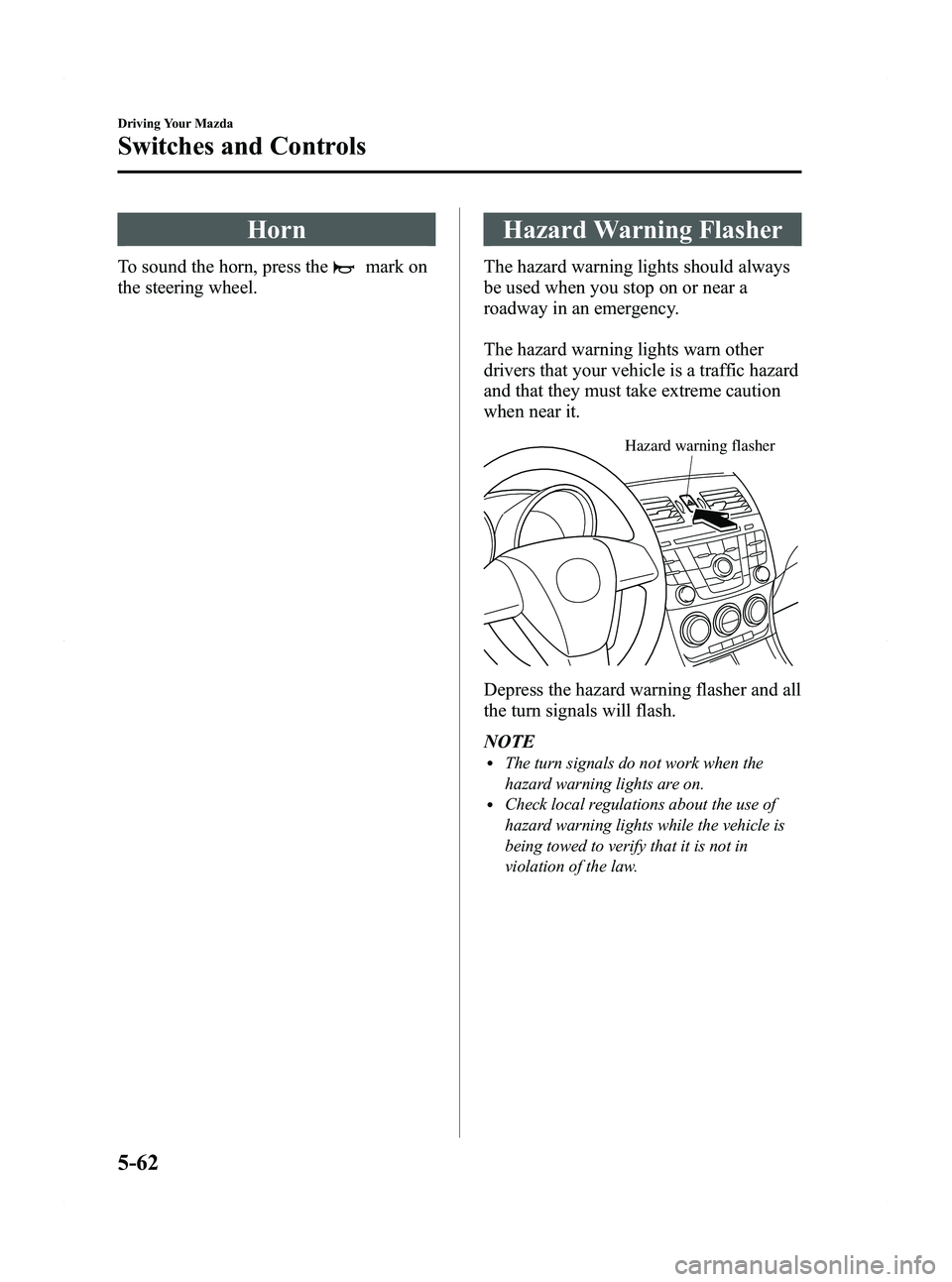
Hazard Warning Flasher
The hazard warning lights should always
be used when you stop on or near a
roadway in an emergency.
The hazard warning lights warn other
drivers that your vehicle is a traffic hazard
and that they must take extreme caution
when near it.
Hazard warning flasher
Depress the hazard warning flasher and all
the turn signals will flash.
NOTE
lThe turn signals do not work when the
hazard warning lights are on.
lCheck local regulations about the use of
hazard warning lights while the vehicle is
being towed to verify that it is not in
violation of the law.
5-62
Driving Your Mazda
Switches and Controls
Mazda5_8BR9-EA-10J_Edition3 Page186
Monday, February 21 2011 1:44 PM
Form No.8BR9-EA-10J
Page 198 of 440

Black plate (198,1)
Operating Tips for Audio
System
WARNING
Do not adjust the audio control
switches while driving the vehicle:Adjusting the audio while driving the
vehicle is dangerous as it could
distract your attention from the
vehicle operation which could lead to
a serious accident. Always adjust the
audio while the vehicle is stopped.
Even if the audio control switches are
equipped on the steering wheel, learn
to use the switches without looking
down at them so that you can keep
your maximum attention on the road
while driving the vehicle.
CAUTION
For the purposes of safe driving,
adjust the audio volume to a level
that allows you to hear sounds
outside of the vehicle including car
horns and particularly emergency
vehicle sirens.
NOTE
lTo prevent the battery from being
discharged, do not leave the audio system
on for a long period of time when the
engine is not running.
lIf a cellular phone or CB radio is used in
or near the vehicle, it could cause noise to
occur from the audio system, however, this
does not indicate that the system has been
damaged.
q Radio Reception
AM characteristics
AM signals bend around such things as
buildings or mountains and bounce off the
ionosphere. Therefore, they can reach
longer distances than FM signals. Because
of this, two stations may sometimes be
picked up on the same frequency at the
same time.
Station 2
Station 1 Ionosphere
FM characteristics
An FM broadcast range is usually about
40
―50 km (25 ―30 miles) from the
source. Because of extra coding needed to
break the sound into two channels, stereo
FM has even less range than monaural
(non-stereo) FM.
FM Station
40—50km
(25—30 miles)
6-12
Interior Comfort
Audio System
Mazda5_8BR9-EA-10J_Edition3 Page198
Monday, February 21 2011 1:44 PM
Form No.8BR9-EA-10J
Page 236 of 440
Black plate (236,1)
Audio Control Switch
Operation
When the audio unit is turned on,
operation of the audio unit from the
steering wheel is possible.
NOTE
Because the audio unit will be turned off under
the following conditions, the switches will be
inoperable.
lWhen the ignition is switched off.lWhen the power button on the audio unit is
pressed and the audio unit is turned off.
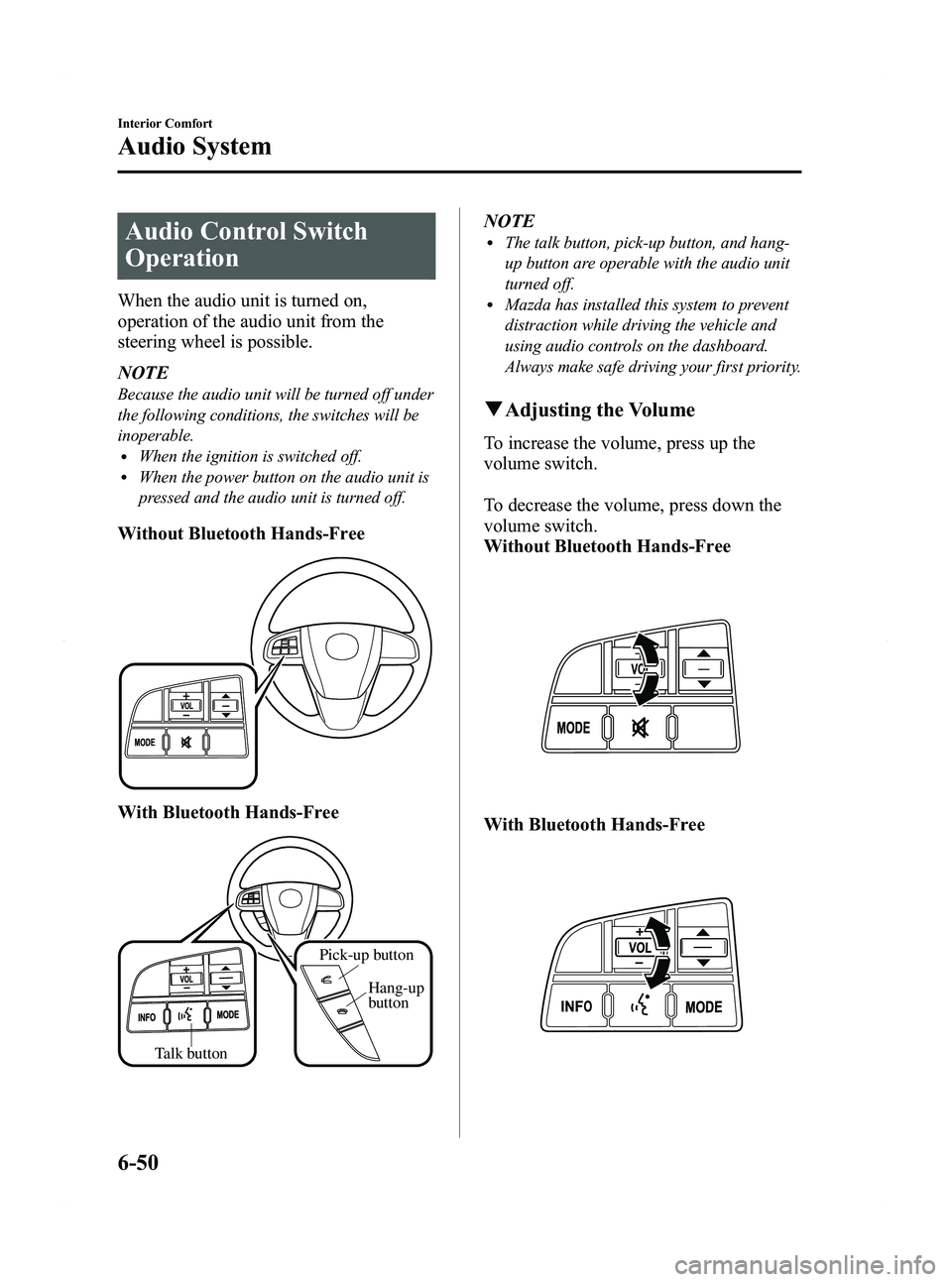
Without Bluetooth Hands-Free
With Bluetooth Hands-Free
Talk buttonHang-up
button
Pick-up button
NOTElThe talk button, pick-up button, and hang-
up button are operable with the audio unit
turned off.
lMazda has installed this system to prevent
distraction while driving the vehicle and
using audio controls on the dashboard.
Always make safe driving your first priority.
q
Adjusting the Volume
To increase the volume, press up the
volume switch.
To decrease the volume, press down the
volume switch.
Without Bluetooth Hands-Free
With Bluetooth Hands-Free
6-50
Interior Comfort
Audio System
Mazda5_8BR9-EA-10J_Edition3 Page236
Monday, February 21 2011 1:45 PM
Form No.8BR9-EA-10J
Page 240 of 440
Black plate (240,1)
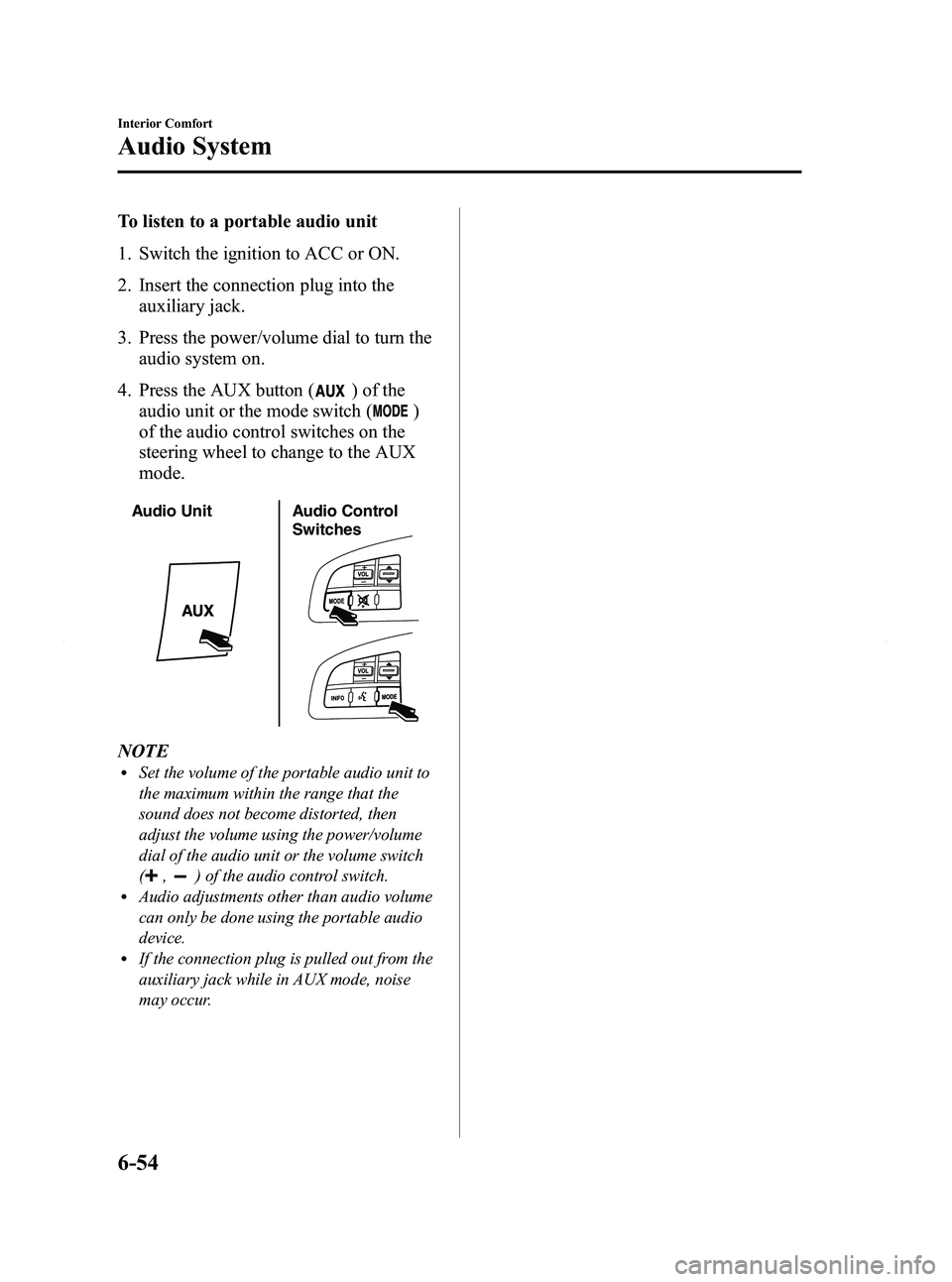
To listen to a portable audio unit
1. Switch the ignition to ACC or ON.
2. Insert the connection plug into theauxiliary jack.
3. Press the power/volume dial to turn the audio system on.
4. Press the AUX button (
) of the
audio unit or the mode switch (
)
of the audio control switches on the
steering wheel to change to the AUX
mode.
Audio Unit Audio Control
Switches
NOTElSet the volume of the portable audio unit to
the maximum within the range that the
sound does not become distorted, then
adjust the volume using the power/volume
dial of the audio unit or the volume switch
(
,) of the audio control switch.lAudio adjustments other than audio volume
can only be done using the portable audio
device.
lIf the connection plug is pulled out from the
auxiliary jack while in AUX mode, noise
may occur.
6-54
Interior Comfort
Audio System
Mazda5_8BR9-EA-10J_Edition3 Page240
Monday, February 21 2011 1:45 PM
Form No.8BR9-EA-10J
Page 252 of 440

Black plate (252,1)
Bluetooth Hands-Freeí
qWhat is Bluetooth Hands-Free?
Bluetooth Hands-Free Outline
By connecting a Bluetooth equipped
device (Mobile phone) to the hands-free
unit equipped on the vehicle, making and
receiving calls are possible using the talk
button, pick-up button and hang-up button
located on the steering wheel, and saying
the voice commands.
WARNING
Perform phonebook registration related
operations while the vehicle is parked:
Performing phonebook registration
while driving the vehicle could be a
distraction to your driving and result
in an accident. In addition, a mistake
in performing the phonebook
operation could result in the loss of
important data.
Bluetooth equipped device (Mobile
phone)
A Bluetooth equipped device (Mobile
phone) communicates with the hands-free
unit equipped on the vehicle using radio
transmission (Bluetooth).
For example, if the device (Mobile phone)
is placed in a coat pocket, the phone calls
can be made through your mobile service
without taking out and handling the
device (Mobile phone).
CAUTION
The types of devices (Mobile phone)
which can be connected to the
hands-free unit are limited.
Therefore, before purchasing or
changing your device (Mobile phone)
model, consult Mazda Bluetooth
Hands-Free Customer Service or visit
www.MazdaUSA.com/bluetooth for a
complete list of compatible phones.
Devices (Mobile phone) which can be
connected to the hands-free system
need to be compliant with Bluetooth
specifications and the appropriate
profile. However, even among these
Bluetooth devices (Mobile phone) are
some which will not connect with
your Mazda or will have limited
function. Therefore, consult Mazda
Bluetooth Hands-Free Customer
Service for information regarding
device (Mobile phone) compatibility:
ØU.S.A.
Phone: 800-430-0153
Web: www.MazdaUSA.com/
bluetooth
Ø Canada
Phone: 800-430-0153
Web: www.mazdahandsfree.ca
Ø Mexico
Center of Attention to Client (CAC)
Phone: 01-800-01-MAZDA
Web: www.MazdaUSA.com/
bluetooth
Applicable Bluetooth specification
Ver. 2.0 or higher
Response profile
lHFP (Hands Free Profile) Ver. 1.5lDUN (Dial-up Networking Profile)
Ver. 1.1
lPBAP (Phone Book Access Profile)
Ver. 1.0
6-66
Interior Comfort
íSome models.
Bluetooth Hands-Free
Mazda5_8BR9-EA-10J_Edition3 Page252
Monday, February 21 2011 1:45 PM
Form No.8BR9-EA-10J
Page 253 of 440

Black plate (253,1)
lA2DP (Advanced Audio Distribution
Profile) Ver. 1.0
lAVRCP (Audio/Video Remote Control
Profile) Ver. 1.0/1.3
lOPP (Object Push Profile) Ver. 1.1
Bluetooth is the registered trademark of
Bluetooth SIG. Inc.
NOTE
lThe Bluetooth Hands-Free system is
operable several seconds after the ignition
is switched to ACC or ON (requires less
than 15 seconds).
lIf the ignition is switched off during a
hands-free call, the line is transferred to the
device (Mobile phone) automatically.
lIf the device (Mobile phone) is in a location
where radio reception is difficult such as a
metal container or in the trunk, the call may
not be connected using Bluetooth. If
communication is not possible, change the
location of the device (Mobile phone).
qComponent Parts
Bluetooth Hands-Free consists of the
following items:
lTalk buttonlPick-up buttonlHang-up buttonlInformation displaylMicrophonelAudio unit
Talk button, Pick-Up button and Hang-
Up button
Basic functions of Bluetooth Hands-Free
can be used for such things as making
calls or hanging up using the talk button,
pick-up button and hang-up button on the
steering wheel.
Talk button Hang-up
button
Pick-up button
Talk button operations
A short press or a long press of the talk
button is used to operate the system as
follows:
lShort press (Press the button less than
0.7 sec.)
lLong press (Press the button 0.7 sec. or
more.)
Interior Comfort
Bluetooth Hands-Free
6-67
Mazda5_8BR9-EA-10J_Edition3 Page253
Monday, February 21 2011 1:45 PM
Form No.8BR9-EA-10J
Page 260 of 440
Black plate (260,1)
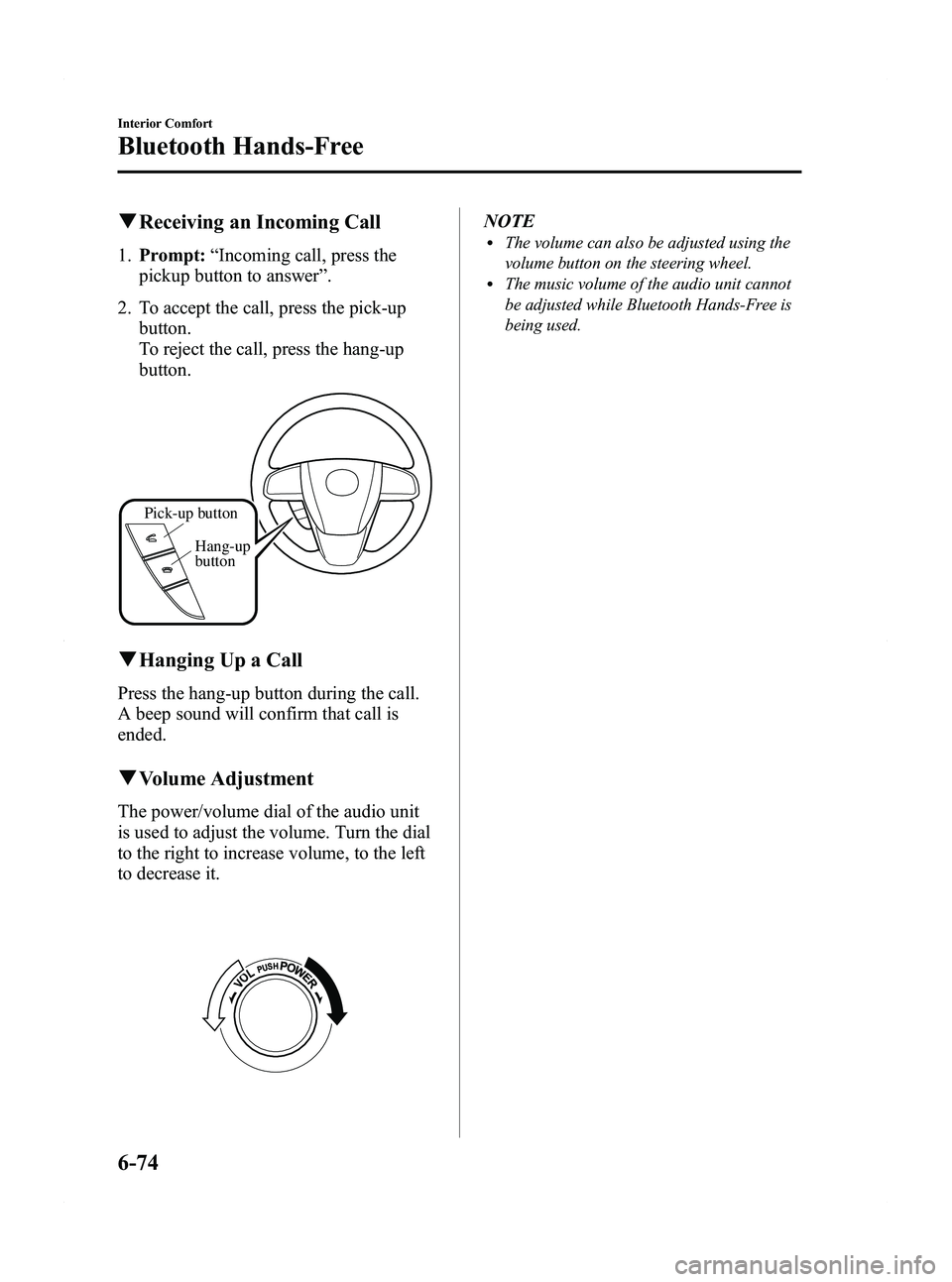
qReceiving an Incoming Call
1. Prompt: “Incoming call, press the
pickup button to answer ”.
2. To accept the call, press the pick-up button.
To reject the call, press the hang-up
button.
Pick-up button
Hang-up
button
qHanging Up a Call
Press the hang-up button during the call.
A beep sound will confirm that call is
ended.
qVolume Adjustment
The power/volume dial of the audio unit
is used to adjust the volume. Turn the dial
to the right to increase volume, to the left
to decrease it.
NOTElThe volume can also be adjusted using the
volume button on the steering wheel.
lThe music volume of the audio unit cannot
be adjusted while Bluetooth Hands-Free is
being used.
6-74
Interior Comfort
Bluetooth Hands-Free
Mazda5_8BR9-EA-10J_Edition3 Page260
Monday, February 21 2011 1:45 PM
Form No.8BR9-EA-10J