i stop MAZDA MODEL 5 2012 Workshop Manual
[x] Cancel search | Manufacturer: MAZDA, Model Year: 2012, Model line: MODEL 5, Model: MAZDA MODEL 5 2012Pages: 440, PDF Size: 5.51 MB
Page 212 of 440

Black plate (212,1)
qOperating the Radio
Auto memory button
Channel preset buttons Scan button Manual tuning dial/Mute button
Band selector buttonSeek tuning buttons
Radio ON
Press a band selector button (
)to
turn the radio on.
Band selection
Successively pressing the band selector
button (
) switches the bands as
follows: FM1 →FM2 →AM.
The selected mode will be indicated. If
FM stereo is being received, “ST ”will be
displayed.
NOTE
If the FM broadcast signal becomes weak,
reception automatically changes from
STEREO to MONO for reduced noise, and the
“ ST ”indicator will go out.
Tuning
The radio has the following tuning
methods: Manual, Seek, Scan, Preset
channel, and Auto memory tuning. The
easiest way to tune stations is to set them
on preset channels.
Manual tuning
Turning the manual tuning dial will
change the frequency higher or lower.
Seek tuning
Pressing the seek tuning button (
,)
will cause the tuner to seek a higher or
lower frequency automatically.
NOTE
If you continue to press and hold the button,
the frequency will continue changing without
stopping.
6-26
Interior Comfort
Audio System
Mazda5_8BR9-EA-10J_Edition3 Page212
Monday, February 21 2011 1:44 PM
Form No.8BR9-EA-10J
Page 213 of 440

Black plate (213,1)
Scan tuning
Press the scan button (
)to
automatically sample strong stations.
Scanning stops at each station for about 5
seconds. To hold a station, press the scan
button (
) again during this interval.
Preset channel tuning
The 6 preset channels can be used to store
6 AM and 12 FM stations.
1. To set a channel first select AM, FM1, or FM2. Tune to the desired station.
2. Depress a channel preset button for about 2 seconds until a beep sound is
heard. The preset channel number and
station frequency will be displayed.
The station is now held in the memory.
3. Repeat this operation for the other stations and bands you want to store.
To tune one in the memory, select AM,
FM1, or FM2 and then press its
channel preset button. The station
frequency and the channel number will
be displayed.
Auto memory tuning
This is especially useful when driving in
an area where the local stations are not
known. Additional AM/FM stations can
be stored without disturbing the
previously set channels.
Press and hold the auto memory button
(
) for about 2 seconds until a beep
sound is heard; the system will
automatically scan and temporarily store
up to 6 stations with the strongest
frequencies in each selected band in that
area. After scanning is completed, the station
with the strongest frequency will be tuned
and its frequency displayed.
Press and release the auto memory button
(
) to recall stations from the auto-
stored stations. One stored station will be
selected each time; its frequency and
channel number will be displayed.
NOTE
If no stations can be tuned after scanning
operations, “A ” will be displayed.
Mute
Press the mute button (
) once to
mute the audio. Press it again to resume
audio output.
Interior Comfort
Audio System
6-27
Mazda5_8BR9-EA-10J_Edition3 Page213
Monday, February 21 2011 1:44 PM
Form No.8BR9-EA-10J
Page 219 of 440
Black plate (219,1)
Scan tuning
Press the scan button (
)to
automatically sample stations. Scanning
stops at each station for about five
seconds. To hold a station, press the scan
button (
) again during this interval.
NOTE
lUnsubscribed channels, invalid channels,
parental lock channels and channel 0 are
not subject to the scan, therefore these
channels will be skipped automatically.
lYou can scan all channels while all
categories are selected. If you are in a
selected category, you can only scan the
channels in that category.
Channel number, channel name,
category, artist, song titles and info
display
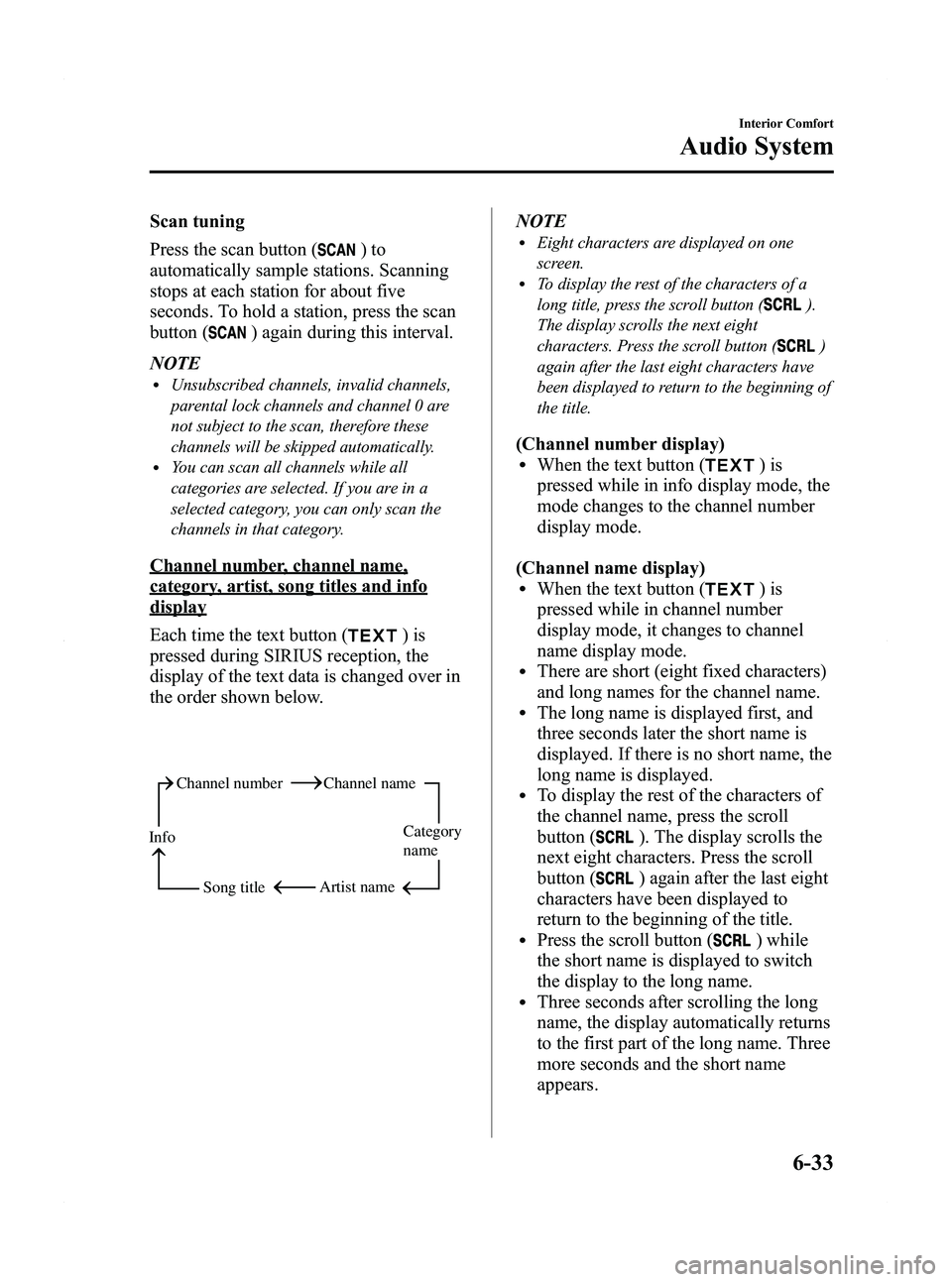
Each time the text button (
)is
pressed during SIRIUS reception, the
display of the text data is changed over in
the order shown below.
Channel number Channel name
Category
name
Artist name
Info
Song title
NOTElEight characters are displayed on one
screen.
lTo display the rest of the characters of a
long title, press the scroll button (
).
The display scrolls the next eight
characters. Press the scroll button (
)
again after the last eight characters have
been displayed to return to the beginning of
the title.
(Channel number display)lWhen the text button ()is
pressed while in info display mode, the
mode changes to the channel number
display mode.
(Channel name display)
lWhen the text button ()is
pressed while in channel number
display mode, it changes to channel
name display mode.
lThere are short (eight fixed characters)
and long names for the channel name.
lThe long name is displayed first, and
three seconds later the short name is
displayed. If there is no short name, the
long name is displayed.
lTo display the rest of the characters of
the channel name, press the scroll
button (
). The display scrolls the
next eight characters. Press the scroll
button (
) again after the last eight
characters have been displayed to
return to the beginning of the title.
lPress the scroll button () while
the short name is displayed to switch
the display to the long name.
lThree seconds after scrolling the long
name, the display automatically returns
to the first part of the long name. Three
more seconds and the short name
appears.
Interior Comfort
Audio System
6-33
Mazda5_8BR9-EA-10J_Edition3 Page219
Monday, February 21 2011 1:45 PM
Form No.8BR9-EA-10J
Page 226 of 440
Black plate (226,1)
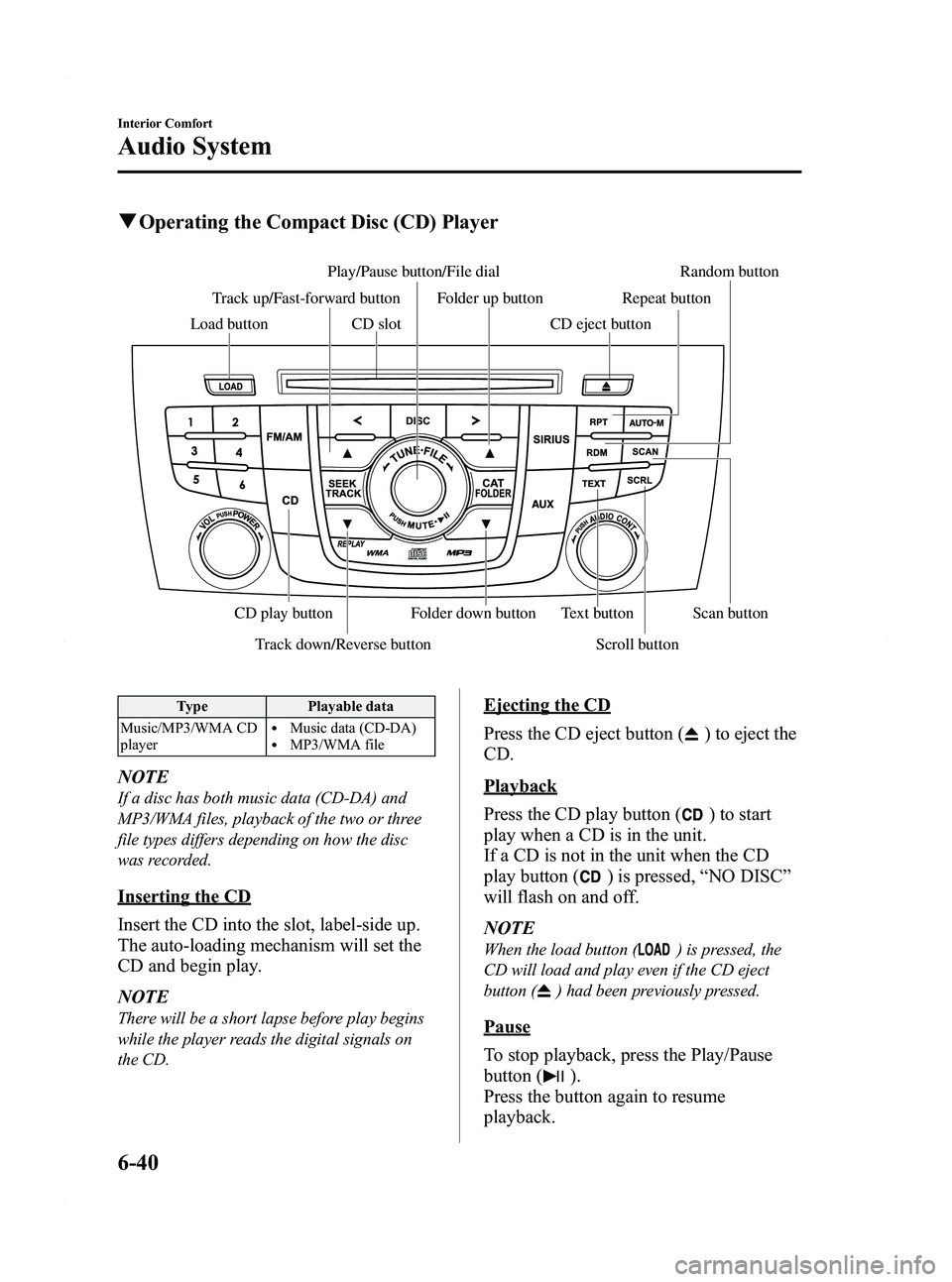
qOperating the Compact Disc (CD) Player
Track down/Reverse button Scroll button
Play/Pause button/File dial Random button
CD slot
CD play button Folder down button Text button Scan button
Folder up button Repeat button
Track up/Fast-forward button
Load button CD eject button
Type Playable data
Music/MP3/WMA CD
player
lMusic data (CD-DA)lMP3/WMA file
NOTE
If a disc has both music data (CD-DA) and
MP3/WMA files, playback of the two or three
file types differs depending on how the disc
was recorded.
Inserting the CD
Insert the CD into the slot, label-side up.
The auto-loading mechanism will set the
CD and begin play.
NOTE
There will be a short lapse before play begins
while the player reads the digital signals on
the CD.
Ejecting the CD
Press the CD eject button (
) to eject the
CD.
Playback
Press the CD play button (
) to start
play when a CD is in the unit.
If a CD is not in the unit when the CD
play button (
) is pressed, “NO DISC ”
will flash on and off.
NOTE
When the load button () is pressed, the
CD will load and play even if the CD eject
button (
) had been previously pressed.
Pause
To stop playback, press the Play/Pause
button (
).
Press the button again to resume
playback.
6-40
Interior Comfort
Audio System
Mazda5_8BR9-EA-10J_Edition3 Page226
Monday, February 21 2011 1:45 PM
Form No.8BR9-EA-10J
Page 232 of 440

Black plate (232,1)
Pause
To stop playback, press the Play/Pause
button (
).
Press the button again to resume
playback.
Fast-forward/Reverse
Press and hold the fast-forward button
(
) to advance through a track at high
speed.
Press and hold the reverse button (
)to
reverse through a track at high speed.
Track search
Press the track up button (
) or turn the
file dial clockwise once to skip forward to
the beginning of the next track.
Press the track down button (
) or turn
the file dial counterclockwise once to skip
back to the beginning of the current track.
Disc search
To change the disc, press the DISC button
(
or) during playback.
Folder search (during MP3/WMA CD
playback)
To change to the previous folder, press the
folder down button (
), or press the
folder up button (
) to advance to the
next folder.
Music scan
During music CD playback
This function scans the titles on a CD and
plays 10 seconds of each song to aid you
in finding a song you want to listen to.
During MP3/WMA CD playback
This function scans the titles in a folder
currently being played and plays 10
seconds of each song to aid you in finding
a song you want to listen to. Press the scan button (
) during
playback to start the scan play operation
(the track number will flash).
Press the scan button (
) again to
cancel scan playback.
NOTE
If the unit is left in scan, normal playback will
resume where scan was selected.
Repeat playback
During music CD playback
1. Press the repeat button (
) during
playback to play the current track
repeatedly. “RPT ”is displayed.
2. Press the button again to cancel the repeat playback.
During MP3/WMA CD playback
(Track repeat)
1. Press the repeat button (
) during
playback to play the current track
repeatedly. “TRACK RPT ”is
displayed.
2. To cancel the repeat playback, press the button again after 3 seconds.
(Folder repeat)
1. Press the repeat button (
) during
playback, and then press the button
again within 3 seconds to play the
tracks in the current folder repeatedly.
“ FOLDER RPT ”is displayed.
2. Press the button again to cancel the repeat playback.
Random playback
Tracks are randomly selected and played.
6-46
Interior Comfort
Audio System
Mazda5_8BR9-EA-10J_Edition3 Page232
Monday, February 21 2011 1:45 PM
Form No.8BR9-EA-10J
Page 239 of 440
Black plate (239,1)
AUX Mode (Auxiliary input)
You can connect portable audio units,
such as an MP3 player or similar products
on the market, to the auxiliary jack to
listen to music or audio over the vehicle's
speakers.
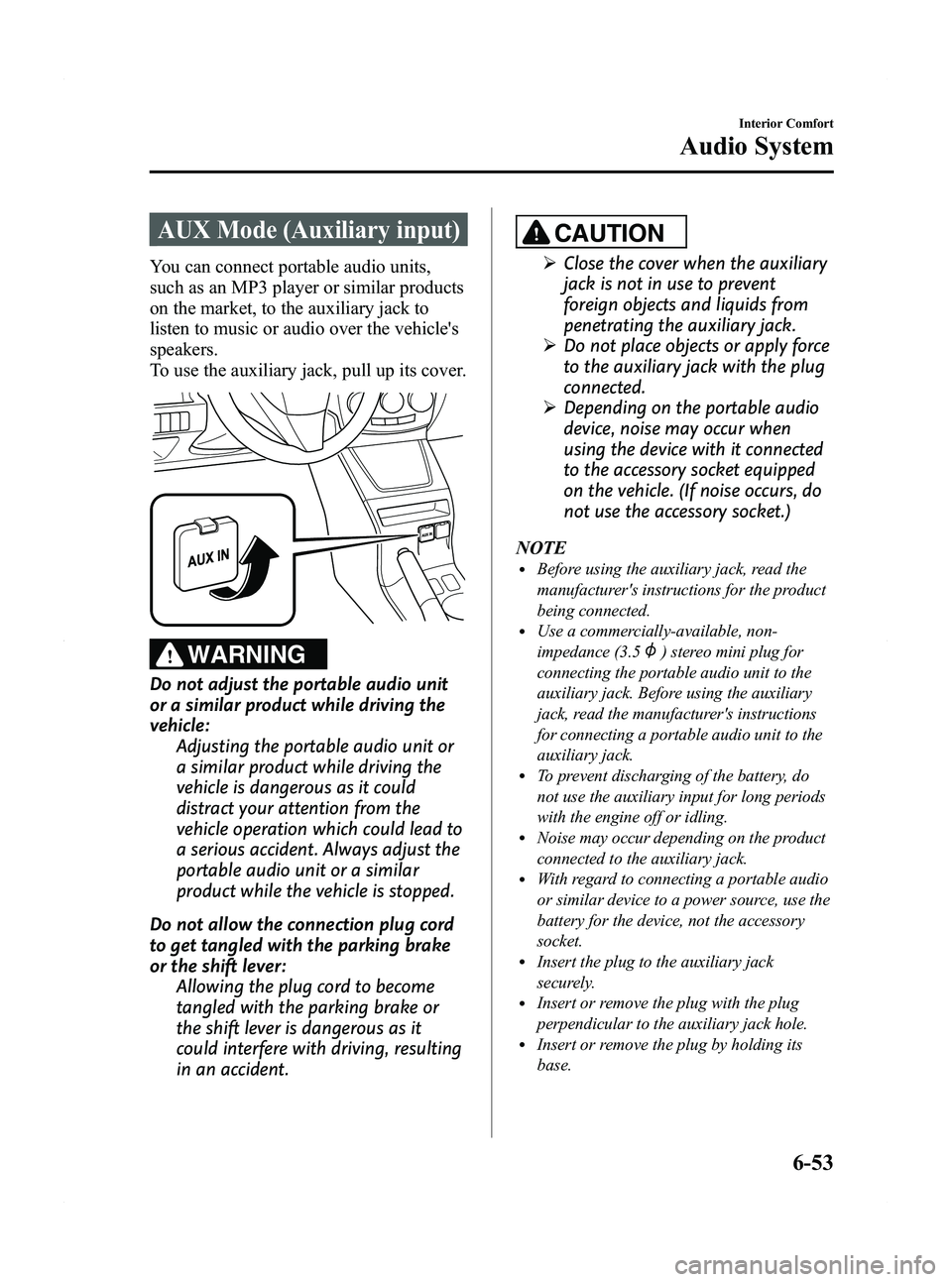
To use the auxiliary jack, pull up its cover.
WARNING
Do not adjust the portable audio unit
or a similar product while driving the
vehicle:Adjusting the portable audio unit or
a similar product while driving the
vehicle is dangerous as it could
distract your attention from the
vehicle operation which could lead to
a serious accident. Always adjust the
portable audio unit or a similar
product while the vehicle is stopped.
Do not allow the connection plug cord
to get tangled with the parking brake
or the shift lever: Allowing the plug cord to become
tangled with the parking brake or
the shift lever is dangerous as it
could interfere with driving, resulting
in an accident.
CAUTION
ØClose the cover when the auxiliary
jack is not in use to prevent
foreign objects and liquids from
penetrating the auxiliary jack.
Ø Do not place objects or apply force
to the auxiliary jack with the plug
connected.
Ø Depending on the portable audio
device, noise may occur when
using the device with it connected
to the accessory socket equipped
on the vehicle. (If noise occurs, do
not use the accessory socket.)
NOTE
lBefore using the auxiliary jack, read the
manufacturer's instructions for the product
being connected.
lUse a commercially-available, non-
impedance (3.5
) stereo mini plug for
connecting the portable audio unit to the
auxiliary jack. Before using the auxiliary
jack, read the manufacturer's instructions
for connecting a portable audio unit to the
auxiliary jack.
lTo prevent discharging of the battery, do
not use the auxiliary input for long periods
with the engine off or idling.
lNoise may occur depending on the product
connected to the auxiliary jack.
lWith regard to connecting a portable audio
or similar device to a power source, use the
battery for the device, not the accessory
socket.
lInsert the plug to the auxiliary jack
securely.
lInsert or remove the plug with the plug
perpendicular to the auxiliary jack hole.
lInsert or remove the plug by holding its
base.
Interior Comfort
Audio System
6-53
Mazda5_8BR9-EA-10J_Edition3 Page239
Monday, February 21 2011 1:45 PM
Form No.8BR9-EA-10J
Page 242 of 440

Black plate (242,1)
Bluetooth Audioí
qWhat is Bluetooth Audio?
Bluetooth audio outline
By programming portable audio devices
equipped with the Bluetooth
communication function to the vehicle's
Bluetooth unit, you can listen to music or
audio recorded on these audio devices
from the vehicle's speakers. Bluetooth
audio devices do not need to be plugged
into the auxiliary jack.
After programming, operate the audio
system's control panel to play/stop the
music or audio.
CAUTION
Ø Always program audio devices to
the Bluetooth audio system while
the vehicle is stopped.
Ø Because only specified Bluetooth
audio devices can be used, consult
an Authorized Mazda Dealer when
purchasing or changing devices.
Bluetooth audio devices which
correspond to specified Bluetooth
versions and profiles can be
Bluetooth-connected to the
vehicle's Bluetooth unit. However,
even among these devices are ones
which cannot be Bluetooth-
connected or have limited
functionality. Each device to be
used with the vehicle's Bluetooth
unit needs to be checked
individually for compatibility.
Consult an Authorized Mazda
Dealer concerning device
compatibility.
ØU.S.A.
Phone:800-430-0153
Web: www.MazdaUSA.com/
bluetooth
ØCanada
Phone:800-430-0153
Web: www.mazdahandsfree.ca
ØMexico
Center of Attention to Client
(CAC)
Phone:01-800-01-MAZDA
Web: www.MazdaUSA.com/
bluetooth
Applicable Bluetooth specification
Ver. 2.0 or higher
6-56
Interior Comfort
íSome models.
Bluetooth Audio
Mazda5_8BR9-EA-10J_Edition3 Page242
Monday, February 21 2011 1:45 PM
Form No.8BR9-EA-10J
Page 245 of 440

Black plate (245,1)
NOTElAlways perform Bluetooth audio device
programming while the vehicle is stopped.
lIf a Bluetooth device has already been
programmed to the vehicle as a hands-free
mobile phone, it does not need to be
programmed again when using the device
as a Bluetooth audio device. Conversely, it
does not need to be programmed again as a
hands-free mobile phone if it has already
been programmed as a Bluetooth audio
device.
lLook around to be sure other likely
Bluetooth audio devices are not in range
when you start to program. If in doubt,
move your car to another location. The
transmission range of a Bluetooth audio
device is about 10 m (32 ft). Therefore, if
there is another Bluetooth audio device
within a 10 m (32 ft) radius of the vehicle,
the device may be identified and
programmed instead.
lDevice registration can also be done using
voice recognition (page 6-70).
Concerning the operation of a Bluetooth
audio device itself, refer to its instruction
manual.
Some Bluetooth audio devices have PIN
codes (four digits). Refer to the audio
device's instruction manual because the
programming procedure differs depending
on whether it has a PIN code or not.
Programming a Bluetooth audio device
which has a four-digit PIN code
1. Using the audio control dial, select thepairing program mode
“PAIR DEVICE ”in the “BT SETUP”
mode. (Refer to
“ Bluetooth audio device set-up ”for
details.) 2. Press the audio control dial to
determine the mode.
After “ENTER PIN ”is displayed on
the information display for three
seconds, “PIN 0000 ”is displayed and
the PIN code can be input.
3. Input the PIN code of your Bluetooth audio device by pressing channel
preset buttons 1 to 4 while “PIN 0000 ”
is displayed.
Press channel preset button 1 to input
the first digit, 2 for the second, 3 for
the third, and 4 for the forth. For
example, if the PIN code were “4213 ”,
press channel preset button 1 four
times (1, 2, 3, 4), button 2 twice (1, 2),
button 3 once (1), and button 4 three
times (1, 2, 3). If the “PIN 0000 ”
display disappears before finishing the
PIN code input, repeat the procedure
from Step 1.
NOTE
Some devices accept only a particular pairing
code (Usually, “0000 ”or “1234 ”).
If pairing cannot be completed, refer to the
owner's manual of your mobile device, and try
those numbers if necessary.
4. Press the audio control dial while the input PIN code is displayed.
“PAIRING ”flashes on the display.
5. Operate the Bluetooth audio device and set it to the program mode while
“PAIRING ”is flashing.
6. When the programming is completed, “
”and “PAIR SUCCESS” are
displayed after about 10-30 seconds,
after which “PAIR SUCCESS”
continues to be displayed for three
seconds, and then the unit returns to the
normal display.
Interior Comfort
Bluetooth Audio
6-59
Mazda5_8BR9-EA-10J_Edition3 Page245
Monday, February 21 2011 1:45 PM
Form No.8BR9-EA-10J
Page 250 of 440

Black plate (250,1)
NOTE
Some Bluetooth audio devices need a certain
amount of time before the“
”symbol is
displayed.
3. Press the AUX button () to switch
to the Bluetooth audio mode and start
playback.
If the current device version is lower
than AVRCP Ver. 1.3:
“ BT Audio ”is displayed.
If the current device is AVRCP Ver.
1.3:
The playback time is displayed.
NOTE
lIf the Bluetooth audio device does not begin
playback, press the Play/Pause button
(
).lIf the mode is switched from Bluetooth
audio mode to another mode (radio mode),
audio playback from the Bluetooth audio
device stops.
lIf a call is received on a hands-free mobile
phone during playback from the Bluetooth
audio device, the playback is stopped.
Playback from the Bluetooth audio device
resumes after the call ends.
Playback
1. To listen to a Bluetooth audio device over the vehicle's speaker system,
switch the mode to Bluetooth audio
mode. (Refer to
“Switching to Bluetooth audio mode ”)
2. To stop playback, press the Play/Pause button (
).
3. Press the button again to resume playback.
Selecting a file (track)
Short-press the track down button (
)or
turn the file dial counterclockwise: Selects
the beginning of the current file (track).
Short-press the track up button (
)or
turn the file dial clockwise: Selects the
next file (track).
Fast-forward/Reverse (only AVRCP
Ver. 1.3)
Fast-forward
Press and hold the track up button (
).
Reverse
Press and hold the track down button
(
).
Switching the display (only AVRCP
Ver. 1.3)
For files with a song title and other
information that have been input, the
display switches between display of the
song title and other information each time
the text button (
) is pressed during
playback.
Album title
Song title
Artist name
File number/ Playback time
NOTElIf title information is not available,
“
NO TITLE ”is displayed.
lIf there are any undisplayable characters in
the title, “-------- ”is displayed.
6-64
Interior Comfort
Bluetooth Audio
Mazda5_8BR9-EA-10J_Edition3 Page250
Monday, February 21 2011 1:45 PM
Form No.8BR9-EA-10J
Page 271 of 440

Black plate (271,1)
Confirmation Prompts
The confirmation prompt confirms the
command content to the user before
advancing to the operation requested by
the user. When this function is turned on,
the system reads out the voice input
command previously received and
confirms whether the command is correct
before advancing to the command
execution.
When the confirmation prompt function is
turned on:
(Ex.“Calling John's device. Is this
correct? ”)
When the confirmation prompt function is
turned off:
(Ex. “Calling John's device. ”)
NOTE
If the confirmation prompt function is turned
off when making an emergency call, the system
reads out and confirms the command before
executing it.
1. Press the pick-up button or talk button with a short press.
2. Say: [Beep] “Setup ”
3. Prompt: “Select one of the following:
Pairing options, confirmation prompts,
language, passcode, select phone or
select music player.”
4. Say: [Beep] “Confirmation prompts”
5. Prompt: “Confirmation prompts are
on/off. Would you like to turn
confirmation prompts off/on? ”
6. Say: [Beep] “Ye s ”
7. Prompt: “Confirmation prompts are
off/on. ”
qVoice Recognition Learning
Function (Speaker Enrollment)
The voice recognition learning function
enables voice recognition appropriate to
the characteristics of the user's voice.
If the recognition of the voice input
commands to the system is not adequate,
this function can largely improve the
system's voice recognition of the user. If
your voice can be recognized sufficiently
without using this function, you may not
realize the added benefit of the function.
To register your voice, the voice input
command list must be read out. Read out
the list when the vehicle is parked.
Perform the registration in as quiet a place
as possible (page 6-68).
The registration must be performed
completely. The required time is a few
minutes. The user needs to be seated in
the driver's seat with the voice input
command list for voice recognition
learning open to the page indicated below.
When voice recognition learning is
done for the first time
1. Press the pick-up button or talk button
with a short press.
2. Say: [Beep] “Voice training ”
3. Prompt: “This operation must be
performed in a quiet environment while
the vehicle is stopped. See the owner's
manual for the list of required training
phrases. Press and release the talk
button when you are ready to begin.
Press the hangup button to cancel at
any time. ”
4. Press the talk button with a short press.
Interior Comfort
Bluetooth Hands-Free
6-85
Mazda5_8BR9-EA-10J_Edition3 Page271
Monday, February 21 2011 1:45 PM
Form No.8BR9-EA-10J