ignition MAZDA MODEL 5 2014 User Guide
[x] Cancel search | Manufacturer: MAZDA, Model Year: 2014, Model line: MODEL 5, Model: MAZDA MODEL 5 2014Pages: 456, PDF Size: 5.46 MB
Page 72 of 456

Black plate (72,1)
Front passenger air bag deactivation indicator light
This indicator light illuminates to remind you that the front passenger front and side air
bags and seat belt pretensioner will not deploy during a collision.
If the front passenger weight sensors are normal, the indicator light illuminates when the
ignition is switched ON. The light turns off after a few seconds. Then, the indicator light
illuminates or is off under the following conditions:
Front passenger air bag deactivation indicator light on/off condition chartCondition detected by the
front passenger occupant classification system Front passenger air bag
deactivation indicator light Front passenger front and
side air bags Front passenger seat
belt pretensioner system
Empty (Not occupied)
*1Off Deactivated Deactivated
Child or child-restraint
system
*2On Deactivated Deactivated
Adult
*3Off ReadyReady
*1 : If the front passenger seat belt is buckled, the front passenger air bag deactivation indicator light illuminates, however this does not indicate a malfunction.
*2 : If a larger child sits on the front passenger seat, the sensors might detect the child as being an adult depending on the child's physique.
*3 : If a smaller adult sits on the front passenger seat, the sensors might detect the person as being a child depending on the person's physique.
The curtain air bag is ready for inflating regardless of what the front passenger air bag deactivation indicator light
on/off condition chart indicates.
If the front passenger air bag deactivation indicator light does not illuminate when the
ignition is switched ON and does not illuminate as indicated in the front passenger air bag
deactivation indicator light on/off condition chart, do not allow a child to sit in the front
passenger seat and consult an Authorized Mazda Dealer as soon as possible. The system
may not work properly in an accident.
2-60
Essential Safety Equipment
SRS Air Bags
Mazda5_8DH4-EA-13H_Edition3 Page72
Tuesday, January 14 2014 9:19 AM
Form No.8DH4-EA-13H
Page 76 of 456

Black plate (76,1)
Monitoring and Maintenance
qConstant Monitoring
The following components of the air bag systems are monitored by a diagnostic system:
lCrash sensors, and diagnostic module (SAS unit)lFront air bag sensorlAir bag moduleslSide crash sensorslAir bag/Front seat belt pretensioner system warning lightlFront seat belt pretensionerslRelated wiring
(With Driver and Front Passenger Occupant Classification System)
lFront passenger air bag deactivation indicator lightlDriver seat slide position sensorlFront passenger seat weight sensorslFront passenger seat weight sensor control module
The diagnostic module continuously monitors the system's readiness. This begins when the
ignition is switched ON and continues while the vehicle is being driven.
q Maintenance
The air bag systems do not require regular maintenance. But if any of the following occurs,
take your vehicle to an Authorized Mazda Dealer as soon as possible:
lThe air bag system warning light flashes.lThe air bag system warning light remains illuminated.lThe air bag system warning light does not illuminate when the ignition is switched ON.lThe air bag system warning beep sound is heard.lThe air bags have deployed.l(With Driver and Front Passenger Occupant Classification System)
Front passenger air bag deactivation indicator light does not illuminate when the ignition
is switched ON or does not illuminate as indicated in the chart. For more details about
this indicator light and this chart, refer to “Front passenger seat weight sensors ”(page
2-59).
2-64
Essential Safety Equipment
SRS Air Bags
Mazda5_8DH4-EA-13H_Edition3 Page76
Tuesday, January 14 2014 9:19 AM
Form No.8DH4-EA-13H
Page 81 of 456

Black plate (81,1)
Key extend/retract method (Retractable
type key)
To extend the key, press the release
button.
To retract the key, rotate it into the holder
while pressing the release button.
Keyless Entry System
This system remotely locks and unlocks
the doors and the liftgate.
It can also help you signal for attention.
Press the buttons slowly and carefully.
CAUTION
To avoid damage to the transmitter,
do not:
ØDrop the transmitter.
Ø Get the transmitter wet.
Ø Disassemble the transmitter.
Ø Expose the transmitter to any kind
of magnetic field.
Ø Expose the transmitter to high
temperatures on places such as
the dashboard or hood, under
direct sunlight.
NOTE
lThe keyless entry system is designed to
operate up to about 2.5 m (8 ft) from the
center of the vehicle, but this may vary due
to local conditions.
lThe system does not operate when the key is
in the ignition switch.
lIf the transmitter does not operate when
pressing a button or the operation range
becomes too small, the battery may be
dead. To install a new battery, refer to
Maintenance (page 3-7).
lAdditional transmitters can be obtained at
an Authorized Mazda Dealer. Up to 3
transmitters can be used with the keyless
entry system per vehicle. Bring all
transmitters to an Authorized Mazda
Dealer when additional transmitters are
required.
Knowing Your Mazda
Doors and Locks
3-3
Mazda5_8DH4-EA-13H_Edition3 Page81
Tuesday, January 14 2014 9:19 AM
Form No.8DH4-EA-13H
Page 82 of 456
Black plate (82,1)
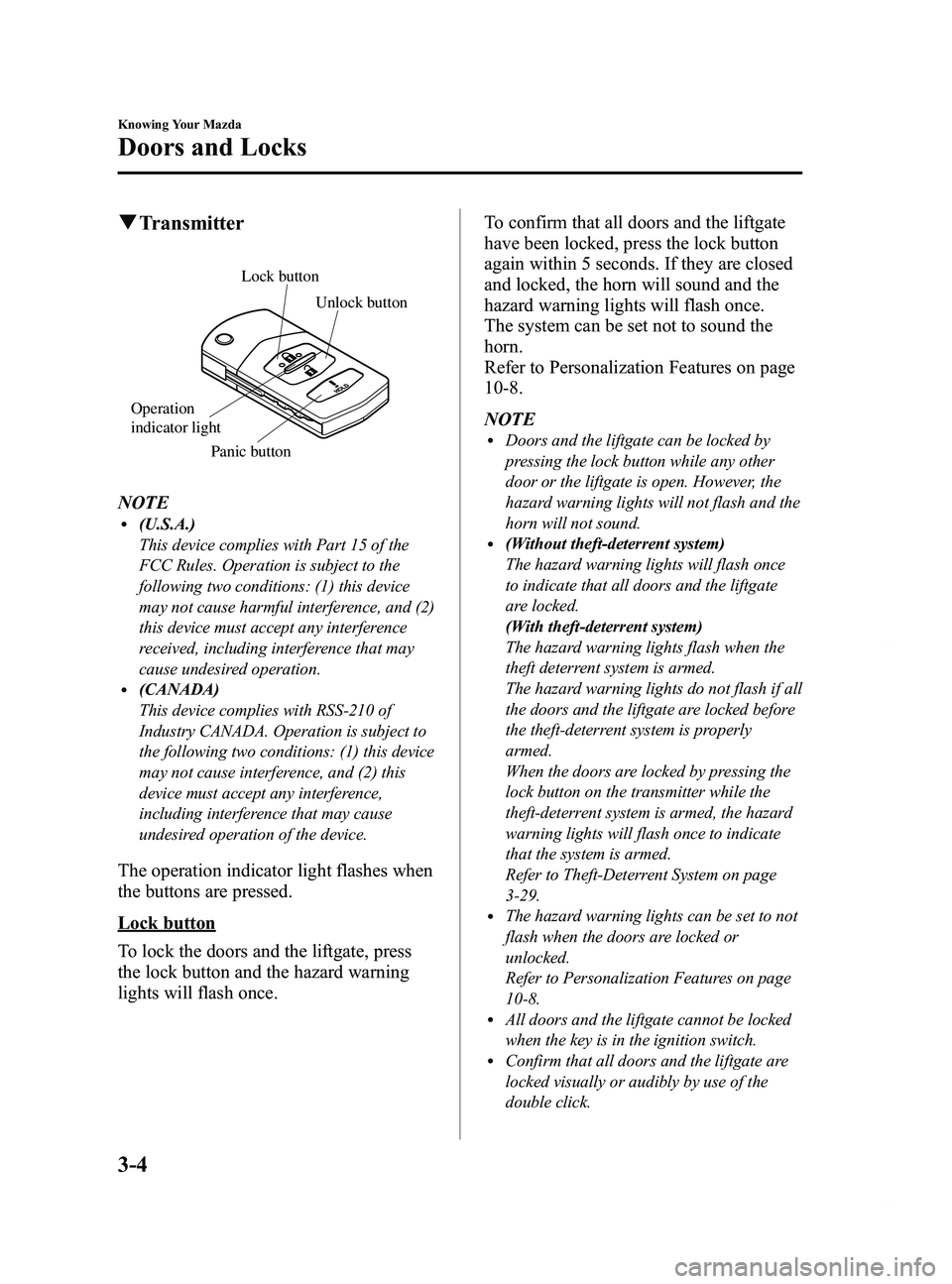
qTransmitter
Lock button
Unlock button
Panic button
Operation
indicator light
NOTEl(U.S.A.)
This device complies with Part 15 of the
FCC Rules. Operation is subject to the
following two conditions: (1) this device
may not cause harmful interference, and (2)
this device must accept any interference
received, including interference that may
cause undesired operation.
l(CANADA)
This device complies with RSS-210 of
Industry CANADA. Operation is subject to
the following two conditions: (1) this device
may not cause interference, and (2) this
device must accept any interference,
including interference that may cause
undesired operation of the device.
The operation indicator light flashes when
the buttons are pressed.
Lock button
To lock the doors and the liftgate, press
the lock button and the hazard warning
lights will flash once. To confirm that all doors and the liftgate
have been locked, press the lock button
again within 5 seconds. If they are closed
and locked, the horn will sound and the
hazard warning lights will flash once.
The system can be set not to sound the
horn.
Refer to Personalization Features on page
10-8.
NOTE
lDoors and the liftgate can be locked by
pressing the lock button while any other
door or the liftgate is open. However, the
hazard warning lights will not flash and the
horn will not sound.
l(Without theft-deterrent system)
The hazard warning lights will flash once
to indicate that all doors and the liftgate
are locked.
(With theft-deterrent system)
The hazard warning lights flash when the
theft deterrent system is armed.
The hazard warning lights do not flash if all
the doors and the liftgate are locked before
the theft-deterrent system is properly
armed.
When the doors are locked by pressing the
lock button on the transmitter while the
theft-deterrent system is armed, the hazard
warning lights will flash once to indicate
that the system is armed.
Refer to Theft-Deterrent System on page
3-29.
lThe hazard warning lights can be set to not
flash when the doors are locked or
unlocked.
Refer to Personalization Features on page
10-8.
lAll doors and the liftgate cannot be locked
when the key is in the ignition switch.
lConfirm that all doors and the liftgate are
locked visually or audibly by use of the
double click.
3-4
Knowing Your Mazda
Doors and Locks
Mazda5_8DH4-EA-13H_Edition3 Page82
Tuesday, January 14 2014 9:19 AM
Form No.8DH4-EA-13H
Page 89 of 456

Black plate (89,1)
qPower Door Locks
Vehicle lock-out prevention
The vehicle lock-out prevention feature
prevents you from locking yourself out of
the vehicle. With the key in the ignition
switch, all doors and the liftgate will
automatically unlock if they are locked
using the power door locks with any door
or the liftgate open.
Locking, unlocking with key
All doors and the liftgate lock
automatically when the driver's door is
locked with the key.
All doors and the liftgate unlock when the
driver's door is unlocked and the key is
held in the unlock position for one second
or longer.
Unlock
Lock
NOTElHolding the key in the unlocked position in
the driver's door lock for about a second
unlocks all doors and the liftgate. To unlock
only the driver's door, insert the key into the
driver's door lock and turn the key briefly
to the unlock position and then immediately
return it to the center position.
lThe system can be set to unlock all doors by
performing a single operation.
Refer to Personalization Features on page
10-8.
Locking, unlocking with door-lock
switch
All doors and the liftgate lock
automatically when LOCK is pressed.
They all unlock when the unmarked part
of the door-lock switch is pressed.
Unlock
Lock
Locking, unlocking with transmitter
All doors and the liftgate can be locked/
unlocked by operating the keyless entry
system transmitter, refer to Keyless Entry
System (page 3-3).
q Sliding Door Open/Close
WARNING
Do not leave a sliding door open while
parked on an incline:
Leaving a sliding door open is
dangerous. The door may open
unexpectedly resulting in injury.
Knowing Your Mazda
Doors and Locks
3-11
Mazda5_8DH4-EA-13H_Edition3 Page89
Tuesday, January 14 2014 9:19 AM
Form No.8DH4-EA-13H
Page 92 of 456

Black plate (92,1)
CAUTION
ØWhen loading or unloading
luggage in the luggage
compartment, turn off the engine.
Otherwise, you could get burned
by the heat of the exhaust gas.
Ø Be careful not to apply excessive
force to the damper stay on the
liftgate such as by putting your
hand on the stay. Otherwise, the
damper stay may bend and affect
the liftgate operation.
Damper stay
qLocking, Unlocking with Key
The liftgate can be locked/unlocked by
inserting the key into the driver's door key
cylinder, refer to Power Door Locks (page
3-11).
qLocking, Unlocking with Transmitter
The liftgate can be locked/unlocked by
operating the keyless entry system
transmitter, refer to Keyless Entry System
(page 3-3).
qLocking, Unlocking with Door-
Lock Switch
The liftgate can be locked/unlocked by
operating the door-lock switch, refer to
Power Door Locks (page 3-11).
qOpening and Closing the Liftgate
Opening the liftgate
Grasp the lower end of the liftgate, press
the electric liftgate opener on the liftgate,
and then raise the liftgate when the latch
releases.
Electric liftgate
opener
While the ignition is switched ON, the
liftgate can be opened only when the
vehicle is stopped with the parking brake
applied (manual transaxle), or with the
selector lever in the P position (automatic
transaxle).
3-14
Knowing Your Mazda
Doors and Locks
Mazda5_8DH4-EA-13H_Edition3 Page92
Tuesday, January 14 2014 9:19 AM
Form No.8DH4-EA-13H
Page 94 of 456

Black plate (94,1)
Closing the liftgate
To close, lower the liftgate slowly using
the liftgate grip recess, and then push the
liftgate closed using both hands.
Do not slam it. Pull up on the liftgate to
make sure it is secure.
Liftgate grip
recess
Power Windows
The ignition must be switched ON for the
power windows to operate.
WARNING
Make sure the opening is clear before
closing a window:Closing power windows are
dangerous. A person's hands, head,
or even neck could be caught by the
window and result in serious injury
or even death.
This warning applies especially to
children.
Never allow children to play with
power window switches: Power window switches that are not
locked with the power window lock
switch would allow children to
operate power windows
unintentionally which could result in
serious injury if a child's hands, head
or neck becomes caught by the
window.
CAUTION
To prevent burning out the fuse and
damaging the power window system,
do not open or close more than three
windows at once.
3-16
Knowing Your Mazda
Doors and Locks
Mazda5_8DH4-EA-13H_Edition3 Page94
Tuesday, January 14 2014 9:19 AM
Form No.8DH4-EA-13H
Page 95 of 456

Black plate (95,1)
qOperating the Driver's Side
Power Window
Normal opening/closing
To open the window to the desired
position, lightly hold down the switch.
To close the window to the desired
position, lightly pull up the switch.
Open
Driver's window
Close
Master control switches
Auto-opening/closing
To fully open the window automatically,
press the switch completely down, then
release. The window will fully open
automatically.
To fully close the window automatically,
pull the switch completely up, then
release. The window will fully close
automatically.
To stop the window partway, pull or press
the switch in the opposite direction and
then release it. Power window system initialization
procedure
If the battery was disconnected during
vehicle maintenance, or for other reasons
(such as a switch continues to be operated
after the window is fully open/closed), the
window will not fully open and close
automatically. Carry out the following
procedure to resume operation:
1. Switch the ignition ON.
2. Press the switch and fully open the
window.
3. Pull up the switch to fully close the window and continue holding the
switch for about 2 seconds after the
window fully closes.
Two-step down function
With the window completely closed, press
the switch lightly and the window will
open and stop about 3 cm (1 in) from the
top.
If you continue to press and hold the
switch, the window will resume opening
all the way.
NOTE
lPressing the power window switch once
when the window is fully closed will only
open it about 3 cm (1 in) to allow
convenient ventilation of the cabin.
lThe two-step down function can be
canceled.
Refer to Personalization Features on page
10-8.
Jam-safe window
If a person's hands, head or an object
blocks the window during the auto-
closing operation, the window will stop
and open halfway.
Knowing Your Mazda
Doors and Locks
3-17
Mazda5_8DH4-EA-13H_Edition3 Page95
Tuesday, January 14 2014 9:19 AM
Form No.8DH4-EA-13H
Page 96 of 456

Black plate (96,1)
WARNING
Make sure nothing blocks the window
just before it reaches the fully closed
position or while fully holding up the
power window switch:Blocking the power window just
before it reaches the fully closed
position or while fully holding up the
power window switch is dangerous.
In this case, the jam-safe function
cannot prevent the window from
closing all the way. If fingers are
caught, serious injuries could occur.
NOTE
Depending on driving conditions, a closing
power window could stop and start opening
when the window feels a shock that is similar
to something blocking it.
In the event the jam-safe function activates and
the power window cannot be closed
automatically, pull and hold the switch and the
window will close.
Engine-off power window operation
The power window can be operated for
about 40 seconds after the ignition is
switched from ON to ACC or OFF with
all doors closed. If any door is opened, the
power window will be inoperable.
NOTE
lFor engine-off operation of the power
window, the switch must be held up firmly
throughout window closure because the
auto-closing function will be inoperable.
lThe two-step down function is inoperable
during engine-off operation.
q Operating the Passenger Power
Windows
The power windows may be operated
when the power window lock switch on
the driver's door is in the unlocked
position.
The passenger windows may be opened or
closed using the master control switches
on the driver's door.
Power window lock switch Front passenger's
window
Right rear window
Left rear window
Master control switches
To open the window to the desired
position, hold down the switch.
To close the window to the desired
position, pull up the switch.
Close
Open
3-18
Knowing Your Mazda
Doors and Locks
Mazda5_8DH4-EA-13H_Edition3 Page96
Tuesday, January 14 2014 9:19 AM
Form No.8DH4-EA-13H
Page 100 of 456

Black plate (100,1)
qClosing the Hood
1. Check under the hood area to make
certain all filler caps are in place and
all loose items (e.g. tools, oil
containers, etc.) have been removed.
2. Lift the hood, grasp the padded area on the stay, and secure the stay in the clip.
Verify that the support rod is secured in
the clip before closing the hood.
Pad
3. Lower the hood slowly to a height ofabout 20 cm (7.9 in) above its closed
position and then let it drop.
CAUTION
When closing the hood, do not push
it excessively such as by applying
your weight. Otherwise, the hood
could be deformed.
Moonroofí
The moonroof can be opened or closed
electrically only when the ignition is
switched ON.
Tilt switch
Slide switch
WARNING
Do not let passengers stand up or
extend part of their body through the
open moonroof while the vehicle is
moving:
Extending the head, arms, or other
parts of the body through the
moonroof is dangerous. The head or
arms could hit something while the
vehicle is moving. This could cause
serious injury or death.
Make sure the opening is clear before
closing the moonroof: A closing moonroof is dangerous. The
hands, head, or even neck of a
person, especially a child, could be
caught in it as it closes, causing
serious injury or even death.
3-22
Knowing Your Mazda
íSome models.
Doors and Locks
Mazda5_8DH4-EA-13H_Edition3 Page100
Tuesday, January 14 2014 9:19 AM
Form No.8DH4-EA-13H