radio MAZDA MODEL 5 2015 User Guide
[x] Cancel search | Manufacturer: MAZDA, Model Year: 2015, Model line: MODEL 5, Model: MAZDA MODEL 5 2015Pages: 458, PDF Size: 5.46 MB
Page 216 of 458

Black plate (216,1)
Playable AAC file specifications
This unit supports playback of AAC files
recorded in CD-R and CD-RW.
Playable AAC files are as follows:
ItemContent
Specification MPEG-4 AAC-LC
Sampling rate 8/11.025/12 kHz
16/22.05/24 kHz
32/44.1/48 kHz
Bit rate 24―320 kbps
CAUTION
This unit plays files with the file
extension (.aac/.m4a) as an AAC file.
Do not use the AAC file extension for
files other than AAC files. Otherwise,
it could result in noise or a
malfunction.
lSong, artist, and album name
information in the AAC file is recorded
as data termed
“iTunes, m4a, Meta-Data applicable ”,
and this information is displayable.
lAAC files written under specifications
other than the indicated specification
may not play normally or files or folder
names may not display correctly.
lThe file extension may not be provided
depending on the computer operating
system, version, software, or settings.
In this case, add the file extension
“ .aac/.m4a ”to the end of the file name,
then write it to the disc.
q Operating Tips for USB device
This unit supports playback of MP3/
WMA/AAC files recorded to USB device.
NOTE
lMusic data (MP3/WMA/AAC (.aac/.m4a)
format) stored in a USB mass-storage class
compliant device (such as USB flash
memory) can be played.
lPlayback may not be possible depending on
the type and condition of the USB flash
memory even if the audio file complies with
the standard above.
lA copyright protected WMA/AAC file
cannot be played in this unit.
lThe order of the music data stored in the
device may differ from the playback order.
lTo prevent loss or damage of stored data,
we recommend that you always back up
your data.
lIf a device exceeds the maximum electric
current value of 500 mA, it may not operate
or recharge when connected.
lDo not pull out the USB device while in the
USB mode (only pull it out while in FM/AM
radio or CD mode).
lThe device will not operate if the data is
password protected.
Playable MP3 file specifications
Playable MP3 files are as follows:
Item Content
Specification MPEG1 AUDIO LAYER III
MPEG2 AUDIO LAYER III
MPEG2.5
Sampling rate 44.1/48/32 kHz (MPEG1)
22.05/24/16 kHz (MPEG2)
11.025/12/8 kHz (MPEG2.5)
Bit rate 32
―320 kbps (MPEG1)
32 ―160 kbps (MPEG2)
32 ―160 kbps (MPEG2.5)
6-20
Interior Comfort
Audio System
Mazda5_8DW3-EA-14H_Edition3 Page216
Thursday, December 18 2014 9:27 AM
Form No.8DW3-EA-14H
Page 219 of 458

Black plate (219,1)
Audio Set
Audio information is displayed on the information display.
Power/Volume/Sound Controls .............................................................................. page 6-24
Operating the Radio ............................................................................................... page 6-28
Operating the Satellite Radio ................................................................................. page 6-30
Operating the Compact Disc (CD) Player .............................................................. page 6-42
Operating the Auxiliary jack/USB port .................................................................. page 6-45
Error Indications ..................................................................................................... page 6-46
Interior Comfort
Audio System
6-23
Mazda5_8DW3-EA-14H_Edition3 Page219
Thursday, December 18 2014 9:27 AM
Form No.8DW3-EA-14H
Page 224 of 458
Black plate (224,1)
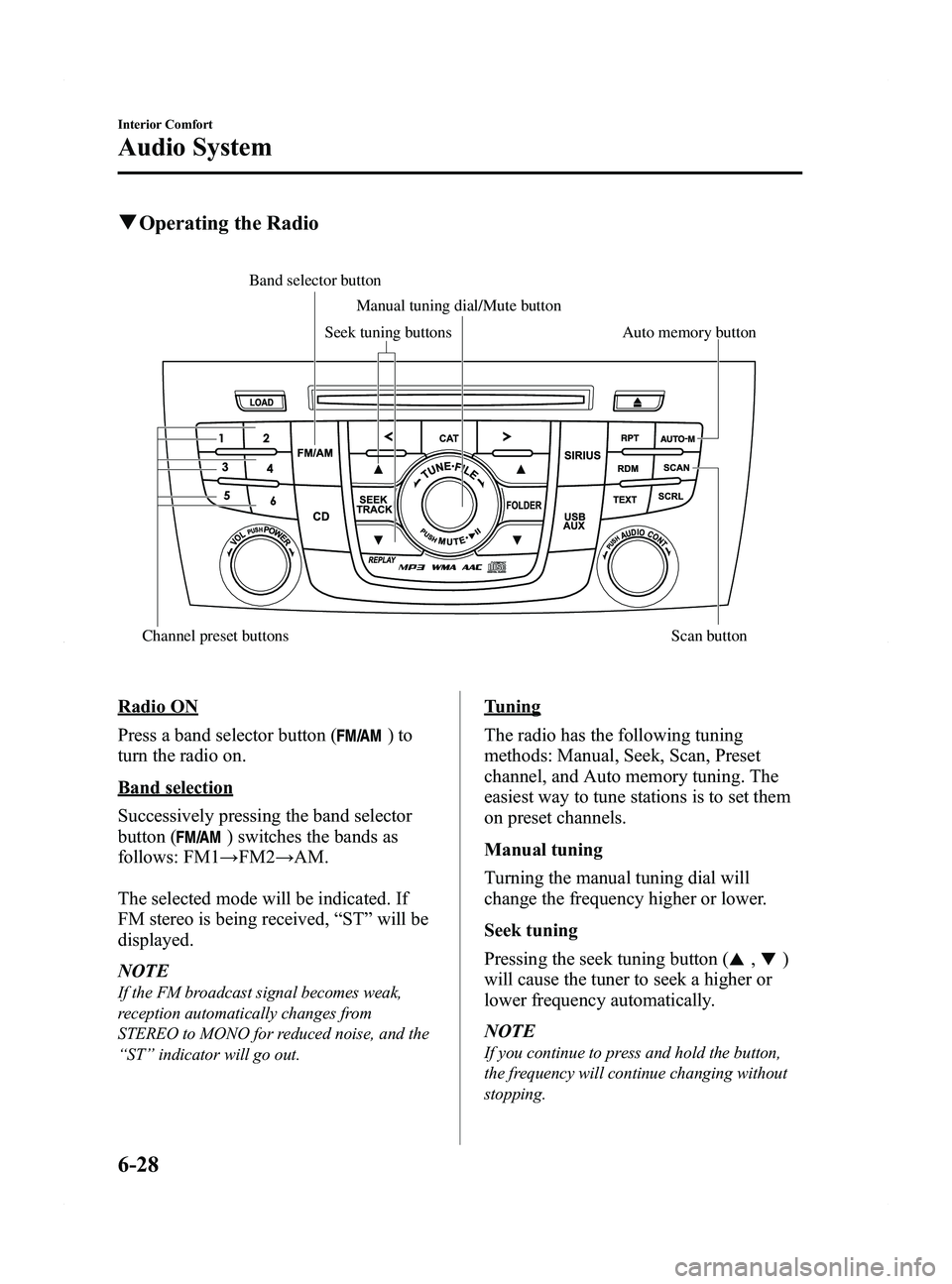
qOperating the Radio
Auto memory button
Channel preset buttons Scan button Manual tuning dial/Mute button
Band selector buttonSeek tuning buttons
Radio ON
Press a band selector button (
)to
turn the radio on.
Band selection
Successively pressing the band selector
button (
) switches the bands as
follows: FM1 →FM2 →AM.
The selected mode will be indicated. If
FM stereo is being received, “ST ”will be
displayed.
NOTE
If the FM broadcast signal becomes weak,
reception automatically changes from
STEREO to MONO for reduced noise, and the
“ ST ”indicator will go out.
Tuning
The radio has the following tuning
methods: Manual, Seek, Scan, Preset
channel, and Auto memory tuning. The
easiest way to tune stations is to set them
on preset channels.
Manual tuning
Turning the manual tuning dial will
change the frequency higher or lower.
Seek tuning
Pressing the seek tuning button (
,)
will cause the tuner to seek a higher or
lower frequency automatically.
NOTE
If you continue to press and hold the button,
the frequency will continue changing without
stopping.
6-28
Interior Comfort
Audio System
Mazda5_8DW3-EA-14H_Edition3 Page224
Thursday, December 18 2014 9:27 AM
Form No.8DW3-EA-14H
Page 226 of 458
Black plate (226,1)
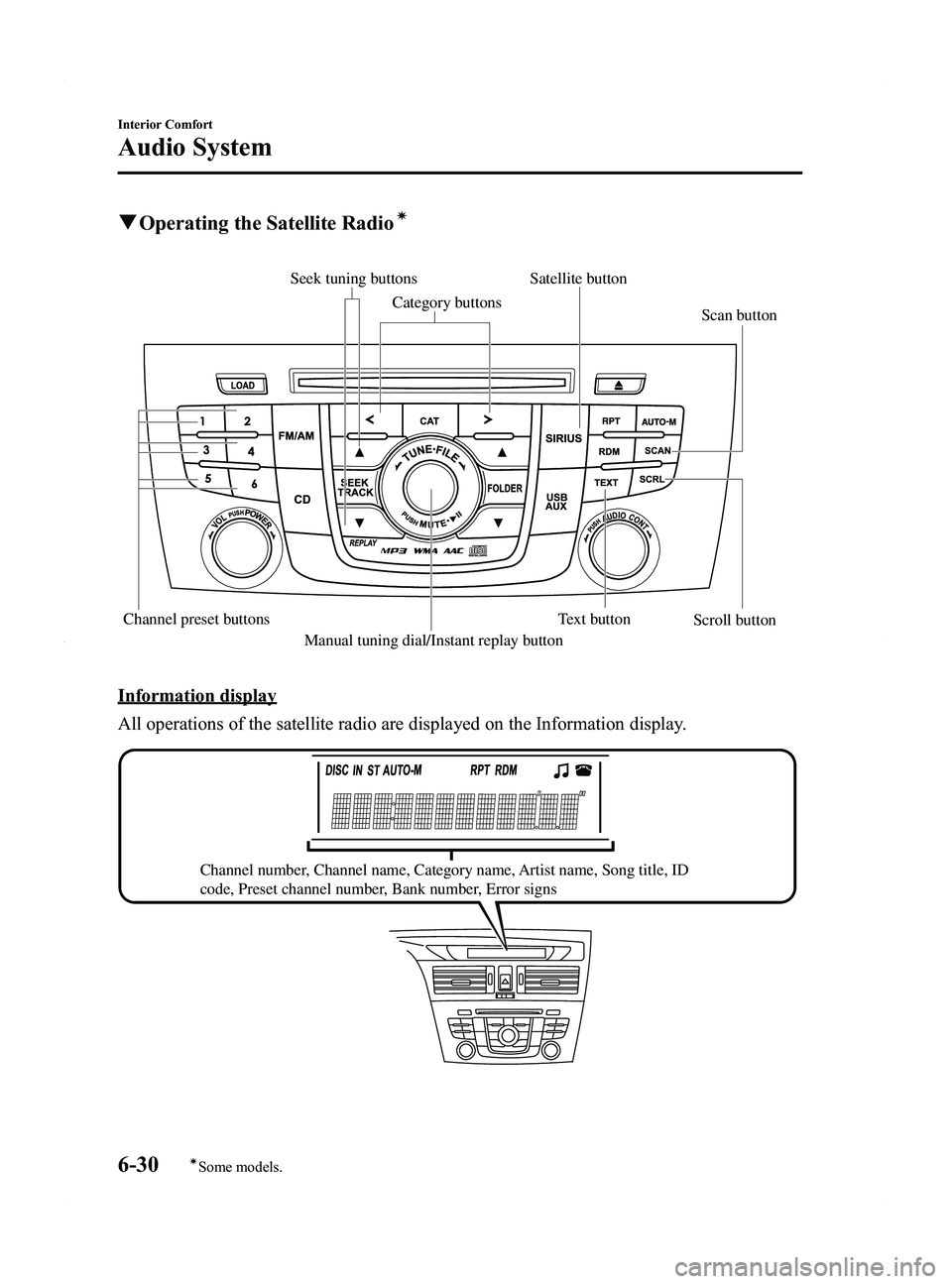
qOperating the Satellite Radioí
Scan button
Scroll button
Channel preset buttons Text button
Manual tuning dial/Instant replay button Satellite button
Seek tuning buttons
Category buttons
Information display
All operations of the satellite radio are displayed on the Information display.
Channel number, Channel name, Category name, Artist name, Song title, ID
code, Preset channel number, Bank number, Error signs
6-30
Interior Comfort
íSome models.
Audio System
Mazda5_8DW3-EA-14H_Edition3 Page226
Thursday, December 18 2014 9:27 AM
Form No.8DW3-EA-14H
Page 227 of 458
Black plate (227,1)
NOTE
This equipment has been tested and found to
comply with the limits for a Class B digital
device, pursuant to Part 15 of the FCC Rules.
These limits are designed to provide
reasonable protection against harmful
interference in a residential installation. This
equipment generates, uses, and can radiate
radio frequency energy and if not installed and
used in accordance with the instructions, may
cause harmful interference to radio
communications. However, there is no
guarantee that interference will not occur in a
particular installation. If this equipment does
cause harmful interference to radio or
television reception, which can be determined
by turning the equipment off and on, the user
is encouraged to try to correct the interference
by one or more of the following measures:
- Increase the separation between the
equipment and tuner.
- Connect the equipment into an outlet on a
circuit different from that to which the tuner is
connected.
- Consult the dealer or an experienced radio/
TV technician for help.
What is satellite radio?
With over 130 channels, SIRIUS Satellite
Radio brings you more of what you love.
Get 69 channels of 100 % commercial-
free music, plus all your favorite sports,
news, talk and entertainment. Everything
worth listening to is now on SIRIUS.
100 % Commercial-free Music―With
music from every genre, artist-dedicated
channels, live performances and more,
SIRIUS is the home of 100 %
commercial-free music.
Live Sports Play-by-Play & Expert
Talk ―Hear every NFL game, every
NASCAR
®race and college sports
coverage from over 150 schools. Plus
24/7 sports talk with channels like
SIRIUS NFL Radio, SIRIUS NASCAR
Radio and more.
Exclusive Entertainment and
Talk ―The biggest names, compelling
talk, hilarious comedy. Hear Howard
Stern, Martha Stewart, Jamie Foxx, Blue
Collar Comedy, Playboy Radio, political
talk and more.
World-class News ―Stay informed with
FOX, CNN, CNBC, NPR
®, BBC and
more.
Plus local traffic and weather.
Family & Kids ―Entertain the entire
family with Radio Disney, Kids Place
Live, Laugh USA and more.
Sign up for SIRIUS Radio today! For
more information, visit
www.siriusxm.com.
Satellite radio is only available in regions
providing satellite radio service (some
areas of the United States and Canada).
How to Activate Satellite Radio
You must call SIRIUS to activate your
service. Activation is free and takes only a
few minutes.
Interior Comfort
Audio System
6-31
Mazda5_8DW3-EA-14H_Edition3 Page227
Thursday, December 18 2014 9:27 AM
Form No.8DW3-EA-14H
Page 228 of 458

Black plate (228,1)
SIRIUS service uses an ID code to
identify your radio. This code is needed to
activate SIRIUS service, and report any
problems.
To activate you SIRIUS radio tuner, call a
SIRIUS customer service specialist at 1-
888-539-7474 or you can visit SIRIUS
online at www.siriusxm.com.
Please have the following information
ready:
lSIRIUS ID (12-digit electronic serial
no., or ESN*)lValid credit card information (may not
be required at initial sign-up)
*ESN: Electronic Serial Number
Displaying the SIRIUS ID (ESN)
When the manual tuning dial is turned to
channel 0, a 12-digit Electronic Serial
Number (ESN) for the SIRIUS tuner is
displayed.
(If the SIRIUS ID (ESN) for the tuner
does not display)
If “ESN FAIL ”is displayed after channel
0 is selected by operating the manual
tuning dial, contact an Authorized Mazda
Dealer.
Be sure you are parked outside with a
clear view of open sky, you will be
instructed to turn on your radio (in SAT
mode and tuned to channel 184).
Activation typically takes only 2 ―5
minutes.
SIRIUS operation
All operations of the satellite radio are
conducted by means of the audio unit. SIRIUS radio mode selection
When the satellite button (
)is
pressed during ACC ON, it will play the
last SIRIUS channel in use before the
mode was switched over to another mode
or the power was turned off.
When the satellite button (
)is
pressed in a mode other than the SIRIUS
mode, the last channel in use will be
received.
Every time the satellite button (
)
is pressed, the bank changes in the order
shown below.
SR2
SR1
SR3
NOTE
SR1, SR2 and SR3: six stations can be stored
in each bank for convenient access to your
favorite stations.
Operation in the initial state
It may take some time to start up the
equipment when it is in the initial state,
when there is a change in the user's
subscription condition, or when the
SIRIUS channel map is changed.
6-32
Interior Comfort
Audio System
Mazda5_8DW3-EA-14H_Edition3 Page228
Thursday, December 18 2014 9:27 AM
Form No.8DW3-EA-14H
Page 233 of 458
Black plate (233,1)
Instant replay
This function allows you to rewind and
replay the program that you were
previously or are currently listening to.
Press the instant replay button (
).
When the seek tuning button (
)is
pressed (about 1.5 seconds), playback
starts from the beginning of the current
program.
When the seek tuning button (
)is
pressed twice, playback starts from the
beginning of the previous program.
When the seek tuning button (
)is
pressed for about 1.5 seconds or longer,
the program is reversed while the button
is being pressed.
When the seek tuning button (
)is
pressed (about 1.5 seconds), playback
starts from the beginning of the next
program. When the seek tuning button
(
) is pressed (about 1.5 seconds) while
the last program is being played, the
instant replay mode is cancelled.
When the seek tuning button (
)is
pressed for 1.5 seconds or longer, the
program is fast-forwarded while the
button is being pressed. When pressing
and holding the button until the end of the
program, the instant replay mode is
cancelled.
When the instant replay button (
)is
pressed again, playback is paused, or
playback starts if it has been paused.
Instant replay (PAUSE)
If the instant replay button (
)is
pressed while the instant replay mode is
off, instant replay mode is turned on in a
paused condition (PAUSE). Press the
instant replay button (
) again to
resume playback from the point at which
it was paused. NOTE
lIf the channel is changed, the instant replay
buffer data is deleted.
lAfter turning on the power and switching to
SIRIUS digital satellite radio mode, the
instant replay mode is not available for
several seconds after changing channels.
Initialization of ID code
If the registered ID code is forgotten,
return the ID code to the default [0000] by
performing the following steps:
Setting condition: SAT mode
(Master code input preparation)
1. Press and hold the scan button (
),
then press channel preset button 4.
Hold both buttons together for 1.5
seconds.
2. “ENTER PIN ”appears for three
seconds which indicates that it is in
code input mode.
3. “SR1 - - - - ”appears, which indicates
that it is ready for code input.
(Master code input)
4. Input the master code using the channel preset buttons 1-4.
(The master code is already set at the
time of factory shipment.)
(Master code input determination)
5. Determine the master code which has been input by pressing the scan button
(
).
6. “PIN CLEARED ”appears which
indicates that the master code input has
been completed.
7. The ID code is set to the default [0000] and the initialization process is
completed.
Interior Comfort
Audio System
6-37
Mazda5_8DW3-EA-14H_Edition3 Page233
Thursday, December 18 2014 9:27 AM
Form No.8DW3-EA-14H
Page 234 of 458
![MAZDA MODEL 5 2015 User Guide Black plate (234,1)
NOTE
Master code:
The Master Code is used to initialize or re-
initialize the ID code in the event that the code
is not set to [0000] and/or the personalized ID
code is not known.](/img/28/40998/w960_40998-233.png "MAZDA MODEL 5 2015 User Guide Black plate (234,1)
NOTE
Master code:
The Master Code is used to initialize or re-
initialize the ID code in the event that the code
is not set to [0000] and/or the personalized ID
code is not known.")
Black plate (234,1)
NOTE
Master code:
The Master Code is used to initialize or re-
initialize the ID code in the event that the code
is not set to [0000] and/or the personalized ID
code is not known. The initialization process
resets the ID code to [0000]. The master code
can potentially defeat the intent of the security
of the parental lock if it is located by persons
not authorized by the owner to access certain
channels.
SIRIUS Satellite Radio Master Code: [0913]
NOTElWhen a numeric value other than the
master code is input and the scan button
(
) is pressed,“SR1 Err ”is displayed
and then it returns to the “SR1---- ”
display again.
lIf an ID code is not input for ten seconds,
“ Err ”is displayed and it returns to the
former display.
lChannel preset buttons 1, 2, 3, 4 and the
scan button (
) are used for inputting
the ID code. Buttons 5 and 6 cannot be
used.
Change of ID code
Setting condition: SAT mode
When changing the ID code, the new ID
code is input after the previous one is
input first.
(Registered ID code input)
1. Press and hold the scan button (
),
then press channel preset button 5.
Hold both buttons together for 1.5
seconds.
2. “ENTER PIN ”appears for three
seconds which indicates that it is in
code input mode. 3.
“SR1 - - - - ”appears, which indicates
that it is ready for code input.
4. Input the registered ID code using channel preset buttons 1-4.
Example: When the registered ID code
is“2323 ”, input “2323 ”. At this time
“ SR1 2323 ”is displayed.
Press 1 for the first digit, 2 for the
second, 3 for the third, and 4 for the
last digit. For example, if your number
is 2323, press 1 three times (includes
0), 2 four times, 3 three times, and 4
four times. If the display goes off while
inputting, begin from Step 1.
NOTE
The registered ID code is the default [0000] at
the time of factory shipment. If [0000] results
in “Err ”on the display, go to the
“ INITIALIZATION OF ID CODE” section to
reset to [0000].
(Verification with the registered ID
code)
5. Determine the input code by pressing the scan button (
).
6. If it does not match with the previously registered code, “SR1 Err ”is displayed
and then it returns to “SR1 - - - - ”.
7. If it matches with the previously registered code, “ENTER PIN ”appears
again and it switches to code input
mode.
8. “SR1 - - - - ”appears, and it is ready for
input of the new ID code.
(New ID code input)
9. Input the new ID code using channel preset buttons 1-4.
Example: If “1234 ”is input as the new
code, “SR1 1234 ”is displayed.
6-38
Interior Comfort
Audio System
Mazda5_8DW3-EA-14H_Edition3 Page234
Thursday, December 18 2014 9:27 AM
Form No.8DW3-EA-14H
Page 242 of 458

Black plate (242,1)
qError Indications
If you see an error indication on the display, find the cause in the chart. If you cannot clear
the error indication, take the vehicle to an Authorized Mazda Dealer.
Indication Cause Solution
ACQUIRING Depending on the
surrounding conditions
(such as large trees, build-
ings, or tunnels) and special
weather conditions,
SIRIUS radio reception
may be diminished or
temporarily interrupted. Improve reception by moving away from possible
obstructions. If the error indication continues to display,
consult an Authorized Mazda Dealer.
ANTENNA FAIL Satellite radio antenna
malfunction Check the satellite radio antenna, antenna cable and
DLP antenna connector. If the error indication continues
to display, consult an Authorized Mazda Dealer.
CHECK CD CD is inserted upside down
Insert the CD properly. If the error indication continues
to display, consult an Authorized Mazda Dealer.
CD is defective Insert another CD properly. If the error indication
continues to display, consult an Authorized Mazda
Dealer.
NOTE
If a broken DLP* unit is replaced with a new unit, cancel the license for the broken unit and make
sure to carry out new registration for the replaced unit. If the license for the broken unit is not
canceled, you will be charged a reception fee for both units.
* DLP: Down Link Processor (SATELLITE RADIO Module)
6-46
Interior Comfort
Audio System
Mazda5_8DW3-EA-14H_Edition3 Page242
Thursday, December 18 2014 9:27 AM
Form No.8DW3-EA-14H
Page 244 of 458

Black plate (244,1)
qChanging the Source
Press the mode switch () to change
the audio source (FM1 radio →FM2
radio →AM radio →CD player →
SIRIUS1 →SIRIUS2 →SIRIUS3 →
AUX →BT audio →USB/iPod →
cyclical).
Without Bluetooth® Hands-Free
With Bluetooth® Hands-Free
NOTE
CD, USB, iPod, SIRIUS digital satellite radio,
and BT audio modes cannot be selected in the
following cases:
lUSB device, iPod, SIRIUS digital satellite
radio unit, or BT audio unit is not equipped
on the audio system.
lCD has not been inserted.
The AUX mode is unavailable unless you
connect a commercially available portable
audio unit (such as an MP3 player) to the
auxiliary jack. Connect a portable audio unit
or similar product on the market to the
auxiliary jack to listen to music or audio over
the vehicle's speakers. Change the audio
source to AUX mode (page 6-50).
q Seek Switch
Without Bluetooth® Hands-Free
6-48
Interior Comfort
Audio System
Mazda5_8DW3-EA-14H_Edition3 Page244
Thursday, December 18 2014 9:27 AM
Form No.8DW3-EA-14H