roof MAZDA MODEL 6 2015 (in English) User Guide
[x] Cancel search | Manufacturer: MAZDA, Model Year: 2015, Model line: MODEL 6, Model: MAZDA MODEL 6 2015Pages: 576
Page 83 of 576
Black plate (83,1)
Door Locks
WARNING
Always take all children and pets with
you or leave a responsible person with
them:
Leaving a child or a pet unattended
in a parked vehicle is dangerous. In
hot weather, temperatures inside a
vehicle can become high enough to
cause brain damage or even death.
Do not leave the key in your vehicle
with children and keep them in a place
where your children will not find or
play with them:
Leaving children in a vehicle with the
key is dangerous. This could result in
someone being badly injured or even
killed.
Keep all doors locked when driving:
Unlocked doors in a moving vehicle
are dangerous. Passengers can fall
out if a door is accidentally opened
and can more easily be thrown out in
an accident.
Always close all the windows and
moonroof, lock the doors and take the
key with you when leaving your vehicle
unattended:
Leaving your vehicle unlocked is
dangerous as children could lock
themselves in a hot vehicle, which
could result in death. Also, a vehicle
left unlocked becomes an easy target
for thieves and intruders.After closing the doors, always verify
that they are securely closed:
Doors not securely closed are
dangerous, if the vehicle is driven
with a door not securely closed, the
door could open unexpectedly
resulting in an accident.
Always confirm the safety around the
vehicle before opening a door:
Suddenly opening a door is
dangerous. A passing vehicle or a
pedestrian could be hit and cause an
accident.
Before Driving
Doors and Locks
3-11
Mazda6_8DQ8-EA-13L_Edition3 Page83
Friday, June 13 2014 6:21 PM
Form No.8DQ8-EA-13L
Page 110 of 576
Black plate (110,1)
Moonroofí
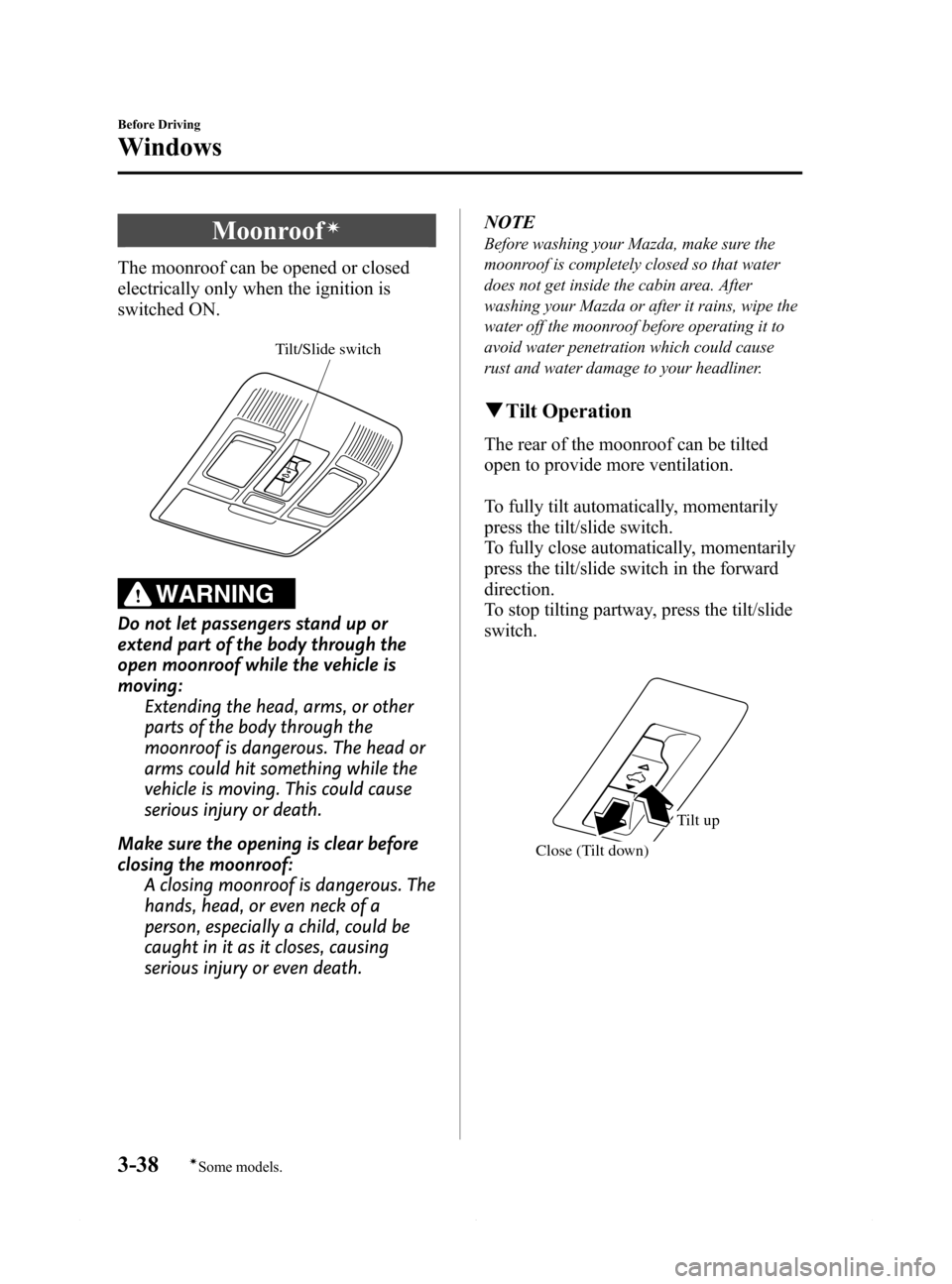
The moonroof can be opened or closed
electrically only when the ignition is
switched ON.
Tilt/Slide switch
WARNING
Do not let passengers stand up or
extend part of the body through the
open moonroof while the vehicle is
moving:
Extending the head, arms, or other
parts of the body through the
moonroof is dangerous. The head or
arms could hit something while the
vehicle is moving. This could cause
serious injury or death.
Make sure the opening is clear before
closing the moonroof:
A closing moonroof is dangerous. The
hands, head, or even neck of a
person, especially a child, could be
caught in it as it closes, causing
serious injury or even death.NOTE
Before washing your Mazda, make sure the
moonroof is completely closed so that water
does not get inside the cabin area. After
washing your Mazda or after it rains, wipe the
water off the moonroof before operating it to
avoid water penetration which could cause
rust and water damage to your headliner.
qTilt Operation
The rear of the moonroof can be tilted
open to provide more ventilation.
To fully tilt automatically, momentarily
press the tilt/slide switch.
To fully close automatically, momentarily
press the tilt/slide switch in the forward
direction.
To stop tilting partway, press the tilt/slide
switch.
Close (Tilt down)
Tilt up
3-38
Before Driving
íSome models.
Windows
Mazda6_8DQ8-EA-13L_Edition3 Page110
Friday, June 13 2014 6:21 PM
Form No.8DQ8-EA-13L
Page 111 of 576

Black plate (111,1)
qSlide Operation
To fully open automatically, momentarily
press the tilt/slide switch in the backward
direction.
To fully close automatically, momentarily
press the tilt/slide switch in the forward
direction.
To stop sliding partway, press the tilt/slide
switch.
CloseOpen
qPower Moonroof Re-set Procedure
If the battery is disconnected, the
moonroof will not operate. The moonroof
will not operate correctly until it is re-set.
Carry out the following procedure to re-
set the moonroof and resume operation:
1. Switch the ignition ON.
2. Press the tilt switch, to partially tilt
open the rear of the moonroof.
3. Repeat Step 2. The rear of the
moonroof tilts open to the fully open
position, then closes a little.
NOTE
If the re-set procedure is performed while the
moonroof is in the slide position (partially
open) it will close before the rear tilt opens.
qJam-safe Moonroof
If a person's hands, head or an object
blocks the moonroof during closing
operation, the moonroof will stop and
open halfway.
WARNING
Make sure nothing blocks the
moonroof just before it reaches the
fully closed position:
Blocking the moonroof just before it
reaches the closed position is
dangerous.
In this case, the jam-safe function
cannot prevent the moonroof from
closing. If fingers are caught, serious
injuries could occur.
NOTE
lDepending on driving conditions, a closing
moonroof could stop and start opening
when the moonroof feels a shock that is
similar to something blocking it.
lThe moonroof's jam-safe function does not
function while the moonroof is initializing.
Before Driving
Windows
3-39
Mazda6_8DQ8-EA-13L_Edition3 Page111
Friday, June 13 2014 6:21 PM
Form No.8DQ8-EA-13L
Page 112 of 576

Black plate (112,1)
qSunshade
The sunshade can be opened and closed
by hand.
The sunshade opens automatically when
the moonroof is opened, but must be
closed by hand.
Sunshade
CAUTION
ØThe sunshade does not tilt. To
avoid damaging the sunshade, do
not push up on it.
ØDo not close the sunshade while
the moonroof is opening. Trying to
force the sunshade closed could
damage it.
3-40
Before Driving
Windows
Mazda6_8DQ8-EA-13L_Edition3 Page112
Friday, June 13 2014 6:21 PM
Form No.8DQ8-EA-13L
Page 115 of 576
Black plate (115,1)
Theft-Deterrent Systemí
If the theft deterrent system detects an
inappropriate entry into the vehicle, which
could result in the vehicle or its contents
being stolen, the alarm alerts the
surrounding area of an abnormality by
sounding the horn and flashing the hazard
warning lights.
The system will not function unless it's
properly armed. So when you leave the
vehicle, follow the arming procedure
correctly.
qOperation
System triggering conditions
The horn sounds intermittently and the
hazard warning lights flash for about 30
seconds when the system is triggered by
any one of the following:
lUnlocking a door with the keyí, door
lock switch, or an inside door-lock
knob.
lForcing open a door, the hood or the
trunk lid.
lOpening the hood by operating the
hood release handle.
lSwitching the ignition ON without
using the push button start.
If the system is triggered again, the lights
and horn will activate until the driver's
door or the trunk lid is unlocked with the
auxiliary key
íor with the transmitter.
(With advanced key)
The lights and horn can also be
deactivated by pressing the request switch
on a door.NOTE
If the battery goes dead while the theft-
deterrent system is armed, the horn will
activate and the hazard warning lights will
flash when the battery is charged or replaced.
qHow to Arm the System
1. Close the windows and the moonroofí
securely.
2. Press the push button start off.
3. Make sure the hood, the doors, and the
trunk lid are closed.
4. Press the lock button on the transmitter
or lock the driver's door from the
outside with the auxiliary key.
The hazard warning lights will flash
once.
The following method will also arm the
theft-deterrent system:
Press the door-lock switch“
”while
any door is open and then close all of
the doors.
(With the advanced keyless function)
Press a request switch.
The security indicator light in the
instrument panel flashes twice per
second for 20 seconds.
Refer to Warning/Indicator Lights on
page 4-23.
5. After 20 seconds, the system is fully
armed.
Before Driving
Security System
3-43íSome models. Mazda6_8DQ8-EA-13L_Edition3 Page115
Friday, June 13 2014 6:21 PM
Form No.8DQ8-EA-13L
Page 213 of 576

Black plate (213,1)
NOTElThe Smart City Brake Support (SCBS) system will not operate if the driver is deliberately
performing driving operations (accelerator pedal and steering wheel).
lThe Smart City Brake Support (SCBS) system will operate under the following conditions.lThe engine is running.lThe display in the instrument cluster does not indicate that the system requires inspection or it
cannot be used.
lThe vehicle speed is between about 4 to 30 km/h (2 to 18 mph).lThe Smart City Brake Support (SCBS) system is not turned off.lThe DSC operation is not turned off using the DSC OFF switch.lThe DSC is not malfunctioning.lThe Smart City Brake Support (SCBS) detects a vehicle ahead by emitting a near-infrared laser
beam and receiving the beam reflected off the reflector of the vehicle ahead, and then using it for
the measurement. Consequently, the Smart City Brake Support (SCBS) may not operate under the
following conditions:
lReflection of the laser is poor due to the shape of the vehicle ahead.lThe vehicle ahead is significantly dirty.lUnder bad weather condition, such as rain, fog and snow.lThe window washer is being used or the windshield wipers are not used when it's raining.lThe windshield is dirty.lThe steering wheel is turned completely left or right, or the vehicle is accelerated rapidly and
comes close to the vehicle ahead.
lTrucks with low loading platforms and vehicles with an extremely low or high profile.lVehicles with certain shapes such as a vehicle carrier.lUnder the following conditions, the Smart City Brake Support (SCBS) system may not operate
normally.
lHeavy luggage is loaded in the luggage compartment or on the rear seat.lIf there is the possibility of partial contact with a vehicle ahead.lWhen driving on continuously curving roads, and entering and exiting exits.lElongated luggage or cargo is loaded onto installed roof rails and covers the laser sensor.lExhaust gas from the vehicle in front, sand, snow, and water vapor rising from manholes and
grating, and water splashed into the air.
lWhen towing a malfunctioning vehicle.lIn the following cases, the laser sensor may inadvertently determine that there is a vehicle ahead
and the Smart City Brake Support (SCBS) system may operate.
lObjects on the road at the entrance to a curve.lVehicles passing in the opposite lane while making a curve.lMetal objects, bumps, or protruding objects on the road.lWhen passing through a toll gate.lWhen passing under a vinyl curtain or flag.lPlastic objects such as pylons.lTwo-wheeled vehicles, pedestrians, animals or standing trees.lVehicle is driven with some of the tires having significant wear.
When Driving
Brake
4-89
Mazda6_8DQ8-EA-13L_Edition3 Page213
Friday, June 13 2014 6:21 PM
Form No.8DQ8-EA-13L
Page 261 of 576

Black plate (261,1)
Rear View Monitorí
The rear view monitor provides visual images of the rear of the vehicle when reversing.
WARNING
Always drive carefully confirming the safety of the rear and the surrounding
conditions by looking directly with your eyes:
Reversing the vehicle by only looking at the screen is dangerous as it may cause an
accident or a collision with an object. The rear view monitor is only a visual assist
device when reversing the vehicle. The images on the screen may be different from
the actual conditions.
CAUTION
ØDo not use the rear view monitor under the following conditions: Using the rear
view monitor under the following conditions is dangerous and could result in
injury or vehicle damage or both.
ØIcy or snow-covered roads.
ØTire chains or a temporary spare tire is installed.
ØThe trunk lid is not fully closed.
ØThe vehicle is on a road incline.
ØWhen the display is cold, images may course across the monitor or the screen and
may be dimmer than usual, which could cause difficulty in confirming the
surrounding conditions of the vehicle. Always drive carefully confirming the safety
of the rear and the surrounding conditions by looking directly with your eyes.
ØDo not apply excessive force to the camera. The camera position and angle may
deviate.
ØDo not disassemble, modify, or remove it as it may no longer be waterproof.
ØThe camera cover is made of plastic. Do not apply degreasing agents, organic
solvents, wax, or glass coating agents to the camera cover. If any are spilled on
the cover, wipe off with a soft cloth immediately.
ØDo not rub the cover excessively, or polish it using an abrasive compound or a
hard brush. The cover may be damaged affecting the image.
NOTE
lIf water, snow, or mud is stuck on the camera lens, wipe it off using a soft cloth. If it cannot be
wiped off, use a mild detergent.
lIf the camera temperature changes rapidly (Hot to cold, cold to hot), the rear view monitor may
not operate correctly.
lWhen replacing the tires, consult an Authorized Mazda Dealer. Replacing the tires could result in
deviation of the guide lines which appear on the display.
lIf the vehicle's front, side, or rear has been involved in a collision, the alignment of the rear view
parking camera (location, installation angle) may have deviated. Always consult an Authorized
Mazda Dealer to have the vehicle inspected.
When Driving
Rear View Monitor
4-137íSome models. Mazda6_8DQ8-EA-13L_Edition3 Page261
Friday, June 13 2014 6:21 PM
Form No.8DQ8-EA-13L
Page 357 of 576
Black plate (357,1)
lClose the windows and/or the
moonroof to reduce loud noises from
outside the vehicle. Turn down the
airflow of the air-conditioning system
while Bluetooth
®Hands-Free is being
used.
lMake sure the vents are not directing
air up towards the microphone.
NOTE
If the voice recognition performance is not
satisfactory.
Refer to Troubleshooting on page 5-108.
Bluetooth® Hands-Free
qMaking a Call
Phonebook Usage
Telephone calls can be made by saying
the contact name in the downloaded
phonebook or the name of a person whose
phone number has been registered in the
Bluetooth
®Hands-Free. Refer to Import
contact (Download Phonebook).
1. Press the talk button.
2.Prompt:“Ready.”
3.Say:[Beep]“Phone call”
4.Prompt:“Name, please.”
5.Say:[Beep]“XXXXX... (Ex.“John”)”
(Say a name registered in the
phonebook.)
The name spoken will be searched for
in the phonebook.
If a contact is matched, go to Step 7.
If multiple contacts are matched, go to
Step 6.
6.Prompt:“Would you like to call
XXXXX... (Choice 1)?”
(Person you would like to call)
Say:[Beep]“Yes.”Then go to Step 7.
(Person you do not want to call)
Say:[Beep]“No”Then go to Step 6
(Maximum 3 times)
7.Prompt:“Would you like to call
XXXXX... (Ex.“John”) at home, at
work, or mobile, or other... or press the
hang-up button to exit Hands-Free
mode.”
8.Say:[Beep]“XXXXX... (Ex.“at
home”)”
Interior Features
Bluetooth®
5-85
Mazda6_8DQ8-EA-13L_Edition3 Page357
Friday, June 13 2014 6:22 PM
Form No.8DQ8-EA-13L
Page 450 of 576

Black plate (450,1)
DESCRIPTIONFUSE
RATINGPROTECTED COMPONENT
53 HORN 15 A Horn
54 ROOM 15 A Overhead light
*1 With xenon fusion headlights
*2 With halogen headlights
Fuse block (Left side)
DESCRIPTIONFUSE
RATINGPROTECTED COMPONENT
1 P.SEAT D 30 A Power seat
í
2 P.WINDOW3 30 A Power windowsí
3 R.OUTLET3 15 A―
4 P.WINDOW2 25 A Power windows
5 SRS2/ESCL 15 A Seat weight sensor
í
6 D.LOCK 25 A Power door locks
7 SEAT WARM 20 A Seat warmerí
8 SUNROOF 10 A Moonroofí
9 F.OUTLET 15 A Accessory sockets
10 MIRROR 7.5 A Power control mirror
11 R.OUTLET1 15 A―
12―― ―
6-56
Maintenance and Care
íSome models.
Owner Maintenance
Mazda6_8DQ8-EA-13L_Edition3 Page450
Friday, June 13 2014 6:23 PM
Form No.8DQ8-EA-13L
Page 453 of 576

Black plate (453,1)
Prevention
It is necessary to wash and wax your
vehicle to preserve its finish according to
the instructions in this section. These
steps should be taken immediately after
you find water marks on your vehicle's
finish.
Paint Chipping
Occurrence
Paint chipping occurs when gravel thrown
in the air by another vehicle's tires hits
your vehicle.
How to avoid paint chipping
Keeping a safe distance between you and
the vehicle ahead reduces the chances of
having your paint chipped by flying
gravel.
NOTE
lThe paint chipping zone varies with the
speed of the vehicle. For example, when
traveling at 90 km/h (56 mph), the paint
chipping zone is 50 m (164 ft).
lIn low temperatures a vehicle's finish
hardens. This increases the chance of paint
chipping.
lChipped paint can lead to rust forming on
your Mazda. Before this happens, repair the
damage by using Mazda touch-up paint
according to the instructions in this section.
Failure to repair the affected area could
lead to serious rusting and expensive
repairs.
Followalllabel and container directions
when using a chemical cleaner or polish.
Read all warnings and cautions.
qMaintaining the Finish
Washing
CAUTION
ØWhen the wiper lever is in the
AUTO position and the ignition is
switched ON, the wipers may
move automatically in the
following cases:
ØIf the windshield above the rain
sensor is touched or wiped with
a cloth.
ØIf the windshield is struck with
a hand or other object from
either outside or inside the
vehicle.
Keep hands and scrapers clear of
the windshield when the wiper
lever is in the AUTO position and
the ignition is switched ON as
fingers could be pinched or the
wipers and wiper blades damaged
when the wipers activate
automatically.
If you are going to clean the
windshield, be sure the wipers are
turned off completely―this is
particularly important when
clearing ice and snow―when it is
most likely that the engine is left
running.
ØDo not spray water in the engine
compartment. Otherwise, it could
result in engine-starting problems
or damage to electrical parts.
ØWhen washing and waxing the
vehicle, be careful not to apply
excessive force to any single area
of the vehicle roof or the antenna.
Otherwise, you could dent the
vehicle or damage the antenna.
Maintenance and Care
Appearance Care
6-59
Mazda6_8DQ8-EA-13L_Edition3 Page453
Friday, June 13 2014 6:23 PM
Form No.8DQ8-EA-13L