low beam MAZDA MODEL 6 2015 Owners Manual (in English)
[x] Cancel search | Manufacturer: MAZDA, Model Year: 2015, Model line: MODEL 6, Model: MAZDA MODEL 6 2015Pages: 576
Page 150 of 576

Black plate (150,1)
Signal Warning/Indicator Lights Page
Door-Ajar Warning Indication 4-37
Trunk lid-Ajar Warning Indication 4-38
Low Washer Fluid Level Warning Indication 4-38
Tire Pressure Monitoring System Warning Light 4-38
KEY Warning Indication 4-40
High Beam Control System (HBC) Warning Light (Amber)/Indicator Light
(Green)4-42
Wrench Indication 4-42
TCS/DSC Indicator Light 4-42
DSC OFF Indicator Light 4-42
AFS OFF Indicator Light 4-43
Low Engine Coolant Temperature Indicator Light (Blue) 4-43
Shift Position Indication 4-43
SPORT Mode Indicator Light 4-44
Headlight High-Beam Indicator Light 4-44
4-26
When Driving
Instrument Cluster and Display
Mazda6_8DQ8-EA-13L_Edition3 Page150
Friday, June 13 2014 6:21 PM
Form No.8DQ8-EA-13L
Page 152 of 576

Black plate (152,1)
Signal Warning/Indicator Lights Page
Check Engine Light 4-32
High Engine Coolant Temperature Warning Light (Red) 4-33
BSM OFF Indicator Light 4-45
Lane Departure Warning System (LDWS) Warning Light (Amber)/Indicator
Light (Green)4-33
Automatic Transaxle Warning Light 4-34
Power Steering Malfunction Light 4-34
Air Bag/Front Seat Belt Pretensioner System Warning Light 4-35
Low Fuel Warning Light 4-36
Check Fuel Cap Warning Light 4-36
Seat Belt Warning Light 4-36
Door-Ajar Warning Light 4-37
Low Washer Fluid Level Warning Light 4-38
Tire Pressure Monitoring System Warning Light 4-38
KEY Warning Light 4-40
High Beam Control System (HBC) Warning Light (Amber)/Indicator Light
(Green)4-42
TCS/DSC Indicator Light 4-42
4-28
When Driving
Instrument Cluster and Display
Mazda6_8DQ8-EA-13L_Edition3 Page152
Friday, June 13 2014 6:21 PM
Form No.8DQ8-EA-13L
Page 153 of 576

Black plate (153,1)
Signal Warning/Indicator Lights Page
DSC OFF Indicator Light 4-42
AFS OFF Indicator Light 4-43
Low Engine Coolant Temperature Indicator Light (Blue) 4-43
Shift Position Indication 4-43
Headlight High-Beam Indicator Light 4-44
Turn Signal/Hazard Warning Indicator Lights 4-44
Security Indicator Light 4-44
Cruise Main Indicator Light (Amber)/Cruise Set Indicator Light (Green) 4-45
Lights-On Indicator Light 4-46
qMaster Warning Light
This warning light stays on for a few
seconds when the ignition is switched
ON.
Type A
Displays when notification of the system
malfunctions is required.
Check the message indicated in the
display and consult an Authorized Mazda
Dealer.
Type B
The light illuminates continuously if any
one of the following occurs. Consult an
Authorized Mazda Dealer.
lThere is a malfunction in the battery
management system.
lThere is a malfunction in the brake
switch.
When Driving
Instrument Cluster and Display
4-29
Mazda6_8DQ8-EA-13L_Edition3 Page153
Friday, June 13 2014 6:21 PM
Form No.8DQ8-EA-13L
Page 168 of 576
Black plate (168,1)
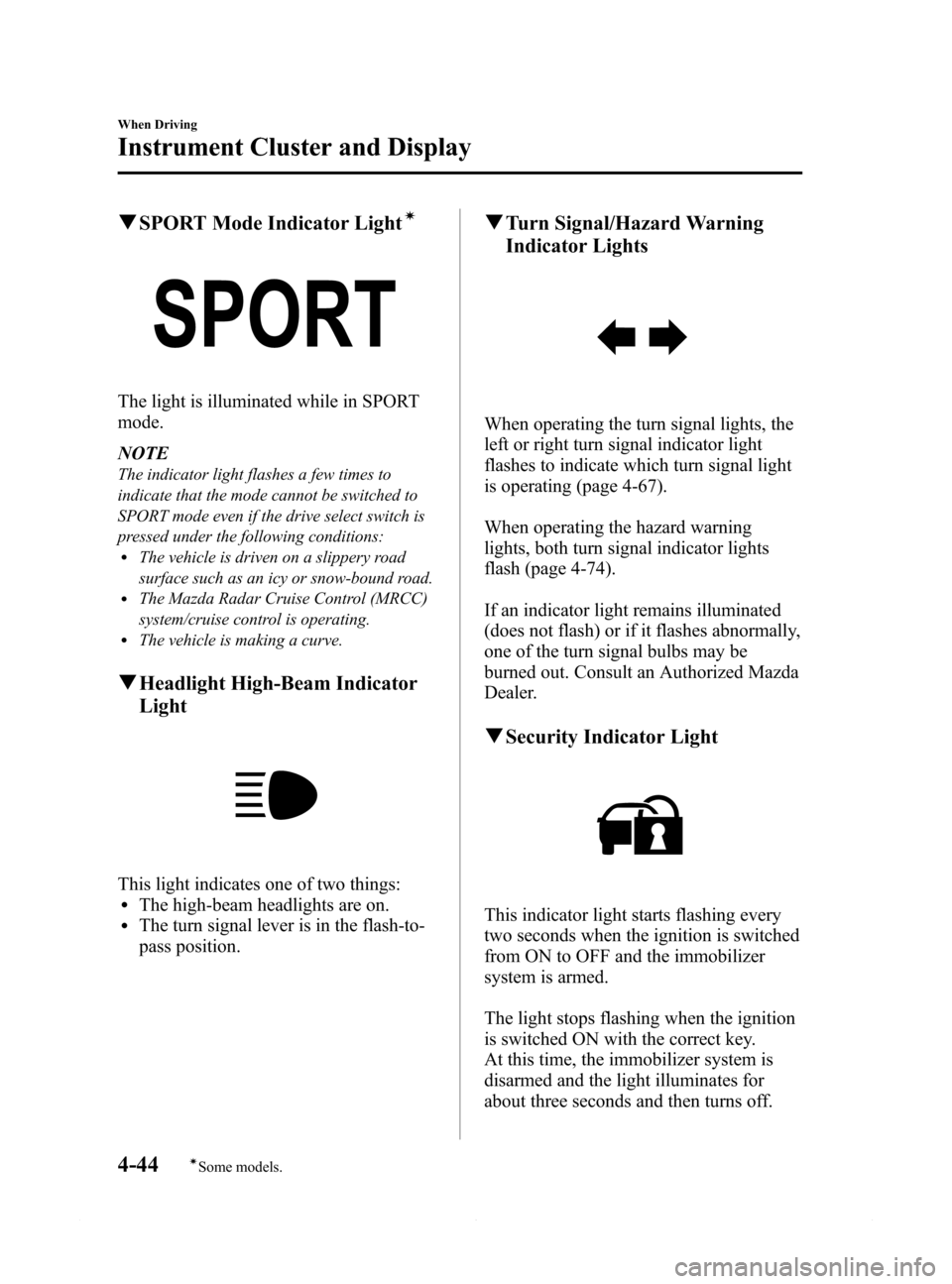
qSPORT Mode Indicator Lightí
The light is illuminated while in SPORT
mode.
NOTE
The indicator light flashes a few times to
indicate that the mode cannot be switched to
SPORT mode even if the drive select switch is
pressed under the following conditions:
lThe vehicle is driven on a slippery road
surface such as an icy or snow-bound road.
lThe Mazda Radar Cruise Control (MRCC)
system/cruise control is operating.
lThe vehicle is making a curve.
qHeadlight High-Beam Indicator
Light
This light indicates one of two things:lThe high-beam headlights are on.lThe turn signal lever is in the flash-to-
pass position.
qTurn Signal/Hazard Warning
Indicator Lights
When operating the turn signal lights, the
left or right turn signal indicator light
flashes to indicate which turn signal light
is operating (page 4-67).
When operating the hazard warning
lights, both turn signal indicator lights
flash (page 4-74).
If an indicator light remains illuminated
(does not flash) or if it flashes abnormally,
one of the turn signal bulbs may be
burned out. Consult an Authorized Mazda
Dealer.
qSecurity Indicator Light
This indicator light starts flashing every
two seconds when the ignition is switched
from ON to OFF and the immobilizer
system is armed.
The light stops flashing when the ignition
is switched ON with the correct key.
At this time, the immobilizer system is
disarmed and the light illuminates for
about three seconds and then turns off.
4-44
When Driving
íSome models.
Instrument Cluster and Display
Mazda6_8DQ8-EA-13L_Edition3 Page168
Friday, June 13 2014 6:21 PM
Form No.8DQ8-EA-13L
Page 185 of 576
Black plate (185,1)
Xenon fusion headlight bulbsí
The low-beam bulbs of the headlights have xenon fusion bulbs that produce a bright white
beam over a wide area.
WARNING
Do not replace the xenon fusion bulbs yourself
Replacing the xenon fusion bulbs yourself is dangerous. Because the xenon fusion
bulbs require high voltage, you could receive an electric shock if the bulbs are
handled incorrectly. Consult an Authorized Mazda Dealer when the replacement is
necessary.
NOTE
If the headlights flicker, or the brightness weakens, the bulb-life may be depleted and a replacement is
necessary. Consult an Authorized Mazda Dealer.
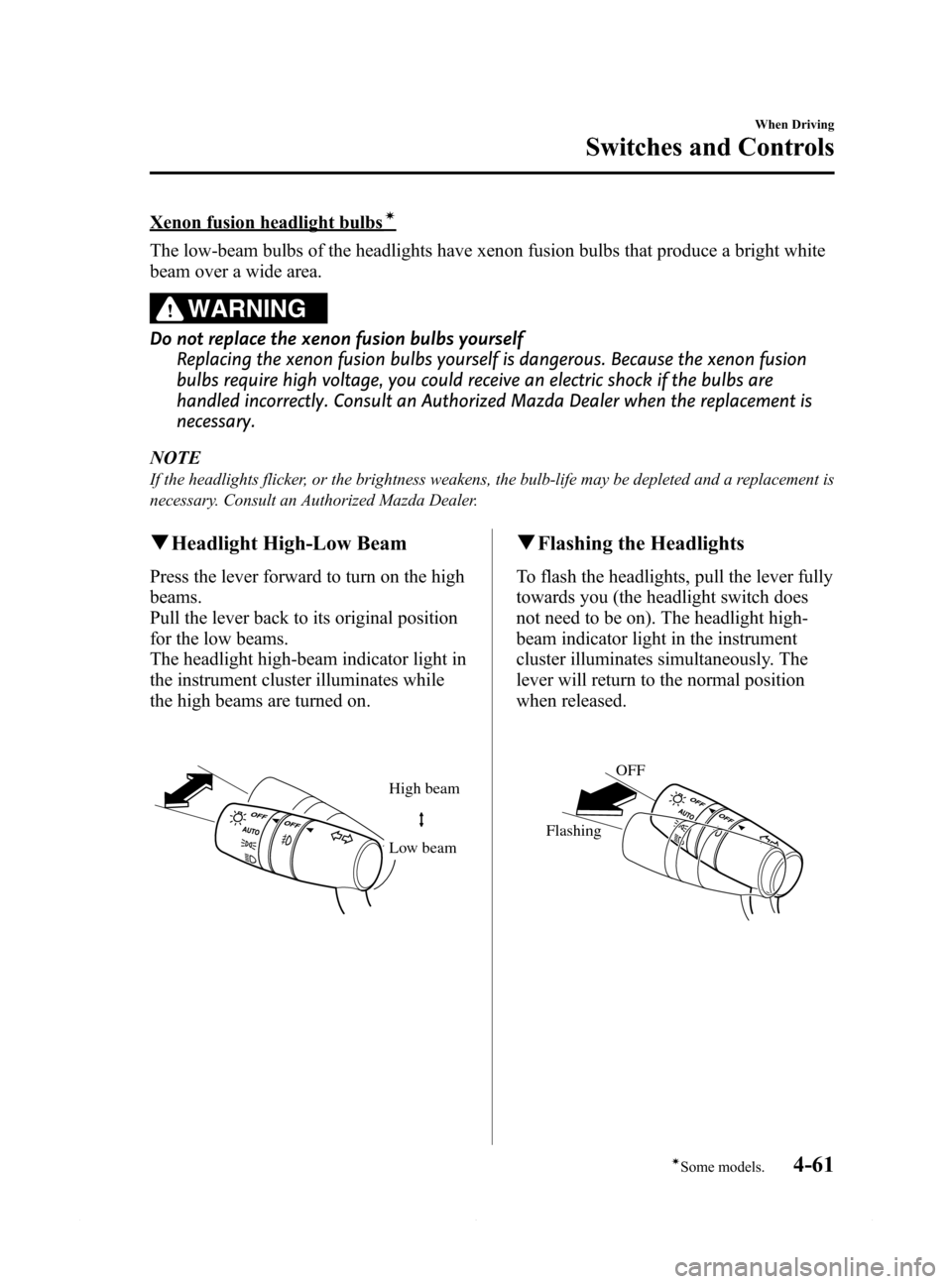
qHeadlight High-Low Beam
Press the lever forward to turn on the high
beams.
Pull the lever back to its original position
for the low beams.
The headlight high-beam indicator light in
the instrument cluster illuminates while
the high beams are turned on.
High beam
Low beam
qFlashing the Headlights
To flash the headlights, pull the lever fully
towards you (the headlight switch does
not need to be on). The headlight high-
beam indicator light in the instrument
cluster illuminates simultaneously. The
lever will return to the normal position
when released.
OFF
Flashing
When Driving
Switches and Controls
4-61íSome models. Mazda6_8DQ8-EA-13L_Edition3 Page185
Friday, June 13 2014 6:21 PM
Form No.8DQ8-EA-13L
Page 187 of 576

Black plate (187,1)
High Beam Control System (HBC)í
lThe High Beam Control System (HBC) determines the conditions in front of the vehicle
while driving at night using the Forward Sensing Camera (FSC) to automatically switch
the headlights between high and low beams.
While driving the vehicle at a speed of about 30 km/h (18 mph), the headlights are
switched to high beams when there are no vehicles in front of your vehicle or
approaching in the opposite direction.
The system switches the headlights to low beams during the following:
lWhen the system detects a vehicle or the headlights/lights of a vehicle approaching in
the opposite direction.
lWhen driving on roads lined with streetlamps or on roads in well-lit cities and towns.lWhen the vehicle is driven at less than about 20 km/h (12 mph).lFor vehicles with the type A instrument cluster, check the vehicle condition or have the
vehicle inspected at an Authorized Mazda Dealer according to the indication.
lA system malfunction or operation conditions are indicated by a warning.
Refer to Warning/Indicator Lights on page 4-23.
Forward Sensing
Camera (FSC) The recognition distance of the
Forward Sensing Camera (FSC)
varies according to the
surrounding conditions.
When Driving
Switches and Controls
4-63íSome models. Mazda6_8DQ8-EA-13L_Edition3 Page187
Friday, June 13 2014 6:21 PM
Form No.8DQ8-EA-13L
Page 188 of 576
Black plate (188,1)
CAUTION
ØDo not adjust the vehicle height, modify the headlight units, or remove the
camera. Otherwise, the system will not operate normally.
ØHeed the following cautions to assure correct operation of the High Beam Control
System (HBC).
ØDo not place objects on the dashboard which reflect light.
ØKeep the area of the windshield glass near the Forward Sensing Camera (FSC)
clean.
ØDo not apply accessories, stickers or film to the windshield near the Forward
Sensing Camera (FSC). If there are objects in front of the Forward Sensing
Camera (FSC) lens, even a transparent sticker, they will obstruct the lens and
cause the system to not operate correctly.
ØBefore performing repairs around the rearview mirror, consult an Authorized
Mazda Dealer.
ØAlways keep the windshield glass around the Forward Sensing Camera (FSC)
clean. If the windshield fogs, defog it using the front defroster.
ØWhen cleaning the windshield, do not allow glass cleaners or similar cleaning
fluids to get on the Forward Sensing Camera (FSC) lens. In addition, do not
touch the Forward Sensing Camera (FSC) lens.
ØConsult an Authorized Mazda Dealer regarding cleaning the interior side of the
windshield around the Forward Sensing Camera (FSC).
NOTE
Under the following conditions, the timing in which the system switches the headlights changes. If the
system does not switch the headlights appropriately, manually switch between high and low beams
according to the visibility, and road and traffic conditions.
lWhen there are sources of light in the area such as street lamps, illuminated signboards, and
traffic signals.
lWhen there are reflective objects in the surrounding area such as reflective plates and signs.lWhen visibility is reduced under rain, snow and foggy conditions.lWhen driving on roads with sharp curves or undulations.lWhen the headlights/rear lamps of vehicles in front of you or in the opposite lane are dim or not
illuminated.
lWhen there is sufficient darkness such as at dawn or dusk.lWhen the luggage compartment is loaded with heavy objects or the rear passenger seats are
occupied.
lWhen visibility is reduced due to a vehicle in front of you spraying water from its tires onto your
windshield.
4-64
When Driving
Switches and Controls
Mazda6_8DQ8-EA-13L_Edition3 Page188
Friday, June 13 2014 6:21 PM
Form No.8DQ8-EA-13L
Page 189 of 576

Black plate (189,1)
Forward Sensing Camera (FSC)
The High Beam Control System (HBC) camera, located near the rearview mirror, also
functions as the Forward Sensing Camera (FSC) for the Lane Departure Warning System
(LDWS).
Forward Sensing Camera (FSC)
CAUTION
Heed the following cautions to assure the correct operation of the Forward Sensing
Camera (FSC).
ØDo not remove the Forward Sensing Camera (FSC) cover.
ØConsult an Authorized Mazda Dealer regarding cleaning of the camera lens.
ØDo not hit or apply strong force to the Forward Sensing Camera (FSC) or the area
around it. If the Forward Sensing Camera (FSC) has been severely hit, do not use
the High Beam Control System (HBC) and consult an Authorized Mazda Dealer.
ØConsult an Authorized Mazda Dealer before performing repairs around the
Forward Sensing Camera (FSC).
ØThe Forward Sensing Camera (FSC) is installed to the windshield. Consult an
Authorized Mazda Dealer for windshield repair and replacement.
ØThe direction in which the Forward Sensing Camera (FSC) is pointed has been
finely adjusted. Do not change the installation position of the Forward Sensing
Camera (FSC) or remove it. Otherwise, it could result in damage or malfunction.
ØBe careful not to scratch the Forward Sensing Camera (FSC) lens or allow it to get
dirty. Also, do no take the camera apart. Otherwise, it could result in damage or
malfunction.
ØAlways keep the windshield glass around the camera clean by removing dirt or
fogging. Use the windshield defroster to remove fogging on the windshield.
When Driving
Switches and Controls
4-65
Mazda6_8DQ8-EA-13L_Edition3 Page189
Friday, June 13 2014 6:21 PM
Form No.8DQ8-EA-13L
Page 190 of 576

Black plate (190,1)
qTo Operate the System
The High Beam Control System (HBC)
operates to switch the headlights
automatically between high and low
beams after the ignition is switched ON
and the headlight switch is in the AUTO
and high beam position. At the same time,
the High Beam Control System (HBC)
indicator light (green) in the instrument
cluster illuminates.
Refer to Warning/Indicator Lights on page
4-23.
The High Beam Control System (HBC)
determines that it is nighttime based on
the brightness of the surrounding area.
NOTE
lWhen the vehicle speed is 30 km/h (18 mph)
or higher, the headlights automatically
switch to high beams when there are no
vehicles in front of your vehicle or
approaching in the opposite direction.
When the vehicle speed is less than about
20 km/h (12 mph), the High Beam Control
System (HBC) switches the headlights to
low beams.
lThe low beams may not switch to high
beams when cornering the vehicle.
lOperation of the High Beam Control
System (HBC) function can be
disabled.Refer to Personalization Features
on page 9-9.
qManual Switching
Switching to low beams
Shift the lever to the low beam position.
The High Beam Control System (HBC)
indicator light (Green) turns off.
Switching to high beams
Turn the headlight switch to the
position.
The High Beam Control System (HBC)
indicator light (Green) turns off and the
is illuminated.
4-66
When Driving
Switches and Controls
Mazda6_8DQ8-EA-13L_Edition3 Page190
Friday, June 13 2014 6:21 PM
Form No.8DQ8-EA-13L
Page 213 of 576

Black plate (213,1)
NOTElThe Smart City Brake Support (SCBS) system will not operate if the driver is deliberately
performing driving operations (accelerator pedal and steering wheel).
lThe Smart City Brake Support (SCBS) system will operate under the following conditions.lThe engine is running.lThe display in the instrument cluster does not indicate that the system requires inspection or it
cannot be used.
lThe vehicle speed is between about 4 to 30 km/h (2 to 18 mph).lThe Smart City Brake Support (SCBS) system is not turned off.lThe DSC operation is not turned off using the DSC OFF switch.lThe DSC is not malfunctioning.lThe Smart City Brake Support (SCBS) detects a vehicle ahead by emitting a near-infrared laser
beam and receiving the beam reflected off the reflector of the vehicle ahead, and then using it for
the measurement. Consequently, the Smart City Brake Support (SCBS) may not operate under the
following conditions:
lReflection of the laser is poor due to the shape of the vehicle ahead.lThe vehicle ahead is significantly dirty.lUnder bad weather condition, such as rain, fog and snow.lThe window washer is being used or the windshield wipers are not used when it's raining.lThe windshield is dirty.lThe steering wheel is turned completely left or right, or the vehicle is accelerated rapidly and
comes close to the vehicle ahead.
lTrucks with low loading platforms and vehicles with an extremely low or high profile.lVehicles with certain shapes such as a vehicle carrier.lUnder the following conditions, the Smart City Brake Support (SCBS) system may not operate
normally.
lHeavy luggage is loaded in the luggage compartment or on the rear seat.lIf there is the possibility of partial contact with a vehicle ahead.lWhen driving on continuously curving roads, and entering and exiting exits.lElongated luggage or cargo is loaded onto installed roof rails and covers the laser sensor.lExhaust gas from the vehicle in front, sand, snow, and water vapor rising from manholes and
grating, and water splashed into the air.
lWhen towing a malfunctioning vehicle.lIn the following cases, the laser sensor may inadvertently determine that there is a vehicle ahead
and the Smart City Brake Support (SCBS) system may operate.
lObjects on the road at the entrance to a curve.lVehicles passing in the opposite lane while making a curve.lMetal objects, bumps, or protruding objects on the road.lWhen passing through a toll gate.lWhen passing under a vinyl curtain or flag.lPlastic objects such as pylons.lTwo-wheeled vehicles, pedestrians, animals or standing trees.lVehicle is driven with some of the tires having significant wear.
When Driving
Brake
4-89
Mazda6_8DQ8-EA-13L_Edition3 Page213
Friday, June 13 2014 6:21 PM
Form No.8DQ8-EA-13L