service MAZDA MODEL 6 2015 Owners Manual (in English)
[x] Cancel search | Manufacturer: MAZDA, Model Year: 2015, Model line: MODEL 6, Model: MAZDA MODEL 6 2015Pages: 576
Page 3 of 576
Black plate (3,1)
Thank you for choosing a Mazda. We at Mazda design and build vehicles with complete
customer satisfaction in mind.
To help ensure enjoyable and trouble-free operation of your Mazda, read this manual
carefully and follow its recommendations.
An Authorized Mazda Dealer knows your vehicle best. So when maintenance or service is
necessary, that's the place to go.
Our nationwide network of Mazda professionals is dedicated to providing you with the best
possible service.
We assure you that all of us at Mazda have an ongoing interest in your motoring pleasure
and in your full satisfaction with your Mazda product.
Mazda Motor Corporation
HIROSHIMA, JAPAN
Important Notes About This Manual
Keep this manual in the glove box as a handy reference for the safe and enjoyable use of your Mazda. Should you
resell the vehicle, leave this manual with it for the next owner.
All specifications and descriptions are accurate at the time of printing. Because improvement is a constant goal at
Mazda, we reserve the right to make changes in specifications at any time without notice and without obligation.
Air Conditioning and the Environment
Your Mazda's genuine air conditioner is filled with HFC134a (R134a), a refrigerant that has been found not to
damage the earth's ozone layer. If the air conditioner does not operate properly, consult an Authorized Mazda
Dealer.
Perchlorate
Certain components of this vehicle such as [air bag modules, seat belt pretensioners, lithium batteries, ···] may contain Perchlorate Material- - Special handling
may apply for service or vehicle end of life disposal. See
www.dtsc.ca.gov/hazardouswaste/perchlorate.
Please be aware that this manual applies to all models, equipment and options. As a result, you may find
some explanations for equipment not installed on your vehicle.
©2013 Mazda Motor Corporation
Printed in Japan June 2014 (Print3)
A Word to Mazda Owners
Mazda6_8DQ8-EA-13L_Edition3 Page3
Friday, June 13 2014 6:20 PM
Form No.8DQ8-EA-13L
Page 20 of 576
Black plate (20,1)
NOTElIf the ignition is switched off while the seat
warmer is operating (High, Mid or Low)
and then switched ON again, the seat
warmer will automatically operate at the
temperature set before switching off the
ignition.
lUse the seat warmer when the engine is
running. Leaving the seat warmer on for
long periods with the engine not running
could cause the battery power to be
depleted.
lThe temperature of the seat warmer cannot
be adjusted beyond High, Mid and Low
because the seat warmer is controlled by a
thermostat.
qSeat Position Memory (Driver's
seat)í
The seat position memory function allows
you to program the driver's seat to a
desired seat position and to call up a
programmed position with the simple
touch of a button.
CAUTION
Do not place fingers or hands around
the bottom of the seat while the seat
memory function is operating. The
seat moves automatically while the
seat memory function is operating
and fingers or hands could get
pinched and injured.
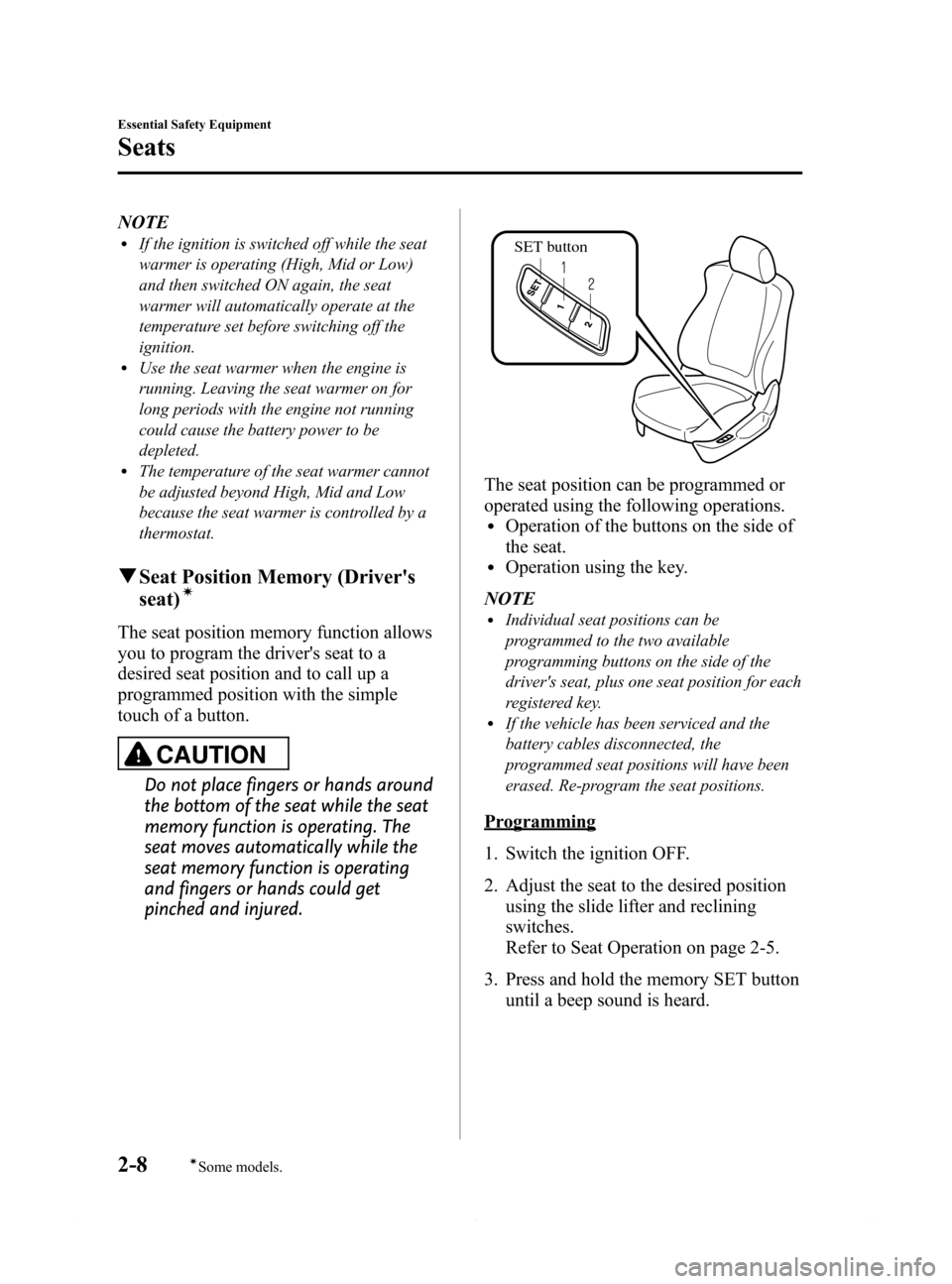
SET button
The seat position can be programmed or
operated using the following operations.
lOperation of the buttons on the side of
the seat.
lOperation using the key.
NOTE
lIndividual seat positions can be
programmed to the two available
programming buttons on the side of the
driver's seat, plus one seat position for each
registered key.
lIf the vehicle has been serviced and the
battery cables disconnected, the
programmed seat positions will have been
erased. Re-program the seat positions.
Programming
1. Switch the ignition OFF.
2. Adjust the seat to the desired position
using the slide lifter and reclining
switches.
Refer to Seat Operation on page 2-5.
3. Press and hold the memory SET button
until a beep sound is heard.
2-8
Essential Safety Equipment
íSome models.
Seats
Mazda6_8DQ8-EA-13L_Edition3 Page20
Friday, June 13 2014 6:20 PM
Form No.8DQ8-EA-13L
Page 140 of 576
Black plate (140,1)
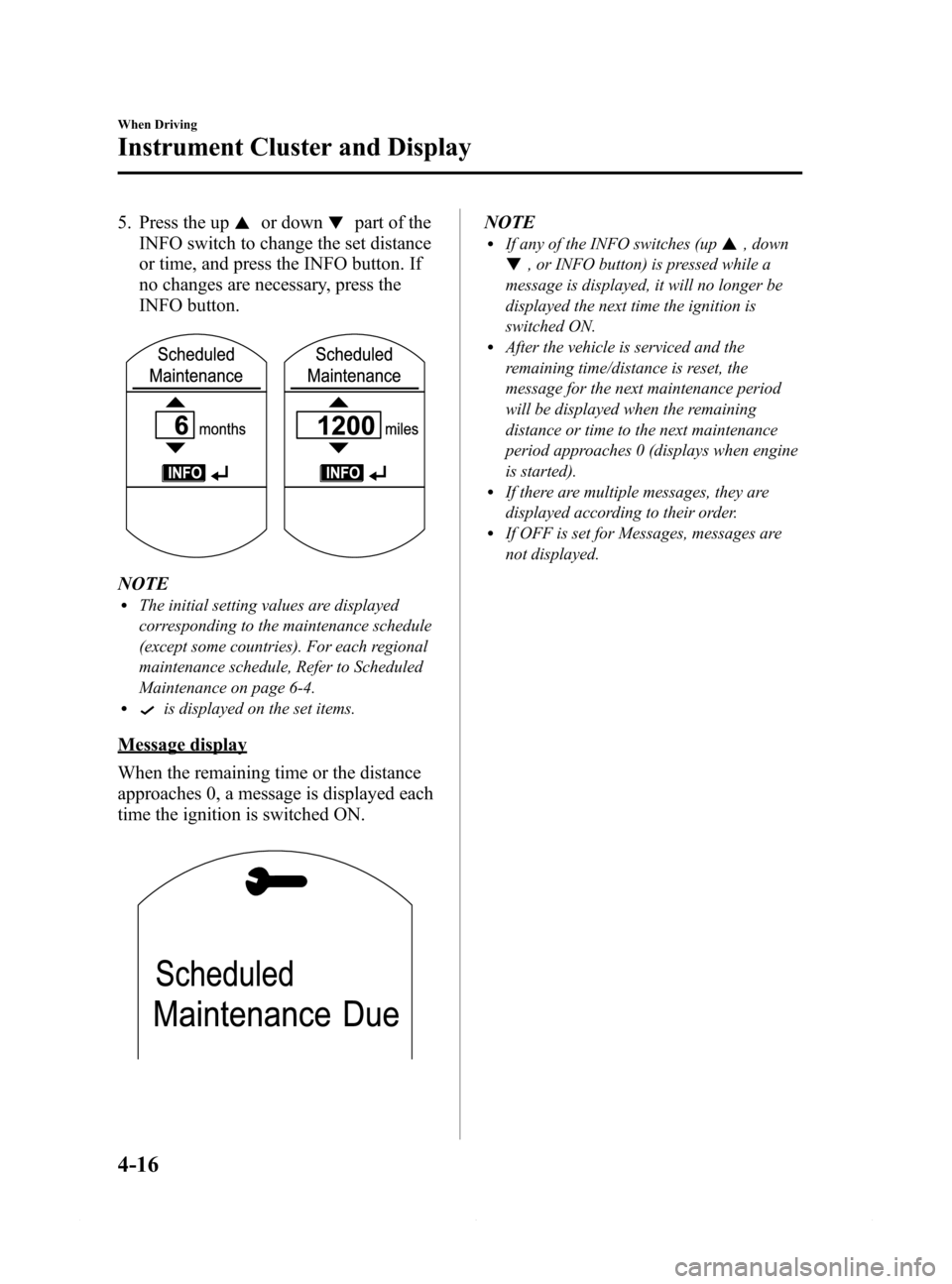
5. Press the upor downpart of the
INFO switch to change the set distance
or time, and press the INFO button. If
no changes are necessary, press the
INFO button.
NOTElThe initial setting values are displayed
corresponding to the maintenance schedule
(except some countries). For each regional
maintenance schedule, Refer to Scheduled
Maintenance on page 6-4.
lis displayed on the set items.
Message display
When the remaining time or the distance
approaches 0, a message is displayed each
time the ignition is switched ON.
NOTElIf any of the INFO switches (up, down
, or INFO button) is pressed while a
message is displayed, it will no longer be
displayed the next time the ignition is
switched ON.
lAfter the vehicle is serviced and the
remaining time/distance is reset, the
message for the next maintenance period
will be displayed when the remaining
distance or time to the next maintenance
period approaches 0 (displays when engine
is started).
lIf there are multiple messages, they are
displayed according to their order.
lIf OFF is set for Messages, messages are
not displayed.
4-16
When Driving
Instrument Cluster and Display
Mazda6_8DQ8-EA-13L_Edition3 Page140
Friday, June 13 2014 6:21 PM
Form No.8DQ8-EA-13L
Page 227 of 576

Black plate (227,1)
WARNING
Do not rely completely on the Mazda Radar Cruise Control (MRCC) system and
always drive carefully:
The Mazda Radar Cruise Control (MRCC) system is designed to reduce load on the
driver, and although it maintains a constant vehicle speed, or specifically, it
maintains a constant distance between your vehicle and the detected vehicle ahead
according to the vehicle speed, the system has detection limitations depending on the
type of vehicle ahead and its conditions, the weather conditions, and the road
conditions. Additionally, the system may be unable to decelerate sufficiently to avoid
hitting the vehicle ahead if the vehicle ahead applies the brakes suddenly or another
vehicle cuts into the driving lane, which could result in an accident. Always verify the
safety of the surrounding area and depress the brake pedal or accelerator pedal
while keeping a safe distance from vehicles ahead or on-coming vehicles.
Do not use the Mazda Radar Cruise Control (MRCC) system in the following locations.
Otherwise, it could lead to an accident:
ØRoads with sharp curves and where vehicle traffic is heavy and there is insufficient
space between vehicles. Roads where frequent and repetitive acceleration and
deceleration occur (Driving under these conditions using the Mazda Radar Cruise
Control (MRCC) system is not possible).
ØWhen entering and exiting interchanges, service areas, and parking areas of
highways (If you exit a highway while headway control is in use, the vehicle
ahead will no longer be tracked and your vehicle may accelerate to the set speed).
ØSlippery roads such as ice or snow-bound roads (The tires could spin causing you
to lose vehicle control).
ØLong descending slopes (to maintain distance between vehicles, the system
automatically and continuously applies the brakes which could result in the loss
of brake power).
For the purposes of safety, switch the Mazda Radar Cruise Control (MRCC) system off
when it is not being used.
CAUTION
If the vehicle is towed or you are towing something, switch the Mazda Radar Cruise
Control (MRCC) system off to prevent a miss-operation.
When Driving
Mazda Radar Cruise Control (MRCC)
4-103
Mazda6_8DQ8-EA-13L_Edition3 Page227
Friday, June 13 2014 6:21 PM
Form No.8DQ8-EA-13L
Page 305 of 576

Black plate (305,1)
NOTE
The number of characters which can be
displayed is restricted.
Message display
If“CHECK CD”is displayed, it means
that there is some CD malfunction. Check
the CD for damage, dirt, or smudges, and
then properly reinsert. If the message
appears again, take the unit to an
Authorized Mazda Dealer for service.
qHow to use Auxiliary jack/USB port
Audio can be heard from the vehicle's
speakers by connecting a commercially-
available portable audio unit to the
auxiliary jack.
Use a commercially-available, non-
impedance (3.5
) stereo mini plug cable.
Contact an Authorized Mazda Dealer for
details.
In addition, audio can be played from the
vehicle audio device by connecting a USB
device or an iPod to the USB port.
Refer to AUX/USB/iPod mode on page
5-60.
qError Indications
If you see an error indication on the
display, find the cause in the chart. If you
cannot clear the error indication, take the
vehicle to an Authorized Mazda Dealer.
Indication Cause Solution
CHECK CD
CD is
inserted
upside
downInsert the CD properly. If
the error indication
continues to display,
consult an Authorized
Mazda Dealer.
CD is
defectiveInsert another CD
properly. If the error
indication continues to
display, consult an
Authorized Mazda
Dealer.
Interior Features
Audio System
5-33
Mazda6_8DQ8-EA-13L_Edition3 Page305
Friday, June 13 2014 6:22 PM
Form No.8DQ8-EA-13L
Page 316 of 576

Black plate (316,1)
qOperating the Satellite Radioí
Seek tuning buttons
Manual tuning dial Audio button
What is satellite radio?
With over 130 channels, SIRIUS Satellite
Radio brings you more of what you love.
Get channels and channels of commercial-
free music, plus sports, news, talk,
entertainment and more.
Commercial-free music from nearly
every genre―rock to pop, hip-hop to
country, jazz, classical and more. Plus live
performances and artist-dedicated
channels.
Live sports Play-by-Play & Expert Talk
―every NFL game, every NASCAR
®
race, 24/7 sports talk, college sports and
more.
Exclusive entertainment, comedy and
talk―The biggest names, compelling
talk, hilarious comedy.
World-class news plus local traffic and
weather.
Sign up for SIRIUS Satellite Radio today!NOTE
Exclusive to Sirius. If your vehicle is equipped
with Sirius, your new Mazda includes a free
introductory subscription with a limited term
trial offer. Call 888-539-7474 to activate. For
more information, visit www.siriusxm.com.
Satellite radio is only available in regions
providing satellite radio service (some areas of
the United States and Canada). Contact
Authorized Mazda Dealer for details.
How to Activate Satellite Radio
You must call SIRIUS to activate your
service. Activation is free and takes only a
few minutes.
SIRIUS service uses an ID code to
identify your radio. This code is needed to
activate SIRIUS service, and report any
problems.
Please have the following information
ready:
lSIRIUS ID (12-digit electronic serial
no, or ESN*1)lValid credit card information (may not
be required at initial sign-up)
*1 ESN: Electronic Serial Number
5-44
Interior Features
íSome models.
Audio System
Mazda6_8DQ8-EA-13L_Edition3 Page316
Friday, June 13 2014 6:22 PM
Form No.8DQ8-EA-13L
Page 327 of 576

Black plate (327,1)
Display scroll
If a whole title cannot be displayed at one
time, touch the
on-screen button on
the right side of the title. When the last
character is displayed, touch the
on-
screen button to display the first character
of the title.
NOTE
lTheon-screen button is displayed only
if a whole title cannot be displayed at one
time.
lThe information viewable in the display is
only CD information (such as artist name,
song title) which has been recorded to the
CD.
lThis unit cannot display some characters.
Characters which cannot be displayed are
indicated by an asterisk (
).lThe number of characters which can be
displayed is restricted.
Message Display
If“CD Error”is displayed, it means that
there is some CD malfunction. Check the
CD for damage, dirt, or smudges, and
then properly reinsert. If the message
appears again, take the unit to an
Authorized Mazda Dealer for service.
qHow to use Auxiliary jack/USB port
Audio can be heard from the vehicle's
speakers by connecting a commercially-
available portable audio unit to the
auxiliary jack.
Use a commercially-available, non-
impedance (3.5
) stereo mini plug cable.
Contact an Authorized Mazda Dealer for
details.
In addition, audio can be played from the
vehicle audio device by connecting a USB
device or an iPod to the USB port.
Refer to AUX/USB/iPod mode on page
5-60.
qError Indications
If you see an error indication on the
display, find the cause in the chart. If you
cannot clear the error indication, take the
vehicle to an Authorized Mazda Dealer.
IndicationCause Solution
CD
ErrorCD is inserted
upside downInsert the CD
properly. If the error
indication continues
to display, consult an
Authorized Mazda
Dealer.
CD is defectiveInsert another CD
properly. If the error
indication continues
to display, consult an
Authorized Mazda
Dealer.
qSetup
You can customize settings in the setup
display as follows:
Display
Refer to Power/Volume/Display/Sound
Controls on page 5-36.
Interior Features
Audio System
5-55
Mazda6_8DQ8-EA-13L_Edition3 Page327
Friday, June 13 2014 6:22 PM
Form No.8DQ8-EA-13L
Page 362 of 576

Black plate (362,1)
qCall interrupt
A call can be interrupted to receive an
incoming call from a third party.
To switch to a new incoming call.
Touch the
on-screen button or press
the pick-up button on the steering wheel.
NOTE
lAfter receiving a new incoming call, the
previous call is placed on hold.
lTouch theon-screen button or press
the hang-up button on the steering wheel to
refuse a call.
Switching between calls
Touch the
on-screen button or
press the pick-up button on the steering
wheel.
Three-way call function
Touch the
on-screen button.
qDTMF (Dual Tone Multi-
Frequency Signal) Transmission
This function is used when transmitting
DTMF via the Numerical Keypad. The
receiver of a DTMF transmission is
generally a home telephone answering
machine or a company's automated
guidance call center.
1. Touch the
on-screen button
after connecting to a home device or
service to display the tone transmission
screen.
2. Input the number using a numerical
keypad.
NOTE
If the DTMF code has two or more digits or
symbols, each one must be transmitted
individually.
qReceiving and Replying to
Messages (only MAP 1.0)
SMS (Short Message Service) messages,
MMS (Multimedia Messaging Service)
messages, and E-mail received by
connected devices can be downloaded,
displayed, and played (read by the
system).
Additionally, replies can also be made to
calls and messages in the received
messages.
Downloading messages
Up to 15 new messages can be
downloaded and displayed from a
connected device.
1. Touch the
on-screen tab.
2. Touch the
on-screen button.
NOTE
lMessages that have not been read are
downloaded first.
lAttached data is not downloaded.lMessages up to 160-bytes can be
downloaded.
lA message list is created for each device.lIf there are unread messages, the receive
icon is displayed.
lIf the connected device does not correspond
to MAP 1.0, the AT command is used to
download. The downloaded message
indicates that it is already read.
lDownloading using the AT command may
not function depending on the connected
device.
Receiving messages
When a device receives a message, a
message received notification is
displayed.
When the
on-screen button
is touched, the message is downloaded.
5-90
Interior Features
Bluetooth®
Mazda6_8DQ8-EA-13L_Edition3 Page362
Friday, June 13 2014 6:22 PM
Form No.8DQ8-EA-13L
Page 373 of 576

Black plate (373,1)
qGracenote Database
The Gracenote media database is used to improve voice recognition of artist and album
names with the Mazda Hands Free system. To make best use of the voice recognition,
install the most recent database.
CAUTION
For information related to the most recent Gracenote database which can be used
and how to install it, go to the Mazda Hands Free Website:
http://www.mazdahandsfree.com
Introduction
Music recognition technology and related data are provided by Gracenote
®. Gracenote is
the industry standard in music recognition technology and related content delivery. For
more information visit www.gracenote.com.
CD and music-related data from Gracenote, Inc., copyright © 2000 to present Gracenote.
Gracenote Software, copyright © 2000 to present Gracenote. One or more patents owned
by Gracenote apply to this product and service. See the Gracenote website for a non-
exhaustive list of applicable Gracenote patents. Gracenote, CDDB, MusicID, MediaVOCS,
the Gracenote logo and logotype, and the“Powered by Gracenote”logo are either
registered trademarks or trademarks of Gracenote in the United States and/or other
countries.
Interior Features
Bluetooth®
5-101
Mazda6_8DQ8-EA-13L_Edition3 Page373
Friday, June 13 2014 6:22 PM
Form No.8DQ8-EA-13L
Page 374 of 576
Black plate (374,1)
Gracenote®End User License Agreement
This application or device contains software from Gracenote, Inc. of Emeryville, California
(“Gracenote”). The software from Gracenote (the“Gracenote Software”) enables this
application to perform disc and/or file identification and obtain music-related information,
including name, artist, track, and title information (“Gracenote Data”) from online servers
or embedded databases (collectively,“Gracenote Servers”) and to perform other functions.
You may use Gracenote Data only by means of the intended End-User functions of this
application or device.
You agree that you will use Gracenote Data, the Gracenote Software, and Gracenote
Servers for your own personal non-commercial use only. You agree not to assign, copy,
transfer or transmit the Gracenote Software or any Gracenote Data to any third party. YOU
AGREE NOT TO USE OR EXPLOIT GRACENOTE DATA, THE GRACENOTE
SOFTWARE, OR GRACENOTE SERVERS, EXCEPT AS EXPRESSLY PERMITTED
HEREIN.
You agree that your non-exclusive license to use the Gracenote Data, the Gracenote
Software, and Gracenote Servers will terminate if you violate these restrictions. If your
license terminates, you agree to cease any and all use of the Gracenote Data, the Gracenote
Software, and Gracenote Servers. Gracenote reserves all rights in Gracenote Data, the
Gracenote Software, and the Gracenote Servers, including all ownership rights. Under no
circumstances will Gracenote become liable for any payment to you for any information
that you provide. You agree that Gracenote, Inc. may enforce its rights under this
Agreement against you directly in its own name.
The Gracenote service uses a unique identifier to track queries for statistical purposes. The
purpose of a randomly assigned numeric identifier is to allow the Gracenote service to
count queries without knowing anything about who you are. For more information, see the
web page for the Gracenote Privacy Policy for the Gracenote service.
The Gracenote Software and each item of Gracenote Data are licensed to you“AS IS.”
Gracenote makes no representations or warranties, express or implied, regarding the
accuracy of any Gracenote Data from in the Gracenote Servers. Gracenote reserves the
right to delete data from the Gracenote Servers or to change data categories for any cause
that Gracenote deems sufficient. No warranty is made that the Gracenote Software or
Gracenote Servers are error-free or that functioning of Gracenote Software or Gracenote
Servers will be uninterrupted. Gracenote is not obligated to provide you with new
enhanced or additional data types or categories that Gracenote may provide in the future
and is free to discontinue its services at any time.
GRACENOTE DISCLAIMS ALL WARRANTIES EXPRESS OR IMPLIED,
INCLUDING, BUT NOT LIMITED TO, IMPLIED WARRANTIES OF
MERCHANTABILITY, FITNESS FOR A PARTICULAR PURPOSE, TITLE, AND
NON-INFRINGEMENT. GRACENOTE DOES NOT WARRANT THE RESULTS THAT
WILL BE OBTAINED BY YOUR USE OF THE GRACENOTE SOFTWARE OR ANY
GRACENOTE SERVER. IN NO CASE WILL GRACENOTE BE LIABLE FOR ANY
CONSEQUENTIAL OR INCIDENTAL DAMAGES OR FOR ANY LOST PROFITS OR
LOST REVENUES.
© 2000 to present. Gracenote, Inc.
5-102
Interior Features
Bluetooth®
Mazda6_8DQ8-EA-13L_Edition3 Page374
Friday, June 13 2014 6:22 PM
Form No.8DQ8-EA-13L