tire pressure MAZDA MODEL 6 2015 Owners Manual (in English)
[x] Cancel search | Manufacturer: MAZDA, Model Year: 2015, Model line: MODEL 6, Model: MAZDA MODEL 6 2015Pages: 576
Page 8 of 576
Black plate (8,1)
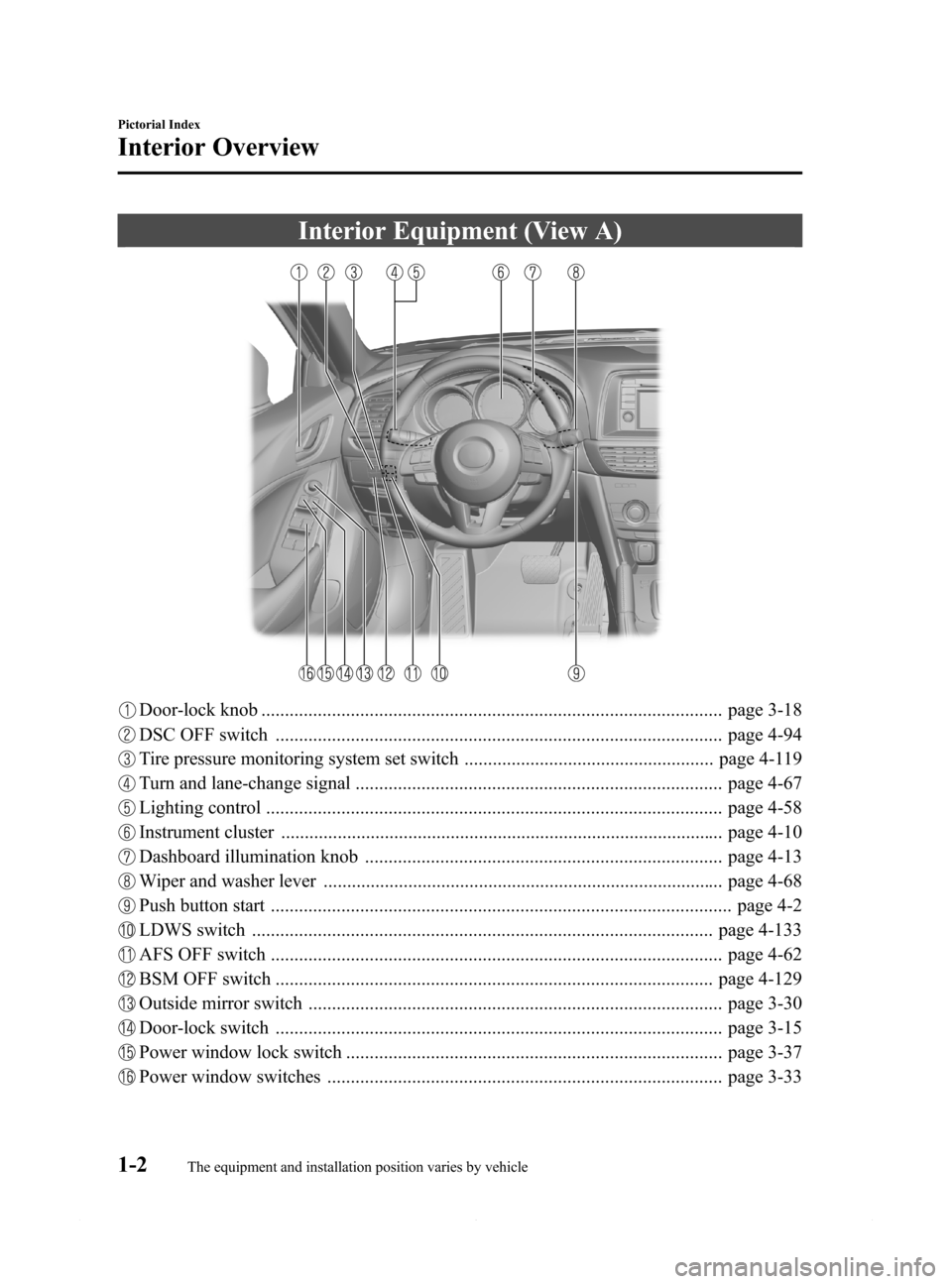
Interior Equipment (View A)
Door-lock knob .................................................................................................. page 3-18
DSC OFF switch ............................................................................................... page 4-94
Tire pressure monitoring system set switch ..................................................... page 4-119
Turn and lane-change signal .............................................................................. page 4-67
Lighting control ................................................................................................. page 4-58
Instrument cluster .............................................................................................. page 4-10
Dashboard illumination knob ............................................................................ page 4-13
Wiper and washer lever ..................................................................................... page 4-68
Push button start .................................................................................................. page 4-2
LDWS switch .................................................................................................. page 4-133
AFS OFF switch ................................................................................................ page 4-62
BSM OFF switch ............................................................................................. page 4-129
Outside mirror switch ........................................................................................ page 3-30
Door-lock switch ............................................................................................... page 3-15
Power window lock switch ................................................................................ page 3-37
Power window switches .................................................................................... page 3-33
1-2
Pictorial Index
The equipment and installation position varies by vehicle
Interior Overview
Mazda6_8DQ8-EA-13L_Edition3 Page8
Friday, June 13 2014 6:20 PM
Form No.8DQ8-EA-13L
Page 120 of 576
Black plate (120,1)
lBraking performance can be adversely
affected if snow or ice adheres to the
brake components. If this situation
occurs, drive the vehicle slowly,
releasing the accelerator pedal and
lightly applying the brakes several
times until the brake performance
returns to normal.
qSnow Tires
Use snow tires on all four wheels
Do not go faster than 120 km/h (75 mph)
while driving with snow tires. Inflate
snow tires 30 kPa (0.3 kgf/cm
2, 4.3 psi)
more than recommended on the tire
pressure label (driver's door frame), but
never more than the maximum cold-tire
pressure shown on the tires.
Your vehicle is originally equipped with
all season radials designed to be used all
year around. In some extreme climates
you may find it necessary to replace them
with snow tires during the winter months
to further improve traction on snow and
ice covered roads.
WARNING
Use only the same size and type tires
(snow, radial, or non-radial) on all four
wheels:
Using tires different in size or type is
dangerous. Your vehicle's handling
could be greatly affected and result
in an accident.
CAUTION
Check local regulations before using
studded tires.
qTire Chains
Check local regulations before using tire
chains.
CAUTION
ØChains may affect handling.
ØDo not go faster than 50 km/h (30
mph) or the chain manufacturer's
recommended limit, whichever is
lower.
ØDrive carefully and avoid bumps,
holes, and sharp turns.
ØAvoid locked-wheel braking.
ØDo not use chains on a temporary
spare tire; it may result in damage
to the vehicle and to the tire.
ØDo not use chains on roads that
are free of snow or ice. The tires
and chains could be damaged.
ØChains may scratch or chip
aluminum wheels.
NOTE
The tire pressure monitoring system may not
function correctly when using tire chains.
Install the chains on the front tires only.
Do not use chains on the rear tires.
Please consult an Authorized Mazda
Dealer.
Installing the chains
1. Secure the chains on the front tires as
tightly as possible.
Always follow the chain
manufacturer's instructions.
2. Retighten the chains after driving 1/2
―1 km (1/4―1/2 mile).
3-48
Before Driving
Driving Tips
Mazda6_8DQ8-EA-13L_Edition3 Page120
Friday, June 13 2014 6:21 PM
Form No.8DQ8-EA-13L
Page 125 of 576

Black plate (125,1)
4When Driving
Information concerning safe driving and stopping.
Start/Stop Engine .................................... 4-2
Ignition Switch .................................... 4-2
Starting the Engine .............................. 4-3
Turning the Engine Off ....................... 4-8
Instrument Cluster and Display ........... 4-10
Meters and Gauges ............................ 4-10
Warning/Indicator Lights .................. 4-23
Transaxle ................................................ 4-47
Manual Transaxle Operation ............. 4-47
Automatic Transaxle Controls .......... 4-49
Switches and Controls ........................... 4-58
Lighting Control ............................... 4-58
High Beam Control System (HBC)í... 4-63
Fog Lightsí...................................... 4-67
Turn and Lane-Change Signals ......... 4-67
Windshield Wipers and Washer ........ 4-68
Rear Window Defogger .................... 4-72
Horn .................................................. 4-73
Hazard Warning Flasher .................... 4-74
HomeLink Wireless Control
System
í............................................ 4-74
Radar Sensor .......................................... 4-78
Radar Sensor
í.................................. 4-78
Brake ...................................................... 4-81
Brake System .................................... 4-81
Hill Launch Assist (HLA) ................. 4-84
Smart City Brake Support (SCBS)í... 4-86
ABS/TCS/DSC ....................................... 4-92
Antilock Brake System (ABS) .......... 4-92
Traction Control System (TCS) ........ 4-93
Dynamic Stability Control (DSC) ..... 4-94i-ELOOP ................................................. 4-96
i-ELOOP
í........................................ 4-96
Drive Selection ....................................... 4-99
Drive Selection
í............................... 4-99
Power Steering ..................................... 4-101
Power Steering ................................ 4-101
Mazda Radar Cruise Control (MRCC)... 4-102
Mazda Radar Cruise Control (MRCC)í... 4-102
Cruise Control ...................................... 4-111
Cruise Control
í.............................. 4-111
Forward Obstruction Warning (FOW)... 4-114
Forward Obstruction Warning (FOW)í... 4-114
Tire Pressure Monitoring System ....... 4-117
Tire Pressure Monitoring System .... 4-117
Blind Spot Monitoring (BSM)
System .................................................. 4-121
Blind Spot Monitoring (BSM)
System
í.......................................... 4-121
Lane Departure Warning System
(LDWS) ................................................ 4-130
Lane Departure Warning System
(LDWS)
í....................................... 4-130
Rear View Monitor .............................. 4-137
Rear View Monitor
í...................... 4-137
4-1íSome models.
Mazda6_8DQ8-EA-13L_Edition3 Page125
Friday, June 13 2014 6:21 PM
Form No.8DQ8-EA-13L
Page 139 of 576
Black plate (139,1)
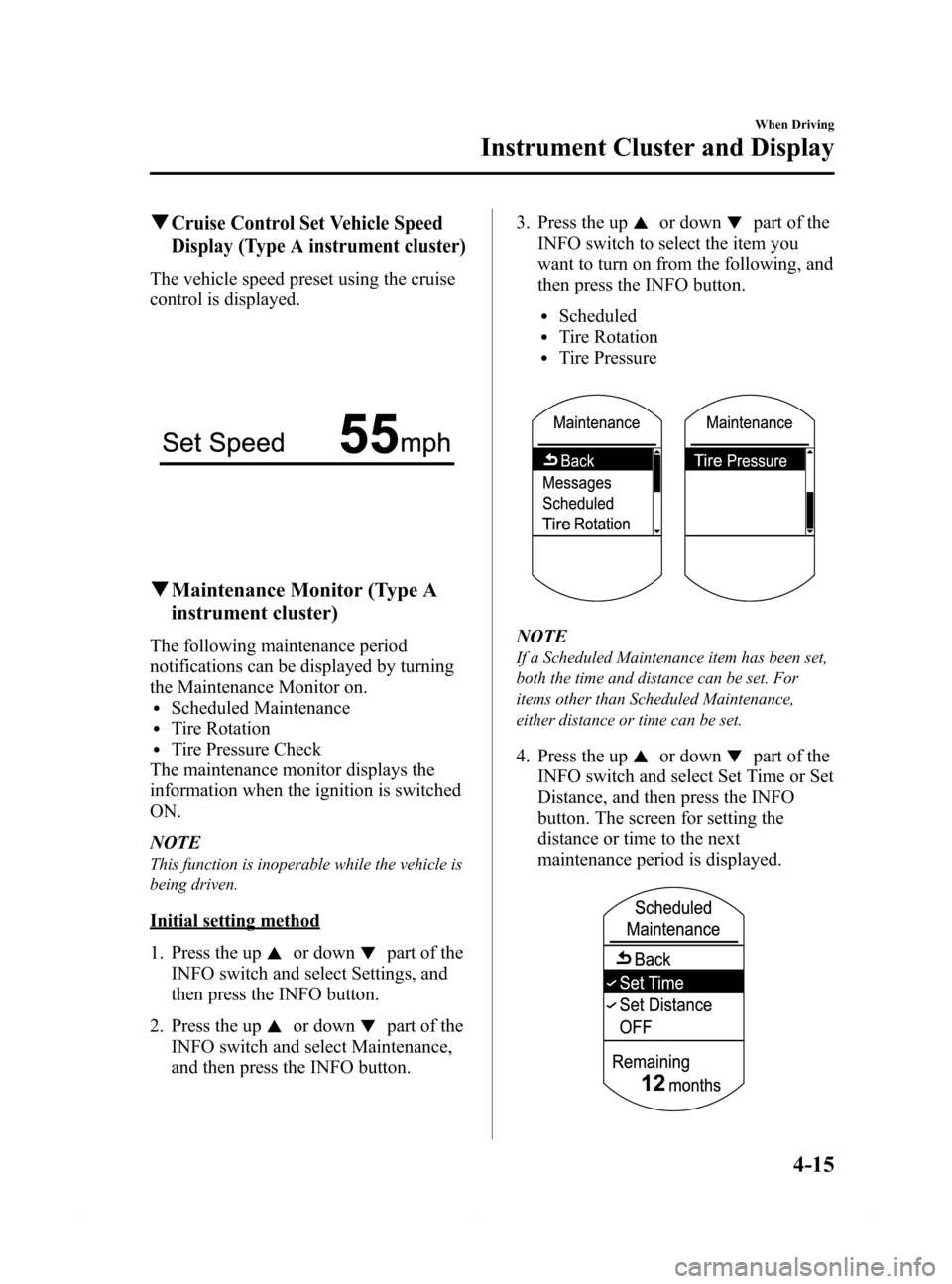
qCruise Control Set Vehicle Speed
Display (Type A instrument cluster)
The vehicle speed preset using the cruise
control is displayed.
qMaintenance Monitor (Type A
instrument cluster)
The following maintenance period
notifications can be displayed by turning
the Maintenance Monitor on.
lScheduled MaintenancelTire RotationlTire Pressure Check
The maintenance monitor displays the
information when the ignition is switched
ON.
NOTE
This function is inoperable while the vehicle is
being driven.
Initial setting method
1. Press the up
or downpart of the
INFO switch and select Settings, and
then press the INFO button.
2. Press the up
or downpart of the
INFO switch and select Maintenance,
and then press the INFO button.3. Press the up
or downpart of the
INFO switch to select the item you
want to turn on from the following, and
then press the INFO button.
lScheduledlTire RotationlTire Pressure
NOTE
If a Scheduled Maintenance item has been set,
both the time and distance can be set. For
items other than Scheduled Maintenance,
either distance or time can be set.
4. Press the upor downpart of the
INFO switch and select Set Time or Set
Distance, and then press the INFO
button. The screen for setting the
distance or time to the next
maintenance period is displayed.
When Driving
Instrument Cluster and Display
4-15
Mazda6_8DQ8-EA-13L_Edition3 Page139
Friday, June 13 2014 6:21 PM
Form No.8DQ8-EA-13L
Page 141 of 576
Black plate (141,1)
Message display
Item Start of message display Displayed message
Scheduled
MaintenanceWhen remaining distance is less than
500 km (250 mile), or remaining days are
less than 15 (whichever comes first)Scheduled Maintenance Due
Tire Rotation When remaining distance is less than
500 km (250 mile)Tire Rotation Due
Tire Pressure Check When remaining days are less than 15 Tire Pressure Increase Pressure
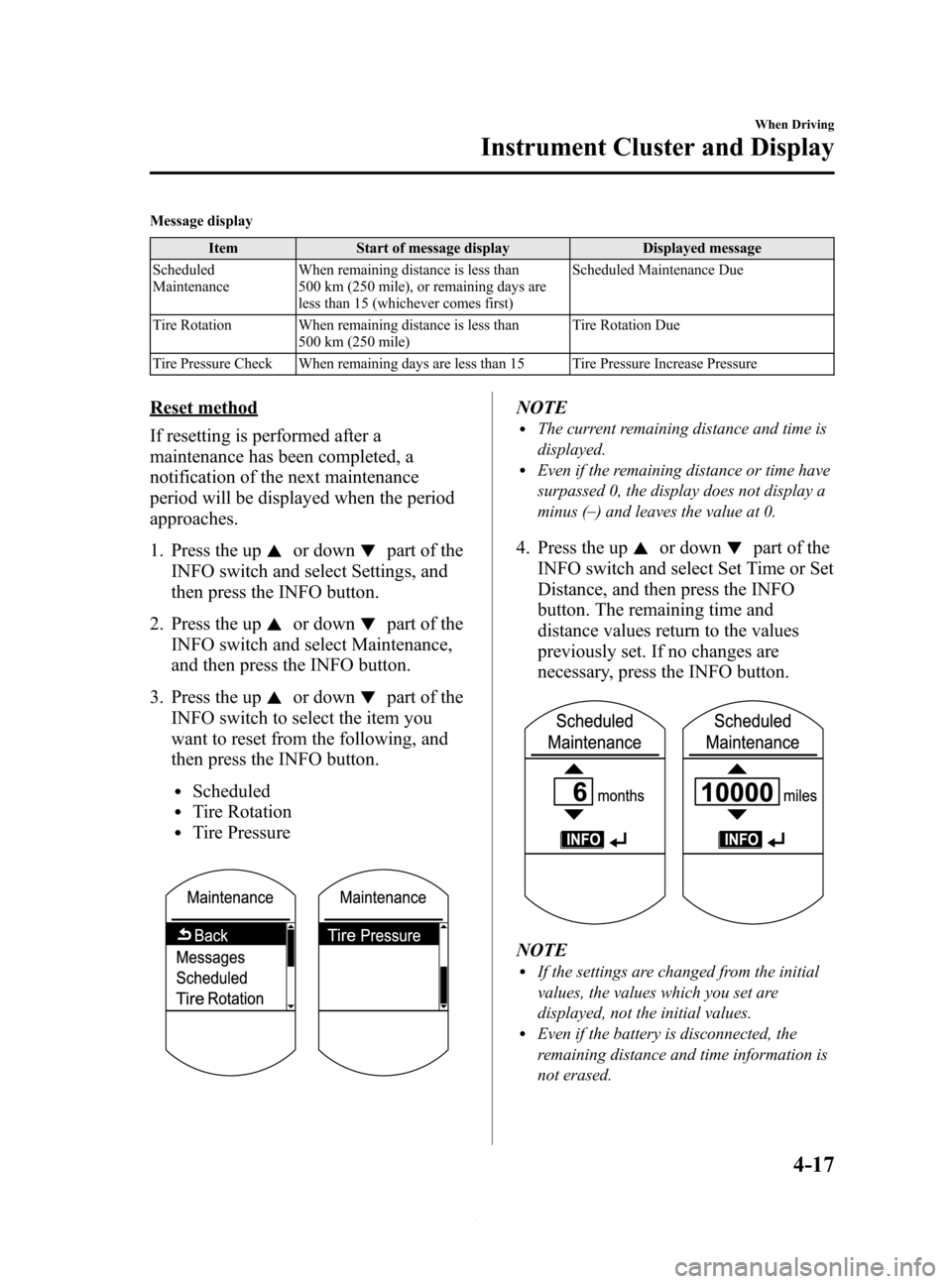
Reset method
If resetting is performed after a
maintenance has been completed, a
notification of the next maintenance
period will be displayed when the period
approaches.
1. Press the up
or downpart of the
INFO switch and select Settings, and
then press the INFO button.
2. Press the up
or downpart of the
INFO switch and select Maintenance,
and then press the INFO button.
3. Press the up
or downpart of the
INFO switch to select the item you
want to reset from the following, and
then press the INFO button.
lScheduledlTire RotationlTire Pressure
NOTElThe current remaining distance and time is
displayed.
lEven if the remaining distance or time have
surpassed 0, the display does not display a
minus (_
) and leaves the value at 0.
4. Press the upor downpart of the
INFO switch and select Set Time or Set
Distance, and then press the INFO
button. The remaining time and
distance values return to the values
previously set. If no changes are
necessary, press the INFO button.
NOTElIf the settings are changed from the initial
values, the values which you set are
displayed, not the initial values.
lEven if the battery is disconnected, the
remaining distance and time information is
not erased.
When Driving
Instrument Cluster and Display
4-17
Mazda6_8DQ8-EA-13L_Edition3 Page141
Friday, June 13 2014 6:21 PM
Form No.8DQ8-EA-13L
Page 142 of 576

Black plate (142,1)
Method for turning the system off
The maintenance monitor can be turned
off even after it has been turned on. If you
want to turn it off, the remaining distance
and time calculation to the next
maintenance period is stopped, and a
message does not display to indicate an
approaching maintenance period.
1. Press the up
or downpart of the
INFO switch and select Settings, and
then press the INFO button.
2. Press the up
or downpart of the
INFO switch and select Maintenance,
and then press the INFO button.
3. Press the up
or downpart of the
INFO switch to select the item you
want to turn off from the following,
and then press the INFO button.
lScheduledlTire RotationlTire Pressure
4. Select OFF and press the INFO button.
qTrip Computer and INFO Switch
The following information can be selected
by pressing the up
or downpart of
the INFO switch with the ignition
switched ON.
lApproximate distance you can travel
on the available fuel
lAverage fuel economylCurrent fuel economylAverage vehicle speedli-ELOOP display (Type A instrument
cluster)í
lLane departure warning system
(LDWS) display (Type A instrument
cluster)
í
lMazda Radar Cruise Control (MRCC)
display (Type A instrument cluster)í
lSettings (Type A instrument cluster)lWarning (Type A instrument cluster)
If you have any problems with your trip
computer, consult an Authorized Mazda
Dealer.
Distance-to-empty mode
This mode displays the approximate
distance you can travel on the remaining
fuel based on the fuel economy.
4-18
When Driving
íSome models.
Instrument Cluster and Display
Mazda6_8DQ8-EA-13L_Edition3 Page142
Friday, June 13 2014 6:21 PM
Form No.8DQ8-EA-13L
Page 150 of 576

Black plate (150,1)
Signal Warning/Indicator Lights Page
Door-Ajar Warning Indication 4-37
Trunk lid-Ajar Warning Indication 4-38
Low Washer Fluid Level Warning Indication 4-38
Tire Pressure Monitoring System Warning Light 4-38
KEY Warning Indication 4-40
High Beam Control System (HBC) Warning Light (Amber)/Indicator Light
(Green)4-42
Wrench Indication 4-42
TCS/DSC Indicator Light 4-42
DSC OFF Indicator Light 4-42
AFS OFF Indicator Light 4-43
Low Engine Coolant Temperature Indicator Light (Blue) 4-43
Shift Position Indication 4-43
SPORT Mode Indicator Light 4-44
Headlight High-Beam Indicator Light 4-44
4-26
When Driving
Instrument Cluster and Display
Mazda6_8DQ8-EA-13L_Edition3 Page150
Friday, June 13 2014 6:21 PM
Form No.8DQ8-EA-13L
Page 152 of 576

Black plate (152,1)
Signal Warning/Indicator Lights Page
Check Engine Light 4-32
High Engine Coolant Temperature Warning Light (Red) 4-33
BSM OFF Indicator Light 4-45
Lane Departure Warning System (LDWS) Warning Light (Amber)/Indicator
Light (Green)4-33
Automatic Transaxle Warning Light 4-34
Power Steering Malfunction Light 4-34
Air Bag/Front Seat Belt Pretensioner System Warning Light 4-35
Low Fuel Warning Light 4-36
Check Fuel Cap Warning Light 4-36
Seat Belt Warning Light 4-36
Door-Ajar Warning Light 4-37
Low Washer Fluid Level Warning Light 4-38
Tire Pressure Monitoring System Warning Light 4-38
KEY Warning Light 4-40
High Beam Control System (HBC) Warning Light (Amber)/Indicator Light
(Green)4-42
TCS/DSC Indicator Light 4-42
4-28
When Driving
Instrument Cluster and Display
Mazda6_8DQ8-EA-13L_Edition3 Page152
Friday, June 13 2014 6:21 PM
Form No.8DQ8-EA-13L
Page 162 of 576

Black plate (162,1)
Type A
This warning indication illuminates when
any door is not securely closed.
Close the door securely before driving the
vehicle.
Type B
This warning light illuminates when any
door or the trunk lid is not securely
closed.
Close the door or the trunk lid securely
before driving the vehicle.
qTrunk lid-Ajar Warning Indication
(Type A instrument cluster)í
This warning indication is illuminated
when the trunk lid is not securely closed.
Close the trunk lid securely before driving
the vehicle.
qLow Washer Fluid Level Warning
Indication/Warning Lightí
This warning light/warning indication
indicates that little washer fluid remains.
Add fluid (page 6-25).
qTire Pressure Monitoring System
Warning Light
This warning light illuminates for a few
seconds when the ignition is switched
ON.
The warning light illuminates and a beep
is heard when tire pressure is too low in
one or more tires, and flashes when there
is a system malfunction.
4-38
When Driving
íSome models.
Instrument Cluster and Display
Mazda6_8DQ8-EA-13L_Edition3 Page162
Friday, June 13 2014 6:21 PM
Form No.8DQ8-EA-13L
Page 163 of 576

Black plate (163,1)
WARNING
If the tire pressure monitoring system
warning light illuminates or flashes, or
the tire pressure warning beep sound is
heard, decrease vehicle speed
immediately and avoid sudden
maneuvering and braking:
If the tire pressure monitoring system
warning light illuminates or flashes,
or the tire pressure warning beep
sound is heard, it is dangerous to
drive the vehicle at high speeds, or
perform sudden maneuvering or
braking. Vehicle drivability could
worsen and result in an accident.
To determine if you have a slow leak
or a flat, pull over to a safe position
where you can check the visual
condition of the tire and determine if
you have enough air to proceed to a
place where air may be added and
the system monitored again by an
Authorized Mazda Dealer or a tire
repair station.
Do not ignore the TPMS Warning Light:
Ignoring the TPMS warning light is
dangerous, even if you know why it is
illuminated. Have the problem taken
care of as soon as possible before it
develops into a more serious
situation that could lead to tire
failure and a dangerous accident.
Warning light illuminates/Warning
beep sounds
When the warning light illuminates, and
the warning beep sound is heard (about 3
seconds), tire pressure is too low in one or
more tires.Adjust the tire pressure to the correct tire
pressure and initialize TPMS. Refer to the
specification charts (page 9-7).
NOTE
lPerform tire pressure adjustment when the
tires are cold. Tire pressure will vary
according to the tire temperature, therefore
let the vehicle stand for 1 hour or only drive
it 1.6 km (1 mile) or less before adjusting
the tire pressures. When pressure is
adjusted on hot tires to the cold inflation
pressure, the TPMS warning light/beep may
turn on after the tires cool and pressure
drops below specification.
Also, an illuminated TPMS warning light,
resulting from the tire air pressure dropping
due to cold ambient temperature will
remain illuminated even if the ambient
temperature rises. In this case, it will also
be necessary to adjust the tire air pressures.
If the TPMS warning light illuminates due
to a drop in tire air pressure, make sure to
check and adjust the tire air pressures.
lTires lose air naturally over time and the
TPMS cannot tell if the tires are getting too
soft over time or you have a flat. However,
when you find one low tire in a set of four-
that is an indication of trouble; you should
have someone drive the vehicle slowly
forward so you can inspect any low tire for
cuts and any metal objects sticking through
tread or sidewall. Put a few drops of water
in the valve stem to see if it bubbles
indicating a bad valve. Leaks need to be
addressed by more than simply reinflating
the tire as leaks are dangerous - take it to
an Authorized Mazda Dealer.
If the warning light illuminates again even
after the tire pressures are adjusted and the
TPMS initialization is performed, there
may be a tire puncture. Replace the
punctured tire with the temporary spare
tire (page 7-13).
When Driving
Instrument Cluster and Display
4-39
Mazda6_8DQ8-EA-13L_Edition3 Page163
Friday, June 13 2014 6:21 PM
Form No.8DQ8-EA-13L