AUX MAZDA MODEL 6 2016 (in English) User Guide
[x] Cancel search | Manufacturer: MAZDA, Model Year: 2016, Model line: MODEL 6, Model: MAZDA MODEL 6 2016Pages: 614, PDF Size: 12.82 MB
Page 340 of 614
Black plate (340,1)
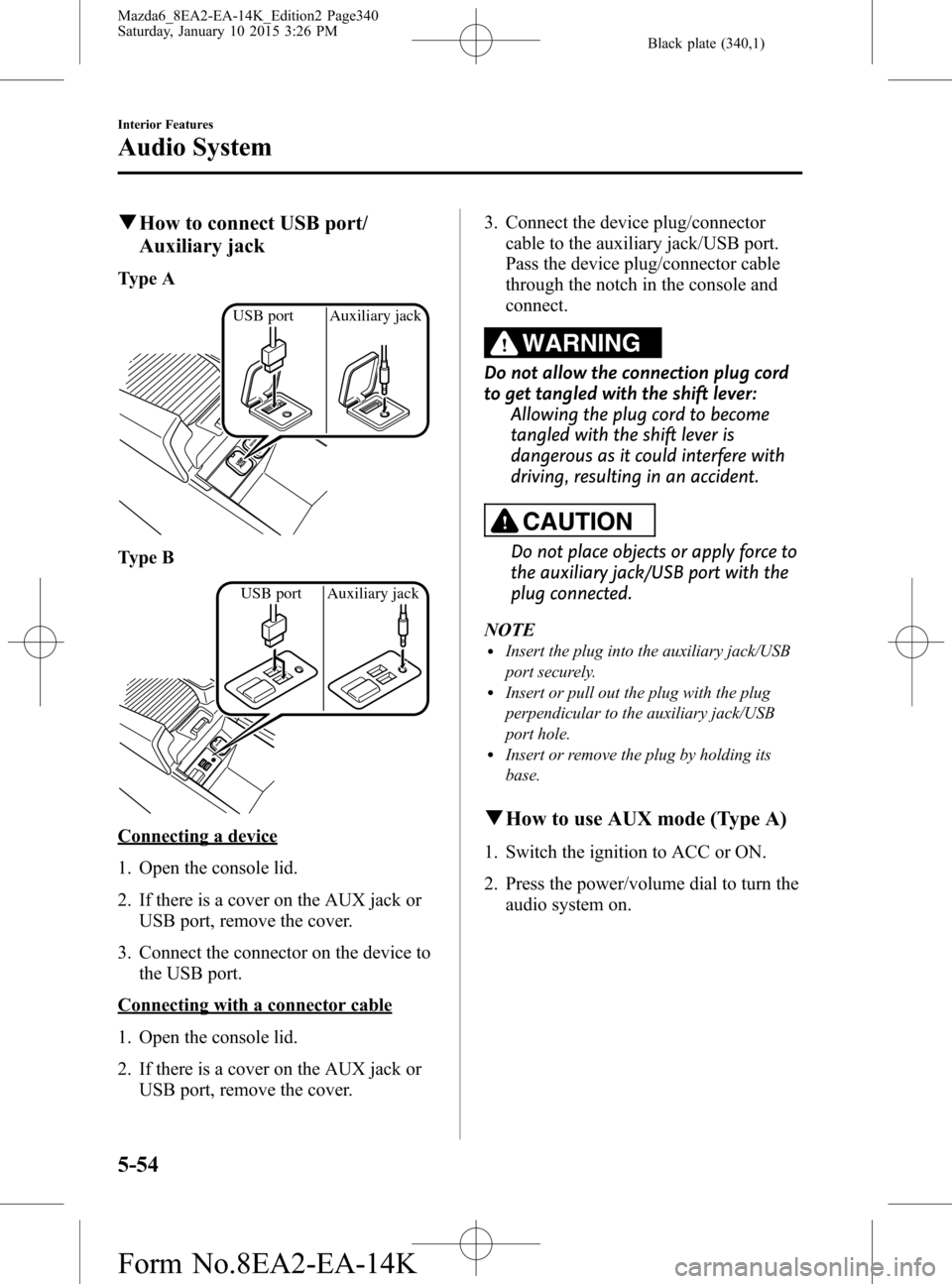
qHow to connect USB port/
Auxiliary jack
Type A
USB port Auxiliary jack
Type B
USB port Auxiliary jack
Connecting a device
1. Open the console lid.
2. If there is a cover on the AUX jack or
USB port, remove the cover.
3. Connect the connector on the device to
the USB port.
Connecting with a connector cable
1. Open the console lid.
2. If there is a cover on the AUX jack or
USB port, remove the cover.3. Connect the device plug/connector
cable to the auxiliary jack/USB port.
Pass the device plug/connector cable
through the notch in the console and
connect.
WARNING
Do not allow the connection plug cord
to get tangled with the shift lever:
Allowing the plug cord to become
tangled with the shift lever is
dangerous as it could interfere with
driving, resulting in an accident.
CAUTION
Do not place objects or apply force to
the auxiliary jack/USB port with the
plug connected.
NOTE
lInsert the plug into the auxiliary jack/USB
port securely.
lInsert or pull out the plug with the plug
perpendicular to the auxiliary jack/USB
port hole.
lInsert or remove the plug by holding its
base.
qHow to use AUX mode (Type A)
1. Switch the ignition to ACC or ON.
2. Press the power/volume dial to turn the
audio system on.
5-54
Interior Features
Audio System
Mazda6_8EA2-EA-14K_Edition2 Page340
Saturday, January 10 2015 3:26 PM
Form No.8EA2-EA-14K
Page 341 of 614

Black plate (341,1)
3. Press the media button () of the
audio unit to change to the AUX mode.
NOTElWhen the device is not connected to the
auxiliary jack, the mode does not switch to
the AUX mode.
lAdjust the audio volume using the portable
audio device or audio unit.
lAudio adjustments other than audio volume
can only be done using the portable audio
device.
lIf the connection plug is pulled out from the
auxiliary jack while in AUX mode, noise
may occur.
Interior Features
Audio System
5-55
Mazda6_8EA2-EA-14K_Edition2 Page341
Saturday, January 10 2015 3:26 PM
Form No.8EA2-EA-14K
Page 349 of 614

Black plate (349,1)
qHow to use AUX mode (Type B)
1. Select theicon on the home screen and display the Entertainment screen.
2. Select
to switch to the AUX mode. The following icons are displayed in the lower
part of the center display.
Icon Function
Displays the Entertainment menu. Use to switch to a different audio source.
Displays sound settings to adjust audio quality level.
Refer to Volume/Display/Sound Controls on page 5-36.
NOTElIf a device is not connected to the auxiliary jack, the mode does not switch to the AUX mode.lAdjust the audio volume using the portable audio device, commander switch, or audio control
switch.
lAudio adjustments can also be made using the portable audio device's volume setting.lIf the connection plug is pulled out from the auxiliary jack while in AUX mode, noise may occur.
qHow to use USB mode (Type B)
Type Playable data
USB mode MP3/WMA/AAC/OGG file
This unit does not support a USB 3.0 device. In addition, other devices may not be
supported depending on the model or OS version.
USB devices formatted to FAT32 are supported (USB devices formatted to other formats
such as NTFS are not supported).
Playback
1. Select the
icon on the home screen and display the Entertainment screen.
Interior Features
Audio System
5-63
Mazda6_8EA2-EA-14K_Edition2 Page349
Saturday, January 10 2015 3:26 PM
Form No.8EA2-EA-14K
Page 376 of 614

Black plate (376,1)
qAudio Operation Using Voice Recognition (Type B)
Main audio operation
The below commands are examples of the available commands.
When the talk button is pressed and the following command is spoken out, the audio can
be operated. The commands in the () can be omitted. The specified name and number are
put into the {}.
Voice command FunctionCorresponding audio
source
(Go to/Play) AM (Radio) Switches the audio source to AM radio. All
(Go to/Play) FM (Radio) Switches the audio source to FM radio. All
(Go to/Play) Bluetooth (Audio) Switches the audio source to Bluetooth
®audio. All
(Go to/Play) Pandora Switches the audio source to Pandora®. All
(Go to/Play) Aha (Radio) Switches the audio source to Aha™. All
(Go to/Play) Stitcher Switches the audio source to Stitcher™Radio. All
(Go to/Play) USB 1 Switches the audio source to USB 1. All
(Go to/Play) USB 2 Switches the audio source to USB 2. All
Play Playlist {Playlist name} Plays the selected playlist. USB
Play Artist {Artist name} Plays the selected artist. USB
Play Album {Album name} Plays the selected album. USB
Play Genre {Genre name} Plays the selected genre. USB
Play Folder {Folder name} Plays the selected folder. USB
NOTElSome commands cannot be used depending on devices and use conditions.lIf the Bluetooth®device, USB, or AUX is not connected, the related commands cannot be used.
5-90
Interior Features
Bluetooth®
Mazda6_8EA2-EA-14K_Edition2 Page376
Saturday, January 10 2015 3:26 PM
Form No.8EA2-EA-14K
Page 394 of 614

Black plate (394,1)
Bluetooth® Audio (Type A)
Applicable Bluetooth®specification
(Recommended)
Ver. 2.0
Response profile
lA2DP (Advanced Audio Distribution
Profile) Ver. 1.0/1.2
lAVRCP (Audio/Video Remote Control
Profile) Ver. 1.0/1.3
A2DP is a profile which transmits only
audio to the Bluetooth
®unit. If your
Bluetooth®audio device corresponds only
to A2DP, but not AVRCP, you cannot
operate it using the control panel of the
vehicle's audio system. In this case, only
the operations on the mobile device are
available the same as when a portable
audio device for a non-compliant
Bluetooth
®device is connected to the
AUX terminal.
Function A2DPAVRCP
Ver. 1.0 Ver. 1.3
Playback―XX
Pause―XX
File (Track) up/down―XX
Reverse――X
Fast-forward――X
Text display――X
X: Available
―: Not available
NOTElThe battery consumption of Bluetooth®
audio devices increases while Bluetooth®is
connected.
lIf a general mobile phone device is USB
connected during music playback over the
Bluetooth
®connection, the Bluetooth®
connection is disconnected. For this reason,
you cannot have music playback over a
Bluetooth
®connection and music playback
using a USB connection at the same time.
lThe system may not operate normally
depending on the Bluetooth®audio device.
qHow to Use the Bluetooth®
Audio System
Switching to Bluetooth®audio mode
To listen to music or voice audio recorded
to a Bluetooth
®audio device, switch to
the Bluetooth®audio mode to operate the
audio device using the audio system
control panel. Any Bluetooth
®audio
device must be paired to the vehicle's
Bluetooth
®unit before it can be used.
Refer to Bluetooth® Preparation (Type A)
on page 5-71.
1. Turn on the Bluetooth
®audio device's
power.
2. Switch the ignition to ACC or ON.
Make sure that the“
”symbol is
displayed in the audio display. The
symbol is not displayed if an un-paired
Bluetooth
®audio device is being used
or the vehicle's Bluetooth®unit has a
malfunction.
NOTE
Some Bluetooth®audio devices need a certain
amount of time before the“
”symbol is
displayed.
5-108
Interior Features
Bluetooth®
Mazda6_8EA2-EA-14K_Edition2 Page394
Saturday, January 10 2015 3:26 PM
Form No.8EA2-EA-14K
Page 396 of 614

Black plate (396,1)
qBluetooth® Audio Device
Information Display
If a Bluetooth®audio device is connected,
the following information is displayed in
the audio display.
AVRCP Ver.
lower than 1.3AVRCP
Ver. 1.3
Device name X X
Title―X
Artist name―X
Album name―X
File number―X
Playback time―X
Folder number――
X: Available
―: Not available
NOTE
Some information may not display depending
on the device, and if the information cannot be
displayed,“NO TITLE”is indicated.
Bluetooth® Audio (Type B)
Applicable Bluetooth®specification
(Recommended)
Ver. 1.1/1.2/2.0
EDR/2.1EDR/3.0
(conformity)
Response profile
lA2DP (Advanced Audio Distribution
Profile) Ver. 1.0/1.2
lAVRCP (Audio/Video Remote Control
Profile) Ver. 1.0/1.3/1.4
A2DP is a profile which transmits only
audio to the Bluetooth
®unit. If your
Bluetooth®audio device corresponds only
to A2DP, but not AVRCP, you cannot
operate it using the control panel of the
vehicle's audio system. In this case, only
the operations on the mobile device are
available the same as when a portable
audio device for a non-compliant
Bluetooth
®device is connected to the
AUX terminal.
FunctionA2DP
AVRCP
Ve r.
1.0Ver. 1.3 Ver. 1.4
Playback X X X X
Pause X X X X
File (Track)
up/down―XX X
Reverse――XX
Fast-forward――XX
Text display――XX
Repeat――Depends on
deviceDepends on
device
Shuffle――Depends on
deviceDepends on
device
Scan――Depends on
deviceDepends on
device
Folder
up/down―― ―Depends on
device
X: Available
―: Not available
5-110
Interior Features
Bluetooth®
Mazda6_8EA2-EA-14K_Edition2 Page396
Saturday, January 10 2015 3:26 PM
Form No.8EA2-EA-14K
Page 458 of 614

Black plate (458,1)
Key Battery Replacement
If the buttons on the transmitter are
inoperable and the operation indicator
light does not flash, the battery may be
dead.
Replace with a new battery before the
transmitter becomes unusable.
CAUTION
ØMake sure the battery is installed
correctly. Battery leakage could
occur if it is not installed correctly.
ØWhen replacing the battery, be
careful not to touch any of the
internal circuitry and electrical
terminals, bend the electrical
terminals, or get dirt in the
transmitter as the transmitter
could be damaged.
ØThere is the danger of explosion if
the battery is not correctly
replaced.
ØDispose of used batteries
according to the following
instructions.
ØInsulate the plus and minus
terminals of the battery using
cellophane or equivalent tape.
ØNever disassemble.
ØNever throw the battery into
fire or water.
ØNever deform or crush.
ØReplace only with the same type
battery (CR2025 or equivalent).
The following conditions indicate that the
battery power is low:
lThe KEY indicator light (green) flashes
in the instrument cluster for about 30
seconds after the engine is turned off
(for vehicles with a type A meter,
messages are displayed in the
instrument cluster).
lThe system does not operate and the
operation indicator light on the
transmitter does not flash when the
buttons are pressed.
lThe system's operational range is
reduced.
Replacing the battery at an Authorized
Mazda Dealer is recommended to prevent
damage to the key. If replacing the battery
by yourself, follow the instruction below.
Replacing the key battery
1. Press the knob and pull out the
auxiliary key.
Knob
2. Twist a tape-wrapped flathead
screwdriver in the direction of the
arrow and open the cover slightly.
Cover
6-38
Maintenance and Care
Owner Maintenance
Mazda6_8EA2-EA-14K_Edition2 Page458
Saturday, January 10 2015 3:27 PM
Form No.8EA2-EA-14K
Page 459 of 614

Black plate (459,1)
3. Insert the tape-wrapped flathead
screwdriver into the gap and slide it in
the direction of the arrow.
Cover
Gap
4. Twist the flathead screwdriver in the
direction of the arrow and remove the
cover.
Cover
5. Remove the battery cap, then remove
the battery.
6. Insert a new battery with the positive
pole facing up, and then cover the
battery with the battery cap.
7. Close the cover.
8. Reinsert the auxiliary key.
Maintenance and Care
Owner Maintenance
6-39
Mazda6_8EA2-EA-14K_Edition2 Page459
Saturday, January 10 2015 3:27 PM
Form No.8EA2-EA-14K
Page 606 of 614

Black plate (606,1)
A
Accessory Socket ............................ 5-130
Active driving display ....................... 4-20
Adaptive Front Lighting System
(AFS) ................................................ 4-94
Add-On Non-Genuine Parts and
Accessories ....................................... 8-19
Advanced Key
Operational range ....................... 3-10
Advanced Keyless Entry System ........ 3-9
Air Bag Systems ............................... 2-41
Antilock Brake System (ABS) .......... 4-80
Audio Control Switch
Adjusting the Volume ................ 5-51
Seek Switch ................................ 5-51
Audio System
Antenna ...................................... 5-13
Audio Control Switch ................ 5-51
Audio Set (Type A) .................... 5-21
Audio Set (Type B) .................... 5-32
AUX/USB/iPod mode ................ 5-52
Operating Tips for Audio
System ........................................ 5-13
Satellite Radio ............................ 5-42
Automatic Transaxle
Driving tips ................................ 4-56
Shift-lock override ..................... 4-51
Shift-lock system ....................... 4-51
Transaxle ranges ........................ 4-50
B
Battery ............................................... 6-36
Maintenance ............................... 6-37
Replacement ............................... 6-37
Specifications ............................... 9-4
Battery runs out ................................. 7-14
Jump-Starting ............................. 7-14
B
Beep sounds
Power steering warning buzzer ... 7-37
Beep Sounds
Air bag/front seat belt pretensioner
system warning .......................... 7-34
Blind spot monitoring
(BSM) system warning .............. 7-36
Electric parking brake warning ... 7-37
i-ELOOP ..................................... 7-36
Ignition not switched off
(STOP) warning ......................... 7-35
Key left-in-trunk compartment
warning ...................................... 7-36
Key left-in-vehicle warning ....... 7-36
Key removed from vehicle
warning ...................................... 7-35
Lane departure warning ............. 7-36
Lights-on reminder ..................... 7-33
Request switch inoperable
warning ...................................... 7-35
Seat belt warning ........................ 7-34
Tire inflation pressure warning ... 7-36
Blind Spot Monitoring
(BSM) System ................................ 4-104
Bluetooth® ....................................... 5-69
Bluetooth® Audio (Type A) .... 5-108
Bluetooth® Audio (Type B) ..... 5-110
Bluetooth® Hands-Free
(Type A) ..................................... 5-91
Bluetooth® Hands-Free
(Type B) ..................................... 5-98
Troubleshooting ....................... 5-124
Body Lubrication .............................. 6-32
Bottle Holder ................................... 5-132
10-2
Index
Mazda6_8EA2-EA-14K_Edition2 Page606
Saturday, January 10 2015 3:28 PM
Form No.8EA2-EA-14K