ignition MAZDA MODEL 6 2016 (in English) Manual Online
[x] Cancel search | Manufacturer: MAZDA, Model Year: 2016, Model line: MODEL 6, Model: MAZDA MODEL 6 2016Pages: 614, PDF Size: 12.82 MB
Page 231 of 614

Black plate (231,1)
qBlind Spot Monitoring (BSM) Warning Lights/Blind Spot Monitoring
(BSM) Warning Beep
The Blind Spot Monitoring (BSM) or Rear Cross Traffic Alert (RCTA) system notifies the
driver of the presence of vehicles in adjacent lanes to the rear of your vehicle using the
Blind Spot Monitoring (BSM) warning lights and the warning beep while the systems are
operational.
Blind Spot Monitoring (BSM) warning lights
The Blind Spot Monitoring (BSM) warning lights are equipped on the left and right door
mirrors. The warning lights turn on when a vehicle approaching from the rear in an
adjacent lane is detected.
When the ignition is switched ON, the malfunction warning light turns on momentarily and
then turns off after a few seconds.
Forward driving (Blind Spot Monitoring (BSM) system operation)
The Blind Spot Monitoring (BSM) system detects vehicles approaching from the rear and
turns on the Blind Spot Monitoring (BSM) warning lights equipped on the door mirrors
according to the conditions. Additionally, while a Blind Spot Monitoring (BSM) warning
light is illuminated, if the turn signal lever is operated to signal a turn in the direction in
which the Blind Spot Monitoring (BSM) warning light is illuminated, the Blind Spot
Monitoring (BSM) warning light flashes.
Reverse driving (Rear Cross Traffic Alert (RCTA) system operation)
The Rear Cross Traffic Alert (RCTA) system detects vehicles approaching from the left and
right of your vehicle and flashes the Blind Spot Monitoring (BSM) warning lights.
When Driving
i-ACTIVSENSE
4-107
Mazda6_8EA2-EA-14K_Edition2 Page231
Saturday, January 10 2015 3:25 PM
Form No.8EA2-EA-14K
Page 232 of 614
Black plate (232,1)
Function for cancelling illumination dimmer
When the headlight switch is in the
orposition, the brightness of the Blind Spot
Monitoring (BSM) warning lights is dimmed. If the Blind Spot Monitoring (BSM) warning
lights are difficult to see due to glare from surrounding brightness when traveling on snow-
covered roads or under foggy conditions, press the dimmer cancellation button to cancel
the dimmer and increase the brightness of Blind Spot Monitoring (BSM) warning lights
when they turn on.
Refer to Dashboard Illumination on page 4-14.
Blind Spot Monitoring (BSM) warning beep
The Blind Spot Monitoring (BSM) warning beep is activated simultaneously with the
flashing of a Blind Spot Monitoring (BSM) warning light.
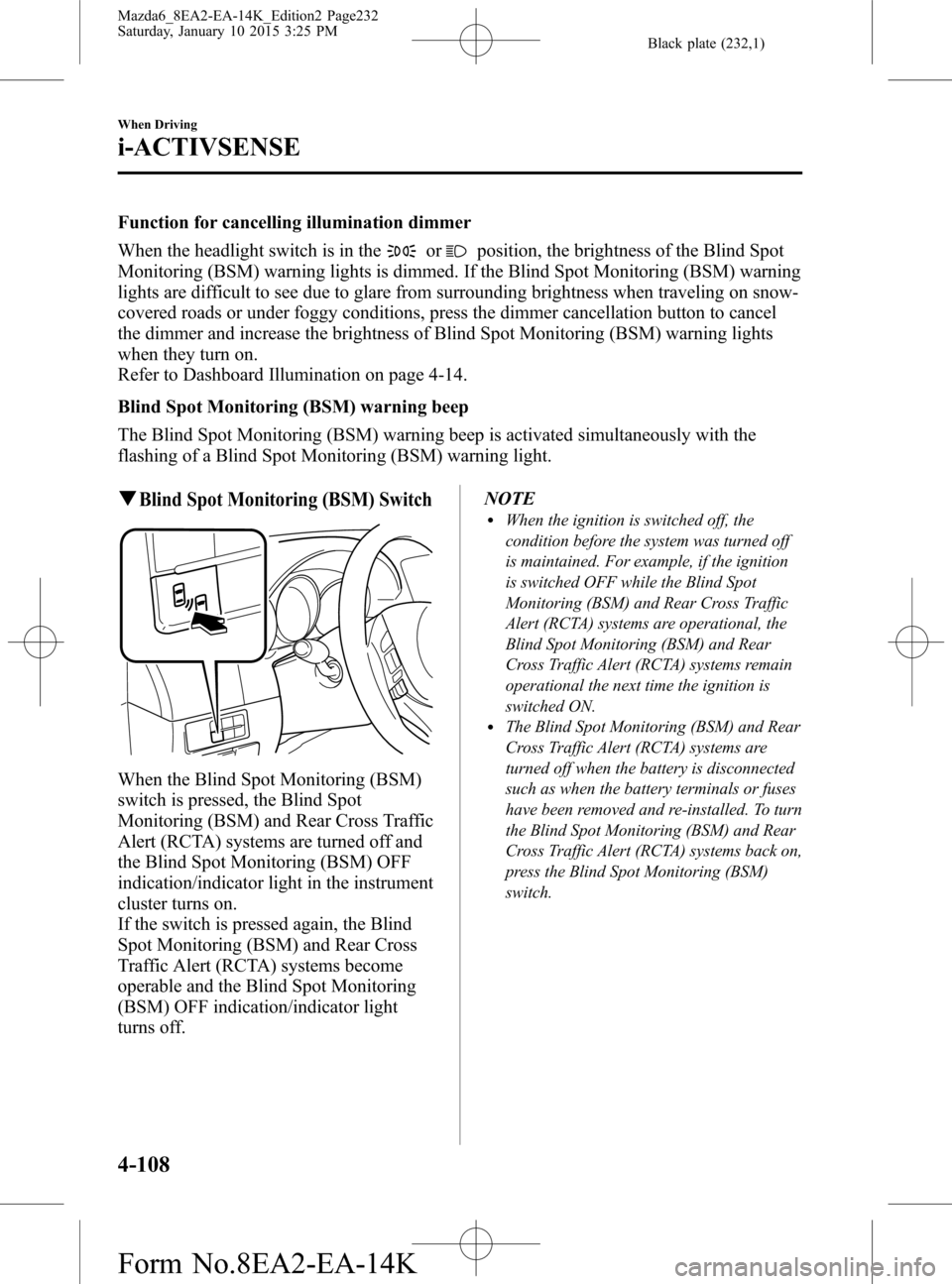
qBlind Spot Monitoring (BSM) Switch
When the Blind Spot Monitoring (BSM)
switch is pressed, the Blind Spot
Monitoring (BSM) and Rear Cross Traffic
Alert (RCTA) systems are turned off and
the Blind Spot Monitoring (BSM) OFF
indication/indicator light in the instrument
cluster turns on.
If the switch is pressed again, the Blind
Spot Monitoring (BSM) and Rear Cross
Traffic Alert (RCTA) systems become
operable and the Blind Spot Monitoring
(BSM) OFF indication/indicator light
turns off.NOTE
lWhen the ignition is switched off, the
condition before the system was turned off
is maintained. For example, if the ignition
is switched OFF while the Blind Spot
Monitoring (BSM) and Rear Cross Traffic
Alert (RCTA) systems are operational, the
Blind Spot Monitoring (BSM) and Rear
Cross Traffic Alert (RCTA) systems remain
operational the next time the ignition is
switched ON.
lThe Blind Spot Monitoring (BSM) and Rear
Cross Traffic Alert (RCTA) systems are
turned off when the battery is disconnected
such as when the battery terminals or fuses
have been removed and re-installed. To turn
the Blind Spot Monitoring (BSM) and Rear
Cross Traffic Alert (RCTA) systems back on,
press the Blind Spot Monitoring (BSM)
switch.
4-108
When Driving
i-ACTIVSENSE
Mazda6_8EA2-EA-14K_Edition2 Page232
Saturday, January 10 2015 3:25 PM
Form No.8EA2-EA-14K
Page 233 of 614

Black plate (233,1)
Distance Recognition
Support System (DRSS)
í
The Distance Recognition Support
System (DRSS) measures the distance
between your vehicle and a vehicle ahead
using a radar sensor (front) while the
vehicle speed is 30 km/h or faster (19
mph or faster), and indicates a
recommended distance to maintain
between the vehicles. Furthermore, if your
vehicle approaches a vehicle ahead more
closely than the appropriate distance to
maintain between the vehicles, the
vehicle-ahead indication in the multi-
information display or the active driving
display (with active driving display) is
flashed to advise the driver to keep a safer
distance from the vehicle ahead.
WARNING
Do not rely completely on the Distance
Recognition Support System (DRSS) and
always drive carefully:
The Distance Recognition Support
System (DRSS) provides advice for
safer driving and notifies the driver of
a recommended, safer distance to
maintain with a vehicle ahead. The
ability to detect a vehicle ahead is
limited depending on the type of
vehicle ahead, the weather
conditions, and the traffic conditions.
Therefore, if the accelerator and
brake pedals are not operated
correctly it could lead to an accident.
Always verify the safety of the
surrounding area and depress the
brake pedal or accelerator pedal
while keeping a safer distance from
vehicles ahead or on-coming vehicles.NOTE
lThe Distance Recognition Support System
(DRSS) operates when all of the following
conditions are met:
lThe ignition is switched ON.lThe Distance Recognition Support
System (DRSS) is on.
lThe selector lever is in a position other
than reverse (R).
lThe vehicle speed is 30 km/h or faster
(19 mph or faster).
lThe objects which activate the system are 4-
wheeled vehicles.
lThe Distance Recognition Support System
(DRSS) may also operate in the presence of
motorcycles and bicycles.
lThe Distance Recognition Support System
(DRSS) may not operate normally under the
following conditions:
lThe Dynamic Stability Control (DSC)
has a malfunction.
lThe vehicle ahead is traveling at an
extremely slow speed.
lThe system does not operate with the
following objects:
lVehicles approaching in the opposite
direction.
lStationary objects (stopped vehicles,
obstructions)
When Driving
i-ACTIVSENSE
4-109íSome models. Mazda6_8EA2-EA-14K_Edition2 Page233
Saturday, January 10 2015 3:25 PM
Form No.8EA2-EA-14K
Page 234 of 614

Black plate (234,1)
qIndication on Display
The Distance Recognition Support System (DRSS) operation status is displayed in the
multi-information display or the active driving display (with active driving display).
Problems are indicated in the center display (Type B audio). If there is a problem, take
appropriate action according to the displayed message.
Refer to Warning/Indicator Lights on page 4-22.
NOTE
lWhen the ignition is switched off, the operation status before the system was turned off is
maintained. For example, if the ignition is switched off with the Distance Recognition Support
System (DRSS) operable, the system will be operable when the ignition is switched ON the next
time.
lThe Distance Recognition Support System (DRSS) can be turned on/off and the system's sensitivity
can be changed.
Refer to Personalization Features on page 9-9.
Vehicle ahead
display
Distance between
vehicle display
4-110
When Driving
i-ACTIVSENSE
Mazda6_8EA2-EA-14K_Edition2 Page234
Saturday, January 10 2015 3:25 PM
Form No.8EA2-EA-14K
Page 245 of 614

Black plate (245,1)
qSetting the System
CANCEL switch
switch switchRES switch
OFF switch ON switch
Cruise control
SET+/SET- switch
When the ON switch is pressed, the vehicle speed and the distance between vehicles while
in headway control can be set. The Mazda Radar Cruise Control (MRCC) indication is
shown in the display of the instrument cluster.
NOTE
lWhen the ignition is switched to ACC or OFF while the Mazda Radar Cruise Control (MRCC) is
ON, the Mazda Radar Cruise Control (MRCC) remains ON automatically.
lWhen the ON switch is pressed continuously for about 2 seconds while the Mazda Radar Cruise
Control (MRCC) system is turned on, the system switches the function to only cruise control.
When Driving
i-ACTIVSENSE
4-121
Mazda6_8EA2-EA-14K_Edition2 Page245
Saturday, January 10 2015 3:25 PM
Form No.8EA2-EA-14K
Page 246 of 614

Black plate (246,1)
How to Set the Speed
1. Adjust the vehicle speed to the desired
setting using the accelerator pedal.
2. Headway control begins when the
SET
or SETswitch is pressed.
The set speed and the inter-vehicle
distance display filled with white lines
are displayed. The Mazda Radar Cruise
Control (MRCC) indicator light (green)
is indicated simultaneously.
Travel status Display
During travel at constant
speed
During travel under
headway control
NOTElIf a vehicle ahead is detected while
traveling at a constant speed, the vehicle-
ahead indication is displayed and headway
control is performed. Additionally, when a
vehicle ahead is no longer detected, the
vehicle-ahead indication turns off and the
system switches back to travel at constant
speed.
lIf you are driving the vehicle at a speed
faster than the set speed, headway control
on the vehicle ahead is not possible Adjust
the system to the desired vehicle speed
using the accelerator pedal.
How to Set the Distance Between
Vehicles During Headway Control
The distance between vehicles is set to a
shorter distance each time the
switch
is pressed. The distance between vehicles
is set to a longer distance by pressing the
switch. The distance-between-vehicles
can be set to 4 levels; Long, medium,
short, and extremely short distance.
Distance-between-vehi-
cles guideline
(at 80 km/h (50 mph)
vehicle speed)Indication on display
Long
(about 50 m (164 ft))
Medium
(about 40 m (131 ft))
Short
(about 30 m (98 ft))
Extremely short
(about 25 m (82 ft))
NOTElThe distance between vehicles differs
depending on the vehicle speed, and the
slower the vehicle speed, the shorter the
distance.
lWhen the ignition is switched to ACC or
OFF and then the engine is started again,
the system automatically sets the distance
between vehicles to the previous setting.
4-122
When Driving
i-ACTIVSENSE
Mazda6_8EA2-EA-14K_Edition2 Page246
Saturday, January 10 2015 3:25 PM
Form No.8EA2-EA-14K
Page 257 of 614
Black plate (257,1)
NOTElThe Smart Brake Support (SBS) system operates when all of the following conditions are met:lThe ignition is switched ON.lThe Smart Brake Support (SBS) system is on.lThe vehicle speed is about 15 km/h or faster (10 mph or faster).lThe relative speed between your vehicle and the vehicle ahead is about 15 km/h or faster (10
mph or faster).
lThe Dynamic Stability Control (DSC) is not operating.lThe Smart Brake Support (SBS) system may not operate under the following conditions:lIf the vehicle is accelerated rapidly and it comes close to a vehicle ahead.lThe vehicle is driven at the same speed as the vehicle ahead.lThe accelerator pedal is depressed.lThe brake pedal is depressed.lThe steering wheel is being operated.lThe selector lever is being operated.lThe turn signal is being used.lWhen the vehicle ahead is not equipped with taillights or the taillights are turned off.lWhen warnings and messages, such as a dirty windshield, related to the Forward Sensing
Camera (FSC)/laser sensor (front) are being displayed in the multi-information display.
lAlthough the objects which activate the system are four-wheeled vehicles, the radar sensor could
detect the following objects, determine them to be an obstruction, and operate the Smart Brake
Support (SBS) system.
lObjects on the road at the entrance to a curve (including guardrails and snow banks).lA vehicle appears in the opposite lane while cornering or rounding a curve.lWhen crossing a narrow bridge.lWhen passing under a low gate or through a tunnel or narrow gate.lWhen entering an underground parking area.lMetal objects, bumps, or protruding objects on the road.lIf you suddenly come close to a vehicle ahead.lWhen driving in areas where there is high grass or forage.lTwo-wheeled vehicles such as motorbikes or bicycles.lPedestrians or non-metallic objects such as standing trees.lWhen the system operates, the user is notified by the multi-information display or the active
driving display (with active driving display).
When Driving
i-ACTIVSENSE
4-133
Mazda6_8EA2-EA-14K_Edition2 Page257
Saturday, January 10 2015 3:25 PM
Form No.8EA2-EA-14K
Page 270 of 614

Black plate (270,1)
qActivation/Deactivation
To activate the system, press the ON
switch.
The cruise main indicator light (Amber)
illuminates.
Refer to Warning/Indicator Lights on page
4-22.
To deactivate the system, press the OFF
switch.
The cruise main indicator light (Amber)
turns off.
WARNING
Always turn off the cruise control
system when it is not in use:
Leaving the cruise control system in
an activation-ready state while the
cruise control is not in use is
dangerous as the cruise control could
unexpectedly activate if the
activation button is accidentally
pressed, and result in loss of vehicle
control and an accident.
NOTE
When the ignition is switched OFF, the system
status before it was turned off is maintained.
For example, if the ignition is switched OFF
with the cruise control system operable, the
system will be operable when the ignition is
switched ON the next time.
qTo Set Speed
1. Activate the cruise control system by
pressing the ON switch.
The cruise main indicator light
(Amber) illuminates. Refer to Warning/
Indicator Lights on page 4-22.
2. Accelerate to the desired speed, which
must be more than 25 km/h (16 mph).3. Set the cruise control by pressing the
SET
or SET - switch at the desired
speed. The cruise control is set at the
moment the SET
or SET - switch is
pressed. Release the accelerator pedal
simultaneously. The cruise set indicator
light (Green) illuminates.
NOTE
lThe cruise control speed setting cannot be
performed under the following conditions:
l(Automatic transaxle)
The selector lever is in the P or N
position.
l(Manual transaxle)
The shift lever is in the neutral position.
lThe parking brake is applied.lRelease the SETor SET - switch at the
desired speed, otherwise the speed will
continue increasing while the SET
switch is pressed and held, and continue
decreasing while the SET - switch is pressed
and held (except when the accelerator
pedal is depressed).
lOn a steep grade, the vehicle may
momentarily slow down while ascending,
or speed up while descending.
lCruise control will cancel if the vehicle
speed decreases below 21 km/h (13 mph)
when cruise is activated, such as when
climbing a steep grade.
lCruise control may cancel at about 15 km/h
(9 mph) below the preset speed (such as
may happen when climbing a long, steep
grade).
4-146
When Driving
Cruise Control
Mazda6_8EA2-EA-14K_Edition2 Page270
Saturday, January 10 2015 3:25 PM
Form No.8EA2-EA-14K
Page 275 of 614
Black plate (275,1)
NOTE
Because this system detects slight changes in tire conditions, the timing of the warning may be faster
or slower in the following cases:
lThe size, manufacturer, or the type of tires is different from the specification.lThe size, manufacturer, or the type of a tire is different from the others, or the level of tire wear is
excessively different between them.
lA run-flat tire, studless tire, snow tire, or tire chains are used.lAn emergency tire is used (The tire pressure monitoring system warning light may flash and then
continue illuminating).
lA tire is repaired using the emergency flat tire repair kit.lThe tire pressure is excessively higher than the specified pressure, or the tire pressure is suddenly
lowered for some reason such as a tire burst during driving.
lThe vehicle speed is lower than about 15 km/h (9.3 mph) (including when the vehicle is stopped),
or the drive period is shorter than 5 minutes.
lThe vehicle is driven on an extremely rough road or a slippery, icy road.lHard steering and rapid acceleration/deceleration are repeated such as during aggressive driving
on a winding road.
lLoad on the vehicle is applied to a tire such as by loading heavy luggage to one side of the
vehicle.
lSystem initialization has not been implemented with the specified tire pressure.
qTire Pressure Monitoring System
Initialization
In the following cases, system
initialization must be performed so that
the system operates normally.
lA tire pressure is adjusted.lTire rotation is performed.lA tire or wheel is replaced.lThe battery is replaced or completely
drained.
lThe tire pressure monitoring system
warning light is illuminated.
Initialization method
1. Park the car in a safe place and firmly
apply the parking brake.2. Let the tires cool, then adjust the tire
pressure of all four (4) tires to the
specified pressure indicated on the tire
pressure label located on the door jamb
of the driver's door (door open). Refer
to Tires on page 9-7.
3. Switch the ignition ON.
When Driving
Tire Pressure Monitoring System
4-151
Mazda6_8EA2-EA-14K_Edition2 Page275
Saturday, January 10 2015 3:25 PM
Form No.8EA2-EA-14K
Page 278 of 614

Black plate (278,1)
NOTElIf water, snow, or mud is stuck on the camera lens, wipe it off using a soft cloth. If it cannot be
wiped off, use a mild detergent.
lIf the camera temperature changes rapidly (Hot to cold, cold to hot), the rear view monitor may
not operate correctly.
lWhen replacing the tires, consult an Authorized Mazda Dealer. Replacing the tires could result in
deviation of the guide lines which appear on the display.
lIf the vehicle's front, side, or rear has been involved in a collision, the alignment of the rear view
parking camera (location, installation angle) may have deviated. Always consult an Authorized
Mazda Dealer to have the vehicle inspected.
lIf“No Video Signal Available”is indicated in the display, there could be a problem with the
camera. Have your vehicle inspected at an Authorized Mazda Dealer.
qRear View Parking Camera Location
Rear View Parking Camera
qSwitching to the Rear View Monitor Display
Shift the shift lever to R with the ignition switched ON to switch the display to the rear
view monitor display.
NOTE
When the shift lever is shifted from R to another shift lever position, the screen returns to the previous
display.
4-154
When Driving
Rear View Monitor
Mazda6_8EA2-EA-14K_Edition2 Page278
Saturday, January 10 2015 3:25 PM
Form No.8EA2-EA-14K