Oil MAZDA MODEL 6 2016 Owners Manual (in English)
[x] Cancel search | Manufacturer: MAZDA, Model Year: 2016, Model line: MODEL 6, Model: MAZDA MODEL 6 2016Pages: 614, PDF Size: 12.82 MB
Page 28 of 614

Black plate (28,1)
Have your seat belts changed immediately if the pretensioner or load limiter has
been expended:
Always have an Authorized Mazda Dealer immediately inspect the front seat belt
pretensioners and air bags after any collision. Like the air bags, the front seat belt
pretensioners and load limiters will only function once and must be replaced after
any collision that caused them to deploy. A seat belt with an expended pretensioner
or load limiter is still better than wearing no seat belt at all; however, if the front
seat belt pretensioners and load limiters are not replaced, the risk of injury in a
collision will increase.
Positioning the Shoulder Portion of the Seat Belt:
Improper positioning of the shoulder portion of the seat belt is dangerous. Always
make sure the shoulder portion of the seat belt is positioned across your shoulder
and near your neck, but never under your arm, on your neck, or on your upper arm.
Positioning the Lap Portion of the Seat Belt:
The lap portion of the seat belt worn too high is dangerous. In a collision, this would
concentrate the impact force directly on the abdominal area, causing serious injury.
Wear the lap portion of the belt snugly and as low as possible.
CAUTION
Belt retraction may become difficult if the belts and rings are soiled, so try to keep
them clean. For more details about cleaning the seat belts, refer to“Cleaning the
Lap/Shoulder Belt Webbing”(page 6-69).
Ring
2-16
Essential Safety Equipment
Seat Belt Systems
Mazda6_8EA2-EA-14K_Edition2 Page28
Saturday, January 10 2015 3:24 PM
Form No.8EA2-EA-14K
Page 119 of 614
Black plate (119,1)
Rocking the Vehicle
WARNING
Do not spin the wheels at more than 56
km/h (35 mph), and do not allow
anyone to stand behind a wheel when
pushing the vehicle:
When the vehicle is stuck, spinning
the wheels at high speed is
dangerous. The spinning tire could
overheat and explode. This could
cause serious injuries.
CAUTION
Too much rocking may cause engine
overheating, transaxle failure, and
tire damage.
If you must rock the vehicle to free it from
snow, sand or mud, depress the
accelerator slightly and slowly move the
shift lever from 1 (D) to R.
Winter Driving
Carry emergency gear, including tire
chains, window scraper, flares, a small
shovel, jumper cables, and a small bag of
sand or salt.
Ask an Authorized Mazda Dealer to
perform the following precautions:
lHave the proper ratio of antifreeze in
the radiator.
Refer to Engine Coolant on page 6-29.
lInspect the battery and its cables. Cold
reduces battery capacity.
lUse an engine oil appropriate for the
lowest ambient temperatures that the
vehicle will be driven in (page 6-27).
lInspect the ignition system for damage
and loose connections.
lUse washer fluid made with
antifreeze―but do not use engine
coolant antifreeze for washer fluid
(page 6-31).
lSnow left on the windshield is
dangerous as it could obstruct vision.
Remove snow before driving.
lDo not apply excessive force to a
window scraper when removing ice or
frozen snow on the mirror glass and
windshield.
lNever use warm or hot water for
removing snow or ice from windows
and mirrors as it could result in the
glass cracking.
lBraking performance can be adversely
affected if snow or ice adheres to the
brake components. If this situation
occurs, drive the vehicle slowly,
releasing the accelerator pedal and
lightly applying the brakes several
times until the brake performance
returns to normal.
Before Driving
Driving Tips
3-45
Mazda6_8EA2-EA-14K_Edition2 Page119
Saturday, January 10 2015 3:24 PM
Form No.8EA2-EA-14K
Page 139 of 614
Black plate (139,1)
(Vehicles with type A audio)
The outside temperature unit can be
switched between Celsius and Fahrenheit
using the following procedure.
1. Press the INFO button with the ignition
switched off and continue pressing the
INFO button for 5 seconds or longer
while switching the ignition ON. The
outside temperature display flashes.
2. Press the up
or downpart of the
INFO switch to change the outside
temperature unit.
3. Press and hold the INFO button for 3
seconds or longer while the outside
temperature display is flashing. The
outside temperature display
illuminates.
qCruise Control Set Vehicle Speed
Display (Type A instrument cluster)
The vehicle speed preset using the cruise
control is displayed.
qMaintenance Monitor (Type A
instrument cluster)
The following maintenance period
notifications can be displayed by turning
the Maintenance Monitor on.
lScheduled Maintenance
lTire RotationlOil Change
For the setting method and indications for
the maintenance monitor, refer to the
Maintenance Monitor.
Refer to Maintenance Monitor on page
6-20.
The maintenance monitor displays the
information when the ignition is switched
ON.
NOTE
This function is inoperable while the vehicle is
being driven.
Message display
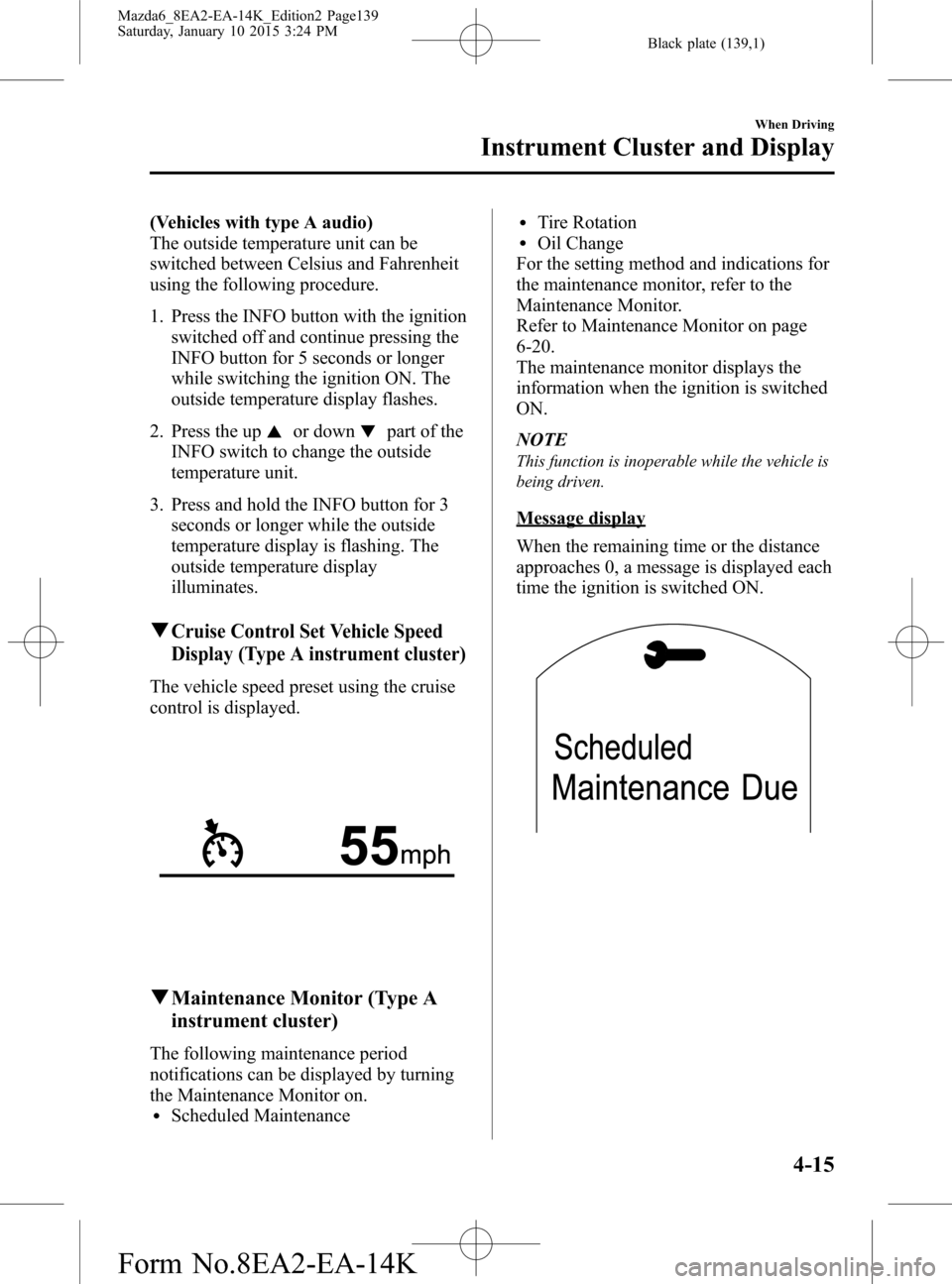
When the remaining time or the distance
approaches 0, a message is displayed each
time the ignition is switched ON.
When Driving
Instrument Cluster and Display
4-15
Mazda6_8EA2-EA-14K_Edition2 Page139
Saturday, January 10 2015 3:24 PM
Form No.8EA2-EA-14K
Page 148 of 614
Black plate (148,1)
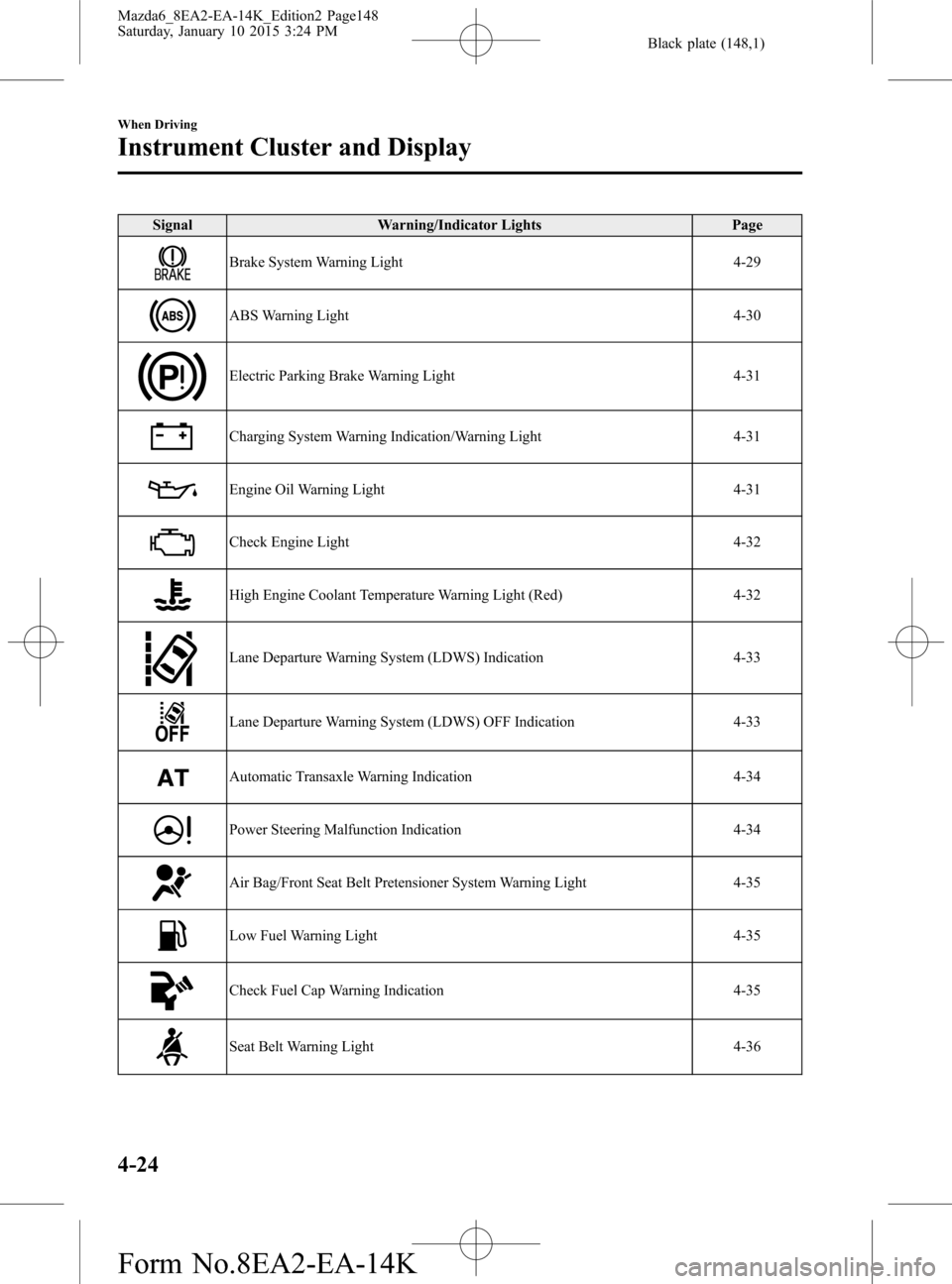
Signal Warning/Indicator Lights Page
Brake System Warning Light 4-29
ABS Warning Light 4-30
Electric Parking Brake Warning Light 4-31
Charging System Warning Indication/Warning Light 4-31
Engine Oil Warning Light 4-31
Check Engine Light 4-32
High Engine Coolant Temperature Warning Light (Red) 4-32
Lane Departure Warning System (LDWS) Indication 4-33
Lane Departure Warning System (LDWS) OFF Indication 4-33
Automatic Transaxle Warning Indication 4-34
Power Steering Malfunction Indication 4-34
Air Bag/Front Seat Belt Pretensioner System Warning Light 4-35
Low Fuel Warning Light 4-35
Check Fuel Cap Warning Indication 4-35
Seat Belt Warning Light 4-36
4-24
When Driving
Instrument Cluster and Display
Mazda6_8EA2-EA-14K_Edition2 Page148
Saturday, January 10 2015 3:24 PM
Form No.8EA2-EA-14K
Page 151 of 614
Black plate (151,1)
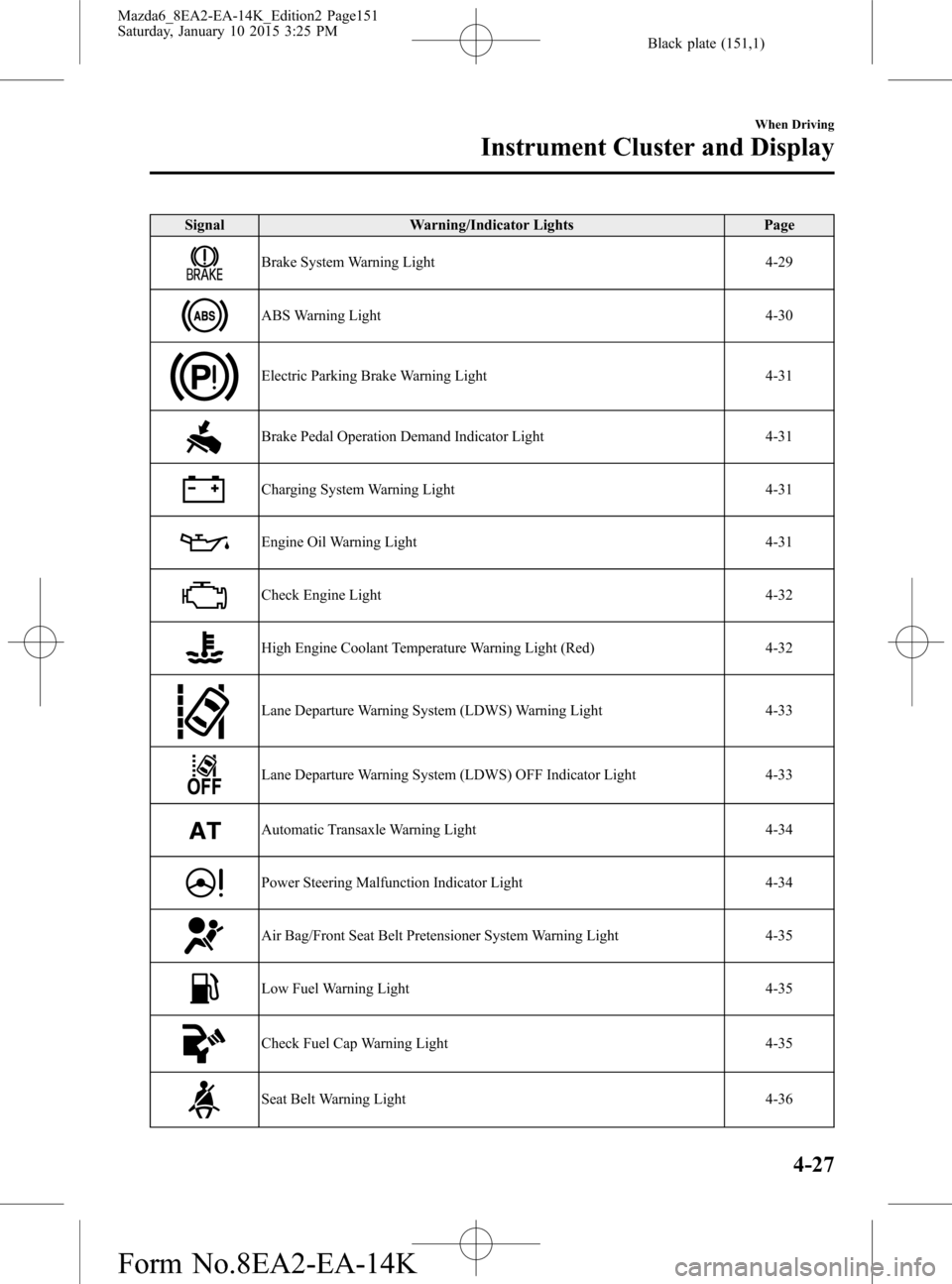
Signal Warning/Indicator Lights Page
Brake System Warning Light 4-29
ABS Warning Light 4-30
Electric Parking Brake Warning Light 4-31
Brake Pedal Operation Demand Indicator Light 4-31
Charging System Warning Light 4-31
Engine Oil Warning Light 4-31
Check Engine Light 4-32
High Engine Coolant Temperature Warning Light (Red) 4-32
Lane Departure Warning System (LDWS) Warning Light 4-33
Lane Departure Warning System (LDWS) OFF Indicator Light 4-33
Automatic Transaxle Warning Light 4-34
Power Steering Malfunction Indicator Light 4-34
Air Bag/Front Seat Belt Pretensioner System Warning Light 4-35
Low Fuel Warning Light 4-35
Check Fuel Cap Warning Light 4-35
Seat Belt Warning Light 4-36
When Driving
Instrument Cluster and Display
4-27
Mazda6_8EA2-EA-14K_Edition2 Page151
Saturday, January 10 2015 3:25 PM
Form No.8EA2-EA-14K
Page 155 of 614
Black plate (155,1)
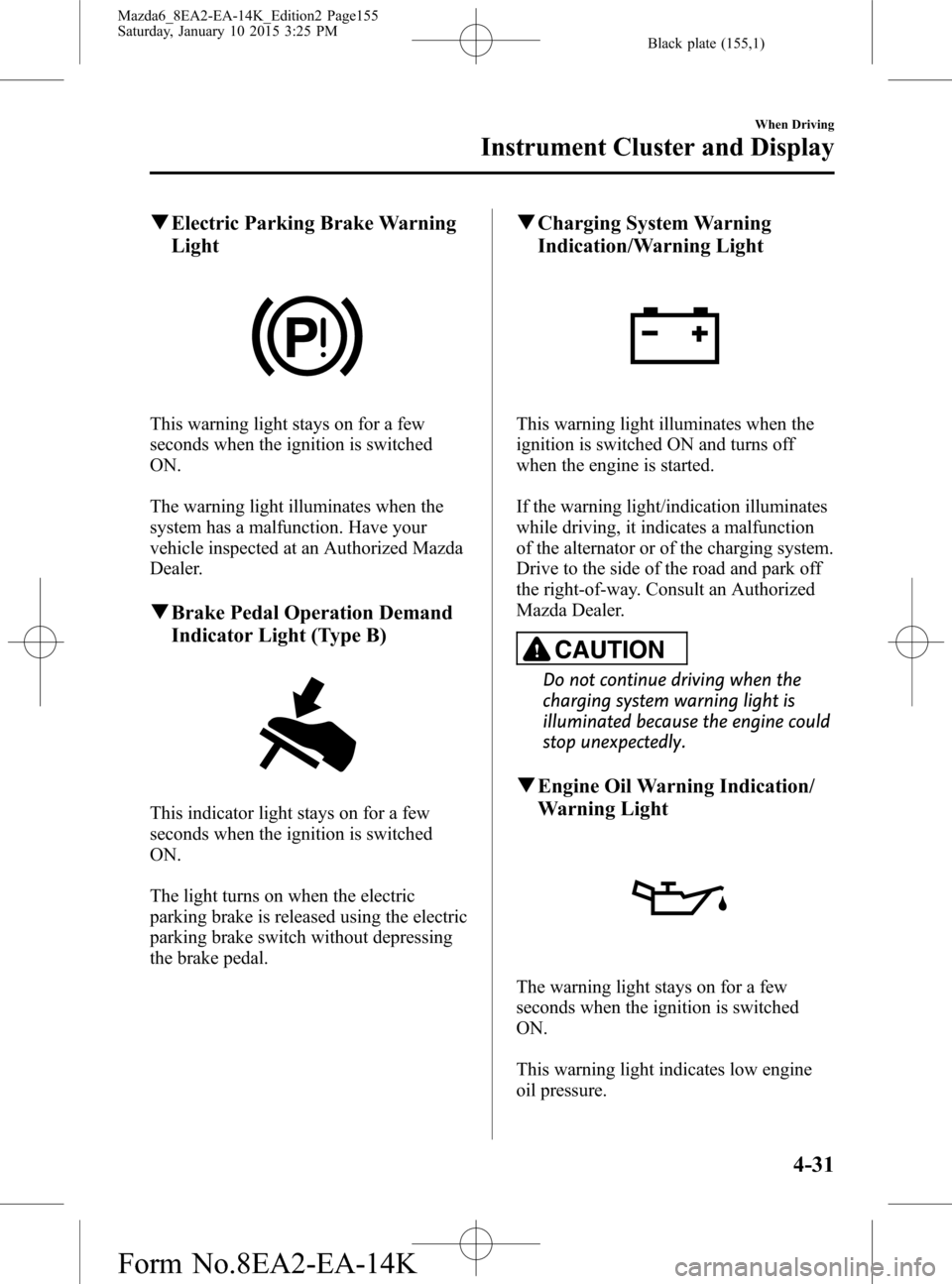
qElectric Parking Brake Warning
Light
This warning light stays on for a few
seconds when the ignition is switched
ON.
The warning light illuminates when the
system has a malfunction. Have your
vehicle inspected at an Authorized Mazda
Dealer.
qBrake Pedal Operation Demand
Indicator Light (Type B)
This indicator light stays on for a few
seconds when the ignition is switched
ON.
The light turns on when the electric
parking brake is released using the electric
parking brake switch without depressing
the brake pedal.
qCharging System Warning
Indication/Warning Light
This warning light illuminates when the
ignition is switched ON and turns off
when the engine is started.
If the warning light/indication illuminates
while driving, it indicates a malfunction
of the alternator or of the charging system.
Drive to the side of the road and park off
the right-of-way. Consult an Authorized
Mazda Dealer.
CAUTION
Do not continue driving when the
charging system warning light is
illuminated because the engine could
stop unexpectedly.
qEngine Oil Warning Indication/
Warning Light
The warning light stays on for a few
seconds when the ignition is switched
ON.
This warning light indicates low engine
oil pressure.
When Driving
Instrument Cluster and Display
4-31
Mazda6_8EA2-EA-14K_Edition2 Page155
Saturday, January 10 2015 3:25 PM
Form No.8EA2-EA-14K
Page 156 of 614

Black plate (156,1)
CAUTION
Do not run the engine if the oil
pressure is low. Otherwise, it could
result in extensive engine damage.
If the light illuminates while driving:
1. Drive to the side of the road and park
off the right-of-way on level ground.
2. Turn off the engine and wait 5 minutes
for the oil to drain back into the oil
pan.
3. Inspect the engine oil level (page 6-28).
If it's low, add the appropriate amount
of engine oil while being careful not to
overfill.
CAUTION
Do not run the engine if the oil level
is low. Otherwise, it could result in
extensive engine damage.
4. Start the engine and check the warning
light.
If the light remains illuminated even
though the oil level is normal or after
adding oil, stop the engine immediately
and have your vehicle towed to an
Authorized Mazda Dealer.
qCheck Engine Light
This indicator light illuminates when the
ignition is switched ON and turns off
when the engine is started.If this light illuminates while driving, the
vehicle may have a problem. It is
important to note the driving conditions
when the light illuminated and consult an
Authorized Mazda Dealer.
The check engine light may illuminate in
the following cases:
lThe fuel tank level being very low or
approaching empty.
lThe engine's electrical system has a
problem.
lThe emission control system has a
problem.
l(U.S.A. and Canada)
The fuel-filler cap is missing or not
tightened securely.
If the check engine light remains on, do
not drive at high speeds and consult an
Authorized Mazda Dealer as soon as
possible.
qHigh Engine Coolant Temperature
Warning Light (Red)
When the ignition is switched ON, the
light illuminates momentarily and then
turns off.
The light flashes when the engine coolant
temperature is extremely high, and
illuminates when the engine coolant
temperature increases further.
4-32
When Driving
Instrument Cluster and Display
Mazda6_8EA2-EA-14K_Edition2 Page156
Saturday, January 10 2015 3:25 PM
Form No.8EA2-EA-14K
Page 166 of 614

Black plate (166,1)
Type B
This indicator light stays on for a few
seconds when the ignition is switched
ON.
The wrench indicator light illuminates
when the engine oil replacement period is
reached.
If the light is illuminated, replace the
engine oil.
Refer to Engine Oil on page 6-27.
qTCS/DSC Indicator Light
This indicator light stays on for a few
seconds when the ignition is switched
ON. If the TCS or DSC is operating, the
indicator light flashes.
If the light stays on, the TCS, DSC or the
brake assist system may have a
malfunction and they may not operate
correctly. Take your vehicle to an
Authorized Mazda Dealer.
NOTE
lIn addition to the indicator light flashing, a
slight lugging sound will come from the
engine. This indicates that the TCS/DSC is
operating properly.
lOn slippery surfaces, such as fresh snow, it
will be impossible to achieve high rpm
when the TCS is on.
qDSC OFF Indicator Light
This indicator light stays on for a few
seconds when the ignition is switched
ON.
It also illuminates when the DSC OFF
switch is pressed and TCS/DSC is
switched off.
Refer to DSC OFF Switch on page 4-82.
If the light remains illuminated and the
TCS/DSC is not switched off, take your
vehicle to an Authorized Mazda Dealer.
The DSC may have a malfunction.
qSmart Brake Support/Smart City
Brake Support (SBS/SCBS) OFF
Indicator Light (Type A)
í
This indicator light illuminates for a few
seconds when the ignition is switched
ON.
When the Smart Brake Support/Smart
City Brake Support (SBS/SCBS) system
is turned off, the Smart Brake Support/
Smart City Brake Support (SBS/SCBS)
OFF indicator light turns on.
Refer to Personalization Features on page
9-9.
4-42
When Driving
íSome models.
Instrument Cluster and Display
Mazda6_8EA2-EA-14K_Edition2 Page166
Saturday, January 10 2015 3:25 PM
Form No.8EA2-EA-14K
Page 253 of 614

Black plate (253,1)
CAUTION
ØWhen driving off-road in areas where there is grass or forage, it is recommended
that the Smart City Brake Support (SCBS) system be turned off.
ØAlways use tires for all wheels that are of the specified size, and the same
manufacturer, brand, and tread pattern. In addition, do not use tires with
significantly different wear patterns on the same vehicle as the Smart City Brake
Support (SCBS) system may not operate normally.
ØThe laser sensor includes a function for detecting a soiled windshield and
informing the driver, however, depending on the conditions, it may not detect
plastic shopping bags, ice or snow on the windshield. In such cases, the system
cannot accurately determine a vehicle ahead and may not be able to operate
normally. Always drive carefully and pay attention to the road ahead.
When Driving
i-ACTIVSENSE
4-129
Mazda6_8EA2-EA-14K_Edition2 Page253
Saturday, January 10 2015 3:25 PM
Form No.8EA2-EA-14K
Page 263 of 614

Black plate (263,1)
CAUTION
Heed the following precautions to assure correct operation of each system.
ØDo not adhere stickers (including transparent stickers) to the surface of the
radiator grille and front emblem in and around the radar sensor (front), and do
not replace the radiator grille and front emblem with any product that is not a
genuine product designed for use with the radar sensor (front).
ØThe radar sensor (front) includes a function for detecting soiling of the radar
sensor's front surface and informing the driver, however, depending on the
conditions, it may require time to detect or it may not detect plastic shopping
bags, ice or snow. If this occurs, the system may not operate correctly, therefore
always keep the radar sensor (front) clean.
ØDo not install a grille guard.
ØIf the front part of the vehicle has been damaged in a vehicle accident, the
position of the radar sensor (front) may have moved. Stop the system immediately
and always have the vehicle inspected at an Authorized Mazda Dealer.
ØDo not use the front bumper to push other vehicles or obstructions such as when
pulling out of a parking space. Otherwise, the radar sensor (front) could be hit
and its position deviated.
ØDo not remove, disassemble, or modify the radar sensor (front).
ØFor repairs, replacement or paint work around the radar sensor (front), consult an
Authorized Mazda Dealer.
ØDo not modify the suspension. If the suspension are modified, the vehicle's posture
could change and the radar sensor (front) may not be able to correctly detect a
vehicle ahead or an obstruction.
When Driving
i-ACTIVSENSE
4-139
Mazda6_8EA2-EA-14K_Edition2 Page263
Saturday, January 10 2015 3:25 PM
Form No.8EA2-EA-14K