USB port MAZDA MODEL 6 2016 Owners Manual (in English)
[x] Cancel search | Manufacturer: MAZDA, Model Year: 2016, Model line: MODEL 6, Model: MAZDA MODEL 6 2016Pages: 614, PDF Size: 12.82 MB
Page 306 of 614

Black plate (306,1)
CAUTION
Do not use an audio file extension on
files other than audio files. In
addition, do not change the audio file
extension. Otherwise, the unit will
not recognize the file correctly
resulting in noise or a malfunction.
NOTE
lPlayback may not be possible depending on
the type and condition of the USB flash
memory even if the audio file complies with
the standard above.
lA copyright protected WMA/AAC file
cannot be played in this unit.
lThe order of the music data stored in the
device may differ from the playback order.
lTo prevent loss or damage of stored data,
we recommend that you always back up
your data.
lIf a device exceeds the maximum electric
current value of 1,000 mA, it may not
operate or recharge when connected.
lDo not pull out the USB device while in the
USB mode (only pull it out while in FM/AM
radio or CD mode).
lThe device will not operate if the data is
password protected.
lMP3/WMA/AAC/OGG*1files written
under specifications other than the
indicated specification may not play
normally or files/folder names may not
display correctly.
*1 Type B
qOperating Tips for iPod
This unit supports playback of music files
recorded to an iPod.
iPod is a trademark of Apple Inc.,
registered in the U.S. and other countries.
The iPod may not be compatible
depending on the model or OS version. In
this case, an error message is displayed.
CAUTION
ØRemove the iPod when it is not in
use. Because the iPod is not
designed to withstand excessive
changes in temperature inside the
cabin, it could be damaged or the
battery may deteriorate due to the
excessive temperature or humidity
inside the cabin if it is left in the
vehicle.
ØIf data in the iPod is lost while it is
connected to the unit, Mazda
cannot guarantee recovery of any
lost data.
ØIf the iPod battery is deteriorated,
the iPod may not recharge and
playback may not be possible
when it is connected to the unit.
ØFor details on using the iPod, refer
to the iPod instruction manual.
ØWhen connecting the iPod to a
USB port, all commands are made
from the audio unit. iPod control is
not possible.
NOTE
The audio unit cannot display images or
videos stored in an iPod.
5-20
Interior Features
Audio System
Mazda6_8EA2-EA-14K_Edition2 Page306
Saturday, January 10 2015 3:25 PM
Form No.8EA2-EA-14K
Page 307 of 614
Black plate (307,1)
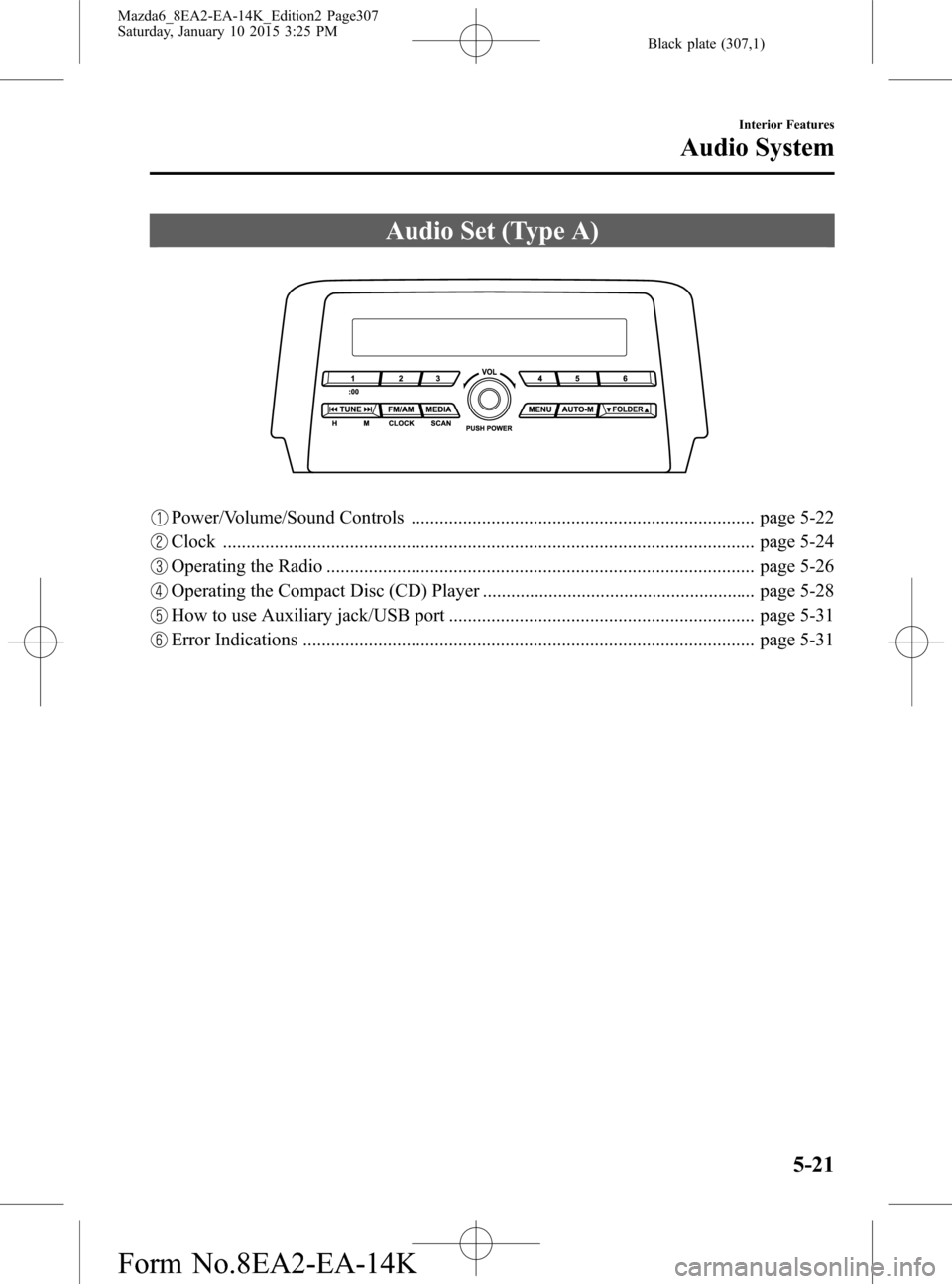
Audio Set (Type A)
Power/Volume/Sound Controls ......................................................................... page 5-22
Clock ................................................................................................................. page 5-24
Operating the Radio ........................................................................................... page 5-26
Operating the Compact Disc (CD) Player .......................................................... page 5-28
How to use Auxiliary jack/USB port ................................................................. page 5-31
Error Indications ................................................................................................ page 5-31
Interior Features
Audio System
5-21
Mazda6_8EA2-EA-14K_Edition2 Page307
Saturday, January 10 2015 3:25 PM
Form No.8EA2-EA-14K
Page 317 of 614

Black plate (317,1)
NOTElThe information viewable in the display is
only CD information (such as artist name,
song title) which has been recorded to the
CD.
lThis unit cannot display some characters.
Characters which cannot be displayed are
indicated by an asterisk (
).
Display scroll
Only 13 characters can be displayed at
one time. To display the rest of the
characters of a long title, press and hold
the text button (3). The display scrolls the
next 13 characters. Press and hold the text
button (3) again after the last 13
characters have been displayed to return
to the beginning of the title.
NOTE
The number of characters which can be
displayed is restricted.
Message display
If“CHECK CD”is displayed, it means
that there is some CD malfunction. Check
the CD for damage, dirt, or smudges, and
then properly reinsert it. If the message
appears again, insert another known good
CD. If the message continues to appear,
take the unit to an Authorized Mazda
Dealer for service.
qHow to use Auxiliary jack/USB port
Audio can be heard from the vehicle's
speakers by connecting a commercially-
available portable audio unit to the
auxiliary jack.
Use a commercially-available, non-
impedance (3.5
) stereo mini plug cable.
Contact an Authorized Mazda Dealer for
details.
In addition, audio can be played from the
vehicle audio device by connecting a USB
device or an iPod to the USB port.
Refer to AUX/USB/iPod mode on page
5-52.
qError Indications
If you see an error indication on the audio
display, find the cause in the chart. If you
cannot clear the error indication, take the
vehicle to an Authorized Mazda Dealer.
Indication Cause Solution
CHECK CD
CD is
inserted
upside
downInsert the CD properly. If
the error indication
continues to display,
consult an Authorized
Mazda Dealer.
CD is
defectiveInsert another CD
properly. If the error
indication continues to
display, consult an
Authorized Mazda
Dealer.
Interior Features
Audio System
5-31
Mazda6_8EA2-EA-14K_Edition2 Page317
Saturday, January 10 2015 3:25 PM
Form No.8EA2-EA-14K
Page 328 of 614

Black plate (328,1)
NOTElIf an analog broadcast is received once and
is received while HD1 is
selected, the audio unit switches to the
station automatically.lWhen theicon is illuminated, there
could be a noticeable difference in sound
quality and volume when a change from
digital to analog signals occurs. If the
sound quality and volume become
noticeably diminished or cut off, select the
icon to turn off(icon is
not illuminated).
lOnce an analog broadcast is received when
HD1 is selected from the Favorite channels,
it is switched to
automatically.
If the radio reception conditions are poor,
or HD is off, switching to
broadcasts is not possible.lWhen an HD specialty channel (HD2 to
HD8) is selected from the Favorite
channels,“Signal Lost”is displayed and
no audio is output until
is
received. If the radio reception conditions
are poor,“Signal Lost”continues to be
displayed.
lIf theicon is not illuminated,
information such as song titles of the
station are received, however,
the audio output is analog.
iTunes Tagging (for Apple devices with
USB use only)
By tagging a song currently being aired,
the song can be easily purchased from the
iTunes Store. Up to 100 tags can be
stored.
1. Select the
icon. The tag is stored in
the audio unit.
2. Connect the device via USB. The tag is
sent to the connected device
automatically.3. Synchronize the device with iTunes.
The tagged song can now be purchased
from the iTunes Store.
NOTE
lBoth AM and FMcan be used.lBecause iTunes Tagging only supports
purchasing from the iTunes Store, direct
downloading from the equipped vehicle
audio is not possible.
lIf the available memory for the connected
device is insufficient, the tag is not sent.
lIf an error occurs while the tag is being
sent, reconnect the device.
qOperating the Satellite Radioí
What is satellite radio?
With over 130 channels, SiriusXM
Satellite Radio brings you more of what
you love. Get channels and channels of
commercial-free music, plus sports, news,
talk, entertainment and more.
Commercial-free music from nearly
every genre―rock to pop, hip-hop to
country, jazz, classical and more. Plus live
performances and artist-dedicated
channels.
Live sports Play-by-Play & Expert Talk
―every NFL game, every NASCAR
®
race, 24/7 sports talk, college sports and
more.
Exclusive entertainment, comedy and
talk―The biggest names, compelling
talk, hilarious comedy.
World-class news plus local traffic and
weather.
Sign up for SiriusXM Satellite Radio
today!
5-42
Interior Features
íSome models.
Audio System
Mazda6_8EA2-EA-14K_Edition2 Page328
Saturday, January 10 2015 3:26 PM
Form No.8EA2-EA-14K
Page 334 of 614
Black plate (334,1)
Icon Function
Plays a CD. When selected again, playback is temporarily stopped.
Advances to the beginning of the next song.
Long-press to fast forward. It stops when you remove your hand from the icon or the
commander knob.
Displays sound settings to adjust audio quality level.
Refer to Volume/Display/Sound Controls on page 5-36.
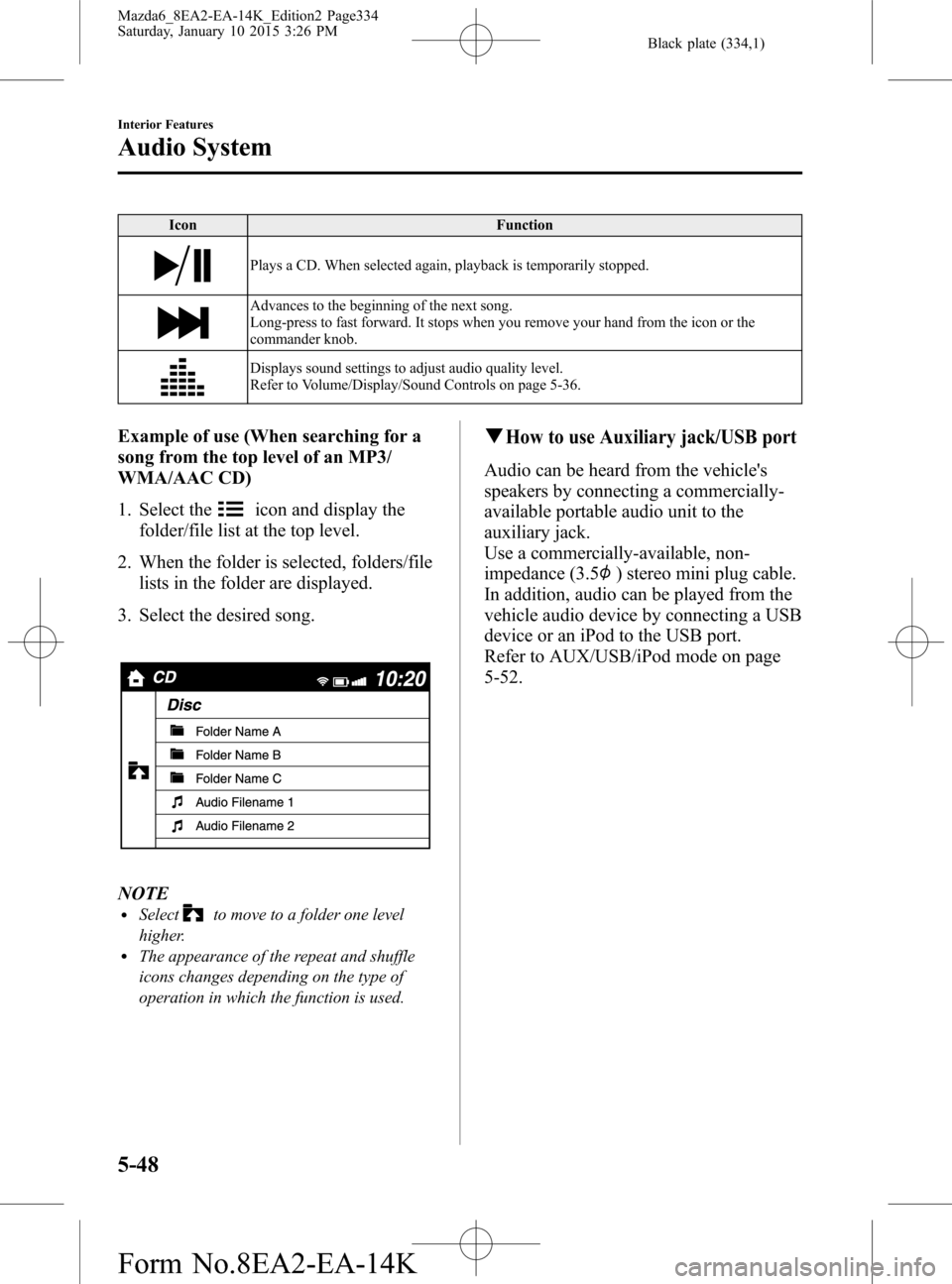
Example of use (When searching for a
song from the top level of an MP3/
WMA/AAC CD)
1. Select the
icon and display the
folder/file list at the top level.
2. When the folder is selected, folders/file
lists in the folder are displayed.
3. Select the desired song.
NOTElSelectto move to a folder one level
higher.
lThe appearance of the repeat and shuffle
icons changes depending on the type of
operation in which the function is used.
qHow to use Auxiliary jack/USB port
Audio can be heard from the vehicle's
speakers by connecting a commercially-
available portable audio unit to the
auxiliary jack.
Use a commercially-available, non-
impedance (3.5
) stereo mini plug cable.
In addition, audio can be played from the
vehicle audio device by connecting a USB
device or an iPod to the USB port.
Refer to AUX/USB/iPod mode on page
5-52.
5-48
Interior Features
Audio System
Mazda6_8EA2-EA-14K_Edition2 Page334
Saturday, January 10 2015 3:26 PM
Form No.8EA2-EA-14K
Page 338 of 614
Black plate (338,1)
Pandora®/Aha™/Stitcher™Radio
(Type B)
Press the seek switch (
) to skip forward
to the beginning of the next track.
Press and hold the seek switch (
)to
evaluate the playback of the current song
as“Like”.
Press and hold the seek switch (
)to
evaluate the playback of the current song
as“Dislike”.
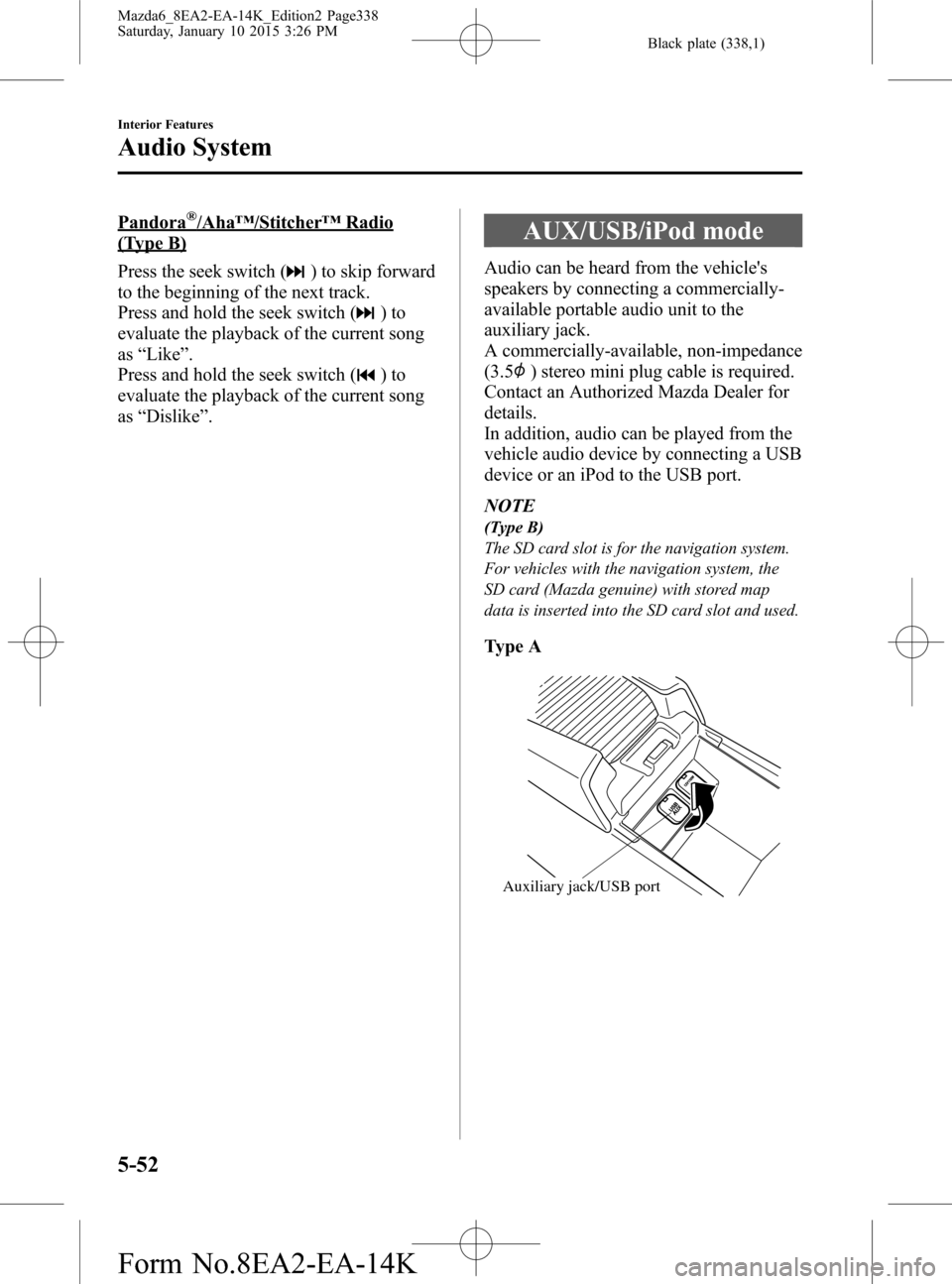
AUX/USB/iPod mode
Audio can be heard from the vehicle's
speakers by connecting a commercially-
available portable audio unit to the
auxiliary jack.
A commercially-available, non-impedance
(3.5
) stereo mini plug cable is required.
Contact an Authorized Mazda Dealer for
details.
In addition, audio can be played from the
vehicle audio device by connecting a USB
device or an iPod to the USB port.
NOTE
(Type B)
The SD card slot is for the navigation system.
For vehicles with the navigation system, the
SD card (Mazda genuine) with stored map
data is inserted into the SD card slot and used.
Type A
Auxiliary jack/USB port
5-52
Interior Features
Audio System
Mazda6_8EA2-EA-14K_Edition2 Page338
Saturday, January 10 2015 3:26 PM
Form No.8EA2-EA-14K
Page 339 of 614
Black plate (339,1)
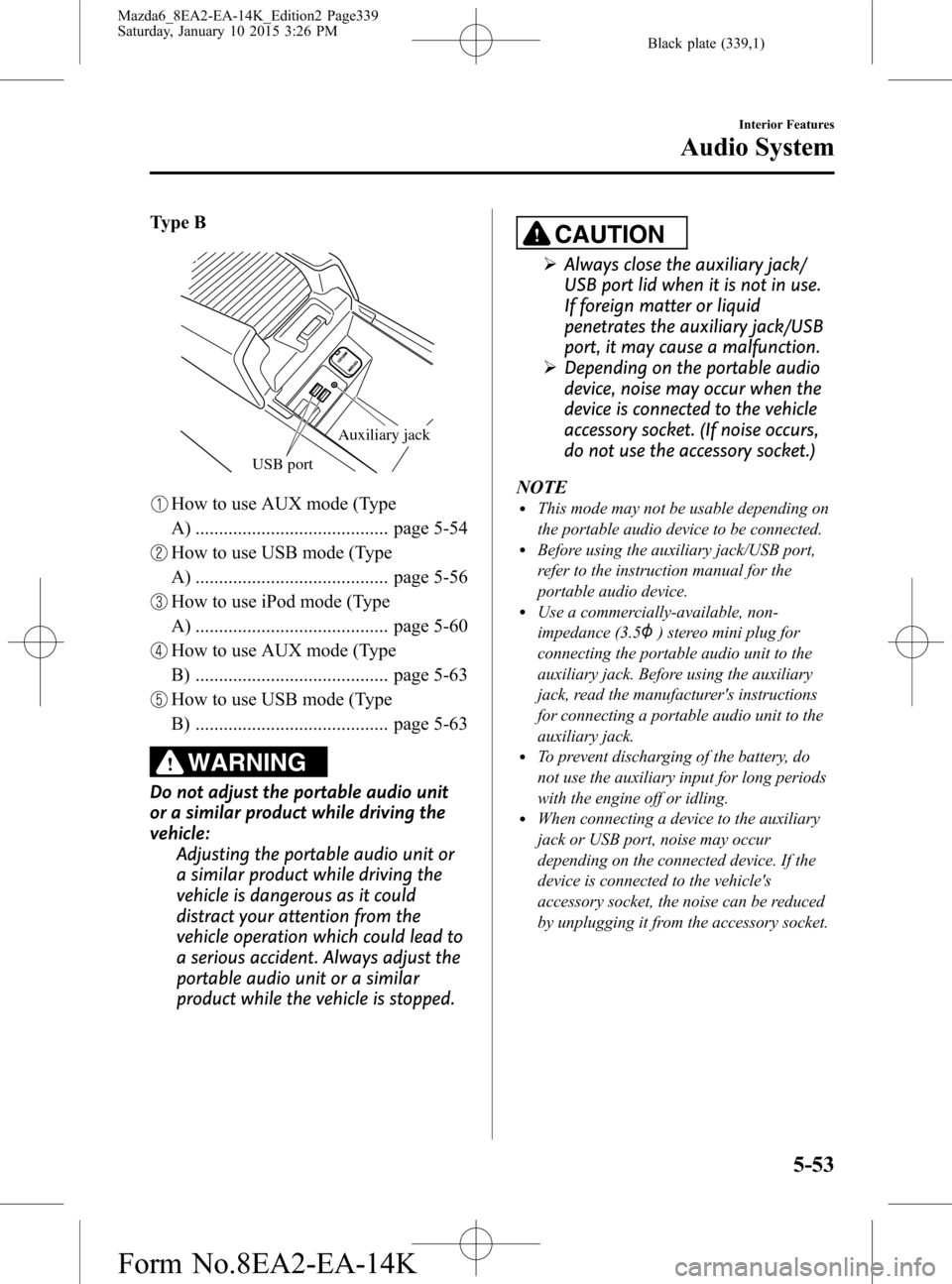
Type B
USB port
Auxiliary jack
How to use AUX mode (Type
A) ......................................... page 5-54
How to use USB mode (Type
A) ......................................... page 5-56
How to use iPod mode (Type
A) ......................................... page 5-60
How to use AUX mode (Type
B) ......................................... page 5-63
How to use USB mode (Type
B) ......................................... page 5-63
WARNING
Do not adjust the portable audio unit
or a similar product while driving the
vehicle:
Adjusting the portable audio unit or
a similar product while driving the
vehicle is dangerous as it could
distract your attention from the
vehicle operation which could lead to
a serious accident. Always adjust the
portable audio unit or a similar
product while the vehicle is stopped.
CAUTION
ØAlways close the auxiliary jack/
USB port lid when it is not in use.
If foreign matter or liquid
penetrates the auxiliary jack/USB
port, it may cause a malfunction.
ØDepending on the portable audio
device, noise may occur when the
device is connected to the vehicle
accessory socket. (If noise occurs,
do not use the accessory socket.)
NOTE
lThis mode may not be usable depending on
the portable audio device to be connected.
lBefore using the auxiliary jack/USB port,
refer to the instruction manual for the
portable audio device.
lUse a commercially-available, non-
impedance (3.5
) stereo mini plug for
connecting the portable audio unit to the
auxiliary jack. Before using the auxiliary
jack, read the manufacturer's instructions
for connecting a portable audio unit to the
auxiliary jack.
lTo prevent discharging of the battery, do
not use the auxiliary input for long periods
with the engine off or idling.
lWhen connecting a device to the auxiliary
jack or USB port, noise may occur
depending on the connected device. If the
device is connected to the vehicle's
accessory socket, the noise can be reduced
by unplugging it from the accessory socket.
Interior Features
Audio System
5-53
Mazda6_8EA2-EA-14K_Edition2 Page339
Saturday, January 10 2015 3:26 PM
Form No.8EA2-EA-14K
Page 340 of 614
Black plate (340,1)
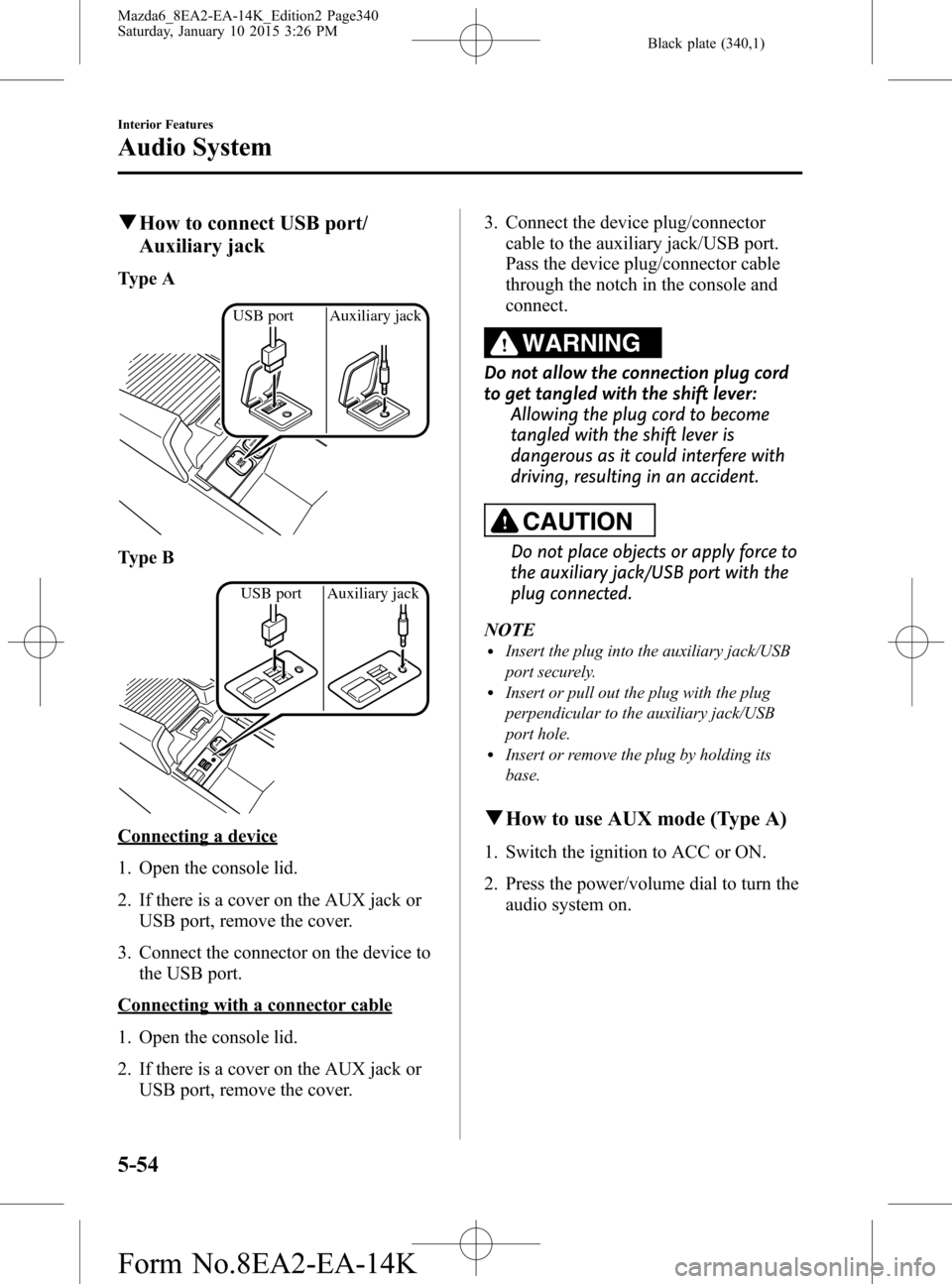
qHow to connect USB port/
Auxiliary jack
Type A
USB port Auxiliary jack
Type B
USB port Auxiliary jack
Connecting a device
1. Open the console lid.
2. If there is a cover on the AUX jack or
USB port, remove the cover.
3. Connect the connector on the device to
the USB port.
Connecting with a connector cable
1. Open the console lid.
2. If there is a cover on the AUX jack or
USB port, remove the cover.3. Connect the device plug/connector
cable to the auxiliary jack/USB port.
Pass the device plug/connector cable
through the notch in the console and
connect.
WARNING
Do not allow the connection plug cord
to get tangled with the shift lever:
Allowing the plug cord to become
tangled with the shift lever is
dangerous as it could interfere with
driving, resulting in an accident.
CAUTION
Do not place objects or apply force to
the auxiliary jack/USB port with the
plug connected.
NOTE
lInsert the plug into the auxiliary jack/USB
port securely.
lInsert or pull out the plug with the plug
perpendicular to the auxiliary jack/USB
port hole.
lInsert or remove the plug by holding its
base.
qHow to use AUX mode (Type A)
1. Switch the ignition to ACC or ON.
2. Press the power/volume dial to turn the
audio system on.
5-54
Interior Features
Audio System
Mazda6_8EA2-EA-14K_Edition2 Page340
Saturday, January 10 2015 3:26 PM
Form No.8EA2-EA-14K
Page 342 of 614

Black plate (342,1)
qHow to use USB mode (Type A)
Media/Scan button Folder down buttonFolder up button Play/Pause button Random button
Repeat buttonAudio display
Text button
Track down/Reverse button
Track up/Fast-forward button
Type Playable data
USB mode MP3/WMA/AAC file
This unit does not support a USB 3.0
device. In addition, other devices may not
be supported depending on the model or
OS version.
Playback
1. Switch the ignition to ACC or ON.
2. Press the power/volume dial to turn the
audio system on.
3. Press the media button (
)to
switch to the USB mode and start
playback.
NOTE
lSome devices such as smart phones may
require a setting change to allow operation
using a USB connection.
lWhen the USB device is not connected, the
mode does not switch to USB mode.
lWhen there is no playable data in the USB
device,“NO CONTENTS”is flashed.
lPlayback of the USB device is in the order
of the folder numbers. Folders which have
no MP3/WMA/AAC files are skipped.
lDo not remove the USB device while in the
USB mode. The data may be damaged.
Pause
To stop playback, press the play/pause
button (4).
Press the button again to resume
playback.
Fast-forward/Reverse
Press and hold the fast-forward button
(
) to advance through a track at high
speed.
Press and hold the reverse button (
)to
reverse through a track at high speed.
Track search
Press the track up button (
) once to
skip forward to the beginning of the next
track.
Press the track down button (
) within a
few seconds after playback begins to track
down to the beginning of the previous
track.
Press the track down button (
) after a
few seconds have elapsed to start
playback from the beginning of the
current track.
5-56
Interior Features
Audio System
Mazda6_8EA2-EA-14K_Edition2 Page342
Saturday, January 10 2015 3:26 PM
Form No.8EA2-EA-14K
Page 349 of 614

Black plate (349,1)
qHow to use AUX mode (Type B)
1. Select theicon on the home screen and display the Entertainment screen.
2. Select
to switch to the AUX mode. The following icons are displayed in the lower
part of the center display.
Icon Function
Displays the Entertainment menu. Use to switch to a different audio source.
Displays sound settings to adjust audio quality level.
Refer to Volume/Display/Sound Controls on page 5-36.
NOTElIf a device is not connected to the auxiliary jack, the mode does not switch to the AUX mode.lAdjust the audio volume using the portable audio device, commander switch, or audio control
switch.
lAudio adjustments can also be made using the portable audio device's volume setting.lIf the connection plug is pulled out from the auxiliary jack while in AUX mode, noise may occur.
qHow to use USB mode (Type B)
Type Playable data
USB mode MP3/WMA/AAC/OGG file
This unit does not support a USB 3.0 device. In addition, other devices may not be
supported depending on the model or OS version.
USB devices formatted to FAT32 are supported (USB devices formatted to other formats
such as NTFS are not supported).
Playback
1. Select the
icon on the home screen and display the Entertainment screen.
Interior Features
Audio System
5-63
Mazda6_8EA2-EA-14K_Edition2 Page349
Saturday, January 10 2015 3:26 PM
Form No.8EA2-EA-14K