battery MAZDA MODEL 6 2016 Owners Manual (in English)
[x] Cancel search | Manufacturer: MAZDA, Model Year: 2016, Model line: MODEL 6, Model: MAZDA MODEL 6 2016Pages: 614, PDF Size: 12.82 MB
Page 16 of 614
Black plate (16,1)
CAUTION
ØWhen operating a seat, be careful not to put your hands or fingers near the
moving parts of the seat or on the side trim to prevent injury.
ØWhen moving the seats, make sure there is no cargo in the surrounding area. If
the cargo gets caught it could damage the cargo.
Ø(Manual Seat)
When returning a rear-reclined seatback to its upright position, make sure you
hold onto the seatback with your other hand while operating the lever. If the
seatback is not supported, it will flip forward suddenly and could cause injury.
Ø(Power Seat)
The seat-bottom power adjustment is operated by motors. Avoid extended
operation because excessive use can damage the motors.
ØTo prevent the battery from running down, avoid using the power adjustment
when the engine is stopped. The adjuster uses a large amount of electrical
power.
ØDo not use the switch to make more than one adjustment at a time.
NOTE
When returning a rear seat to its original position, also replace the seat belt to its normal position.
Verify that the seat belt pulls out and retracts.
2-4
Essential Safety Equipment
Seats
Mazda6_8EA2-EA-14K_Edition2 Page16
Saturday, January 10 2015 3:24 PM
Form No.8EA2-EA-14K
Page 20 of 614
Black plate (20,1)
CAUTION
ØBefore folding a rear seatback,
make sure that the rear seat
warmer switch is off. If a rear
seatback is folded while the rear
seat warmer is in operation, it
may heat the seat excessively and
damage the seat surface.
ØDo not use organic solvents to
clean the seat. It may damage the
seat surface and the heater.
NOTE
lUse the seat warmer when the engine is
running. Leaving the seat warmer on for
long periods with the engine not running
could cause the battery power to be
depleted.
l(Front)
If the ignition is switched off while the seat
warmer is operating (High, Mid or Low)
and then switched ON again, the seat
warmer will automatically operate at the
temperature set before switching off the
ignition.
l(Rear)
When the ignition is switched OFF during
seat warmer operation, the seat warmers
are automatically turned off at the next
engine start. To turn the seat warmers back
on, press the seat warmer switch again.
lThe temperature of the seat warmer cannot
be adjusted beyond High, Mid and Low
because the seat warmer is controlled by a
thermostat.
qSeat Position Memory (Driver's
seat)í
The seat position memory function allows
you to program the driver's seat to a
desired seat position and to call up a
programmed position with the simple
touch of a button.
CAUTION
Do not place fingers or hands around
the bottom of the seat while the seat
memory function is operating. The
seat moves automatically while the
seat memory function is operating
and fingers or hands could get
pinched and injured.
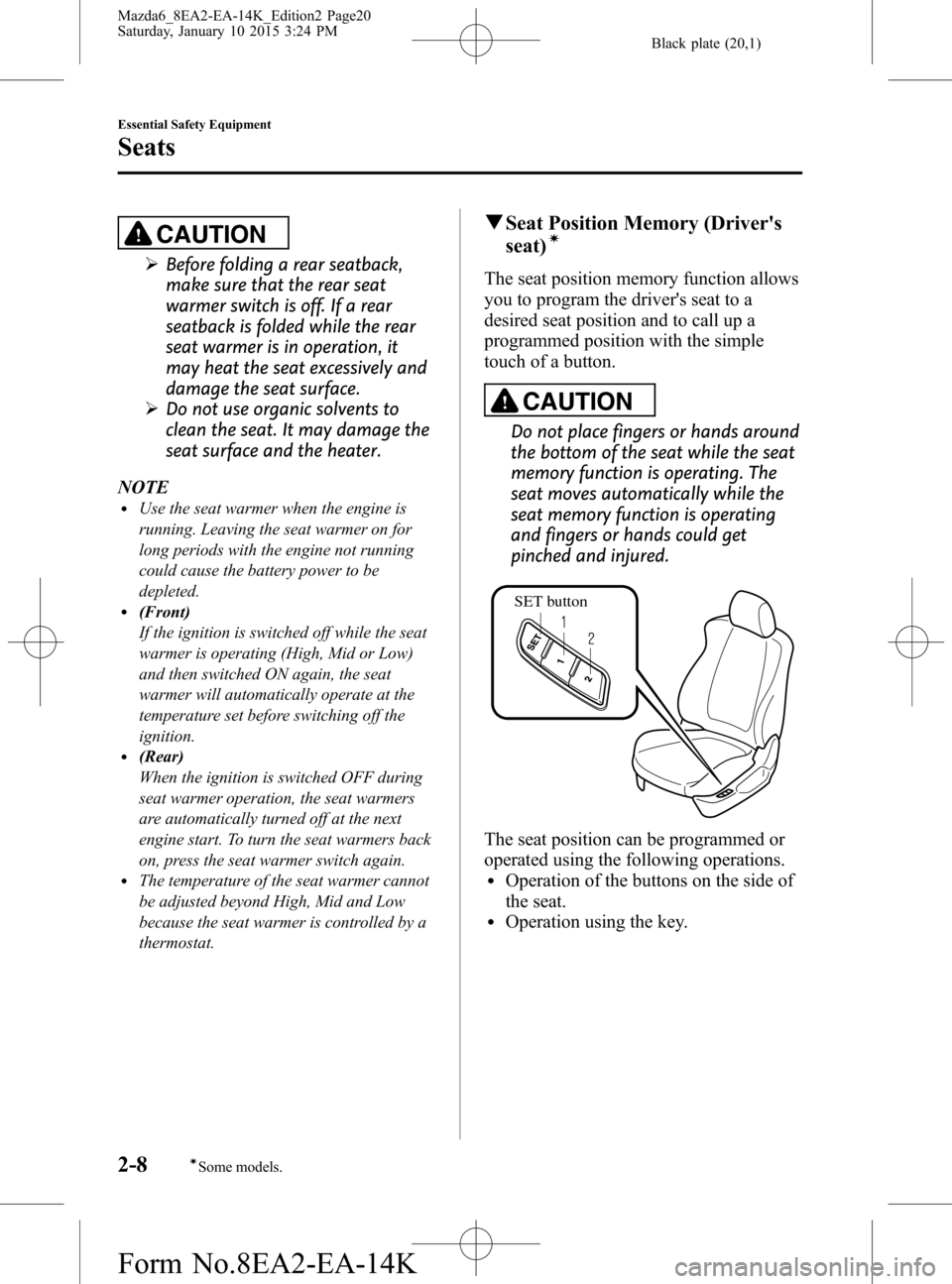
SET button
The seat position can be programmed or
operated using the following operations.
lOperation of the buttons on the side of
the seat.
lOperation using the key.
2-8
Essential Safety Equipment
íSome models.
Seats
Mazda6_8EA2-EA-14K_Edition2 Page20
Saturday, January 10 2015 3:24 PM
Form No.8EA2-EA-14K
Page 21 of 614

Black plate (21,1)
NOTElIndividual seat positions can be
programmed to the two available
programming buttons on the side of the
driver's seat, plus one seat position for each
registered key.
lIf the vehicle has been serviced and the
battery cables disconnected, the
programmed seat positions will have been
erased. Re-program the seat positions.
Programming
1. Switch the ignition OFF.
2. Adjust the seat to the desired position
using the slide lifter and reclining
switches.
Refer to Seat Operation on page 2-5.
3. Press and hold the memory SET button
until a beep sound is heard.
4. Perform one of the following settings
within 5 seconds of completing step 3
above:
lTo program memory button 1 or 2,
press and hold the button until a
beep sound is heard.
lTo program a key, press and hold
the key
switch until a beep sound
is heard.
Adjusting a programmed position
(Programming to a button on the seat
side)
1. While the vehicle is stopped, press the
programming button for the seat
position you want to call up (button 1
or 2).
2. A beep sound is heard when the seat
position adjustment is completed.NOTE
lIf seat movement is not required, only the
beep sounds.
lWhen the ignition is switched ON, the seat
position memory function does not operate
unless the selector lever is in the P position
(Automatic transaxle) or the parking brake
is applied (Manual transaxle).
lWhen the ignition is switched OFF, the seat
position memory function is operable while
the selector lever is in a position other than
P position (Automatic transaxle) or the
parking brake is not applied (Manual
transaxle), however, if the ignition is
switched ON while the seat position
memory function is operating, the operation
is stopped.
lThe seat position adjustment is canceled in
the following cases:
lAny of the seat adjustment switches is
operated.
lThe SET button is pressed.lProgramming button 1 or 2 is pressed.lThe key lock switch or unlock switch is
operated.
lThe vehicle starts moving.
(When programming to the key)
1. Unlock the doors by pressing a request
switch or the key
switch.
2. After unlocking the doors, the seat
position adjustment begins within 40
seconds of opening the driver's door,
and a beep sounds when the operation
is finished.
Essential Safety Equipment
Seats
2-9
Mazda6_8EA2-EA-14K_Edition2 Page21
Saturday, January 10 2015 3:24 PM
Form No.8EA2-EA-14K
Page 76 of 614

Black plate (76,1)
Keys
WARNING
Do not leave the key in your vehicle
with children and keep them in a place
where your children will not find or
play with them:
Leaving children in a vehicle with the
key is dangerous. This could result in
someone being badly injured or even
killed. Children may find these keys
to be an interesting toy to play with
and could cause the power windows
or other controls to operate, or even
make the vehicle move.
CAUTION
ØBecause the key (transmitter) uses
low-intensity radio waves, it may
not function correctly under the
following conditions:
ØThe key is carried with
communication devices such as
cellular phones.
ØThe key contacts or is covered
by a metal object.
ØThe key is near electronic
devices such as personal
computers.
ØNon-Mazda genuine electronic
equipment is installed in the
vehicle.
ØThere is equipment which
discharges radio waves near the
vehicle.
ØThe key (transmitter) may
consume battery power excessively
if it receives high-intensity radio
waves. Do not place the key near
electronic devices such as
televisions or personal computers.
ØTo avoid damage to the key
(transmitter), DO NOT:
ØDrop the key.
ØGet the key wet.
ØDisassemble the key.
ØExpose the key to high
temperatures on places such as
the dashboard or hood, under
direct sunlight.
ØExpose the key to any kind of
magnetic field.
ØPlace heavy objects on the key.
ØPut the key in an ultrasonic
cleaner.
ØPut any magnetized objects
close to the key.
3-2
Before Driving
Keys
Mazda6_8EA2-EA-14K_Edition2 Page76
Saturday, January 10 2015 3:24 PM
Form No.8EA2-EA-14K
Page 78 of 614
Black plate (78,1)
Keyless Entry System
This system uses the key buttons to
remotely lock and unlock the doors, and
opens the trunk lid.
The system can start the engine without
having to take the key out of your purse
or pocket.
It can also help you signal for attention.
Operating the theft-deterrent system is
also possible on theft-deterrent system-
equipped vehicles.
Press the buttons slowly and carefully.
System malfunctions or warnings are
indicated by the following warning lights
or beeps.
For vehicles with the type A instrument
cluster, check the displayed message for
more information and, if necessary, have
the vehicle inspected at an Authorized
Mazda Dealer, according to the indication.
lKEY Warning Light (Red)
Refer to Warning/Indicator Lights on
page 4-22.
lIgnition Not Switched Off (STOP)
Warning Beep
Refer to Ignition Not Switched Off
(STOP) Warning Beep on page 7-35.
lKey Removed from Vehicle Warning
Beep
Refer to Key Removed from Vehicle
Warning Beep on page 7-35.
If you have a problem with the key,
consult an Authorized Mazda Dealer.
If your key is lost or stolen, consult an
Authorized Mazda Dealer as soon as
possible for a replacement and to make
the lost or stolen key inoperative.
CAUTION
Radio equipment like this is governed
by laws.
Changes or modifications not
expressly approved by the party
responsible for compliance could void
the user's authority to operate the
equipment.
NOTE
lThe keyless entry system operation may
vary due to local conditions.
lThe keyless entry system is fully operational
(door lock/unlock) when the push button
start is switched off. The system does not
operate if the push button start is switched
to any position other than off.
lIf the key does not operate when pressing a
button or the operational range becomes
too small, the battery may be dead. To
install a new battery, refer to Replace
Electrical Battery(page 6-38).
lBattery life is about one year. Replace the
battery with a new one if the KEY indicator
light (green) flashes in the instrument
cluster. Replacing the battery about once a
year is recommended because the KEY
warning light/indicator light may not
illuminate or flash depending on the rate of
battery depletion.
lAdditional keys can be obtained at an
Authorized Mazda Dealer. Up to 6 keys can
be used with the keyless functions per
vehicle. Bring all keys to an Authorized
Mazda Dealer when additional keys are
required.
3-4
Before Driving
Keys
Mazda6_8EA2-EA-14K_Edition2 Page78
Saturday, January 10 2015 3:24 PM
Form No.8EA2-EA-14K
Page 83 of 614
Black plate (83,1)
Advanced Keyless Entry
System
WARNING
Radio waves from the key may affect
medical devices such as pacemakers:
Before using the key near people who
use medical devices, ask the medical
device manufacturer or your
physician if radio waves from the key
will affect the device.
The advanced keyless function allows you
to lock/unlock the doors, or open the
trunk lid while carrying the key without
using the key.
System malfunctions or warnings are
indicated by the following warning beeps.
lRequest switch Inoperable Warning
Beep
Refer to Request Switch Inoperable
Warning Beep (With the advanced
keyless function) on page 7-35.
lKey Left-in-Trunk Warning Beep
Refer to Key Left-in-trunk Warning
Beep (With the advanced keyless
function) on page 7-36.
lKey Left-in-vehicle Warning Beep
Refer to Key Left-in-vehicle Warning
Beep (With the advanced keyless
function) on page 7-36.NOTE
The advanced keyless entry system functions
can be deactivated to prevent any possible
adverse effect on a user wearing a pacemaker
or other medical device. If the system is
deactivated, you will be unable to start the
engine by carrying the key. Consult an
Authorized Mazda Dealer for details. If the
advanced keyless entry system has been
deactivated, you can start the engine by
following the procedure indicated when the key
battery goes dead.
Refer to Engine Start Function When Key
Battery is Dead on page 4-6.
Before Driving
Advanced Keyless Entry System
3-9
Mazda6_8EA2-EA-14K_Edition2 Page83
Saturday, January 10 2015 3:24 PM
Form No.8EA2-EA-14K
Page 84 of 614

Black plate (84,1)
Operational Range
The system operates only when the driver
is in the vehicle or within operational
range while the key is being carried.
NOTE
When the battery power is low, or in places
where there are high-intensity radio waves or
noise, the operational range may become
narrower or the system may not operate. For
determining battery replacement, Refer to
Keyless Entry System on page 3-4.
qLocking, Unlocking the Doors
Exterior antenna
Operational range80cm (31in) 80cm (31in)
NOTE
The system may not operate if you are too
close to the windows, door handles.
qOpening the Trunk Lid
Exterior antenna
Operational range80cm (31in)
3-10
Before Driving
Advanced Keyless Entry System
Mazda6_8EA2-EA-14K_Edition2 Page84
Saturday, January 10 2015 3:24 PM
Form No.8EA2-EA-14K
Page 86 of 614

Black plate (86,1)
NOTElWhen the ignition is switched to ACC or
ON, the vehicle lock-out prevention feature
prevents you from locking yourself out of
the vehicle.
All doors will automatically unlock if they
are locked using the power door locks with
any door open.
The vehicle lock-out prevention feature
does not operate while the ignition is
switched off.
When any door is opened from the outside
while the key is inside the vehicle, the
closed doors are locked. All the doors are
automatically unlocked by closing the open
door.
(With the advanced keyless function)
The beep sound is heard for about 10
seconds to notify the driver that the key has
been left in the vehicle.
(Without the advanced keyless function)
The horn sound is heard twice to notify the
driver that the key has been left in the
vehicle.
l(Door unlock (control) system with
collision detection)
This system automatically unlocks the
doors in the event the vehicle is involved in
an accident to allow passengers to get out
of the vehicle immediately and prevent
being trapped inside. While the ignition is
switched ON and in the event the vehicle
receives an impact strong enough to inflate
the air bags, all the doors are automatically
unlocked after about 6 seconds have
elapsed from the time of the accident.
The doors may not unlock depending on
how an impact is applied, the force of the
impact, and other conditions of the
accident.
If door-related systems or the battery is
malfunctioning, the doors will not unlock.
qLocking, Unlocking with Key
All doors lock automatically when the
driver's door is locked with the key.
All doors unlock when the driver's door is
unlocked and the key is held in the unlock
position for one second or longer.
Turn the key toward the front to lock,
toward the back to unlock.
LockUnlock
NOTE
Holding the key in the unlocked position in the
driver's door lock for about a second unlocks
all doors. To unlock only the driver's door,
insert the key into the driver's door lock and
turn the key briefly to the unlock position and
then immediately return it to the center
position.
3-12
Before Driving
Doors and Locks
Mazda6_8EA2-EA-14K_Edition2 Page86
Saturday, January 10 2015 3:24 PM
Form No.8EA2-EA-14K
Page 95 of 614

Black plate (95,1)
Opening the trunk lid with the remote
release button
Push the remote release button.
NOTE
If the vehicle battery is dead or there is a
malfunction in the electrical system and the
trunk lid cannot be unlocked, the trunk lid can
be opened by performing the emergency
procedure.
Refer to When Trunk Lid Cannot be Opened on
page 7-38.
Closing the trunk lid
To close, lower the trunk lid slowly using
the trunk lid grip recess, and then push the
trunk lid closed using both hands.
Do not slam it. Pull up on the trunk lid to
make sure it is secure.
Trunk lid grip recess
qLuggage Compartment
Loading golf bags
Golf bags can be carried in the luggage
compartment.
Up to three golf bags can be carried in the
luggage compartment.
Place each of the three golf bags into the
luggage compartment with the bottom of
each bag pointed to the left, and then set
the top of each bag so that it is pointed to
the right.
Before Driving
Doors and Locks
3-21
Mazda6_8EA2-EA-14K_Edition2 Page95
Saturday, January 10 2015 3:24 PM
Form No.8EA2-EA-14K
Page 108 of 614

Black plate (108,1)
Close
Open
Auto-opening/closing
To fully open the window automatically,
press the switch completely down.
To fully close the window automatically,
pull the switch completely up.
To stop the window partway, pull or press
the switch in the opposite direction and
then release it.
Power window system initialization
procedure
If the battery was disconnected during
vehicle maintenance, or for other reasons
(such as a switch continues to be operated
after the window is fully open/closed), the
window will not fully open and close
automatically.
Resetting of the automatic function can be
performed using the master control
switches or each passenger door switch.
The power window auto function reset
procedure can be done on all door
switches. The power window auto
function will only resume on the power
window that has been reset.
1 Switch the ignition ON.
2 Make sure that the power window lock
switch located on the driver's door is
not depressed.3 Press the switch and fully open the
window.
4 Pull up the switch to fully close the
window and continue holding the
switch for about 2 seconds after the
window fully closed.
5 Repeat Steps 3-4 for the front passenger
power window while seated in the front
passenger seat.
6 Repeat Steps 3-4 for both the left and
right rear power windows while seated
in the rear seat.
7 Make sure that the power windows
operate correctly using the door
switches.
After the system has been re-initialized,
each passenger window can be fully
opened or closed automatically using the
master control switches.
Jam-safe window
If a person's hands, head or an object
blocks the window during the manual
closing operation or the auto-closing
operation, the window will stop and open
halfway.
WARNING
Make sure nothing blocks the window
just before it reaches the fully closed
position or while fully holding up the
power window switch:
Blocking the power window just
before it reaches the fully closed
position or while fully holding up the
power window switch is dangerous.
In this case, the jam-safe function
cannot prevent the window from
closing all the way. If fingers are
caught, serious injuries could occur.
3-34
Before Driving
Windows
Mazda6_8EA2-EA-14K_Edition2 Page108
Saturday, January 10 2015 3:24 PM
Form No.8EA2-EA-14K