change wheel MAZDA MODEL 6 2017 (in English) User Guide
[x] Cancel search | Manufacturer: MAZDA, Model Year: 2017, Model line: MODEL 6, Model: MAZDA MODEL 6 2017Pages: 578, PDF Size: 54.72 MB
Page 255 of 578

4–131
When Driving
i-ACTIVSENSE
Vehicle lane line display
When the Lane-keep Assist System
(LAS) & Lane Departure Warning System
(LDWS) becomes operational while
on standby, the vehicle lane lines are
displayed in the multi-information display
and the active driving display. In the
vehicle lane lines display indicating the
operation status, the color of the vehicle
lane lines being detected changes to white.
(Stand-by status)
Multi-information Display
Active Driving Display
(Operational status)
Multi-information Display
Active Driving Display
Auto cancel
In the following cases, the Lane-keep
Assist System (LAS) & Lane Departure
Warning System (LDWS) is automatically
canceled, the Lane-keep Assist System
(LAS) and Lane Departure Warning
System (LDWS) warning indication
(amber) turns on, and an alert is displayed.
When the Lane-keep Assist System
(LAS) & Lane Departure Warning System
(LDWS) become operational, the system
turns back on automatically.
The temperature inside the camera is
high or low.
The windshield around the camera is
foggy.
The windshield around the camera is
blocked by an obstruction, causing poor
forward visibility.
Auto cancel of warning/steering assist
When the following operations are
performed, the Lane-keep Assist System
(LAS) & Lane Departure Warning System
(LDWS) determines that the driver intends
to make a lane change and the system
operation is canceled automatically. The
Lane-keep Assist System (LAS) & Lane
Departure Warning System (LDWS)
resumes automatically after the operation.
The steering wheel is operated abruptly. The brake pedal is operated. The accelerator pedal is operated.
(To cancel the automatic sensitivity
cancel function, deselect “Cancel
sensitivity” in the personalization
features setting.)
The turn signal lever is operated. The vehicle crosses a lane line.
Mazda6_8FH2-EA-16F_Edition2.indb 1312016/07/07 13:45:18
Page 256 of 578

4–132
When Driving
i-ACTIVSENSE
NOTE
After the operation, the Lane-keep
Assist System (LAS) & Lane Departure
Warning System (LDWS) operation may
not operate for a period of 5 seconds
at the most until the lane lines are
detected.
Under the following conditions, the
Lane-keep Assist System (LAS) & Lane
Departure Warning System (LDWS)
cancels the warning/steering assist
automatically.
The driver takes his/her hands off the
steering wheel.
(The Lane-keep Assist System (LAS)
& Lane Departure Warning System
(LDWS) is designed to assist the
driver's steering operation and it
will resume operation automatically
when the driver holds the steering
wheel.)
The DSC OFF switch is pressed to
cancel the DSC.
Steering operation assist OFF (non-
operational)
The steering operation assist for the
Lane-keep Assist System (LAS) & Lane
Departure Warning System (LDWS) can
be changed to non-operational (OFF).
Refer to Setting Change (Personalization
Features) on page 9-10.
When the steering operation assist has
been changed to non-operational (OFF),
the operation conditions and the display
of the Lane-keep Assist System (LAS) &
Lane Departure Warning System (LDWS)
differ. Operate the system as follows: System operation
Make sure that the Lane-keep Assist
System (LAS) & Lane Departure Warning
System (LDWS) OFF indicator light is in
the instrument cluster turned off. When the
Lane-keep Assist System (LAS) & Lane
Departure Warning System (LDWS) OFF
indicator light turns on, press the switch
and make sure that the indicator light turns
off.Drive the vehicle in the center of the
driving lane while the Lane-keep Assist
System (LAS) & Lane Departure Warning
System (LDWS) OFF indicator light in the
instrument cluster is turned off.
The system becomes operational when all
of the following conditions are met.
The system detects white (yellow) lane
lines on both the right and left sides or
on either side.
The vehicle speed is about 60 km/h
(37 mph) or faster. The vehicle is driven on a straight road
or road with gentle curves.
The engine is running.
Mazda6_8FH2-EA-16F_Edition2.indb 1322016/07/07 13:45:18
Page 258 of 578

4–134
When Driving
i-ACTIVSENSE
Auto cancel
In the following cases, the Lane-keep
Assist System (LAS) & Lane Departure
Warning System (LDWS) is automatically
canceled, the Lane-keep Assist System
(LAS) and Lane Departure Warning
System (LDWS) warning indication
(amber) turns on, and an alert is displayed.
When the Lane-keep Assist System
(LAS) & Lane Departure Warning System
(LDWS) become operational, the system
turns back on automatically.
The temperature inside the camera is
high or low.
The windshield around the camera is
foggy.
The windshield around the camera is
blocked by an obstruction, causing poor
forward visibility.
(Auto cancel of warnings)
When the following operations are
performed, the Lane-keep Assist System
(LAS) & Lane Departure Warning System
(LDWS) determines that the driver intends
to make a lane change and the system
operation is canceled automatically. The
Lane-keep Assist System (LAS) & Lane
Departure Warning System (LDWS) is
resumes automatically after the operation.
The steering wheel is operated abruptly. The brake pedal is depressed. The accelerator pedal is depressed.
(To cancel the automatic sensitivity
cancel function, deselect “Warning
sensitivity” in the personalization
features setting.)
The turn signal lever is operated. The vehicle crosses a lane line.
System Canceling
When the Lane-keep Assist System
(LAS) & Lane Departure Warning System
(LDWS) is turned off, press the Lane-keep
Assist System (LAS) & Lane Departure
Warning System (LDWS) OFF switch.
The Lane-keep Assist System (LAS) &
Lane Departure Warning System (LDWS)
OFF indicator light turns on.
Mazda6_8FH2-EA-16F_Edition2.indb 1342016/07/07 13:45:18
Page 260 of 578
 User Guide 4–136
When Driving
i-ACTIVSENSE
Lane Departure Warning
If the system determines that the vehicle may deviate from its lane, the\
lane departure
warning (beep sound, rumble sound*1, or steering")
4–136
When Driving
i-ACTIVSENSE
Lane Departure Warning
If the system determines that the vehicle may deviate from its lane, the\
lane departure
warning (beep sound, rumble sound*1, or steering wheel vibration) is activated and the
direction in which the system determines that the vehicle may deviate is\
indicated in the
multi-information display and the active driving display.
If the system determines that the vehicle may deviate from its lane, the\
color of the lane line
on the side being detected by the system changes from white to amber, and flashes.
Multi-information Display Active Driving Display
Mazda6_8FH2-EA-16F_Edition2.indb 1362016/07/07 13:45:18
Page 261 of 578

4–137
When Driving
i-ACTIVSENSE
NOTE
If you have set the lane departure warning sound to the beep sound/rumble sound*1
setting, the warning sound may not be heard depending on the surrounding noise
conditions.
If you have set the lane departure warning system to the steering wheel vibrations setting,
the vibration may not be felt depending on the road surface conditions.
When the setting for the steering operation assist is changed to operati\
onal, the warnings
can be set to activate/not activate. (When the setting for the steering\
operation assist is
changed to non-operational, the warnings cannot be set to not activate.)\
Refer to Setting Change (Personalization Features) on page 9-10.
The Lane-keep Assist System (LAS) & Lane Departure Warning System (LDWS) can be
changed to the following settings regardless of whether the steering operation assist has
been set to operational/non-operational. Always check the setting status when driving the
vehicle and make setting changes if necessary.
Refer to Setting Change (Personalization Features) on page 9-10.
Steering wheel vibration: Strong/weak Warning sound volume Types of warnings (steering wheel vibration/beep sound/rumble sound*1)
*1 A rumble strip is a series of grooves in the road pavement surface positioned at specific
intervals, and when the vehicle passes over it a vibration and rumble so\
und is produced
which alerts the driver that the vehicle is departing from the lane.
The rumble sound is a reproduction of the sound which occurs when a vehicle passes
over a rumble strip.
Rumble
Groove
Mazda6_8FH2-EA-16F_Edition2.indb 1372016/07/07 13:45:19
Page 271 of 578
4–147
When Driving
i-ACTIVSENSE
Heed the following cautions to assure the correct operation of the Forward Sensing Camera
(FSC).
Be careful not to scratch the Forward Sensing Camera (FSC) lens or allow it to get dirty. Do not remove the Forward Sensing Camera (FSC) cover. Do not place objects on the dashboard which reflect light. Always keep the windshield glass around the camera clean by removing dirt or fogging.
Use the windshield defroster to remove fogging on the windshield.
Consult an Authorized Mazda Dealer regarding cleaning the interior side of the
windshield around the Forward Sensing Camera (FSC).
Consult an Authorized Mazda Dealer before performing repairs around the Forward
Sensing Camera (FSC).
The Forward Sensing Camera (FSC) is installed to the windshield. Consult an Authorized
Mazda Dealer for windshield repair and replacement.
When cleaning the windshield, do not allow glass cleaners or similar cleaning fluids to
get on the Forward Sensing Camera (FSC) lens. In addition, do not touch the Forward
Sensing Camera (FSC) lens.
When performing repairs around the rearview mirror, consult an Authorized Mazda
Dealer.
Consult an Authorized Mazda Dealer regarding cleaning of the camera lens. Do not hit or apply strong force to the Forward Sensing Camera (FSC) or the area around
it. If the Forward Sensing Camera (FSC) is severely hit or if there are cracks or damage
caused by flying gravel or debris in the area around it, stop using the following systems
and consult an Authorized Mazda Dealer.
High Beam Control System (HBC) Lane-keep Assist System (LAS) & Lane Departure Warning System (LDWS) Traffic Sign Recognition System (TSR) Smart City Brake Support (SCBS) Smart Brake Support (SBS)
The direction in which the Forward Sensing Camera (FSC) is pointed has been finely
adjusted. Do not change the installation position of the Forward Sensing Camera (FSC)
or remove it. Otherwise, it could result in damage or malfunction.
Always use tires for all wheels that are of the specified size, and the same manufacturer,
brand, and tread pattern. In addition, do not use tires with significantly different wear
patterns on the same vehicle as the system may not operate normally.
The Forward Sensing Camera (FSC) includes a function for detecting a soiled windshield
and informing the driver, however, depending on the conditions, it may not detect plastic
shopping bags, ice or snow on the windshield. In such cases, the system cannot accurately
determine a vehicle ahead and may not be able to operate normally. Always drive carefully
and pay attention to the road ahead.
Mazda6_8FH2-EA-16F_Edition2.indb 1472016/07/07 13:45:20
Page 391 of 578
6–5
Maintenance and Care
Scheduled Maintenance
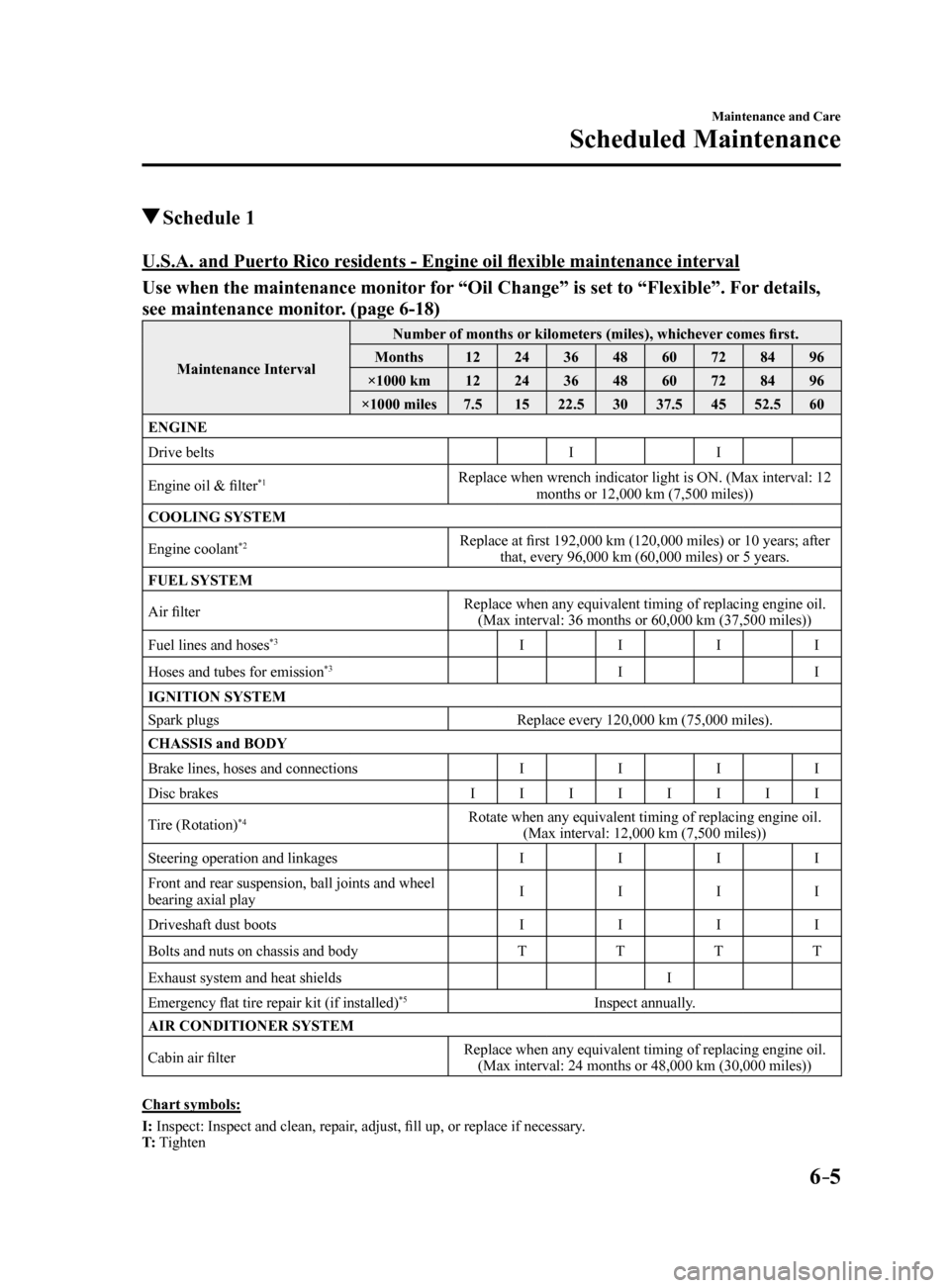
Schedule 1
U.S.A. and Puerto Rico residents ‑ Engine oil flexible maintenance interval
Use when the maintenance monitor for “Oil Change” is set to “Flexible”. For details,
see maintenance monitor. (page 6-18)
Maintenance IntervalNumber of months or kilometers (miles), whichever comes first.
Months 1224364860728496
×1000 km 1224364860728496
×1000 miles 7.51522.5 3037.5 4552.5 60
ENGINE
Drive belts II
Engine oil & filter
*1Replace when wrench indicator light is ON. (Max interval: 12 months or 12,000 km (7,500 miles))
COOLING SYSTEM
Engine coolant
*2Replace at first 192,000 km (120,000 miles) or 10 years; after that, every 96,000 km (60,000 miles) or 5 years.
FUEL SYSTEM
Air filter Replace when any equivalent timing of replacing engine oil.
(Max interval: 36 months or 60,000 km (37,500 miles))
Fuel lines and hoses
*3I III
Hoses and tubes for emission
*3I I
IGNITION SYSTEM
Spark plugs Replace every 120,000 km (75,000 miles).
CHASSIS and BODY
Brake lines, hoses and connections IIII
Disc brakes IIIIIIII
Tire (Rotation)
*4Rotate when any equivalent timing of replacing engine oil. (Max interval: 12,000 km (7,500 miles))
Steering operation and linkages IIII
Front and rear suspension, ball joints and wheel
bearing axial play I
III
Driveshaft dust boots IIII
Bolts and nuts on chassis and body TTTT
Exhaust system and heat shields I
Emergency flat tire repair kit (if installed)
*5Inspect annually.
AIR CONDITIONER SYSTEM
Cabin air filter Replace when any equivalent timing of replacing engine oil.
(Max interval: 24 months or 48,000 km (30,000 miles))
Chart symbols:
I: Inspect: Inspect and clean, repair, adjust, fill up, or replace if necessary.
T: Tighten
Mazda6_8FH2-EA-16F_Edition2.indb 52016/07/07 13:46:06
Page 466 of 578
7–6
If Trouble Arises
Flat Tire
Changing a Flat Tire
NOTE
If the following occurs while driving, it
could indicate a flat tire.
Steering becomes difficult. The vehicle begins to vibrate
excessively.
The vehicle pulls in one direction.
If you have a flat tire, drive slowly to a
level spot that is well off the road and out
of the way of traffic to change the tire.
Stopping in traffic or on the shoulder of a
busy road is dangerous.
WARNING
Be sure to follow the directions for
changing a tire: Changing a tire is dangerous if not
done properly. The vehicle can slip off
the jack and seriously injure someone.
No person should place any portion
of their body under a vehicle that is
supported by a jack.
Never allow anyone inside a vehicle
supported by a jack: Allowing someone to remain in
a vehicle supported by a jack is
dangerous. The occupant could cause
the vehicle to fall resulting in serious
injury.
NOTE
Make sure the jack is well lubricated
before using it. 1.
Park on a hard, level surface off the
right-of-way and firmly set the parking
brake.
2. Put a vehicle with an automatic
transaxle in Park (P), a manual
transaxle in Reverse (R) or 1, and turn
off the engine.
3. Turn on the hazard warning flasher.
4. Have everyone get out of the vehicle
and away from the vehicle and traffic.
5. Remove the jack, tool, and spare tire
(page 7-3).
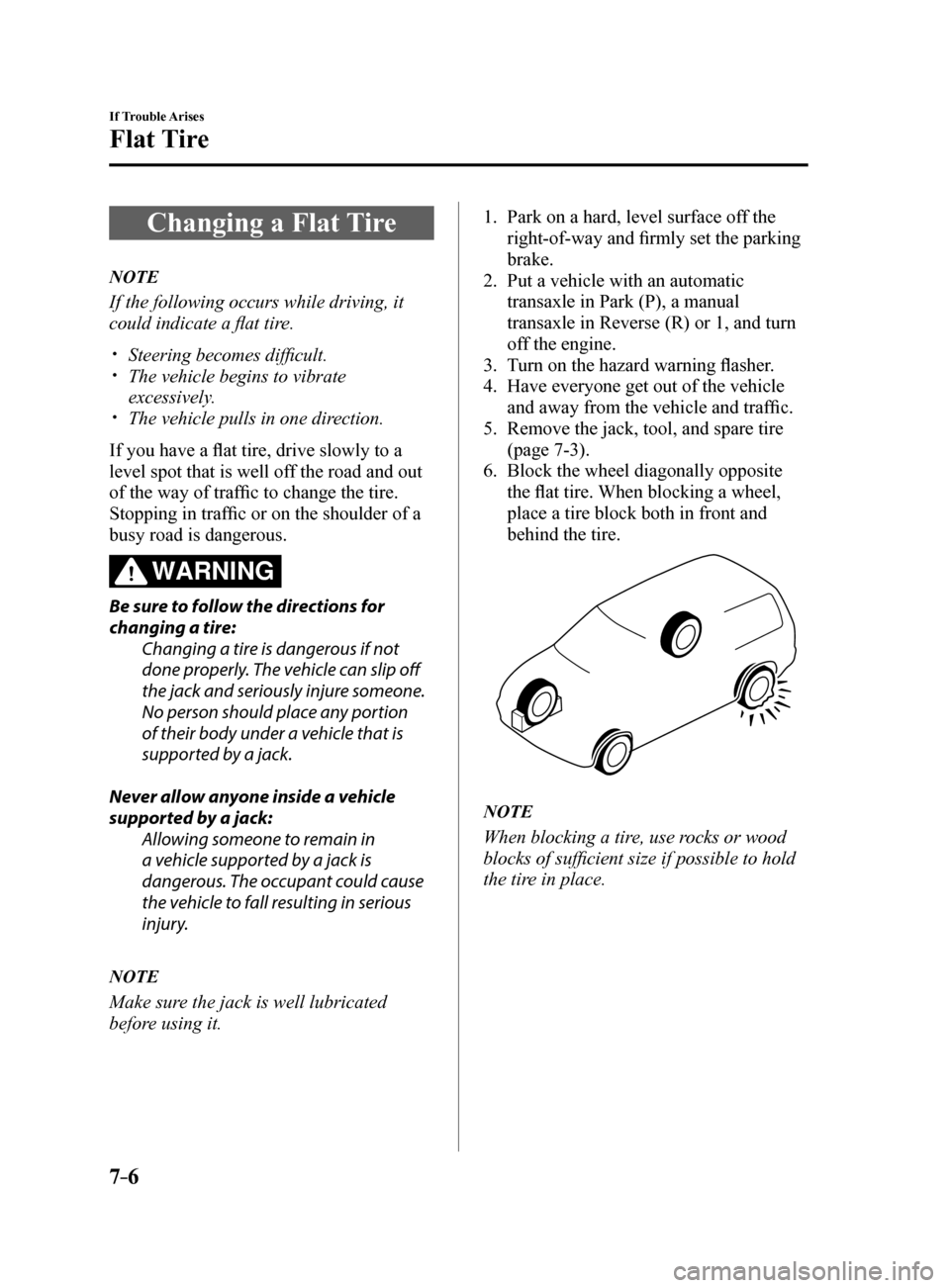
6. Block the wheel diagonally opposite
the flat tire. When blocking a wheel,
place a tire block both in front and
behind the tire.
NOTE
When blocking a tire, use rocks or wood
blocks of sufficient size if possible to hold
the tire in place.
Mazda6_8FH2-EA-16F_Edition2.indb 62016/07/07 13:46:25
Page 498 of 578
7–38
If Trouble Arises
Warning/Indicator Lights and Warning Sounds
*Some models.
Request Switch Inoperable
Warning Beep (With the advanced
keyless function)
If the request switch is pressed with the
door open or ajar, or the ignition is not
switched OFF with a key being carried,
a beep will be heard outside for about 2
seconds to notify the driver that the door
or trunk lid cannot be locked.
Key Left-in-trunk Compartment
Warning Beep (With the advanced
keyless function)
If the key is left in the trunk with all the
doors locked and the trunk lid closed, a
beep will be heard outside for about 10
seconds to notify the driver that the key is
in the trunk. In this case, take out the key
by pressing the electric trunk lid opener
and opening the trunk lid. The key taken
out of the trunk may not operate because
its functions have been temporarily
stopped. To restore the key's functions,
perform the applicable procedure (page
3-9).
Key Left-in-vehicle Warning Beep
(With the advanced keyless
function)
If all the doors and trunk are locked using
another key while the key is left in the
cabin, the beep which sounds outside of
the vehicle will be heard for about 10
seconds to notify the driver that the key
is in the cabin. In this case, take out the
key by opening the door. A key taken
out of the vehicle using this method may
not operate because its functions have
been temporarily stopped. To restore the
key's functions, perform the applicable
procedure (page 3-9).
i-ELOOP Warning Beep*
If the vehicle is driven while “i-ELOOP
Charging Please don't Drive” is displayed,
a beep sound is heard. Make sure the
message is no longer displayed before
driving.
Tire Inflation Pressure Warning
Beep
The warning beep sound will be heard
for about 3 seconds when there is any
abnormality in tire inflation pressures
(page 4-159).
Blind Spot Monitoring (BSM)
System Warning Beep*
Driving forward
The warning beep operates when the turn
signal lever is operated to the side where
the Blind Spot Monitoring (BSM) warning
light is illuminated.
NOTE
A personalized function is available to
change the Blind Spot Monitoring (BSM)
warning beep sound volume.
Refer to Personalization Features on page
9-10.
Reversing
If a moving object such as a vehicle or
two-wheeled vehicle approaches on the
left or right from behind your vehicle, the
Blind Spot Monitoring (BSM) warning
sound is activated.
Mazda6_8FH2-EA-16F_Edition2.indb 382016/07/07 13:46:37
Page 563 of 578

9–11
Specifications
Personalization Features
ItemFeatureFactory
Setting Available
Settings Settings
Change
Method
Lane-keep Assist
System (LAS) &
Lane Departure
Warning System
(LDWS) (page
4-125) The system can be changed so that the
steering wheel assist does not operate.
On
On/OffA—
When the steering
wheel operation
assistance is
turned on The cancel sensitivity
of the steering
assistance for the
Lane-keep Assist
System (LAS) & Lane
Departure Warning
System (LDWS) can
be changed.
High
High/Low A—
The system can be
changed so that the
Lane Departure
Warning does not
activate. On
On/OffA—
When the steering
wheel operation
assistance is
turned off The warning timing
in which the Lane-
keep Assist System
(LAS) & Lane
Departure Warning
System (LDWS)
system determines that
the vehicle may be
deviating from its lane
can be changed.
Before
At/BeforeA—
The sensitivity of
the warning for the
Lane-keep Assist
System (LAS) & Lane
Departure Warning
System (LDWS) can
be changed. Rare
High/Rare A—
The type of Lane-keep Assist System
(LAS) & Lane Departure Warning System
(LDWS) warning can be changed. Vibration
Vibration/Beep/
Rumble A
—
The warning
intensity/volume
of the Lane-keep
Assist System
(LAS) & Lane
Departure
Warning System
(LDWS) system
can be changed. Vibration
LowHigh/Low A—
Rumble LowHigh/Mid/Low A—
Beep LowHigh/Low A—
Mazda6_8FH2-EA-16F_Edition2.indb 112016/07/07 13:46:49