headlights MAZDA MODEL 6 2017 (in English) User Guide
[x] Cancel search | Manufacturer: MAZDA, Model Year: 2017, Model line: MODEL 6, Model: MAZDA MODEL 6 2017Pages: 578, PDF Size: 54.72 MB
Page 213 of 578
4–89
When Driving
i-ACTIVSENSE
Collision damage reduction in low vehicle speed range
Forward driving
Smart City Brake Support (SCBS) ........................................................................\
...........4-138
Collision damage reduction in medium/high speed range
Smart Brake Support (SBS) ........................................................................\
...................... 4-143
Camera and Sensors
Forward Sensing Camera (FSC)
The Forward Sensing Camera (FSC) detects lane indications and recogniz\
es headlights,
taillights and city lights during nighttime driving. In addition, it als\
o detects the vehicle
ahead, pedestrians, or obstructions. The following systems also use the Forward Sensing
Camera (FSC).
High Beam Control system (HBC) Lane-keep Assist System (LAS) & Lane Departure Warning System (LDWS) Traffic Sign Recognition System (TSR) Smart City Brake Support (SCBS) Smart Brake Support (SBS)
The Forward Sensing Camera (FSC) is installed at the top of the windsh\
ield near the
rearview mirror.
Refer to Forward Sensing Camera (FSC) on page 4-146.
Radar sensor (front)
The radar sensor (front) functions by detecting the radio waves reflected off a vehicle ahead
sent from the radar sensor. The following systems also use the radar sensor (front).
Mazda Radar Cruise Control (MRCC) Distance Recognition Support System (DRSS) Smart Brake Support (SBS)
The radar sensor (front) is mounted behind the radiator grille.
Refer to Radar Sensor (Front) on page 4-150.
Radar sensors (rear)
The radar sensors (rear) function by detecting the radio waves reflected off a vehicle
approaching from the rear or an obstruction sent from the radar sensors.\
The following
systems also use the radar sensors (rear).
Blind Spot Monitoring (BSM) Rear Cross Traffic Alert (RCTA)
The radar sensors (rear) are installed inside the rear bumper, one each on the left and right
sides.
Refer to Radar Sensors (Rear) on page 4-153.
Mazda6_8FH2-EA-16F_Edition2.indb 892016/07/07 13:45:04
Page 214 of 578
 User Guide 4–90
When Driving
i-ACTIVSENSE
*Some models.
Adaptive Front Lighting System (AFS)*
The adaptive front lighting system (AFS) automatically adjusts the hea\
dlight beams to the
left or right in conju")
4–90
When Driving
i-ACTIVSENSE
*Some models.
Adaptive Front Lighting System (AFS)*
The adaptive front lighting system (AFS) automatically adjusts the hea\
dlight beams to the
left or right in conjunction with the operation of the steering wheel af\
ter the headlights have
been turned on and the vehicle speed is about 2 km/h (2 mph) or higher\
.
A system malfunction or operation conditions are indicated by a warning.
Refer to Warning/Indicator Lights on page 4-32.
NOTE
The Adaptive Front Lighting System (AFS) function can be switched to operable/inopera\
ble
using the personalization function.
Refer to Personalization Features on page 9-10.
Mazda6_8FH2-EA-16F_Edition2.indb 902016/07/07 13:45:04
Page 215 of 578
4–91
When Driving
i-ACTIVSENSE
*Some models.
High Beam Control System (HBC)*
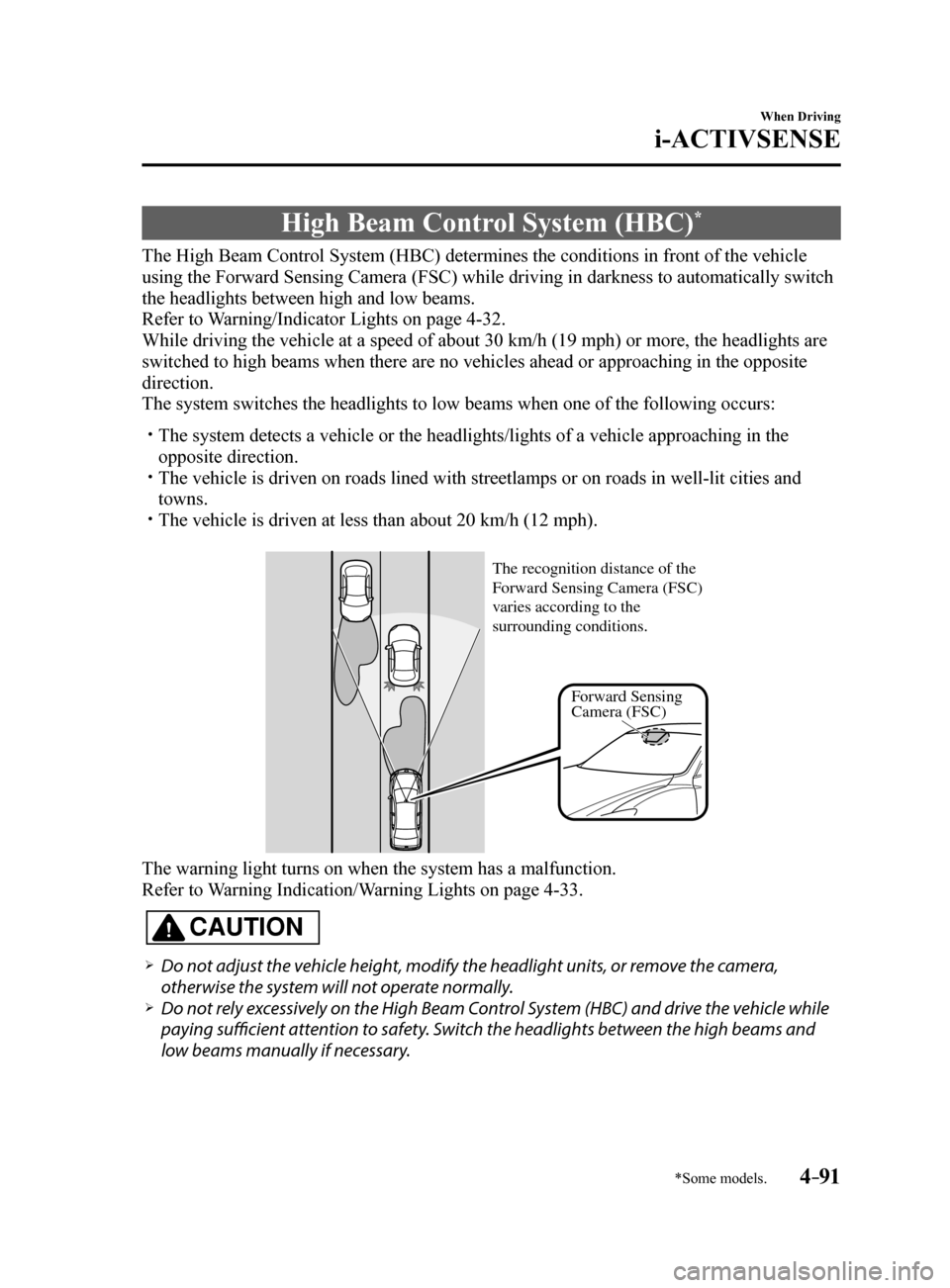
The High Beam Control System (HBC) determines the conditions in front of the vehicle
using the Forward Sensing Camera (FSC) while driving in darkness to au\
tomatically switch
the headlights between high and low beams.
Refer to Warning/Indicator Lights on page 4-32.
While driving the vehicle at a speed of about 30 km/h (19 mph) or more\
, the headlights are
switched to high beams when there are no vehicles ahead or approaching i\
n the opposite
direction.
The system switches the headlights to low beams when one of the followin\
g occurs:
The system detects a vehicle or the headlights/lights of a vehicle appro\
aching in the
opposite direction.
The vehicle is driven on roads lined with streetlamps or on roads in wel\
l-lit cities and
towns.
The vehicle is driven at less than about 20 km/h (12 mph).
F orward Sensing
Camera (FSC)
The recognition distance of the
F
orward Sensing Camera (FSC)
v aries according to the
surrounding conditions.
The warning light turns on when the system has a malfunction.
Refer to Warning Indication/Warning Lights on page 4-33.
CAUTION
Do not adjust the vehicle height, modify the headlight units, or remove the camera,
otherwise the system will not operate normally.
Do not rely excessively on the High Beam Control System (HBC) and drive the vehicle while
paying sufficient attention to safety. Switch the headlights between the high beams and
low beams manually if necessary.
Mazda6_8FH2-EA-16F_Edition2.indb 912016/07/07 13:45:05
Page 216 of 578
 User Guide 4–92
When Driving
i-ACTIVSENSE
NOTE
The timing in which the system switches the headlights changes under the\
following
conditions. If the system does not switch the headlights appropriately, manu")
4–92
When Driving
i-ACTIVSENSE
NOTE
The timing in which the system switches the headlights changes under the\
following
conditions. If the system does not switch the headlights appropriately, manually switch
between high and low beams according to the visibility as well as road and traffic
conditions.
When there are sources of light in the area such as street lamps, illuminated signboards,
and traffic signals.
When there are reflective objects in the surrounding area such as reflective plates and
signs.
When visibility is reduced under rain, snow and foggy conditions. When driving on roads with sharp turn or hilly terrain. When the headlights/rear lamps of vehicles in front of you or in the opposite lane are dim
or not illuminated.
When there is sufficient darkness such as at dawn or dusk. When the luggage compartment is loaded with heavy objects or the rear passenger seats
are occupied.
When visibility is reduced due to a vehicle in front of you spraying water from its tires
onto your windshield.
Mazda6_8FH2-EA-16F_Edition2.indb 922016/07/07 13:45:05
Page 217 of 578
4–93
When Driving
i-ACTIVSENSE
To Operate the System
The High Beam Control System (HBC)
operates to switch the headlights
automatically between high and low
beams after the ignition is switched ON
and the headlight switch is in the AUTO
and high beam position.
The High Beam Control System (HBC)
determines that it is dark based on the
brightness of the surrounding area. At the
same time, the High Beam Control System
(HBC) indicator light (green) in the
instrument cluster illuminates.
NOTE
When the vehicle speed is about 30
km/h (19 mph) or more, the headlights
automatically switch to high beams
when there are no vehicles ahead or
approaching in the opposite direction.
When the vehicle speed is less than
about 20 km/h (12 mph), the High Beam
Control System (HBC) switches the
headlights to low beams.
The low beams may not switch to high
beams when cornering.
Operation of the High Beam Control
System (HBC) function can be disabled.
Refer to Personalization Features on
page 9-10.
Manual Switching
Switching to low beams
Shift the lever to the low beam position.
The High Beam Control System (HBC)
indicator light (green) turns off.
Switching to high beams
Turn the headlight switch to the
position.
The High Beam Control System (HBC)
indicator light (green) turns off and the
is illuminated.
Mazda6_8FH2-EA-16F_Edition2.indb 932016/07/07 13:45:05
Page 226 of 578
4–102
When Driving
i-ACTIVSENSE
NOTE
The Traffic Sign Recognition System (TSR) does not operate if there is a malfunction in
the Forward Sensing Camera (FSC).
Under the following conditions, the Traffic Sign Recognition System (TSR) may not
operate normally.
An object placed on the dashboard is reflected in the windshield and picked up by the
camera.
Heavy luggage is loaded in the luggage compartment or on the rear seat and the
vehicle is tilted.
The tire pressures are not adjusted to the specified pressure. Tires other than standard tires are equipped. The vehicle is driven on the ramp and surrounding area to or from a rest area or a
tollgate on a highway.
When surrounding brightness suddenly changes such as when entering or exiting a
tunnel.
The illumination of the headlights is weakened because of dirt or the op\
tical axis is
deviated.
The windshield is dirty or foggy. The windshield and camera are fogged (water droplets). Strong light is directed at the front of the vehicle (such as backlight or high-beam
headlights of on-coming vehicles).
The vehicle is making a sharp turn. Strong light reflects off the road. A traffic sign is in a position which makes it difficult to reflect the light from the
vehicle's headlights, such as when the vehicle is driven at night or in \
a tunnel.
The vehicle is driven under weather conditions such as rain, fog, or sno\
w. The stored map data for the navigation system is not current. The camera cannot capture a traffic sign's image. A traffic sign is obscured by mud or snow. A traffic sign is concealed by trees or a vehicle. A traffic sign is partially shaded. A traffic sign is bent or warped. A traffic sign is too low or too high. A traffic sign is too bright or too dark (including electronic traffic signs). A traffic sign is too big or too small. There is an object similar to the traffic sign being read (such as another traffic sign or
other signs resembling it).
The Traffic Sign Recognition System (TSR) does not operate if the active driving display
is set to non-display.
The Traffic Sign Recognition System (TSR) can be set to inoperable.
Refer to Personalization Features on page 9-10.
Mazda6_8FH2-EA-16F_Edition2.indb 1022016/07/07 13:45:07
Page 252 of 578
 User Guide 4–128
When Driving
i-ACTIVSENSE
Under the following conditions, the Lane-keep Assist System (LAS) & Lane Departure
Warning System (LDWS) may not be able to detect white (yellow) lane l\
ines co")
4–128
When Driving
i-ACTIVSENSE
Under the following conditions, the Lane-keep Assist System (LAS) & Lane Departure
Warning System (LDWS) may not be able to detect white (yellow) lane l\
ines correctly and
it may not operate normally.
If an object placed on the dashboard is reflected in the windshield and picked up by the
camera.
Heavy luggage is loaded in the luggage compartment or on the rear seat and the
vehicle is tilted.
The tire pressures are not adjusted to the specified pressure. Tires other than conventional tires are equipped. When the vehicle is driven on the guiding branch to or from the rest area or tollgate of
a highway.
The white (yellow) lane lines are less visible because of dirt or fading/patchiness. A vehicle in front of your vehicle is running near a white (yellow) lane line making \
it
less visible.
A white (yellow) lane line is less visible because of bad weather (rai\
n, fog, or snow). The vehicle is driven on a temporary lane or section with a closed lane \
resulting
from construction where there may be multiple white (yellow) lane lines or they are
interrupted.
A misleading line is picked up on the road such as a temporary line for construction,
or because of shade, lingering snow, or grooves filled with water.
The surrounding brightness suddenly changes such as when entering or exiting a
tunnel.
The illumination of the headlights is weakened because of dirt or the op\
tical axis is
deviated.
The windshield is dirty or foggy. The windshield, camera is fogged (water droplets). Back-light is reflected off the road surface. The road surface is wet and shiny after rain, or there are puddles on the road. The shade of a guardrail parallel to a white (yellow) lane line is cast on the road. The width of the driving lane is narrow (less than about 2.5 m (98 in)) or wide (more
than about 4.5 m (178 in))
Driving on roads with tight curves. The road is excessively uneven. The vehicle is shaken after hitting a road bump. There are two or more adjacent white (yellow) lane lines. There are various road markings or lane markings of various shapes near an
intersection.
Mazda6_8FH2-EA-16F_Edition2.indb 1282016/07/07 13:45:16
Page 272 of 578
4–14 8
When Driving
i-ACTIVSENSE
NOTE
In the following cases, the Forward Sensing Camera (FSC) cannot detect target objects
correctly, and each system may be unable to operate normally.
The height of the vehicle ahead is low. You drive your vehicle at the same speed as the vehicle ahead. Headlights are not turned on during the night or when going through a tunnel.
In the following cases, the Forward Sensing Camera (FSC) may not be able to detect
target objects correctly.
Under bad weather condition, such as rain, fog and snow. The window washer is being used or the windshield wipers are not used when it's raining. Ice, fog, snow, frost, rainfall, dirt, or foreign matter such as a plastic bag is stuck on
the windshield.
Trucks with low loading platforms and vehicles with an extremely low or high profile. When driving next to walls with no patterning (including fences and lon\
gitudinally
striped walls).
The taillights of the vehicle ahead are turned off. A vehicle is outside the illumination range of the headlights. The vehicle is making a sharp turn, or ascending or descending a steep s\
lope. Entering or exiting a tunnel. Heavy luggage is loaded causing the vehicle to tilt. Strong light is shone at the front of the vehicle (back light or high-beam light from on-
coming vehicles).
There are many light emitters on the vehicle ahead. When the vehicle ahead is not equipped with taillights or the taillights\
are turned off at
nighttime.
Elongated luggage or cargo is loaded onto installed roof rails and covers the Forward
Sensing Camera (FSC).
Exhaust gas from the vehicle in front, sand, snow, and water vapor rising from
manholes and grating, and water splashed into the air.
When towing a malfunctioning vehicle. The vehicle is driven with tires having significantly different wear. The vehicle is driven on down slopes or bumpy roads. There are water puddles on the road. The surroundings are dark such as during the night, early evening, or early morning,
or in a tunnel or indoor parking lot.
The illumination brightness of the headlights is reduced or the headlight illumination
is weakened due to dirt or a deviated optical axis.
The target object enters the blind spot of the Forward Sensing Camera (FSC). A person or object bursts onto the road from the shoulder or cuts right in front of you. You change lanes and approach a vehicle ahead. When driving extremely close to the target object. Tire chains or a temporary spare tire is installed. The vehicle ahead has a special shape. For example, a vehicle towing a t\
railer house
or a boat, or a vehicle carrier carrying a vehicle with its front pointed rearward.
Mazda6_8FH2-EA-16F_Edition2.indb 1482016/07/07 13:45:20
Page 381 of 578
5–87
Interior Features
Interior Equipment
*Some models.
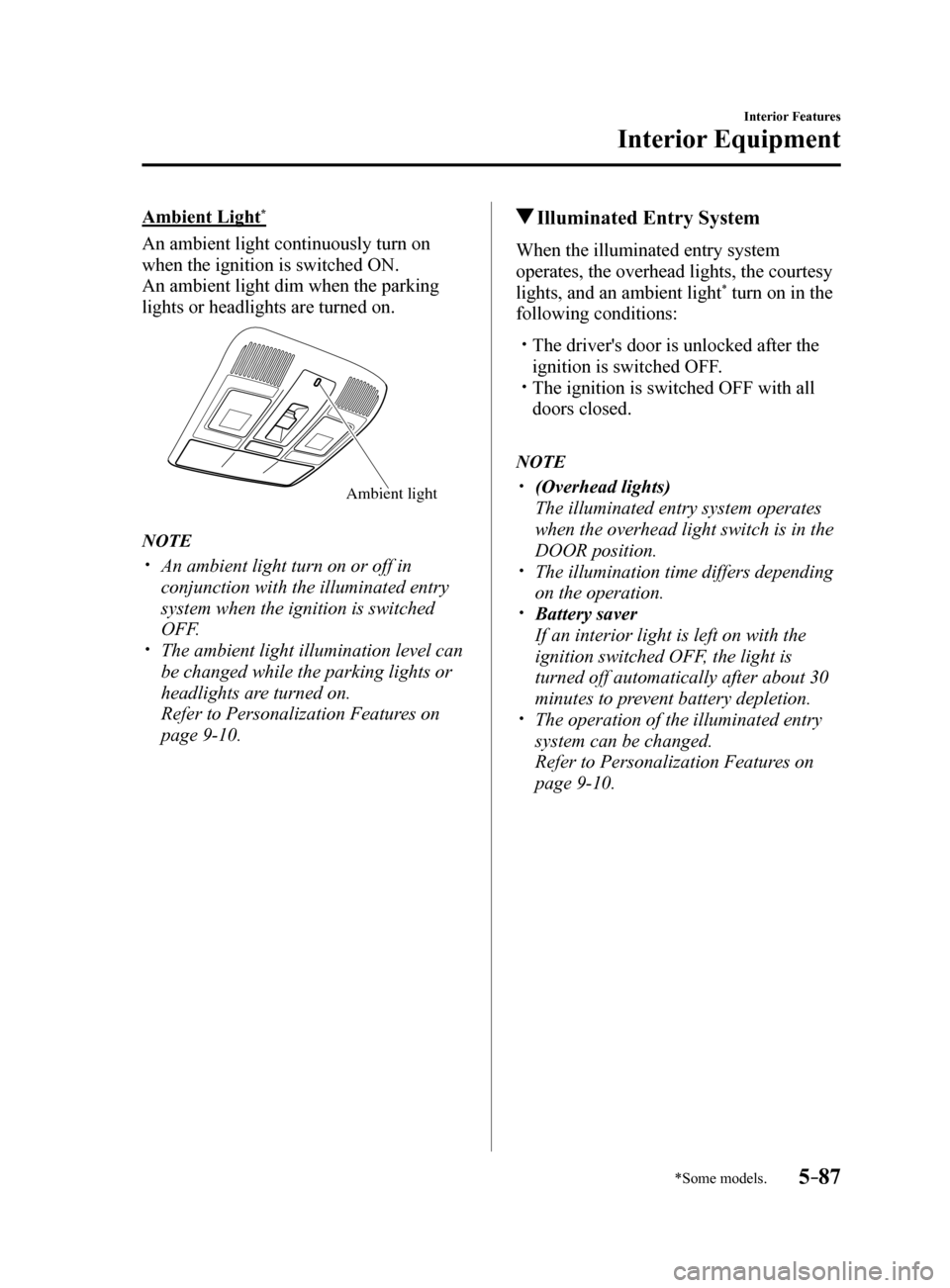
Ambient Light*
An ambient light continuously turn on
when the ignition is switched ON.
An ambient light dim when the parking
lights or headlights are turned on.
Ambient light
NOTE
An ambient light turn on or off in
conjunction with the illuminated entry
system when the ignition is switched
OFF.
The ambient light illumination level can
be changed while the parking lights or
headlights are turned on.
Refer to Personalization Features on
page 9-10.
Illuminated Entry System
When the illuminated entry system
operates, the overhead lights, the courtesy
lights, and an ambient light
* turn on in the
following conditions:
The driver's door is unlocked after the
ignition is switched OFF.
The ignition is switched OFF with all
doors closed.
NOTE
(Overhead lights)
The illuminated entry system operates
when the overhead light switch is in the
DOOR position.
The illumination time differs depending
on the operation.
Battery saver
If an interior light is left on with the
ignition switched OFF, the light is
turned off automatically after about 30
minutes to prevent battery depletion.
The operation of the illuminated entry
system can be changed.
Refer to Personalization Features on
page 9-10.
Mazda6_8FH2-EA-16F_Edition2.indb 872016/07/07 13:46:04
Page 431 of 578
6–45
Maintenance and Care
Owner Maintenance
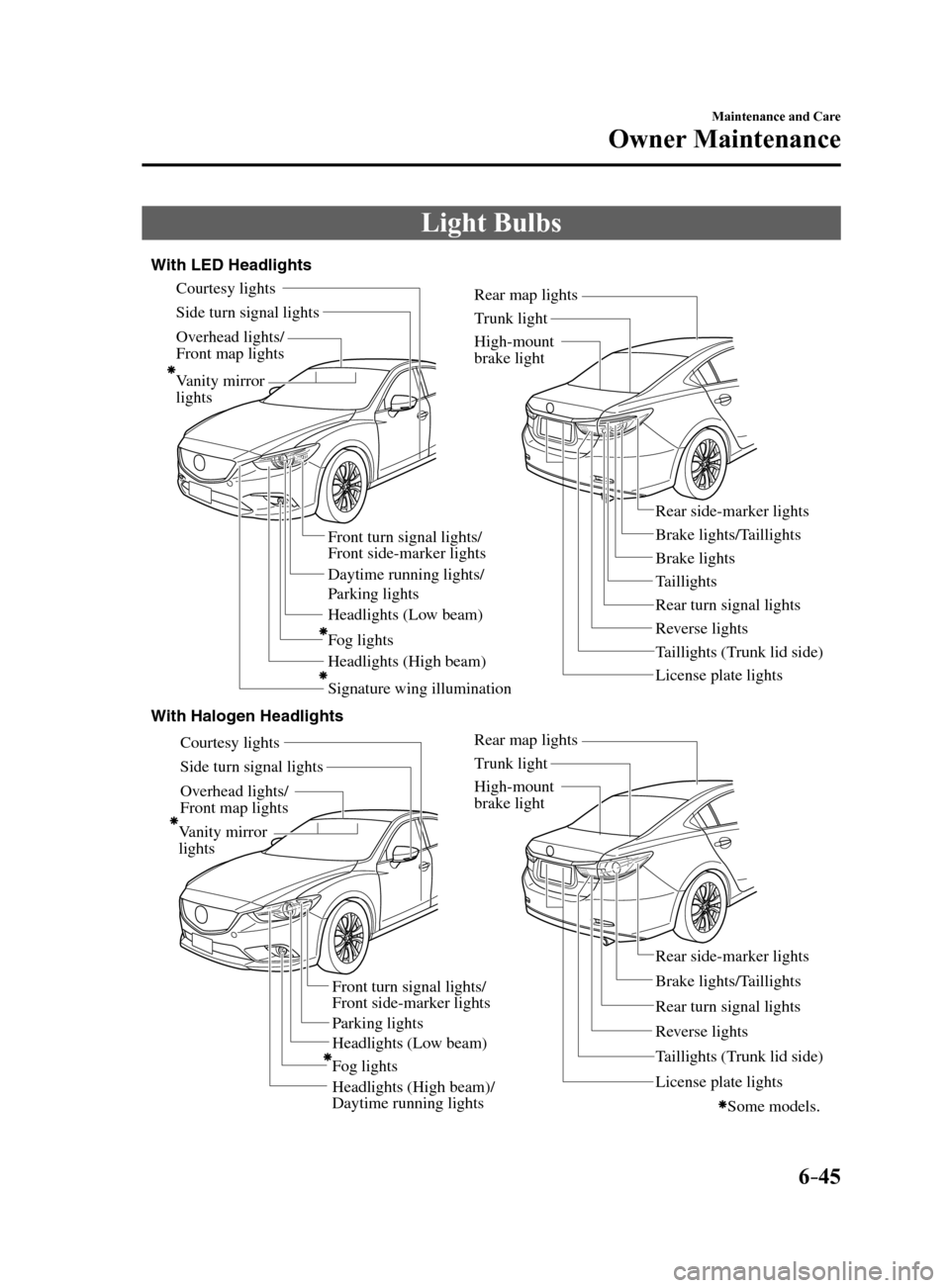
Light Bulbs
Overhead lights/
Front map lights
V anity mirror
lights
Headlights (Low beam)
Headlights (High beam) Daytime running lights/
P arking lights
Headlights (Lo w beam)
Headlights (High beam)/
Daytime running lights
Front turn signal lights/
Front side-marker lights
P arking lights Brake lights/T
aillights
Rear side-marker lights
Rear turn signal lights
T
aillights (T runk lid side)
Re
verse lights
High-mount
brake light
License plate lights
T
runk light
Rear map lights
Side turn signal lights Courtesy lights
Ov erhead lights/
Front map lights Side turn signal lights Courtesy lights
With LED Headlights
With Halogen Headlights
V anity mirror
lights
F og lights
Some models.
Brake lights Brake lights/T aillights
T aillights
Rear side-marker lights
Rear turn signal lights
T
aillights (T runk lid side)
Re
verse lights
High-mount
brake light
License plate lights
T
runk light
Rear map lights
Signature wing illumination
F
og lights
Front turn signal lights/
Front side-marker lights
Mazda6_8FH2-EA-16F_Edition2.indb 452016/07/07 13:46:16