navigation system MAZDA MODEL 6 2017 (in English) User Guide
[x] Cancel search | Manufacturer: MAZDA, Model Year: 2017, Model line: MODEL 6, Model: MAZDA MODEL 6 2017Pages: 578, PDF Size: 54.72 MB
Page 522 of 578
8–20
Customer Information and Reporting Safety Defects
Cell Phones
Cell Phones Warning
WARNING
Please comply with the legal regulations concerning the use of communication
equipment in vehicles in your country:Use of any electrical devices such as cell phones, computers, portable radios, vehicle
navigation or other devices by the driver while the vehicle is moving is dangerous. Dialing
a number on a cell phone while driving also ties-up the driver's hands. Use of these
devices will cause the driver to be distracted and could lead to a serious accident. If a
passenger is unable to use the device, pull off the right-of-way to a safe area before use.
If use of a cell phone is necessary despite this warning, use a hands-free system to at least
leave the hands free to drive the vehicle. Never use a cell phone or other electrical devices
while the vehicle is moving and, instead, concentrate on the full-time job of driving.
Mazda6_8FH2-EA-16F_Edition2.indb 202016/07/07 13:46:39
Page 567 of 578
9–15
Specifications
Personalization Features
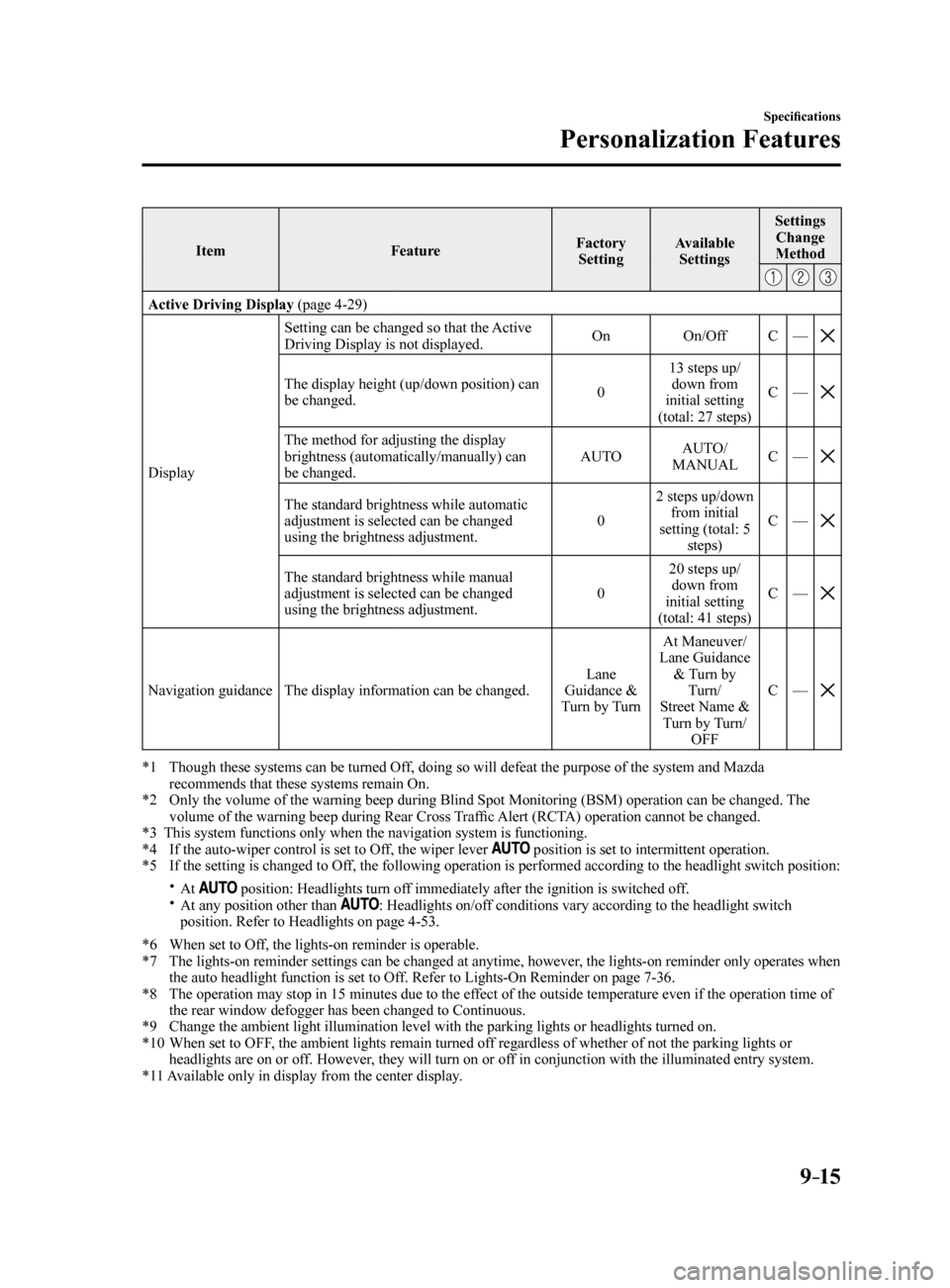
ItemFeatureFactory
Setting Available
Settings Settings
Change
Method
Active Driving Display (page 4-29)
Display Setting can be changed so that the Active
Driving Display is not displayed.
On
On/OffC—
The display height (up/down position) can
be changed. 013 steps up/
down from
initial setting
(total: 27 steps) C
—
The method for adjusting the display
brightness (automatically/manually) can
be changed. AUTO
AUTO/
MANUAL C
—
The standard brightness while automatic
adjustment is selected can be changed
using the brightness adjustment. 02 steps up/down
from initial
setting (total: 5 steps) C
—
The standard brightness while manual
adjustment is selected can be changed
using the brightness adjustment. 020 steps up/
down from
initial setting
(total: 41 steps) C
—
Navigation guidance The display information can be changed. Lane
Guidance &
Turn by Turn At Maneuver/
Lane Guidance & Turn by Turn/
Street Name & Turn by Turn/ OFF C
—
*1 Though these systems can be turned Off, doing so will defeat the purpose of the system and Mazda
recommends that these systems remain On.
*2 Only the volume of the warning beep during Blind Spot Monitoring (BSM) operation can be changed. The
volume of the warning beep during Rear Cross Traffic Alert (RCTA) operation cannot be changed.
*3 This system functions only when the navigation system is functioning.
*4 If the auto-wiper control is set to Off, the wiper lever
position is set to intermittent operation.
*5 If the setting is changed to Off, the following operation is performed according to the headlight switc\
h position:
At position: Headlights turn off immediately after the ignition is switched off. At any position other than : Headlights on/off conditions vary according to the headlight switch
position. Refer to Headlights on page 4-53.
*6 When set to Off, the lights-on reminder is operable.
*7 The lights-on reminder settings can be changed at anytime, however, the lights-on reminder only operates when
the auto headlight function is set to Off. Refer to Lights-On Reminder on page 7-36.
*8 The operation may stop in 15 minutes due to the effect of the outside temperature even if the operation time of
the rear window defogger has been changed to Continuous.
*9 Change the ambient light illumination level with the parking lights or h\
eadlights turned on.
*10 When set to OFF, the ambient lights remain turned off regardless of whether of not the parking lights or
headlights are on or off. However, they will turn on or off in conjunction with the illuminated entry system.
*11 Available only in display from the center display.
Mazda6_8FH2-EA-16F_Edition2.indb 152016/07/07 13:46:50