fog light MAZDA MODEL 6 2017 (in English) Owner's Manual
[x] Cancel search | Manufacturer: MAZDA, Model Year: 2017, Model line: MODEL 6, Model: MAZDA MODEL 6 2017Pages: 578, PDF Size: 54.72 MB
Page 305 of 578

5–11
Interior Features
Climate Control System
Air intake selector
Outside or recirculated air positions can be
selected. Press the switch to select outside/
recirculated air positions.
Recirculated air position (
)
Outside air is shut off. Use this position
when going through tunnels, driving in
congested traffic (high engine exhaust
areas) or when quick cooling is desired.
Outside air position (
)
Outside air is allowed to enter the
cabin. Use this mode for ventilation or
windshield defrosting.
WARNING
Do not use the position in cold or
rainy weather: Using the
position in cold or rainy
weather is dangerous as it will cause
the windows to fog up. Your vision will
be hampered, which could lead to a
serious accident.
DUAL switch
Use the DUAL switch to change the
mode between the individual operation
(driver and passenger) and interconnection
(simultaneous) modes.
Individual operation mode (indicator
light illuminated)
The set temperature can be controlled
individually for the driver and front
passenger.
Interconnection mode (indicator light
turned off)
The set temperature for the driver
and front passenger is controlled
simultaneously.
Windshield defroster switch
Press the switch to defrost the windshield
and front door windows.
Refer to Windshield Defrosting and
Defogging on page 5-12.
Rear window defogger switch
Press the rear window defogger switch to
defrost the rear window.
Refer to Rear Window Defogger on page
4-63.
Operation of Automatic Air-
conditioning
1. Press the AUTO switch. Selection
of the airflow mode, air intake
selector and amount of airflow will be
automatically controlled.
2. Use the temperature control dial to
select a desired temperature.
Press the DUAL switch or turn the
front passenger temperature control
dial to control the set temperature
individually for the driver and front
passenger.
To turn off the system, press the OFF
switch.
NOTE
Setting the temperature to maximum
hot or cold will not provide the desired
temperature at a faster rate.
When selecting heat, the system will
restrict airflow until it has warmed to
prevent cold air from blowing out of the
vents.
Mazda6_8FH2-EA-16F_Edition2.indb 112016/07/07 13:45:29
Page 306 of 578
5–12
Interior Features
Climate Control System
Windshield Defrosting and
Defogging
Press the windshield defroster switch.
In this position, the outside air position
is automatically selected, and the air
conditioner automatically turns on. The
air conditioner will directly dehumidify
the air to the front windshield and side
windows on page 5-4.
Airflow amount will be increased.
WARNING
Set the temperature control to the hot
or warm position when defogging (
position): Using the
position with the
temperature control set to the cold
position is dangerous as it will cause
the outside of the windshield to fog up.
Your vision will be hampered, which
could lead to a serious accident.
NOTE
Use the temperature control dial to
increase the air flow temperature and
defog the windshield more quickly.
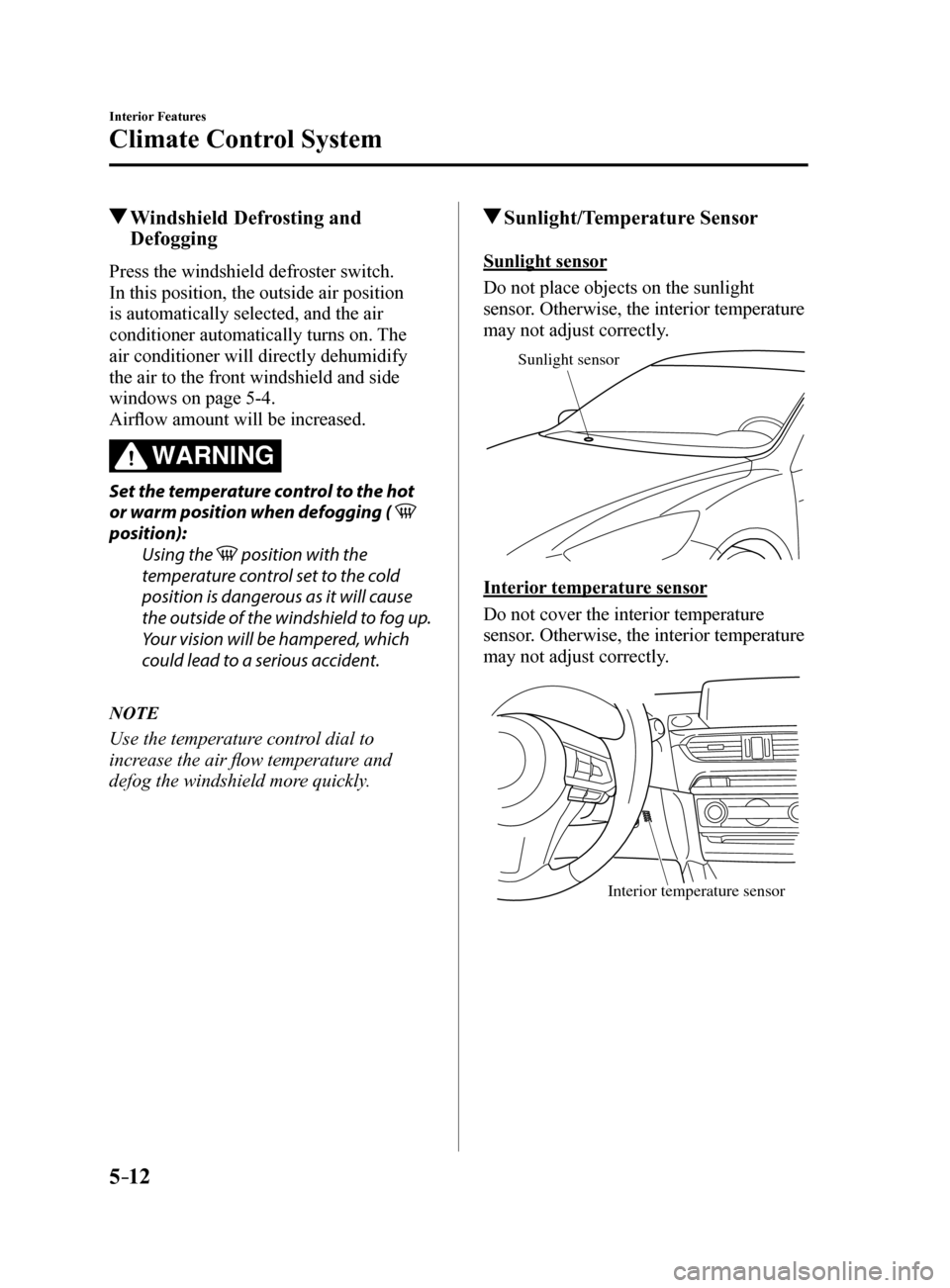
Sunlight/Temperature Sensor
Sunlight sensor
Do not place objects on the sunlight
sensor. Otherwise, the interior temperature
may not adjust correctly.
Sunlight sensor
Interior temperature sensor
Do not cover the interior temperature
sensor. Otherwise, the interior temperature
may not adjust correctly.
Interior temperature sensor
Mazda6_8FH2-EA-16F_Edition2.indb 122016/07/07 13:45:29
Page 311 of 578
5–17
Interior Features
Audio System
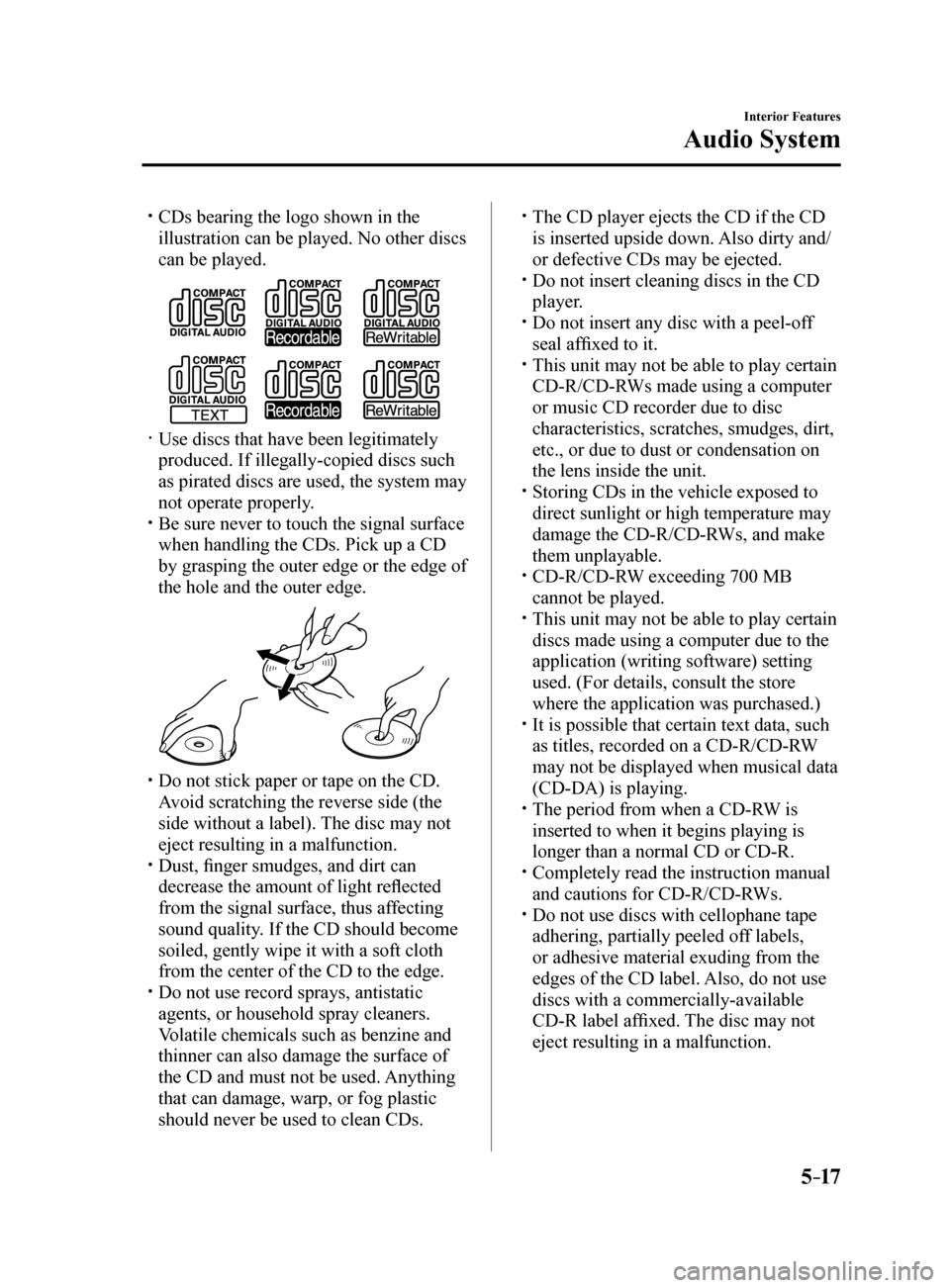
CDs bearing the logo shown in the
illustration can be played. No other discs
can be played.
Use discs that have been legitimately
produced. If illegally-copied discs such
as pirated discs are used, the system may
not operate properly.
Be sure never to touch the signal surface
when handling the CDs. Pick up a CD
by grasping the outer edge or the edge of
the hole and the outer edge.
Do not stick paper or tape on the CD.
Avoid scratching the reverse side (the
side without a label). The disc may not
eject resulting in a malfunction.
Dust, finger smudges, and dirt can
decrease the amount of light reflected
from the signal surface, thus affecting
sound quality. If the CD should become
soiled, gently wipe it with a soft cloth
from the center of the CD to the edge.
Do not use record sprays, antistatic
agents, or household spray cleaners.
Volatile chemicals such as benzine and
thinner can also damage the surface of
the CD and must not be used. Anything
that can damage, warp, or fog plastic
should never be used to clean CDs.
The CD player ejects the CD if the CD
is inserted upside down. Also dirty and/
or defective CDs may be ejected.
Do not insert cleaning discs in the CD
player.
Do not insert any disc with a peel-off
seal affixed to it.
This unit may not be able to play certain
CD-R/CD-RWs made using a computer
or music CD recorder due to disc
characteristics, scratches, smudges, dirt,
etc., or due to dust or condensation on
the lens inside the unit.
Storing CDs in the vehicle exposed to
direct sunlight or high temperature may
damage the CD-R/CD-RWs, and make
them unplayable.
CD-R/CD-RW exceeding 700 MB
cannot be played.
This unit may not be able to play certain
discs made using a computer due to the
application (writing software) setting
used. (For details, consult the store
where the application was purchased.)
It is possible that certain text data, such
as titles, recorded on a CD-R/CD-RW
may not be displayed when musical data
(CD-DA) is playing.
The period from when a CD-RW is
inserted to when it begins playing is
longer than a normal CD or CD-R.
Completely read the instruction manual
and cautions for CD-R/CD-RWs.
Do not use discs with cellophane tape
adhering, partially peeled off labels,
or adhesive material exuding from the
edges of the CD label. Also, do not use
discs with a commercially-available
CD-R label affixed. The disc may not
eject resulting in a malfunction.
Mazda6_8FH2-EA-16F_Edition2.indb 172016/07/07 13:45:31
Page 436 of 578
6–50
Maintenance and Care
Owner Maintenance
*Some models.
Front turn signal lights/Front side-
marker lights, Parking lights (With
halogen headlights)
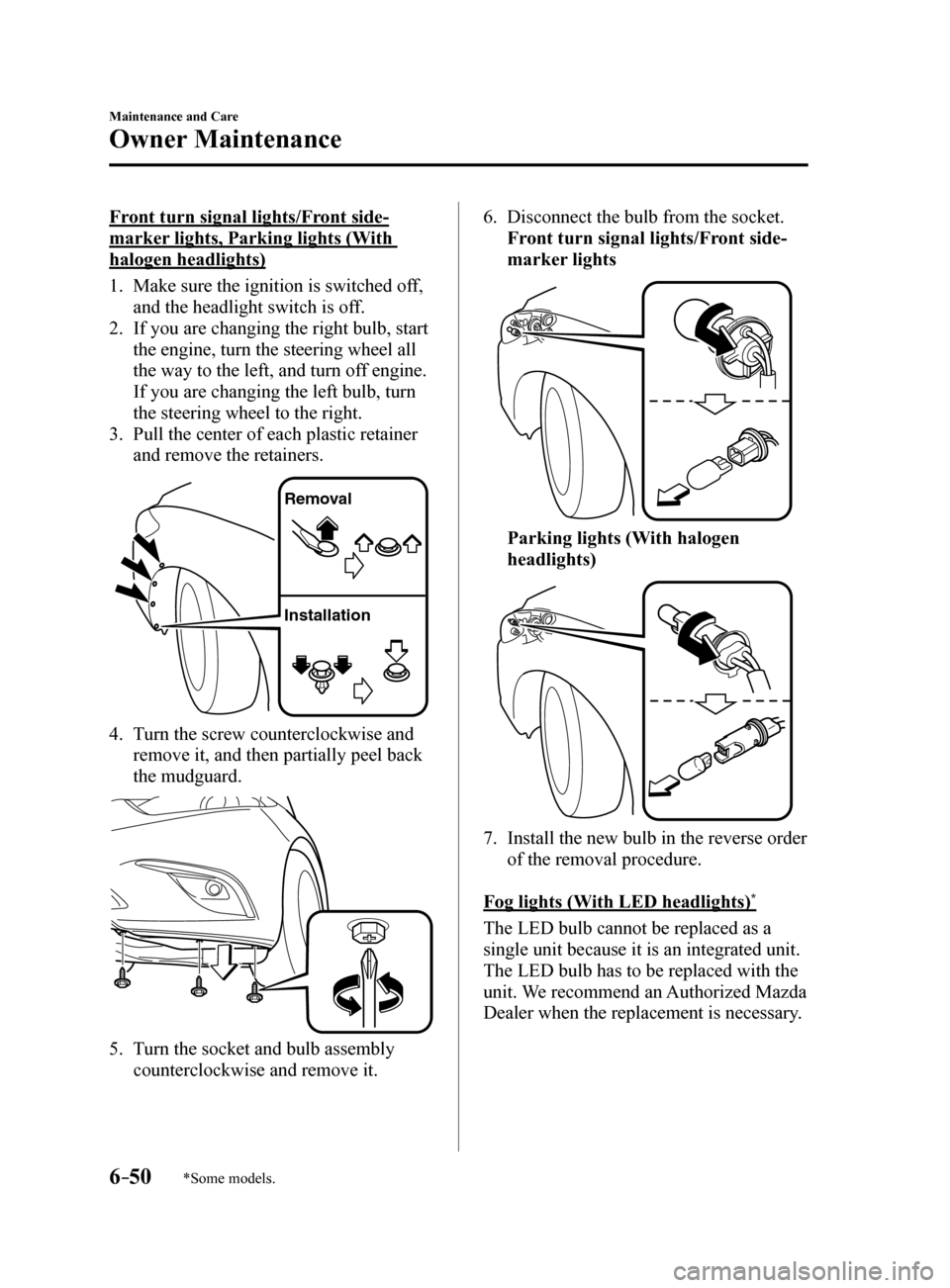
1. Make sure the ignition is switched off,
and the headlight switch is off.
2. If you are changing the right bulb, start
the engine, turn the steering wheel all
the way to the left, and turn off engine.
If you are changing the left bulb, turn
the steering wheel to the right.
3. Pull the center of each plastic retainer
and remove the retainers.
Remova l
Installation
4. Turn the screw counterclockwise and
remove it, and then partially peel back
the mudguard.
5. Turn the socket and bulb assembly
counterclockwise and remove it.
6. Disconnect the bulb from the socket.
Front turn signal lights/Front side-
marker lights
Parking lights (With halogen
headlights)
7. Install the new bulb in the reverse order
of the removal procedure.
Fog lights (With LED headlights)
*
The LED bulb cannot be replaced as a
single unit because it is an integrated unit.
The LED bulb has to be replaced with the
unit. We recommend an Authorized Mazda
Dealer when the replacement is necessary.
Mazda6_8FH2-EA-16F_Edition2.indb 502016/07/07 13:46:18
Page 437 of 578
6–51
Maintenance and Care
Owner Maintenance
*Some models.
Fog lights (With halogen headlights)*
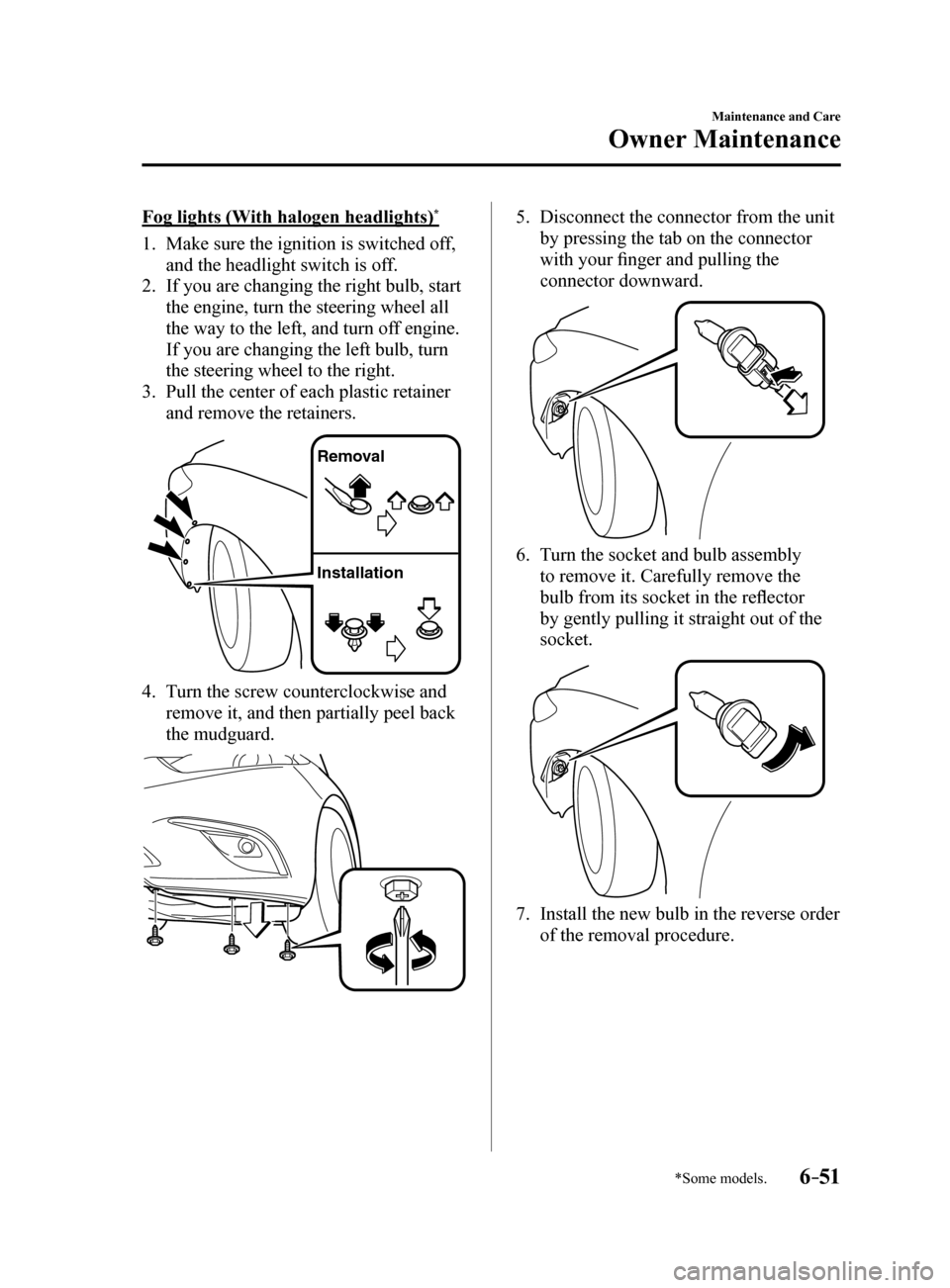
1. Make sure the ignition is switched off,
and the headlight switch is off.
2. If you are changing the right bulb, start
the engine, turn the steering wheel all
the way to the left, and turn off engine.
If you are changing the left bulb, turn
the steering wheel to the right.
3. Pull the center of each plastic retainer
and remove the retainers.
Remova l
Installation
4. Turn the screw counterclockwise and
remove it, and then partially peel back
the mudguard.
5. Disconnect the connector from the unit
by pressing the tab on the connector
with your finger and pulling the
connector downward.
6. Turn the socket and bulb assembly
to remove it. Carefully remove the
bulb from its socket in the reflector
by gently pulling it straight out of the
socket.
7. Install the new bulb in the reverse order
of the removal procedure.
Mazda6_8FH2-EA-16F_Edition2.indb 512016/07/07 13:46:18
Page 446 of 578
6–60
Maintenance and Care
Owner Maintenance
*Some models.
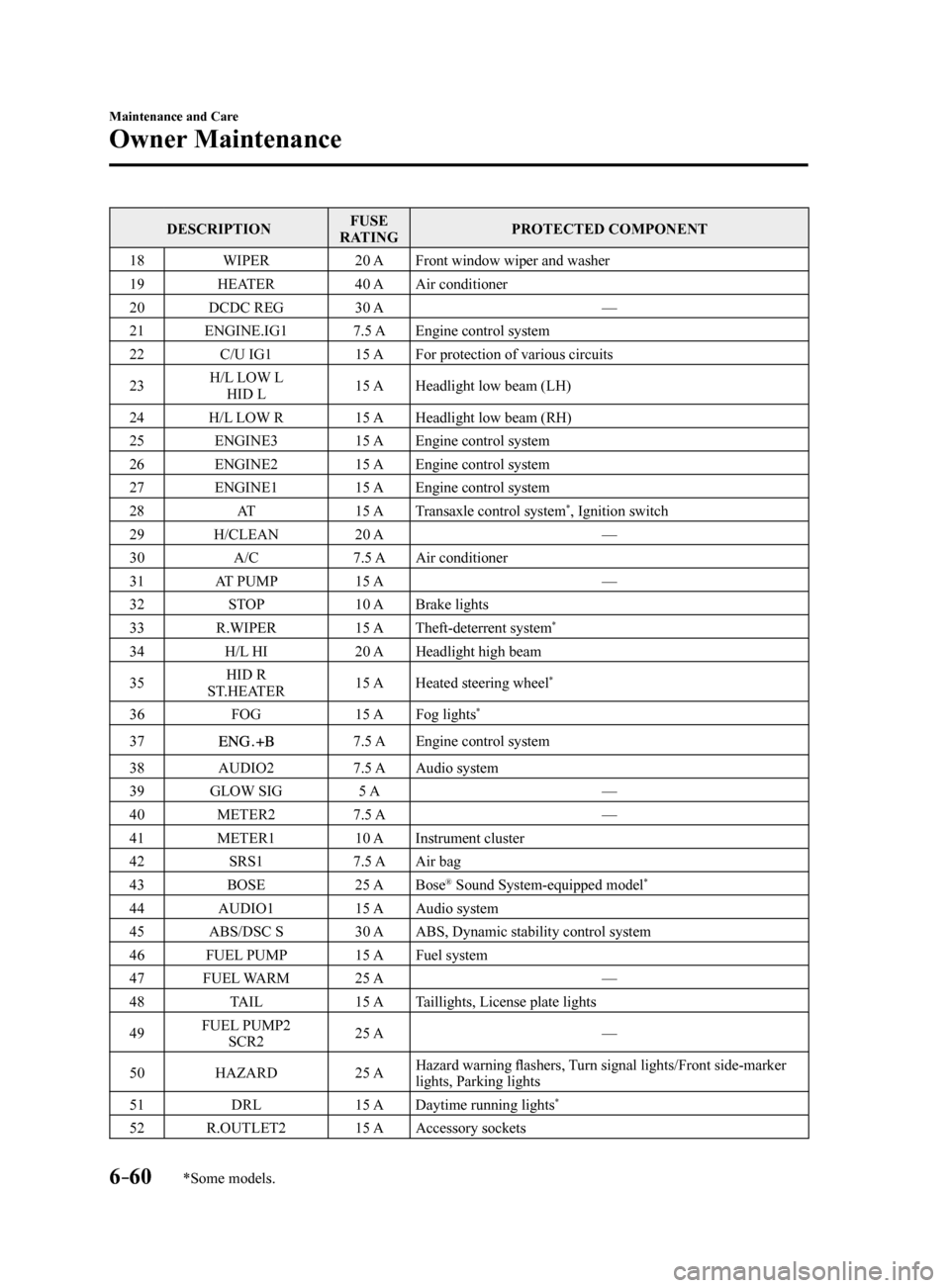
DESCRIPTIONFUSE
RATING PROTECTED COMPONENT
18 WIPER 20 AFront window wiper and washer
19 HEATER 40 AAir conditioner
20 DCDC REG 30 A —
21 ENGINE.IG1 7.5 AEngine control system
22 C/U IG1 15 AFor protection of various circuits
23 H/L LOW L
HID L 15 A
Headlight low beam (LH)
24 H/L LOW R 15 AHeadlight low beam (RH)
25 ENGINE3 15 AEngine control system
26 ENGINE2 15 AEngine control system
27 ENGINE1 15 AEngine control system
28 AT 15 ATransaxle control system
*, Ignition switch
29 H/CLEAN 20 A —
30 A/C 7.5 AAir conditioner
31 AT PUMP 15 A —
32 STOP 10 ABrake lights
33 R.WIPER 15 ATheft-deterrent system
*
34 H/L HI 20 AHeadlight high beam
35 HID R
ST.HEATER 15 A
Heated steering wheel
*
36 FOG 15 AFog lights*
377.5 A Engine control system
38 AUDIO2 7.5 AAudio system
39 GLOW SIG 5 A —
40 METER2 7.5 A —
41 METER1 10 AInstrument cluster
42 SRS1 7.5 AAir bag
43 BOSE 25 ABose
® Sound System-equipped model*
44 AUDIO1 15 AAudio system
45 ABS/DSC S 30 AABS, Dynamic stability control system
46 FUEL PUMP 15 AFuel system
47 FUEL WARM 25 A —
48 TAIL 15 ATaillights, License plate lights
49 FUEL PUMP2
SCR2 25 A
—
50 HAZARD 25 AHazard warning flashers, Turn signal lights/Front side-marker
lights, Parking lights
51 DRL 15 ADaytime running lights
*
52 R.OUTLET2 15 AAccessory sockets
Mazda6_8FH2-EA-16F_Edition2.indb 602016/07/07 13:46:22
Page 487 of 578
7–27
If Trouble Arises
Warning/Indicator Lights and Warning Sounds
*Some models.
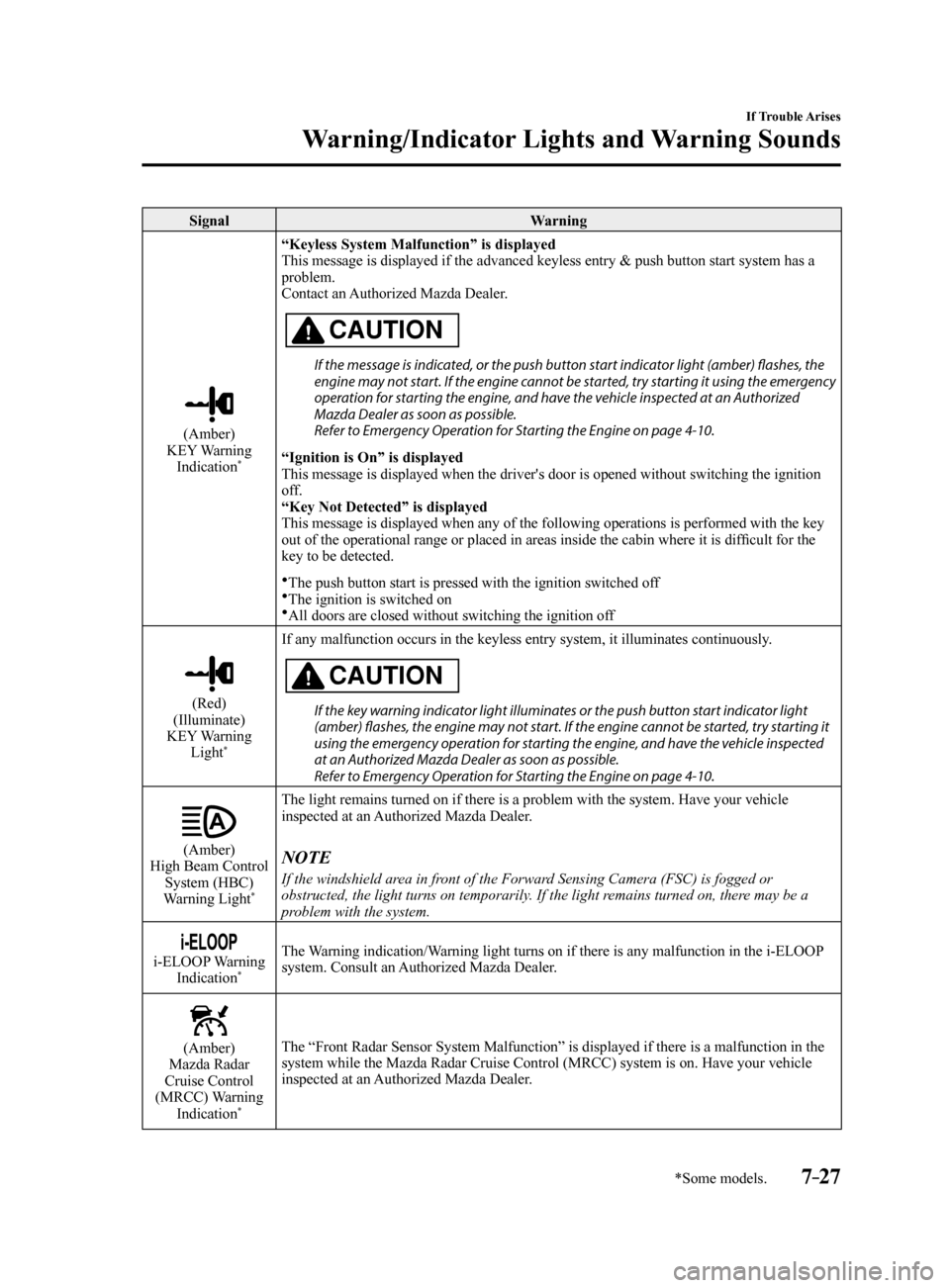
SignalWarning
(Amber)
KEY Warning Indication
*
“Keyless System Malfunction” is displayed
This message is displayed if the advanced keyless entry & push button st\
art system has a
problem.
Contact an Authorized Mazda Dealer.
CAUTION
If the message is indicated, or the push button start indicator light (amber) flashes, the
engine may not start. If the engine cannot be started, try starting it using the emergency
operation for starting the engine, and have the vehicle inspected at an Authorized
Mazda Dealer as soon as possible.
Refer to Emergency Operation for Starting the Engine on page 4-10.
“Ignition is On” is displayed
This message is displayed when the driver's door is opened without switc\
hing the ignition
off.
“Key Not Detected” is displayed
This message is displayed when any of the following operations is perfor\
med with the key
out of the operational range or placed in areas inside the cabin where it is difficult for the
key to be detected.
The push button start is pressed with the ignition switched off
The ignition is switched on
All doors are closed without switching the ignition off
(Red)
(Illuminate)
KEY Warning Light
*
If any malfunction occurs in the keyless entry system, it illuminates co\
ntinuously.
CAUTION
If the key warning indicator light illuminates or the push button start indicator light
(amber) flashes, the engine may not start. If the engine cannot be started, try starting it
using the emergency operation for starting the engine, and have the vehicle inspected
at an Authorized Mazda Dealer as soon as possible.
Refer to Emergency Operation for Starting the Engine on page 4-10.
(Amber)
High Beam Control System (HBC)
Warning Light
*
The light remains turned on if there is a problem with the system. Have \
your vehicle
inspected at an Authorized Mazda Dealer.
NOTE
If the windshield area in front of the Forward Sensing Camera (FSC) is fogged or
obstructed, the light turns on temporarily. If the light remains turned on, there may be a
problem with the system.
i-ELOOP Warning Indication*
The Warning indication/Warning light turns on if there is any malfunction in the i-ELOOP
system. Consult an Authorized Mazda Dealer.
(Amber)
Mazda Radar
Cruise Control
(MRCC) Warning Indication
*
The “Front Radar Sensor System Malfunction” is displayed if there is a malfunction in the
system while the Mazda Radar Cruise Control (MRCC) system is on. Have your vehicle
inspected at an Authorized Mazda Dealer.
Mazda6_8FH2-EA-16F_Edition2.indb 272016/07/07 13:46:33
Page 488 of 578
7–28
If Trouble Arises
Warning/Indicator Lights and Warning Sounds
*Some models.
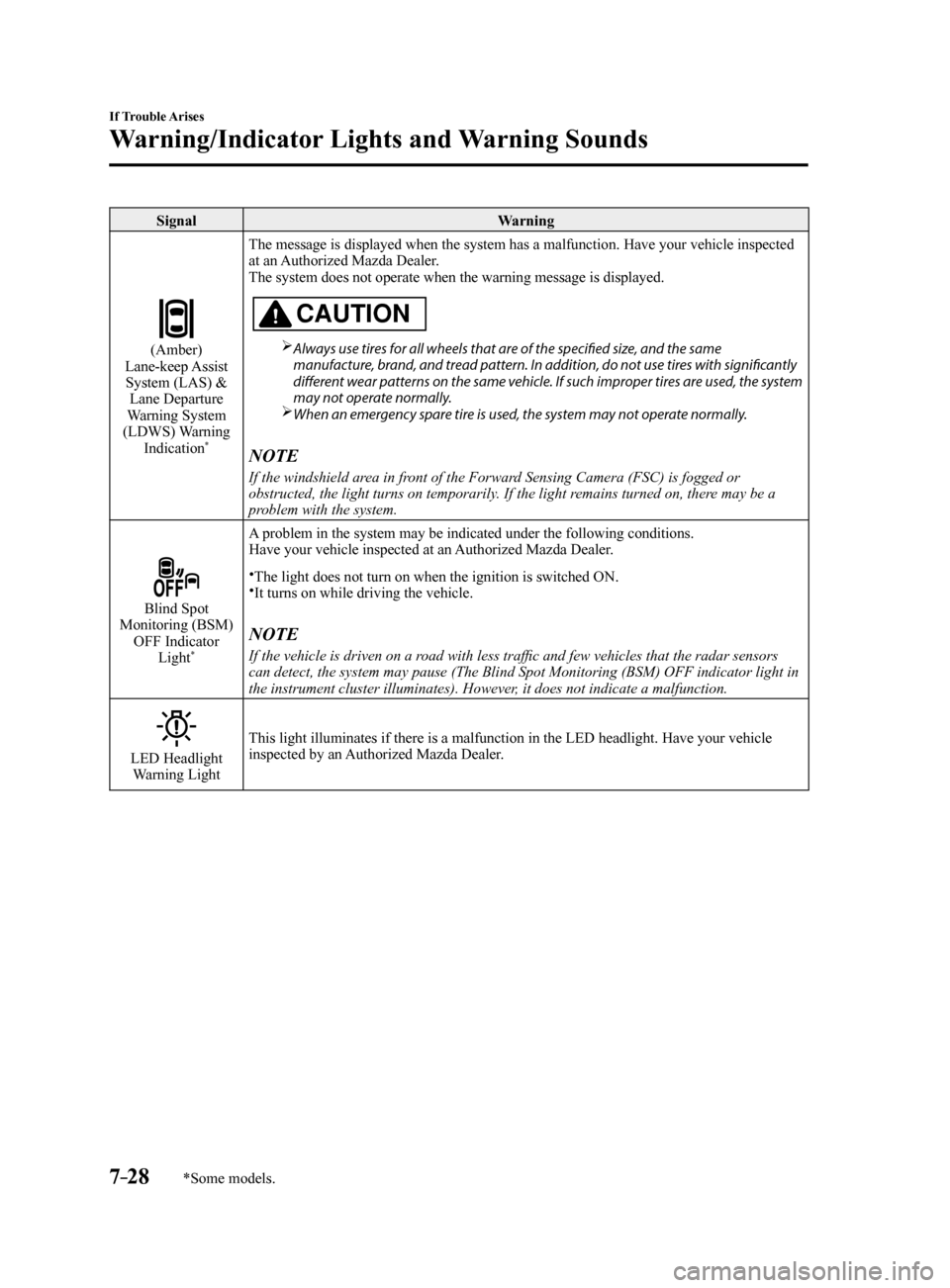
SignalWarning
(Amber)
Lane-keep Assist System (LAS) & Lane Departure
Warning System
(LDWS) Warning Indication
*
The message is displayed when the system has a malfunction. Have your ve\
hicle inspected
at an Authorized Mazda Dealer.
The system does not operate when the warning message is displayed.
CAUTION
Always use tires for all wheels that are of the specified size, and the same
manufacture, brand, and tread pattern. In addition, do not use tires with significantly
different wear patterns on the same vehicle. If such improper tires are used, the system
may not operate normally.
When an emergency spare tire is used, the system may not operate normally.
NOTE
If the windshield area in front of the Forward Sensing Camera (FSC) is fogged or
obstructed, the light turns on temporarily. If the light remains turned on, there may be a
problem with the system.
Blind Spot
Monitoring (BSM) OFF Indicator Light
*
A problem in the system may be indicated under the following conditions.
Have your vehicle inspected at an Authorized Mazda Dealer.
The light does not turn on when the ignition is switched ON.It turns on while driving the vehicle.
NOTE
If the vehicle is driven on a road with less traffic and few vehicles that the radar sensors
can detect, the system may pause (The Blind Spot Monitoring (BSM) OFF\
indicator light in
the instrument cluster illuminates). However, it does not indicate a malfunction.
LED Headlight Warning Light This light illuminates if there is a malfunction in the LED headlight. Have your vehicle
inspected by an Authorized Mazda Dealer.
Mazda6_8FH2-EA-16F_Edition2.indb 282016/07/07 13:46:34
Page 559 of 578
9–7
Specifications
Specifications
*Some models.
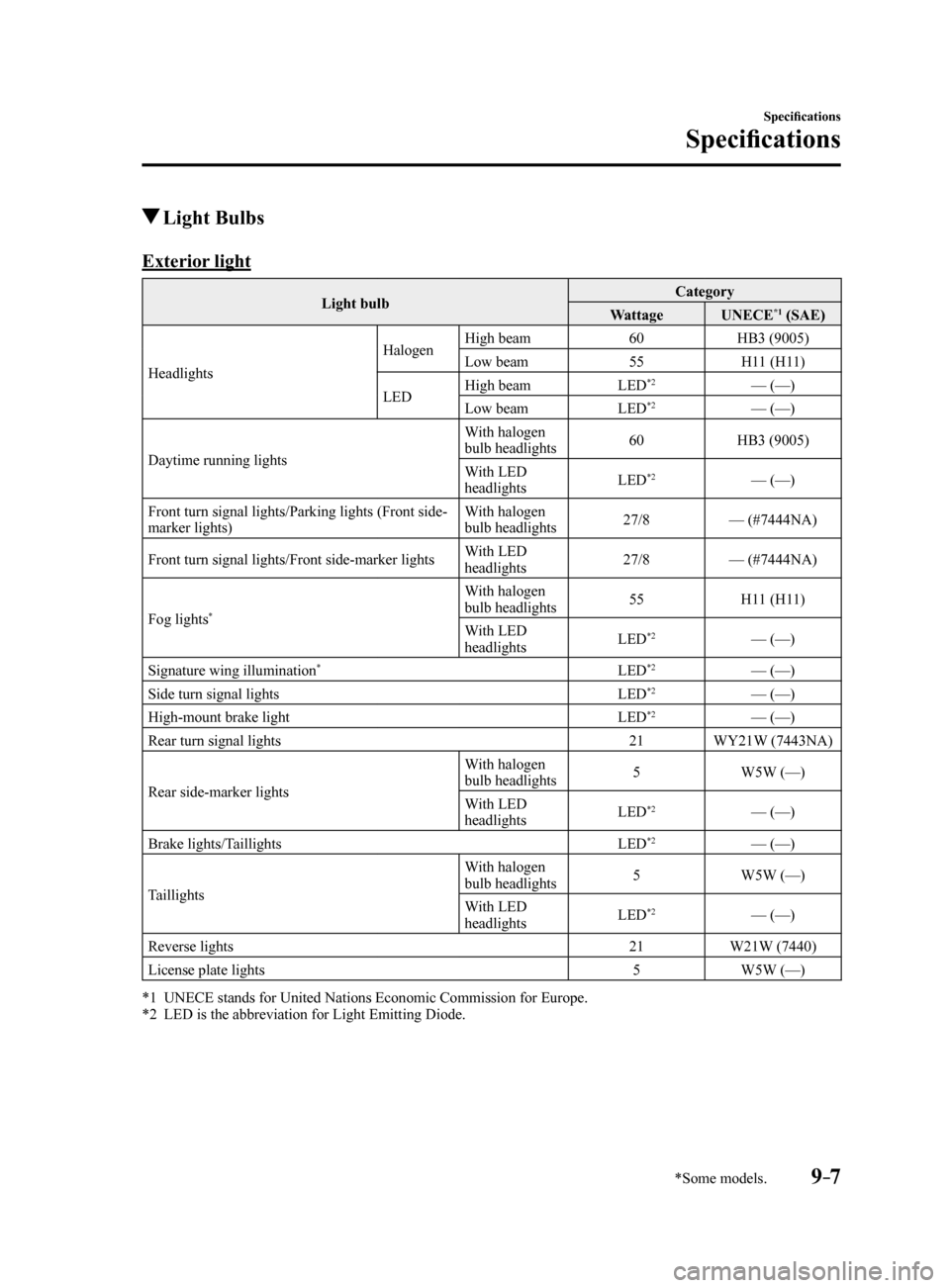
Light Bulbs
Exterior light
Light bulbCategory
Wattage UNECE*1 (SAE)
Headlights Halogen
High beam
60HB3 (9005)
Low beam 55H11 (H11)
LED High beam
LED
*2— (—)
Low beam LED*2— (—)
Daytime running lights With halogen
bulb headlights
60
HB3 (9005)
With LED
headlights LED
*2— (—)
Front turn signal lights/Parking lights (Front side-
marker lights) With halogen
bulb headlights
27/8
— (#7444NA)
Front turn signal lights/Front side-marker lights With LED
headlights27/8
— (#7444NA)
Fog lights
*
With halogen
bulb headlights 55
H11 (H11)
With LED
headlights LED
*2— (—)
Signature wing illumination
*LED*2— (—)
Side turn signal lights LED*2— (—)
High-mount brake light LED*2— (—)
Rear turn signal lights 21WY21W (7443NA)
Rear side-marker lights With halogen
bulb headlights
5
W5W (—)
With LED
headlights LED
*2— (—)
Brake lights/Taillights LED
*2— (—)
Taillights With halogen
bulb headlights
5
W5W (—)
With LED
headlights LED
*2— (—)
Reverse lights 21W21W (7440)
License plate lights 5W5W (—)
*1 UNECE stands for United Nations Economic Commission for Europe.
*2 LED is the abbreviation for Light Emitting Diode.
Mazda6_8FH2-EA-16F_Edition2.indb 72016/07/07 13:46:48
Page 566 of 578
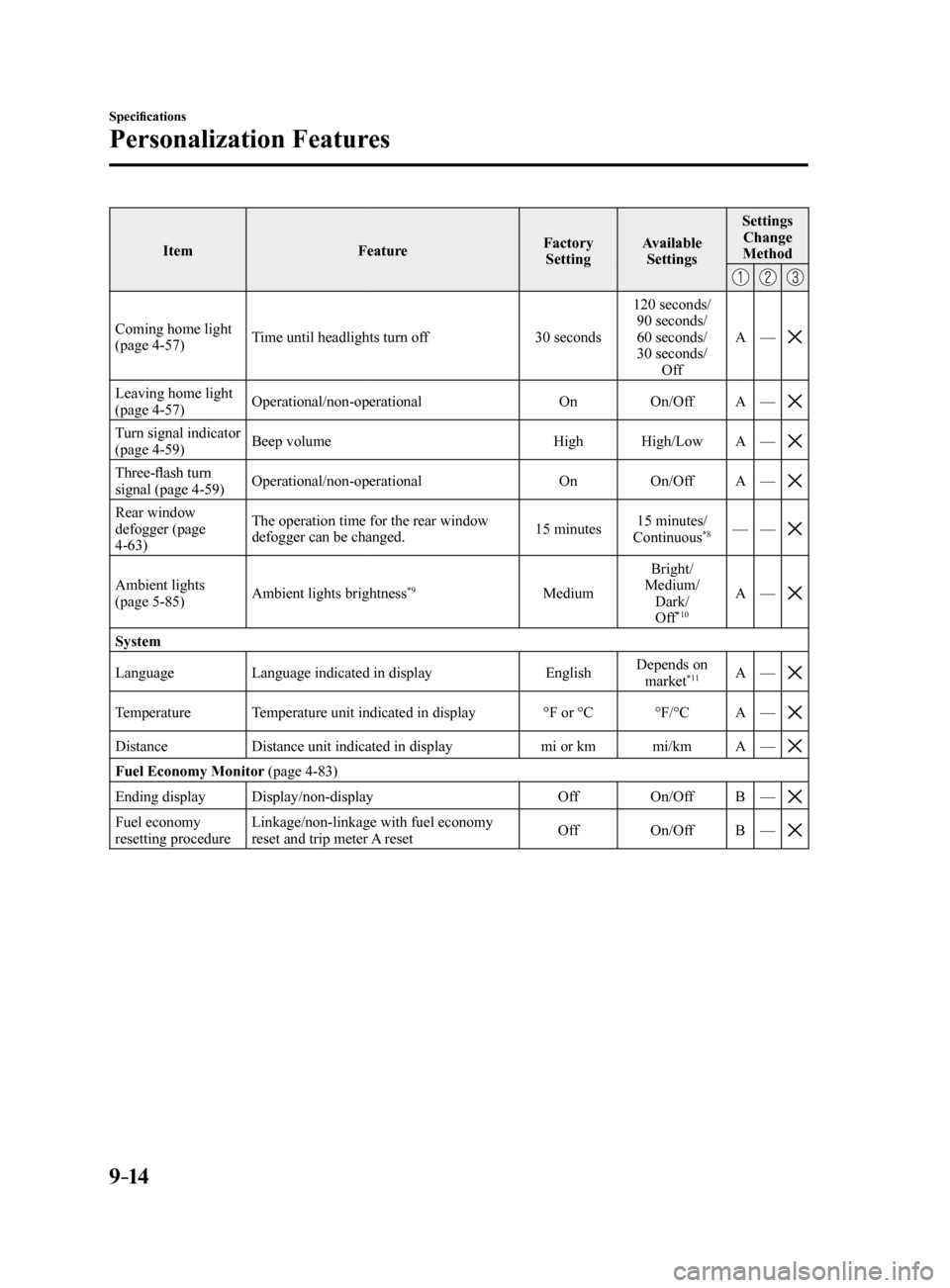
9–14
Specifications
Personalization Features
ItemFeatureFactory
Setting Available
Settings Settings
Change
Method
Coming home light
(page 4-57) Time until headlights turn off
30 seconds120 seconds/
90 seconds/
60 seconds/
30 seconds/ Off A
—
Leaving home light
(page 4-57) Operational/non-operational
OnOn/OffA—
Turn signal indicator
(page 4-59) Beep volume
HighHigh/Low A—
Three-flash turn
signal (page 4-59) Operational/non-operational
OnOn/OffA—
Rear window
defogger (page
4-63) The operation time for the rear window
defogger can be changed.
15 minutes15 minutes/
Continuous
*8— —
Ambient lights
(page 5-85) Ambient lights brightness*9MediumBright/
Medium/ Dark/Off
*10
A —
System
Language Language indicated in display EnglishDepends on
market
*11A —
Temperature Temperature unit indicated in display °F or °C°F/°CA—
Distance Distance unit indicated in display mi or kmmi/kmA—
Fuel Economy Monitor (page 4-83)
Ending display Display/non-display OffOn/OffB—
Fuel economy
resetting procedure Linkage/non-linkage with fuel economy
reset and trip meter A reset
Off
On/OffB—
Mazda6_8FH2-EA-16F_Edition2.indb 142016/07/07 13:46:50