lights MAZDA MODEL 6 2017 (in English) Owner's Manual
[x] Cancel search | Manufacturer: MAZDA, Model Year: 2017, Model line: MODEL 6, Model: MAZDA MODEL 6 2017Pages: 578, PDF Size: 54.72 MB
Page 142 of 578
4–18
When Driving
Instrument Cluster and Display
Function for cancelling illumination
dimmer
The illumination dimmer can be canceled
by rotating the dashboard illumination
knob to the right until a beep sound is
heard while the instrument cluster is
dimmed with the ignition switched ON.
If the instrument cluster's visibility is
reduced due to glare from surrounding
brightness, cancel the illumination
dimmer.
NOTE
(With Multi-information Display)
The illumination dimmer can be
canceled by pressing the dashboard
illumination knob.
When the illumination dimmer is
canceled, the instrument cluster cannot
be dimmed even if the position lights are
turned on.
When the illumination dimmer is
canceled, the screen in the center
display switches to constant display of
the daytime screen.
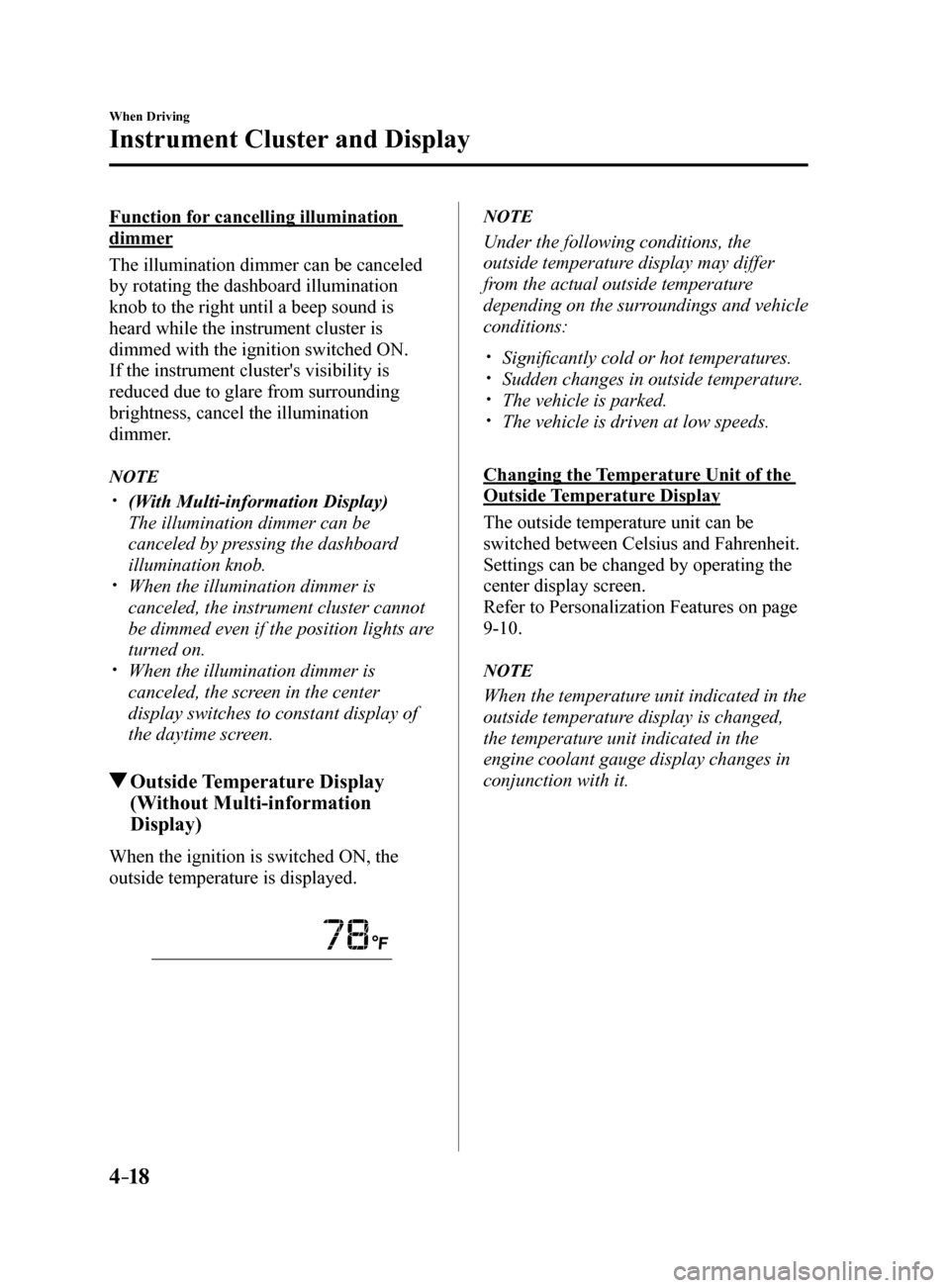
Outside Temperature Display
(Without Multi-information
Display)
When the ignition is switched ON, the
outside temperature is displayed.
NOTE
Under the following conditions, the
outside temperature display may differ
from the actual outside temperature
depending on the surroundings and vehicle
conditions:
Significantly cold or hot temperatures. Sudden changes in outside temperature. The vehicle is parked. The vehicle is driven at low speeds.
Changing the Temperature Unit of the
Outside Temperature Display
The outside temperature unit can be
switched between Celsius and Fahrenheit.
Settings can be changed by operating the
center display screen.
Refer to Personalization Features on page
9-10.
NOTE
When the temperature unit indicated in the
outside temperature display is changed,
the temperature unit indicated in the
engine coolant gauge display changes in
conjunction with it.
Mazda6_8FH2-EA-16F_Edition2.indb 182016/07/07 13:44:36
Page 156 of 578
4–32
When Driving
Instrument Cluster and Display
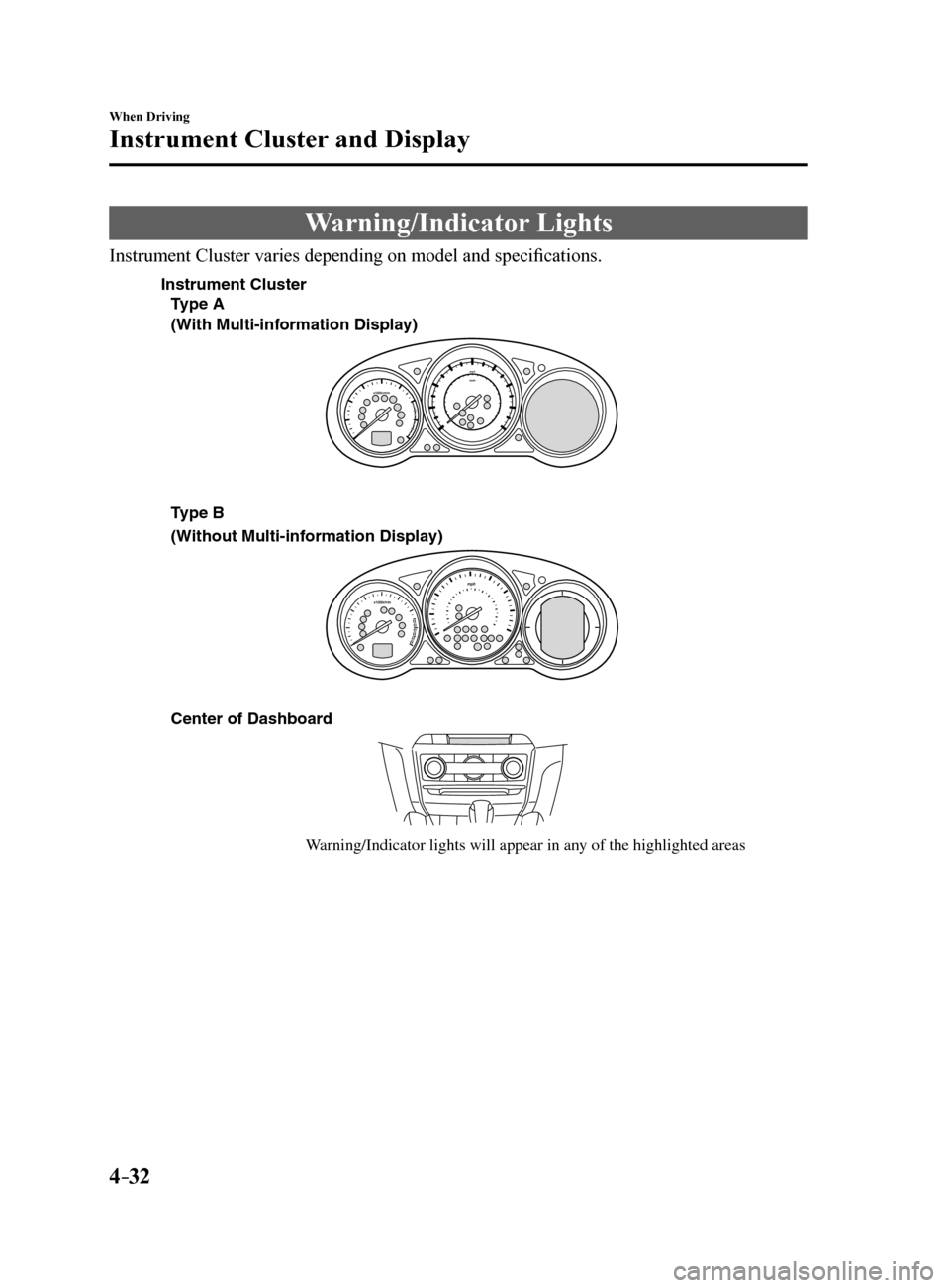
Warning/Indicator Lights
Instrument Cluster varies depending on model and specifications.
Center of Dashboard
W arning/Indicator lights will appear in an y of the highlighted areas
T
ype A
(With Multi-inf ormation Displa y)
(Without Multi-inf ormation Display)
Instrument Cluster
Type B
Mazda6_8FH2-EA-16F_Edition2.indb 322016/07/07 13:44:42
Page 157 of 578
4–33
When Driving
Instrument Cluster and Display
*Some models.
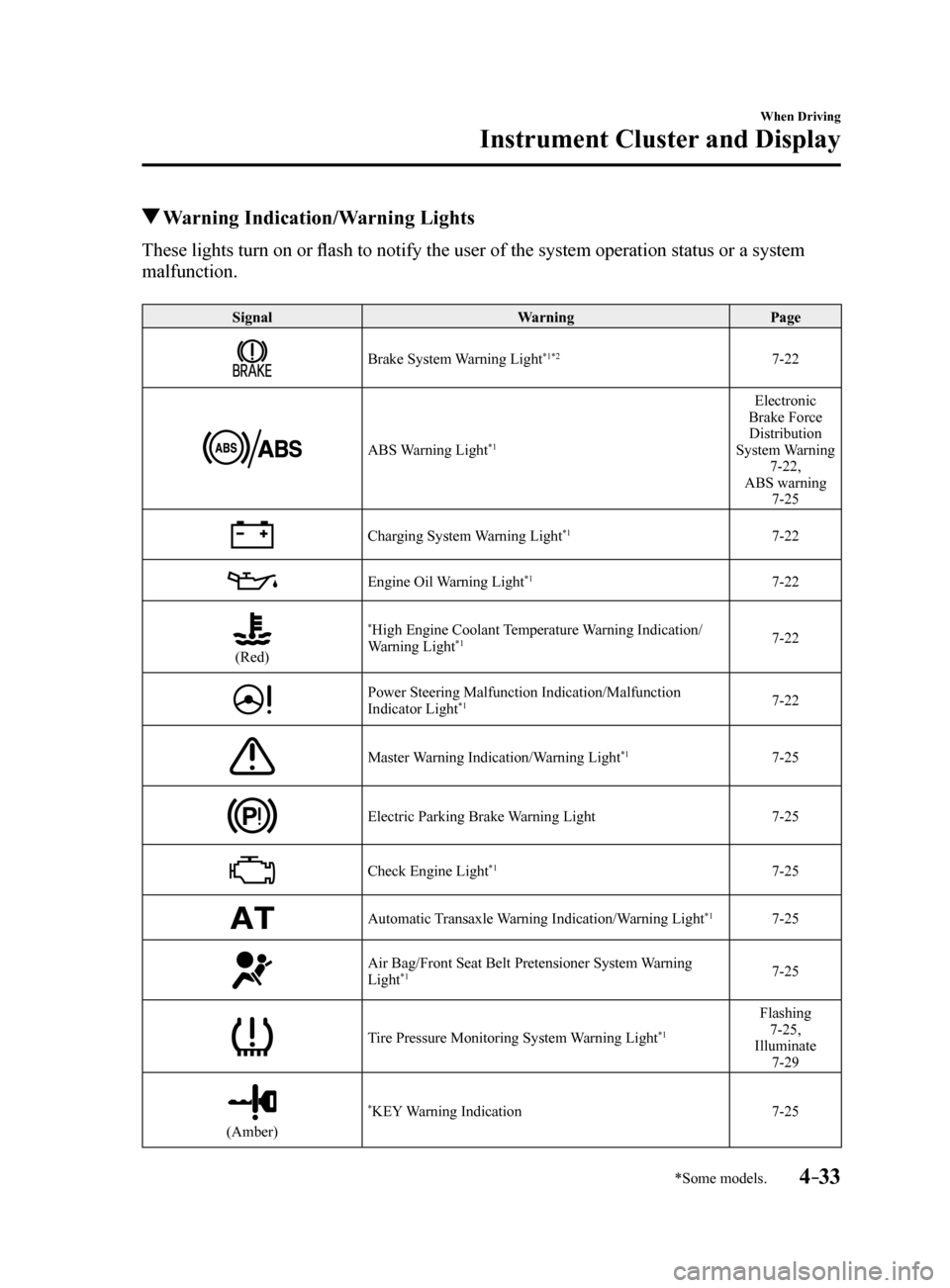
Warning Indication/Warning Lights
These lights turn on or flash to notify the user of the system operation status or a system
malfunction.
Signal WarningPage
Brake System Warning Light*1*27-22
ABS Warning Light*1
Electronic
Brake Force Distribution
System Warning 7-22,
ABS warning 7-25
Charging System Warning Light*17-22
Engine Oil Warning Light*17-22
(Red)
*High Engine Coolant Temperature Warning Indication/
Warning Light*17-22
Power Steering Malfunction Indication/Malfunction
Indicator Light*17-22
Master Warning Indication/Warning Light*17-25
Electric Parking Brake Warning Light 7-25
Check Engine Light*17-25
Automatic Transaxle Warning Indication/Warning Light*17-25
Air Bag/Front Seat Belt Pretensioner System Warning
Light*17-25
Tire Pressure Monitoring System Warning Light*1
Flashing
7-25,
Illuminate 7-29
(Amber)
*KEY Warning Indication 7-25
Mazda6_8FH2-EA-16F_Edition2.indb 332016/07/07 13:44:44
Page 160 of 578
4–36
When Driving
Instrument Cluster and Display
*Some models.
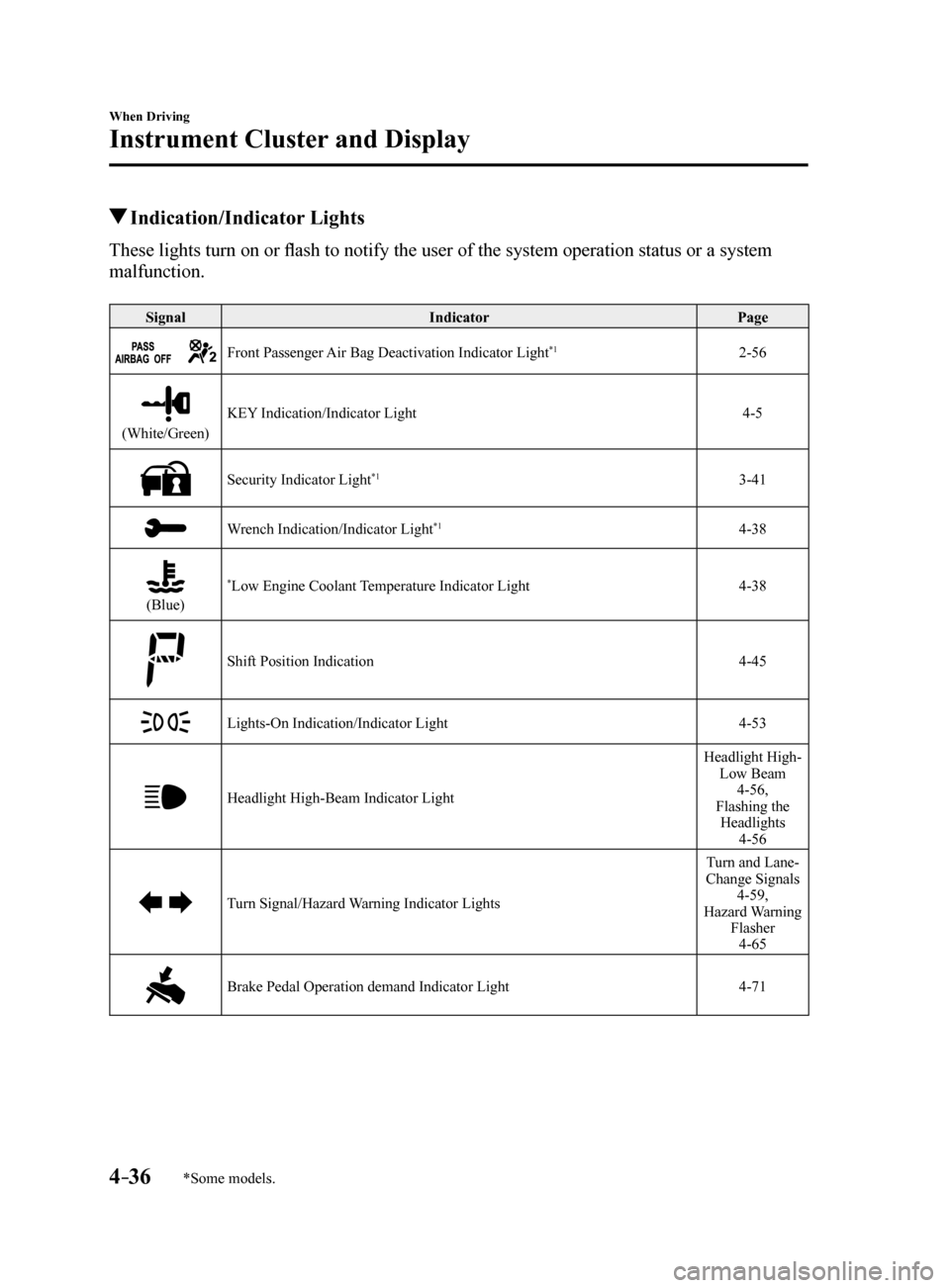
Indication/Indicator Lights
These lights turn on or flash to notify the user of the system operation status or a system
malfunction.
SignalIndicator Page
Front Passenger Air Bag Deactivation Indicator Light*12-56
(White/Green)KEY Indication/Indicator Light
4-5
Security Indicator Light*13-41
Wrench Indication/Indicator Light*14-38
(Blue)
*Low Engine Coolant Temperature Indicator Light4-38
Shift Position Indication 4-45
Lights-On Indication/Indicator Light4-53
Headlight High-Beam Indicator LightHeadlight High-
Low Beam 4-56,
Flashing the Headlights 4-56
Turn Signal/Hazard Warning Indicator Lights Turn and Lane-
Change Signals 4-59,
Hazard Warning Flasher4-65
Brake Pedal Operation demand Indicator Light 4-71
Mazda6_8FH2-EA-16F_Edition2.indb 362016/07/07 13:44:47
Page 168 of 578
4–44
When Driving
Automatic Transaxle
Transaxle Ranges
The shift position indicator light in the
instrument cluster illuminates. Refer
to Warning/Indicator Lights on page
4-32.
The selector lever must be in P or N to
operate the starter.
P (Park)
P locks the transaxle and prevents the front
wheels from rotating.
WARNING
Always set the selector lever to P and set
the parking brake: Only setting the selector lever to the
P position without using the parking
brake to hold the vehicle is dangerous.
If P fails to hold, the vehicle could move
and cause an accident.
CAUTION
Shifting into P, N or R while the vehicle is
moving can damage your transaxle.
Shifting into a driving gear or reverse
when the engine is running faster than
idle can damage the transaxle.
R (Reverse)
In position R, the vehicle moves only
backward. You must be at a complete
stop before shifting to or from R, except
under rare circumstances as explained in
Rocking the Vehicle (page 3-46).
N (Neutral)
In N, the wheels and transaxle are not
locked. The vehicle will roll freely even
on the slightest incline unless the parking
brake or brakes are on.
WARNING
If the engine is running faster than idle,
do not shift from N or P into a driving
gear: It's dangerous to shift from N or P
into a driving gear when the engine
is running faster than idle. If this is
done, the vehicle could move suddenly,
causing an accident or serious injury.
Do not shift into N when driving the
vehicle: Shifting into N while driving is
dangerous. Engine braking cannot
be applied when decelerating which
could lead to an accident or serious
injury.
CAUTION
Do not shift into N when driving the
vehicle. Doing so can cause transaxle
damage.
NOTE
Apply the parking brake or depress the
brake pedal before moving the selector
lever from N to prevent the vehicle from
moving unexpectedly.
D (Drive)
D is the normal driving position. From a
stop, the transaxle will automatically shift
through a 6-gear sequence.
M (Manual)
M is the manual shift mode position. Gears
can be shifted up or down by operating the
selector lever. Refer to Manual Shift Mode
on page 4-45.
Mazda6_8FH2-EA-16F_Edition2.indb 442016/07/07 13:44:51
Page 177 of 578
 Owners Manual 4–53
When Driving
Switches and Controls
Lighting Control
Headlights
Turn the headlight switch to turn the headlights and other exterior light\
s on or off.
When the lights are turned on, the lights")
4–53
When Driving
Switches and Controls
Lighting Control
Headlights
Turn the headlight switch to turn the headlights and other exterior light\
s on or off.
When the lights are turned on, the lights-on indicator light in the inst\
rument cluster turns on.
NOTE
If the light switch is left on, the lights will automatically switch off\
approximately 30
seconds after switching the ignition off.
The time setting can be changed.
Refer to Personalization Features on page 9-10.
To prevent discharging the battery, do not leave the lights on while the engine is off unless
safety requires them.
Without auto-light control
Switch Position
Ignition Position ONACC or
OFF ONACC or
OFF ONACC or
OFF
Headlights OffOffOffOff OnOn
*2
Daytime running lights On*1OffOn*1Off OffOff
Taillights
Parking lights
License lights
Side-marker lights Off
Off OnOn
*2OnOn*2
*1 The lights are turned on while the vehicle is driven.
*2 The lights are turned on for the specified period by the auto headlight off function.
Mazda6_8FH2-EA-16F_Edition2.indb 532016/07/07 13:44:54
Page 178 of 578
4–54
When Driving
Switches and Controls
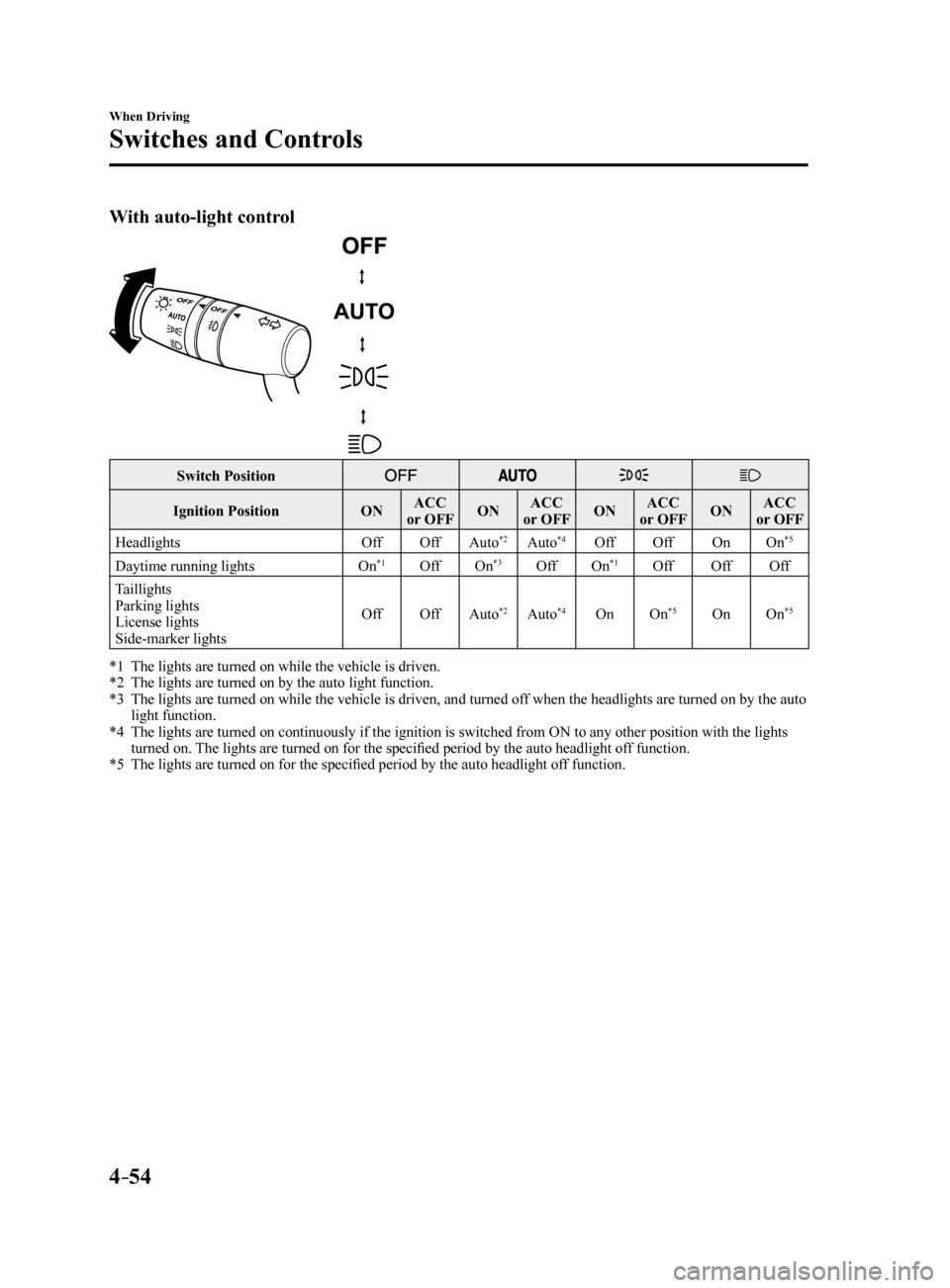
With auto-light control
Switch Position
Ignition PositionONACC
or OFF ONACC
or OFF ONACC
or OFF ONACC
or OFF
Headlights OffOffAuto
*2Auto*4Off Off OnOn*5
Daytime running lights On*1OffOn*3OffOn*1Off OffOff
Taillights
Parking lights
License lights
Side-marker lights Off
OffAuto
*2Auto*4On On*5OnOn*5
*1 The lights are turned on while the vehicle is driven.
*2 The lights are turned on by the auto light function.
*3 The lights are turned on while the vehicle is driven, and turned off when the headlights are turned on by the auto
light function.
*4 The lights are turned on continuously if the ignition is switched from ON to any other position with the lights
turned on. The lights are turned on for the specified period by the auto headlight off function.
*5 The lights are turned on for the specified period by the auto headlight off function.
Mazda6_8FH2-EA-16F_Edition2.indb 542016/07/07 13:44:54
Page 179 of 578
4–55
When Driving
Switches and Controls
*Some models.
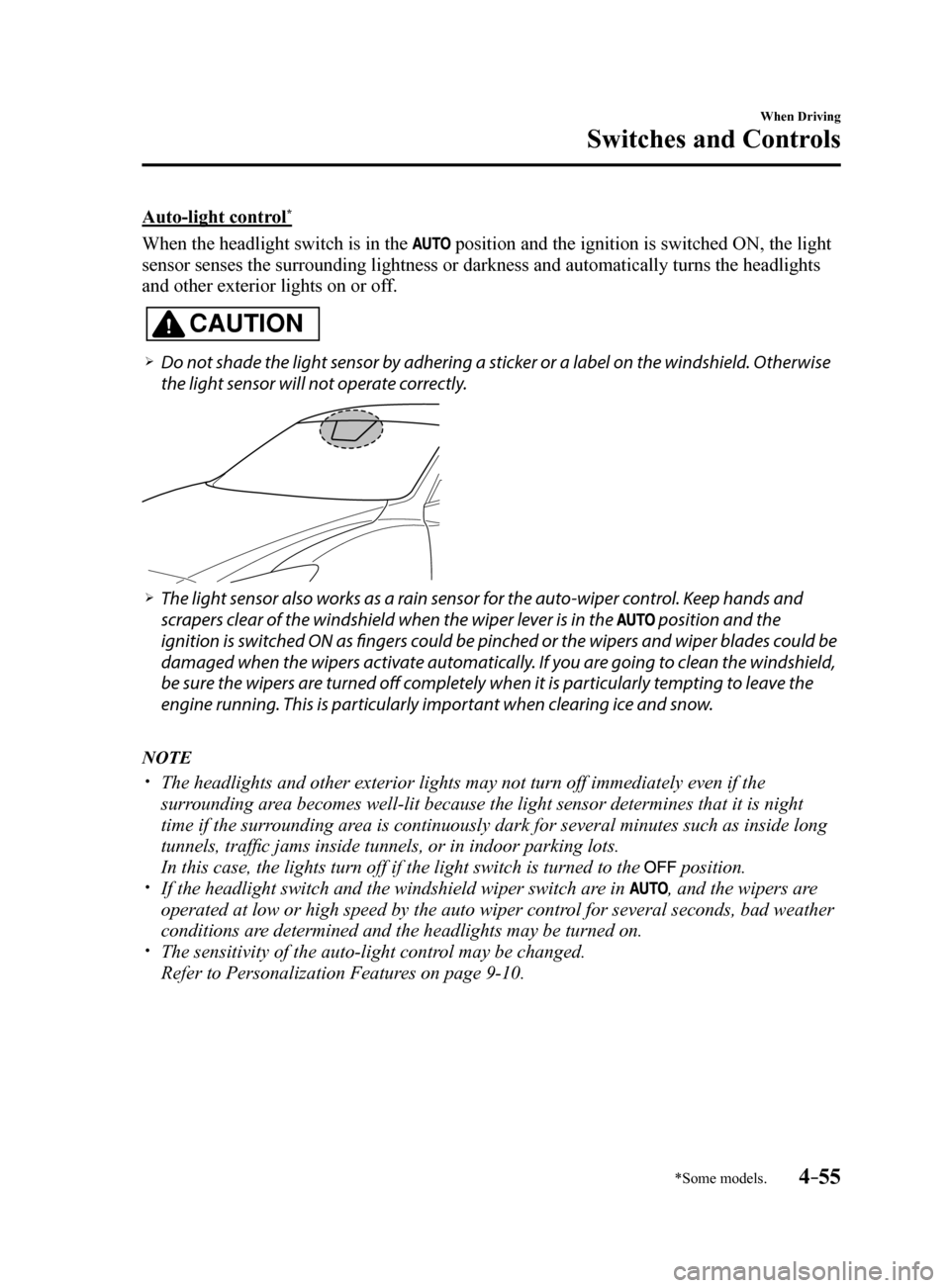
Auto-light control*
When the headlight switch is in the position and the ignition is switched ON, the light
sensor senses the surrounding lightness or darkness and automatically tu\
rns the headlights
and other exterior lights on or off.
CAUTION
Do not shade the light sensor by adhering a sticker or a label on the windshield. Otherwise
the light sensor will not operate correctly.
The light sensor also works as a rain sensor for the auto-wiper control. Keep hands and
scrapers clear of the windshield when the wiper lever is in the
position and the
ignition is switched ON as fingers could be pinched or the wipers and wiper blades could be
damaged when the wipers activate automatically. If you are going to clean the windshield,
be sure the wipers are turned off completely when it is particularly tempting to leave the
engine running. This is particularly important when clearing ice and snow.
NOTE
The headlights and other exterior lights may not turn off immediately ev\
en if the
surrounding area becomes well-lit because the light sensor determines that it is night\
time if the surrounding area is continuously dark for several minutes such as inside long
tunnels, traffic jams inside tunnels, or in indoor parking lots.
In this case, the lights turn off if the light switch is turned to the
position. If the headlight switch and the windshield wiper switch are in , and the wipers are
operated at low or high speed by the auto wiper control for several seconds, bad weather
conditions are determined and the headlights may be turned on.
The sensitivity of the auto-light control may be changed.
Refer to Personalization Features on page 9-10.
Mazda6_8FH2-EA-16F_Edition2.indb 552016/07/07 13:44:54
Page 180 of 578
4–56
When Driving
Switches and Controls
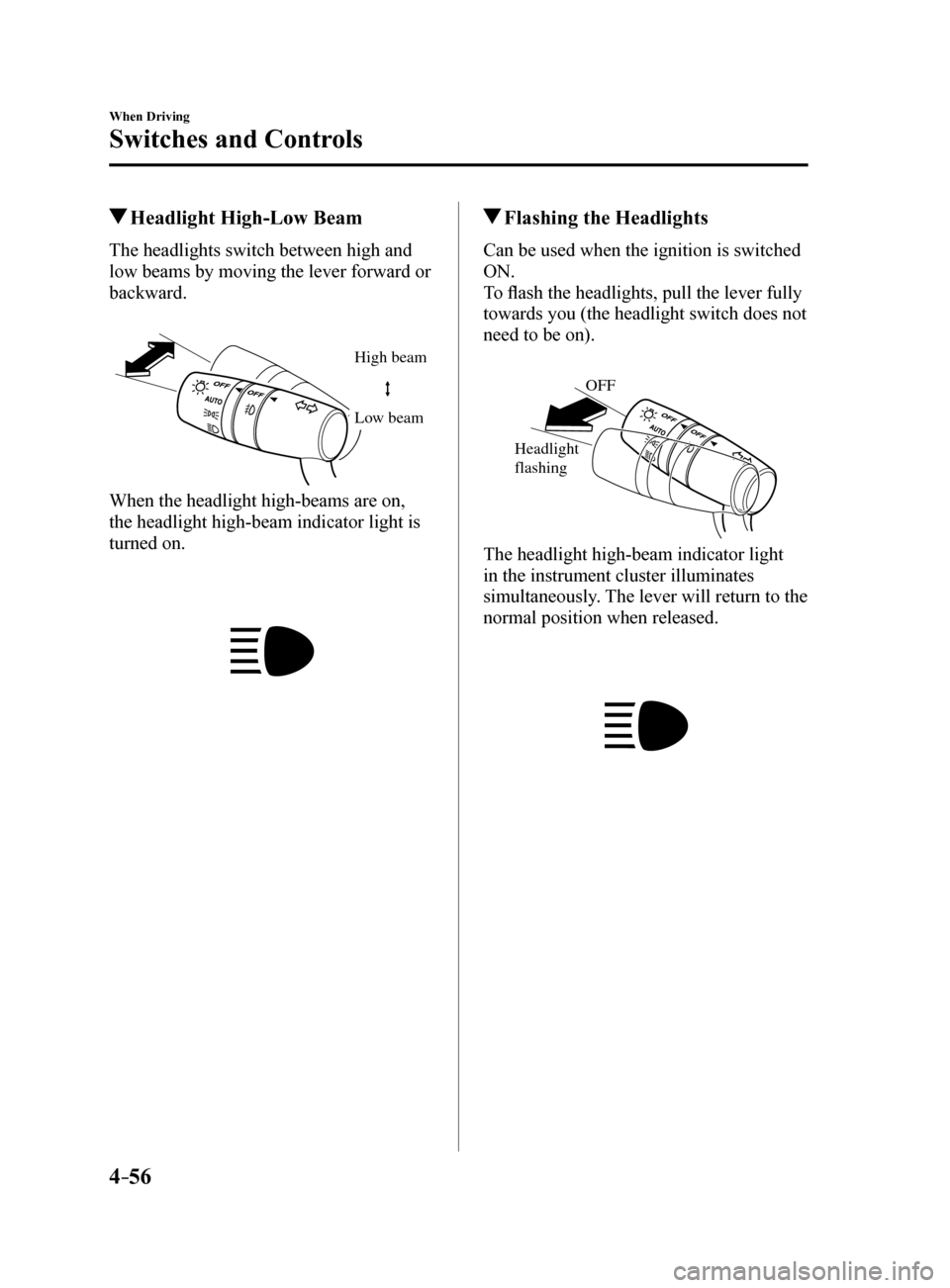
Headlight High-Low Beam
The headlights switch between high and
low beams by moving the lever forward or
backward.
High beam
Lo w beam
When the headlight high-beams are on,
the headlight high-beam indicator light is
turned on.
Flashing the Headlights
Can be used when the ignition is switched
ON.
To flash the headlights, pull the lever fully
towards you (the headlight switch does not
need to be on).
OFF
Headlight
flashing
The headlight high-beam indicator light
in the instrument cluster illuminates
simultaneously. The lever will return to the
normal position when released.
Mazda6_8FH2-EA-16F_Edition2.indb 562016/07/07 13:44:55
Page 181 of 578
4–57
When Driving
Switches and Controls
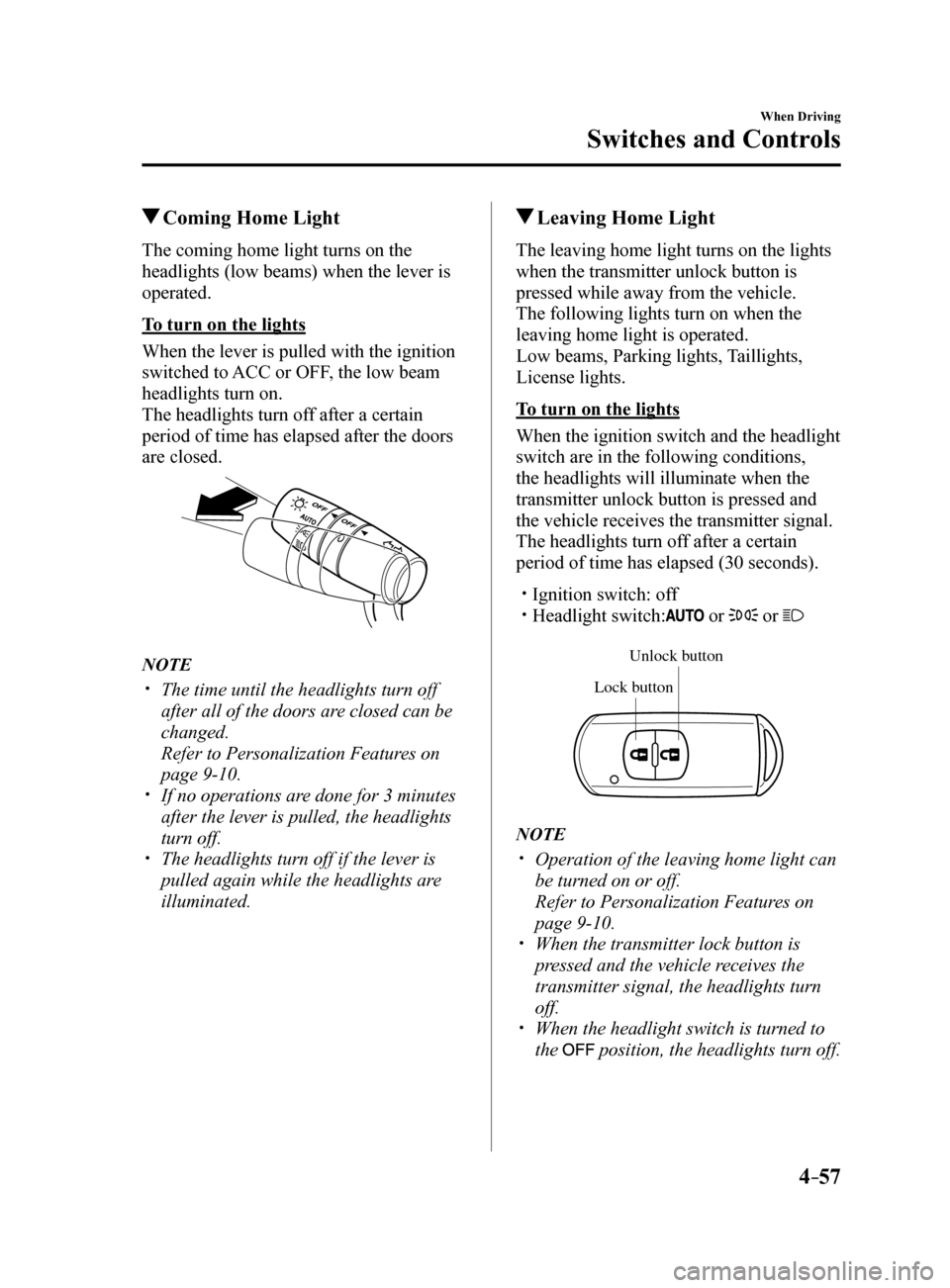
Coming Home Light
The coming home light turns on the
headlights (low beams) when the lever is
operated.
To turn on the lights
When the lever is pulled with the ignition
switched to ACC or OFF, the low beam
headlights turn on.
The headlights turn off after a certain
period of time has elapsed after the doors
are closed.
NOTE
The time until the headlights turn off
after all of the doors are closed can be
changed.
Refer to Personalization Features on
page 9-10.
If no operations are done for 3 minutes
after the lever is pulled, the headlights
turn off.
The headlights turn off if the lever is
pulled again while the headlights are
illuminated.
Leaving Home Light
The leaving home light turns on the lights
when the transmitter unlock button is
pressed while away from the vehicle.
The following lights turn on when the
leaving home light is operated.
Low beams, Parking lights, Taillights,
License lights.
To turn on the lights
When the ignition switch and the headlight
switch are in the following conditions,
the headlights will illuminate when the
transmitter unlock button is pressed and
the vehicle receives the transmitter signal.
The headlights turn off after a certain
period of time has elapsed (30 seconds).
Ignition switch: off Headlight switch: or or
Unlock b utton
Lock button
NOTE
Operation of the leaving home light can
be turned on or off.
Refer to Personalization Features on
page 9-10.
When the transmitter lock button is
pressed and the vehicle receives the
transmitter signal, the headlights turn
off.
When the headlight switch is turned to
the
position, the headlights turn off.
Mazda6_8FH2-EA-16F_Edition2.indb 572016/07/07 13:44:55