trunk MAZDA MODEL 6 2017 (in English) Owner's Manual
[x] Cancel search | Manufacturer: MAZDA, Model Year: 2017, Model line: MODEL 6, Model: MAZDA MODEL 6 2017Pages: 578, PDF Size: 54.72 MB
Page 159 of 578
4–35
When Driving
Instrument Cluster and Display
*Some models.
SignalWarningPage
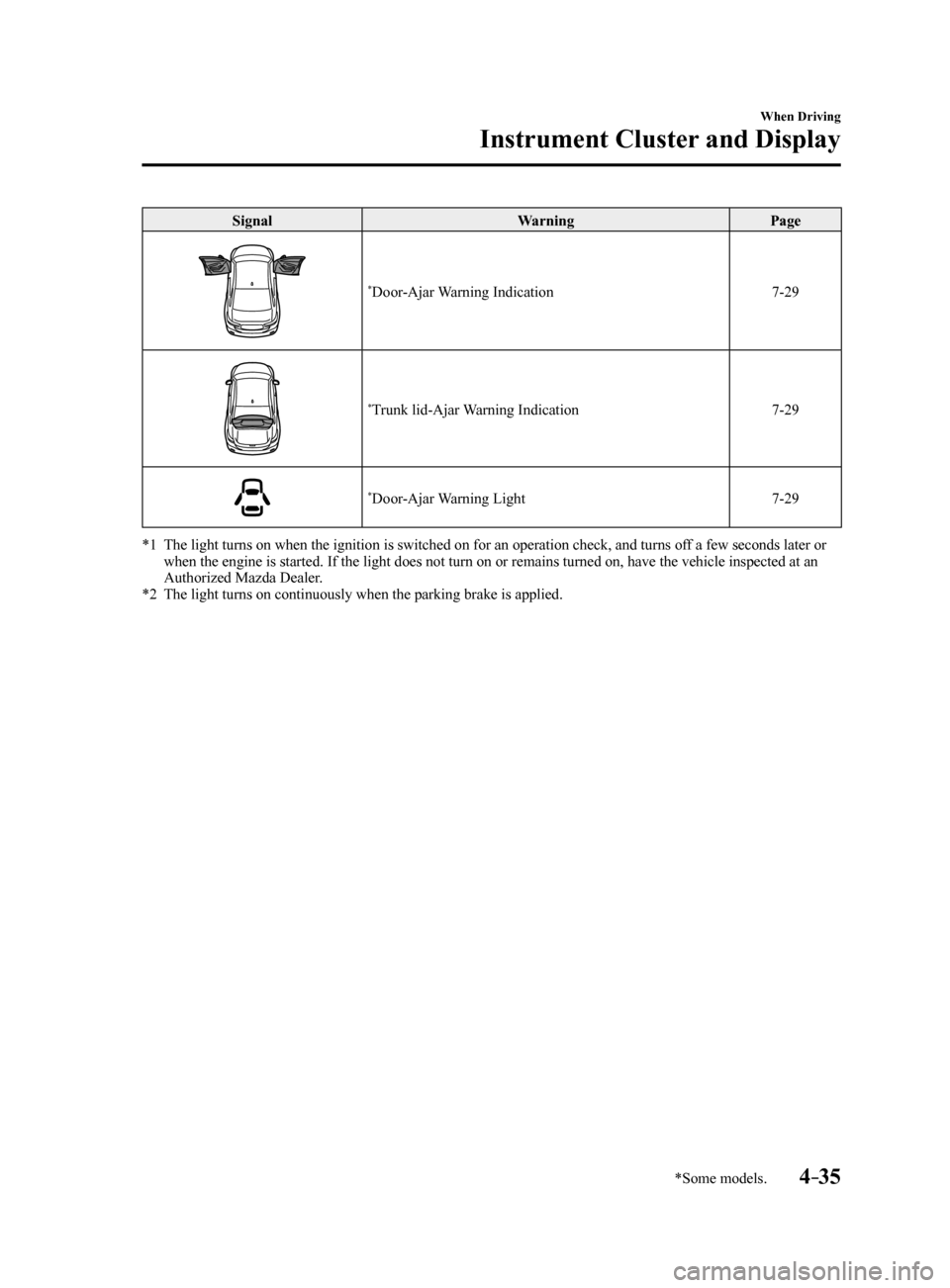
*Door-Ajar Warning Indication 7-29
*Trunk lid-Ajar Warning Indication7-29
*Door-Ajar Warning Light7-29
*1 The light turns on when the ignition is switched on for an operation che\
ck, and turns off a few seconds later or
when the engine is started. If the light does not turn on or remains tur\
ned on, have the vehicle inspected at an
Authorized Mazda Dealer.
*2 The light turns on continuously when the parking brake is applied.
Mazda6_8FH2-EA-16F_Edition2.indb 352016/07/07 13:44:46
Page 276 of 578
4–152
When Driving
i-ACTIVSENSE
NOTE
Under the following conditions, the radar sensor (front) may not be able to detect
vehicles ahead or obstructions correctly and each system may not operate normally.
The rear surface of a vehicle ahead does not reflect radio waves effectively, such as
an unloaded trailer or an automobile with a loading platform covered by a soft top,
vehicles with a hard plastic tailgate, and round-shaped vehicles.
Vehicles ahead with low vehicle height and thus less area for reflecting radio waves. Visibility is reduced due to a vehicle ahead casting off water, snow, or sand from its
tires and onto your windshield.
The trunk compartment is loaded with heavy objects or the rear passenger seats are
occupied.
Ice, snow, or soiling is on the front surface of the front emblem. During inclement weather such as rain, snow, or sand storms. When driving near facilities or objects emitting strong radio waves.
Under the following conditions, the radar sensor (front) may not be able to detect
vehicles ahead or obstructions.
The beginning and end of a curve. Roads with continuous curves. Narrow lane roads due to road construction or lane closures. The vehicle ahead enters the radar sensor's blind spot. The vehicle ahead is running abnormally due to accident or vehicle damag\
e. Roads with repeated up and down slopes Driving on poor roads or unpaved roads. The distance between your vehicle and the vehicle ahead is extremely short. A vehicle suddenly comes close such as by cutting into the lane.
To prevent incorrect operation of the system, use tires of the same specified size,
manufacturer, brand, and tread pattern on all four wheels. In addition, do not use tires
with significantly different wear patterns or tire pressures on the same vehicle (Including
the temporary spare tire).
If the battery power is weak, the system may not operate correctly. When driving on roads with little traffic and few vehicles ahead or obstructions for
the radar sensor (front) to detect, “Front Radar Sensor Blocked” may be temporarily
displayed, however, this does not indicate a problem.
Mazda6_8FH2-EA-16F_Edition2.indb 1522016/07/07 13:45:20
Page 287 of 578
 Owners Manual 4–163
When Driving
Rear View Monitor
Rear View Monitor
The rear view monitor provides visual images of the rear of the vehicle \
when reversing.
WARNING
Always drive carefully confirming the safety")
4–163
When Driving
Rear View Monitor
Rear View Monitor
The rear view monitor provides visual images of the rear of the vehicle \
when reversing.
WARNING
Always drive carefully confirming the safety of the rear and the surrounding conditions
by looking directly with your eyes:Reversing the vehicle by only looking at the screen is dangerous as it may cause an
accident or a collision with an object. The rear view monitor is only a visual assist device
when reversing the vehicle. The images on the screen may be different from the actual
conditions.
CAUTION
Do not use the rear view monitor under the following conditions: Using the rear view
monitor under the following conditions is dangerous and could result in injury or vehicle
damage or both.
Icy or snow-covered roads. Tire chains or a temporary spare tire is installed. The trunk lid is not fully closed. The vehicle is on a road incline.
When the display is cold, images may course across the monitor or the screen and may be
dimmer than usual, which could cause difficulty in confirming the surrounding conditions
of the vehicle. Always drive carefully confirming the safety of the rear and the surrounding
conditions by looking directly with your eyes.
Do not apply excessive force to the camera. The camera position and angle may deviate. Do not disassemble, modify, or remove it as it may no longer be waterproof. The camera cover is made of plastic. Do not apply degreasing agents, organic solvents,
wax, or glass coating agents to the camera cover. If any are spilled on the cover, wipe off
with a soft cloth immediately.
Do not rub the camera cover forcefully with an abrasive or hard brush. The camera cover or
lens may be scratched which might affect the images.
Mazda6_8FH2-EA-16F_Edition2.indb 1632016/07/07 13:45:22
Page 380 of 578
5–86
Interior Features
Interior Equipment
Rear Map Lights
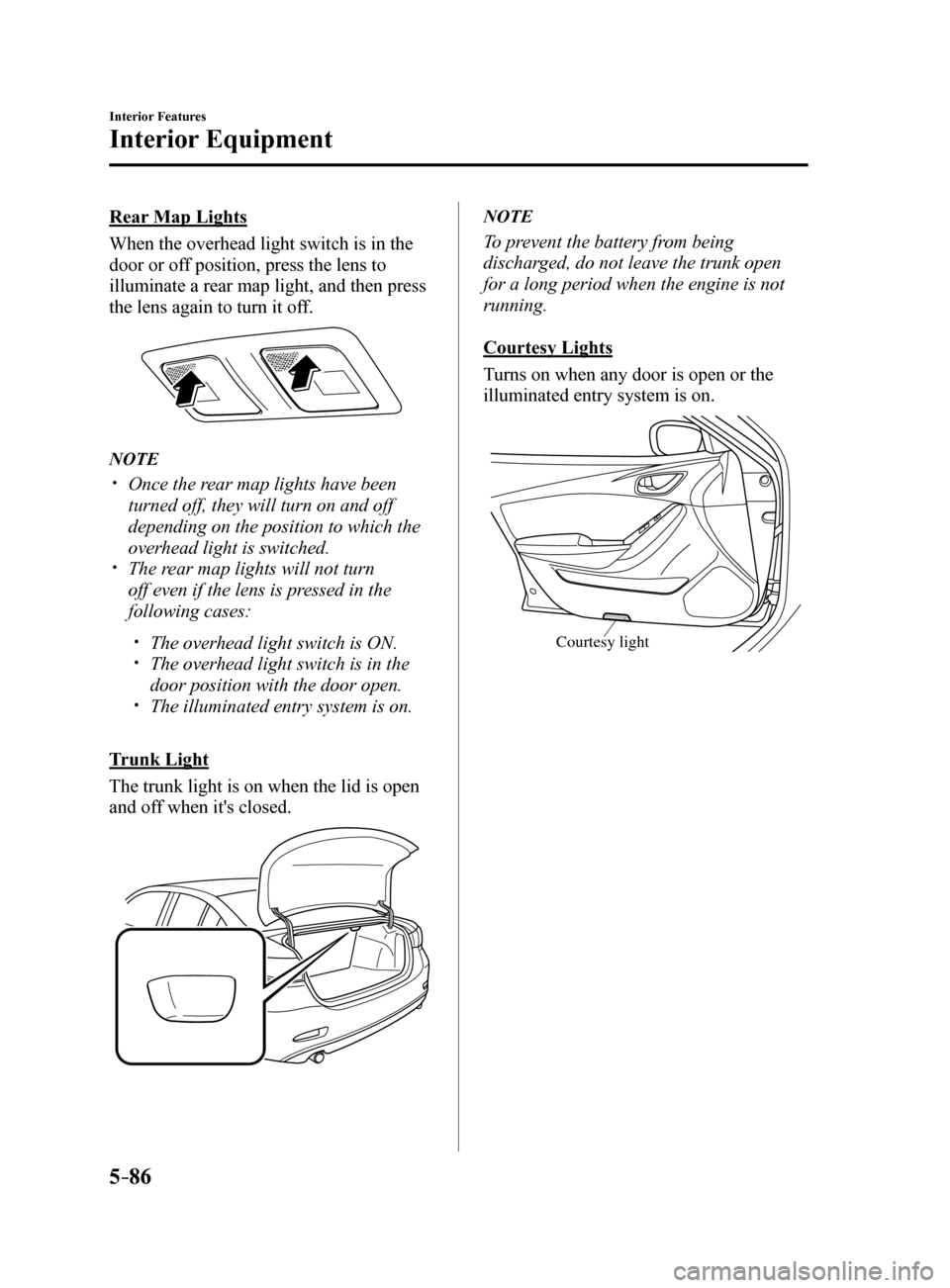
When the overhead light switch is in the
door or off position, press the lens to
illuminate a rear map light, and then press
the lens again to turn it off.
NOTE
Once the rear map lights have been
turned off, they will turn on and off
depending on the position to which the
overhead light is switched.
The rear map lights will not turn
off even if the lens is pressed in the
following cases:
The overhead light switch is ON. The overhead light switch is in the
door position with the door open.
The illuminated entry system is on.
Trunk Light
The trunk light is on when the lid is open
and off when it's closed.
NOTE
To prevent the battery from being
discharged, do not leave the trunk open
for a long period when the engine is not
running.
Courtesy Lights
Turns on when any door is open or the
illuminated entry system is on.
Courtesy light
Mazda6_8FH2-EA-16F_Edition2.indb 862016/07/07 13:46:04
Page 438 of 578
6–52
Maintenance and Care
Owner Maintenance
Brake lights, Taillights, High-mount
brake light, Side-turn signal lights,
Rear side-marker lights (With LED
headlights)
The LED bulb cannot be replaced as a
single unit because it is an integrated unit.
The LED bulb has to be replaced with the
unit. We recommend an Authorized Mazda
Dealer when the replacement is necessary.
Rear turn signal lights, Rear side-
marker lights (With halogen headlights)
1. Make sure the ignition is switched off,
and the turn signal switch is off.
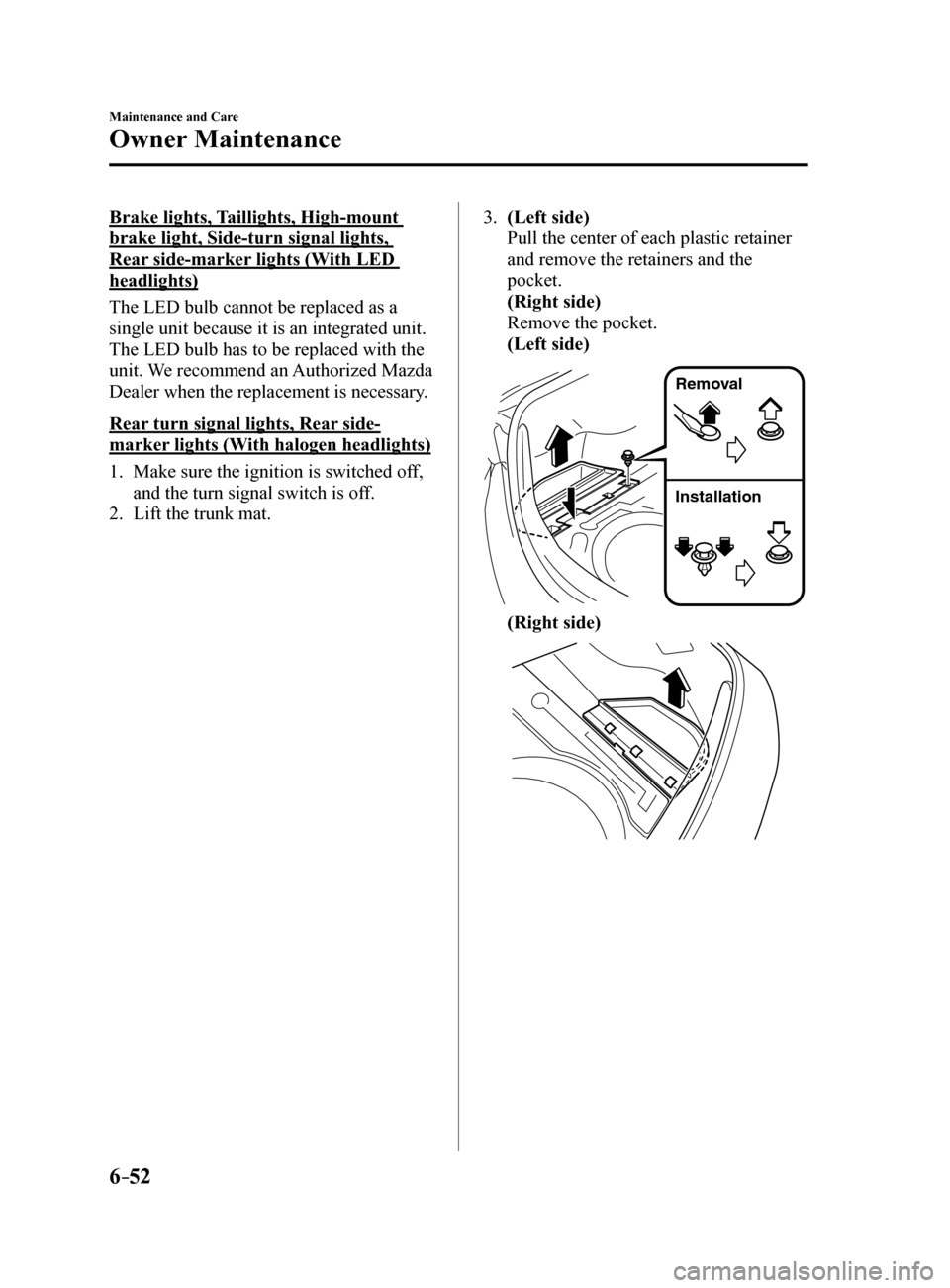
2. Lift the trunk mat. 3.
(Left side)
Pull the center of each plastic retainer
and remove the retainers and the
pocket.
(Right side)
Remove the pocket.
(Left side)
Remova l
Installation
(Right side)
Mazda6_8FH2-EA-16F_Edition2.indb 522016/07/07 13:46:18
Page 439 of 578
6–53
Maintenance and Care
Owner Maintenance
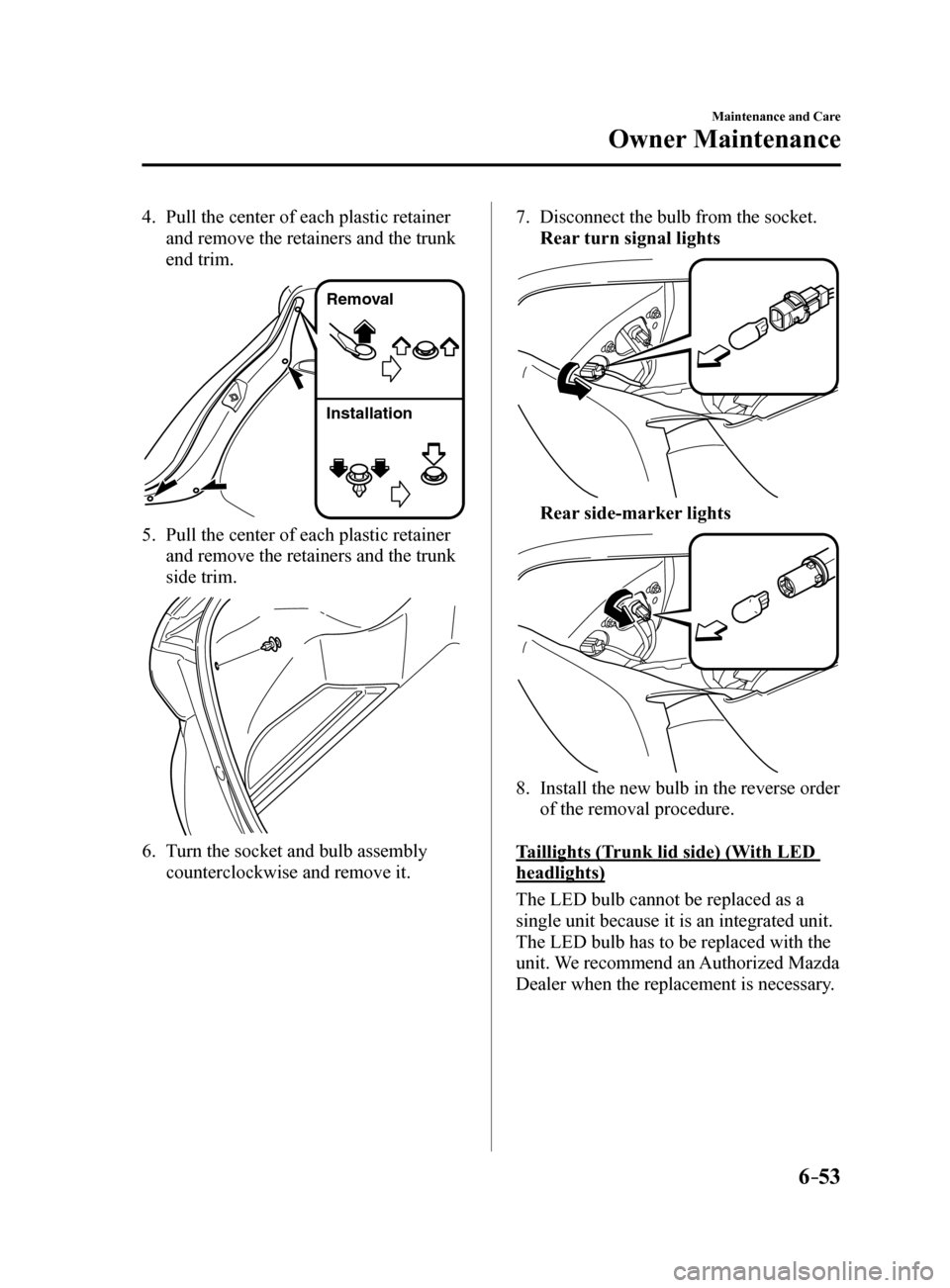
4. Pull the center of each plastic retainer
and remove the retainers and the trunk
end trim.
Remova l
Installation
5. Pull the center of each plastic retainer
and remove the retainers and the trunk
side trim.
6. Turn the socket and bulb assembly
counterclockwise and remove it.
7. Disconnect the bulb from the socket.
Rear turn signal lights
Rear side-marker lights
8. Install the new bulb in the reverse order
of the removal procedure.
Taillights (Trunk lid side) (With LED
headlights)
The LED bulb cannot be replaced as a
single unit because it is an integrated unit.
The LED bulb has to be replaced with the
unit. We recommend an Authorized Mazda
Dealer when the replacement is necessary.
Mazda6_8FH2-EA-16F_Edition2.indb 532016/07/07 13:46:19
Page 440 of 578
6–54
Maintenance and Care
Owner Maintenance
Taillights (Trunk lid side) (With halogen
headlights), Reverse lights
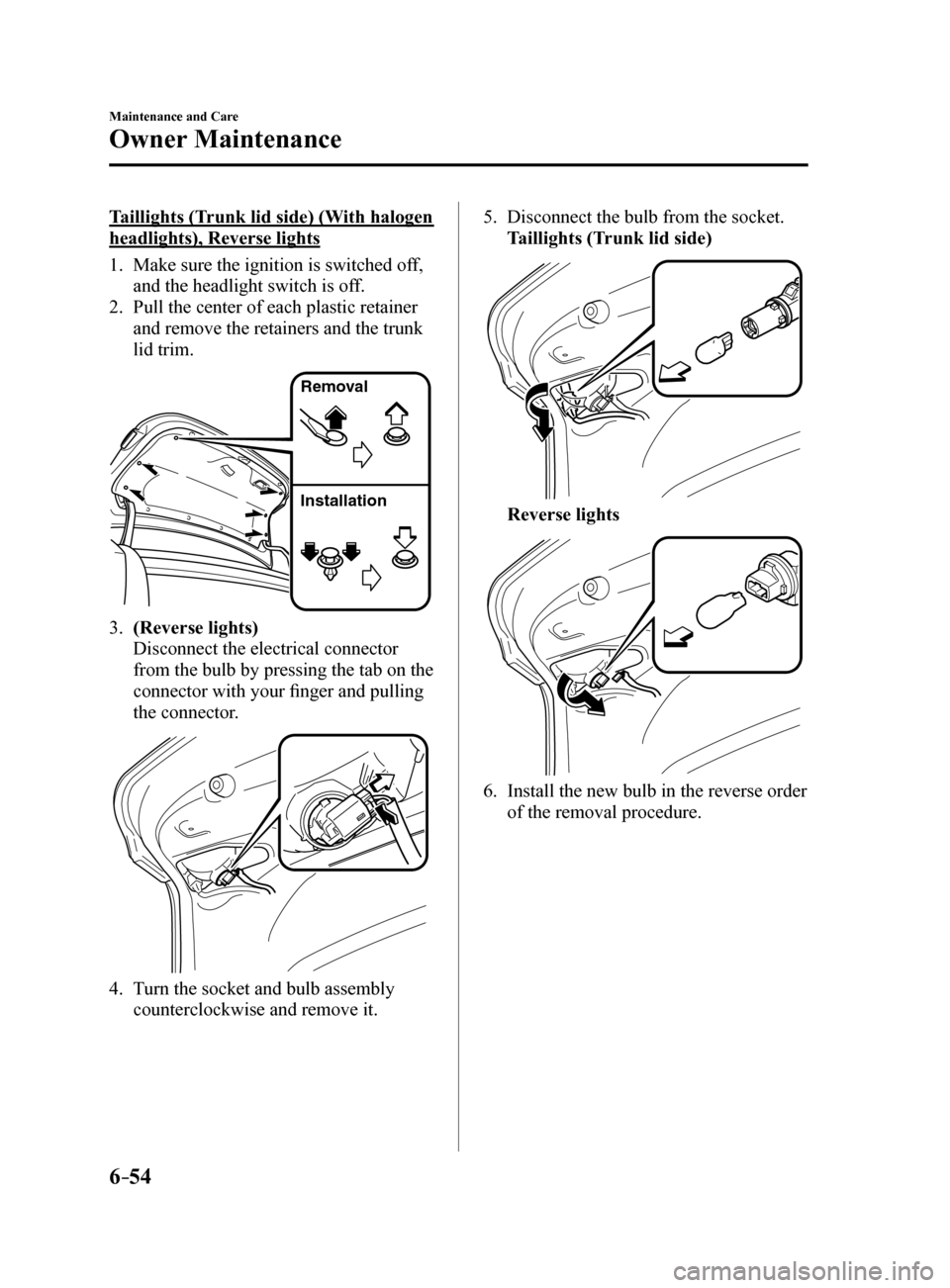
1. Make sure the ignition is switched off,
and the headlight switch is off.
2. Pull the center of each plastic retainer
and remove the retainers and the trunk
lid trim.
Remova l
Installation
3. (Reverse lights)
Disconnect the electrical connector
from the bulb by pressing the tab on the
connector with your finger and pulling
the connector.
4. Turn the socket and bulb assembly
counterclockwise and remove it. 5.
Disconnect the bulb from the socket.
Taillights (Trunk lid side)
Reverse lights
6. Install the new bulb in the reverse order
of the removal procedure.
Mazda6_8FH2-EA-16F_Edition2.indb 542016/07/07 13:46:20
Page 442 of 578
6–56
Maintenance and Care
Owner Maintenance
*Some models.
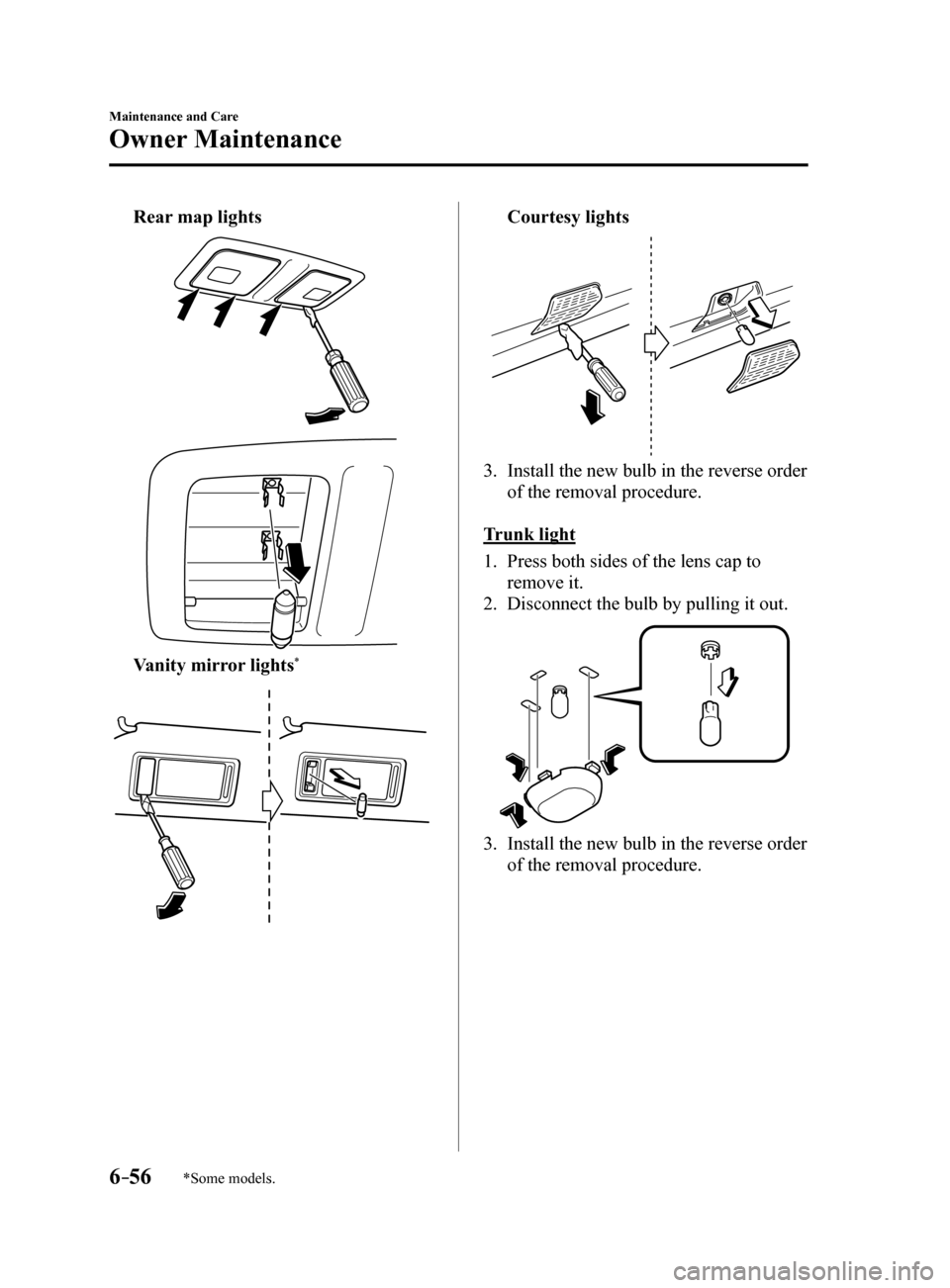
Rear map lights
Vanity mirror lights*
Courtesy lights
3. Install the new bulb in the reverse order
of the removal procedure.
Trunk light
1. Press both sides of the lens cap to
remove it.
2. Disconnect the bulb by pulling it out.
3. Install the new bulb in the reverse order
of the removal procedure.
Mazda6_8FH2-EA-16F_Edition2.indb 562016/07/07 13:46:21
Page 461 of 578
7–1*Some models.
7If Trouble Arises
Helpful information on what to do if a problem arises with the vehicle.
Parking in an Emergency .................................................................. 7-2
Parking in an Emergency .............................................................. 7-2
Flat Tire........................................................................\
....................... 7-3
Spare Tire and Tool Storage .......................................................... 7-3
Changing a Flat Tire ...................................................................... 7-6
Battery Runs Out ........................................................................\
..... 7-13
Jump-Starting ........................................................................\
...... 7-13
Emergency Starting ........................................................................\
. 7-16
Starting a Flooded Engine ........................................................... 7-16
Push-Starting ........................................................................\
....... 7-16
Overheating ........................................................................\
.............. 7-17
Overheating ........................................................................\
......... 7-17
Emergency Towing ........................................................................\
... 7-19
Towing Description ..................................................................... 7-19
Tiedown Hooks
* ........................................................................\
.. 7-20
Warning/Indicator Lights and Warning Sounds ........................... 7-22
If a Warning Light Turns On or Flashes ......................................7-22
Message Indicated on Display .................................................... 7-33
Message Indicated in Multi-information Display
* ...................... 7-35
Warning Sound is Activated ........................................................ 7-36
When Trunk Lid Cannot be Opened .............................................. 7-40
When Trunk Lid Cannot be Opened ........................................... 7-40
Active Driving Display Does Not Operate ..................................... 7-41
If the Active Driving Display does not operate .......................... 7-41
Mazda6_8FH2-EA-16F_Edition2.indb 12016/07/07 13:46:23
Page 464 of 578

7–4
If Trouble Arises
Flat Tire
Jack
To remove the jack
1. Lift the trunk mat.
T runk mat
2. Remove the pocket.
3. Turn the wing bolt and jack screw
counterclockwise.
W ing bolt
Jack scre w
To secure the jack
1. Insert the wing bolt into the jack with
the jack screw pointing to the front
and turn the wing bolt clockwise to
temporarily tighten it.
2. Turn the jack screw in the direction
shown in the figure.
W ing bolt
Jack scre w
3. Turn the wing bolt completely to secure
the jack.
NOTE
If the jack is not completely secured, it
could rattle while driving. Make sure the
jack screw is sufficiently tightened.
Maintenance
Always keep the jack clean. Make sure the moving parts are kept
free from dirt or rust.
Make sure the screw thread is
adequately lubricated.
Spare Tire
Your Mazda has a temporary spare tire.
The temporary spare tire is lighter and
smaller than a conventional tire, and is
designed only for emergency use and
should be used only for VERY short
periods. Temporary spare tires should
NEVER be used for long drives or
extended periods.
Mazda6_8FH2-EA-16F_Edition2.indb 42016/07/07 13:46:25