audio MAZDA MODEL 6 2017 (in English) Repair Manual
[x] Cancel search | Manufacturer: MAZDA, Model Year: 2017, Model line: MODEL 6, Model: MAZDA MODEL 6 2017Pages: 578, PDF Size: 54.72 MB
Page 371 of 578
5–77
Interior Features
Bluetooth®
IconFunction
Fast-forwards for 30 seconds.
Displays sound settings to adjust audio quality level.
Refer to Volume/Display/Sound Controls on page 5-26.
*2 Some stations may use alternate variations of Like and Dislike, based\
on station type or provider.
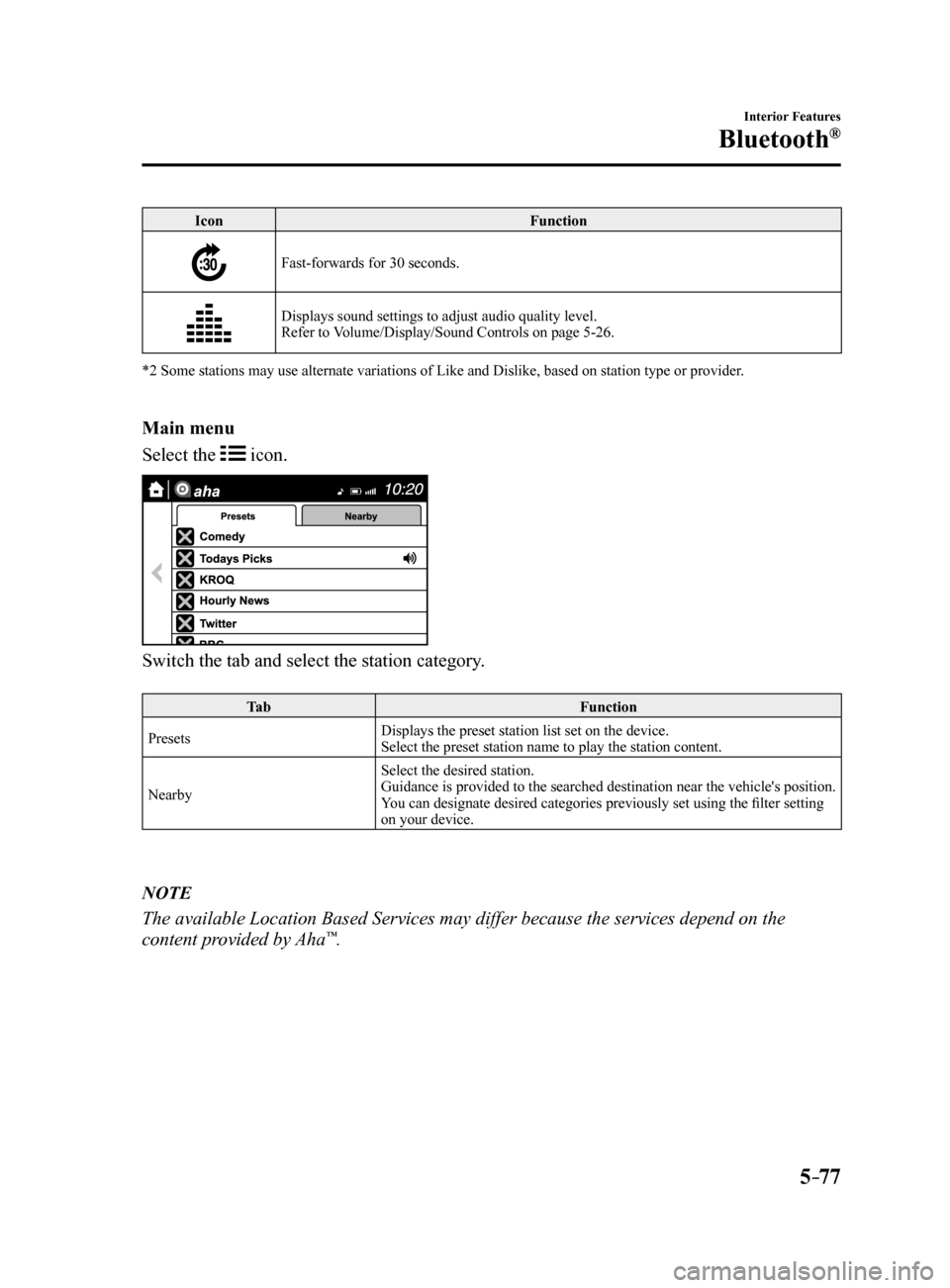
Main menu
Select the
icon.
Switch the tab and select the station category.
Ta b Function
Presets Displays the preset station list set on the device.
Select the preset station name to play the station content.
Nearby Select the desired station.
Guidance is provided to the searched destination near the vehicle's position.
You can designate desired categories previously set using the filter setting
on your device.
NOTE
The available Location Based Services may differ because the services de\
pend on the
content provided by Aha™.
Mazda6_8FH2-EA-16F_Edition2.indb 772016/07/07 13:46:01
Page 373 of 578
 Repair Manual 5–79
Interior Features
Bluetooth®
How to Use Stitcher™ Radio
What is Stitcher™ Radio?
Stitcher
™*1 radio is an application which can be used to listen to Internet radio o\
r stream
podcasts")
5–79
Interior Features
Bluetooth®
How to Use Stitcher™ Radio
What is Stitcher™ Radio?
Stitcher
™*1 radio is an application which can be used to listen to Internet radio o\
r stream
podcasts.
Recommended content is automatically selected by registering content which you put into
your favorites, or by pressing the Like or Dislike button.
For details on Stitcher
™ Radio, refer to “http://stitcher.com/”.
*1 Stitcher
™, the Stitcher™ logo, and the Stitcher™ trade dress are trademarks or registered
trademarks of Stitcher, Inc., used with permission.
NOTE
To operate Stitcher™ Radio from your Bluetooth® device, perform the following in advance:
Install the Stitcher™ Radio application to your device. Create a Stitcher™ Radio account for your device. Log onto Stitcher™ Radio using your device.
Playback
Select the
icon on the home screen to display the Entertainment screen. When is
selected, the following icons are indicated in the bottom part of the ce\
nter display.
Icon Function
Displays the Entertainment menu. Use to switch to a different audio source.
Displays the station list.
Use to switch to other stations.
Dislike
Evaluates the current program as “Dislike”.
Like
Evaluates the current program as “Like”.
Adds the current station to your favorites or deletes the current statio\
n from your favorites.
Reverses for 30 seconds.
Mazda6_8FH2-EA-16F_Edition2.indb 792016/07/07 13:46:02
Page 374 of 578

5–80
Interior Features
Bluetooth®
IconFunction
Plays the station. Select it again to pause playback.
Goes to the next station.
Displays sound settings to adjust audio quality level.
Refer to Volume/Display/Sound Controls on page 5-26.
Station list
1. Select the
icon to display the station list.
Favorites station name: Select to display the program registered to you\
r favorites.
Category name: A recommended category selected from your favorites by Stitcher™ is
displayed.
Select it to display the category program.
2. Select the program name to play it.
Add to your favorites
If the current program has not been
registered to your favorites, it can be
registered to your favorites.
1. Select the
icon to display the
favorites station which the registration
can be added.
2. Select the station name which you want
to register.
3. Select
to add the program to the
selected favorites station.
NOTE
Multiple favorites stations can be
selected and registered.
Favorites stations registered by
oneself as well those set by default are
displayed.
Delete from your favorites
If the current program has already been
registered to your favorites, the program
can be deleted from your favorites.
1. Select the
icon.
2. The program is automatically deleted
from the favorites station.
Mazda6_8FH2-EA-16F_Edition2.indb 802016/07/07 13:46:02
Page 376 of 578
 Repair Manual 5–82
Interior Features
Bluetooth®
NOTE
When the OS of the device is updated, the pairing information may be del\
eted. If this
happens, reprogram the pairing information to the Bluetooth® uni")
5–82
Interior Features
Bluetooth®
NOTE
When the OS of the device is updated, the pairing information may be del\
eted. If this
happens, reprogram the pairing information to the Bluetooth® unit. If you pair your phone which has already been paired to your vehicle more than once in
the past, you need to delete “Mazda” on your mobile device. Then, \
execute the Bluetooth®
search on your mobile device once again, and pair to a newly detected “Ma\
zda”.
Before you pair your device, make sure that Bluetooth® is “ON”, both on your phone and
on the vehicle.
If Bluetooth®-enabled devices are used in the following locations or conditions,
connection via Bluetooth® may not be possible.
The device is in a location hidden from the center display such as behind or under a
seat, or inside the glove compartment.
The device contacts or is covered by a metal object or body. The device is set to power-saving mode.
Different Bluetooth®-enabled devices can be used for Bluetooth® Hands-Free and
Bluetooth® audio. For example, device A can be connected as a Bluetooth® Hands-
Free device and device B can be connected as a Bluetooth® audio device. However, the
following may occur when they are used at the same time.
The Bluetooth® connection of the device is disconnected. Noise occurs in the Hands-Free audio. Hands-Free operates slowly.
Voice recognition related problems
Symptom CauseSolution method
Poor voice recognition
Excessive, slow speech. Excessive, forceful speech
(shouting).
Speaking before the beep sound
has ended.
Loud noise (speaking or noise from
outside/inside vehicle).
Airflow from A/C is blowing
against the microphone.
Speaking in off-standard
expressions (dialect). Regarding the causes indicated
on the left, be careful with how
you speak. In addition, when
numbers are spoken in a sequence,
recognition ability will improve
if no stop is placed between the
numbers.
False recognition of numbers
Poor voice recognition There is a malfunction in the
microphone.A poor connection or malfunction
with the microphone may have
occurred. Consult an Authorized
Mazda Dealer.
Phone-related voice recognition is
disabled There is a problem with the
connection between the Bluetooth
®
unit and the device. If there is any malfunction after
checking the pairing situation, check
for device pairing or connection
problems.
Mazda6_8FH2-EA-16F_Edition2.indb 822016/07/07 13:46:02
Page 377 of 578

5–83
Interior Features
Bluetooth®
SymptomCauseSolution method
Names in the phonebook are not
easily recognized The Bluetooth
® system is under a
condition in which recognition is
difficult. By carrying out the following
measures, the rate of recognition
will improve. Clear memory from the phonebook
which is not used very often.
Avoid shortened names, use full
names. (Recognition improves the
longer the name is. By not using
names such as “Mom”, “Dad”,
recognition will improve.)
When operating the audio, a song
name is not recognized Song names cannot be recognized
by voice.
—
You want to skip guidance —Guidance can be skipped by quickly
pressing and releasing the Talk
button.
Regarding problems with calls
Symptom
CauseSolution method
When starting a call, vehicle noise
from the other party can be heard For about three seconds after
starting a call, the Bluetooth
®
unit's Noise Suppression function
requires time to adapt to the call
environment. This does not indicate a problem
with the device.
The other party cannot be heard or
the speaker's voice is quiet The volume is set at zero or low.
Increase the volume.
Other problems
Symptom CauseSolution method
The indication for the remaining
battery is different between the
vehicle and the device The indication method is different
between the vehicle and the device.
—
When a call is made from the
vehicle, the telephone number is
updated in the incoming/outgoing
call record but the name does not
appear The number has not been registered
into the phonebook.If the number has been registered
into the phonebook, the incoming/
outgoing call record is updated by
the name in the phonebook when the
engine is restarted.
The cell phone does not synchronize
with the vehicle regarding the
incoming/outgoing call record Some types of cell phones do not
synchronize automatically.
Operate the cell phone for
synchronization.
It takes a long time to complete the
function for changing the language A maximum of 60 seconds is
required.
—
Mazda6_8FH2-EA-16F_Edition2.indb 832016/07/07 13:46:02
Page 382 of 578
5–88
Interior Features
Interior Equipment
Accessory Sockets
Only use genuine Mazda accessories or
the equivalent requiring no greater than
120 W (DC 12 V, 10 A).
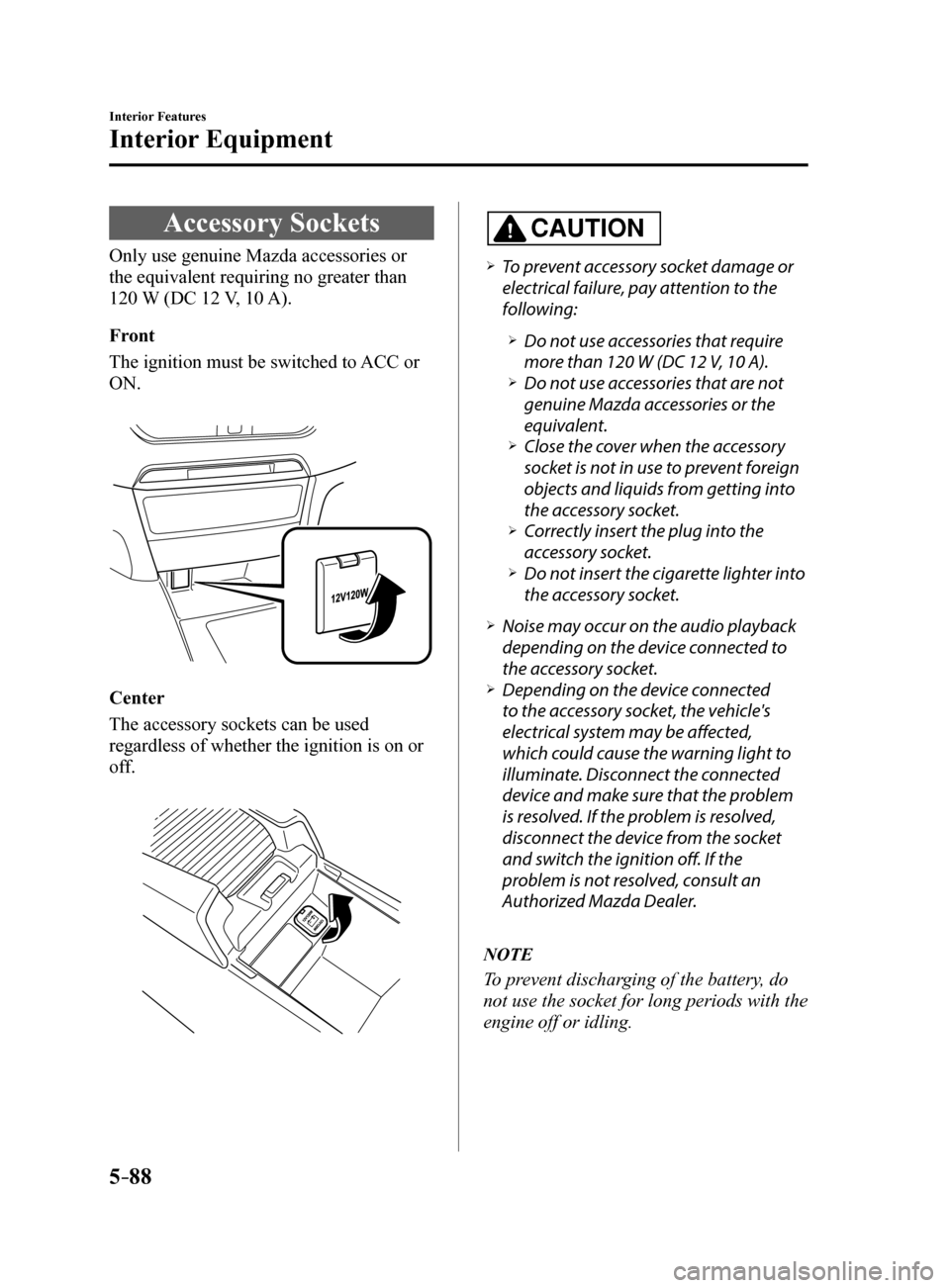
Front
The ignition must be switched to ACC or
ON.
Center
The accessory sockets can be used
regardless of whether the ignition is on or
off.
CAUTION
To prevent accessory socket damage or
electrical failure, pay attention to the
following:
Do not use accessories that require
more than 120 W (DC 12 V, 10 A).
Do not use accessories that are not
genuine Mazda accessories or the
equivalent.
Close the cover when the accessory
socket is not in use to prevent foreign
objects and liquids from getting into
the accessory socket.
Correctly insert the plug into the
accessory socket.
Do not insert the cigarette lighter into
the accessory socket.
Noise may occur on the audio playback
depending on the device connected to
the accessory socket.
Depending on the device connected
to the accessory socket, the vehicle's
electrical system may be affected,
which could cause the warning light to
illuminate. Disconnect the connected
device and make sure that the problem
is resolved. If the problem is resolved,
disconnect the device from the socket
and switch the ignition off. If the
problem is not resolved, consult an
Authorized Mazda Dealer.
NOTE
To prevent discharging of the battery, do
not use the socket for long periods with the
engine off or idling.
Mazda6_8FH2-EA-16F_Edition2.indb 882016/07/07 13:46:04
Page 443 of 578
6–57
Maintenance and Care
Owner Maintenance
Fuses
Your vehicle's electrical system is
protected by fuses.
If any lights, accessories, or controls do
not work, inspect the appropriate circuit
protector. If a fuse has blown, the inside
element will be melted.
If the same fuse blows again, avoid using
that system and consult an Authorized
Mazda Dealer as soon as possible.
Fuse Replacement
Replacing the fuses on the vehicle's left
side
If the electrical system does not work, first
inspect the fuses on the vehicle's left side.
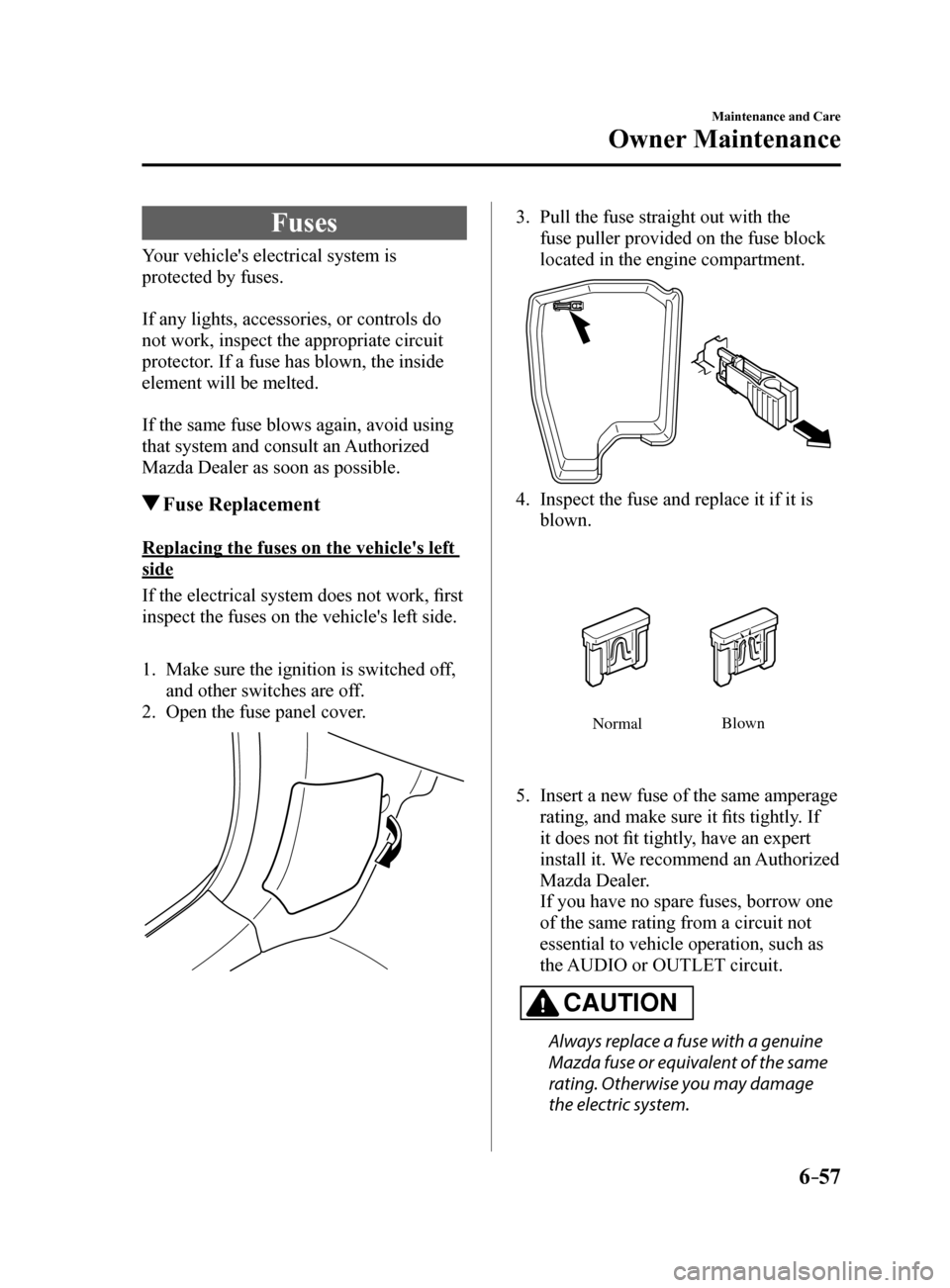
1. Make sure the ignition is switched off,
and other switches are off.
2. Open the fuse panel cover.
3. Pull the fuse straight out with the
fuse puller provided on the fuse block
located in the engine compartment.
4. Inspect the fuse and replace it if it is
blown.
Normal Blo
wn
5. Insert a new fuse of the same amperage
rating, and make sure it fits tightly. If
it does not fit tightly, have an expert
install it. We recommend an Authorized
Mazda Dealer.
If you have no spare fuses, borrow one
of the same rating from a circuit not
essential to vehicle operation, such as
the AUDIO or OUTLET circuit.
CAUTION
Always replace a fuse with a genuine
Mazda fuse or equivalent of the same
rating. Otherwise you may damage
the electric system.
Mazda6_8FH2-EA-16F_Edition2.indb 572016/07/07 13:46:21
Page 445 of 578
6–59
Maintenance and Care
Owner Maintenance
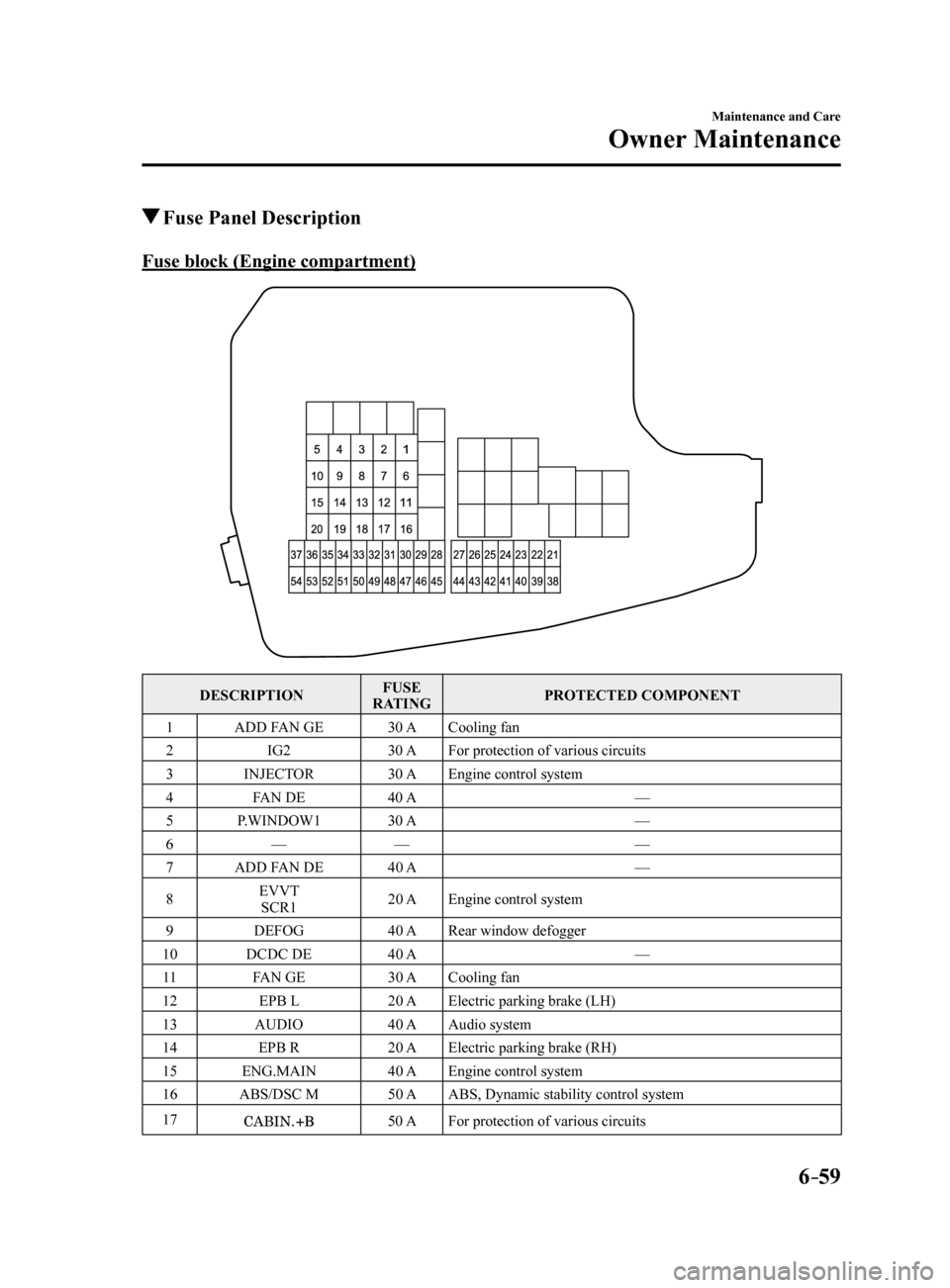
Fuse Panel Description
Fuse block (Engine compartment)
DESCRIPTION FUSE
RATING PROTECTED COMPONENT
1 ADD FAN GE 30 ACooling fan
2 IG2 30 AFor protection of various circuits
3 INJECTOR 30 AEngine control system
4 FAN DE 40 A —
5 P.WINDOW1 30 A —
6 — — —
7 ADD FAN DE 40 A —
8 EVVT
SCR1 20 A
Engine control system
9 DEFOG 40 ARear window defogger
10 DCDC DE 40 A —
11 FAN GE 30 ACooling fan
12 EPB L 20 AElectric parking brake (LH)
13 AUDIO 40 AAudio system
14 EPB R 20 AElectric parking brake (RH)
15 ENG.MAIN 40 AEngine control system
16 ABS/DSC M 50 AABS, Dynamic stability control system
17
50 A For protection of various circuits
Mazda6_8FH2-EA-16F_Edition2.indb 592016/07/07 13:46:22
Page 446 of 578
6–60
Maintenance and Care
Owner Maintenance
*Some models.
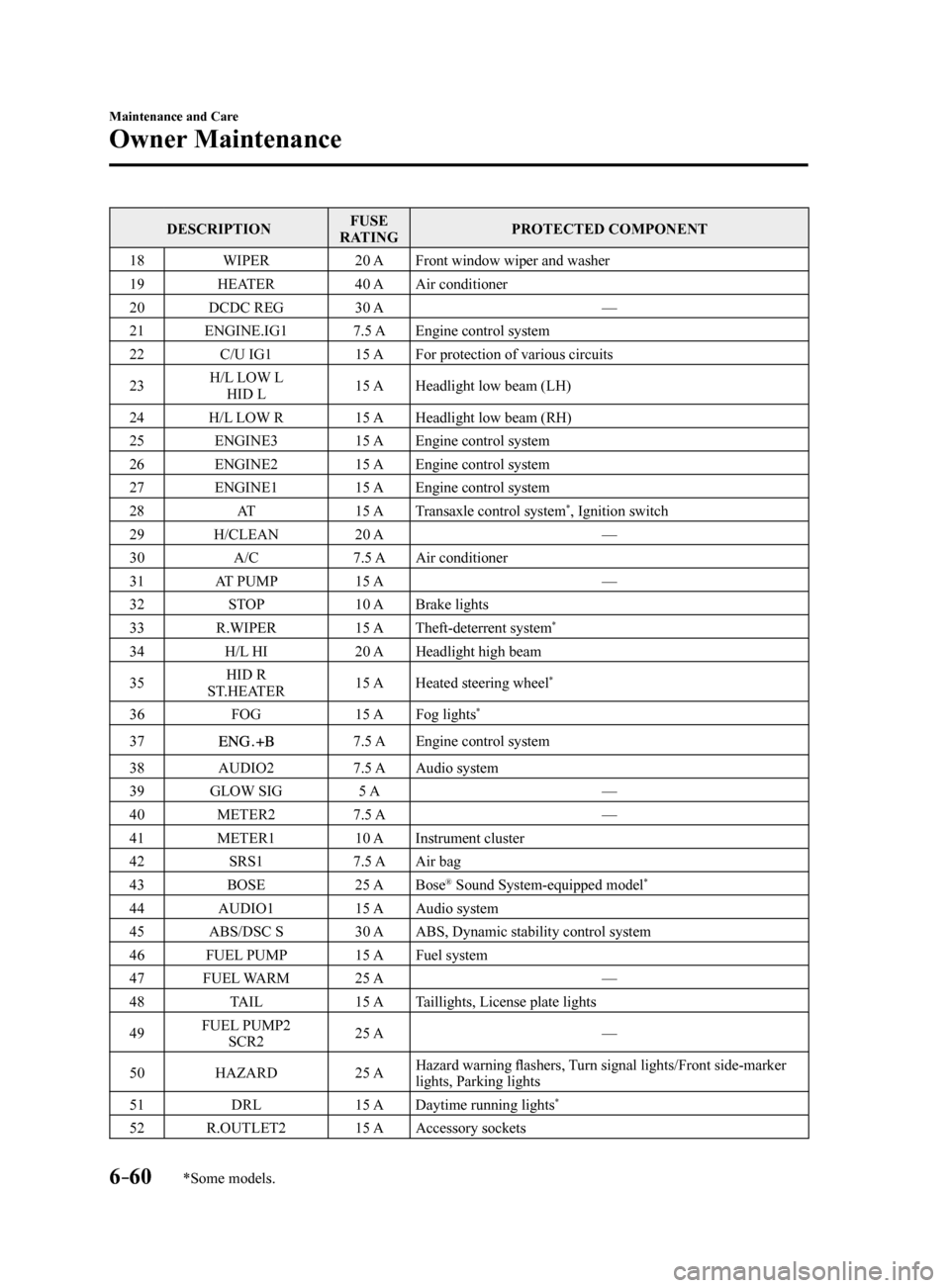
DESCRIPTIONFUSE
RATING PROTECTED COMPONENT
18 WIPER 20 AFront window wiper and washer
19 HEATER 40 AAir conditioner
20 DCDC REG 30 A —
21 ENGINE.IG1 7.5 AEngine control system
22 C/U IG1 15 AFor protection of various circuits
23 H/L LOW L
HID L 15 A
Headlight low beam (LH)
24 H/L LOW R 15 AHeadlight low beam (RH)
25 ENGINE3 15 AEngine control system
26 ENGINE2 15 AEngine control system
27 ENGINE1 15 AEngine control system
28 AT 15 ATransaxle control system
*, Ignition switch
29 H/CLEAN 20 A —
30 A/C 7.5 AAir conditioner
31 AT PUMP 15 A —
32 STOP 10 ABrake lights
33 R.WIPER 15 ATheft-deterrent system
*
34 H/L HI 20 AHeadlight high beam
35 HID R
ST.HEATER 15 A
Heated steering wheel
*
36 FOG 15 AFog lights*
377.5 A Engine control system
38 AUDIO2 7.5 AAudio system
39 GLOW SIG 5 A —
40 METER2 7.5 A —
41 METER1 10 AInstrument cluster
42 SRS1 7.5 AAir bag
43 BOSE 25 ABose
® Sound System-equipped model*
44 AUDIO1 15 AAudio system
45 ABS/DSC S 30 AABS, Dynamic stability control system
46 FUEL PUMP 15 AFuel system
47 FUEL WARM 25 A —
48 TAIL 15 ATaillights, License plate lights
49 FUEL PUMP2
SCR2 25 A
—
50 HAZARD 25 AHazard warning flashers, Turn signal lights/Front side-marker
lights, Parking lights
51 DRL 15 ADaytime running lights
*
52 R.OUTLET2 15 AAccessory sockets
Mazda6_8FH2-EA-16F_Edition2.indb 602016/07/07 13:46:22
Page 456 of 578
6–70
Maintenance and Care
Appearance Care
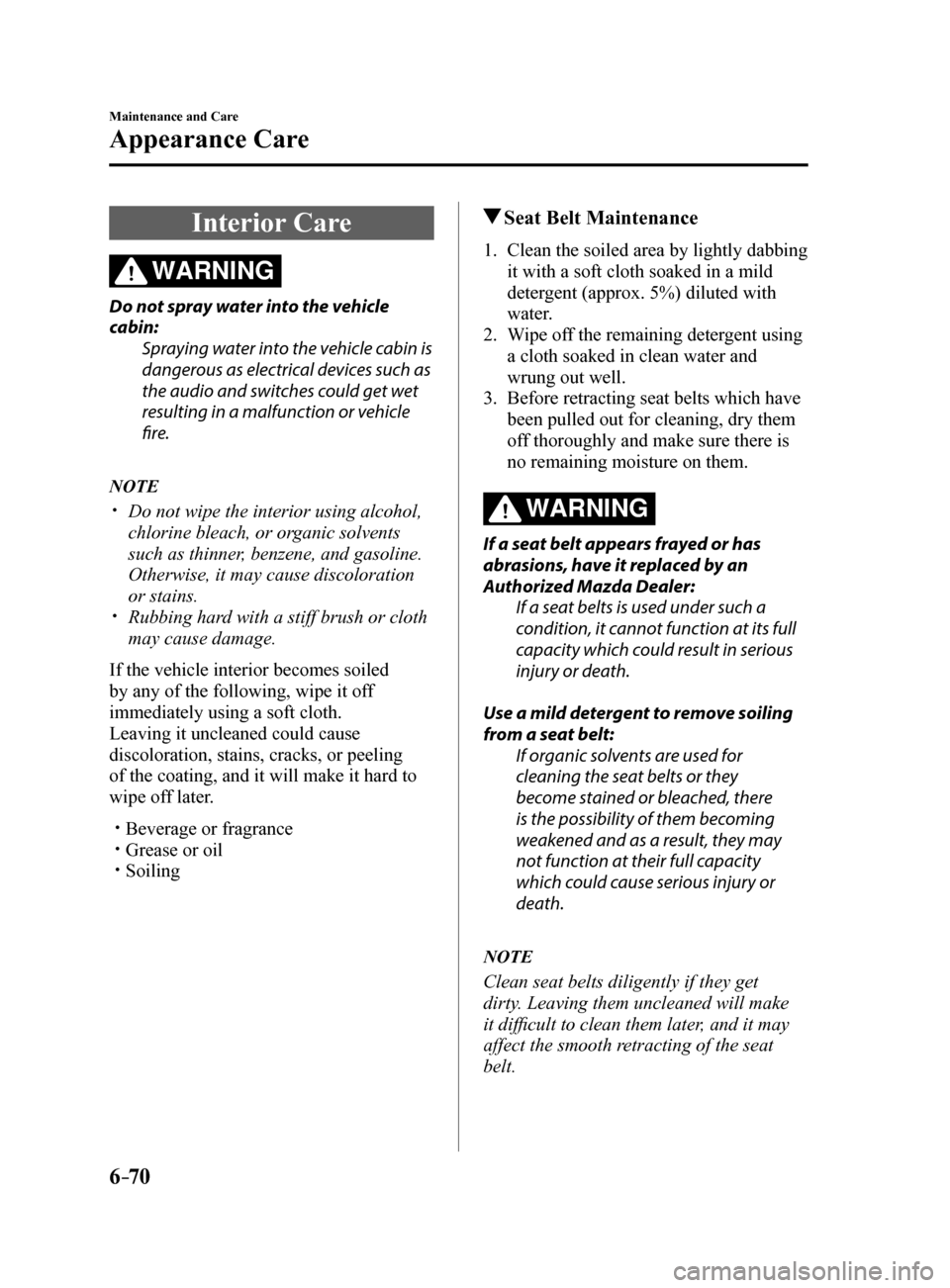
Interior Care
WARNING
Do not spray water into the vehicle
cabin:Spraying water into the vehicle cabin is
dangerous as electrical devices such as
the audio and switches could get wet
resulting in a malfunction or vehicle
fire.
NOTE
Do not wipe the interior using alcohol,
chlorine bleach, or organic solvents
such as thinner, benzene, and gasoline.
Otherwise, it may cause discoloration
or stains.
Rubbing hard with a stiff brush or cloth
may cause damage.
If the vehicle interior becomes soiled
by any of the following, wipe it off
immediately using a soft cloth.
Leaving it uncleaned could cause
discoloration, stains, cracks, or peeling
of the coating, and it will make it hard to
wipe off later.
Beverage or fragrance Grease or oil Soiling
Seat Belt Maintenance
1. Clean the soiled area by lightly dabbing
it with a soft cloth soaked in a mild
detergent (approx. 5%) diluted with
water.
2. Wipe off the remaining detergent using
a cloth soaked in clean water and
wrung out well.
3. Before retracting seat belts which have
been pulled out for cleaning, dry them
off thoroughly and make sure there is
no remaining moisture on them.
WARNING
If a seat belt appears frayed or has
abrasions, have it replaced by an
Authorized Mazda Dealer:
If a seat belts is used under such a
condition, it cannot function at its full
capacity which could result in serious
injury or death.
Use a mild detergent to remove soiling
from a seat belt: If organic solvents are used for
cleaning the seat belts or they
become stained or bleached, there
is the possibility of them becoming
weakened and as a result, they may
not function at their full capacity
which could cause serious injury or
death.
NOTE
Clean seat belts diligently if they get
dirty. Leaving them uncleaned will make
it difficult to clean them later, and it may
affect the smooth retracting of the seat
belt.
Mazda6_8FH2-EA-16F_Edition2.indb 702016/07/07 13:46:23