ad blue MAZDA MODEL 6 2017 Owners Manual (in English)
[x] Cancel search | Manufacturer: MAZDA, Model Year: 2017, Model line: MODEL 6, Model: MAZDA MODEL 6 2017Pages: 578, PDF Size: 54.72 MB
Page 148 of 578
4–24
When Driving
Instrument Cluster and Display
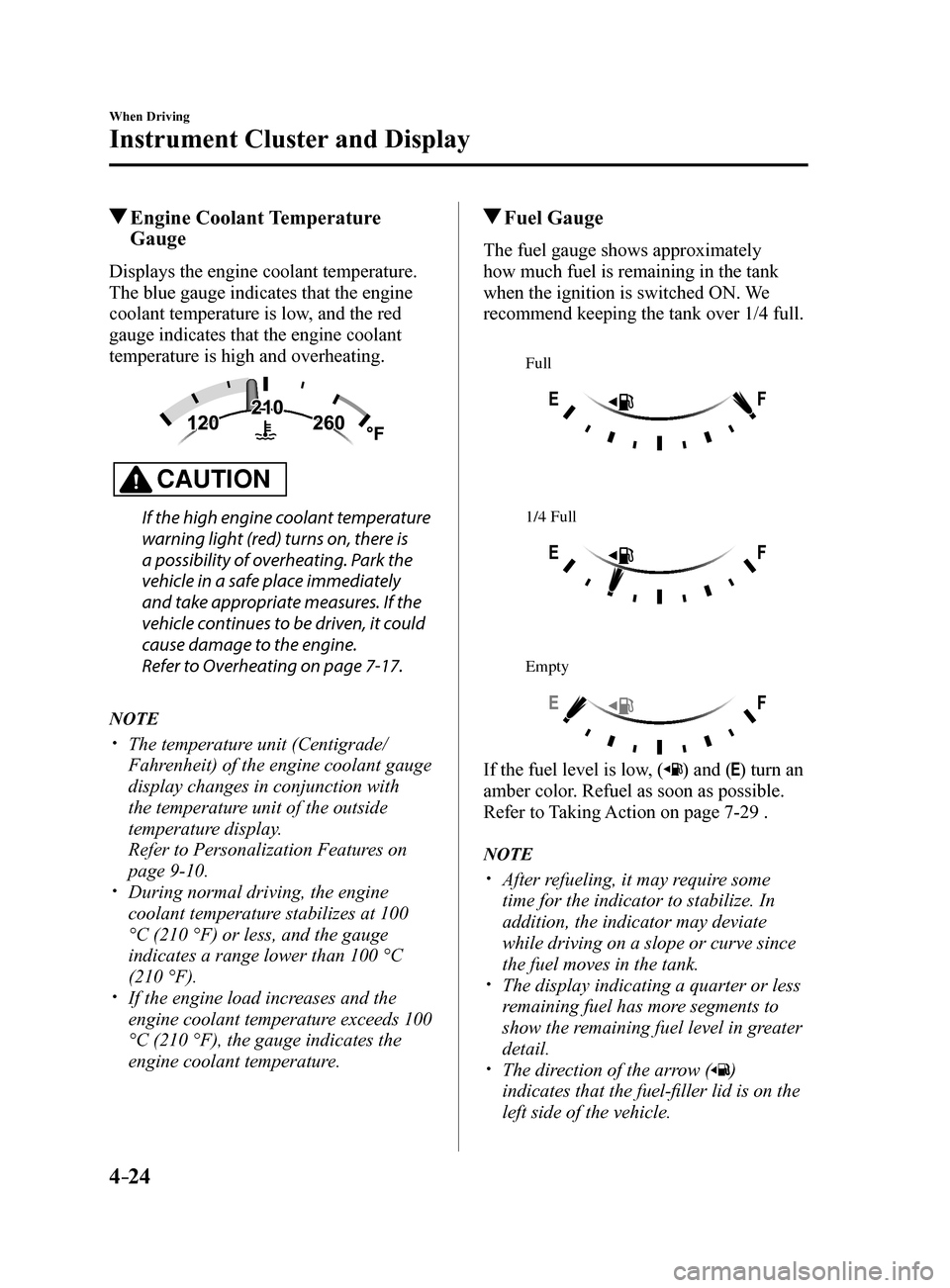
Engine Coolant Temperature Gauge
Displays the engine coolant temperature.
The blue gauge indicates that the engine
coolant temperature is low, and the red
gauge indicates that the engine coolant
temperature is high and overheating.
CAUTION
If the high engine coolant temperature
warning light (red) turns on, there is
a possibility of overheating. Park the
vehicle in a safe place immediately
and take appropriate measures. If the
vehicle continues to be driven, it could
cause damage to the engine.
Refer to Overheating on page 7-17.
NOTE
The temperature unit (Centigrade/
Fahrenheit) of the engine coolant gauge
display changes in conjunction with
the temperature unit of the outside
temperature display.
Refer to Personalization Features on
page 9-10.
During normal driving, the engine
coolant temperature stabilizes at 100
°C (210 °F) or less, and the gauge
indicates a range lower than 100 °C
(210 °F).
If the engine load increases and the
engine coolant temperature exceeds 100
°C (210 °F), the gauge indicates the
engine coolant temperature.
Fuel Gauge
The fuel gauge shows approximately
how much fuel is remaining in the tank
when the ignition is switched ON. We
recommend keeping the tank over 1/4 full.
Full
1/4 Full
Empty
If the fuel level is low, () and () turn an
amber color. Refuel as soon as possible.
Refer to Taking Action on page 7-29 .
NOTE
After refueling, it may require some
time for the indicator to stabilize. In
addition, the indicator may deviate
while driving on a slope or curve since
the fuel moves in the tank.
The display indicating a quarter or less
remaining fuel has more segments to
show the remaining fuel level in greater
detail.
The direction of the arrow ()
indicates that the fuel-filler lid is on the
left side of the vehicle.
Mazda6_8FH2-EA-16F_Edition2.indb 242016/07/07 13:44:39
Page 160 of 578
4–36
When Driving
Instrument Cluster and Display
*Some models.
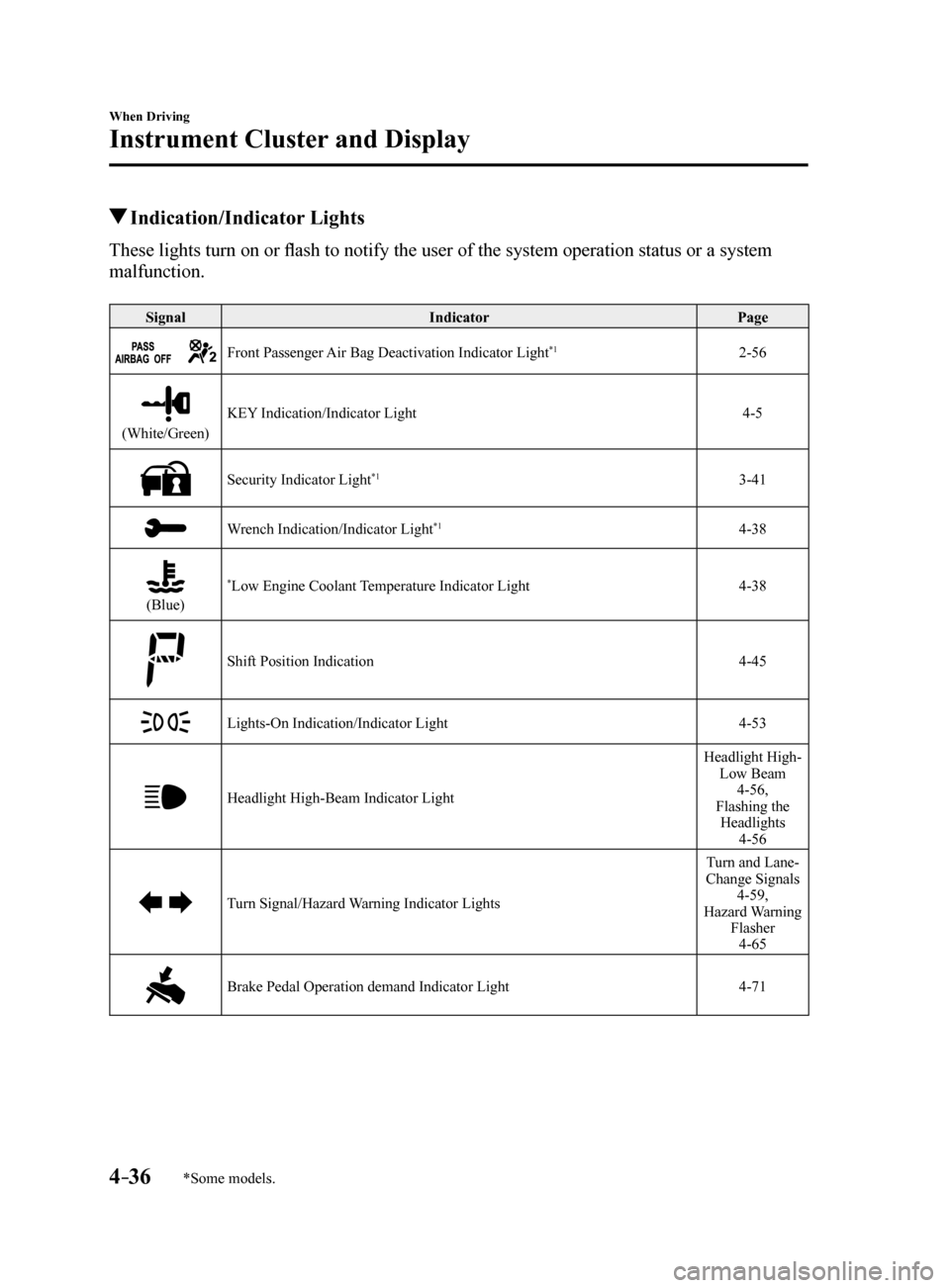
Indication/Indicator Lights
These lights turn on or flash to notify the user of the system operation status or a system
malfunction.
SignalIndicator Page
Front Passenger Air Bag Deactivation Indicator Light*12-56
(White/Green)KEY Indication/Indicator Light
4-5
Security Indicator Light*13-41
Wrench Indication/Indicator Light*14-38
(Blue)
*Low Engine Coolant Temperature Indicator Light4-38
Shift Position Indication 4-45
Lights-On Indication/Indicator Light4-53
Headlight High-Beam Indicator LightHeadlight High-
Low Beam 4-56,
Flashing the Headlights 4-56
Turn Signal/Hazard Warning Indicator Lights Turn and Lane-
Change Signals 4-59,
Hazard Warning Flasher4-65
Brake Pedal Operation demand Indicator Light 4-71
Mazda6_8FH2-EA-16F_Edition2.indb 362016/07/07 13:44:47
Page 162 of 578
4–38
When Driving
Instrument Cluster and Display
*Some models.
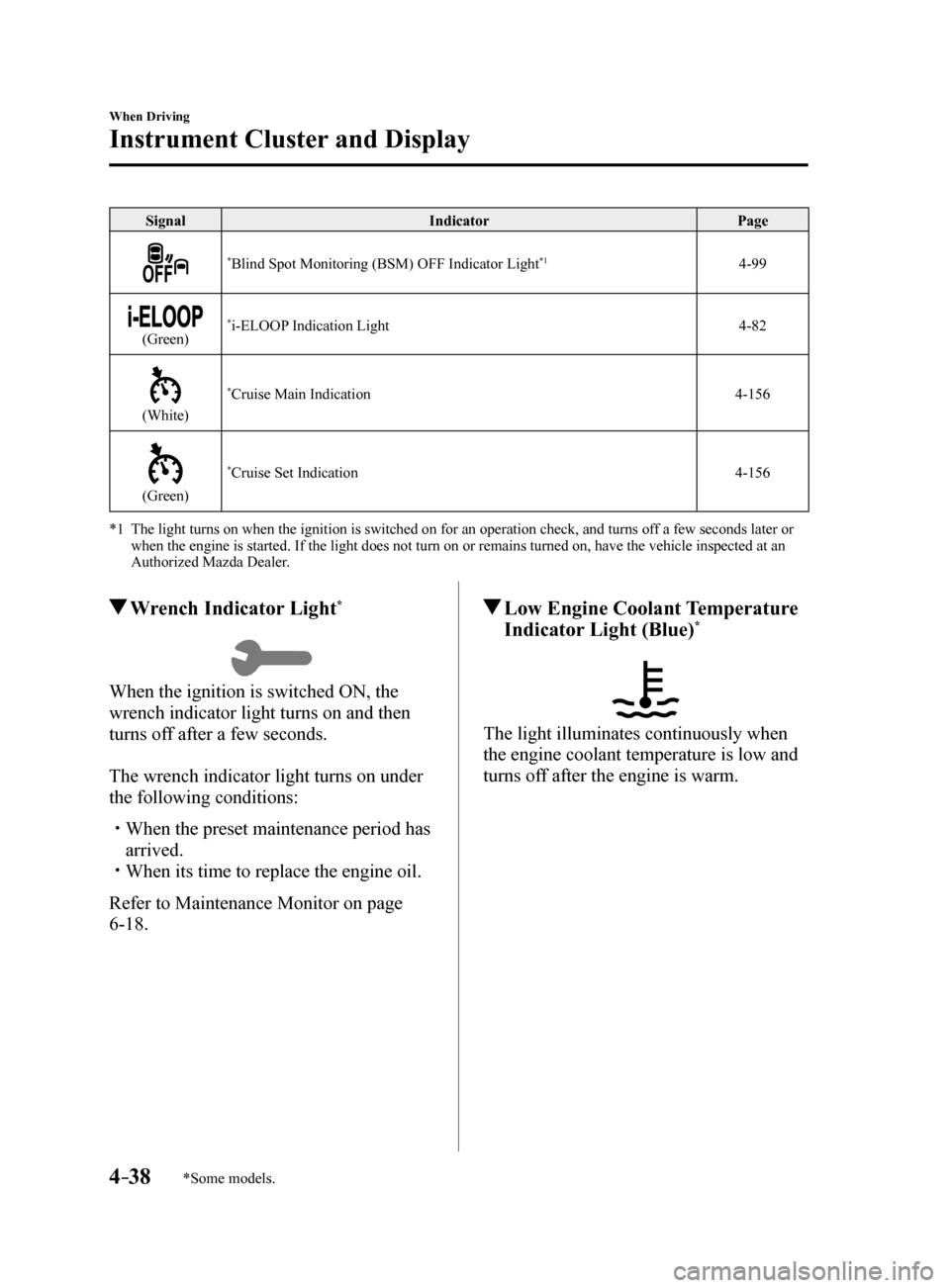
SignalIndicator Page
*Blind Spot Monitoring (BSM) OFF Indicator Light*14-99
(Green)*i-ELOOP Indication Light 4-82
(White)
*Cruise Main Indication4-156
(Green)
*Cruise Set Indication4-156
*1 The light turns on when the ignition is switched on for an operation che\
ck, and turns off a few seconds later or
when the engine is started. If the light does not turn on or remains tur\
ned on, have the vehicle inspected at an
Authorized Mazda Dealer.
Wrench Indicator Light*
When the ignition is switched ON, the
wrench indicator light turns on and then
turns off after a few seconds.
The wrench indicator light turns on under
the following conditions:
When the preset maintenance period has
arrived.
When its time to replace the engine oil.
Refer to Maintenance Monitor on page
6-18.
Low Engine Coolant Temperature
Indicator Light (Blue)*
The light illuminates continuously when
the engine coolant temperature is low and
turns off after the engine is warm.
Mazda6_8FH2-EA-16F_Edition2.indb 382016/07/07 13:44:50
Page 295 of 578
5–1
5Interior Features
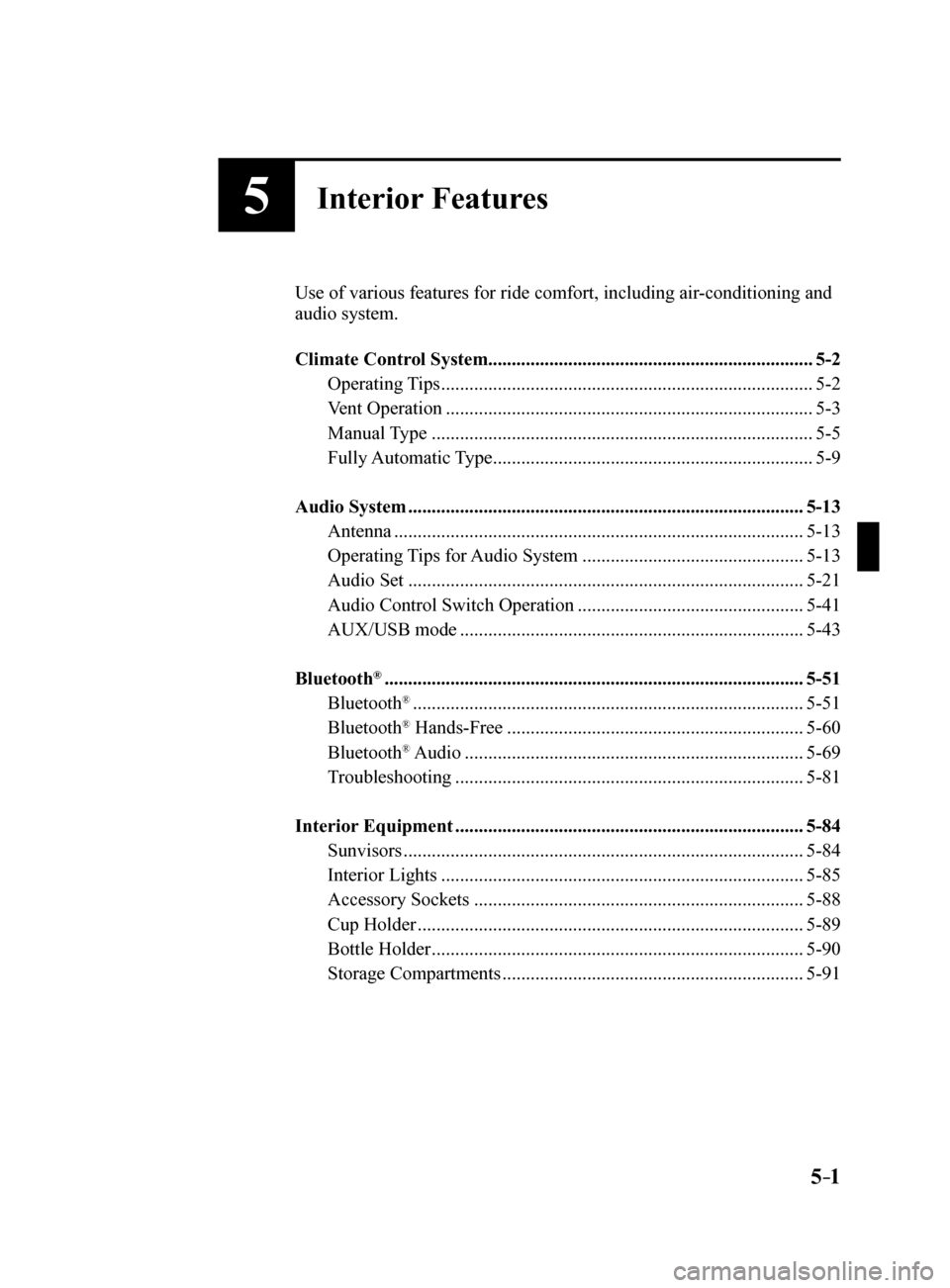
Use of various features for ride comfort, including air-conditioning and
audio system.
Climate Control System..................................................................... 5-2
Operating Tips ........................................................................\
....... 5-2
Vent Operation ........................................................................\
...... 5-3
Manual Type ........................................................................\
......... 5-5
Fully Automatic Type .................................................................... 5-9
Audio System ........................................................................\
............ 5-13
Antenna ........................................................................\
............... 5-13
Operating Tips for Audio System ............................................... 5-13
Audio Set ........................................................................\
............ 5-21
Audio Control Switch Operation ................................................ 5-41
AUX/USB mode ........................................................................\
. 5-43
Bluetooth
® ........................................................................\
................. 5-51
Bluetooth® ........................................................................\
........... 5-51
Bluetooth® Hands-Free ............................................................... 5-60
Bluetooth® Audio ........................................................................\
5-69
Troubleshooting ........................................................................\
.. 5-81
Interior Equipment ........................................................................\
.. 5-84
Sunvisors ........................................................................\
............. 5-84
Interior Lights ........................................................................\
..... 5-85
Accessory Sockets ...................................................................... 5-88
Cup Holder ........................................................................\
.......... 5-89
Bottle Holder ........................................................................\
....... 5-90
Storage Compartments ................................................................ 5-91
Mazda6_8FH2-EA-16F_Edition2.indb 12016/07/07 13:45:25
Page 319 of 578
5–25
Interior Features
Audio System
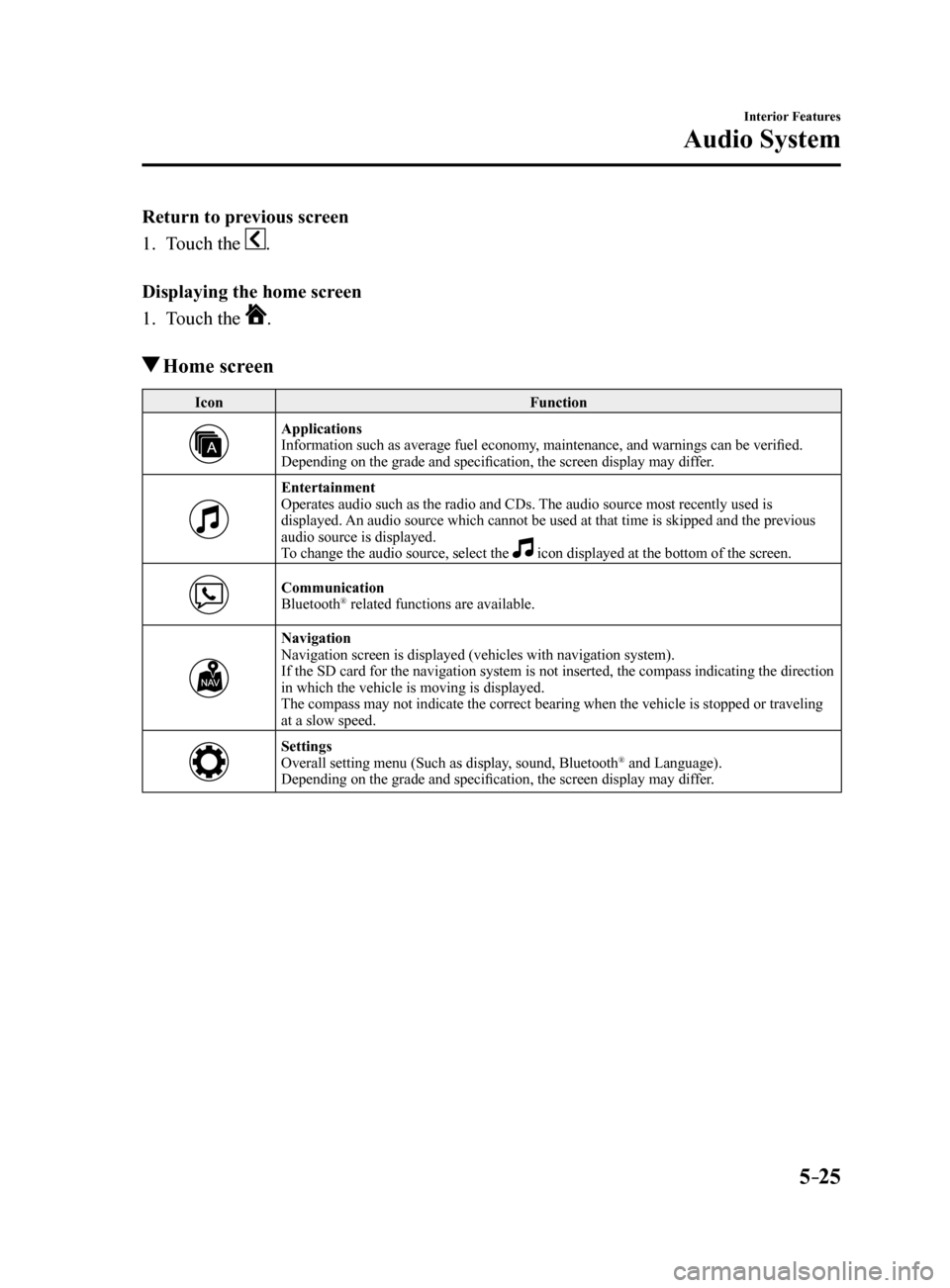
Return to previous screen
1. Touch the
.
Displaying the home screen
1. Touch the
.
Home screen
Icon Function
Applications
Information such as average fuel economy, maintenance, and warnings can be verified.
Depending on the grade and specification, the screen display may differ.
Entertainment
Operates audio such as the radio and CDs. The audio source most recently used is
displayed. An audio source which cannot be used at that time is skipped and the pre\
vious
audio source is displayed.
To change the audio source, select the
icon displayed at the bottom of the screen.
Communication
Bluetooth® related functions are available.
Navigation
Navigation screen is displayed (vehicles with navigation system).
If the SD card for the navigation system is not inserted, the compass in\
dicating the direction
in which the vehicle is moving is displayed.
The compass may not indicate the correct bearing when the vehicle is sto\
pped or traveling
at a slow speed.
Settings
Overall setting menu (Such as display, sound, Bluetooth® and Language).
Depending on the grade and specification, the screen display may differ.
Mazda6_8FH2-EA-16F_Edition2.indb 252016/07/07 13:45:34
Page 333 of 578
5–39
Interior Features
Audio System
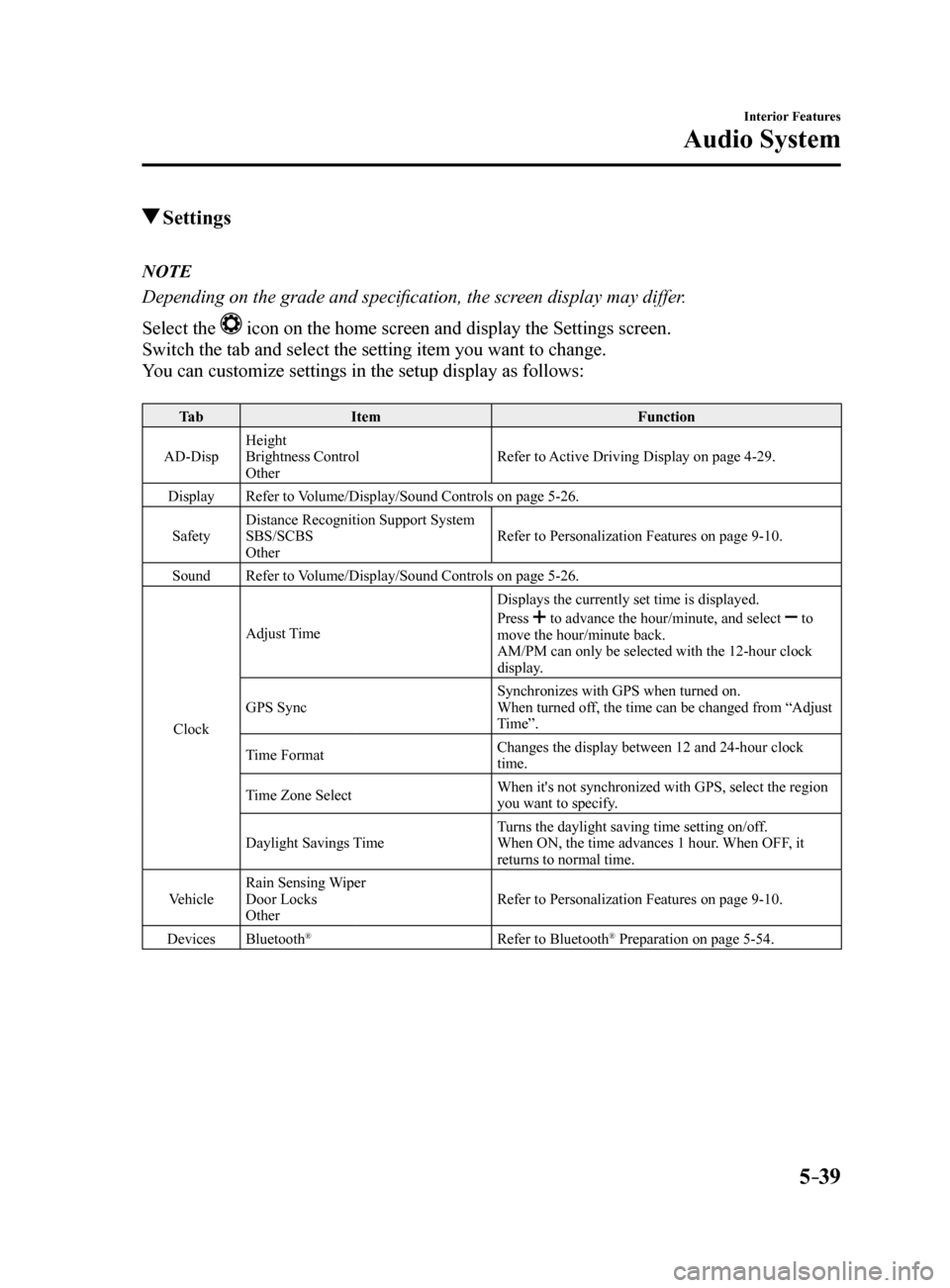
Settings
NOTE
Depending on the grade and specification, the screen display may differ.
Select the
icon on the home screen and display the Settings screen.
Switch the tab and select the setting item you want to change.
You can customize settings in the setup display as follows:
Ta b Item Function
AD-Disp Height
Brightness Control
Other Refer to Active Driving Display on page 4-29.
Display Refer to Volume/Display/Sound Controls on page 5-26.
Safety Distance Recognition Support System
SBS/SCBS
Other Refer to Personalization Features on page 9-10.
Sound Refer to Volume/Display/Sound Controls on page 5-26.
Clock Adjust Time
Displays the currently set time is displayed.
Press
to advance the hour/minute, and select to
move the hour/minute back.
AM/PM can only be selected with the 12-hour clock
display.
GPS Sync Synchronizes with GPS when turned on.
When turned off, the time can be changed from “Adjust
Time”.
Time Format Changes the display between 12 and 24-hour clock
time.
Time Zone Select When it's not synchronized with GPS, select the region
you want to specify.
Daylight Savings Time Turns the daylight saving time setting on/off.
When ON, the time advances 1 hour. When OFF, it
returns to normal time.
Vehicle Rain Sensing Wiper
Door Locks
Other Refer to Personalization Features on page 9-10.
Devices Bluetooth
®Refer to Bluetooth® Preparation on page 5-54.
Mazda6_8FH2-EA-16F_Edition2.indb 392016/07/07 13:45:43
Page 336 of 578
5–42
Interior Features
Audio System
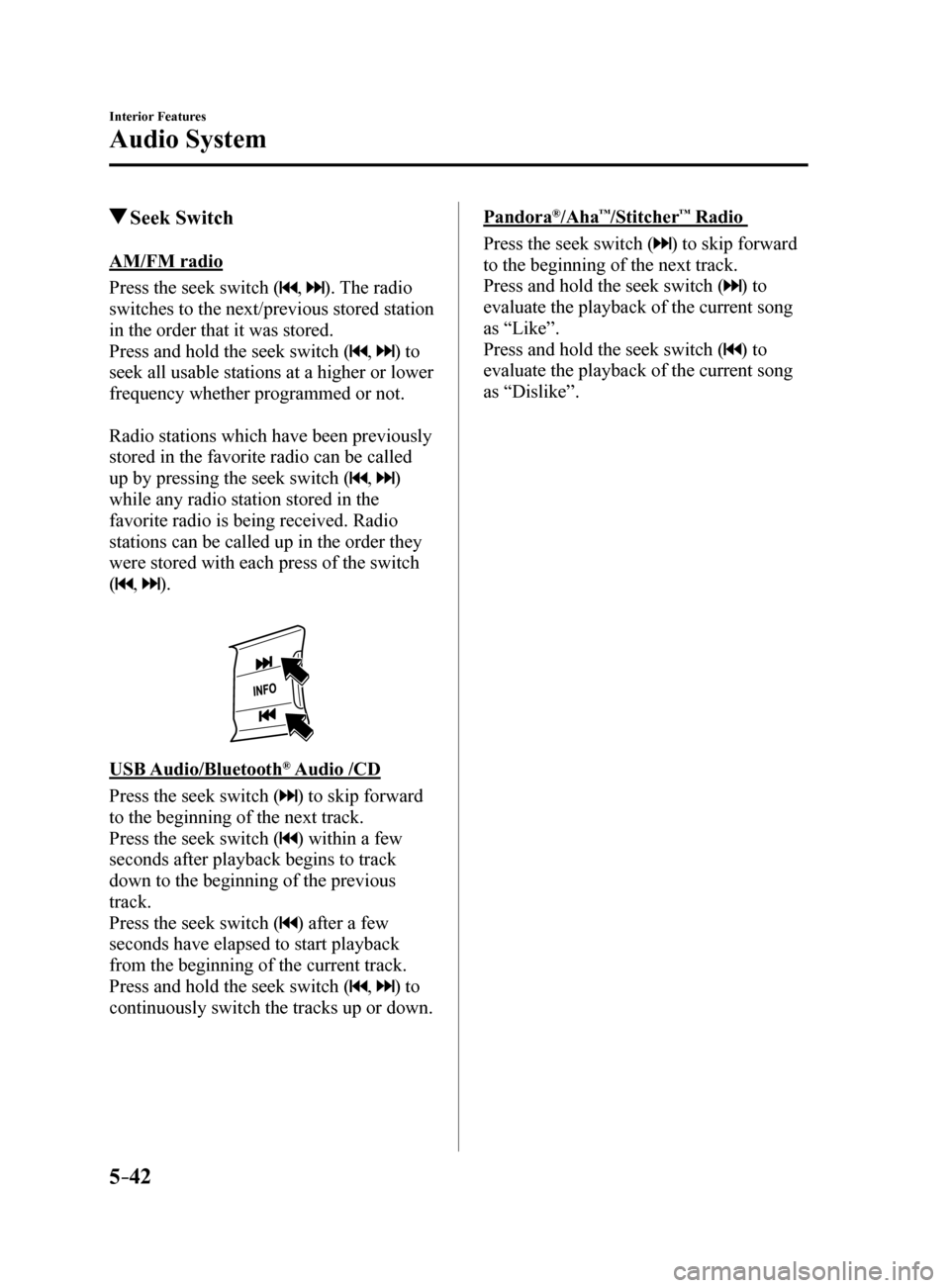
Seek Switch
AM/FM radio
Press the seek switch (
, ). The radio
switches to the next/previous stored station
in the order that it was stored.
Press and hold the seek switch (
, ) to
seek all usable stations at a higher or lower
frequency whether programmed or not.
Radio stations which have been previously
stored in the favorite radio can be called
up by pressing the seek switch (
, )
while any radio station stored in the
favorite radio is being received. Radio
stations can be called up in the order they
were stored with each press of the switch
(
, ).
USB Audio/Bluetooth® Audio /CD
Press the seek switch (
) to skip forward
to the beginning of the next track.
Press the seek switch (
) within a few
seconds after playback begins to track
down to the beginning of the previous
track.
Press the seek switch (
) after a few
seconds have elapsed to start playback
from the beginning of the current track.
Press and hold the seek switch (
, ) to
continuously switch the tracks up or down.
Pandora®/Aha™/Stitcher™ Radio
Press the seek switch (
) to skip forward
to the beginning of the next track.
Press and hold the seek switch (
) to
evaluate the playback of the current song
as “Like”.
Press and hold the seek switch (
) to
evaluate the playback of the current song
as “Dislike”.
Mazda6_8FH2-EA-16F_Edition2.indb 422016/07/07 13:45:44
Page 345 of 578
5–51
Interior Features
Bluetooth®
Bluetooth®
Bluetooth® Hands-Free outline
When a Bluetooth
® device (mobile phone) is connected to the vehicle's Bluetooth® unit via
radio wave transmission, a call can be made or received by pressing the \
talk button, pick-
up button, or hang-up button on the audio remote control switch, or by o\
perating the center
display. For example, even if a device (mobile phone) is in your coat pocket,\
a call can be
made without taking the device (mobile phone) out and operating it dir\
ectly.
Bluetooth
® audio outline
When a portable audio unit equipped with the Bluetooth
® communication function is paired
to the vehicle, you can listen to music stored on the paired portable au\
dio device from the
vehicle's speakers. It is not necessary to connect the portable audio de\
vice to the vehicle's
external input terminal. After programming, operate the vehicle audio control panel to play/
stop the audio.
NOTE
For your safety, a device can be paired only when the vehicle is parked. If the vehicle
starts to move, the pairing procedure will end. Park the vehicle in a safe place before
pairing.
The communication range of a Bluetooth® equipped device is about 10 meters (32 ft) or
less.
Basic audio operation is available using voice commands even if Bluetoot\
h® is not
connected.
For safety reasons, operation of the center display is disabled while the vehicle is\
being
driven. However, items not displayed in gray can be operated using the commander
switch while the vehicle is being driven.
Mazda6_8FH2-EA-16F_Edition2.indb 512016/07/07 13:45:47
Page 346 of 578
5–52
Interior Features
Bluetooth®
CAUTION
Some Bluetooth® mobile devices are not compatible with the vehicle. Consult an
Authorized Mazda Dealer, Mazda's call center or Web support center for information
regarding Bluetooth
® mobile device compatibility:
U.S.A.
Phone: 800-430-0153
Web: www.MazdaUSA.com/bluetooth
Canada
Phone: 800-430-0153
Web: www.mazdahandsfree.ca
Mexico
Center of Attention to Client (CAC)
Phone: 01-800-01-MAZDA
Web: www.mazdamexico.com.mx
Applicable Bluetooth
® specification (Recommended)
Ver. 1.1/1.2/2.0
EDR/2.1 EDR/3.0 (conformity)
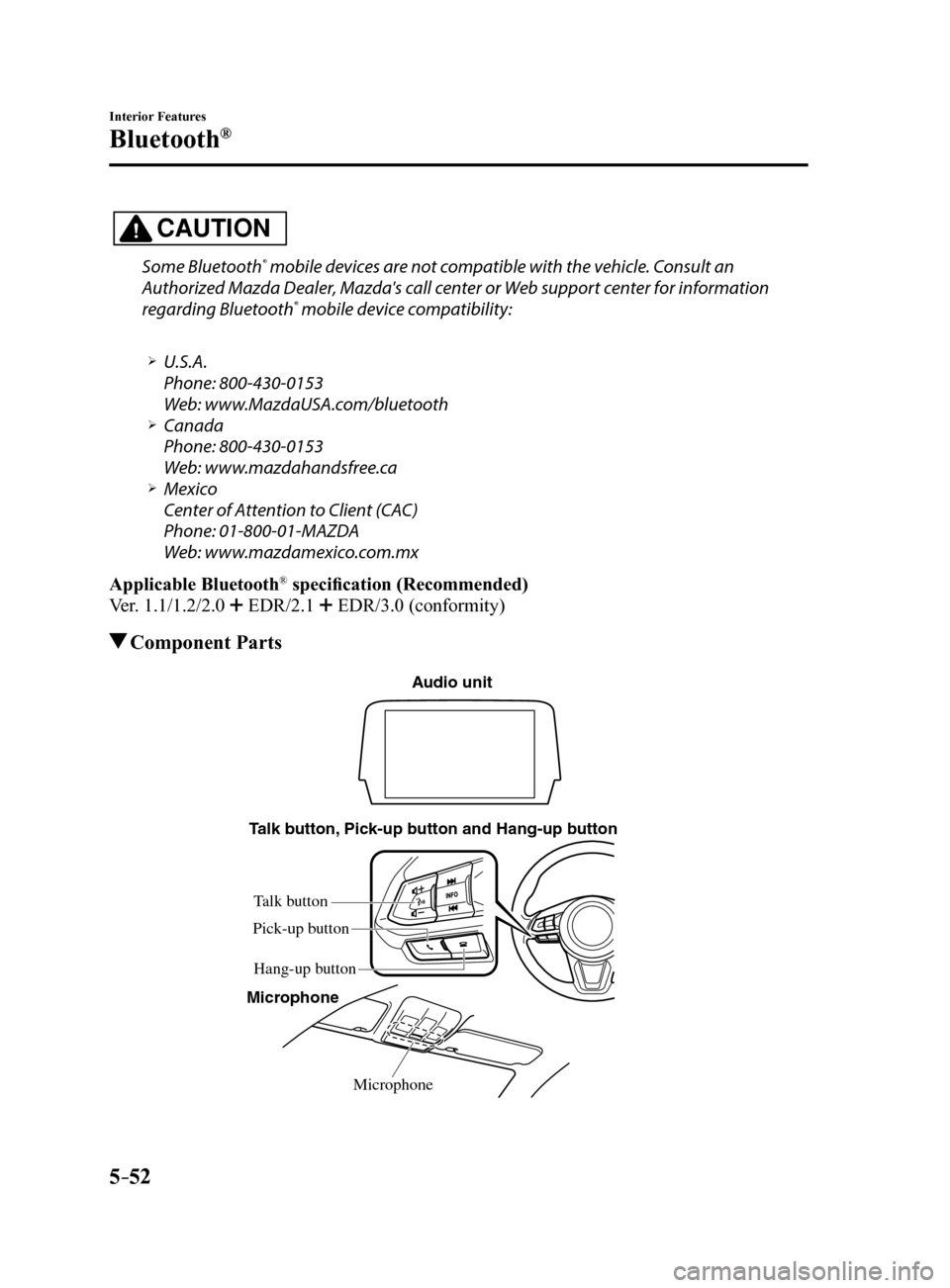
Component Parts
Microphone
T
alk b utton, Pick-up b utton and Hang-up b utton
Microphone
Audio unit
Talk b utton
Hang-up b utton
Pick-up b
utton
Mazda6_8FH2-EA-16F_Edition2.indb 522016/07/07 13:45:48
Page 347 of 578
 5–53
Interior Features
Bluetooth®
Microphone (hands-free)
The microphone is used for speaking voice commands or when making a Hand\
s-free call.
Talk button, Pick-Up button and Hang-Up button (hand")
5–53
Interior Features
Bluetooth®
Microphone (hands-free)
The microphone is used for speaking voice commands or when making a Hand\
s-free call.
Talk button, Pick-Up button and Hang-Up button (hands-free)
The basic functions of Bluetooth
® Hands-Free can be used for such things as making calls or
hanging up using the talk, pick-up and hang-up buttons on the steering w\
heel.
Commander switch
The commander switch is used for volume adjustment and display operation\
. Tilt or turn the
commander knob to move the cursor. Press the commander knob to select the icon.
Volume adjustment
The volume dial of the commander switch is used to adjust the volume. Turn the dial to the
right to increase volume, to the left to decrease it.
The volume can also be adjusted using the volume button on the steering \
wheel.
NOTE
If the volume is lower compared to other audio modes, increase the volume from the device
side.
Conversation volume and the volume of the voice guidance and ringtone ca\
n each be set in
advance.
1. Select the
icon on the home screen to display the Communication screen.
2. Select
.
3. Adjust the
and the using the slider.
Mazda6_8FH2-EA-16F_Edition2.indb 532016/07/07 13:45:48