change wheel MAZDA MODEL 6 2019 (in English) User Guide
[x] Cancel search | Manufacturer: MAZDA, Model Year: 2019, Model line: MODEL 6, Model: MAZDA MODEL 6 2019Pages: 668, PDF Size: 9.4 MB
Page 294 of 668
The following settings for the LAS &
LDWS can be changed. Refer to Safety
Equipment on page 9-11.
Steering operation assist operational/
non-operational
Cancel sensitivity (likelihood of
steering assist)
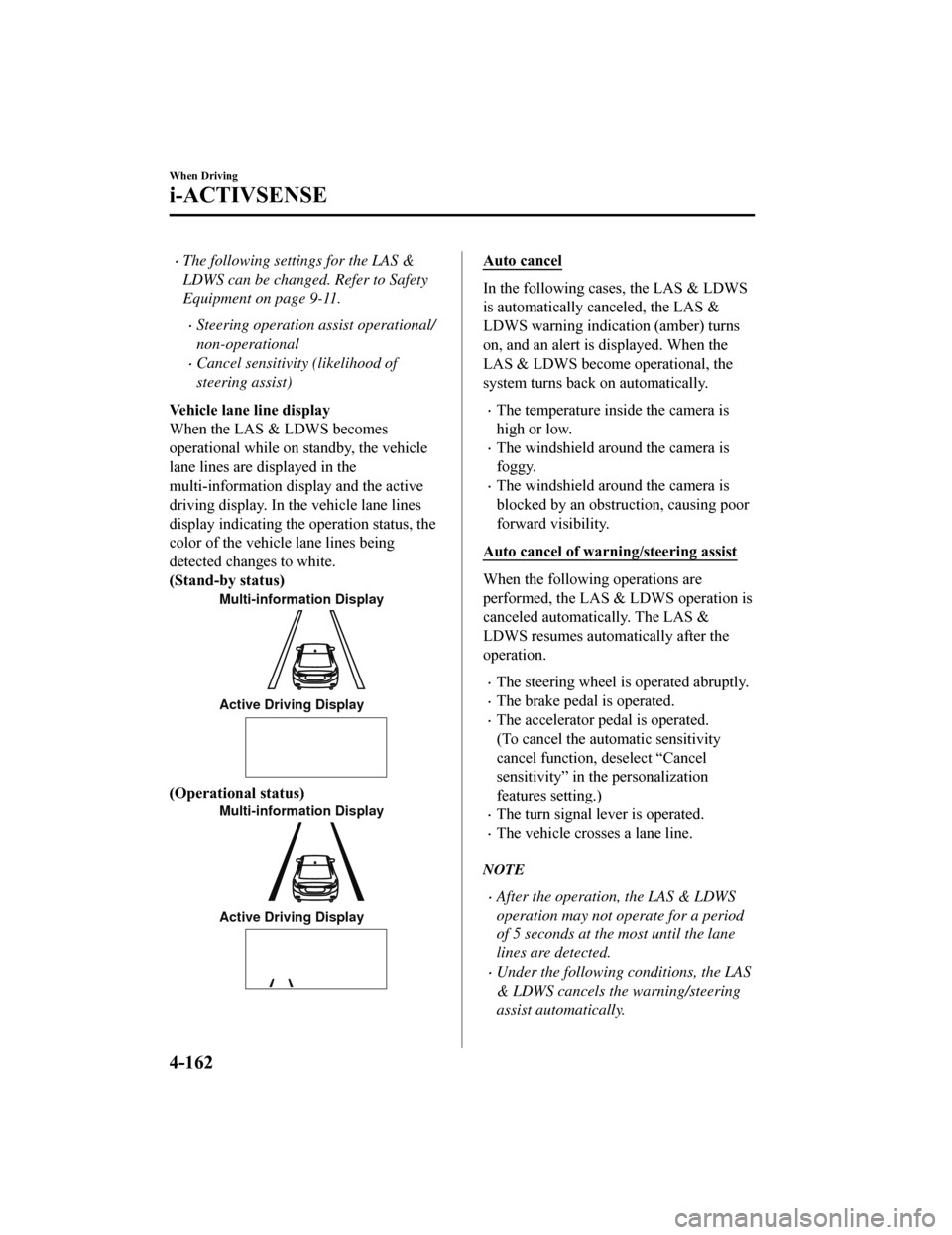
Vehicle lane line display
When the LAS & LDWS becomes
operational while on standby, the vehicle
lane lines are displayed in the
multi-information di splay and the active
driving display. In the vehicle lane lines
display indicating the operation status, the
color of the vehicle lane lines being
detected changes to white.
(Stand-by status)
Multi-information Display
Active Driving Display
(Operational status)
Multi-information Display
Active Driving Display
Auto cancel
In the following cases, the LAS & LDWS
is automatically canceled, the LAS &
LDWS warning indication (amber) turns
on, and an alert is displayed. When the
LAS & LDWS become operational, the
system turns back on automatically.
The temperature inside the camera is
high or low.
The windshield around the camera is
foggy.
The windshield around the camera is
blocked by an obstruction, causing poor
forward visibility.
Auto cancel of warning/steering assist
When the following operations are
performed, the LAS & LDWS operation is
canceled automatically. The LAS &
LDWS resumes automatically after the
operation.
The steering wheel is operated abruptly.
The brake pedal is operated.
The accelerator pedal is operated.
(To cancel the automatic sensitivity
cancel function, deselect “Cancel
sensitivity” in the personalization
features setting.)
The turn signal lever is operated.
The vehicle crosses a lane line.
NOTE
After the operation, the LAS & LDWS
operation may not operate for a period
of 5 seconds at the most until the lane
lines are detected.
Under the following conditions, the LAS
& LDWS cancels the warning/steering
assist automatically.
When Driving
i-ACTIVSENSE
4-162
Mazda6_8HK6-EA-19A_Edition1 2018-11-15 9:36:06
Page 295 of 668
The driver takes his/her hands off the
steering wheel.
(The LAS & LDWS is designed to
assist the driver's steering operation
and it will resume operation
automatically when the driver holds
the steering wheel.)
The DSC OFF switch is pressed to
cancel the DSC.
Steering operation assist OFF
(non-operational)
The steering operation assist for the LAS
& LDWS can be changed to
non-operational (OFF).
Refer to Setting Change (Safety
Equipment) on page 9-11.
When the steering operation assist has
been changed to inoperable (OFF), only
the lane departure warning is operational.
System operation
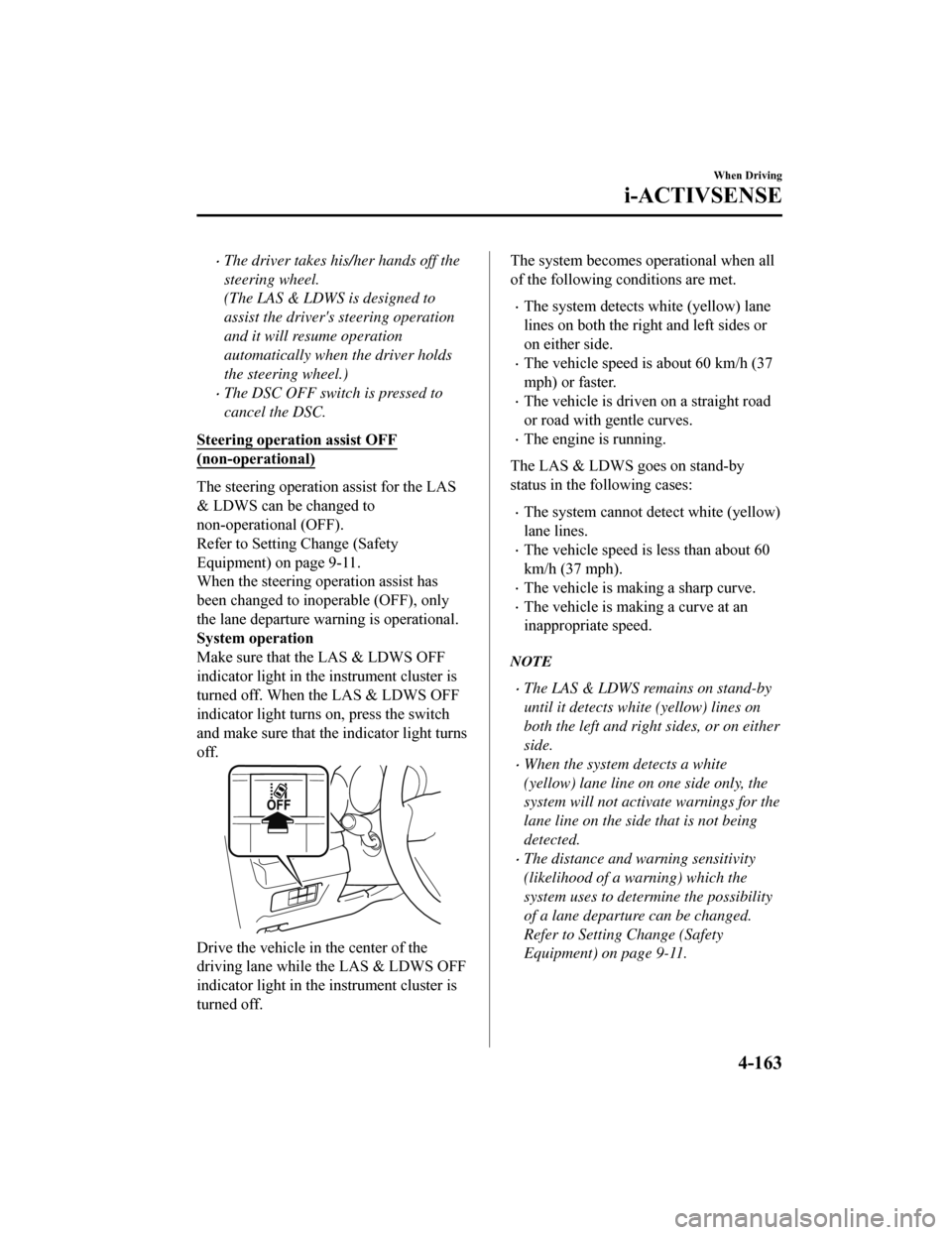
Make sure that the LAS & LDWS OFF
indicator light in the instrument cluster is
turned off. When the LAS & LDWS OFF
indicator light turns on, press the switch
and make sure that the indicator light turns
off.
Drive the vehicle in the center of the
driving lane while the LAS & LDWS OFF
indicator light in the instrument cluster is
turned off.
The system becomes operational when all
of the following conditions are met.
The system detects white (yellow) lane
lines on both the right and left sides or
on either side.
The vehicle speed is about 60 km/h (37
mph) or faster.
The vehicle is driven on a straight road
or road with gentle curves.
The engine is running.
The LAS & LDWS goes on stand-by
status in the following cases:
The system cannot detect white (yellow)
lane lines.
The vehicle speed is less than about 60
km/h (37 mph).
The vehicle is making a sharp curve.
The vehicle is making a curve at an
inappropriate speed.
NOTE
The LAS & LDWS remains on stand-by
until it detects white (yellow) lines on
both the left and right sides, or on either
side.
When the system detects a white
(yellow) lane line on one side only, the
system will not activ ate warnings for the
lane line on the side that is not being
detected.
The distance and warning sensitivity
(likelihood of a warning) which the
system uses to determine the possibility
of a lane departure can be changed.
Refer to Setting Change (Safety
Equipment) on page 9-11.
When Driving
i-ACTIVSENSE
4-163
Mazda6_8HK6-EA-19A_Edition1 2018-11-15 9:36:06
Page 296 of 668
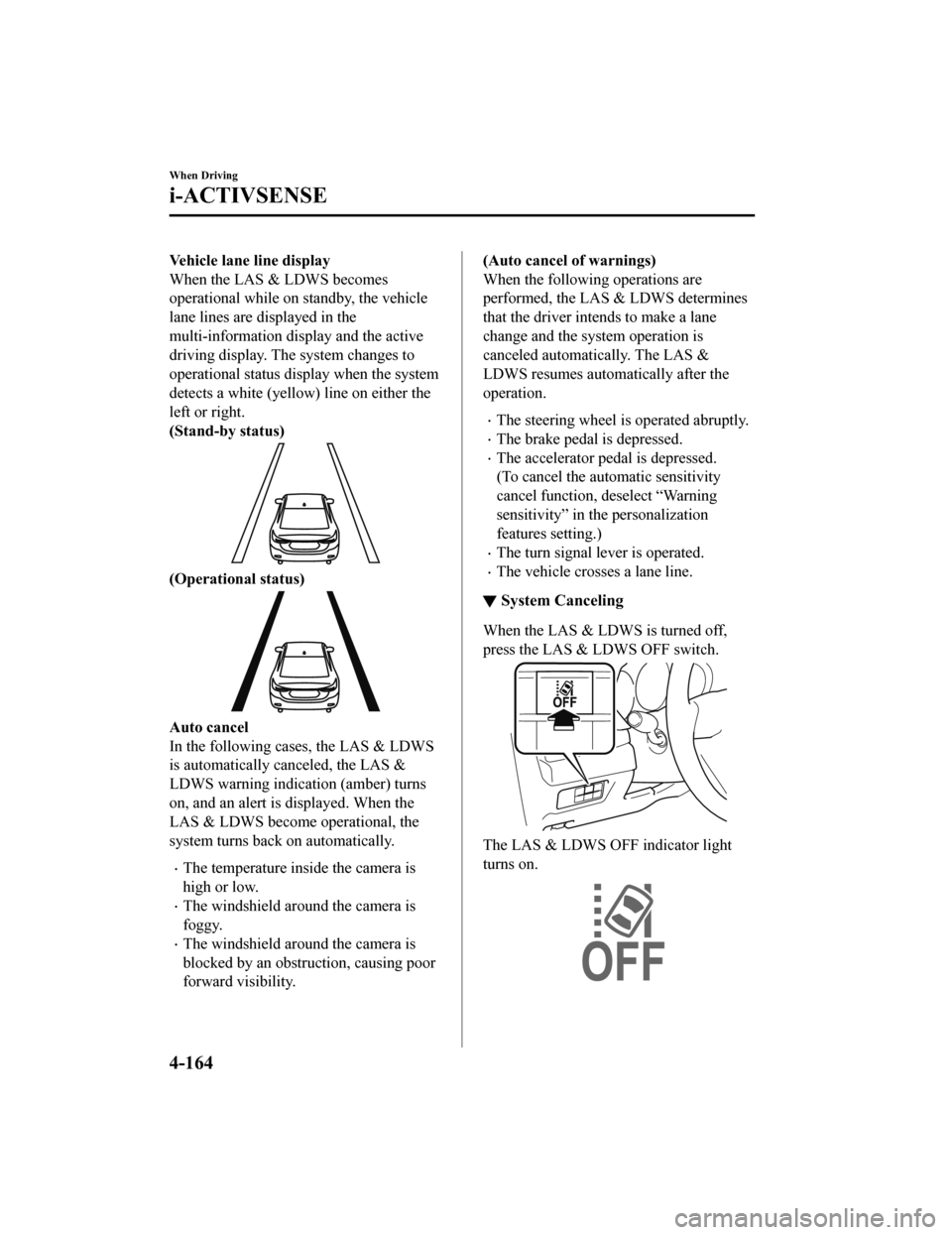
Vehicle lane line display
When the LAS & LDWS becomes
operational while on standby, the vehicle
lane lines are displayed in the
multi-information display and the active
driving display. The system changes to
operational status display when the system
detects a white (yellow) line on either the
left or right.
(Stand-by status)
(Operational status)
Auto cancel
In the following cases, the LAS & LDWS
is automatically canceled, the LAS &
LDWS warning indication (amber) turns
on, and an alert is displayed. When the
LAS & LDWS become operational, the
system turns back on automatically.
The temperature inside the camera is
high or low.
The windshield around the camera is
foggy.
The windshield around the camera is
blocked by an obstruction, causing poor
forward visibility.
(Auto cancel of warnings)
When the following operations are
performed, the LAS & LDWS determines
that the driver intends to make a lane
change and the system operation is
canceled automatically. The LAS &
LDWS resumes automatically after the
operation.
The steering wheel is operated abruptly.
The brake pedal is depressed.
The accelerator pedal is depressed.
(To cancel the automatic sensitivity
cancel function, deselect “Warning
sensitivity” in the personalization
features setting.)
The turn signal lever is operated.
The vehicle crosses a lane line.
▼ System Canceling
When the LAS & LDWS is turned off,
press the LAS & LDWS OFF switch.
The LAS & LDWS OFF indicator light
turns on.
When Driving
i-ACTIVSENSE
4-164
Mazda6_8HK6-EA-19A_Edition1
2018-11-15 9:36:06
Page 298 of 668
▼Lane Departure Warning
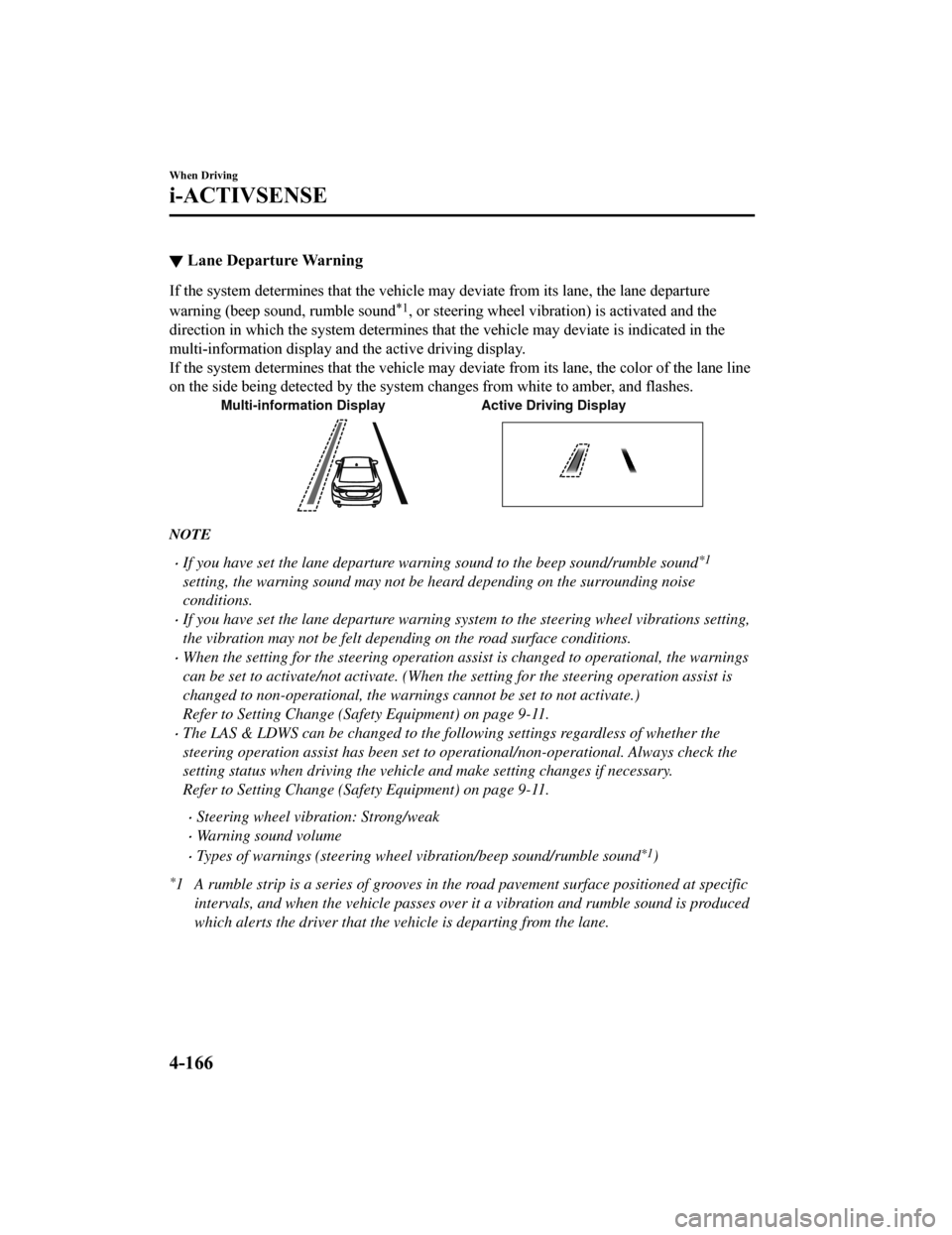
If the system determines that the vehicle may deviate from its
lane, the lane departure
warning (beep sound, rumble sound
*1, or steering wheel vibration) is activated and the
direction in which the system determines that the vehicle may d eviate is indicated in the
multi-information display an d the active driving display.
If the system determines that the vehicle may deviate from its lane, the color of the lane line
on the side being detected by the system changes from white to amber, and flashes.
Multi-information Display Active Driving Display
NOTE
If you have set the lane departure warning sound to the beep sound/rumble sound*1
setting, the warning sound may not be heard depending on the surrounding noise
conditions.
If you have set the lane departure warning system to the steering wheel vibrations setting,
the vibration may not be felt dependi ng on the road surface conditions.
When the setting for the steering operation assist is changed to operational, the warnings
can be set to activate/not activate. (When the setting for the steering operation assist is
changed to non-operational, the warnings cannot be set to not activate.)
Refer to Setting Change (Safety Equipment) on page 9-11.
The LAS & LDWS can be changed to the following settings regardless of whether the
steering operation assist has been set to operational/non-operational. Always check the
setting status when driving the vehicle and make setting changes if necessary.
Refer to Setting Change (Safety Equipment) on page 9-11.
Steering wheel vibr ation: Strong/weak
Warning sound volume
Types of warnings (steering wheel vibration/beep sound/rumble sound*1)
*1 A rumble strip is a series of grooves in the road pavement surface positioned at specific
intervals, and when the vehicle passes over it a vibration and rumble sound is produced
which alerts the driver that the vehicle is departing from the lane.
When Driving
i-ACTIVSENSE
4-166
Mazda6_8HK6-EA-19A_Edition1 2018-11-15 9:36:06
Page 305 of 668
When passing through a toll gate.
When passing through low gates, narrow gates, car washing machines, or tunnels.
If you suddenly come close to a vehicle ahead.
2-wheeled vehicles, pedestrians, animals or standing trees.
Vehicle is driven with some of the tires having significant wear.
(Manual transaxle)
If the vehicle is stopped by the Smart City Brake Support (SCBS) operation and the clutch
pedal is not depressed, the engine stops.
▼Smart City Brake Support (SCBS)
Indicator Light (Red)*
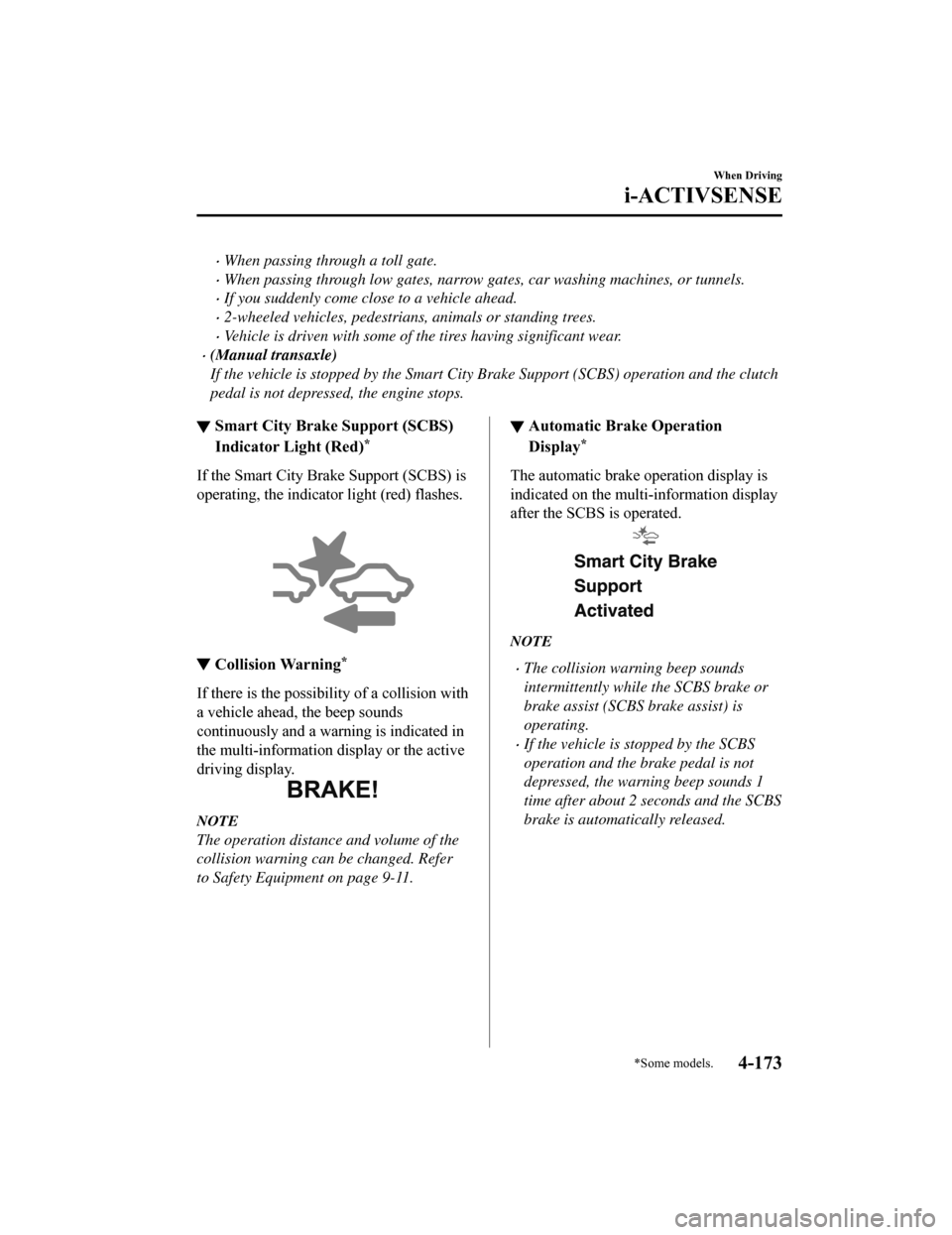
If the Smart City Bra
ke Support (SCBS) is
operating, the indicator light (red) flashes.
▼ Collision Warning*
If there is the possibili
ty of a collision with
a vehicle ahead, the beep sounds
continuously and a warning is indicated in
the multi-information di splay or the active
driving display.
NOTE
The operation distance and volume of the
collision warning can be changed. Refer
to Safety Equipment on page 9-11.
▼ Automatic Brake Operation
Display*
The automatic brake operation display is
indicated on the multi-information display
after the SCBS is operated.
NOTE
The collision warning beep sounds
intermittently while the SCBS brake or
brake assist (SCBS brake assist) is
operating.
If the vehicle is stopped by the SCBS
operation and the brake pedal is not
depressed, the warning beep sounds 1
time after about 2 seconds and the SCBS
brake is automatically released.
When Driving
i-ACTIVSENSE
*Some models.4-173
Mazda6_8HK6-EA-19A_Edition1
2018-11-15 9:36:06
Page 311 of 668

The front doors or the trunk is not fully closed.
The vehicle is on a road incline.
The door mirrors are retracted.
Do not hit the front/rear camera, front bumper, and door mirrors forcefully. The camera
position or installation angle may shift.
The cameras are of a waterproof structure. Do not disassemble, modify, or remove a
camera.
The camera cover is made of hard plastic, therefore do not apply oil film remover, organic
solvents, wax, or coating agents. If any such agent gets on the camera cover, wipe it off
using a soft cloth immediately.
Do not rub the camera lens forcefully, or clean it with an abrasive or hard brush. Otherwise,
it could scratch the camera lens and negatively affect the images.
Consult an Authorized Mazda Dealer for repair, painting, or replacement of the front/rear
camera, front bumper and door mirrors.
Heed the following cautions to assure that the 360°View Monitor operates normally.
Do not modify the vehicle suspensions or lower/raise the vehicle body, or both.
Always use wheels of the specified type and si ze for the front and rear wheels. Consult an
Authorized Mazda Dealer for tire replacement.
When the display is cold, images may leave trai ls or the screen might be darker than usual,
making it difficult to check the vehicle surroundi ngs. Always confirm the safety at the front
and around the vehicle visually when driving.
The method for parking/stopping the vehicle using the 360°View Monitor differs depending
on the road circumstances/conditions and th e vehicle conditions. When and how much you
turn the steering wheel will differ depending on the situation, , therefore always check the
vehicle surroundings directly with yo ur eyes while using the system.
Also, before using the system, always make sure that the vehicle can be parked/stopped in
the parking/stopping space.
NOTE
If there are water droplets, snow, or mud on the camera lens, wipe it off using a soft cloth.
If the camera lens is especially dirt y, wash it off with mild detergent.
If the area where the camera is installed, such as the trunk or door mirrors, has been
damaged in a vehicle accident, the camera (position, installation angle) may have shifted.
Always consult an Authorized Mazda Dealer to have the vehicle inspected.
If the camera is subjected to excessive changes in temperature such as by pouring hot
water on the camera during cold weather, the 360°View Monitor may not operate
normally.
If the battery voltage is low, the screen might be temporarily difficult to view, however,
this does not indicate a problem.
When Driving
i-ACTIVSENSE
4-179
Mazda6_8HK6-EA-19A_Edition1 2018-11-15 9:36:06
Page 322 of 668
Refer to Parking Sensor System on page 4-232.
NOTE
The setting can be changed so that the projected vehicle path lines are not displayed.
Refer to Safety Equipment on page 9-11.
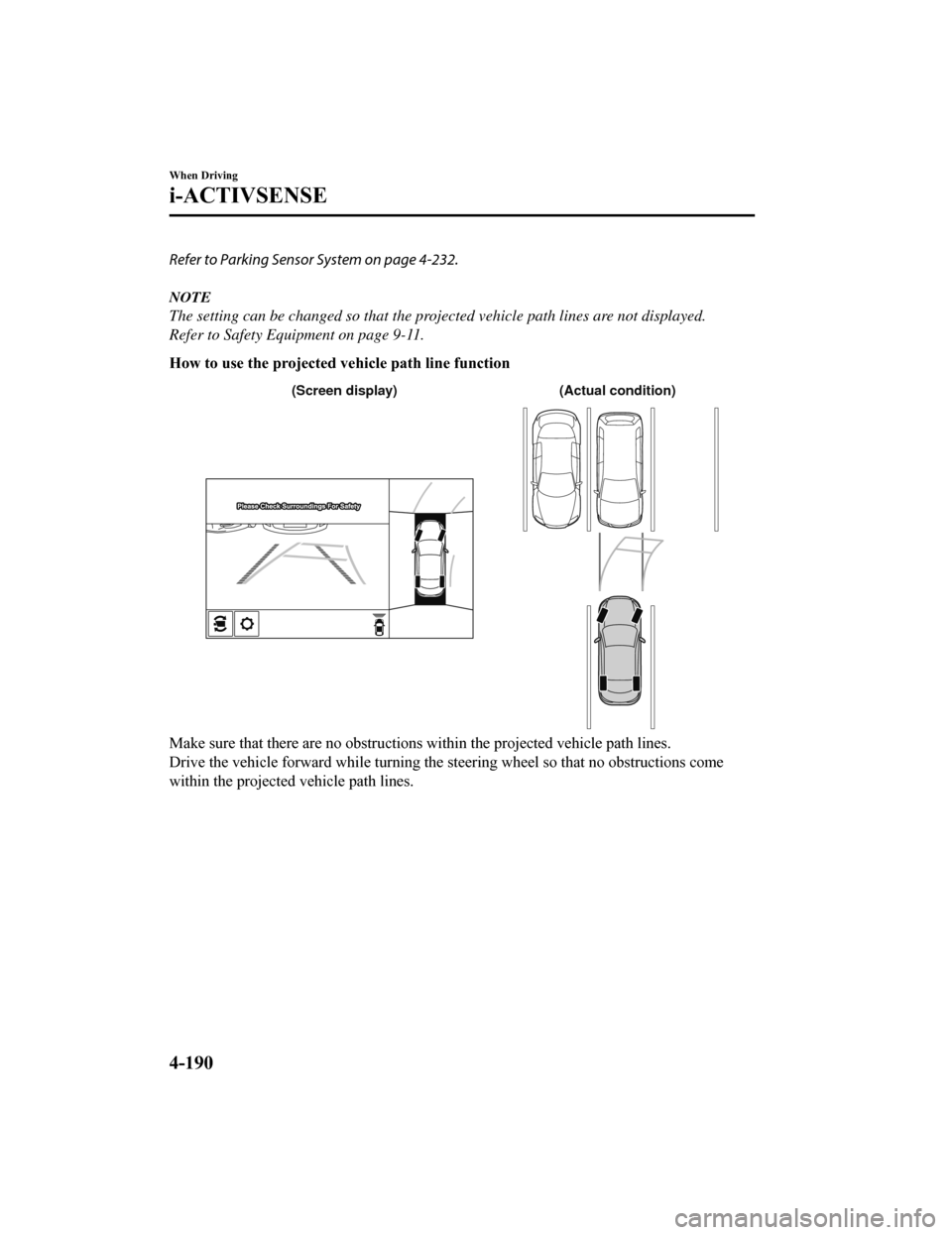
How to use the projected vehicle path line function
(Actual condition)
(Screen display)
Make sure that there are no obstructions within the projected v ehicle path lines.
Drive the vehicle forward while turning the steering wheel so t hat no obstructions come
within the projected vehicle path lines.
When Driving
i-ACTIVSENSE
4-190
Mazda6_8HK6-EA-19A_Edition1 2018-11-15 9:36:06
Page 325 of 668
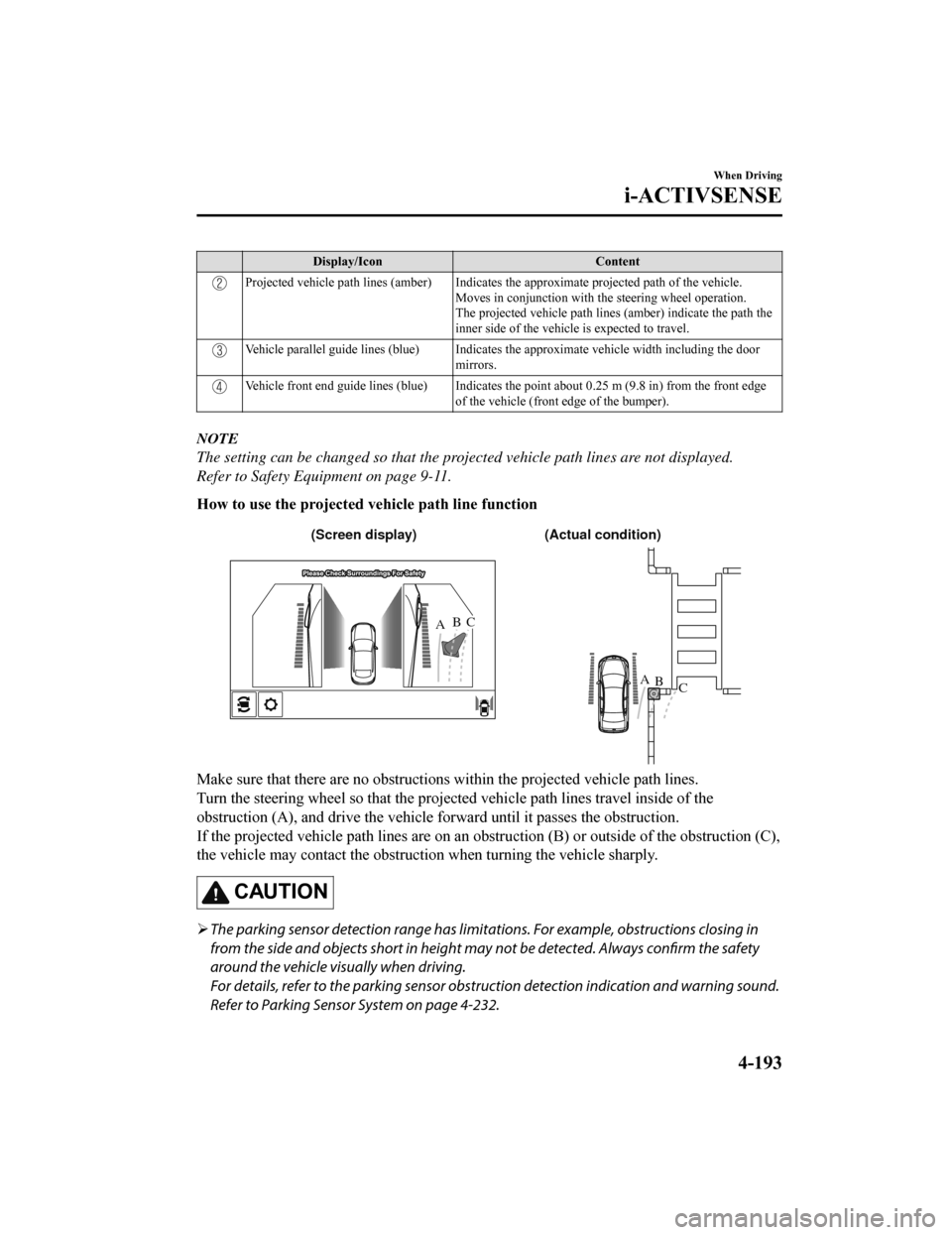
Display/IconContent
Projected vehicle path lines (amber) Indicates the approximate p rojected path of the vehicle.
Moves in conjunction with the steering wheel operation.
The projected vehicle path lines (amber) indicate the path the
inner side of the vehicle is expected to travel.
Vehicle parallel guide lines (blue ) Indicates the approximate ve hicle width including the door
mirrors.
Vehicle front end guide lines (blue) Indicates the point about 0 .25 m (9.8 in) from the front edge
of the vehicle (front edge of the bumper).
NOTE
The setting can be changed so that the projected vehicle path lines are not displayed.
Refer to Safety Equipment on page 9-11.
How to use the projected v ehicle path line function
AB
AB
C
C (Actual condition)
(Screen display)
Make sure that there are no obstructions within the projected v ehicle path lines.
Turn the steering wheel so that the projected vehicle path line s travel inside of the
obstruction (A), and drive the v ehicle forward until it passes the obstruction.
If the projected vehicle path lines are on an obstruction (B) o r outside of the obstruction (C),
the vehicle may contact the obstruction when turning the vehicl e sharply.
CAUTION
The parking sensor detection range has limita tions. For example, obstructions closing in
from the side and objects short in height may not be detected. Always confirm the safety
around the vehicle vi sually when driving.
For details, refer to the parking sensor obstruction detection indication and warning sound.
Refer to Parking Sensor System on page 4-232.
When Driving
i-ACTIVSENSE
4-193
Mazda6_8HK6-EA-19A_Edition1 2018-11-15 9:36:06
Page 327 of 668
If an image containing an object with a conspicuous color is picked up by any of the
cameras, the whole screen may be affected and it may display in that color.
Obstructions displayed in the rear view may not display on the top view screen.
If the position or angle of each camera changes due to tilting of the vehicle, the image
may appear distorted.
Lines on the road may appear distorted at the seams where each of the camera images
merge.
The entire screen may appear bright/dark depending on the illumination level around
any of the cameras.
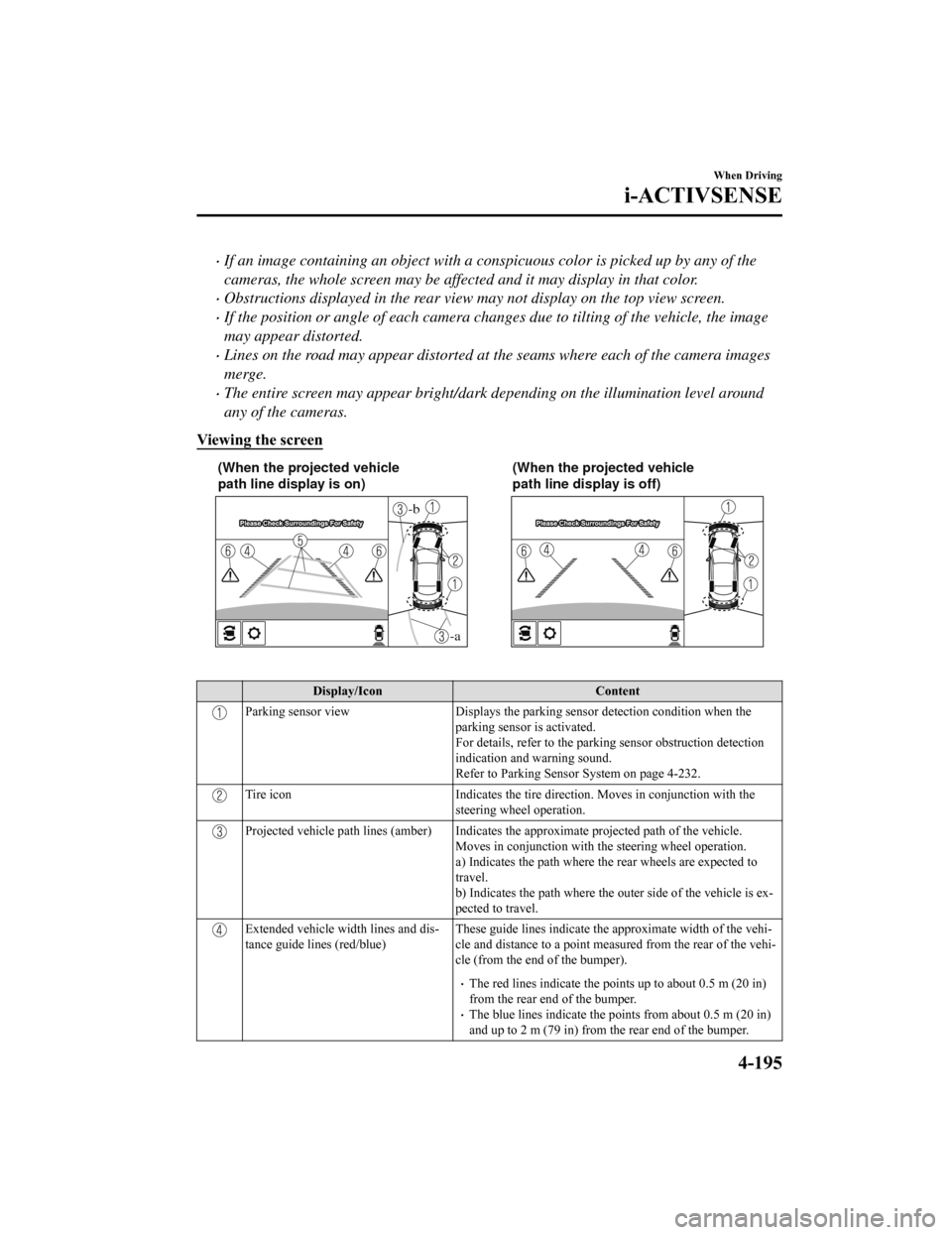
Viewing the screen
-a
-b
(When the projected vehicle
path line display is on) (When the projected vehicle
path line display is off)
Display/Icon
Content
Parking sensor viewDisplays the parking sensor d etection condition when the
parking sensor is activated.
For details, refer to the parkin g sensor obstruction detection
indication and warning sound.
Refer to Parking Sensor System on page 4-232.
Tire icon Indicates the tire direction. Moves in conjunction wit h the
steering wheel operation.
Projected vehicle path lines (amber) Indicates the approximate p rojected path of the vehicle.
Moves in conjunction with the steering wheel operation.
a) Indicates the path where the rear wheels are expected to
travel.
b) Indicates the path where the outer side of the vehicle is ex ‐
pected to travel.
Extended vehicle width lines and dis‐
tance guide lines (red/blue) These guide lines indicate the
approximate width of the vehi‐
cle and distance to a point measur ed from the rear of the vehi‐
cle (from the end of the bumper).
The red lines indicate the poin ts up to about 0.5 m (20 in)
from the rear end of the bumper.
The blue lines indicate the po ints from about 0.5 m (20 in)
and up to 2 m (79 in) from the rear end of the bumper.
When Driving
i-ACTIVSENSE
4-195
Mazda6_8HK6-EA-19A_Edition1 2018-11-15 9:36:06
Page 328 of 668
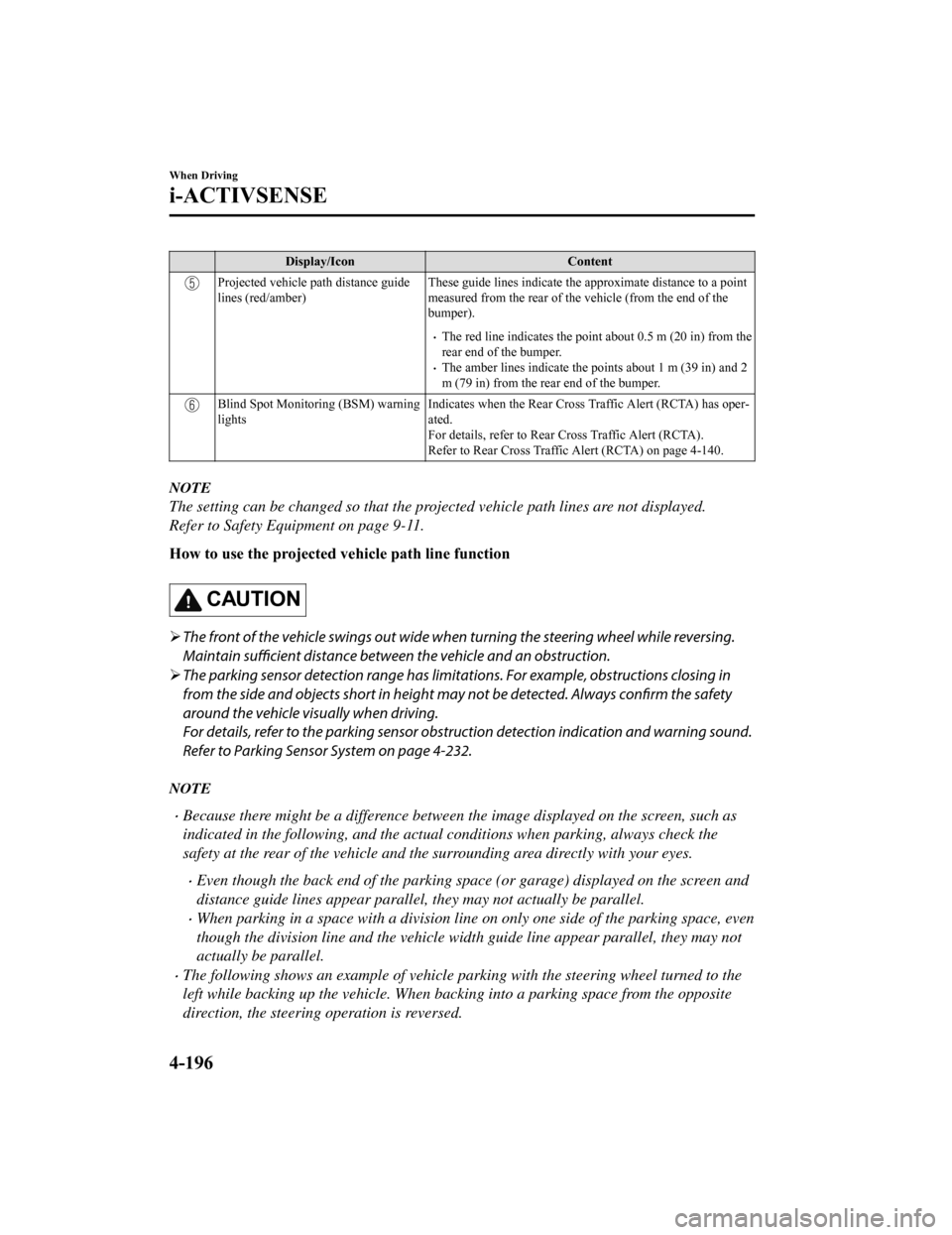
Display/IconContent
Projected vehicle path distance guide
lines (red/amber)These guide lines indicate the
approximate distance to a point
measured from the rear of the vehicle (from the end of the
bumper).
The red line indicates the point about 0.5 m (20 in) from the
rear end of the bumper.
The amber lines indicate the points about 1 m (39 in) and 2
m (79 in) from the rear end of the bumper.
Blind Spot Monitoring (BSM) warning
lights Indicates when the Rear Cross Traffic Alert (RCTA) has oper‐
ated.
For details, refer to Rear Cross Traffic Alert (RCTA).
Refer to Rear Cross Traffic Alert (RCTA) on page 4-140.
NOTE
The setting can be changed so that the projected vehicle path lines are not displayed.
Refer to Safety Equipment on page 9-11.
How to use the projected v
ehicle path line function
CAUTION
The front of the vehicle swings out wide wh en turning the steering wheel while reversing.
Maintain sufficient distance between the vehicle and an obstruction.
The parking sensor detection range has limitat ions. For example, obstructions closing in
from the side and objects short in height may not be detected. Always
confirm the safety
around the vehicle visually when driving.
For details, refer to the parking sensor obstru ction detection indication and warning sound.
Refer to Parking Sensor System on page 4-232.
NOTE
Because there might be a difference between the image displayed on the screen, such as
indicated in the following, and the actual conditions when parking, always check the
safety at the rear of the vehicle and the surrounding area directly with your eyes.
Even though the back end of the parking space (or garage) displayed on the screen and
distance guide lines appear parallel, they may not actually be parallel.
When parking in a space with a division line on only one side of the parking space, even
though the division line and the vehicle wi dth guide line appear parallel, they may not
actually be parallel.
The following shows an example of vehicle parking with the steering wheel turned to the
left while backing up the vehicle. When backing into a parking space from the opposite
direction, the steering operation is reversed.
When Driving
i-ACTIVSENSE
4-196
Mazda6_8HK6-EA-19A_Edition1 2018-11-15 9:36:06