lights MAZDA MODEL 6 2019 (in English) User Guide
[x] Cancel search | Manufacturer: MAZDA, Model Year: 2019, Model line: MODEL 6, Model: MAZDA MODEL 6 2019Pages: 668, PDF Size: 9.4 MB
Page 111 of 668
Reducing glare from headlights
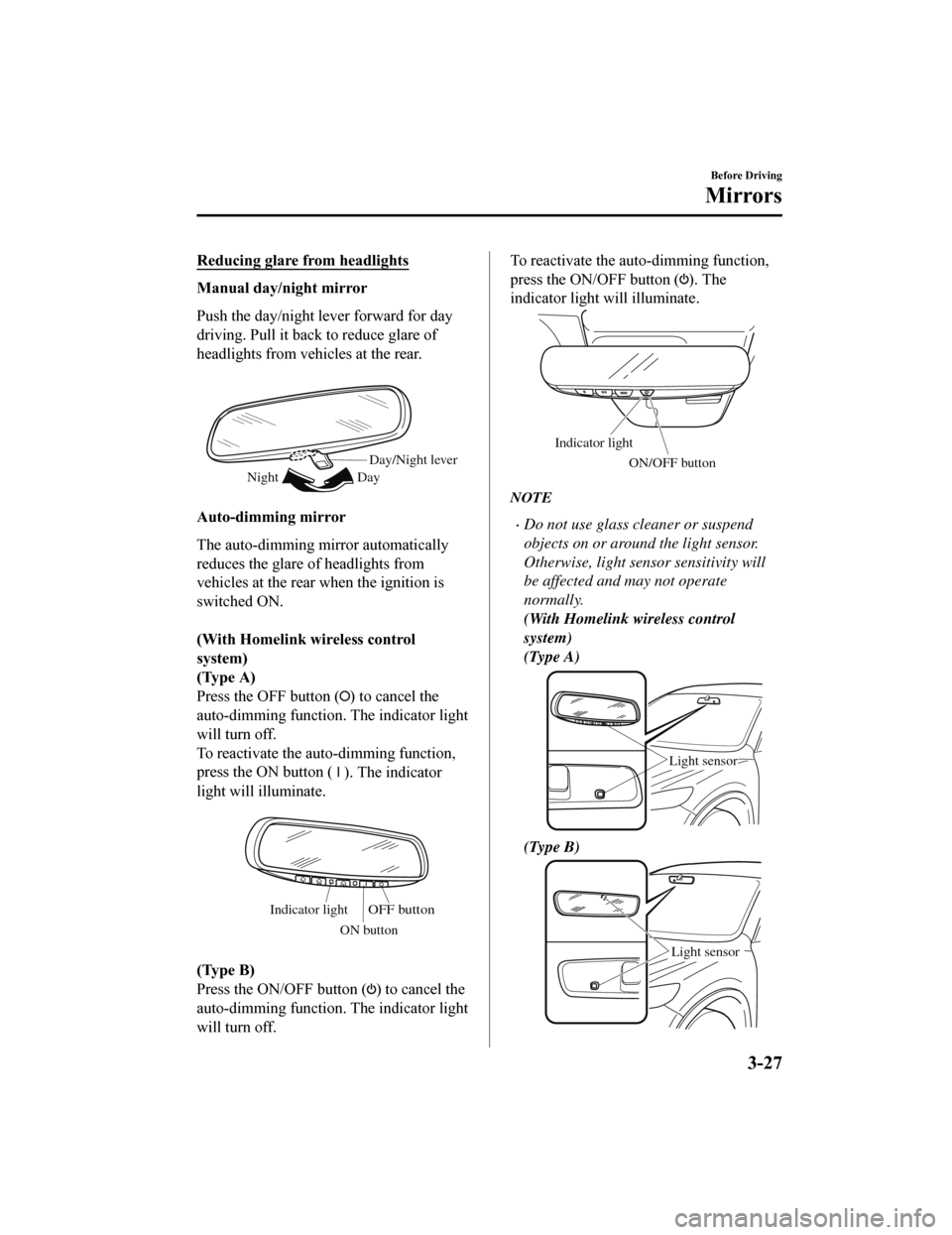
Manual day/night mirror
Push the day/night lever forward for day
driving. Pull it back to reduce glare of
headlights from vehicles at the rear.
Day/Night lever
Day
Night
Auto-dimming mirror
The auto-dimming m irror automatically
reduces the glare of headlights from
vehicles at the rear when the ignition is
switched ON.
(With Homelink wireless control
system)
(Type A)
Press the OFF button (
) to cancel the
auto-dimming function . The indicator light
will turn off.
To reactivate the auto-dimming function,
press the ON button (
). The indicator
light will illuminate.
Indicator lightOFF button
ON button
(Type B)
Press the ON/OFF button (
) to cancel the
auto-dimming function . The indicator light
will turn off.
To reactivate the auto -dimming function,
press the ON/OFF button (
). The
indicator light will illuminate.
Indicator light
ON/OFF button
NOTE
Do not use glass cleaner or suspend
objects on or around the light sensor.
Otherwise, light sensor sensitivity will
be affected and may not operate
normally.
(With Homelink wireless control
system)
(Type A)
Light sensor
(Type B)
Light sensor
Before Driving
Mirrors
3-27
Mazda6_8HK6-EA-19A_Edition1 2018-11-15 9:36:06
Page 121 of 668
Theft-Deterrent System*
If the theft-deterrent system detects an
inappropriate entry in to the vehicle, which
could result in the veh icle or its contents
being stolen, the alarm alerts the
surrounding area of an abnormality by
sounding the horn and flashing the hazard
warning lights.
The system will not function unless it's
properly armed. So when you leave the
vehicle, follow the arming procedure
correctly.
▼ Operation
System triggering conditions
The horn sounds intermittently and the
hazard warning lights flash for about 30
seconds when the system is triggered by
any one of the following:
Unlocking a door with the auxiliary key,
door lock switch, or an inside door-lock
knob.
Forcing open a door, the hood or the
trunk lid.
Opening the hood by operating the hood
release handle.
Switching the ignition ON without using
the push button start.
If the system is triggered again, the lights
and horn will activat e until the driver's
door or the trunk lid is unlocked with the
transmitter.
(With the advanced keyless function)
The lights and horn can also be
deactivated by pressing the request switch
on a door.
NOTE
If the battery goes dead while the
theft-deterrent system is armed, the horn
will activate and the hazard warning
lights will flash when the battery is
charged or replaced.
▼ How to Arm the System
1. Close the windows and the moonroof*
securely.
2. Switch the ignition OFF.
3. Make sure the hood, the doors, and the trunk lid are closed.
4. Press the lock button on the transmitter or lock the driver's door from the
outside with the auxiliary key.
The hazard warning lights will flash
once.
The following method will also arm
the theft-deterrent system:
Press the door-lock switch “
” while
any door is open and then close all of
the doors.
(With the advanced keyless function)
Press a request switch.
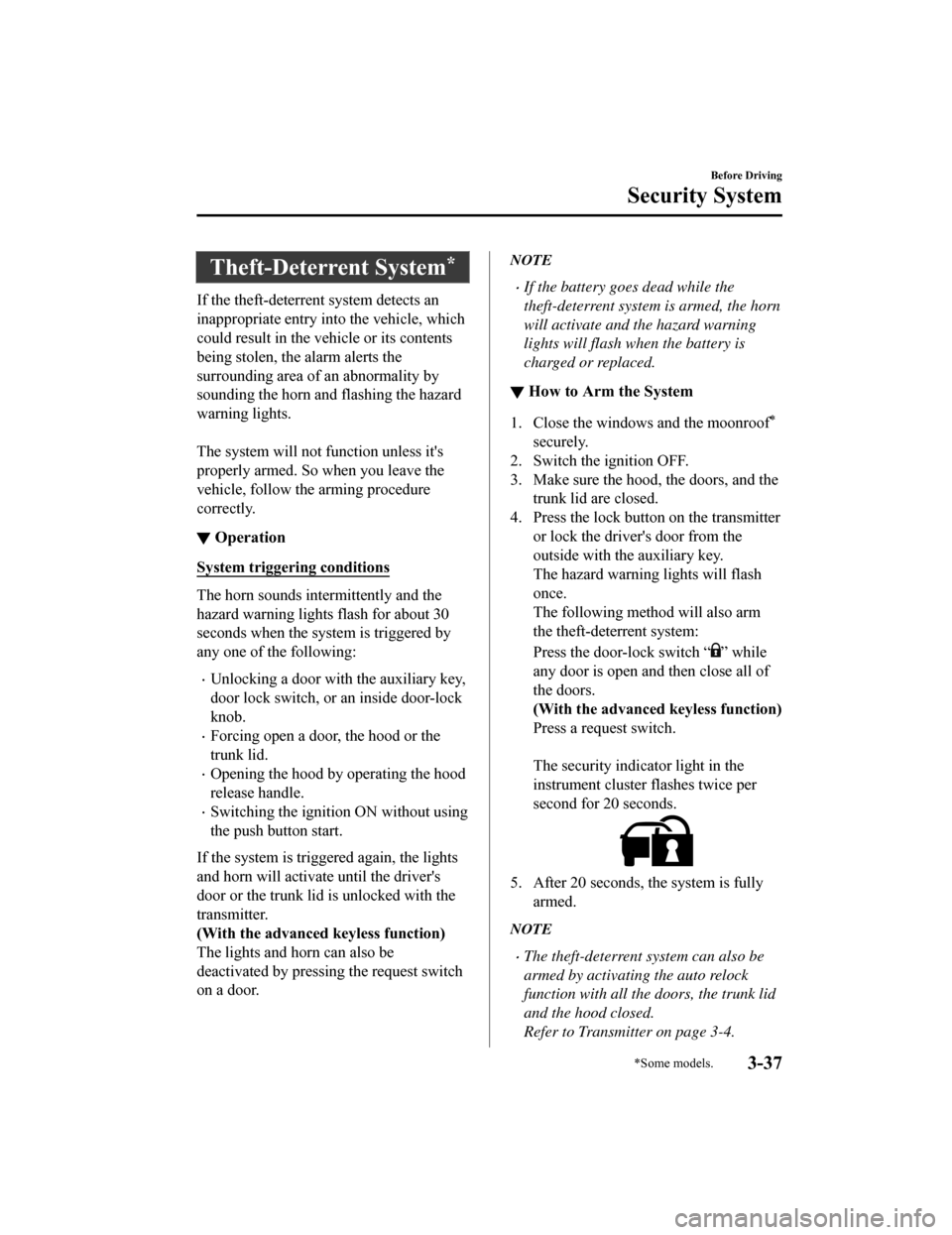
The security indicator light in the
instrument cluster flashes twice per
second for 20 seconds.
5. After 20 seconds, the system is fully
armed.
NOTE
The theft-deterrent system can also be
armed by activating the auto relock
function with all the doors, the trunk lid
and the hood closed.
Refer to Transmitter on page 3-4.
Before Driving
Security System
*Some models.3-37
Mazda6_8HK6-EA-19A_Edition1 2018-11-15 9:36:06
Page 122 of 668

The system will disarm if one of the
following operations takes place within
20 seconds after pressing the lock
button:
Unlocking any door.
Opening any door.
Opening the hood.
Switching the ignition ON.
To rearm the system, do the arming
procedure again.
When the doors are locked by pressing
the lock button on the transmitter or
using the auxiliary key while the
theft-deterrent system is armed, the
hazard warning lights will flash once to
indicate that the system is armed.
▼ To Turn Off an Armed System
An armed system can be turned off using
any one of the following methods:
Pressing the unlock button on the
transmitter.
Starting the engine with the push button
start.
(With the advanced keyless function)
Pressing a request switch on the
doors.
The hazard warning lights will flash twice.
NOTE
When the doors are unlocked by pressing
the unlock button on the transmitter while
the theft-deterrent system is turned off, the
hazard warning lights will flash twice to
indicate that the sy stem is turned off.
▼To Stop the Alarm
A triggered alarm can be turned off using
any one of the following methods:
Pressing the unlock button or the trunk
button on the transmitter.
Starting the engine w
ith the push button
start.
(With the advanced keyless function)
Pressing a request switch on the
doors.
Pressing the electric trunk lid opener
while the key is being carried.
The hazard warning ligh ts will flash twice.
Before Driving
Security System
3-38
Mazda6_8HK6-EA-19A_Edition1 2018-11-15 9:36:06
Page 137 of 668

Some indicator lights/warning lights
should be inspected before the engine is
started (page 4-12).
NOTE
When the push button start is pressed to
ON, the sound of the fuel pump motor
operating near the fuel tank can be heard.
This does not indicate an abnormality.
Starting the Engine
WA R N I N G
Radio waves from the key may affect
medical devices such as pacemakers:
Before using the key near people who use
medical devices, ask the medical device
manufacturer or your physician if radio
waves from the key w ill affect the device.
NOTE
The key must be carried because the key
carries an immobilizer chip that must
communicate with the engine controls at
short range.
The engine can be started when the push
button start is pressed from off, ACC, or
ON.
The push button start system functions
(function which can start the engine by
only carrying the key) can be
deactivated to prevent any possible
adverse effect on a user wearing a
pacemaker or other medical device. If
the system is deactivated, you will be
unable to start the engine by carrying
the key. Consult an Authorized Mazda
Dealer for details. If the push button
start system functions have been
deactivated, you can start the engine by
following the procedure indicated when
the key battery goes dead.
Refer to Engine Start Function When
Key Battery is Dead on page 4-8.
After starting a cold engine, the engine
speed increases and a whining sound
from the engine compartment can be
heard.
When Driving
Start/Stop Engine
4-5
Mazda6_8HK6-EA-19A_Edition1 2018-11-15 9:36:06
Page 151 of 668
▼Dashboard Illumination
When the lights are turned on with the
ignition switched ON, the brightness of
the dashboard illumination is dimmed.
However, when the light sensor detects
that the surrounding area is bright such as
when the lights are turned on in the
daytime, the dashboard illumination does
not dim.
NOTE
When the ignition is
switched ON in the
early evening or at dusk, the dashboard
illumination is dimmed for several
seconds until the light sensor detects the
brightness of the surrounding area,
however, the dimming may cancel after
the brightness is detected.
When the lights are turned on, the
lights-on indicato r light in the
instrument cluster turns on.
Refer to Headlights on page 4-74.
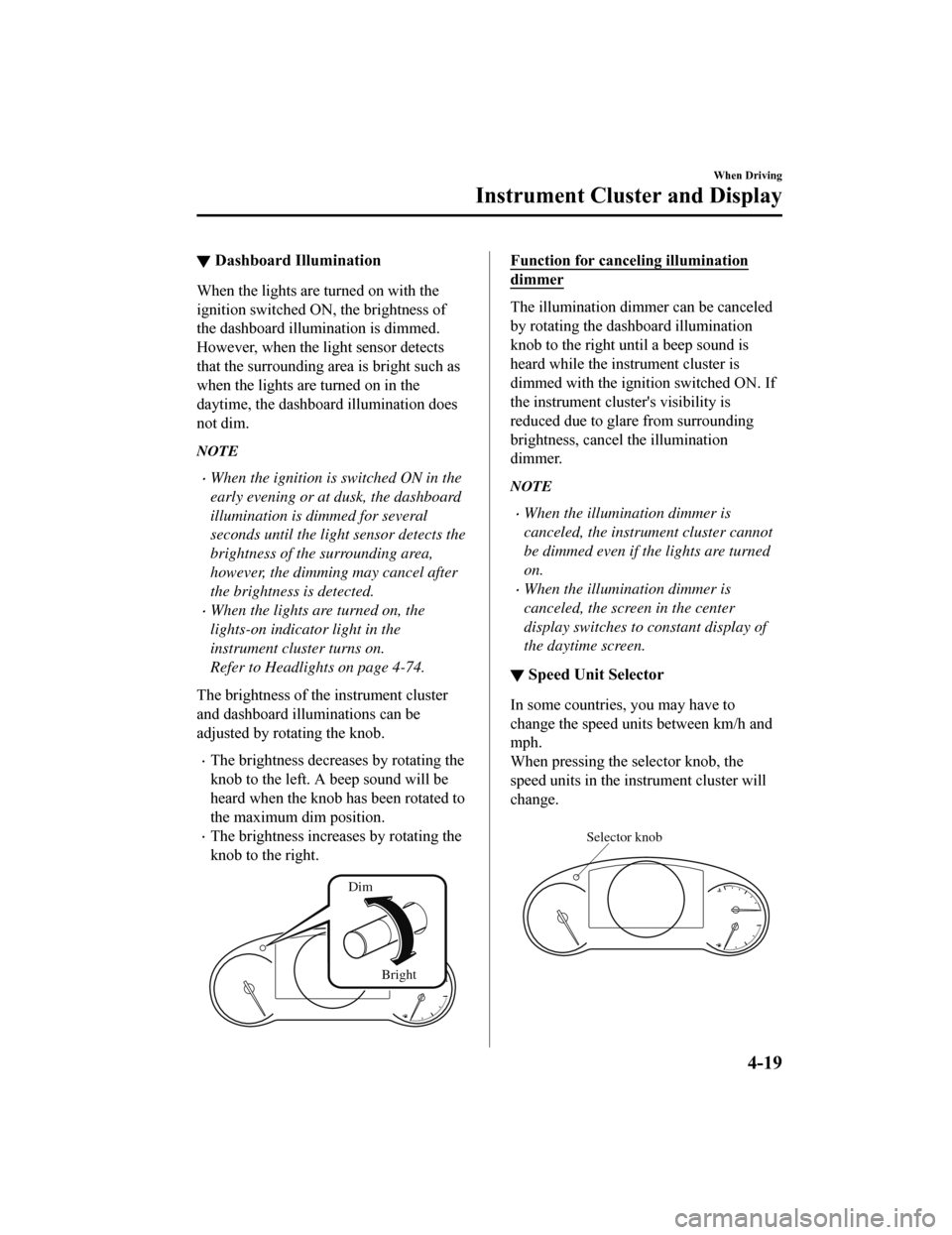
The brightness of the instrument cluster
and dashboard illuminations can be
adjusted by rotating the knob.
The brightness decreases by rotating the
knob to the left. A beep sound will be
heard when the knob has been rotated to
the maximum dim position.
The brightness increases by rotating the
knob to the right.
Dim
Bright
Function for canceling illumination
dimmer
The illumination dimmer can be canceled
by rotating the dashboard illumination
knob to the right until a beep sound is
heard while the instrument cluster is
dimmed with the ignition switched ON. If
the instrument clust er's visibility is
reduced due to glare from surrounding
brightness, cancel the illumination
dimmer.
NOTE
When the illumination dimmer is
canceled, the instrument cluster cannot
be dimmed even if the lights are turned
on.
When the illumination dimmer is
canceled, the screen in the center
display switches to constant display of
the daytime screen.
▼ Speed Unit Selector
In some countries, you may have to
change the speed units between km/h and
mph.
When pressing the selector knob, the
speed units in the instrument cluster will
change.
Selector knob
When Driving
Instrument Cluster and Display
4-19
Mazda6_8HK6-EA-19A_Edition1
2018-11-15 9:36:06
Page 156 of 668

▼Warning/Indicator Lights
Instrument Cluster varies depending on model and specifications
.
Front Center of Headliner
Warning lights will appear in any of the highlighted areas
Instrument Cluster
▼
Warning Indication/Warning Lights
These lights turn on or flash to notify the user of the system
operation status or a system
malfunction.
Signal Warning Page
Brake System Warning Indication/Warning Light*1*27-23
ABS Warning Light*1
Electronic Brake
Force Distribu‐ tion System
Wa r n i n g
7-23
ABS warning 7-26
Charging System Warning Indication/Warning Light*17-23
Engine Oil Warning Light*17-23
High Engine Coolant Temperat ure Warning Indication 7-23
Power Steering Malfunction Indication 7-23
When Driving
Instrument Cluster and Display
4-24
Mazda6_8HK6-EA-19A_Edition1 2018-11-15 9:36:06
Page 158 of 668
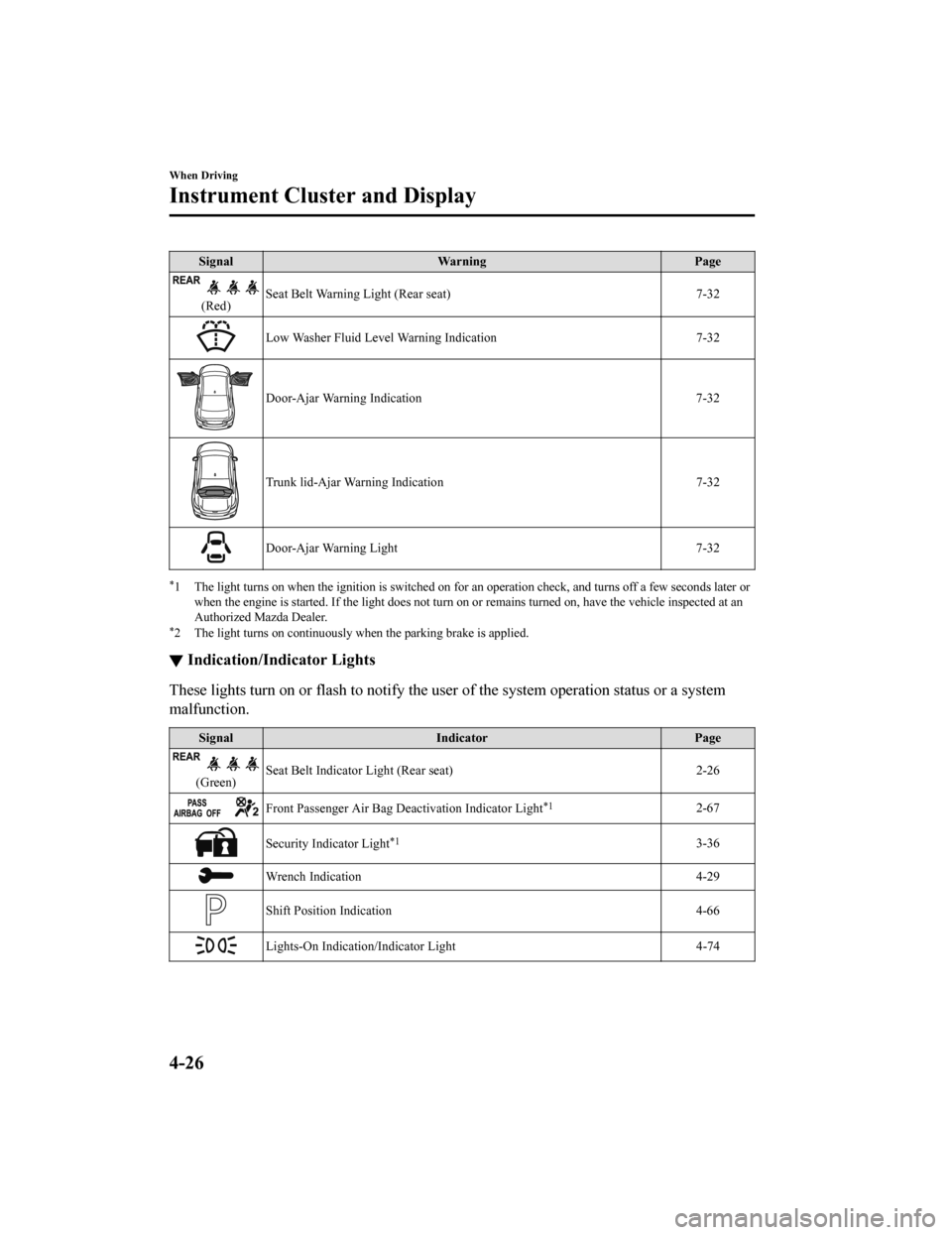
SignalWarning Page
(Red)Seat Belt Warning Light (Rear seat) 7-32
Low Washer Fluid Level Warning Indication
7-32
Door-Ajar Warning Indication7-32
Trunk lid-Ajar Warning Indication 7-32
Door-Ajar Warning Light7-32
*1 The light turns on when the ignition is switched on for an operation check, and turns off a few seconds later or
when the engine is started. If the light does not turn on or remains turned on, have the vehicle inspected at an
Authorized Mazda Dealer.
*2 The light turns on continuously when the parking brake is applied.
▼Indication/Indicator Lights
These lights turn on or flash to notify the user of the system
operation status or a system
malfunction.
Signal Indicator Page
(Green)Seat Belt Indicator Light (Rear seat) 2-26
Front Passenger Air Bag Deactivation Indicator Light*12-67
Security Indicator Light*13-36
Wrench Indication
4-29
Shift Position Indication 4-66
Lights-On Indication/Indicator Light 4-74
When Driving
Instrument Cluster and Display
4-26
Mazda6_8HK6-EA-19A_Edition1 2018-11-15 9:36:06
Page 159 of 668

SignalIndicator Page
Headlight High-Beam Indicator Light Headlight
High-Low Beam 4-77
Flashing the Headlights 4-77
Turn Signal/Hazard Warning Indicator Lights Turn and
Lane-Change Signals4-79
Hazard Warning Flasher4-85
AUTOHOLD Active Indicator Light*14-101
*Mazda Radar Cruise Control with Stop & Go function (MRCC with Stop
& Go function) indicator Light 4-153
TCS/DSC Indicator Light*1
Traction Control
System (TCS) 4-106
Dynamic Stabil‐ ity Control(DSC)4-107
Turns on 7-26
DSC OFF Indicator Light*14-107
Select Mode Indication 4-113
(Green)High Beam Control System (HBC) Indicator Light 4-120
Blind Spot Monitoring (BS
M) OFF Indicator Light*1
Malfunction
7-26
Except malfunc‐ tion
4-127
(White)
*Mazda Radar Cruise Control with Stop & Go function (MRCC with Stop
& Go function) Main Indication 4-148
(Green)
*Mazda Radar Cruise Control with
Stop & Go function (MRCC with Stop
& Go function) Set Indication 4-148
When Driving
Instrument Cluster and Display
*Some models.4-27
Mazda6_8HK6-EA-19A_Edition1
2018-11-15 9:36:06
Page 167 of 668
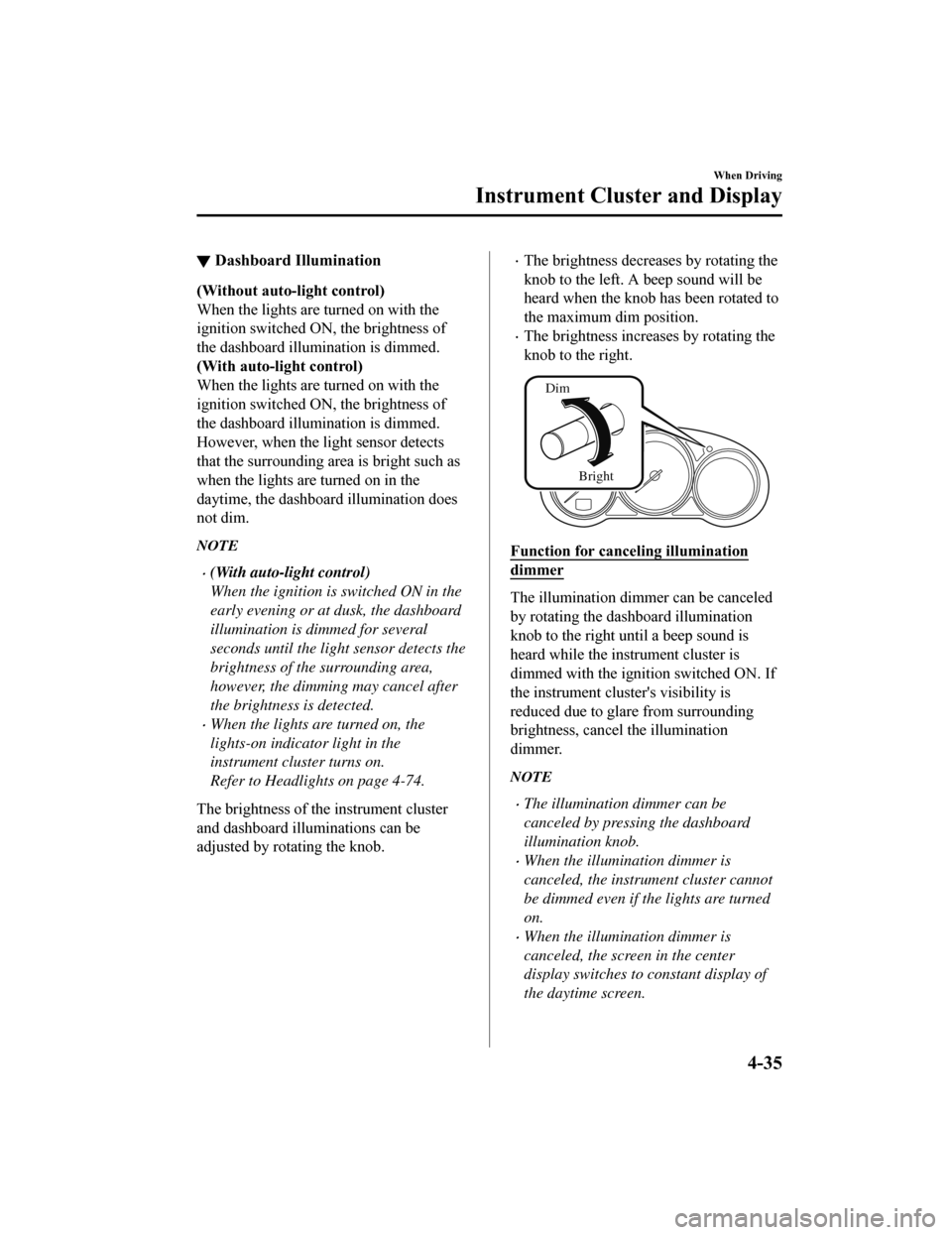
▼Dashboard Illumination
(Without auto-light control)
When the lights are turned on with the
ignition switched ON, the brightness of
the dashboard illumination is dimmed.
(With auto-light control)
When the lights are turned on with the
ignition switched ON, the brightness of
the dashboard illumination is dimmed.
However, when the light sensor detects
that the surrounding area is bright such as
when the lights are turned on in the
daytime, the dashboard illumination does
not dim.
NOTE
(With auto-light control)
When the ignition is
switched ON in the
early evening or at dusk, the dashboard
illumination is dimmed for several
seconds until the light sensor detects the
brightness of the surrounding area,
however, the dimming may cancel after
the brightness is detected.
When the lights are turned on, the
lights-on indicato r light in the
instrument cluster turns on.
Refer to Headlights on page 4-74.
The brightness of the instrument cluster
and dashboard illuminations can be
adjusted by rotating the knob.
The brightness decreases by rotating the
knob to the left. A beep sound will be
heard when the knob has been rotated to
the maximum dim position.
The brightness increases by rotating the
knob to the right.
Dim
Bright
Function for canceling illumination
dimmer
The illumination dimmer can be canceled
by rotating the dashboard illumination
knob to the right until a beep sound is
heard while the instrument cluster is
dimmed with the ignition switched ON. If
the instrument clust er's visibility is
reduced due to glare from surrounding
brightness, cancel the illumination
dimmer.
NOTE
The illumination dimmer can be
canceled by pressing the dashboard
illumination knob.
When the illumination dimmer is
canceled, the instrument cluster cannot
be dimmed even if the lights are turned
on.
When the illumination dimmer is
canceled, the screen in the center
display switches to constant display of
the daytime screen.
When Driving
Instrument Cluster and Display
4-35
Mazda6_8HK6-EA-19A_Edition1 2018-11-15 9:36:06
Page 172 of 668

▼Warning/Indicator Lights
Instrument Cluster varies depending on model and specifications
.
Front Center of Headliner
Warning lights will appear in any of the highlighted areas
Instrument Cluster
▼
Warning Indication/Warning Lights
These lights turn on or flash to notify the user of the system
operation status or a system
malfunction.
Signal Warning Page
Brake System Warning Indication/Warning Light*1*27-23
ABS Warning Light*1
Electronic Brake
Force Distribu‐ tion System
Wa r n i n g
7-23
ABS warning 7-26
Charging System Warning Indication/Warning Light*17-23
Engine Oil Warning Light*17-23
(Red) High Engine Coolant Temperature Warning Light
*17-23
When Driving
Instrument Cluster and Display
4-40
Mazda6_8HK6-EA-19A_Edition1
2018-11-15 9:36:06