park assist MAZDA MODEL 6 2019 (in English) User Guide
[x] Cancel search | Manufacturer: MAZDA, Model Year: 2019, Model line: MODEL 6, Model: MAZDA MODEL 6 2019Pages: 668, PDF Size: 9.4 MB
Page 324 of 668
NOTE
The parking sensor obstruction detection indication does not display. Switch the screen
display to the top view/front view or side view display if the parking sensor warning sound
is activated.
The front wide view screen displays the image in front of the vehicle at a wide angle and
corrects the image to help detect approaching obstructions from the side. Therefore, it
differs from the actual view.
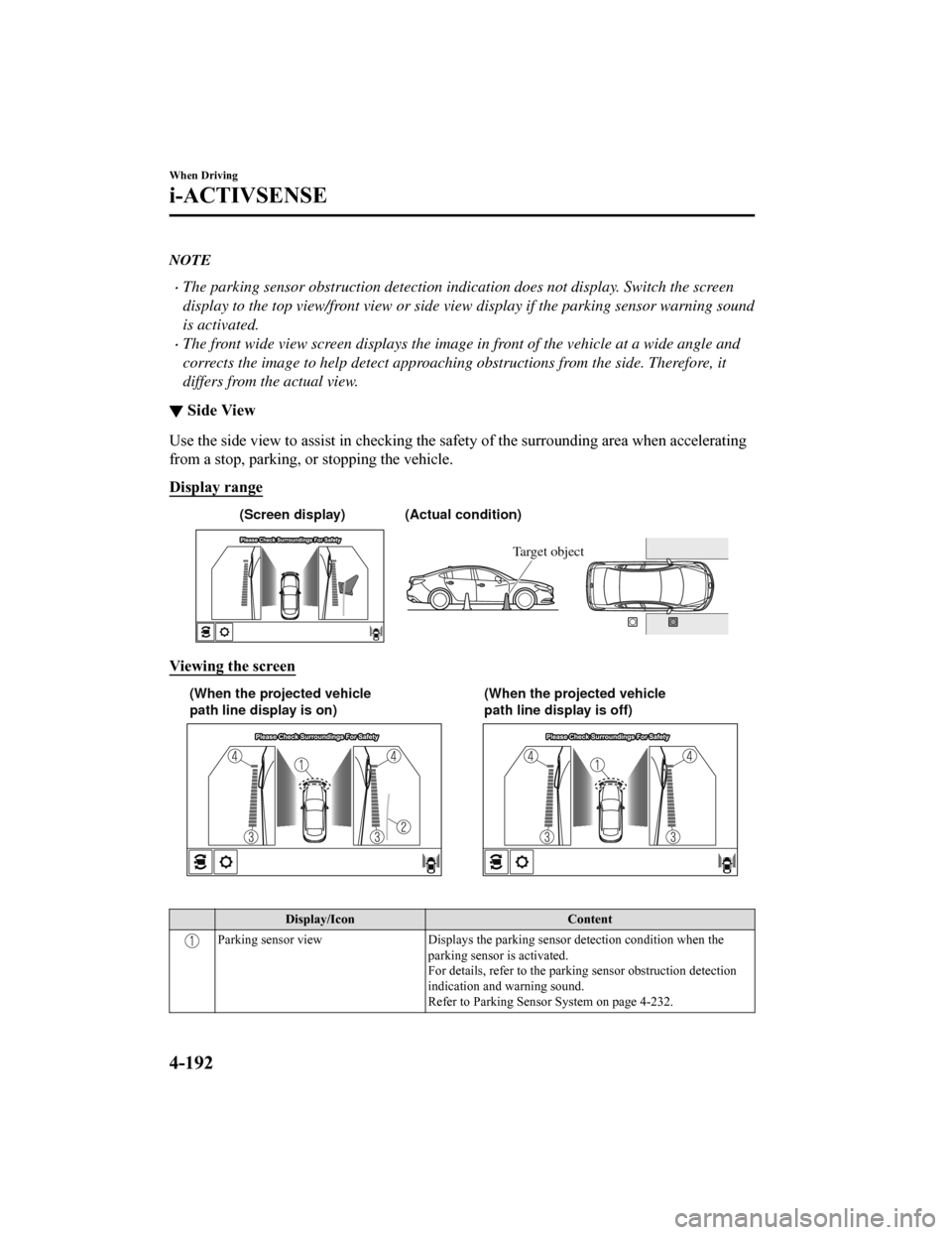
▼Side View
Use the side view to assist in checking the safety of the surro
unding area when accelerating
from a stop, parking, or stopping the vehicle.
Display range
(Actual condition)
(Screen display)
Target object
Viewing the screen
(When the projected vehicle
path line display is on) (When the projected vehicle
path line display is off)
Display/Icon
Content
Parking sensor viewDisplays the parking sensor detection condition when the
parking sensor is activated.
For details, refer to the parking sensor obstruction detection
indication and warning sound.
Refer to Parking Sensor System on page 4-232.
When Driving
i-ACTIVSENSE
4-192
Mazda6_8HK6-EA-19A_Edition1 2018-11-15 9:36:06
Page 326 of 668
Do not turn the steering wheel any more until the vehicle has passed the obstruction, even
if the obstruction is not visible on the side view image. If the steering wheel is turned even
more, the vehicle may contact the obst ruction if it is turned sharply.
NOTE
Because there might be a difference between the image displayed on the screen and the
actual conditions, always check the safety of the surrounding area using the mirrors and
directly with your eyes when driving.
Even though the object displayed on the screen, such as a road curb or a division line of a
parking space, and the vehicle parallel guide lines appear parallel, they may not actually
be parallel.
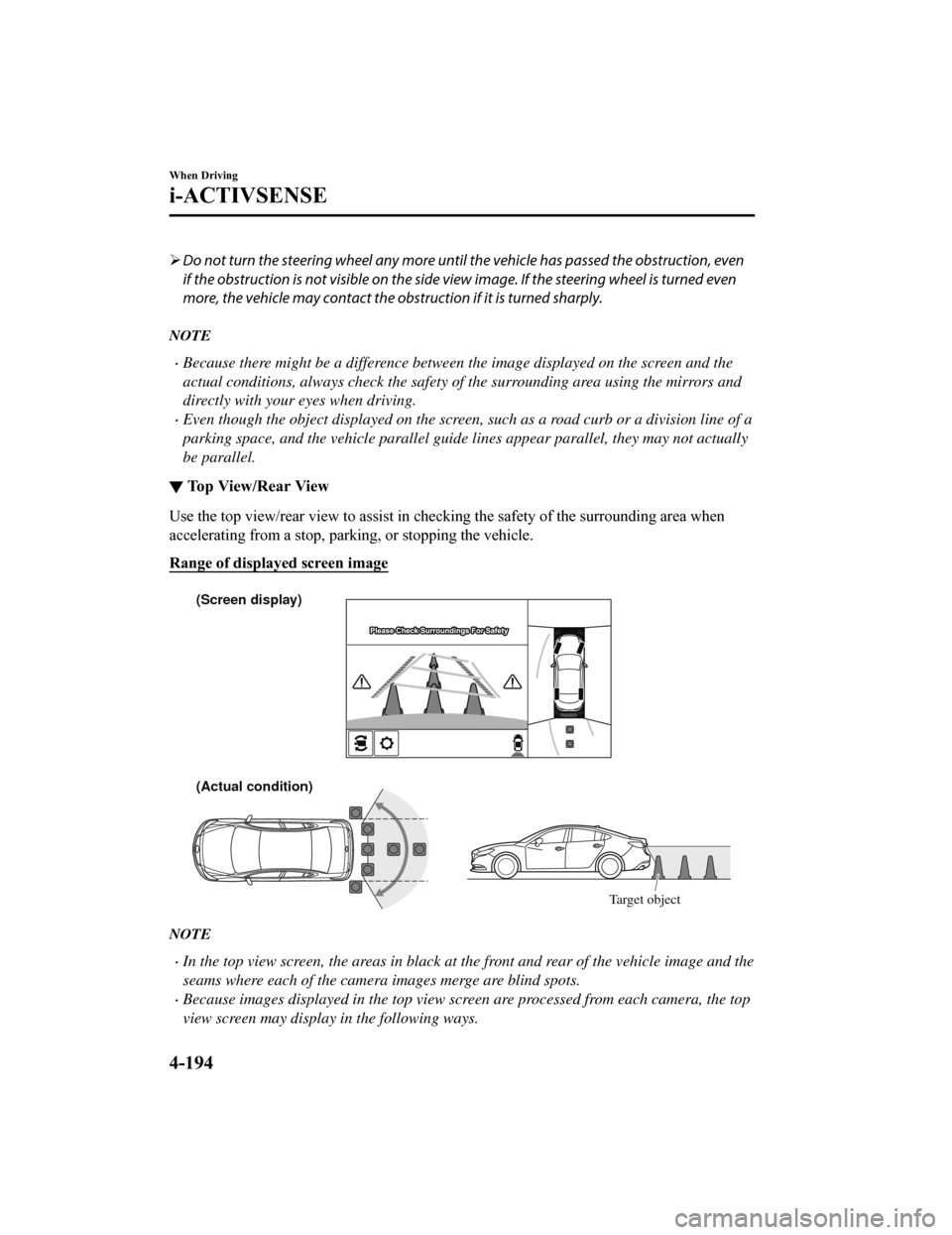
▼Top View/Rear View
Use the top view/rear view to assist in checking the safety of
the surrounding area when
accelerating from a stop, parking, or stopping the vehicle.
Range of displayed screen image
(Actual condition) (Screen display)
Target object
NOTE
In the top view screen, the areas in black at the front and rear of the vehicle image and the
seams where each of the camera images merge are blind spots.
Because images displayed in the top view screen are processed from each camera, the top
view screen may display in the following ways.
When Driving
i-ACTIVSENSE
4-194
Mazda6_8HK6-EA-19A_Edition1 2018-11-15 9:36:06
Page 330 of 668
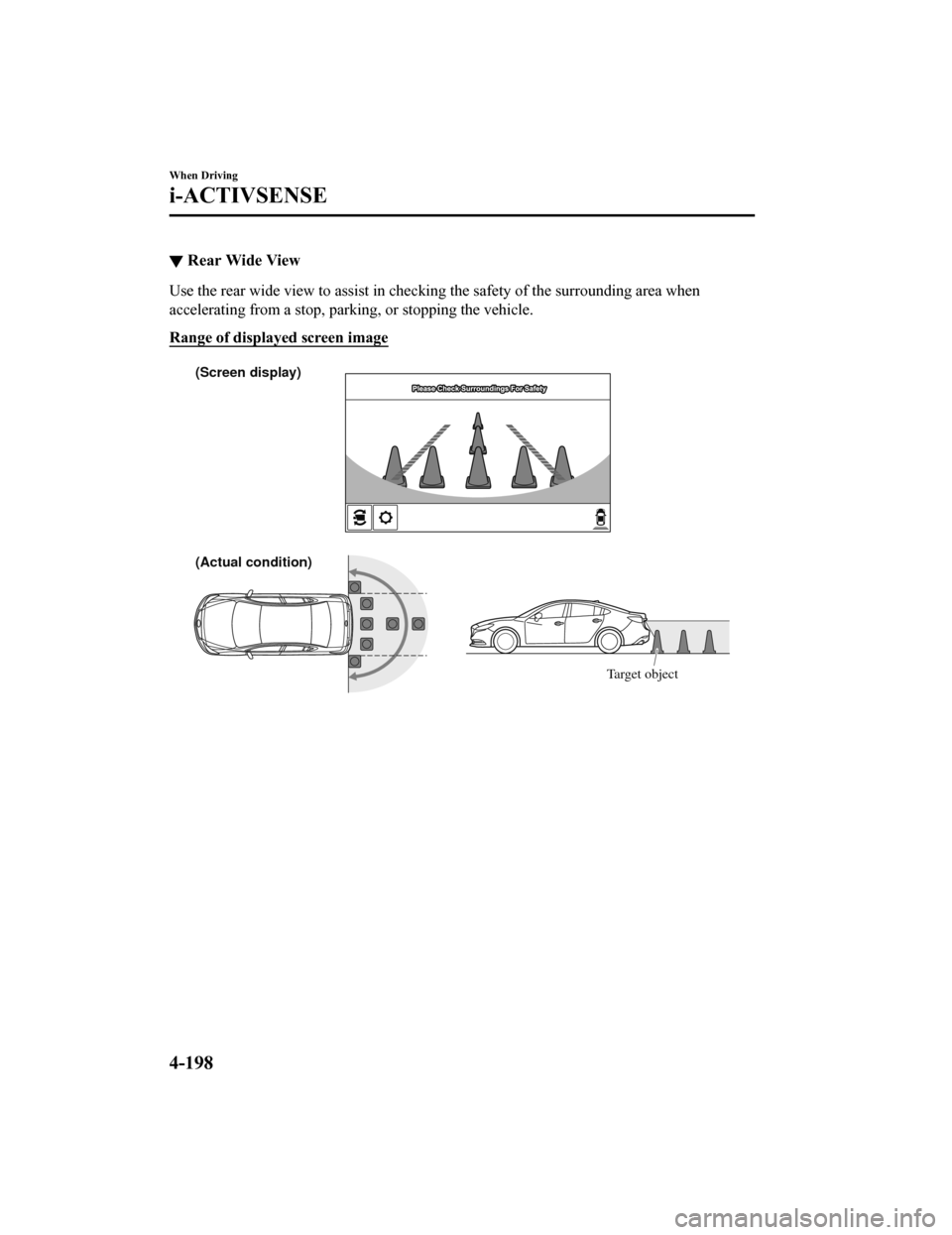
▼Rear Wide View
Use the rear wide view to assist in checking the safety of the
surrounding area when
accelerating from a stop, parking, or stopping the vehicle.
Range of displayed screen image
(Actual condition) (Screen display)
Target object
When Driving
i-ACTIVSENSE
4-198
Mazda6_8HK6-EA-19A_Edition1 2018-11-15 9:36:06
Page 339 of 668

The surroundings are dark such as during the night, early evening, or early morning, or
in a tunnel or indoor parking lot.
The illumination brightness of the headlights is reduced or the headlight illumination is
weakened due to dirt or a deviated optical axis.
The target object enters the blind spot of the Forward Sensing Camera (FSC).
A person or object bursts onto the road from the shoulder or cuts right in front of you.
You change lanes and approach a vehicle ahead.
When driving extremely close to the target object.
Tire chains or a temporary spare tire is installed.
The vehicle ahead has a special shape. For example, a vehicle towing a trailer house or
a boat, or a vehicle carrier carrying a vehicle with its front pointed rearward.
If the Forward Sensing Camera (FSC) cannot operate normally due to backlight or fog,
the system functions related to the Forward Sensing Camera (FSC) are temporarily
stopped and the following warning lights turn on. However, this does not indicate a
malfunction.
High Beam Control System (HBC) warning light (amber)
Lane-keep Assist System (LAS) & Lane Departure Warning System (LDWS) warning
indication
Mazda Radar Cruise Control with Stop & Go function (MRCC with Stop & Go
function) warning indication
Smart Brake Support/Smart City Brake Support (SBS/SCBS) warning indication/
warning light (amber)
If the Forward Sensing Camera (FSC) cannot operate normally due to high temperatures,
the system functions related to the Forward Sensing Camera (FSC) are temporarily
stopped and the following warning lights turn on. However, this does not indicate a
malfunction. Cool down the area around the Forward Sensing Camera (FSC) such as by
turning on the air conditioner.
High Beam Control System (HBC) warning light (amber)
Lane-keep Assist System (LAS) & Lane Departure Warning System (LDWS) warning
indication
Mazda Radar Cruise Control with Stop & Go function (MRCC with Stop & Go
function) warning indication
Smart Brake Support/Smart City Brake Support (SBS/SCBS) warning indication/
warning light (amber)
When Driving
i-ACTIVSENSE
4-207
Mazda6_8HK6-EA-19A_Edition1 2018-11-15 9:36:06
Page 364 of 668
Parking Sensor System*
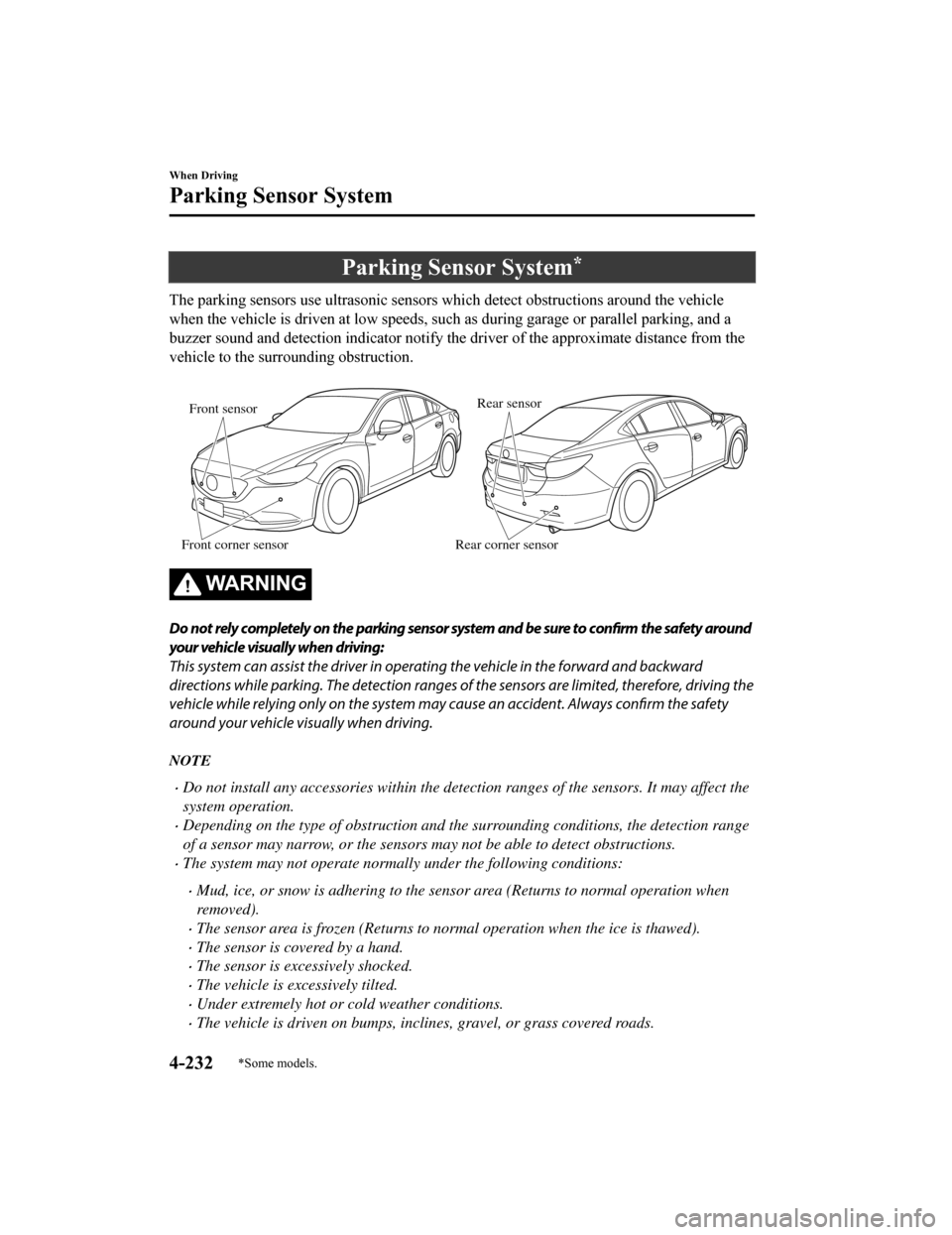
The parking sensors use ultrasonic sensors which detect obstructions around the vehicle
when the vehicle is driven at lo w speeds, such as during garage or parallel parking, and a
buzzer sound and detection indicator notify the driver of the a pproximate distance from the
vehicle to the surrounding obstruction.
Front sensor
Front corner sensor Rear sensor
Rear corner sensor
WA R N I N G
Do not rely completely on the parking sensor system and be sure to confirm the safety around
your vehicle visually when driving:
This system can assist the driver in opera ting the vehicle in the forward and backward
directions while parking. The detection ranges of the sensors are limited, therefore, driving the
vehicle while relying only on the system may cause an accident. Always confirm the safety
around your vehicle visually when driving.
NOTE
Do not install any accessories within the detection ranges of the sensors. It may affect the
system operation.
Depending on the type of obstruction and th e surrounding conditions, the detection range
of a sensor may narrow, or the sensors may not be able to detect obstructions.
The system may not operate norma lly under the following conditions:
Mud, ice, or snow is adhering to the sensor area (Returns to normal operation when
removed).
The sensor area is frozen (Returns to normal operation when the ice is thawed).
The sensor is covered by a hand.
The sensor is excessively shocked.
The vehicle is excessively tilted.
Under extremely hot or cold weather conditions.
The vehicle is driven on bumps, inclines, gravel, or grass covered roads.
When Driving
Parking Sensor System
4-232*Some models.
Mazda6_8HK6-EA-19A_Edition1 2018-11-15 9:36:06
Page 365 of 668

Anything which generates ultrasound is near the vehicle, such as another vehicle's
horn, the engine sound of a motorcycle, the air brake sound of a large-sized vehicle, or
another vehicle's sensors.
The vehicle is driven in heavy rain or in road conditions causing water-splash.
A commercially-available fender pole or an antenna for a radio transmitter is installed
to the vehicle.
The vehicle is moving towards a tall or square curbstone.
An obstruction is too close to the sensor.
Obstructions under the bumper may not be detected. Obstructions that are lower than the
bumper or thin which may have been initially detected may no longer be detected as the
vehicle approaches more closely to the obstruction.
The following types of obstructions may not be detected:
Thin objects such as wire or rope
Things which absorb sonic waves easily such as cotton or snow
Angular shaped objects
Very tall objects, and those which are wide at the top
Small, short objects
Always have the system inspected at an Authorized Mazda Dealer if any shock is applied
to the bumpers, even in a minor accident. If the sensors are deviated, they cannot detect
obstructions.
The system may have a malfunction if the beep does not operate or the indicator light
does not illuminate when the park assist sensors switch is turned on. Consult an
Authorized Mazda Dealer.
The system may have a malfunction if the beep sound which indicates a system
malfunction is heard and the i ndicator light flashes. Consult an Authorized Mazda Dealer.
The beeper which indicates a system malf unction may not be heard if the ambient
temperature is extremely cold, or mud, ice, or snow adheres to the sensor area. Remove
any foreign material from the sensor area.
When Driving
Parking Sensor System
4-233
Mazda6_8HK6-EA-19A_Edition1 2018-11-15 9:36:06
Page 368 of 668
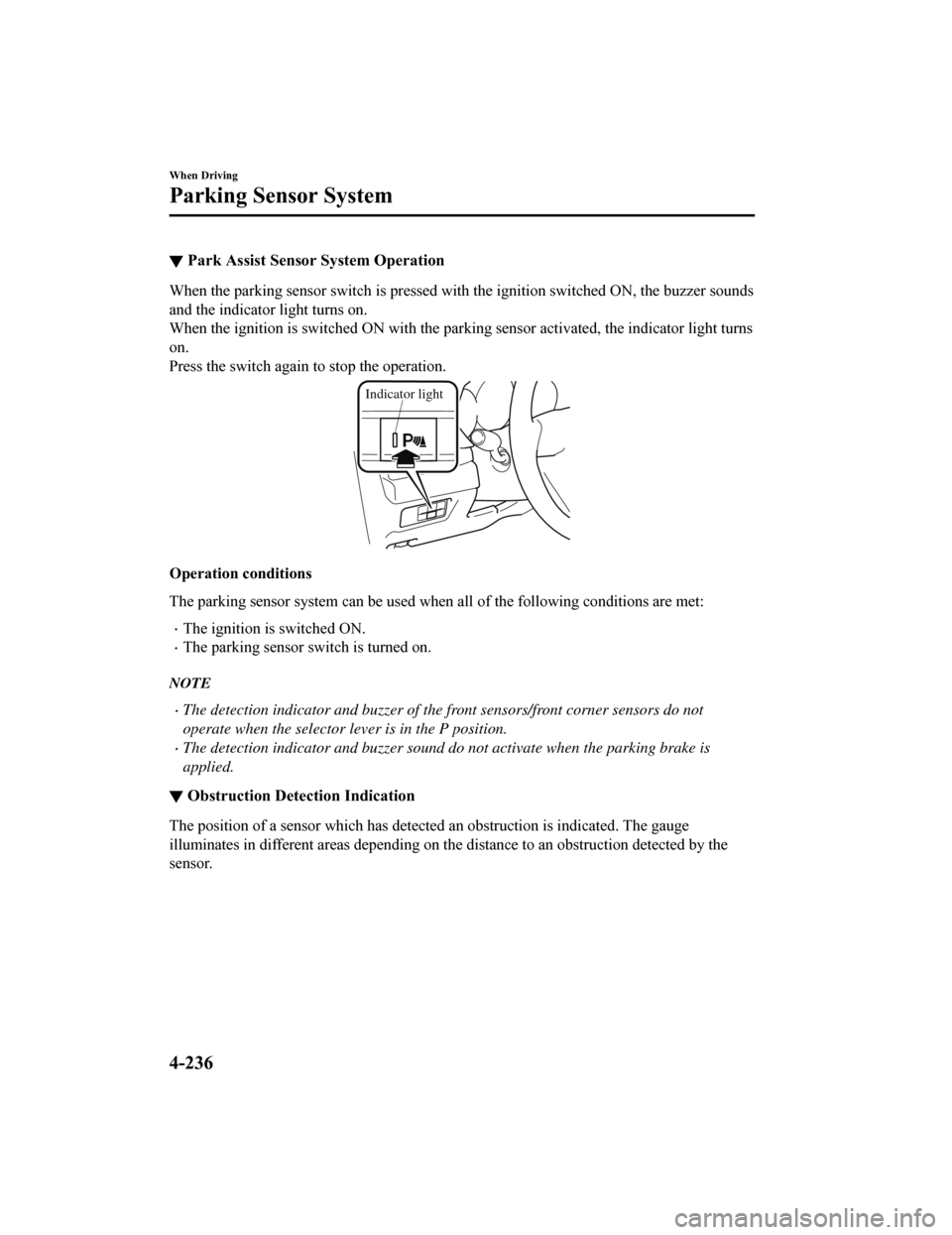
▼Park Assist Sensor System Operation
When the parking sensor switch i
s pressed with the ignition switched ON, the buzzer sounds
and the indicator light turns on.
When the ignition is switched ON with the parking sensor activated, the indicator light turns
on.
Press the switch again to stop the operation.
Indicator light
Operation conditions
The parking sensor system can be used when all of the following conditions are met:
The ignition is switched ON.
The parking sensor switch is turned on.
NOTE
The detection indicator and buzzer of the front sensors/front corner sensors do not
operate when the selector lever is in the P position.
The detection indicator and buzzer sound do not activate when the parking brake is
applied.
▼Obstruction Detection Indication
The position of a sensor which has detected an obstruction is i
ndicated. The gauge
illuminates in different areas d epending on the distance to an obstruction detected by the
sensor.
When Driving
Parking Sensor System
4-236
Mazda6_8HK6-EA-19A_Edition1 2018-11-15 9:36:06
Page 431 of 668

6. Slide the contact or move it using thecommander switch, then select
.
Changing contact name of your
favorites
1. Select the
icon on the home screen
to display the Communication screen.
2. Select
to display the favorites
list.
3. Select
.
4. Select
.
5. Select the contact to display the keyboard screen.
6. If a new name is input and
is
selected, the contact name is stored.
NOTE
If the contact is long-pressed when the
favorites list is displayed, the contact
information can be edited (deleted,
moved).
Telephone Number Input
NOTE
Practice this while parked until you are
confident you can do it while driving in a
non-taxing road situation. If you are not
completely comfortable, make all calls
from a safe parking position, and only
start driving when you can devote your
full attention to driving.
1. Select the
icon on the home screen
to display the Communication screen.
2. When
is pressed, the dial pad
is displayed.
3. Input the telephone number using the dial pad.
4. Select
to make the call.
Numeral or symbol entry
Use the dial pad.
Long-press the
to input +.
Select
to delete the currently input
value.
Long-press
to delete all input values.
Redial Function
Makes a call to the last person called
(latest person on outgoing call record)
from the mobile phone/vehicle.
1. Press the talk button.
2. Wait for the beep sound.
3. Say: “Redial”
Call back Function
Makes a call to the last person who called
your (latest person on incoming call
record) mobile phone/vehicle.
1. Press the talk button.
2. Wait for the beep sound.
3. Say: “Call back”
Mobile 911 (U.S.A./Canada only)
If the vehicle is involved in a moderate to
severe collision, a call is made
automatically to 911 from the connected
device. The “Emergency Assistance Call”
setting must be on.
Refer to Communication Settings on page
5-65.
CAUTION
Though the system can be set to not call
911, doing so will defe at the purpose of the
system. Mazda recommends that the
Mobile 911 system remain activated.
Interior Features
Audio Set
5-59
Mazda6_8HK6-EA-19A_Edition1 2018-11-15 9:36:06
Page 556 of 668
SignalWarning
Power Steering Mal‐
function Indication*
The message is displayed if the electric power steering has a m alfunction.
If the message is displayed, st op the vehicle in a safe place a nd do not operate the
steering wheel. There is no problem if the message in the displ ay turns off after a
while. Contact an Authorized Mazda Dealer if the message is dis played continuously.
NOTE
If the message is displayed, the power steering will not operate normally. In this
case, the steering wheel can still be operated, however, the operation may feel
heavy compared to normal, or the stee ring wheel could vibrate when turning.
Repeatedly jerking the steering wheel left and right while the vehicle is stopped or
moving extremely slowly will cause the po wer steering system to go into protective
mode which will make the steering feel heavy, but this does not indicate a problem.
If this occurs, park the vehicle safely and wait several minutes for the system to
return to normal.
Power Steering Mal‐ function Indicator
Light
*
The light illuminates/flashes if the electric power steering ha s a malfunction.
If the light illuminates/flashes, stop the vehicle in a safe pl ace and do not operate the
steering wheel. There is no problem if the light turns off afte r a while. Contact an Au‐
thorized Mazda Dealer if the lig ht illuminates/flashes continuously.
NOTE
If the indicator light illuminates/flashes , the power steering will not operate nor ‐
mally. If this happens, th e steering wheel can still be operated, however, the opera ‐
tion may feel heavy compared to normal, or the steering wheel could vibrate when
turning.
Repeatedly jerking the steering wheel left and right while the vehicle is stopped or
moving extremely slowly will cause the po wer steering system to go into protective
mode which will make the steering feel heavy, but this does not indicate a problem.
If this occurs, park the vehicle safely and wait several minutes for the system to
return to normal.
▼ Contact Authorized Mazda Deal
er and Have Vehicle Inspected
If any of the following warning lights o r the indicator light turns on/flashes, the system may
have a malfunction. Contact an Authorized Mazda Dealer to have your vehicle inspected.
SignalWarning
ABS Warning LightIf the ABS warning light stays
on while you're driving, the ABS control unit has detected
a system malfunction. If this occurs, your brakes will function normally as if the vehicle
had no ABS.
Should this happen, consult an A uthorized Mazda Dealer as soon as possible.
NOTE
When the engine is jump-started to charge the battery, uneven rpm occurs and the ABS
warning light may illuminate. If this occurs, it is the result of the weak battery and does
not indicate an ABS malfunction.
Recharge the battery.
The brake assist system does not operate while the ABS warning light is illuminated.
If Trouble Arises
Warning/Indicator Lights and Warning Sounds
7-26*Some models.
Mazda6_8HK6-EA-19A_Edition1 2018-11-15 9:36:06
Page 644 of 668

Function and how it can be changed (underlined item is initial setting)
The type of Lane-keep Assist System (LAS) & Lane Depar‐
ture Warning System (LDWS) warning can be changed. Vibration
/Beep/Rumbl.
The warning intensi‐
ty/volume of the sys‐
tem can be changed. Vibration High/Low
Rumbl.
High/Mid/Low
Beep High/Low
Blind Spot Monitoring (BSM) (page 4-122)
The system can be changed so that Blind Spot Monitoring
(BSM) does not operate.
*1On/Off
Warning beep volume
*2High/Low/Off
Distance Recognition Support System (DRSS) (page 4-136)
The system can be changed so that Distance Recognition
Support System (DRSS) does not operate.
*1On/Off
The distance at which the vehicle ahead and your vehicle in‐
dicated in the display flashes in white can be changed. Far/Med./Near
Traffic Sign Recognition System (TSR)*3 (page 4-128)
The Traffic Sign Recognition System (TSR) can be set to
inoperable.
*1On/Off
The warning pattern of the excessive speed warning can be
changed. Off
/Visual/Audio & Visual
The activation timing for the excessive speed warning can
be changed. +0 km/h (+0 mph)
/+5 km/h (+5 mph)/+10 km/h
(+10 mph)
360°View Monitor (page 4-177)
Setting can be changed so that the 360° view monitor is au‐
tomatically displayed when t he ignition is switched to ON. On/Off
Setting can be changed so that
the display of the estimated
forward line of progress is not displayed. On/Off
Setting can be changed so that the top view/front view dis‐
played while the vehicle is moving in the forward direction
after reversing is not displayed. On
/Off
Parking sensor system (page 4-236)
Display
*4/non-display On/Off
*1 Though these systems can be tur
ned Off, doing so will defeat the purpose of the system and Mazda
recommends that these systems remain On.
*2 Only the volume of the warning beep during Blind Spot Monitori ng (BSM) operation can be changed. The
volume of the warning beep durin g Rear Cross Traffic Alert (RCTA) operation cannot be changed.
*3 This system functions only when t he navigation system is functioning.*4 When the ultrasonic sensors detect an obstruction, the content s indicated on the center display switches to the
360°View Monitor.
Specifications
Personalization Features
9-12
Mazda6_8HK6-EA-19A_Edition1 2018-11-15 9:36:06