change time MAZDA MODEL 6 2019 (in English) Owner's Guide
[x] Cancel search | Manufacturer: MAZDA, Model Year: 2019, Model line: MODEL 6, Model: MAZDA MODEL 6 2019Pages: 668, PDF Size: 9.4 MB
Page 224 of 668

▼Gate operator/Canadian
Programming
Canadian radio-frequency laws require
transmitter signals to “time-out” (or quit)
after several seconds of transmission ―
which may not be long enough for
HomeLink to pick up
the signal during
programming. Similar to this Canadian
law, some U.S. gate operators are designed
to “time-out” in the same manner.
If you live in Canada or are having
difficulties programming a gate operator
by using the programming procedures
(regardless of where you live), replace
Step 3 of Programming the HomeLink
System with the following:
NOTE
If programming a garage door opener or
gate operator, it is advised to unplug the
device during the “cycling” process to
prevent possible overheating.
While the indicator light is flashing in
amber, press the button on the hand-held
transmitter for 2 sec onds and release it
repeatedly until the indicator light changes
from amber to green.
Go back to Step 4 of Programming the
HomeLink System to complete the
procedure.
▼ Operating the HomeLink System
Press the programmed HomeLink button
to operate a programmed device.
▼Reprogramming the HomeLink
system
To program a device to HomeLink using a
HomeLink button previously trained,
follow these steps:
1. Press and hold the desired HomeLink
button. DO NOT release the button.
2. After 20 seconds, the indicator light flashes in amber. After the indicator
light flashes, release the HomeLink
button.
3. Go back to Step 2 of Programming the HomeLink System to complete the
procedure.
NOTE
If the programming has not been
completed, the syst em returns to the
previous programming.
▼ Erasing Programmed HomeLink
Buttons
NOTE
All of the programmed HomeLink
buttons are reset.
Individual buttons
cannot be reset, however, individual
buttons can be reprogrammed. For
individual button reprogramming, refer
to Reprogramming the HomeLink
System (page 4-92).
Verify that the programming has been
erased if you resell the vehicle.
When Driving
Switches and Controls
4-92
Mazda6_8HK6-EA-19A_Edition1 2018-11-15 9:36:06
Page 241 of 668
Fuel Economy Monitor
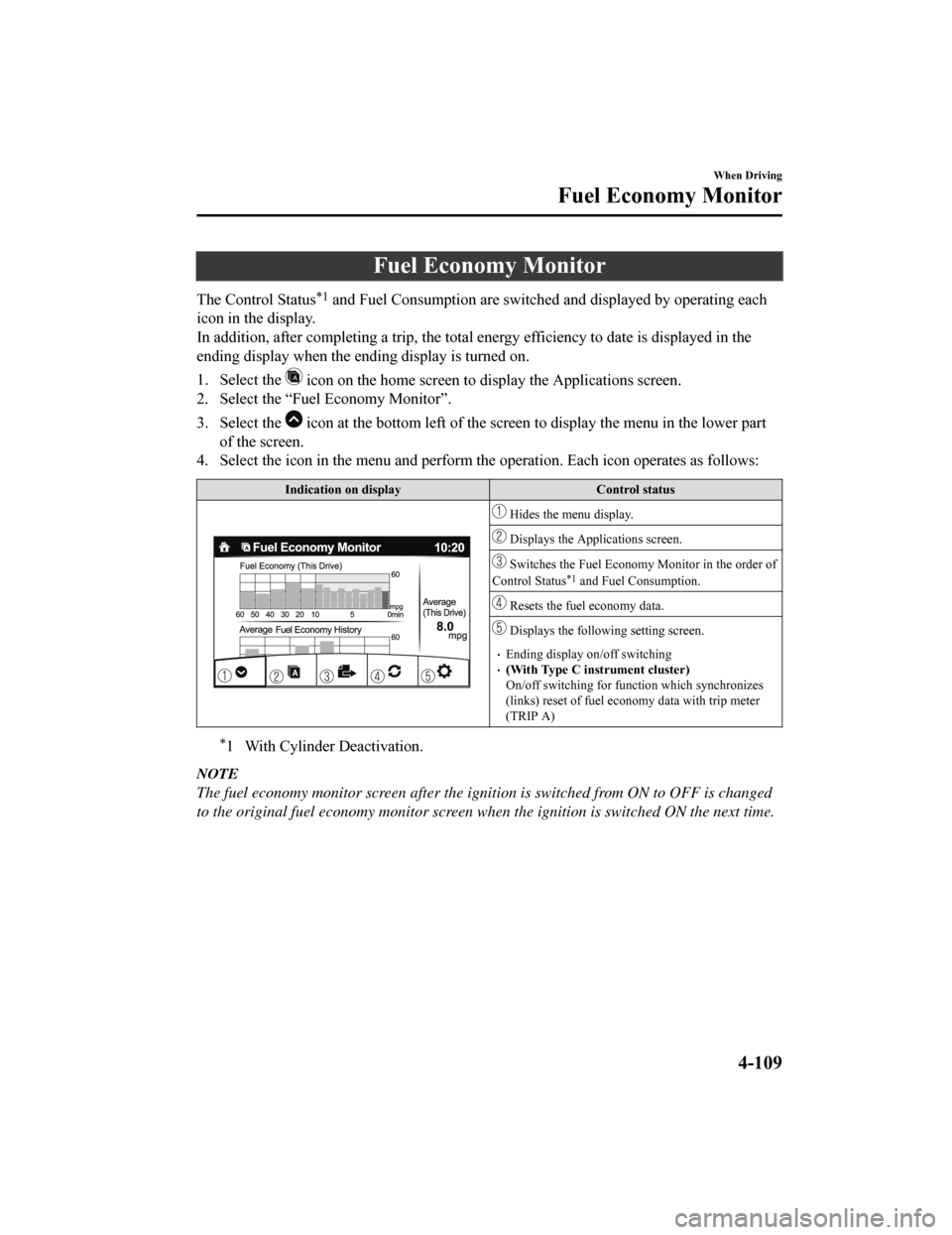
The Control Status*1 and Fuel Consumption are switched and displayed by operating each
icon in the display.
In addition, after completing a t rip, the total energy efficiency to date is displayed in the
ending display when the ending display is turned on.
1. Select the
icon on the home screen to display the Applications screen.
2. Select the “Fuel Economy Monitor”.
3. Select the
icon at the bottom left of the screen to display the menu in t he lower part
of the screen.
4. Select the icon in the menu and perform the operation. Each i con operates as follows:
Indication on display Control status
Hides the menu display.
Displays the Applications screen.
Switches the Fuel Economy Monitor in the order of
Control Status*1 and Fuel Consumption.
Resets the fuel economy data.
Displays the followi ng setting screen.
Ending display on/off switching(With Type C instrument cluster)
On/off switching for function which synchronizes
(links) reset of fuel econo my data with trip meter
(TRIP A)
*1 With Cylinder Deactivation.
NOTE
The fuel economy monitor screen after the ignition is switched from ON to OFF is changed
to the original fuel economy monitor screen wh en the ignition is switched ON the next time.
When Driving
Fuel Economy Monitor
4-109
Mazda6_8HK6-EA-19A_Edition1 2018-11-15 9:36:06
Page 252 of 668
NOTE
The timing in which the system switches the headlights changes under the following
conditions. If the system does not switch the headlights appropriately, manually switch
between high and low beams according to the visibility as well as road and traffic
conditions.
When there are sources of light in the area such as street lamps, illuminated signboards,
and traffic signals.
When there are reflective objects in the surrounding area such as reflective plates and
signs.
When visibility is reduced under rain, snow and foggy conditions.
When driving on roads with sharp turn or hilly terrain.
When the headlights/rear lamps of vehicles in front of you or in the opposite lane are dim
or not illuminated.
When there is insufficient darkness such as at dawn or dusk.
When the luggage compartment is loaded with heavy objects or the rear passenger seats
are occupied.
When visibility is reduced due to a vehicle in front of you spraying water from its tires
onto your windshield.
▼ To Operate the System
The HBC operates to sw
itch the headlights
automatically between high and low
beams after the ignition is switched ON
and the headlight switch is in the AUTO
and high beam position.
The HBC determines t hat it is dark based
on the brightness of the surrounding area.
At the same time, th e HBC indicator light
(green) in the instrument cluster
illuminates.
NOTE
When the vehicle speed is about 30 km/h
(19 mph) or more, the headlights
automatically switch to high beams
when there are no vehicles ahead or
approaching in the opposite direction.
When the vehicle speed is less than
about 20 km/h (12 mph), the HBC
switches the headlights to low beams.
The low beams may not switch to high
beams when cornering.
Operation of the HBC function can be
disabled. Refer to Vehicle Equipment on
page 9-13.
When Driving
i-ACTIVSENSE
4-120
Mazda6_8HK6-EA-19A_Edition1 2018-11-15 9:36:06
Page 255 of 668

NOTE
The BSM will operate when all of the following conditions are met:
The ignition is switched ON.
The BSM OFF indicator light in the instrument cluster is turned off.
The vehicle speed is about 10 km/h (6.3 mph) or faster.
The BSM will not operate under the following circumstances.
The vehicle speed falls below about 10 km/h (6.3 mph) even though the BSM OFF
indicator light is turned off.
The shift lever (manual transaxle)/selector lever (automatic transaxle) is shifted to
reverse (R) and the vehicle is reversing.
The turning radius is small (making a sharp turn, turning at intersections).
In the following cases, the BSM OFF indicator light turns on and operation of the system
is stopped. If the BSM OFF indicator light re mains illuminated, have the vehicle inspected
at an Authorized Mazda Dealer as soon as possible.
Some problem with the system including the BSM warning indicator lights is detected.
A large deviation in the installation position of a radar sensor (rear) on the vehicle has
occurred.
There is a large accumulation of snow or ice on the rear bumper near a radar sensor
(rear). Remove any snow, ice or mud on the rear bumper.
Driving on snow-covered roads for long periods.
The temperature near the radar sensors (rear) becomes extremely hot due to driving for
long periods on slopes during the summer.
The battery voltage has decreased.
Under the following conditions, the radar sensors (rear) cannot detect target objects or it
may be difficult to detect them.
A vehicle is in the detection area at the rear in an adjacent driving lane but it does not
approach. The BSM determines the condition based on radar detection data.
A vehicle is traveling alongside your vehicle at nearly the same speed for an extended
period of time.
Vehicles approaching in the opposite direction.
A vehicle in an adjacent driving lane is attempting to pass your vehicle.
A vehicle is in an adjacent lane on a road with extremely wide driving lanes. The
detection area of the radar sensors (rear) is set at the road width of expressways.
In the following case, the flashing of the BS M warning indicator light, and the activation
of the warning sound and the warning screen indicator display may not occur or they may
be delayed.
A vehicle makes a lane change from a driving lane two lanes over to an adjacent lane.
Driving on steep slopes.
Crossing the summit of a hill or mountain pass.
When Driving
i-ACTIVSENSE
4-123
Mazda6_8HK6-EA-19A_Edition1 2018-11-15 9:36:06
Page 264 of 668
A traffic sign is too bright or too dark (including electronic traffic signs).
A traffic sign is too big or too small.
There is an object similar to the traffic sign being read (such as another traffic sign or
other signs resembling it).
The TSR can be set to inoperable.
Refer to Safety Equipment on page 9-11.
▼Traffic Sign Display Indication
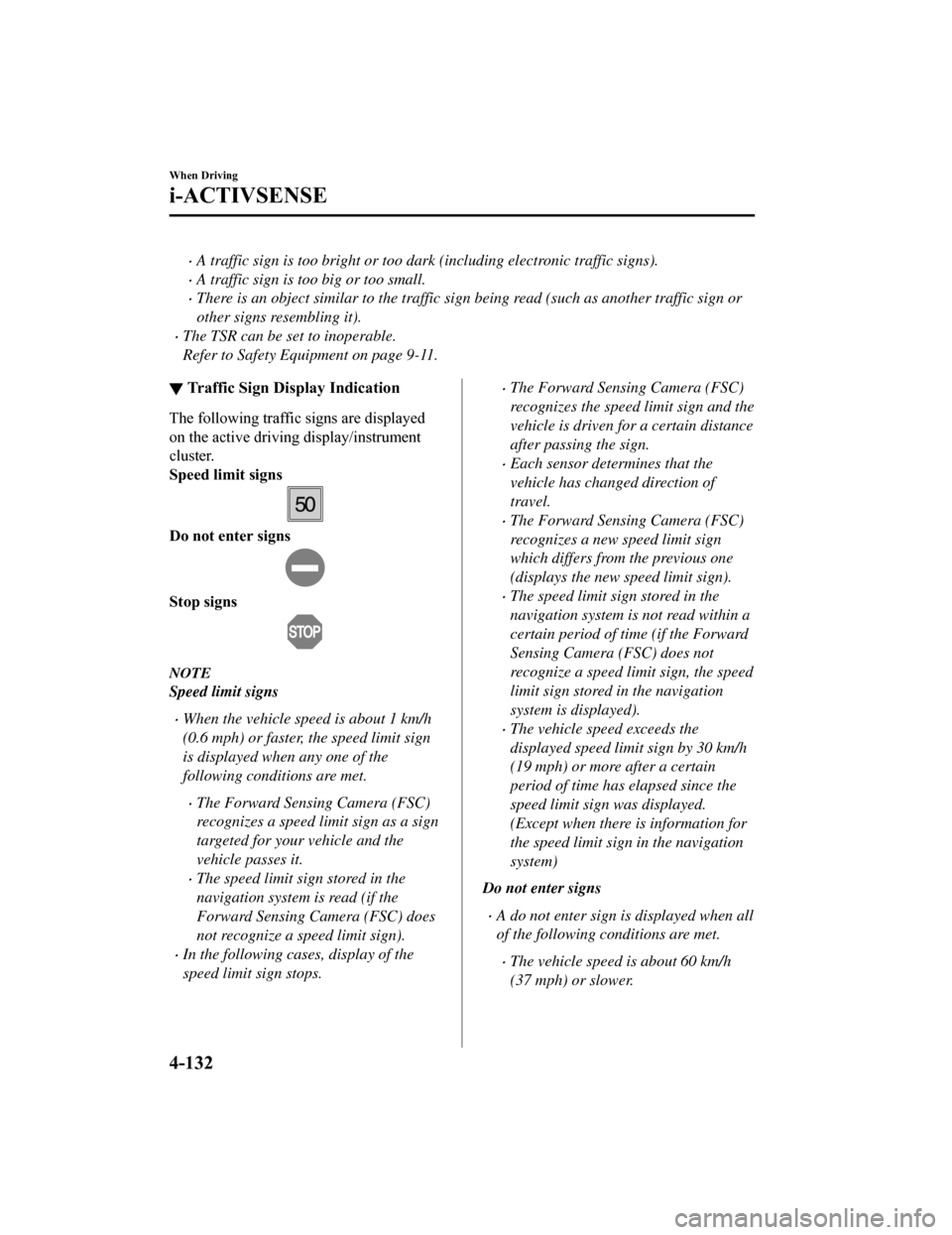
The following traffic signs are displayed
on the active driving display/instrument
cluster.
Speed limit signs
Do not enter signs
Stop signs
NOTE
Speed limit signs
When the vehicle speed is about 1 km/h
(0.6 mph) or faster, the speed limit sign
is displayed when any one of the
following conditions are met.
The Forward Sensing Camera (FSC)
recognizes a speed limit sign as a sign
targeted for your vehicle and the
vehicle passes it.
The speed limit sign stored in the
navigation system is read (if the
Forward Sensing Camera (FSC) does
not recognize a speed limit sign).
In the following cases, display of the
speed limit sign stops.
The Forward Sensing Camera (FSC)
recognizes the speed limit sign and the
vehicle is driven for a certain distance
after passing the sign.
Each sensor determines that the
vehicle has changed direction of
travel.
The Forward Sensing Camera (FSC)
recognizes a new speed limit sign
which differs from the previous one
(displays the new speed limit sign).
The speed limit sign stored in the
navigation system is not read within a
certain period of time (if the Forward
Sensing Camera (FSC) does not
recognize a speed limit sign, the speed
limit sign stored in the navigation
system is displayed).
The vehicle speed exceeds the
displayed speed limit sign by 30 km/h
(19 mph) or more after a certain
period of time has elapsed since the
speed limit sign
was displayed.
(Except when there is information for
the speed limit sign in the navigation
system)
Do not enter signs
A do not enter sign is displayed when all
of the following conditions are met.
The vehicle speed is about 60 km/h
(37 mph) or slower.
When Driving
i-ACTIVSENSE
4-132
Mazda6_8HK6-EA-19A_Edition1 2018-11-15 9:36:06
Page 266 of 668
▼Excessive Speed Warning
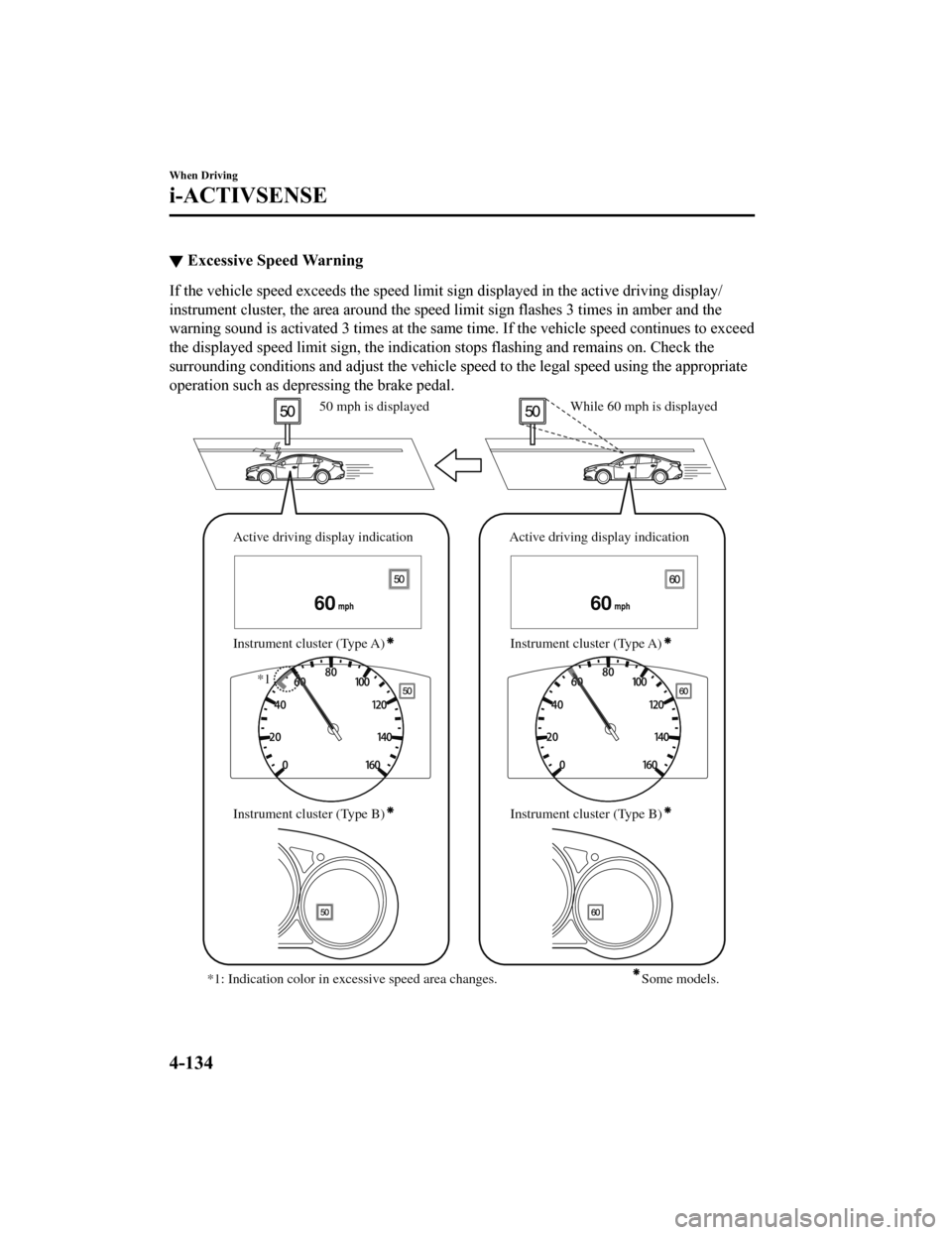
If the vehicle speed exceeds the speed limit sign displayed in
the active driving display/
instrument cluster, the area aro und the speed limit sign flashes 3 times in amber and the
warning sound is activated 3 tim es at the same time. If the vehicle speed continues to exceed
the displayed speed limit sign, the indication stops flashing and remains on. Check the
surrounding conditions and adjust the vehicle speed to the lega l speed using the appropriate
operation such as depressing the brake pedal.
6060
Active driving display indication
Instrument cluster (Type A) Active driving display indication
Instrument cluster (Type A)
While 60 mph is displayed
50 mph is displayed
Instrument cluster (Type B) Instrument cluster (Type B)
*1: Indication color in excessive speed area changes.
*1
Some models.
When Driving
i-ACTIVSENSE
4-134
Mazda6_8HK6-EA-19A_Edition1 2018-11-15 9:36:06
Page 267 of 668

The excessive speed warning is initially set to inoperable. If you want to activate the
excessive speed warning, change the setting in the personalizat ion features. In addition, the
warning pattern and the warning activation timing differ depending on the setting contents.
Refer to Safety Equipment on page 9-11.
Warning pattern
Off: The excessive speed warning is not activated.
Visual: The area around the speed limit sign displayed in the d isplay flashes 3 times in
amber, and if the vehicle speed continues to exceed the display ed speed limit sign, the
indication stops flashing and remains on.
Audio & Visual: The area around t he speed limit sign displayed in the display flashes 3
times in amber and the warning sound is activated 3 times at th e same time. If the vehicle
speed continues to exceed the displayed speed limit sign, the i ndication stops flashing and
remains on.
Warning activation timing
0: If the vehicle speed exceeds the speed limit sign displayed in the display, the
excessive speed warning is activated.
5: If the vehicle speed exceeds the speed limit sign displayed in the display by 5 km/h
(3 mph), the excessive speed warning is activated.
10: If the vehicle speed exceed s the speed limit sign displayed in the display by 10
km/h (5 mph), the excessive speed warning is activated.
NOTE
In the following cases, the excessive speed warning stops operating.
The vehicle speed is less than the speed of the displayed speed limit sign. (If the
activation timing for the exce ssive speed warning is changed in the personalization
features, the excessive speed warning stops operating when the vehicle speed is less
than the changed vehicle speed.
A speed limit sign indication has been updated and the vehicle speed is lower than the
updated indication.
Display of the speed limit sign stops.
The warning indication is displayed at the same time the excessive speed warning sound
is activated if the vehicle speed exceeds the speed indicated on the speed limit sign.
Refer to Warning Sound is Activated on page 7-42.
If the Forward Sensing Camera (FSC) incorrectly recognizes the actual speed limit sign
at a lower speed, the excessive speed alarm is activated even if the vehicle is driven at the
legal speed.
When Driving
i-ACTIVSENSE
4-135
Mazda6_8HK6-EA-19A_Edition1 2018-11-15 9:36:06
Page 269 of 668
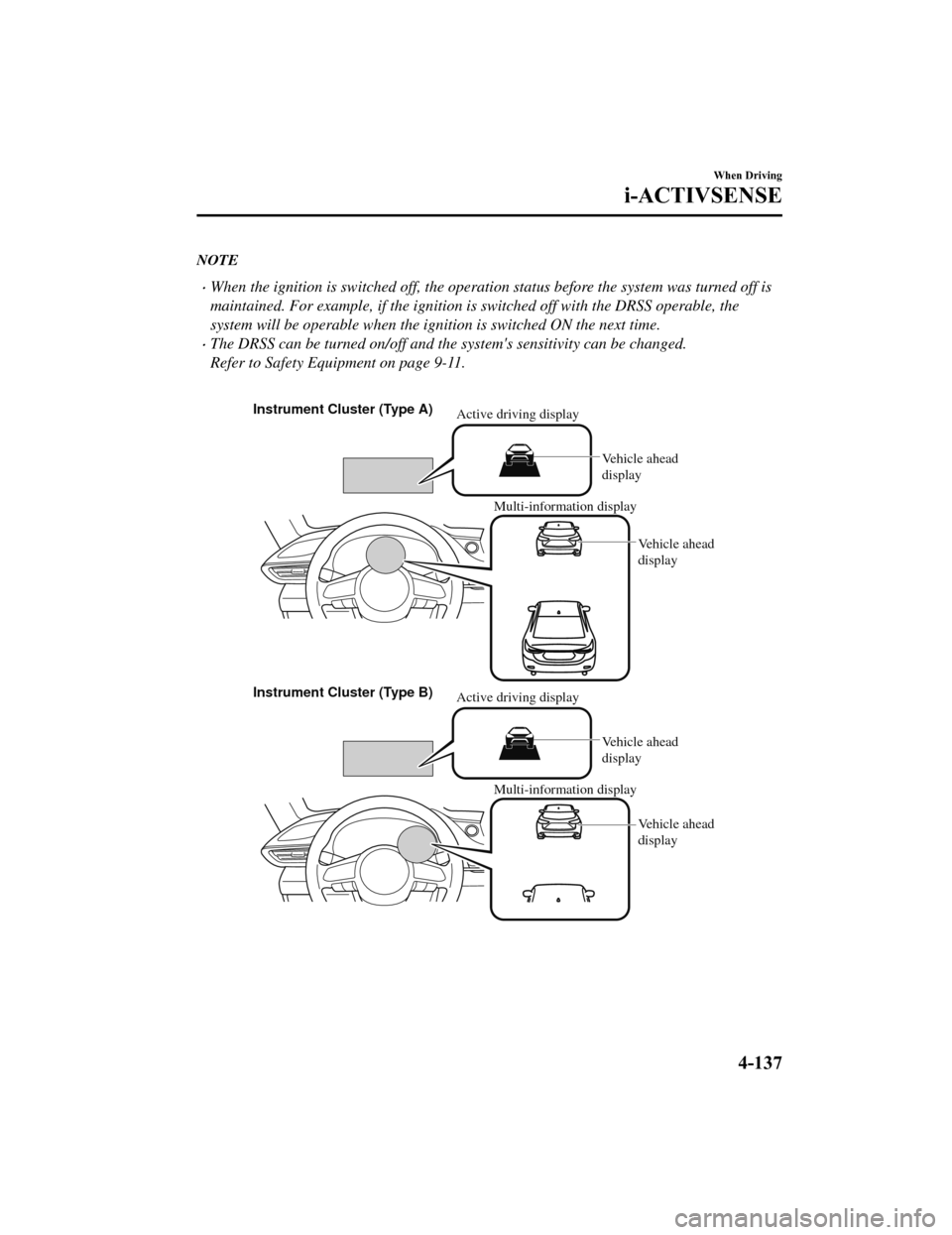
NOTE
When the ignition is switched off, the operation status be fore the system was turned off is
maintained. For example, if the ignition is switched off with the DRSS operable, the
system will be operable when the ignition is switched ON the next time.
The DRSS can be turned on/off and the system's sensitivity can be changed.
Refer to Safety Equipment on page 9-11.
Multi-information display Multi-information display
Active driving display
Instrument Cluster (Type A)
Instrument Cluster (Type B) Vehicle ahead
display
Vehicle ahead
display
Active driving display
Vehicle ahead
display
Vehicle ahead
display
When Driving
i-ACTIVSENSE
4-137
Mazda6_8HK6-EA-19A_Edition1 2018-11-15 9:36:06
Page 283 of 668
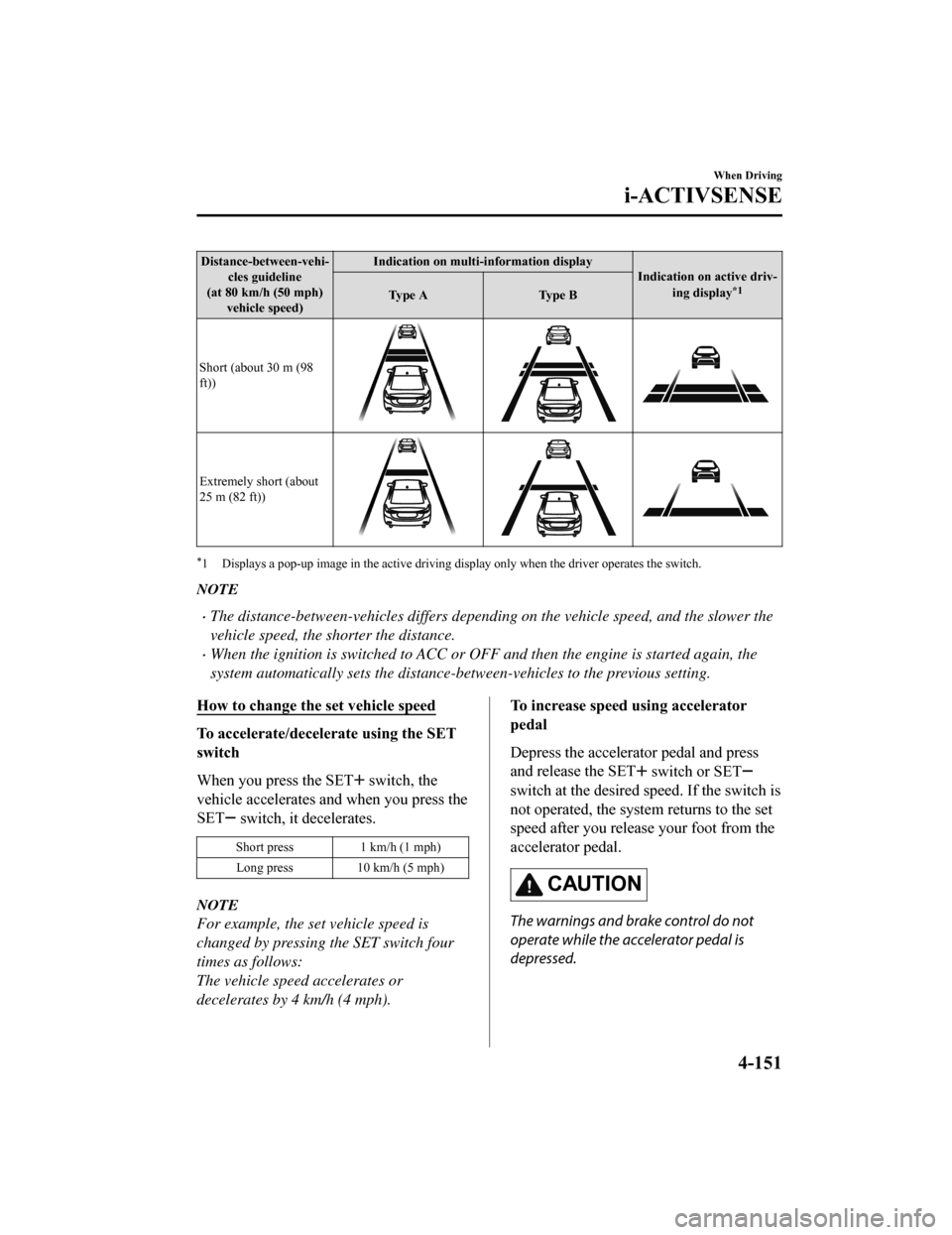
Distance-between-vehi‐cles guideline
(at 80 km/h (50 mph) vehicle speed) Indication on multi-information display
Indication on active driv‐
ing display
*1Ty p e A Ty p e B
Short (about 30 m (98
ft))
Extremely short (about
25 m (82 ft))
*1 Displays a pop-up image in the a ctive driving display only when the driver operates the switch.
NOTE
The distance-between-vehicles differs depending on the vehicle speed, and the slower the
vehicle speed, the shorter the distance.
When the ignition is switched to ACC or OFF and then the engine is started again, the
system automatically sets the distance-between-vehicles to the previous setting.
How to change the set vehicle speed
To accelerate/decelerate using the SET
switch
When you press the SET
switch, the
vehicle accelerates and when you press the
SET
switch, it decelerates.
Short press 1 km/h (1 mph)
Long press 10 km/h (5 mph)
NOTE
For example, the set vehicle speed is
changed by pressing the SET switch four
times as follows:
The vehicle speed accelerates or
decelerates by 4 km/h (4 mph).
To increase speed using accelerator
pedal
Depress the accelerator pedal and press
and release the SET
switch or SET
switch at the desired sp eed. If the switch is
not operated, the syste m returns to the set
speed after you release your foot from the
accelerator pedal.
CAUTION
The warnings and brake control do not
operate while the accelerator pedal is
depressed.
When Driving
i-ACTIVSENSE
4-151
Mazda6_8HK6-EA-19A_Edition1 2018-11-15 9:36:06
Page 284 of 668

NOTE
The setting speed can be changed by
operating the SET
switch or SET
switch during stop hold control.
When accelerating using the SET
switch while in headway control, the set
vehicle speed can be adjusted but
acceleration is not possible. If there is
no longer a vehicle ahead, acceleration
continues until reaching the set vehicle
speed. For the set vehicle speed, check
the set vehicle speed indication in the
display.
When depressing the accelerator pedal,
the inter-vehicle distance indication in
the display changes to the white-line
indication.
Canceling the system
When the following operations are
performed, the MRCC with Stop & Go
function system is canceled, and the
MRCC with Stop & Go function set
indication (green) sw itches to the MRCC
with Stop & Go function main indication
(white) at the same time.
The OFF/CANCEL switch is pressed.
The brake pedal is depressed.
The parking brake is applied.
The selector lever is in the P (Park), N
(Neutral), or R (Reverse) position.
Under the following conditions, the
MRCC with Stop & Go function cancel
indication is displayed in the
multi-information display and a single
beep sound is heard.
The DSC has operated.
The Smart Brake Support (SBS) has
operated.
The Smart City Brake Support (SCBS)
or Advanced Smart City Brake Support
(Advanced SCBS) has operated.
When traveling on a downslope for a
long period of time.
There is a problem with the system.
The engine has stalled.
Any of the doors is opened.
The driver's seat belt is unfastened.
The parking brake is automatically
applied during stop hold control.
The radar sensor (front) cannot detect
target objects (during rain, fog, snow or
other inclement weather conditions, or
when the radiator grille is dirty).
Resuming control
If the MRCC with St op & Go function
system is canceled, you can resume
control at the previously set speed by
pressing the RES switch and after all of
the operation conditions have been met.
NOTE
If the set speed is not indicated in the
display, the control does not resume even
if the RES switch is pressed.
Turning off the system
Press the OFF/CANCEL switch 2 times
while the MRCC with Stop & Go function
system is operating to switch off the
system.
When Driving
i-ACTIVSENSE
4-152
Mazda6_8HK6-EA-19A_Edition1 2018-11-15 9:36:06