change time MAZDA MODEL 6 2019 (in English) Workshop Manual
[x] Cancel search | Manufacturer: MAZDA, Model Year: 2019, Model line: MODEL 6, Model: MAZDA MODEL 6 2019Pages: 668, PDF Size: 9.4 MB
Page 623 of 668
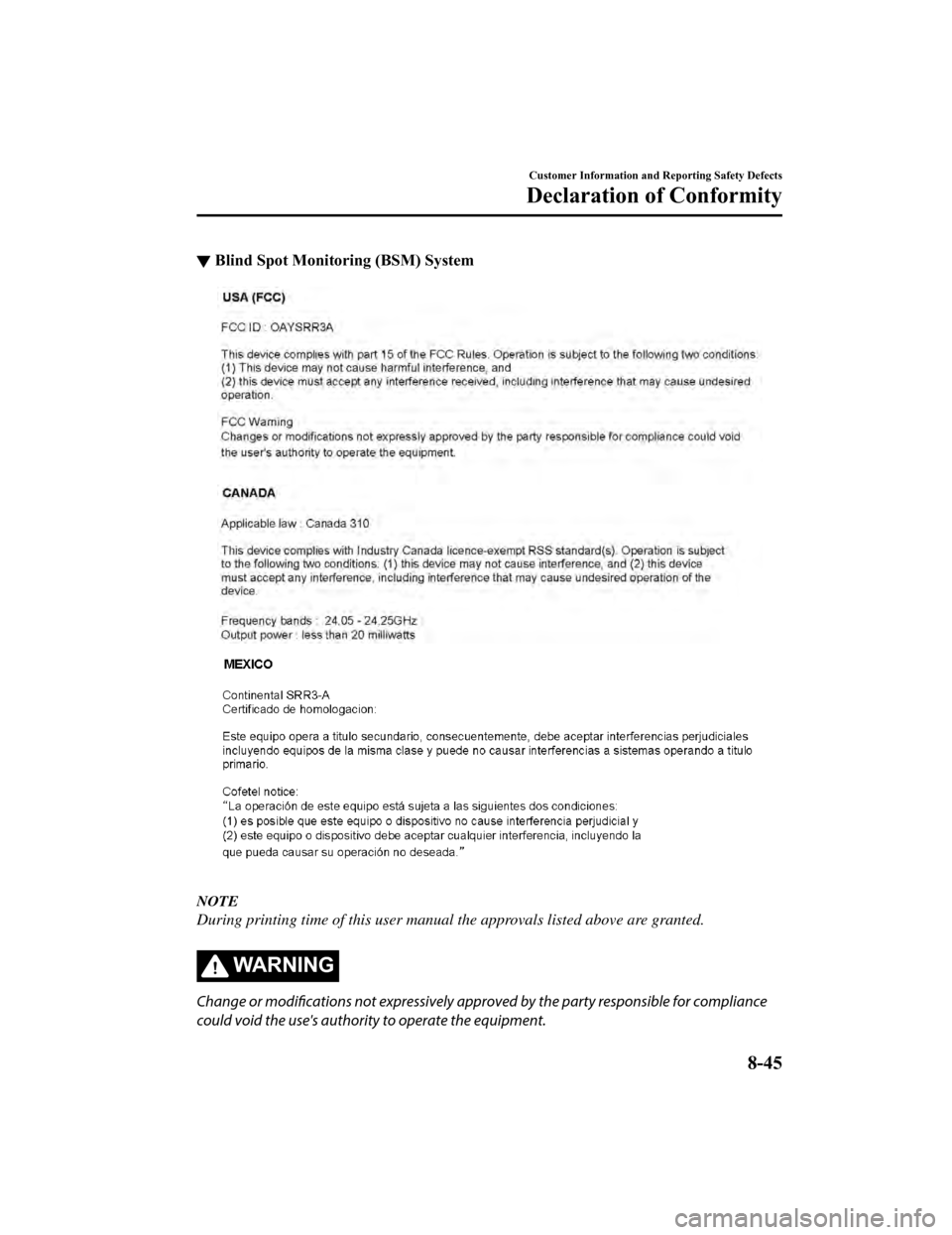
▼Blind Spot Monitoring (BSM) System
NOTE
During printing time of this user manual the approvals listed above are granted.
WA R N I N G
Change or modifications not expressively appr
oved by the party responsible for compliance
could void the use's authority to operate the equipment.
Customer Information and Reporting Safety Defects
Declaration of Conformity
8-45
Mazda6_8HK6-EA-19A_Edition1 2018-11-15 9:36:06
Page 642 of 668

Personalization Features
▼Changeable System Settings/Equipment List
Safety Equipment (page 9-11)
Advanced Smart City Brake Support (Advanced SCBS)
Smart City Brake Support (SCBS)
Smart Brake Support (SBS)
Lane-keep Assist System (LAS) & Lane Departure Warning System (
LDWS)
Blind Spot Monitoring (BSM)
Distance Recognition Support System (DRSS)
Traffic Sign Recognition System (TSR)
Vehicle Equipment (page 9-13)
Illuminated entry system
Auto-wiper control
Auto headlight off
Auto-light control
High Beam Control System (HBC)
Adaptive Front Ligh ting System (AFS)
Lights-on reminder
Coming home light
Leaving home light
Turn signal indicator
Three-flash turn signal
Ambient lights
Other Equipment/Functions (page 9-14)
Door locks
Keyless entry system
Advanced keyless entry system
Active Driving Display
Fuel Economy Monitor
Display
Sound quality
Clock
Each system
Daytime running lights
Rear window defogger
Specifications
Personalization Features
9-10
Mazda6_8HK6-EA-19A_Edition1 2018-11-15 9:36:06
Page 645 of 668

▼Vehicle Equipment
You can change t
he function settings acco rding to your preference.
Personalization features which c an be changed differ depending on the vehicle specifica‐
tion.
Personalization features which can be changed may change withou t notice depending on
software updates.
The following personalization features can be set or changed by the customer or an Author‐
ized Mazda Dealer. Consult an Authorized Mazda Dealer for detai ls.
Personalization features which can be changed differ depending on the specification.
Setting change method
1. Select on the home screen and display the setting screen.
2. Switch the tab to [Vehicle] and select the setting item you w ant to change.
Function and how it can be changed (underlined item is initial setting)
Illuminated entry system (page 5-87)
Time until interior lights turn off after closing door 60 second s/30 seconds/15 seconds
/7.5 seconds
Time until interior lights turn off automatically when any
door is not closed completely 60 minutes/30 minutes
/10 minutes
Auto-wiper control (page 4-80)
Operational/non-operational On
/Off*1
Auto headlight off*2 (page 4-74)
Time until headlights turn off 120 seconds/90 seconds/60 seconds/30 seconds
/
Off*3
Auto-light control (page 4-74)
Timing by which lights turn on Low/Med. Low/Medium
/Med. High/High
High Beam Control System (HBC) (page 4-119)
Operational/non-operational
*4On/Off
Adaptive Front Lighting System (AFS) (page 4-118)
Operational/non-operational
*4On/Off
Lights-on reminder
*5 (page 7-42)
Warning beep volume High
/Low/Off
Coming home light (page 4-77)
Time until headlights turn off 120 seconds/90 seconds/60 seconds/30 seconds
/Off
Leaving home light (page 4-78)
Operational/non-operational On
/Off
Turn signal indicator (page 4-79)
Beep volume High
/Low
Specifications
Personalization Features
9-13
Mazda6_8HK6-EA-19A_Edition1 2018-11-15 9:36:06
Page 646 of 668

Function and how it can be changed (underlined item is initial setting)
Three-flash turn signal (page 4-79)
Operational/non-operational On
/Off
Ambient lights (page 4-79)
Ambient lights brightness
*6Bright/Medium/Dim/Off
*1 If the auto-wiper control is set to Off, the wiper lever position is set to in termittent operation.*2 If the setting is changed to O ff, the following operation is performed according to the headlight switch
position:
At position: Headlights turn off immediately after the ignition i s switched off.At any position other than : Headlights on/off conditions vary according to the headlight switch
position. Refer to Headlights on page 4-74.
*3 When set to Off, the lights-on reminder is operable.*4 Though these systems can be tur ned Off, doing so will defeat the purpose of the system and Mazda
recommends that these systems remain On.
*5 The lights-on reminder settings can be changed at anytime, how ever, the lights-on reminder only operates
when the auto headlight function is set to Off. Refer to Lights-On Reminder on page 7-42.
*6 Change the ambient light illumin ation level with the parking lights or headlights turned on.
▼Other Equipment/Functions
You can change the function settings according to your preferen
ce.
Personalization features which can be changed differ depending on the vehicle
specification.
Personalization features which can be changed may change withou t notice depending on
software updates.
The following personalization feat ures can be set or changed by the customer or an
Authorized Mazda Dealer. Consult an Authorized Mazda Dealer for details.
Personalization features which can be changed differ depending on the specification.
Door locks
Method for changing the auto lock/unlock functions using the do or-lock switch
NOTE
Function number 3 in the following table is the factory setting for your vehicle.
Specifications
Personalization Features
9-14
Mazda6_8HK6-EA-19A_Edition1 2018-11-15 9:36:06
Page 647 of 668

There are only a total of six auto lock/unlock settings available for automatic transaxle
vehicles, and three for manual transaxle vehicles. Be sure to press the unlock side of the
door-lock switch the correct number of times according to the selected function number. If
the switch is mistakenly pressed seven times on an automatic transaxle vehicle or four
times on a manual transaxle, the procedure will be cancelled. If this occurs, start the
procedure from the beginning.
Function number Function*1
1The auto door-lock function is disabled.
2 All the doors lock automatically
when the vehicle speed is about 20 km/h (12 mph)
or more.
3 (Factory Setting) All the doors lock automatically
when the vehicle speed is about 20 km/h (12 mph)
or more. All the doors unlock when the ignition is switched fro m ON to Off.
4 (Automatic transaxle vehicles only)
When the ignition is switched ON and the selector lever is shif
ted from park (P) to
any other gear position, all th e doors lock automatically.
5 (Automatic transaxle vehicles only)
When the ignition is switched ON and the selector lever is shif
ted from park (P) to
any other gear position, all th e doors lock automatically.
When the selector lever is shifted to park (P) while the igniti on is switched ON, all
the doors unlock automatically.
6 (Automatic transaxle vehicles only)
All the doors lock automatically
when the vehicle speed is about 20 km/h (12 mph)
or more.
When the selector lever is shifted to park (P) while the igniti on is switched ON, all
the doors unlock automatically.
*1 Other settings for the auto door lock function are available at an Authorized Mazda Dealer. For details consult
an Authorized Mazda Dealer
1. Safely park the vehicle. All doors must remain closed.
2. Switch the ignition ON.
3. Press and hold the lock side o f the driver's door-lock switch within 20 seconds of
switching the ignition ON, and make sure a beep sound is heard about eight seconds
afterwards.
4. Refer to the auto lock/unlock function setting table, determi ne the function number for
the desired setting. Press the un lock side of the driver's door-lock switch the same
number of times as the selected function number (Ex. If you sel ect function 2, press the
unlock side of the switch only 2 times).
5. Three seconds after the functi on setting has been changed, a beep sound will beep in the
amount of the selected function number. (Ex. Function number 3 = 3 beep sounds)
Specifications
Personalization Features
9-15
Mazda6_8HK6-EA-19A_Edition1 2018-11-15 9:36:06
Page 649 of 668
![MAZDA MODEL 6 2019 (in English) Workshop Manual Method for changing functions using the center display
1. Select
on the home screen and display the setting screen.
2. Switch the tab to [Vehicle] and select the setting item you w ant to change.](/img/28/13475/w960_13475-648.png "MAZDA MODEL 6 2019 (in English) Workshop Manual Method for changing functions using the center display
1. Select
on the home screen and display the setting screen.
2. Switch the tab to [Vehicle] and select the setting item you w ant to change.")
Method for changing functions using the center display
1. Select
on the home screen and display the setting screen.
2. Switch the tab to [Vehicle] and select the setting item you w ant to change.
Function and how it can be changed (underlined item is initial setting)
Door locks (page 3-14)
Operation condition of aut o lock/unlock function Lock: Out of Park
Unlock: In Park/
Lock: Shifting Out of Park/
Lock: When Driving Unlock: In Park/
Lock: When Driving Unlock: IGN Off
/
Lock: When Driving/ Off
Keyless entry system
Method for changing the unloc k functions using the key
1. Switch the ignition off and close all of the doors and the tr unk lid.
2. Open the driver's door.
3. Within 30 seconds of opening the driver's door, press and hol d the UNLOCK button on
the key for 5 seconds or longer (the sound of the doors locking /unlocking can be heard).
After this, the system switches the setting of pressing the dri ver's request switch once or
twice to unlock all doors each time the UNLOCK button is presse d (the sound of the
doors locking/unlocking can be heard).
4. The setting change is completed by doing any one of the follo wing:
Switching the ignition to ACC or ON.
Closing the driver's door.
Opening the trunk lid.
Not operating the key for ten seconds.
Pressing any button except the UNLOCK button on the key.
Pressing a request switch.
Specifications
Personalization Features
9-17
Mazda6_8HK6-EA-19A_Edition1 2018-11-15 9:36:06
Page 650 of 668
![MAZDA MODEL 6 2019 (in English) Workshop Manual Method for changing functions using the center display
1. Select
on the home screen and display the setting screen.
2. Switch the tab to [Vehicle] and select the setting item you want to change.
Fu](/img/28/13475/w960_13475-649.png "MAZDA MODEL 6 2019 (in English) Workshop Manual Method for changing functions using the center display
1. Select
on the home screen and display the setting screen.
2. Switch the tab to [Vehicle] and select the setting item you want to change.
Fu")
Method for changing functions using the center display
1. Select
on the home screen and display the setting screen.
2. Switch the tab to [Vehicle] and select the setting item you want to change.
Function and how it can be changed (underlined item is initial setting)
Keyless entry system (page 3-3)
Method for un locking door using trans mitter All Doors: Once/Driv er's: Once, All Doors: Twice
Time for locking door automatically 90 seconds/60 seconds/30 seconds
Advanced keyless entry system
Method for changing the unlo ck functions using the key
1. Switch the ignition off and close all of the doors and the tr unk lid.
2. Open the driver's door.
3. Within 30 seconds of opening the driver's door, press and hol d the UNLOCK button on
the key for 5 seconds or longer (the sound of the doors locking /unlocking can be heard).
After this, the system switches the setting of pressing the driver's request switch once or
twice to unlock all doors each time the UNLOCK button is presse d (the sound of the
doors locking/unlocki ng can be heard).
4. The setting change is completed by doing any one of the follo wing:
Switching the ignition to ACC or ON.
Closing the driver's door.
Opening the trunk lid.
Not operating the key for ten seconds.
Pressing any button except the UNLOCK button on the key.
Pressing a request switch.
How to change the volume of the door lock/unlock beep sound
1. Switch the ignition off and close all of the doors and the tr unk lid.
2. Open the driver's door.
3. Within 30 seconds of opening the driver's door, press and hold the LOCK button on the
key for 5 seconds or longer. (All of the doors and the liftgate are locked and unlocked
when the LOCK button on the key is pressed and held for 5 secon ds.)
The beep sound activates at the currently set volume. The setting changes each time the
LOCK button on the key is pressed and the beep sound activates at the set volume. (If
the beep sound has been set to not activate, it will not activa te.)
4. The setting change is completed by doing any one of the follo wing:
Switching the ignition to ACC or ON.
Closing the driver's door.
Specifications
Personalization Features
9-18
Mazda6_8HK6-EA-19A_Edition1 2018-11-15 9:36:06
Page 651 of 668
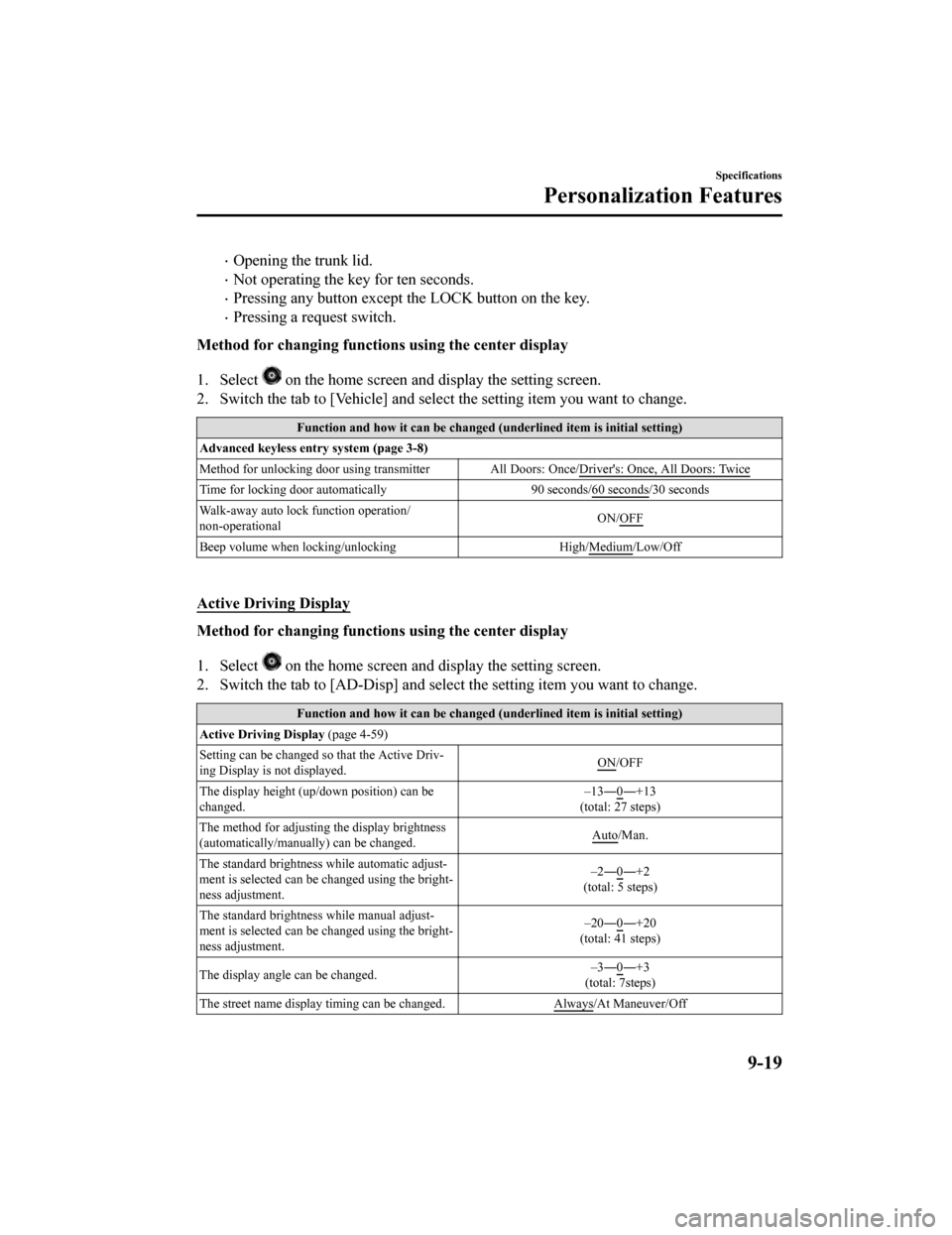
Opening the trunk lid.
Not operating the key for ten seconds.
Pressing any button except the LOCK button on the key.
Pressing a request switch.
Method for changing functions using the center display
1. Select
on the home screen and display the setting screen.
2. Switch the tab to [Vehicle] and select the setting item you w ant to change.
Function and how it can be changed (underlined item is initial setting)
Advanced keyless entry system (page 3-8)
Method for unlocking door using transmitter All Doors: Once/Driv er's: Once, All Doors: Twice
Time for locking door automatically 90 seconds/60 seconds/30 seconds
Walk-away auto lock function operation/
non-operational ON/OFF
Beep volume when locking/unlocking
High/Medium/Low/Off
Active Driving Display
Method for changing functions using the center display
1. Select
on the home screen and display the setting screen.
2. Switch the tab to [AD-Disp] an d select the setting item you want to change.
Function and how it can be changed (underlined item is initial setting)
Active Driving Display (page 4-59)
Setting can be changed so that the Active Driv‐
ing Display is not displayed. ON
/OFF
The display height (up/down position) can be
changed. –13―0
―+13
(total: 27 steps)
The method for adjusting the display brightness
(automatically/manually) can be changed. Auto
/Man.
The standard brightness while automatic adjust‐
ment is selected can be changed using the bright‐
ness adjustment. –2―0
―+2
(total: 5 steps)
The standard brightness while manual adjust‐
ment is selected can be changed using the bright‐
ness adjustment. –20―0
―+20
(total: 41 steps)
The display angle can be changed. –3―0
―+3
(total: 7steps)
The street name display ti ming can be changed. Always
/At Maneuver/Off
Specifications
Personalization Features
9-19
Mazda6_8HK6-EA-19A_Edition1 2018-11-15 9:36:06
Page 653 of 668
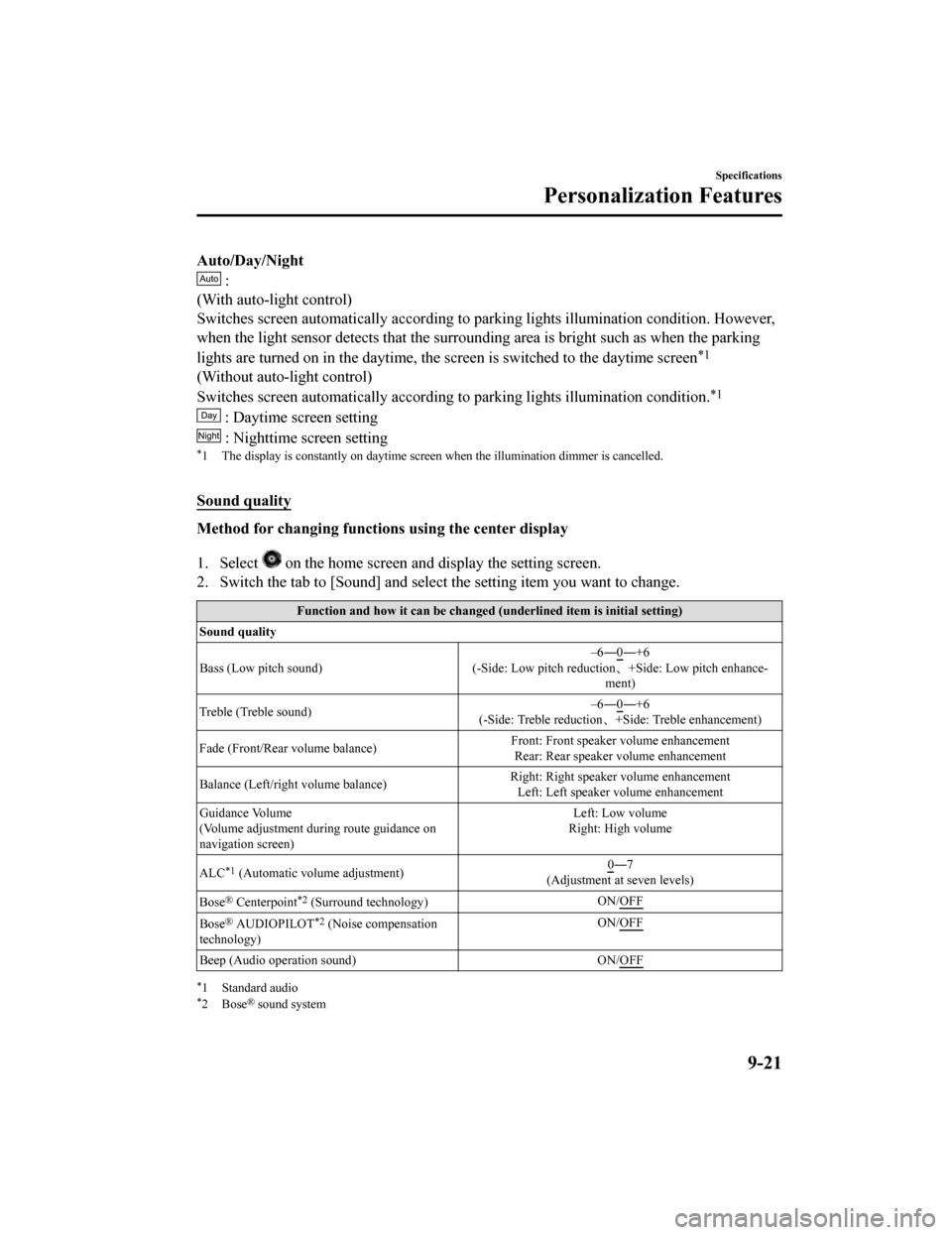
Auto/Day/Night
:
(With auto-light control)
Switches screen automatically according to parking lights illum ination condition. However,
when the light sensor detects that the surrounding area is brig ht such as when the parking
lights are turned on in the dayti me, the screen is switched to the daytime screen
*1
(Without auto-light control)
Switches screen automatically according to parking lights illum ination condition.
*1
: Daytime screen setting
: Nighttime screen setting*1 The display is constantly on daytime screen when the illuminat ion dimmer is cancelled.
Sound quality
Method for changing functions using the center display
1. Select
on the home screen and display the setting screen.
2. Switch the tab to [Sound] and select the setting item you wan t to change.
Function and how it can be changed (underlined item is initial setting)
Sound quality
Bass (Low pitch sound) –6―0
―+6
(-Side: Low pitch reduction 、+Side: Low pitch enhance‐
ment)
Treble (Treble sound) –6―0
―+6
(-Side: Treble reduction 、+Side: Treble enhancement)
Fade (Front/Rear volume balance) Front: Front speaker volume enhancement
Rear: Rear speaker volume enhancement
Balance (Left/right volume balance) Right: Right speaker volume enhancement
Left: Left speaker v olume enhancement
Guidance Volume
(Volume adjustment during route guidance on
navigation screen) Left: Low volume
Right: High volume
ALC
*1 (Automatic volume adjustment) 0―7
(Adjustment at seven levels)
Bose
® Centerpoint*2 (Surround technology) ON/OFF
Bose® AUDIOPILOT*2 (Noise compensation
technology) ON/OFF
Beep (Audio operation sound)
ON/OFF
*1 Standard audio*2Bose® sound system
Specifications
Personalization Features
9-21
Mazda6_8HK6-EA-19A_Edition1 2018-11-15 9:36:06
Page 655 of 668
![MAZDA MODEL 6 2019 (in English) Workshop Manual Clock
Method for changing functions using the center display
1. Select
on the home screen and display the setting screen.
2. Switch the tab to [Clock] and select the setting item you wan t to change](/img/28/13475/w960_13475-654.png "MAZDA MODEL 6 2019 (in English) Workshop Manual Clock
Method for changing functions using the center display
1. Select
on the home screen and display the setting screen.
2. Switch the tab to [Clock] and select the setting item you wan t to change")
Clock
Method for changing functions using the center display
1. Select
on the home screen and display the setting screen.
2. Switch the tab to [Clock] and select the setting item you wan t to change.
Function and how it can be changed (underlined item is initial setting)
Clock
Adjust Time The time can be adjusted when the GPS sync function is
turned off.
Press + to advance the hour/min
ute, and select - to move the
hour/minute back.
AM/PM can only be selected with the 12-hour clock display.
GPS Sync ON
/OFF
Time Format 12h
/24h
Time Zone Select When it's not synchronized w
ith GPS, select the region you
want to specify.
Daylight Savings Time Turns the daylight saving time setting on/off.
When ON, the time advances 1 hour. When OFF, it returns to
normal time.
Devices
Method for changing functions using the center display
1. Select
on the home screen and display the setting screen.
2. Switch the tab to [Devices] a nd select the setting item you want to change.
Function and how it can be changed
Devices
Bluetooth Refer to Bluetooth
® Preparation on page Reference 5-44.
Android Auto An Android Auto™ mode connection can be set on or off
when connecting an Android™ Smartphone.
The setting takes effect direct
ly after switching on/off.
Displays in gray and cannot be selected if an Android™
Smartphone is not connected.
Specifications
Personalization Features
9-23
Mazda6_8HK6-EA-19A_Edition1 2018-11-15 9:36:06