ad blue MAZDA MODEL 6 2020 (in English) User Guide
[x] Cancel search | Manufacturer: MAZDA, Model Year: 2020, Model line: MODEL 6, Model: MAZDA MODEL 6 2020Pages: 702
Page 397 of 702
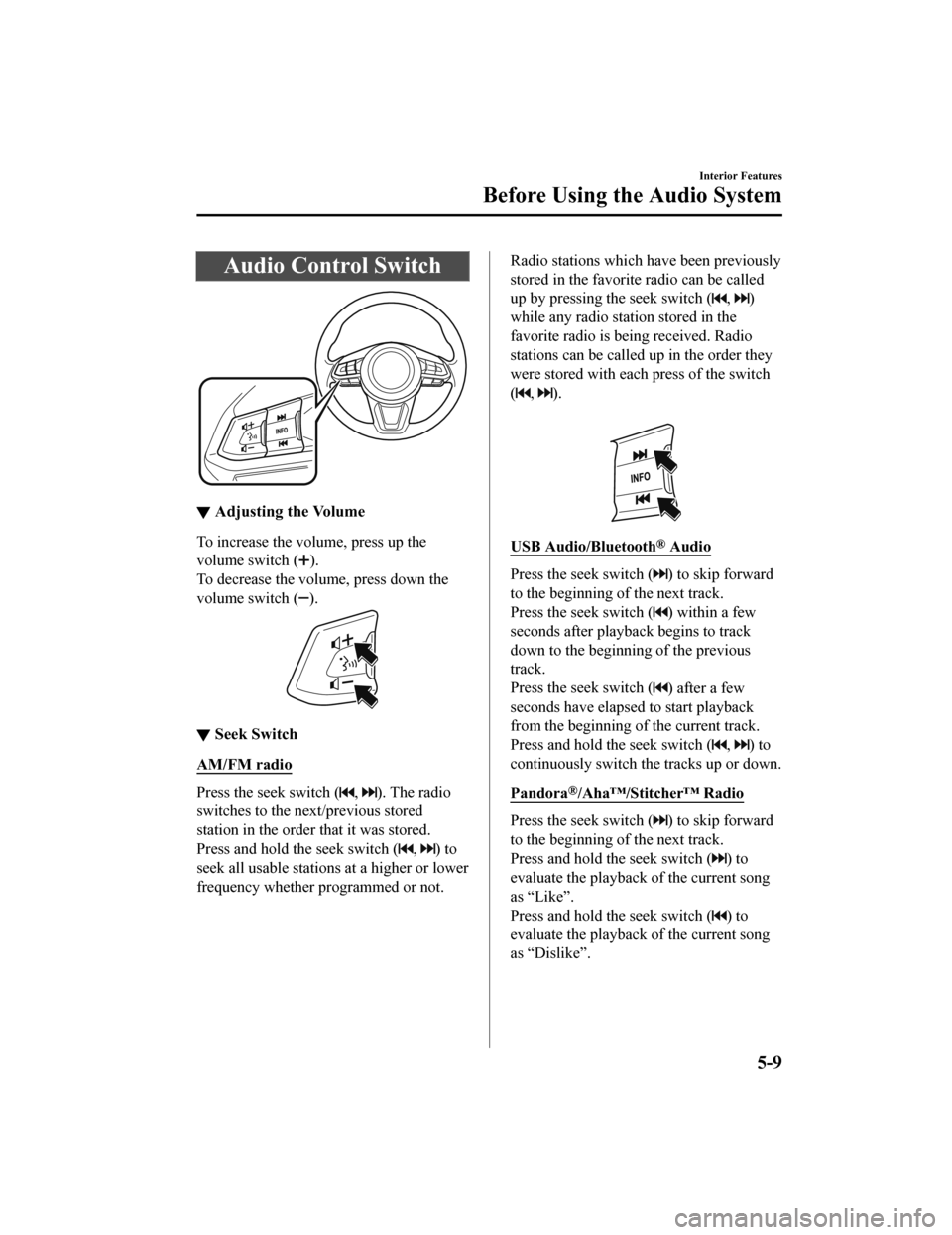
Audio Control Switch
▼Adjusting the Volume
To increase the volume, press up the
volume switch (
).
To decrease the volume, press down the
volume switch (
).
▼ Seek Switch
AM/FM radio
Press the seek switch (, ). The radio
switches to the next/previous stored
station in the order that it was stored.
Press and hold the seek switch (
, ) to
seek all usable stations at a higher or lower
frequency whether programmed or not.
Radio stations which have been previously
stored in the favorite radio can be called
up by pressing the seek switch (
, )
while any radio station stored in the
favorite radio is be ing received. Radio
stations can be called up in the order they
were stored with each press of the switch
(
, ).
USB Audio/Bluetooth® Audio
Press the seek switch () to skip forward
to the beginning of the next track.
Press the seek switch (
) within a few
seconds after playback begins to track
down to the beginning of the previous
track.
Press the seek switch (
) after a few
seconds have elapsed to start playback
from the beginning of the current track.
Press and hold the seek switch (
, ) to
continuously switch the tracks up or down.
Pandora
®/Aha™/Stitcher™ Radio
Press the seek switch () to skip forward
to the beginning of the next track.
Press and hold the seek switch (
) to
evaluate the playback of the current song
as “Like”.
Press and hold the seek switch (
) to
evaluate the playback of the current song
as “Dislike”.
Interior Features
Before Using the Audio System
5-9
Mazda6_8HX3-EA-19I_Edition1_old 2019-6-18 9:25:17
Page 405 of 702
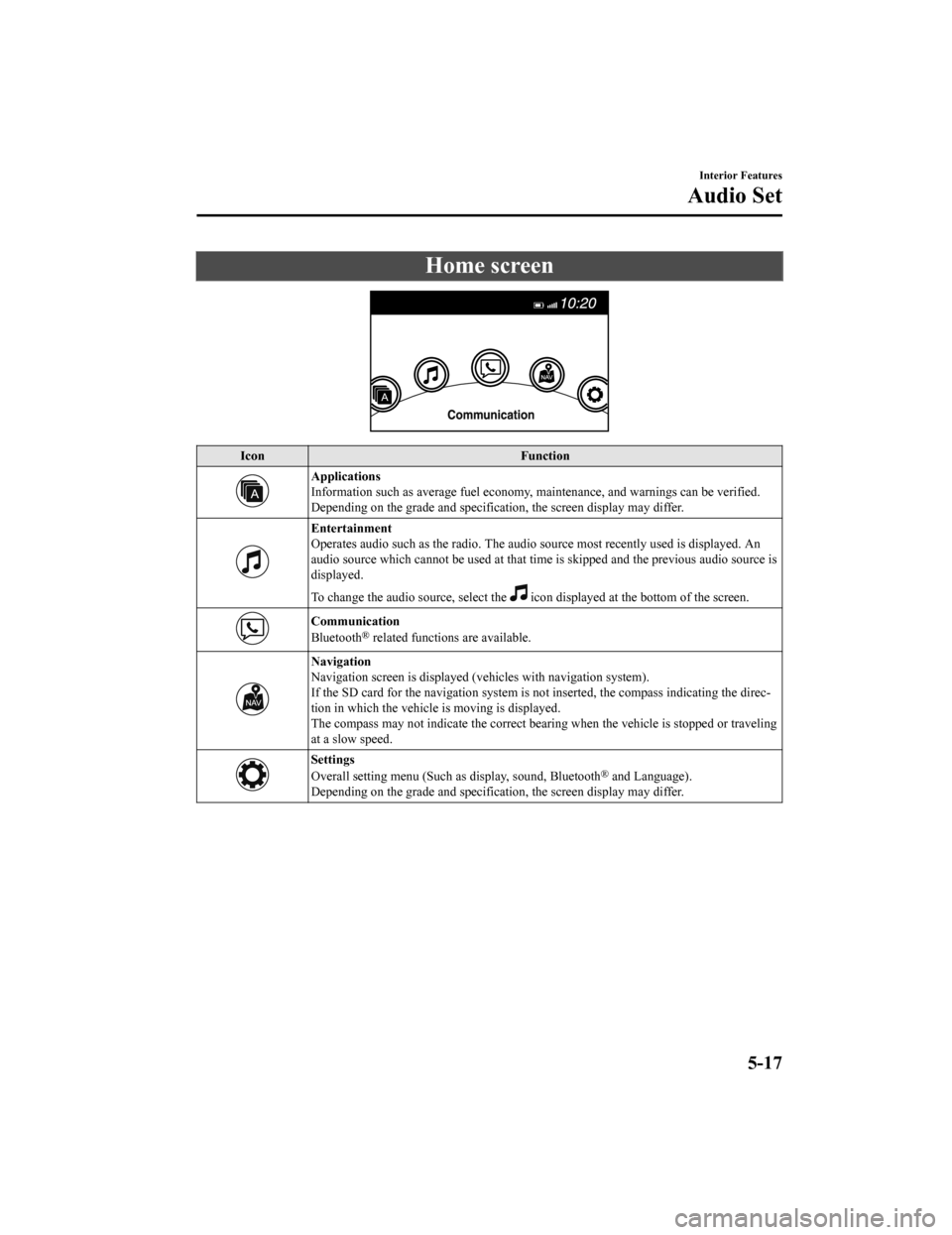
Home screen
IconFunction
Applications
Information such as average fuel economy, maintenance, and warn ings can be verified.
Depending on the grade and specification, the screen display ma y differ.
Entertainment
Operates audio such as the radio. The audio source most recentl y used is displayed. An
audio source which cannot be used at that time is skipped and t he previous audio source is
displayed.
To change the audio source, select the
icon displayed at the bottom of the screen.
Communication
Bluetooth® related functions are available.
Navigation
Navigation screen is displayed (v ehicles with navigation system).
If the SD card for the navigation system is not inserted, the compass indicating the direc‐
tion in which the vehicle is moving is displayed.
The compass may not indicate th e correct bearing when the vehicle is stopped or traveling
at a slow speed.
Settings
Overall setting menu (Such a s display, sound, Bluetooth® and Language).
Depending on the grade and specification, the screen display ma y differ.
Interior Features
Audio Set
5-17
Mazda6_8HX3-EA-19I_Edition1_old 2019-6-18 9:25:17
Page 419 of 702

▼Gracenote® Database
When a USB devic
e or Bluetooth® device is connected to this unit and the audio is played,
the album name, artist name, genre and title information are au tomatically displayed if there
is a match in the vehicle's database compilation to the music b eing played. The information
stored in this device uses database information in the Gracenot e
® music recognition service.
CAUTION
For information related to the most recent Gracenote® database which can be used and how
to install it, go to the Mazda Hands Free Website:
http://www.mazdahandsfree.com
Introduction
Gracenote, the Gracenote logo and logotype are either a registe red trademark or a trademark
of Gracenote, Inc. in the United States and/or other countries.
Gracenote® End User License Agreement
This application or device contains software from Gracenote, In c. of Emeryville, California
(“Gracenote”). The software from Gracenote (the “Gracenote Soft ware”) enables this
application to perform disc and/ or file identification and obtain music-related information,
including name, artist, track, and title information (“Gracenot e Data”) from online servers or
embedded databases (collectively, “Gracenote Servers”) and to p erform other functions. You
may use Gracenote Data only by means of the intended End-User f unctions of this
application or device.
You agree that you will use Gracenote Data, the Gracenote Softw are, and Gracenote Servers
for your own personal non-commercial use only. You agree not to assign, copy, transfer or
transmit the Gracenot e Software or any Gracenote Data to any th ird party. YOU AGREE
NOT TO USE OR EXPLOIT GRACENOTE DATA, THE GRACENOTE SOFTWARE,
OR GRACENOTE SERVERS, EXCEPT AS EXPRESSLY PERMITTED HEREIN.
Interior Features
Audio Set
5-31
Mazda6_8HX3-EA-19I_Edition1_old 2019-6-18 9:25:17
Page 423 of 702

When using Apple CarPlay™, please avoid dist raction and use Apple CarPlay™ responsibly.
Stay fully aware of driving conditions and always obey applicable laws.
NOTE
Apple CarPlay™ is provided by Apple® and its use is subject to your agreement to the
Apple CarPlay™ terms of use, which are incl uded as part of the Apple iOS terms of use.
When using Apple CarPlay™, location, speed, and other vehicle data is transferred to
your iPhone
®. For further details, refer to Apple®’s Privacy Policy.
▼Switching to Apple CarPlay™
Connect the iPhone® by inserting the Apple®-genuine connector cord to the USB terminal
indicated by the
mark.
Refer to How to conn ect USB port/Auxiliary jack on page 5-11.
NOTE
When you switch your iPhone® connection from Bluetooth® to the vehicle's USB terminal,
the system switches to Apple CarPlay™. The applications which was being used via
Bluetooth
® connection can be used continuously. Ho wever, the available functions of the
applications us ing Bluetooth
® connection and those on Apple CarPlay™ may differ.
If the iPhone® is connected to the USB te rminal not indicated by the mark, the system
operates in USB mode.
Display of Apple CarPlay™ Screen
Use any of the following methods to display the Apple CarPlay™ screen in the center
display.
Select on the home screen.
Long press on the commander switch.
Select on the home screen, and select from the Applications screen.
Apple CarPlay™ home screen
Interior Features
Audio Set
5-35
Mazda6_8HX3-EA-19I_Edition1_old 2019-6-18 9:25:17
Page 426 of 702

When using Android Auto™, please avoid di straction and use Android Auto™ responsibly.
Stay fully aware of driving conditions and always obey applicable laws.
NOTE
Android Auto™ is provided by Google and its use is subject to your agreement to the
Android Auto™ terms of use.
When using Android Auto™, location, speed, and other vehicle data is transferred to your
smart phone. For further details, refer to Google’s Privacy Policy.
▼ How to use the Android Auto™ mode
Insert an Android™ Smartphone-genuine connector cord into the U
SB terminal indicated by
the
icon to connect the Smartphone.
Refer to How to connect USB port/Auxiliary jack on page 5-11.
NOTE
When an Android™ Smartphone connected to Bluetooth® is connected to the vehicle's
USB terminal, Bluetooth
® is used by Android Auto™ and the system switches to Android
Auto™ mode.
If the Android™ Smartphone is conn ected to a USB terminal with no icon indicated,
the system operates in USB mode.
Display of Android Auto™ Mode Screen
Use any of the following methods t o display the Android Auto™ mode screen in the center
display.
Select on the home screen, and select from the Applications screen.
Select on the home screen.
Press and hold on the commander switch.
Android Auto™ mode home screen
Interior Features
Audio Set
5-38
Mazda6_8HX3-EA-19I_Edition1_old 2019-6-18 9:25:17
Page 428 of 702

If Android Auto™ cannot be connected
When the message, “Mobile Device Error”, is displayed and Android Auto™ cannot
be connected
Make sure that the Android™ Smartphone in question is compatibl e with Android Auto™.
Before trying to reconnect your Android™ Smartphone to the conn ector cord, do the
Bluetooth
® device pairing again.
If the Android Auto™ do not operate, please do these steps
Depending on your Android™ Smartphone, the connection setting m ay have been in
charging mode only when the connector cord is connected.
In this case, switch off the Andr oid Auto™ connection setting o nce, and then switch it back
on while connected to USB mode.
The connection setting can be changed to the Android Auto™ conn ection in the
tab
on the Settings screen (page 9-15).
Interior Features
Audio Set
5-40
Mazda6_8HX3-EA-19I_Edition1_old 2019-6-18 9:25:17
Page 429 of 702

Bluetooth®
▼Introduction
Bluetooth® Hands-Free outline
When a Bluetooth® device (mobile phone) is connected to the vehicle's Bluetooth® unit via
radio wave transmission, a call c an be made or received by pressing the talk button, pick-up
button, or hang-up button on th e audio remote control switch, o r by operating the center
display.
Bluetooth
® audio outline
When a portable audio unit equipped with the Bluetooth® communication function is paired
to the vehicle, you can listen to music stored on the paired portable audio device from the
vehicle's speakers. It is not necessary to connect the portable audio device to the vehicle's
external input terminal. After programming, operate the vehicle audio control panel to play/
stop the audio.
NOTE
For your safety, a device can be paired only when the vehicle is parked. If the vehicle
starts to move, the pairing procedure will en d. Park the vehicle in a safe place before
pairing.
The communication range of a Bluetooth® equipped device is about 10 meters (32 ft) or
less.
Basic audio operation is available us ing voice commands even if Bluetooth® is not
connected.
For safety reasons, operation of the center di splay is disabled while the vehicle is being
driven. However, items not displayed in gray can be operated using the commander
switch while the vehicle is being driven.
CAUTION
Some Bluetooth® mobile devices are not compatible wi th the vehicle. Consult an Authorized
Mazda Dealer, Mazda's call center or Web support center for information regarding
Bluetooth
® mobile device compatibility:
U.S.A.
Phone: 800-430-0153
Web: www.mazdausa.com/mazdaconnect
Interior Features
Audio Set
5-41
Mazda6_8HX3-EA-19I_Edition1_old 2019-6-18 9:25:17
Page 430 of 702

Canada
Phone: 800-430-0153
Web: www.mazdahandsfree.ca
Mexico
Center of Attention to Client (CAC)
Phone: 01-800-01-MAZDA
Web: www.mazdamexico.com.mx
Applicable Bluetooth
® specification (Recommended)
Ver. 1.1/1.2/2.0
EDR/2.1 EDR/3.0 (conformity)
▼ Component Parts
Microphone
Talk button, Pick-up button and Hang-up button
Microphone Audio unit
Talk button
Hang-up button Pick-up button
Microphone (hands-free)
The microphone is used for speaking voice commands or when maki
ng a Hands-free call.
Talk button
Activates the voice recognition . In addition, it skips the voice guidance.
Pick-up button
Responds to incoming calls. In addition, after selecting a cont act or dialing a number, it
places the call when the button is pressed.
Interior Features
Audio Set
5-42
Mazda6_8HX3-EA-19I_Edition1_old 2019-6-18 9:25:17
Page 432 of 702
Bluetooth® Preparation
▼Device pairing
To use Bluetooth® audio and Hands-Free,
the device equipped with Bluetooth
® has
to be paired to the unit using the following
procedure. A maximum of 7 devices
including Bluetooth
® audio devices and
hands-free mobile phones can be paired.
NOTE
The Bluetooth® system may not operate
for 1 or 2 minutes after the ignition is
switched to ACC or ON. However, this
does not indicate a problem. If the
Bluetooth
® system does not connect
automatically after 1 or 2 minutes have
elapsed, make sure that the Bluetooth
®
setting on the device is normal and
attempt to reconnect the Bluetooth
®
device from the vehicle side.
If Bluetooth®-enabled devices are used
in the following loca tions or conditions,
connection via Bluetooth
® may not be
possible.
The device is in a location hidden
from the center display such as behind
or under a seat, or inside the glove
compartment.
The device contacts or is covered by a
metal object or body.
The device is set to power-saving
mode.
Pairing Procedure
1. Select the
icon on the home screen
to display the Settings screen.
2. Select the
tab.
3. Select
.
4. Turn the Bluetooth® setting on.
5. Select
to display the
message and switch to the device
operation.
6. Using your device, perform a search
for the Bluetooth
® device (Peripheral
device).
7. Select “Mazda” from the device list searched by the device.
8. (Device with Bluetooth
® version 2.0)
Input the displayed 4-digit pairing
code into the device.
(Device with Bluetooth
® version 2.1
or higher)
Make sure the displayed 6-digit code
on the audio is also displayed on the
device, and touch the
.
Connection permission and phonebook
access permission for your mobile
device may be required depending on
the mobile device.
9. If pairing is successful, the functions
of the device connected to Bluetooth
®
are displayed.
10. (Devices compatible with Mazda
E-mail / SMS function)
SMS (Short Message Service)
messages, and E-mail for the device
are downloaded automatically. A
download permission operation for
your device may be required
depending on the device.
NOTE
When Call history and messages are
downloaded automatically, each
automatic download setting must be on.
Refer to Communication Settings on
page 5-65.
Interior Features
Audio Set
5-44
Mazda6_8HX3-EA-19I_Edition1_old 2019-6-18 9:25:17
Page 433 of 702
After a device is registered, the system
automatically identifies the device. By
activating Bluetooth
® Hands-Free again,
or by activating Bluetooth
® Hands-Free
first after switching the ignition from OFF
to ACC, the device connection condition
is indicated in the center display.
IMPORTANT note about pairing and
automatic reconnection:
If pairing is redone on the same
mobile phone device, first clear
“Mazda” displayed on the Bluetooth
®
setting screen of the mobile device.
When the OS of the device is updated,
the pairing information may be deleted.
If this happens, reprogram the pairing
information to the Bluetooth
® unit.
Before you pair your device, make sure
that Bluetooth
® is “ON”, both on your
phone and on the vehicle.
▼ Device selection
If several devices have been paired, the
Bluetooth
® unit links the device last
paired. If you would like to link a different
paired device, it is n ecessary to change the
link. The order of device priority after the
link has been changed is maintained even
when the ignition is switched off.
Connecting other devices
1. Select the
icon on the home screen
to display the Settings screen.
2. Select the
tab.
3. Select
.
4. Turn the Bluetooth
® setting on.
5. Select the name of the device you
would like to connect.
6. selection
Connects both devices as hands-free
and Bluetooth
® audio.
selection
Connects as a hands-free device.
selection
Connects as Bluetooth
® audio.
NOTE
The following functions can be used for
the Hands-free or audio.
Hands-free: Phone calls and
E-mail/SMS
Audio: Bluetooth® audio, Pandora®,
Aha™, Stitcher™ radio
Disconnecting a device
1. Select the
icon on the home screen
to display the Settings screen.
2. Select the
tab.
3. Select
.
4. Turn the Bluetooth
® setting on.
5. Select the device name which is currently connected.
6. Select
.
▼ Deleting a device
Selecting and deleting devices
1. Select the
icon on the home screen
to display the Settings screen.
2. Select the
tab.
3. Select
.
4. Turn the Bluetooth
® setting on.
5. Select the device name which you would like to delete.
6. Select
.
7. Select
.
Interior Features
Audio Set
5-45
Mazda6_8HX3-EA-19I_Edition1_old 2019-6-18 9:25:17