ad blue MAZDA MODEL 6 2020 (in English) Owner's Guide
[x] Cancel search | Manufacturer: MAZDA, Model Year: 2020, Model line: MODEL 6, Model: MAZDA MODEL 6 2020Pages: 702
Page 434 of 702
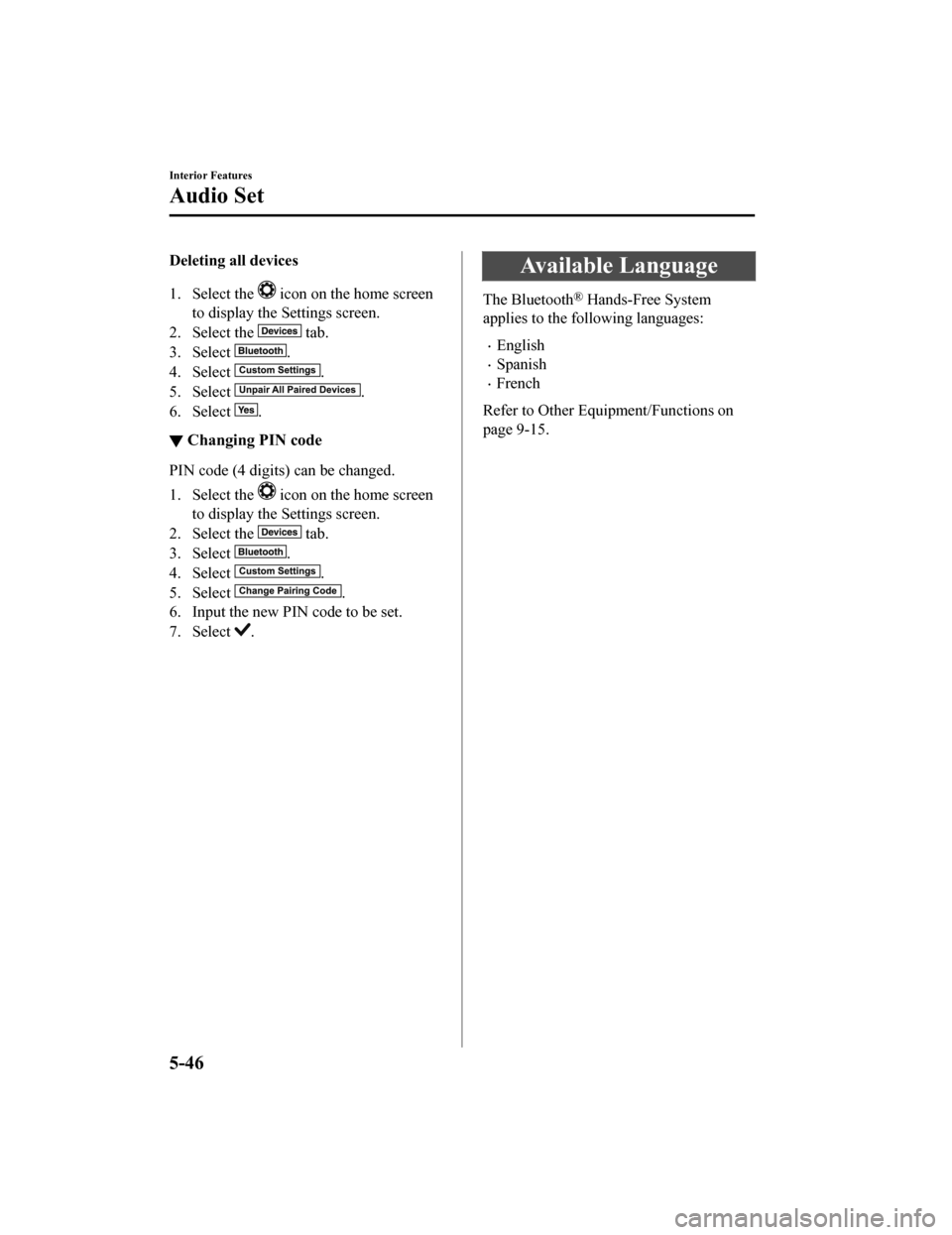
Deleting all devices
1. Select the
icon on the home screen
to display the Settings screen.
2. Select the
tab.
3. Select
.
4. Select
.
5. Select
.
6. Select
.
▼ Changing PIN code
PIN code (4 digits) can be changed.
1. Select the
icon on the home screen
to display the Settings screen.
2. Select the
tab.
3. Select
.
4. Select
.
5. Select
.
6. Input the new PIN code to be set.
7. Select
.
Available Language
The Bluetooth® Hands-Free System
applies to the following languages:
English
Spanish
French
Refer to Other Equipment/Functions on
page 9-15.
Interior Features
Audio Set
5-46
Mazda6_8HX3-EA-19I_Edition1_old 2019-6-18 9:25:17
Page 435 of 702
Bluetooth® Audio
Applicable Bluetooth® specification
(Recommended)
Ver. 1.1/1.2/2.0
EDR/2.1 EDR/3.0
(conformity)
Response profile
A2DP (Advanced Audio Distribution
Profile) Ver. 1.0/1.2
AVRCP (Audio/Video Remote Control
Profile) Ver. 1.0/1.3/1.4
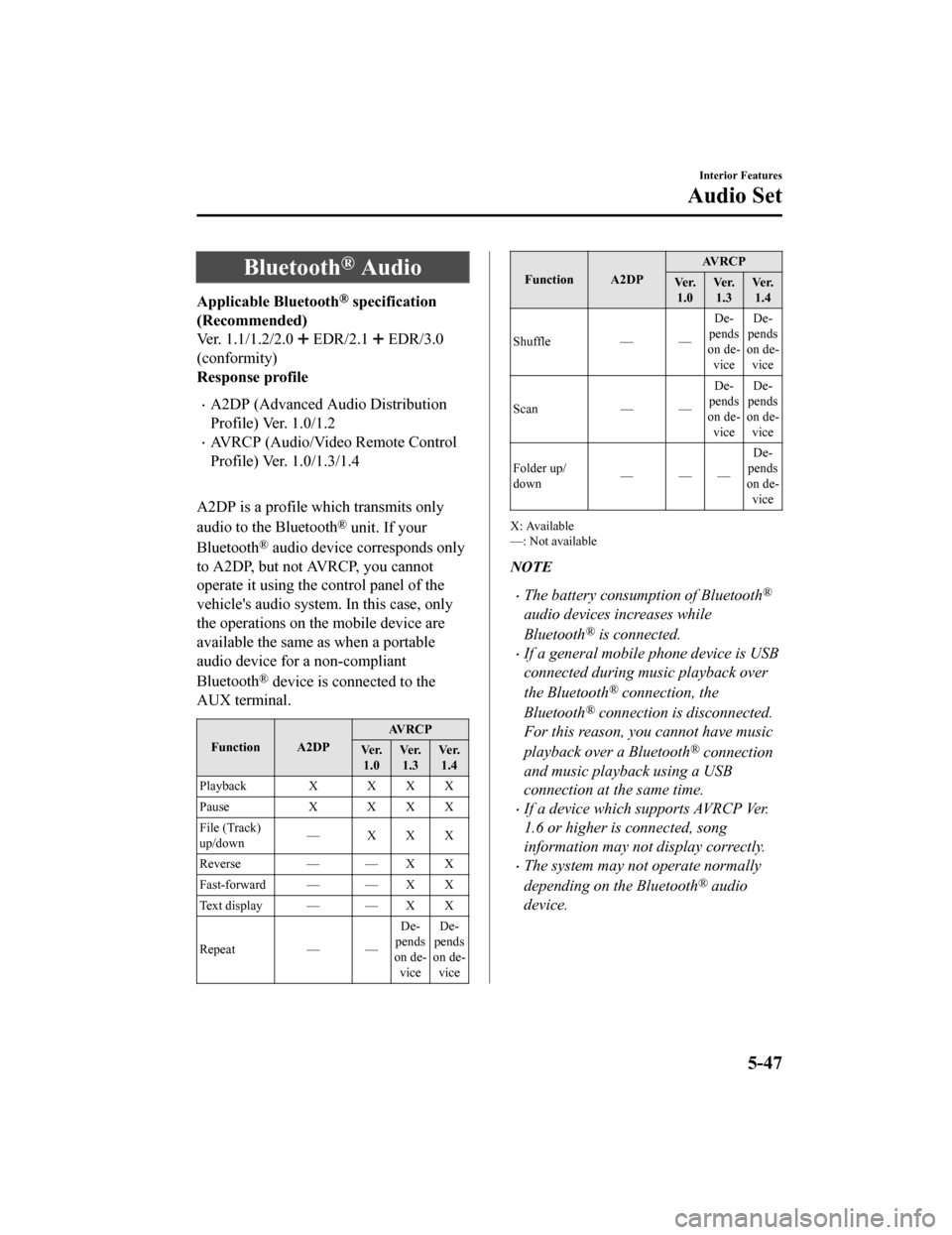
A2DP is a profile which transmits only
audio to the Bluetooth
® unit. If your
Bluetooth
® audio device corresponds only
to A2DP, but not AVRCP, you cannot
operate it using the control panel of the
vehicle's audio system. In this case, only
the operations on the mobile device are
available the same as when a portable
audio device for a non-compliant
Bluetooth
® device is connected to the
AUX terminal.
Function A2DP AVRCP
Ve r. 1.0 Ve r.
1.3 Ve r.
1.4
Playback X X X X
Pause X XXX
File (Track)
up/down — XXX
Reverse — — X X
Fast-forward — — X X
Te x t d i s p l a y — — X X
Repeat — — De‐
pends
on de‐ vice De‐
pends
on de‐ vice
Function A2DP AV R C P
Ve r. 1.0 Ve r.
1.3 Ve r.
1.4
Shuffle — — De‐
pends
on de‐ vice De‐
pends
on de‐ vice
Scan — —De‐
pends
on de‐ vice De‐
pends
on de‐ vice
Folder up/
down ——— De‐
pends
on de‐
vice
X: Available
—: Not available
NOTE
The battery consumption of Bluetooth®
audio devices increases while
Bluetooth
® is connected.
If a general mobile phone device is USB
connected during music playback over
the Bluetooth
® connection, the
Bluetooth
® connection is disconnected.
For this reason, you cannot have music
playback over a Bluetooth
® connection
and music playback using a USB
connection at the same time.
If a device which supports AVRCP Ver.
1.6 or higher is connected, song
information may not display correctly.
The system may not operate normally
depending on the Bluetooth
® audio
device.
Interior Features
Audio Set
5-47
Mazda6_8HX3-EA-19I_Edition1_old 2019-6-18 9:25:17
Page 436 of 702
▼Switching to Bluetooth® audio mode
To listen to music or voice a
udio recorded to a Bluetooth® audio device, switch to the
Bluetooth
® audio mode to operate the audio device using the audio system control panel.
Any Bluetooth
® audio device must be paired to the vehicle's Bluetooth® unit before it can
be used.
Refer to Bluetooth
® Preparation on page 5-44.
1. Turn on the Bluetooth
® audio device's power.
2. Switch the ignition to ACC or ON.
3. Select the
icon on the home screen to display the Entertainment screen.
4. When
is selected, switches to the Bluetooth® audio mode to begin playback.
NOTE
If the Applications screen is not displayed on the device, Bluetooth® audio may not play
on the center display.
If Bluetooth® audio is used after using Pandora®, Aha™ or Stitcher™ radio, the
application on the mo bile device has to be closed first.
If the Bluetooth® audio device does not begin playback, select the icon.
If the mode is switched from Bluetooth® audio mode to another mode (radio mode), audio
playback from the Bluetooth
® audio device stops.
▼ Playback
To listen to a Bluetooth® audio device over the vehicle's speaker system, switch the mod
e to
Bluetooth
® audio mode. (Refer to “Switching to Bluetooth® audio mode”)
After switching t o the Bluetooth
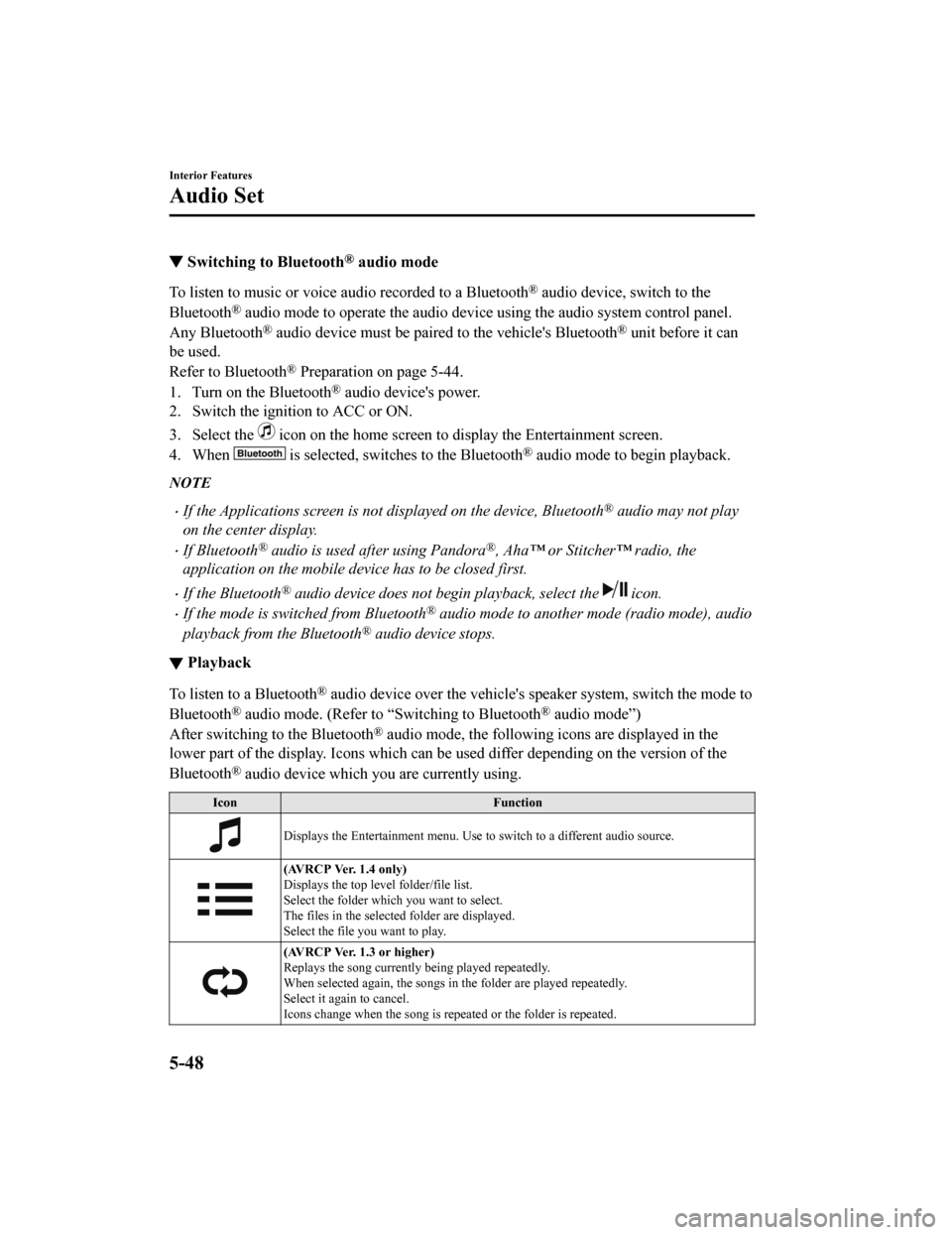
® audio mode, the following icons are displayed in the
lower part of the display. Icons which can be used differ depen ding on the version of the
Bluetooth
® audio device which you are currently using.
Icon Function
Displays the Entertainment menu. Use to switch to a different audio source.
(AVRCP Ver. 1.4 only)
Displays the top level folder/file list.
Select the folder which you want to select.
The files in the selected folder are displayed.
Select the file you want to play.
(AVRCP Ver. 1.3 or higher)
Replays the song currently being played repeatedly.
When selected again, the songs in the folder are played repeate dly.
Select it again to cancel.
Icons change when the song is re peated or the folder is repeated.
Interior Features
Audio Set
5-48
Mazda6_8HX3-EA-19I_Edition1_old 2019-6-18 9:25:17
Page 437 of 702
IconFunction
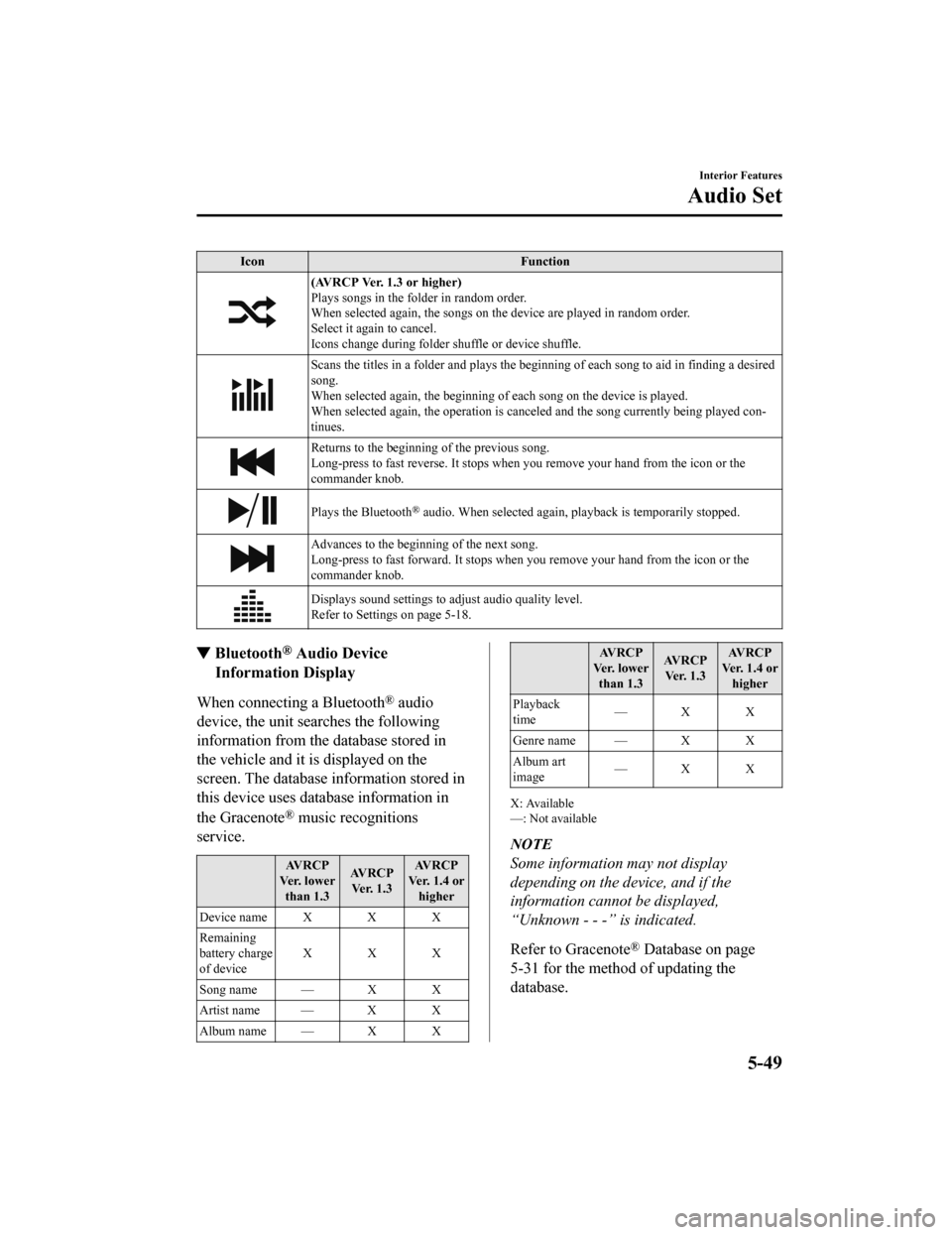
(AVRCP Ver. 1.3 or higher)
Plays songs in the folder in random order.
When selected again, the songs on the device are played in rand om order.
Select it again to cancel.
Icons change during folder shuffle or device shuffle.
Scans the titles in a folder and plays the beginning of each so ng to aid in finding a desired
song.
When selected again, th e beginning of each song on the device is played.
When selected again, the operation is can celed and the song currently being played con‐
tinues.
Returns to the beginning of the previous song.
Long-press to fast reverse. It stops when you remove your hand from the icon or the
commander knob.
Plays the Bluetooth® audio. When selected again, pl ayback is temporarily stopped.
Advances to the beginning of the next song.
Long-press to fast forward. It stops when you remove your hand from the icon or the
commander knob.
Displays sound settings to adjust audio quality level.
Refer to Settings on page 5-18.
▼ Bluetooth® Audio Device
Information Display
When connecting a Bluetooth® audio
device, the unit searches the following
information from the database stored in
the vehicle and it is displayed on the
screen. The database information stored in
this device uses database information in
the Gracenote
® music recognitions
service.
AVRCP
Ve r. l o w e r than 1.3 AVRCP
Ver. 1.3 AVRCP
Ver. 1.4 or higher
Device name X X X
Remaining
battery charge
of device XXX
Song name — X X
Artist name — X X
Album name — X X
AV R C P
Ve r. l o w e r than 1.3 AV R C P
Ve r. 1 . 3 AV R C P
Ver. 1.4 or higher
Playback
time —X X
Genre name — X X
Album art
image —X X
X: Available
—: Not available
NOTE
Some information may not display
depending on the device, and if the
information cannot be displayed,
“Unknown - - -” is indicated.
Refer to Gracenote
® Database on page
5-31 for the method of updating the
database.
Interior Features
Audio Set
5-49
Mazda6_8HX3-EA-19I_Edition1_old 2019-6-18 9:25:17
Page 438 of 702
How to Use Pandora®*
▼What is Pandora®?
Pandora®*1 is free personalized Internet ra
dio. Simply enter a favorite artist, track, genre,
and Pandora
® will create a personalized stati on that plays their music and more like it. Rate
songs by giving thumbs-up and thumbs-down feedback to further r efine your station,
discover new music and help Pandora
® play only music you like.
*1Pandora®, the Pandora® logo, and the Pandora® trade dress are trademarks or registered
trademarks of Pandora Media, Inc., used with permission.
NOTE
Pandora® may not be available outside of the U.S.A..
To operate Pandora® from your Bluetooth® device, perform the following in advance:
Create Pandora® account on the Web.
Create Pandora® station using Pandora® application.
Install Pandora® application on your device.
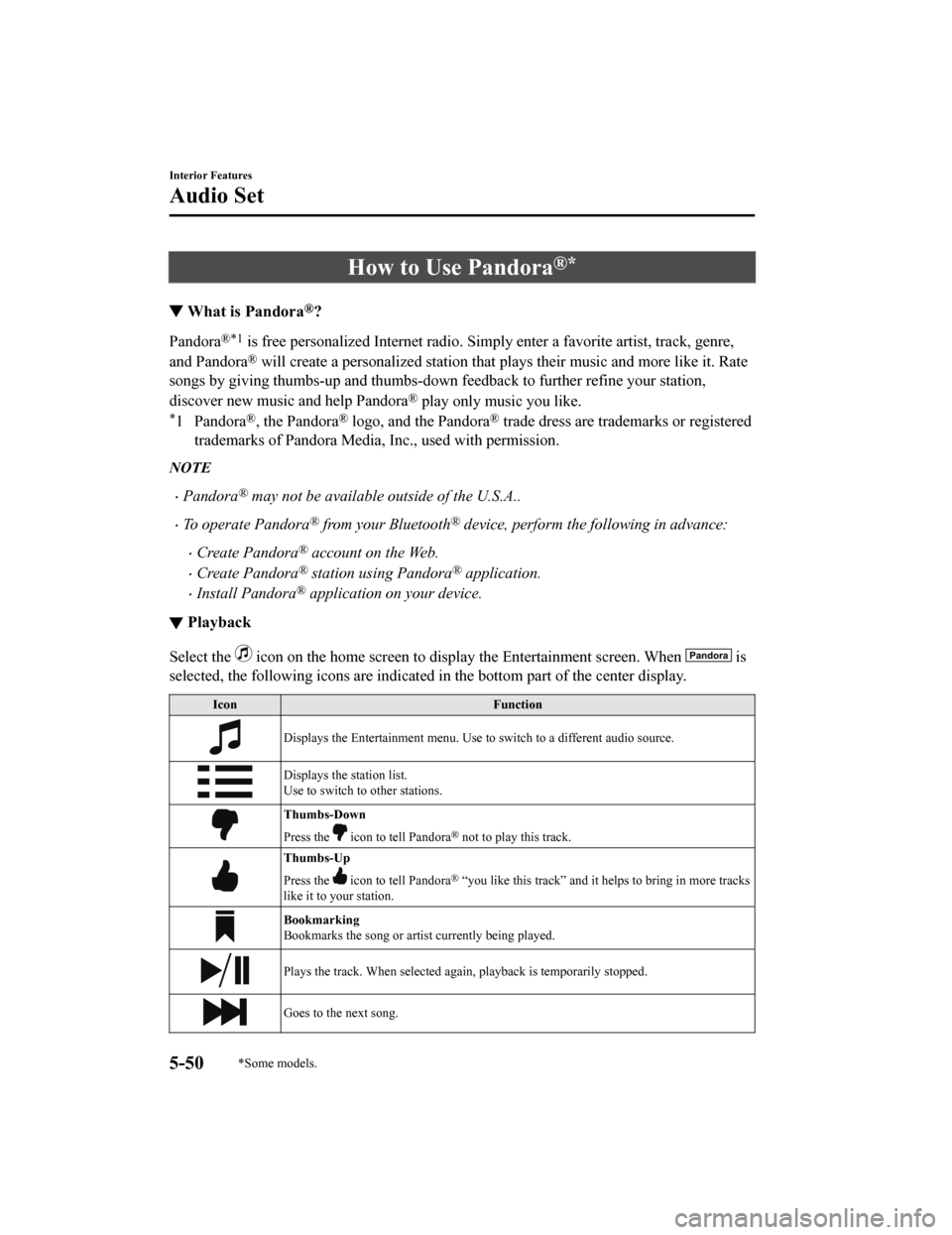
▼Playback
Select the icon on the home screen to display the Entertainment screen. W
hen is
selected, the following icons are indicated in the bottom part of the center display.
IconFunction
Displays the Entertainment menu. Use to switch to a different audio source.
Displays the station list.
Use to switch to other stations.
Thumbs-Down
Press the
icon to tell Pandora® not to play this track.
Thumbs-Up
Press the
icon to tell Pandora® “you like this track” and it helps to bring in more tracks
like it to your station.
Bookmarking
Bookmarks the song or artis t currently being played.
Plays the track. When selected again, playback is temporarily s topped.
Goes to the next song.
Interior Features
Audio Set
5-50*Some models.
Mazda6_8HX3-EA-19I_Edition1_old 2019-6-18 9:25:17
Page 440 of 702
How to Use Aha™
▼What is Aha™?
Aha™*1 is an application which can be used to enjoy various Internet
content such as
Internet radio and podcasts.
Stay connected to your friends activities by getting updates fr om Facebook and Twitter.
Using the location-based service, nearby services and destinati ons can be searched or
real-time local inform ation can be obtained.
For details on Aha™, refer to “http://www.aharadio.com/”.
*1 Aha™, the Aha™ logo, and the Ah a™ trade dress are trademarks or registered
trademarks of Harman International Industries, Inc., used with permission.
NOTE
The service content provided by Aha™ varies depending on the country in which the user
resides. In addition, the service is not available in some countries.
To operate Aha™ from your Bluetooth® device, perform the following in advance:
Install the Aha™ application to your device.
Create an Aha™ account for your device.
Log onto Aha™ using your device.
Select the preset station on your device.
If the Applications screen is not displayed on the device, Aha™ may not play on the
center display.
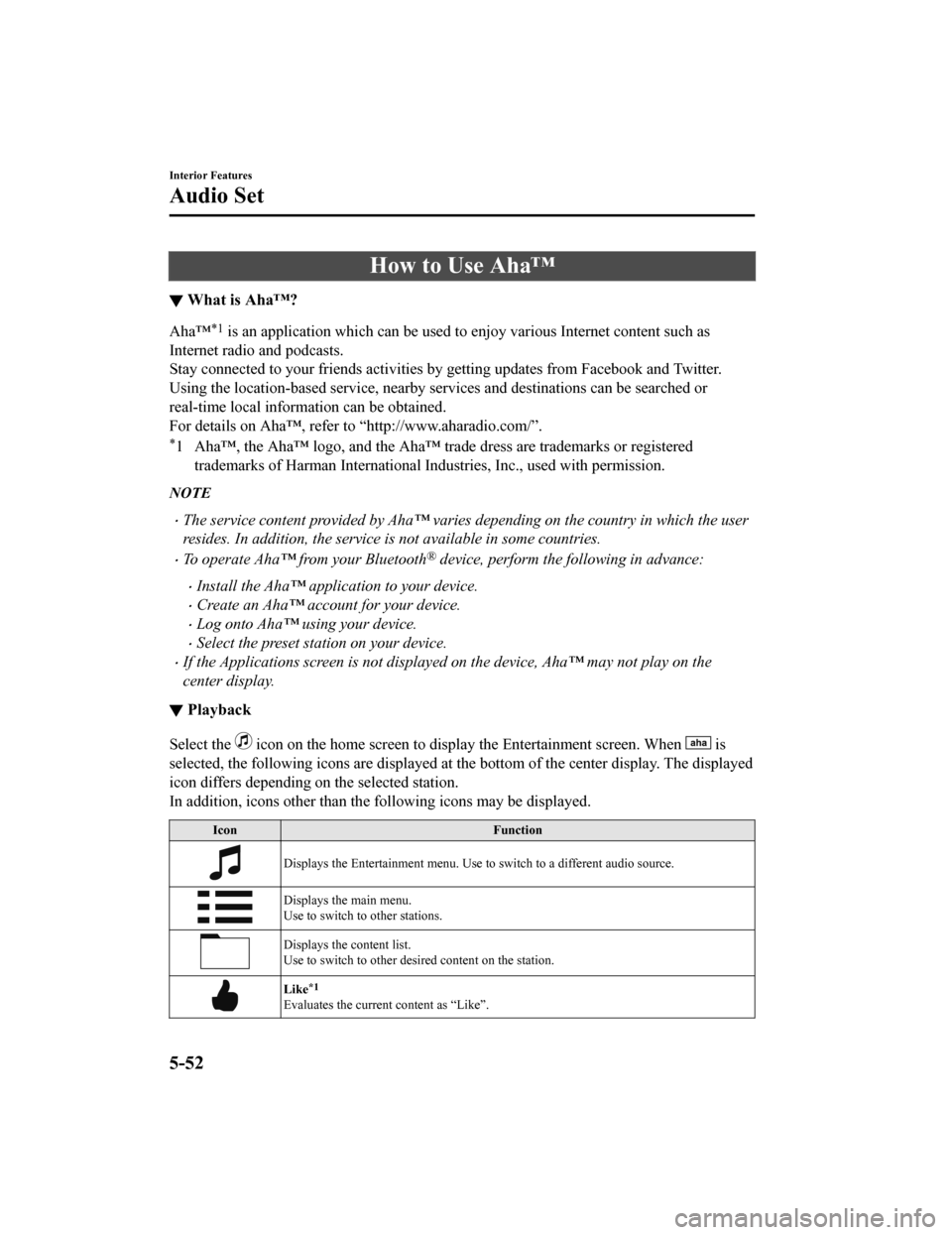
▼ Playback
Select the icon on the home screen to display the Entertainment screen. W
hen is
selected, the following icons are displayed at the bottom of th e center display. The displayed
icon differs depending on the selected station.
In addition, icons other than th e following icons may be displa yed.
Icon Function
Displays the Entertainment menu. Use to switch to a different audio source.
Displays the main menu.
Use to switch to other stations.
Displays the content list.
Use to switch to other desired content on the station.
Like*1
Evaluates the current content as “Like”.
Interior Features
Audio Set
5-52
Mazda6_8HX3-EA-19I_Edition1_old 2019-6-18 9:25:17
Page 443 of 702
How to Use Stitcher™ Radio
▼What is Stitcher™ Radio?
Stitcher™*1 radio is an application which ca
n be used to listen to Internet radio or stream
podcasts.
Recommended content is automatically selected by registering co ntent which you put into
your favorites, or by pressing the Like or Dislike button.
For details on Stitche r™ Radio, refer to “h ttp://stitcher.com/”.
*1 Stitcher™, the Stitcher™ logo, and the Stitcher™ trade dress a re trademarks or
registered trademarks of Stitche r, Inc., used with permission.
NOTE
To operate Stitcher™ Radio from your Bluetooth® device, perform the following in
advance:
Install the Stitcher™ Radio application to your device.
Create a Stitcher™ Radio account for your device.
Log onto Stitcher™ Radio using your device.
If the Applications screen is not displayed on the device, Stitcher™ may not play on the
center display.
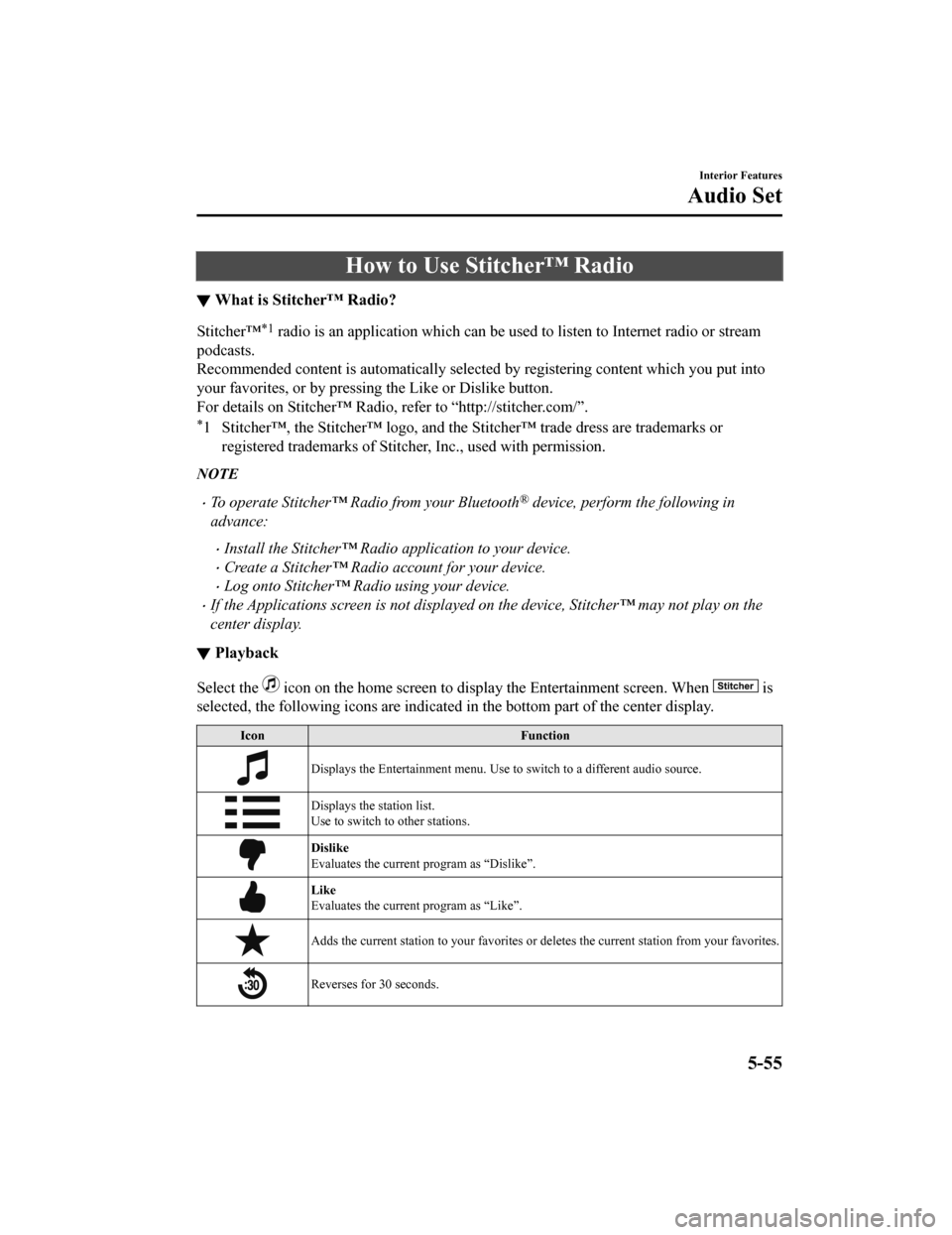
▼ Playback
Select the icon on the home screen to disp
lay the Entertainment screen. When is
selected, the following icons are indicated in the bottom part of the center display.
Icon Function
Displays the Entertainment menu. Use to switch to a different a udio source.
Displays the station list.
Use to switch to other stations.
Dislike
Evaluates the current program as “Dislike”.
Like
Evaluates the current program as “Like”.
Adds the current station to you r favorites or deletes the current station from your favorites.
Reverses for 30 seconds.
Interior Features
Audio Set
5-55
Mazda6_8HX3-EA-19I_Edition1_old 2019-6-18 9:25:17
Page 445 of 702
Bluetooth® Hands-Free
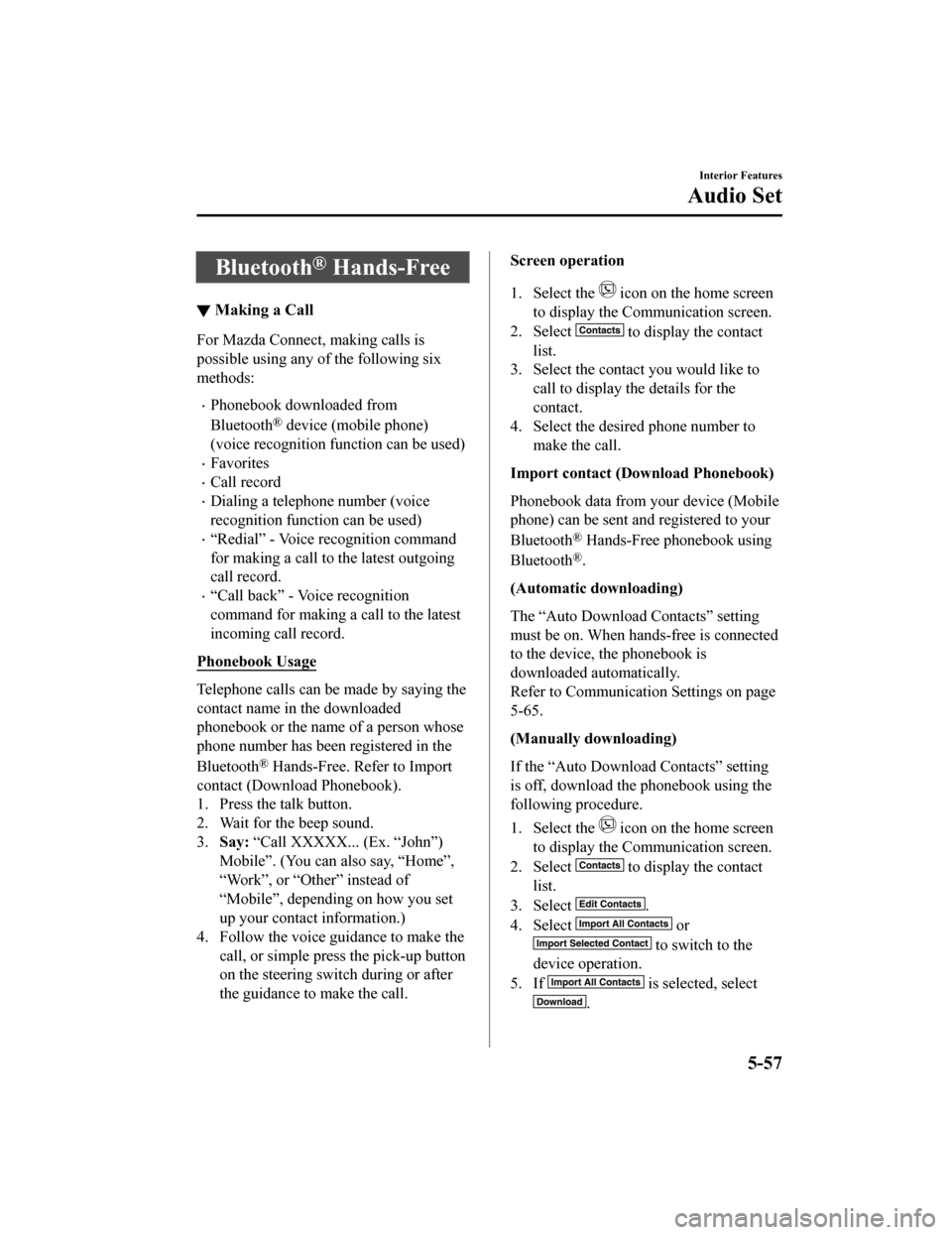
▼Making a Call
For Mazda Connect, making calls is
possible using any of the following six
methods:
Phonebook downloaded from
Bluetooth
® device (mobile phone)
(voice recognition function can be used)
Favorites
Call record
Dialing a telephone number (voice
recognition function can be used)
“Redial” - Voice recognition command
for making a call to the latest outgoing
call record.
“Call back” - Voice recognition
command for making a call to the latest
incoming call record.
Phonebook Usage
Telephone calls can be made by saying the
contact name in the downloaded
phonebook or the name of a person whose
phone number has been registered in the
Bluetooth
® Hands-Free. Refer to Import
contact (Download Phonebook).
1. Press the talk button.
2. Wait for the beep sound.
3. Say: “Call XXXXX... (Ex. “John”)
Mobile”. (You can also say, “Home”,
“Work”, or “Other” instead of
“Mobile”, depending on how you set
up your contact information.)
4. Follow the voice guidance to make the call, or simple press the pick-up button
on the steering switch during or after
the guidance to make the call.
Screen operation
1. Select the
icon on the home screen
to display the Communication screen.
2. Select
to display the contact
list.
3. Select the contact you would like to
call to display the details for the
contact.
4. Select the desired phone number to
make the call.
Import contact (Download Phonebook)
Phonebook data from your device (Mobile
phone) can be sent and registered to your
Bluetooth
® Hands-Free phonebook using
Bluetooth
®.
(Automatic downloading)
The “Auto Download Contacts” setting
must be on. When hands-free is connected
to the device, the phonebook is
downloaded automatically.
Refer to Communication Settings on page
5-65.
(Manually downloading)
If the “Auto Download Contacts” setting
is off, download the phonebook using the
following procedure.
1. Select the
icon on the home screen
to display the Communication screen.
2. Select
to display the contact
list.
3. Select
.
4. Select
or
to switch to the
device operation.
5. If
is selected, select
.
Interior Features
Audio Set
5-57
Mazda6_8HX3-EA-19I_Edition1_old 2019-6-18 9:25:17
Page 446 of 702

6. Download will be started from themobile phone.
NOTE
If “Import All Contacts” is performed
after saving the phonebook to the
Bluetooth
® unit, the phonebook will be
overwritten.
A maximum of 1,000 contacts can be
registered to the phonebook.
Phonebook, incoming/outgoing call
record, and favorite memories are
exclusive to each mobile phone to
protect privacy.
Contacts with no telephone number are
not registered.
Favorites Contacts
A maximum of 50 contacts can be
registered. It will take less time to make a
call after registering the telephone number.
In addition, you do not have to look for the
person you want to call in the phonebook.
Registering your favorites
1. Select the
icon on the home screen
to display the Communication screen.
2. Select
to display the favorites
list.
3. Select
.
4. Select
or
.
5. Select from the displayed list.
NOTE
When “Add New Contact” is selected,
information such as the selected person’s
name is also registered. In addition, when
“Add New Contact Details” is selected,
only the telephone number of the selected
person is registered.
Calling a favorite
1. Select the
icon on the home screen
to display the Communication screen.
2. Select
to display the favorites
list.
3. (If only one phone number is
registered to contact)
Select the contact information you
would like to call. Go to Step 5.
(If multiple phone numbers are
registered to contact)
Select the contact you would like to
call to display the screen indicating the
details for the contact. Go to Step 4.
4. Select the phone number you would
like to call.
5. Select
.
Deleting a favorite
1. Select the
icon on the home screen
to display the Communication screen.
2. Select
to display the favorites
list.
3. Select
.
4. Select
.
5. Select the contact information which you would like to delete.
6. Select
.
Changing the display order of your
favorites list
1. Select the
icon on the home screen
to display the Communication screen.
2. Select
to display the favorites
list.
3. Select
.
4. Select
.
5. The contact can be moved after it is
selected.
Interior Features
Audio Set
5-58
Mazda6_8HX3-EA-19I_Edition1_old 2019-6-18 9:25:17
Page 449 of 702
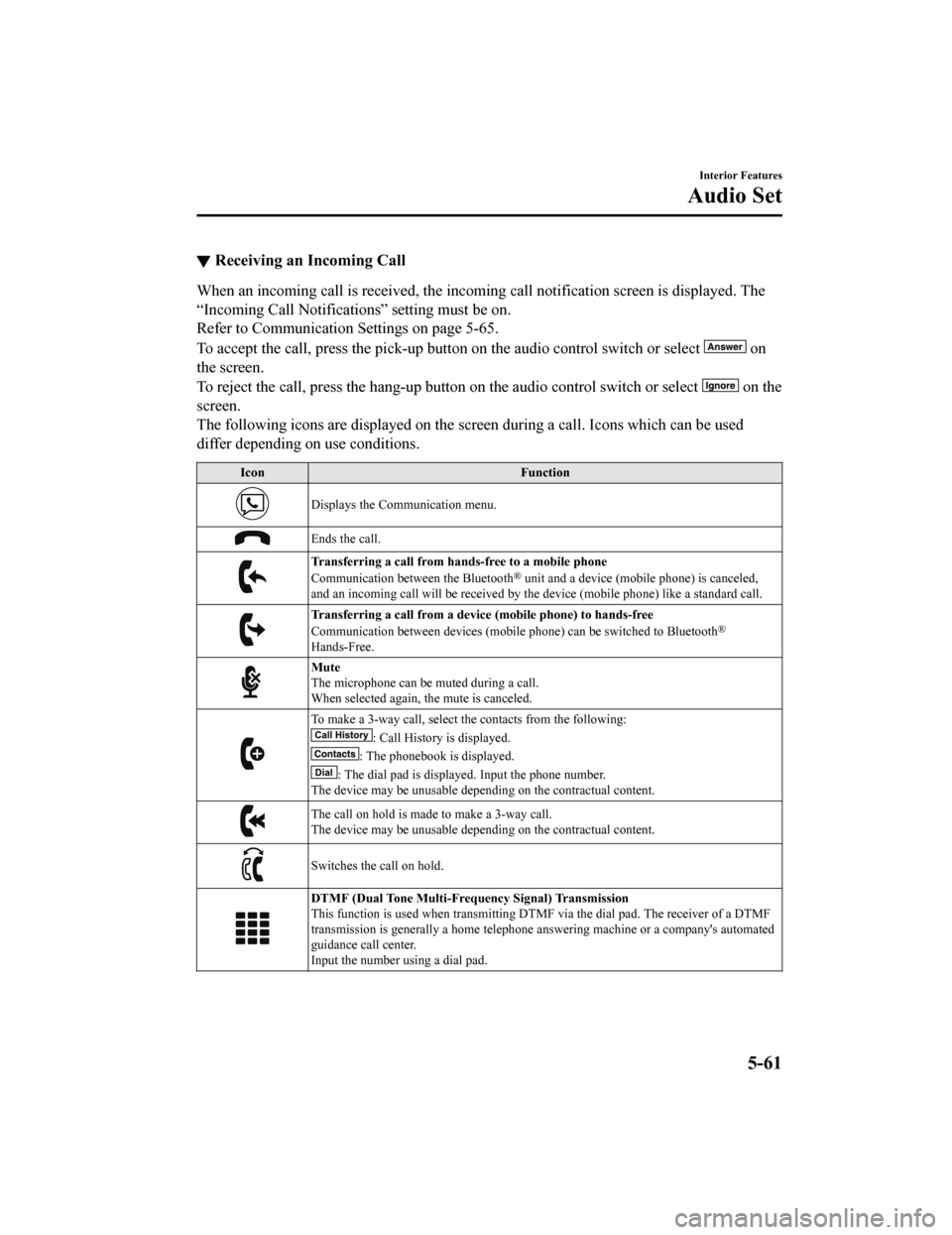
▼Receiving an Incoming Call
When an incoming call is received, the incoming call notificati
on screen is displayed. The
“Incoming Call Notificati ons” setting must be on.
Refer to Communication S ettings on page 5-65.
To accept the call, press the pick-up button on the audio contr ol switch or select
on
the screen.
To reject the call, press the hang-up button on the audio control switch or select
on the
screen.
The following icons are displayed on the screen during a call. Icons which can be used
differ depending on use conditions.
Icon Function
Displays the Communication menu.
Ends the call.
Transferring a call from hands-free to a mobile phone
Communication between the Bluetooth® unit and a device (mobile phone) is canceled,
and an incoming call will be r eceived by the device (mobile pho ne) like a standard call.
Transferring a call from a device (mobile phone) to hands-free
Communication between devices (mo bile phone) can be switched to Bluetooth®
Hands-Free.
Mute
The microphone can be muted during a call.
When selected again, the mute is canceled.
To make a 3-way call, select the contacts from the following:
: Call History is displayed.
: The phonebook is displayed.
: The dial pad is displayed. Input the phone number.
The device may be unusable depending on the contractual content .
The call on hold is made to make a 3-way call.
The device may be unusable depending on the contractual content .
Switches the call on hold.
DTMF (Dual Tone Multi-Frequency Signal) Transmission
This function is used when transmitting DTMF via the dial pad. The receiver of a DTMF
transmission is generally a home telephone answering machine or a company's automated
guidance call center.
Input the number using a dial pad.
Interior Features
Audio Set
5-61
Mazda6_8HX3-EA-19I_Edition1_old 2019-6-18 9:25:17