power steering MAZDA MODEL 6 2021 Owners Manual
[x] Cancel search | Manufacturer: MAZDA, Model Year: 2021, Model line: MODEL 6, Model: MAZDA MODEL 6 2021Pages: 634, PDF Size: 71.37 MB
Page 19 of 634

Front Seat
▼Adjusting the Driver's Seat
Using the driving position set up procedure recommended by Mazd
a allows you to maintain
a relaxed posture, drive the vehicle for longer periods without feeling tired, and make quick
operations naturally.
Also, you can be assured of a clear view in the forward directi on to help you drive more
safely and comfortably.
The adjustments for the driving position recommended by Mazda a re done using the
following procedures.
1. Moving the steering wheel and seat to their default positions .
2. Adjusting the seatback angle.
3. Adjusting the seat position forward and back.
4. Adjusting the seat height.
5. Adjusting the steering wheel position.
6. Adjusting the head restraint position.
Power operation
Seat Slide
(Manual Seat)
To move a seat forward or backward, raise the lever and slide t he seat to the desired position
and release the lever.
Essential Safety Equipment
Seats
2-5
Mazda6_8JN3-EA-20H_Edition1_old 2020-6-18 17:31:27
Page 24 of 634
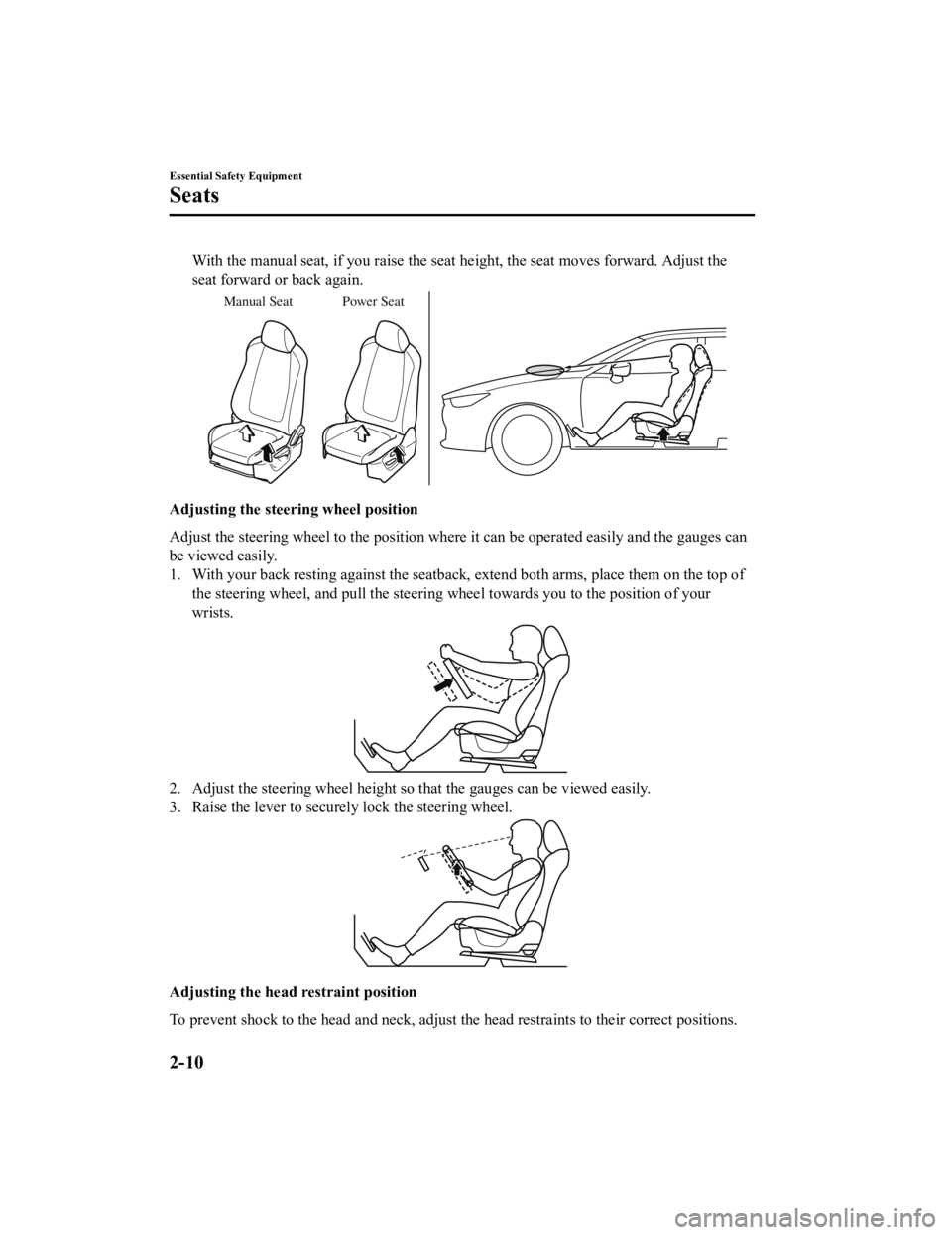
With the manual seat, if you raise the seat height, the seat moves forward. Adjust the
seat forward or back again.
Manual Seat Power Seat
Adjusting the steering wheel position
Adjust the steering wheel to the position where it can be opera ted easily and the gauges can
be viewed easily.
1. With your back resting against the seatback, extend both arms , place them on the top of
the steering wheel, and pull the steering wheel towards you to the position of your
wrists.
2. Adjust the steering wheel height so that the gauges can be vi ewed easily.
3. Raise the lever to securely lock the steering wheel.
Adjusting the head r estraint position
To prevent shock to the head and neck, adjust the head restrain ts to their correct positions.
Essential Safety Equipment
Seats
2-10
Mazda6_8JN3-EA-20H_Edition1_old 2020-6-18 17:31:27
Page 34 of 634
CAUTION
(Rear)
Before folding a rear seatback, make sure
that the rear seat warmer switch is off. If
a rear seatback is folded while the rear
seat warmer is in operation, it may heat
the seat excessively and damage the seat
surface.
Do not use organic solvents to clean the
seat. It may damage the seat surface and
the heater.
NOTE
Use the seat warmer when the engine is
running. Leaving the seat warmer on for
long periods with the engine not running
could cause the battery power to be
depleted.
When the engine is stopped while the
seat warmers are operating and then the
ignition is switched ON, the seat
warmers will not turn back on
automatically. To turn the seat warmers
back on, press the switch. In addition,
the rear seat warmer operation stops
automatically after the seat warmers
have operated for about 90 minutes.
The temperature of the seat warmer
cannot be adjusted beyond High, Mid
and Low because the seat warmer is
controlled by a thermostat.
(Vehicles with seat ventilation)
The front seat warmer cannot be used at
the same time as the seat ventilation.
Seat Ventilation*
The seat ventilation uses fans installed in
the seats to draw air around the seat
surface and ventilate them. The ignition
must be switched ON.
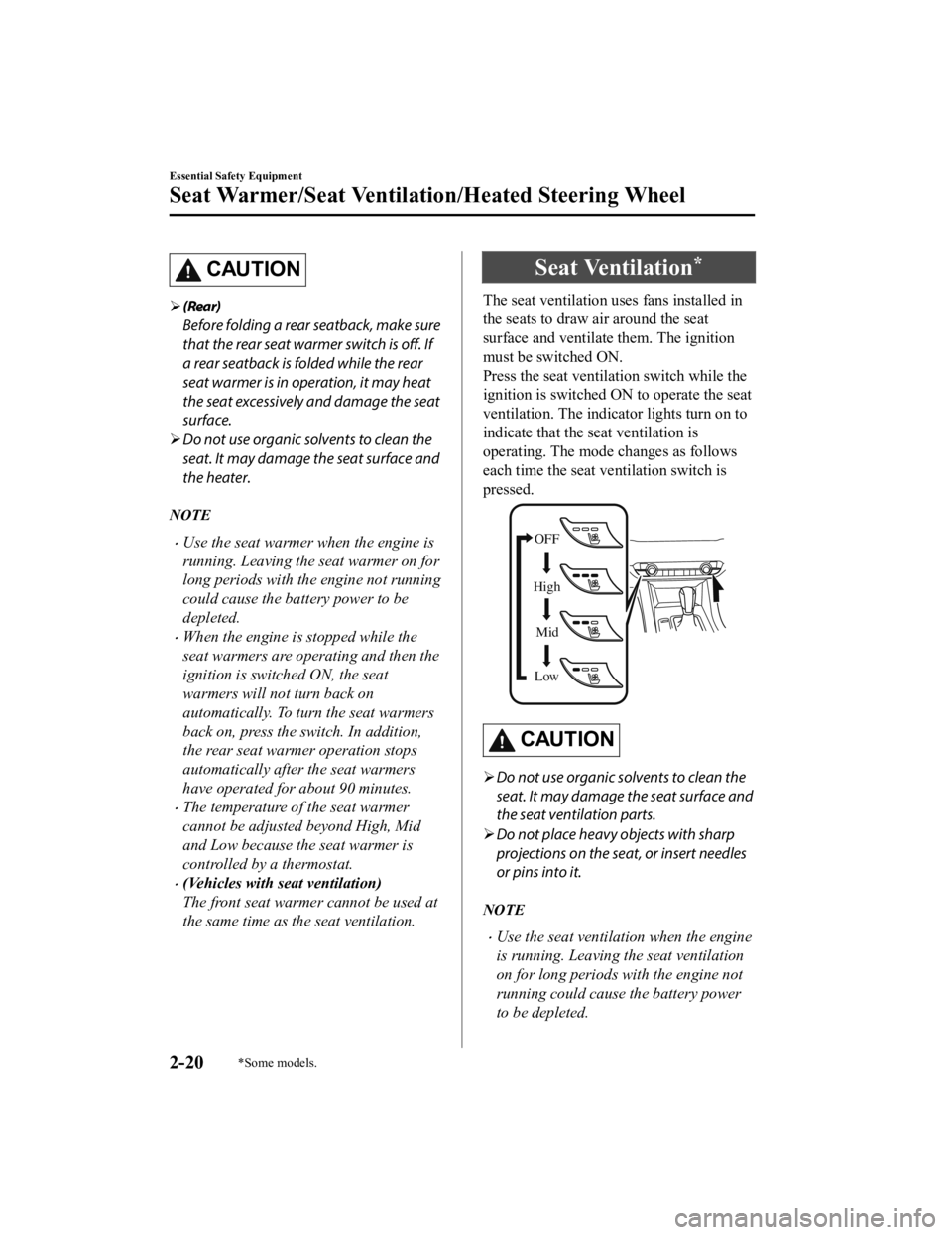
Press the seat ventilation switch while the
ignition is switched O N to operate the seat
ventilation. The indicator lights turn on to
indicate that the seat ventilation is
operating. The mode changes as follows
each time the seat ventilation switch is
pressed.
OFF
High Mid
Low
CAUTION
Do not use organic solvents to clean the
seat. It may damage the seat surface and
the seat ventilation parts.
Do not place heavy objects with sharp
projections on the seat, or insert needles
or pins into it.
NOTE
Use the seat ventilation when the engine
is running. Leaving the seat ventilation
on for long periods with the engine not
running could cause the battery power
to be depleted.
Essential Safety Equipment
Seat Warmer/Seat Ventilation/Heated Steering Wheel
2-20*Some models.
Mazda6_8JN3-EA-20H_Edition1_old 2020-6-18 17:31:27
Page 130 of 634

Break-In Period
No special break-in is necessary, but a few
precautions in the first 1,000 km (600
miles) may add to the performance,
economy, and life of the vehicle.
Do not race the engine.
Do not maintain one constant speed,
either slow or fast, for a long period of
time.
Do not drive constantly at full-throttle or
high engine rpm for e xtended periods of
time.
Avoid unnecessary hard stops.
Avoid full-throttle starts.
Saving Fuel and Protection of the Environment
How you operate your Mazda determines
how far it will travel on a tank of fuel. Use
these suggestions to help save fuel and
reduce CO
2.
Avoid long warm-ups. Once the engine
runs smoothly, begin driving.
Avoid fast starts.
Drive at lower speeds.
Anticipate when to apply the brakes
(avoid sudden braking).
Follow the maintenance schedule (page
6-4) and have an Authorized Mazda
Dealer perform inspections and
servicing.
Use the air conditioner only when
necessary.
Slow down on rough roads.
Keep the tires properly inflated.
Do not carry unnecessary weight.
Do not rest your foot on the brake pedal
while driving.
Keep the wheels in correct alignment.
Keep windows closed at high speeds.
Slow down when driving in crosswinds
and headwinds.
WA R N I N G
Never stop the engine when going down a
hill:
Stopping the engine when going down a
hill is dangerous. This causes the loss of
power steering and power brake control,
and may cause damage to the drivetrain.
Any loss of steering or braking control
could cause an accident.
Before Driving
Driving Tips
3-44
Mazda6_8JN3-EA-20H_Edition1_old 2020-6-18 17:31:27
Page 139 of 634

4When Driving
Information concerning safe driving and stopping.
Start/Stop Engine.............................. 4-4 Ignition Switch........ ..................... 4-4
Starting the Engine....................... 4-5
Turning the Engine Off............... 4-11
Cylinder Deactivation
*............... 4-12
Instrument Cluster and Display ............
........................................................... 4-13 Instrument Cluster and
Display........................................4-13
Instrument Cluster (Type A)....... 4-14
Instrument Cluster (Type B)....... 4-33
Instrument Cluster (Type C)....... 4-51
Active Driving Display
*............. 4-64
Automatic Transaxle....................... 4-67 Automatic Transaxle
Controls...................................... 4-67
Shift-Lock System...................... 4-68
Transaxle Ranges........................4-68
Manual Shift Mode..................... 4-70
Direct Mode
*.............................. 4-76
Driving Tips................................4-77
Switches and Controls..................... 4-78 Lighting Control......................... 4-78
Turn and Lane-Change
Signals........................................ 4-84
Windshield Wipers and
Washer........................................ 4-85
Rear Window Defogg er.............. 4-89
Horn............................................ 4-91
Hazard Warning Flasher............. 4-91
HomeLink Wireless Control System
(Type A)
*.................................... 4-92
HomeLink Wireless Control System
(Type B)
*.................................... 4-95
Brake.............................................. 4-100 Brake System........................... 4-100
AUTOHOLD............................ 4-105
Hill Launch Assist (HLA)........ 4-109
ABS/TCS/DSC................................4-111 Antilock Brake System
(ABS)........................................ 4-111
Traction Control System
(TCS)........................................ 4-112
Dynamic Stability Control
(DSC)........................................ 4-113
Drive Selection............................... 4-115 Drive Selection
*........................4-115
i-ACTIV AWD............................... 4-117 i-ACTIV AWD Operation
*....... 4-117
Power Steering............................... 4-118 Power Steering..........................4-118
i-ACTIVSENSE............................. 4-119 i-ACTIVSENSE....................... 4-119
Adaptive Front Lighting System
(AFS)
*...................................... 4-122
High Beam Control System
(HBC)
*......................................4-123
*Some models.4-1
Mazda6_8JN3-EA-20H_Edition1_old 2020-6-18 17:31:27
Page 164 of 634

▼Warning/Indicator Lights
Instrument Cluster varies depending on model and specifications
.
Front Center of Headliner
Warning lights will appear in any of the highlighted areas
Instrument Cluster
▼
Warning Indication/Warning Lights
These lights turn on or flash to notify the user of the system
operation status or a system
malfunction.
Signal Warning Page
Brake System Warning Indication/Warning Light*1*27-25
ABS Warning Light*1
Electronic Brake
Force Distribu‐ tion System
Wa r n i n g
7-25
ABS warning 7-28
Charging System Warning Indication/Warning Light*17-25
Engine Oil Warning Light*17-25
High Engine Coolant Temperat ure Warning Indication 7-25
Power Steering Malfunction Indication 7-25
When Driving
Instrument Cluster and Display
4-26
Mazda6_8JN3-EA-20H_Edition1_old 2020-6-18 17:31:27
Page 183 of 634

SignalWarning Page
Power Steering Malfunction Indication 7-25
Master Warning Indication 7-28
Electric Parking Brake (EPB) Warning Indication/Warning Light*17-28
Check Engine Light*17-28
*Selective Catalytic Reduction (SCR) system Warning Indication/W arning
Light*17-28
Automatic Transaxle War ning Indication 7-28
*AWD Warning Indication 7-28
Air Bag/Front Seat Belt Pretensioner System Warning Light*17-28
Tire Pressure Monitoring System Warning Light*1
Flashing
7-28
Turns on 7-35
(Amber/White) KEY Warning Indication Amber
7-28
White 7-35
(Amber)
*High Beam Control System (HBC) Warning Indication/Warning Light*17-28
Blind Spot Monitoring (BSM) Warning Indication 7-28
(Amber)
*Mazda Radar Cruise Control with Stop & Go function (MRCC with Stop
& Go function) War ning Indication 7-28
*Lane-keep Assist System (LAS) & Lane Departure Warning System
(LDWS) Warning Indication 7-28
LED Headlight Warning Light*17-28
(Amber)
*Smart Brake Support/Smart City B
rake Support (SBS/SCBS) Warning In‐
dication 7-35
Low Fuel Warning Indication
7-35
When Driving
Instrument Cluster and Display
*Some models.4-45
Mazda6_8JN3-EA-20H_Edition1_old 2020-6-18 17:31:27
Page 197 of 634
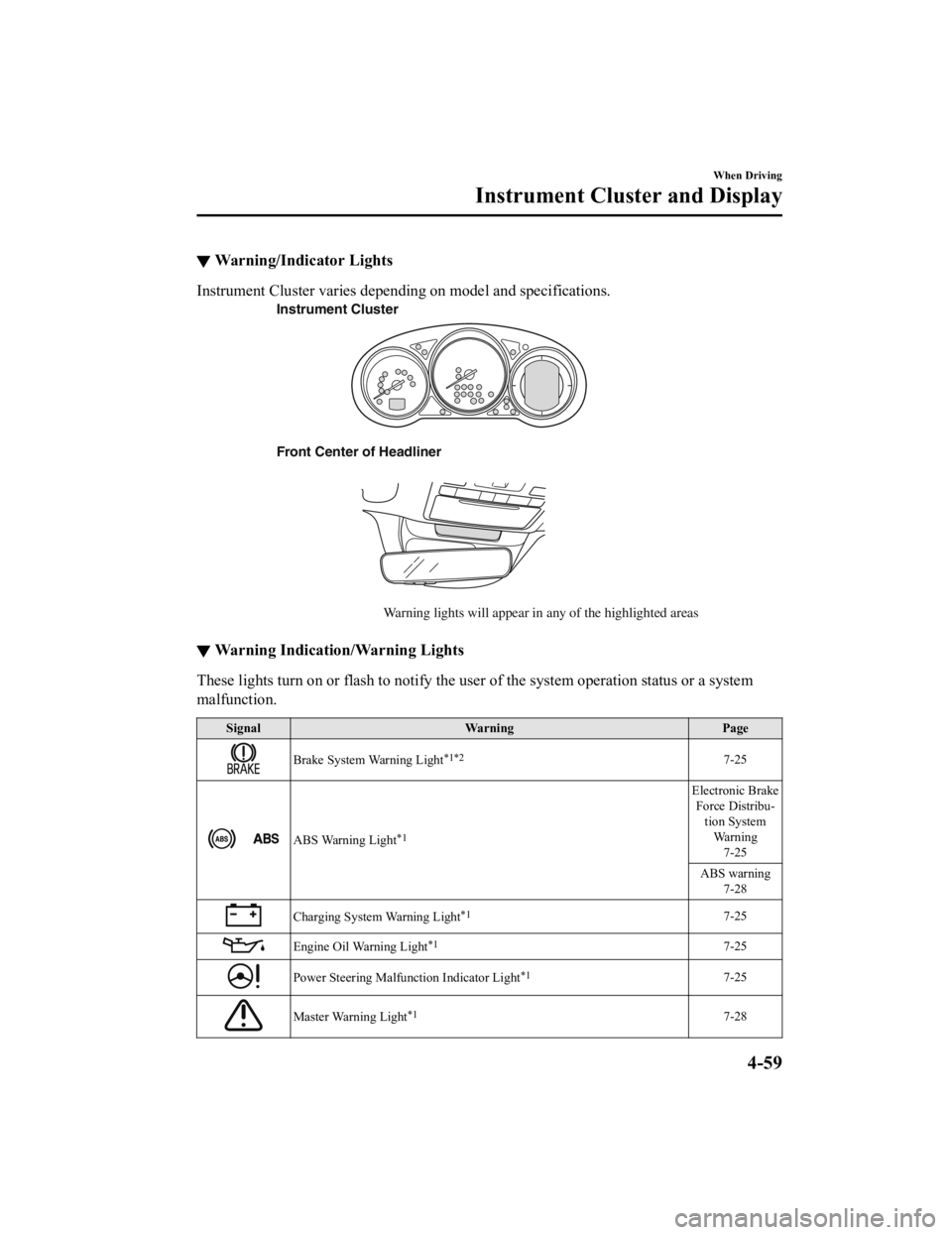
▼Warning/Indicator Lights
Instrument Cluster varies depending on model and specifications
.
Front Center of Headliner
Warning lights will appear in any of the highlighted areas
Instrument Cluster
▼
Warning Indication/Warning Lights
These lights turn on or flash to
notify the user of the system operation status or a system
malfunction.
Signal Warning Page
Brake System Warning Light*1*27-25
ABS Warning Light*1
Electronic Brake
Force Distribu‐ tion System
Wa r n i n g
7-25
ABS warning 7-28
Charging System Warning Light*17-25
Engine Oil Warning Light*17-25
Power Steering Malfunction Indicator Light*17-25
Master Warning Light*17-28
When Driving
Instrument Cluster and Display
4-59
Mazda6_8JN3-EA-20H_Edition1_old 2020-6-18 17:31:27
Page 215 of 634

Driving Tips
WARNING
Do not let the vehicle move in a direction
opposite to the direction selected by the
selector lever:
Do not let the vehicle move backward with
the selector lever in a forward position, or
do not let the vehicle move forward with
the selector lever in the reverse position.
Otherwise, the engine may stop, causing
the loss of the power brake and power
steering functions, and make it difficult to
control the vehicle which could result in an
accident.
Passing
For extra power when passing another
vehicle or climbing steep grades, depress
the accelerator fully. The transaxle will
shift to a lower gear, depending on vehicle
speed.
NOTE
The accelerator pedal may initially feel
heavy as it is being depressed, then feel
lighter as it is depressed further. This
change in pedal force aids the engine
control system in determining how much
the accelerator pedal has been
depressed for performing kickdown, and
functions to control whether or not
kickdown should be performed.
While the selector lever is in the M
position and the DSC is turned off,
manual shift mode does not switch to
automatic shift mode even if the
accelerator pedal is completely
depressed. Operate the selector lever.
Climbing steep grades from a stop
To climb a steep grade from a stopped
position:
1. Depress the brake pedal.
2. Shift to D or M1, depending on the load weight and grade steepness.
3. Release the brake pedal while gradually accelerating.
Descending steep grades
When descending a steep grade, shift to
lower gears, depending on load weight and
grade steepness. Desce nd slowly, using the
brakes only occasionally to prevent them
from overheating.
When Driving
Automatic Transaxle
4-77
Mazda6_8JN3-EA-20H_Edition1_old 2020-6-18 17:31:27
Page 256 of 634

Power Steering
Power steering is only operable when
the engine is running. If the engine is off
or if the power steering system is
inoperable, you can still steer, but it
requires more physical effort.
If the steering feels stiffer than usual
during normal driving or the steering
vibrates, consult an Authorized Mazda
Dealer.
The warning indication/warning light
notifies the driver of system
abnormalities and operation conditions.
In addition, the buzzer may also activate
depending on the system abnormality or
operation condition.
Refer to Stop Vehicle in Safe Place
Immediately on page 7-25.
Refer to Power Steering Warning
Buzzer on page 7-48.
CAUTION
Never hold the steering wheel to the
extreme left or right for more than 5
seconds with the engine running. This
could damage the power steering system.
When Driving
Power Steering
4-118
Mazda6_8JN3-EA-20H_Edition1_old 2020-6-18 17:31:27