ECO mode MAZDA MODEL 6 SPORT WAGON 2006 User Guide
[x] Cancel search | Manufacturer: MAZDA, Model Year: 2006, Model line: MODEL 6 SPORT WAGON, Model: MAZDA MODEL 6 SPORT WAGON 2006Pages: 390, PDF Size: 3.6 MB
Page 171 of 390
Black plate (171,1)
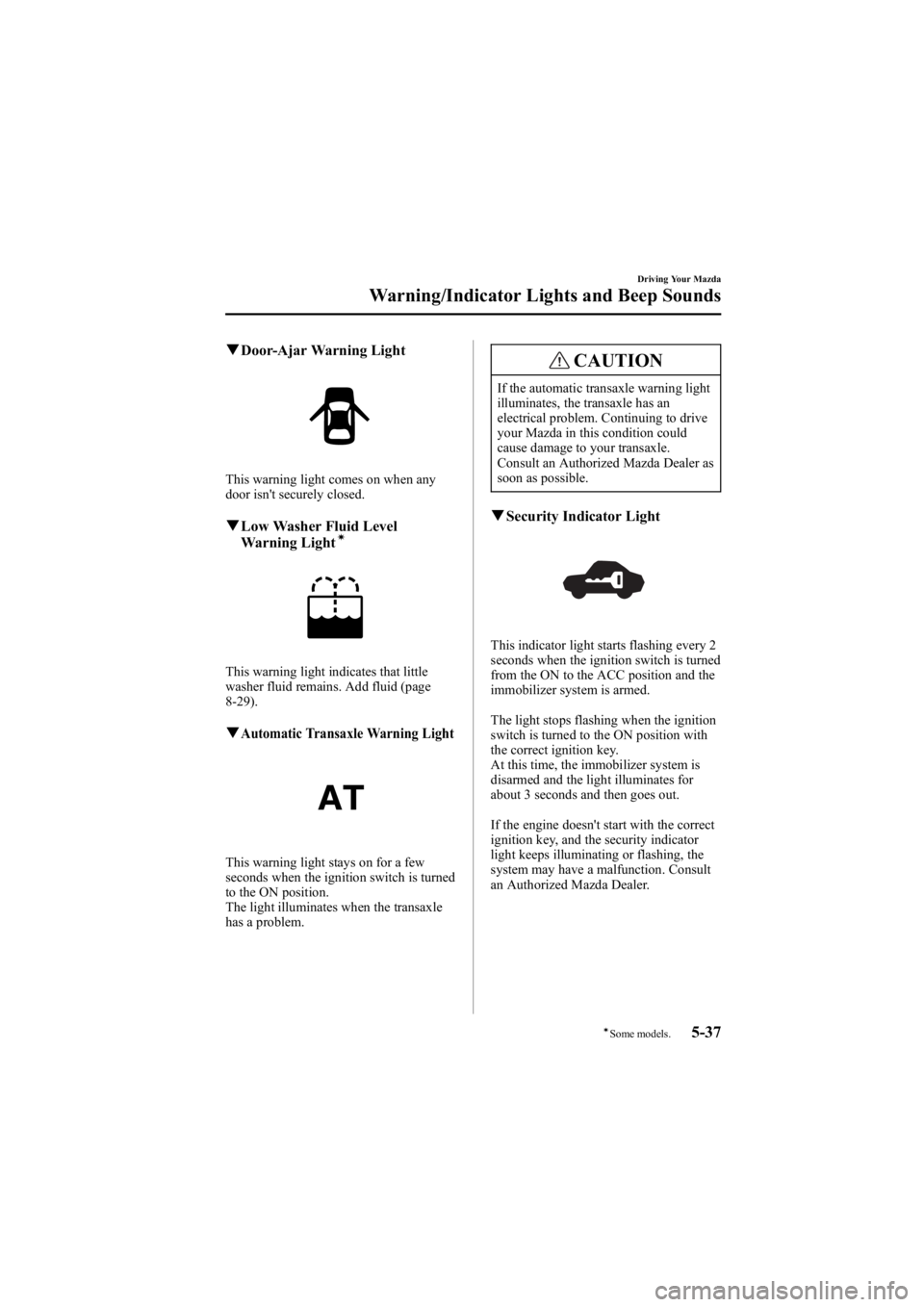
qDoor-Ajar Warning Light
This warning light comes on when any
door isn't securely closed.
qLow Washer Fluid Level
Warning Lightí
This warning light indicates that little
washer fluid remains. Add fluid (page
8-29).
qAutomatic Transaxle Warning Light
This warning light stays on for a few
seconds when the ignition switch is turned
to the ON position.
The light illuminates when the transaxle
has a problem.
CAUTION
If the automatic transaxle warning light
illuminates, the transaxle has an
electrical problem. Continuing to drive
your Mazda in this condition could
cause damage to your transaxle.
Consult an Authorized Mazda Dealer as
soon as possible.
qSecurity Indicator Light
This indicator light starts flashing every 2
seconds when the ignition switch is turned
from the ON to the ACC position and the
immobilizer system is armed.
The light stops flashing when the ignition
switch is turned to the ON position with
the correct ignition key.
At this time, the immobilizer system is
disarmed and the light illuminates for
about 3 seconds and then goes out.
If the engine doesn't start with the correct
ignition key, and the security indicator
light keeps illuminating or flashing, the
system may have a malfunction. Consult
an Authorized Mazda Dealer.
Driving Your Mazda
Warning/Indicator Lights and Beep Sounds
5-37íSome models.
Mazda6_8V40-EA-05L_Edition1 Page171
Monday, November 28 2005 6:10 PM
Form No.8V40-EA-05L
Page 172 of 390
Black plate (172,1)
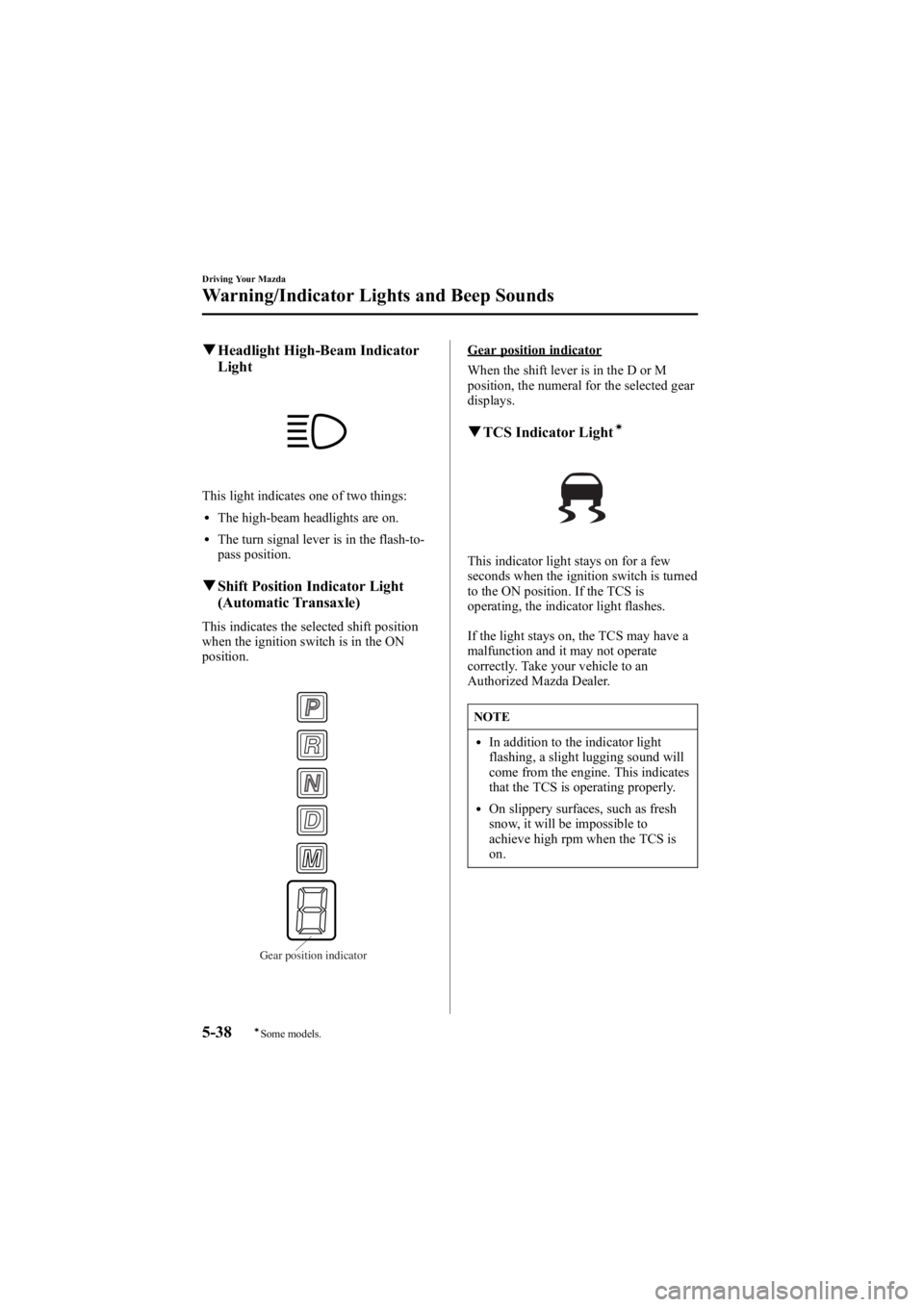
qHeadlight High-Beam Indicator
Light
This light indicates one of two things:
lThe high-beam headlights are on.
lThe turn signal lever is in the flash-to-
pass position.
qShift Position Indicator Light
(Automatic Transaxle)
This indicates the selected shift position
when the ignition switch is in the ON
position.
Gear position indicator
Gear position indicator
When the shift lever is in the D or M
position, the numeral for the selected gear
displays.
qTCS Indicator Lightí
This indicator light stays on for a few
seconds when the ignition switch is turned
to the ON position. If the TCS is
operating, the indicator light flashes.
If the light stays on, the TCS may have a
malfunction and it may not operate
correctly. Take your vehicle to an
Authorized Mazda Dealer.
NOTE
lIn addition to the indicator light
flashing, a slight lugging sound will
come from the engine. This indicates
that the TCS is operating properly.
lOn slippery surfaces, such as fresh
snow, it will be impossible to
achieve high rpm when the TCS is
on.
5-38
Driving Your Mazda
íSome models.
Warning/Indicator Lights and Beep Sounds
Mazda6_8V40-EA-05L_Edition1 Page172
Monday, November 28 2005 6:10 PM
Form No.8V40-EA-05L
Page 173 of 390
Black plate (173,1)
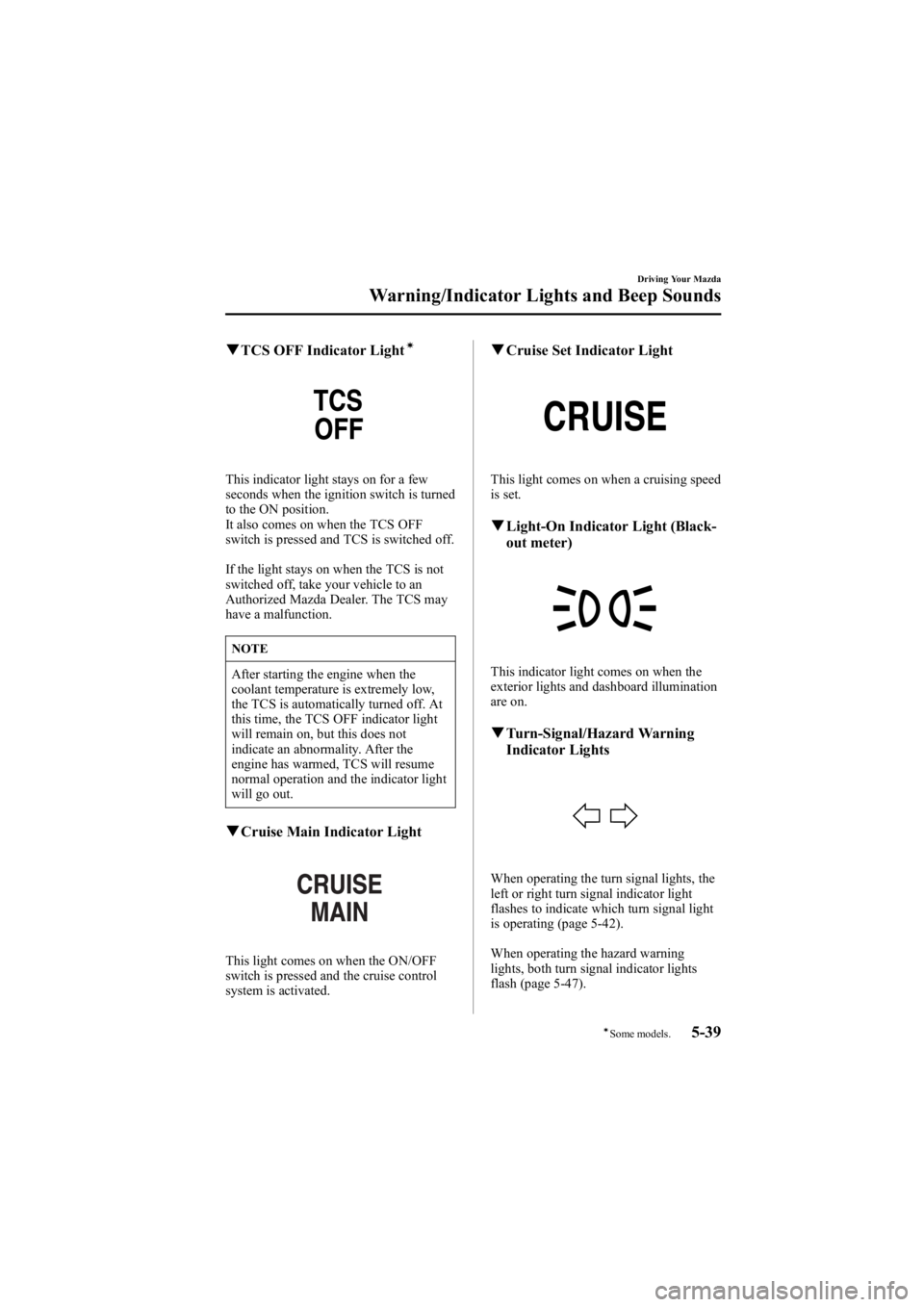
qTCS OFF Indicator Lightí
This indicator light stays on for a few
seconds when the ignition switch is turned
to the ON position.
It also comes on when the TCS OFF
switch is pressed and TCS is switched off.
If the light stays on when the TCS is not
switched off, take your vehicle to an
Authorized Mazda Dealer. The TCS may
have a malfunction.
NOTE
After starting the engine when the
coolant temperature is extremely low,
the TCS is automatically turned off. At
this time, the TCS OFF indicator light
will remain on, but this does not
indicate an abnormality. After the
engine has warmed, TCS will resume
normal operation and the indicator light
will go out.
qCruise Main Indicator Light
This light comes on when the ON/OFF
switch is pressed and the cruise control
system is activated.
qCruise Set Indicator Light
This light comes on when a cruising speed
is set.
qLight-On Indicator Light (Black-
out meter)
This indicator light comes on when the
exterior lights and dashboard illumination
are on.
qTurn-Signal/Hazard Warning
Indicator Lights
When operating the turn signal lights, the
left or right turn signal indicator light
flashes to indicate which turn signal light
is operating (page 5-42).
When operating the hazard warning
lights, both turn signal indicator lights
flash (page 5-47).
Driving Your Mazda
Warning/Indicator Lights and Beep Sounds
5-39íSome models.
Mazda6_8V40-EA-05L_Edition1 Page173
Monday, November 28 2005 6:10 PM
Form No.8V40-EA-05L
Page 193 of 390
Black plate (193,1)
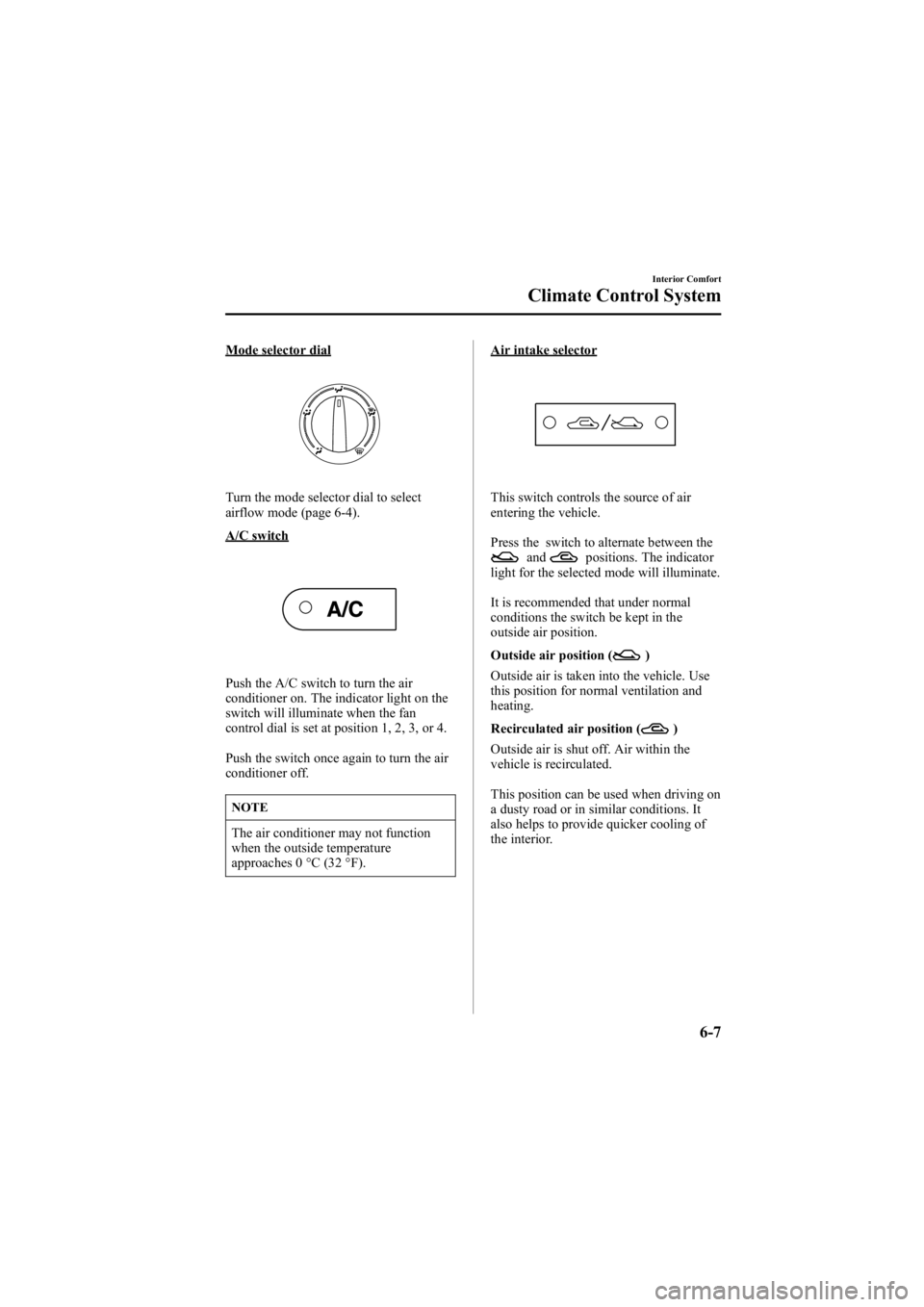
Mode selector dial
Turn the mode selector dial to select
airflow mode (page 6-4).
A/C switch
Push the A/C switch to turn the air
conditioner on. The indicator light on the
switch will illuminate when the fan
control dial is set at position 1, 2, 3, or 4.
Push the switch once again to turn the air
conditioner off.
NOTE
The air conditioner may not function
when the outside temperature
approaches 0 °C (32 °F).
Air intake selector
This switch controls the source of air
entering the vehicle.
Press the switch to alternate between the
andpositions. The indicator
light for the selected mode will illuminate.
It is recommended that under normal
conditions the switch be kept in the
outside air position.
Outside air position (
)
Outside air is taken into the vehicle. Use
this position for normal ventilation and
heating.
Recirculated air position (
)
Outside air is shut off. Air within the
vehicle is recirculated.
This position can be used when driving on
a dusty road or in similar conditions. It
also helps to provide quicker cooling of
the interior.
Interior Comfort
Climate Control System
6-7
Mazda6_8V40-EA-05L_Edition1 Page193
Monday, November 28 2005 6:10 PM
Form No.8V40-EA-05L
Page 215 of 390
Black plate (215,1)
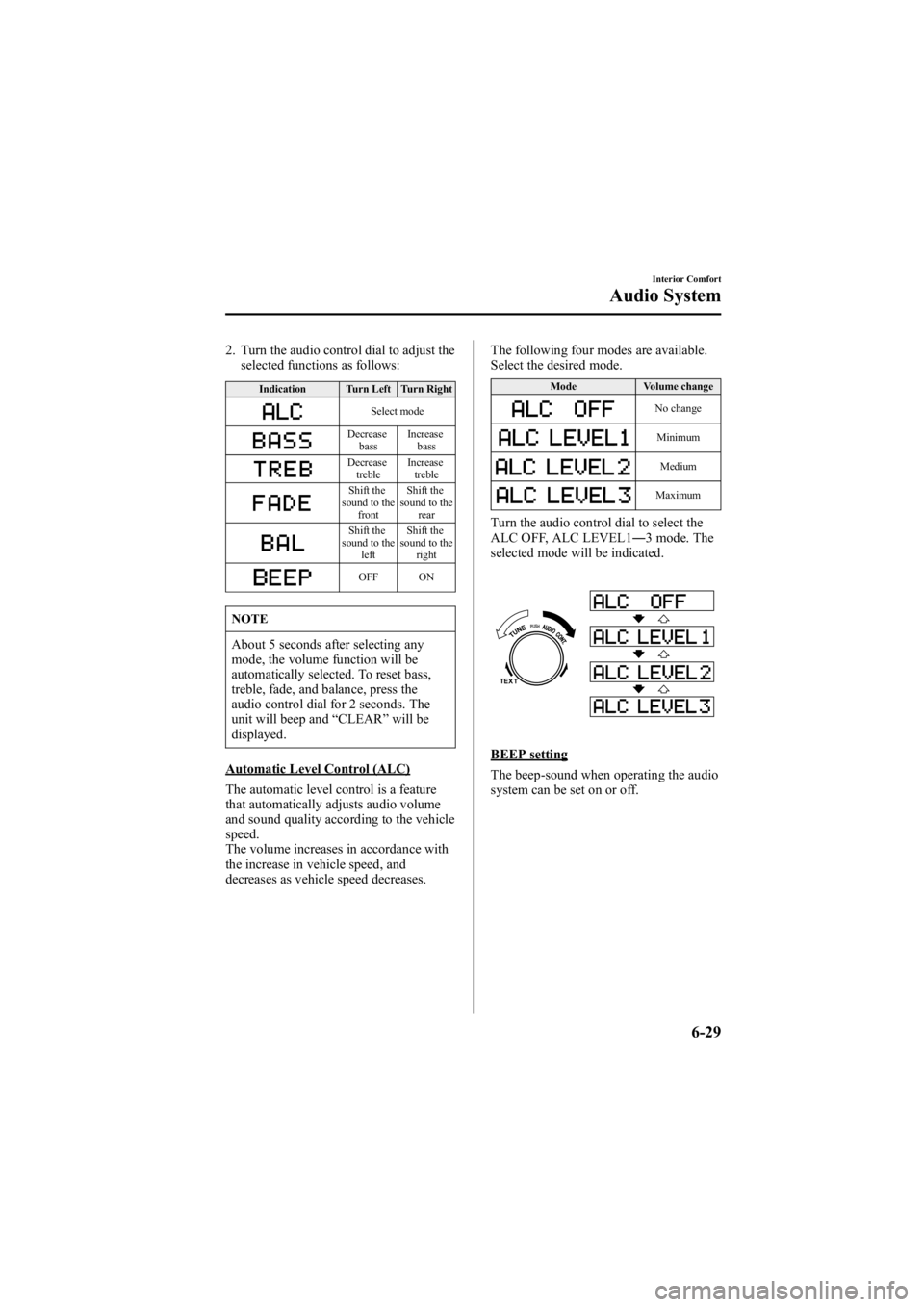
2. Turn the audio control dial to adjust theselected functions as follows:
Indication Turn Left Turn Right
Select mode
Decrease
bass Increase
bass
Decreasetreble Increase
treble
Shift the
sound to the front Shift the
sound to the rear
Shift the
sound to the left Shift the
sound to the right
OFF ON
NOTE
About 5 seconds after selecting any
mode, the volume function will be
automatically selected. To reset bass,
treble, fade, and balance, press the
audio control dial for 2 seconds. The
unit will beep and “CLEAR” will be
displayed.
Automatic Level Control (ALC)
The automatic level control is a feature
that automatically adjusts audio volume
and sound quality according to the vehicle
speed.
The volume increases in accordance with
the increase in vehicle speed, and
decreases as vehicle speed decreases. The following four modes are available.
Select the desired mode.
Mode
Volume change
No change
Minimum
Medium
Maximum
Turn the audio control dial to select the
ALC OFF, ALC LEVEL1 ―3 mode. The
selected mode will be indicated.
BEEP setting
The beep-sound when operating the audio
system can be set on or off.
Interior Comfort
Audio System
6-29
Mazda6_8V40-EA-05L_Edition1 Page215
Monday, November 28 2005 6:10 PM
Form No.8V40-EA-05L
Page 216 of 390
Black plate (216,1)
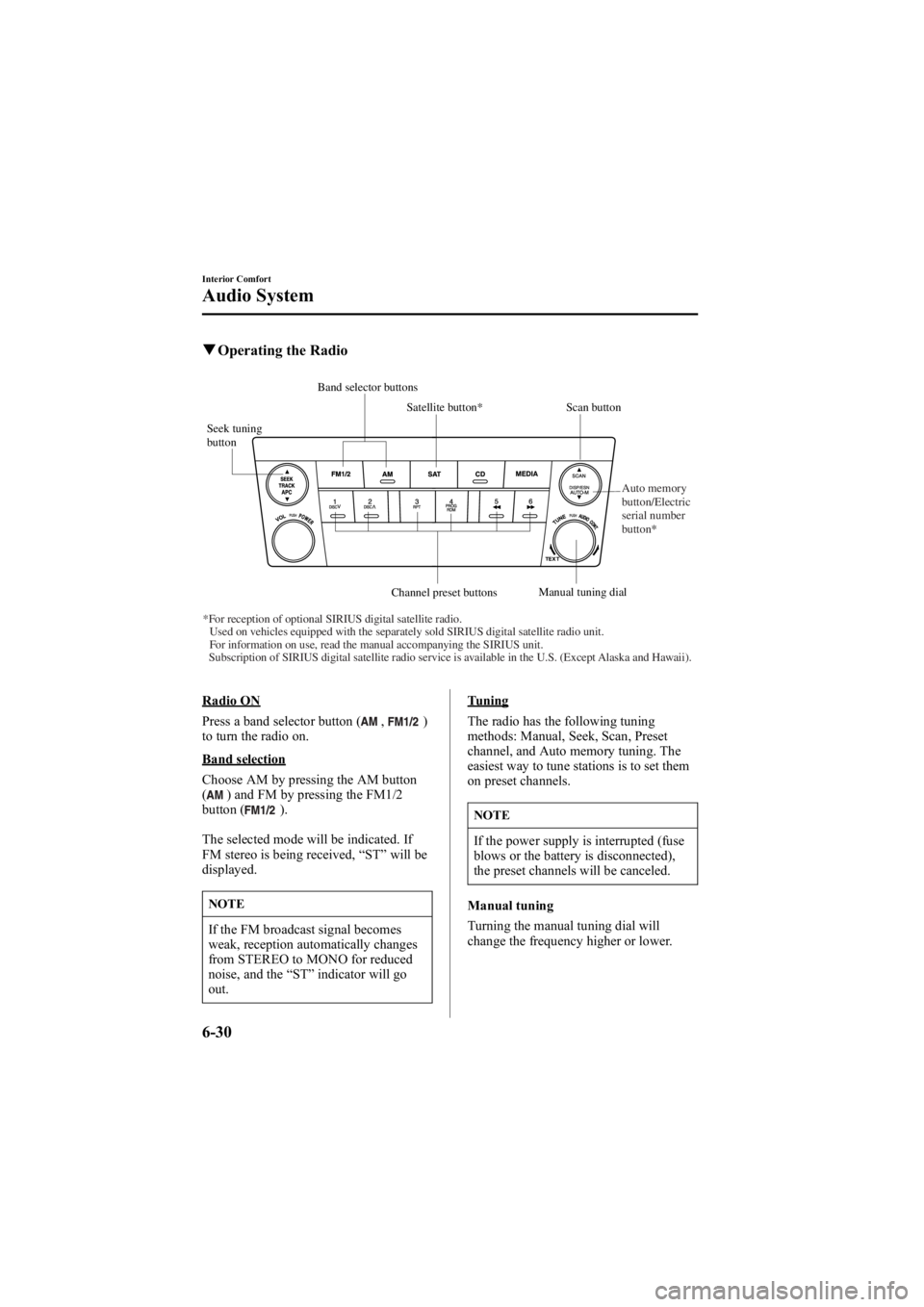
qOperating the Radio
Seek tuning
button Scan button
Channel preset buttons Manual tuning dial
Satellite button*
Band selector buttons
*For reception of optional SIRIUS digital satellite radio. Used on vehicles equipped with the separately sold SIRIUS digital satellite radio\
unit.For information on use, read the manual accompanying the SIRIUS unit.
Subscription of SIRIUS digital satellite radio service is available in the U.S. (Except Alaska and Hawaii). Auto memory
button/Electric
serial number
button*
Radio ON
Press a band selector button (
,)
to turn the radio on.
Band selection
Choose AM by pressing the AM button
(
) and FM by pressing the FM1/2
button ().
The selected mode will be indicated. If
FM stereo is being received, “ST ”will be
displayed.
NOTE
If the FM broadcast signal becomes
weak, reception automatically changes
from STEREO to MONO for reduced
noise, and the “ST ”indicator will go
out.
Tuning
The radio has the following tuning
methods: Manual, Seek, Scan, Preset
channel, and Auto memory tuning. The
easiest way to tune stations is to set them
on preset channels.
NOTE
If the power supply is interrupted (fuse
blows or the battery is disconnected),
the preset channels will be canceled.
Manual tuning
Turning the manual tuning dial will
change the frequency higher or lower.
6-30
Interior Comfort
Audio System
Mazda6_8V40-EA-05L_Edition1 Page216
Monday, November 28 2005 6:10 PM
Form No.8V40-EA-05L
Page 222 of 390
Black plate (222,1)
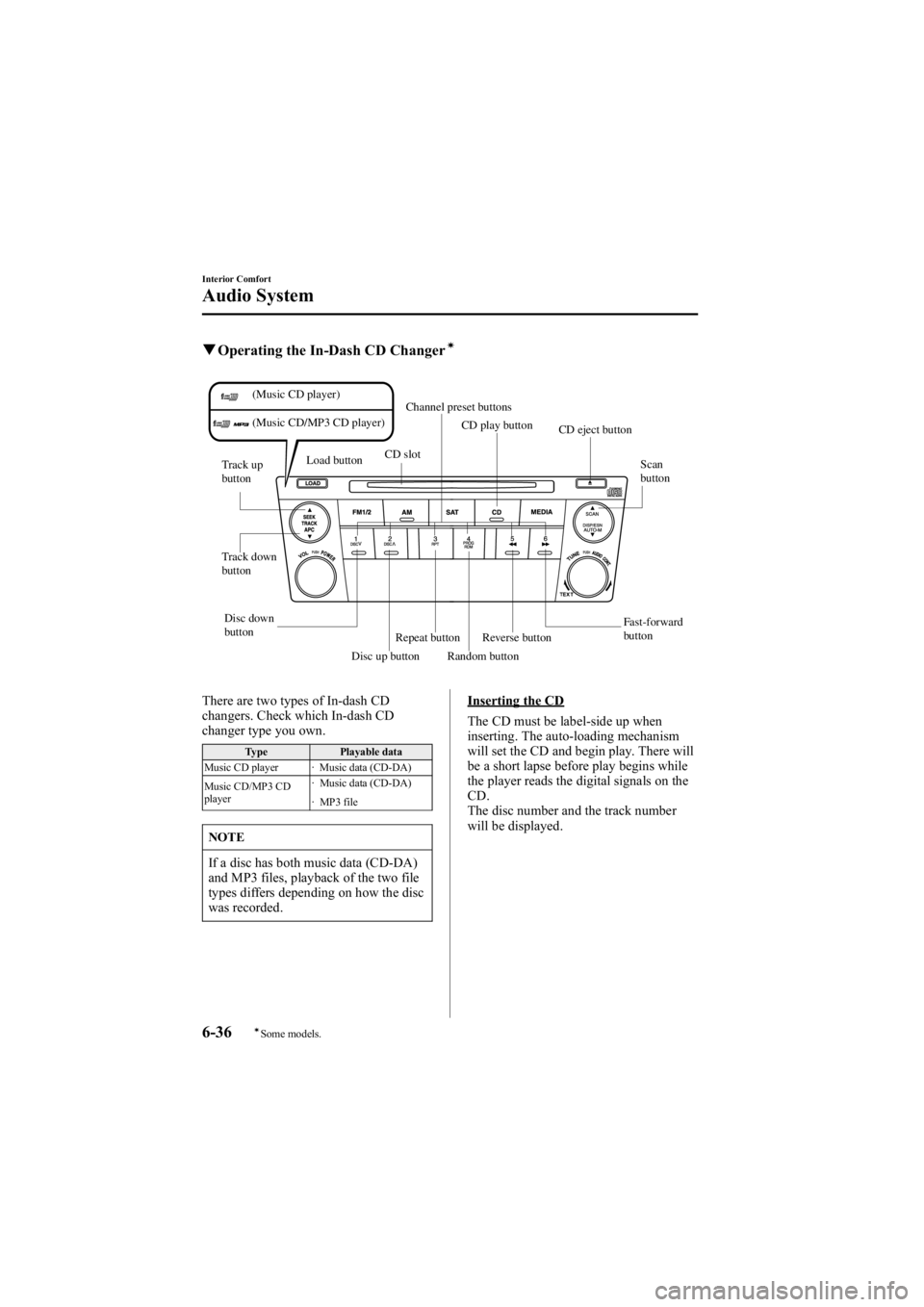
qOperating the In-Dash CD Changerí
Fast-forward
button
Disc down
button
Track down
button Track up
button
Scan
button
Channel preset buttons
CD eject button
CD slot
Load button
Reverse button
Disc up button Random button
Repeat button CD play button
(Music CD player)
(Music CD/MP3 CD player)
There are two types of In-dash CD
changers. Check which In-dash CD
changer type you own.
Type
Playable data
Music CD player · Music data (CD-DA)
Music CD/MP3 CD
player · Music data (CD-DA)
· MP3 file
NOTE
If a disc has both music data (CD-DA)
and MP3 files, playback of the two file
types differs depending on how the disc
was recorded.
Inserting the CD
The CD must be label-side up when
inserting. The auto-loading mechanism
will set the CD and begin play. There will
be a short lapse before play begins while
the player reads the digital signals on the
CD.
The disc number and the track number
will be displayed.
6-36
Interior Comfort
íSome models.
Audio System
Mazda6_8V40-EA-05L_Edition1 Page222
Monday, November 28 2005 6:10 PM
Form No.8V40-EA-05L
Page 230 of 390
Black plate (230,1)
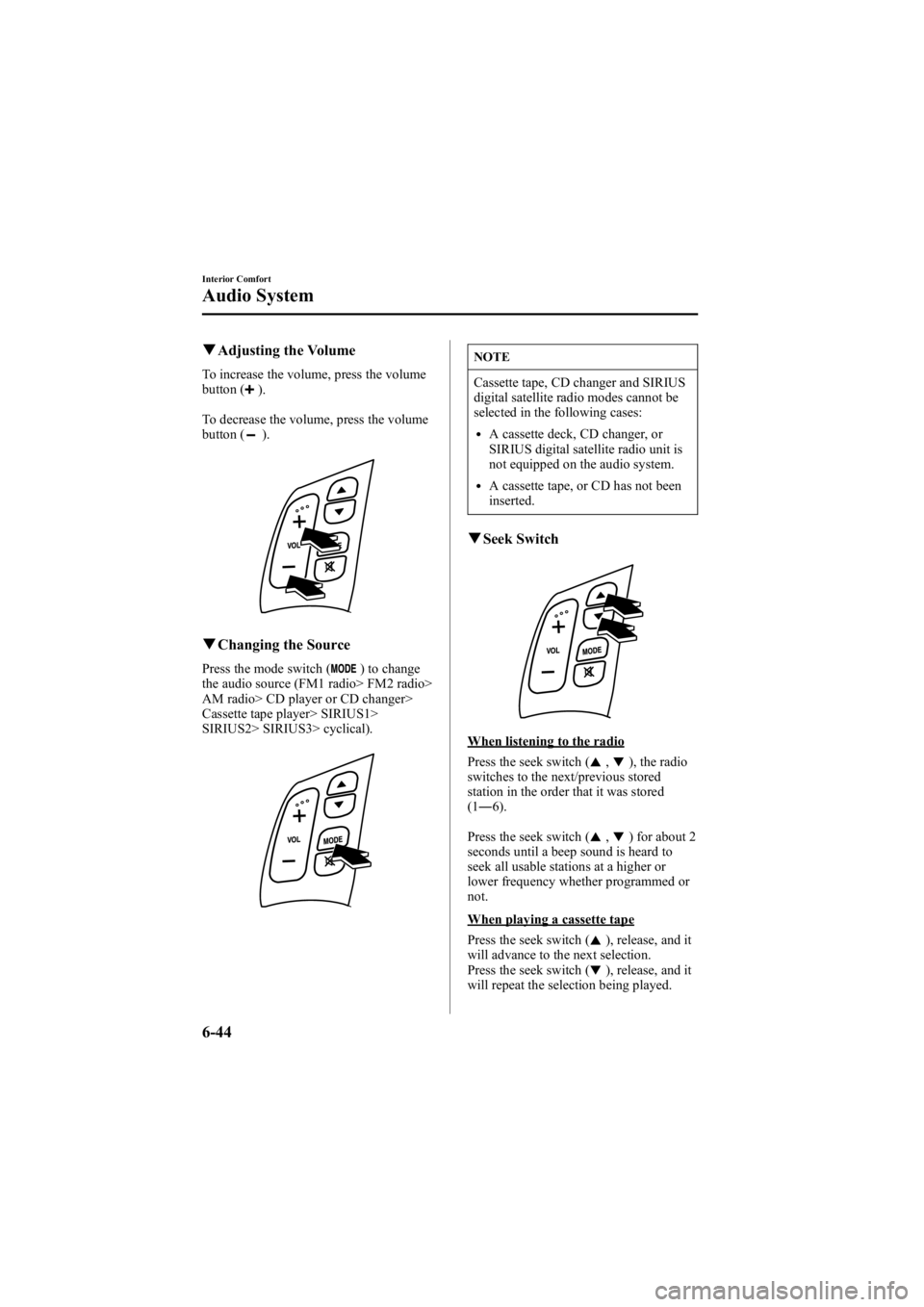
qAdjusting the Volume
To increase the volume, press the volume
button ().
To decrease the volume, press the volume
button (
).
q Changing the Source
Press the mode switch () to change
the audio source (FM1 radio> FM2 radio>
AM radio> CD player or CD changer>
Cassette tape player> SIRIUS1>
SIRIUS2> SIRIUS3> cyclical).
NOTE
Cassette tape, CD changer and SIRIUS
digital satellite radio modes cannot be
selected in the following cases:
lA cassette deck, CD changer, or
SIRIUS digital satellite radio unit is
not equipped on the audio system.
lA cassette tape, or CD has not been
inserted.
q Seek Switch
When listening to the radio
Press the seek switch (
,), the radio
switches to the next/previous stored
station in the order that it was stored
(1 ― 6).
Press the seek switch (
,) for about 2
seconds until a beep sound is heard to
seek all usable stations at a higher or
lower frequency whether programmed or
not.
When playing a cassette tape
Press the seek switch (
), release, and it
will advance to the next selection.
Press the seek switch (
), release, and it
will repeat the selection being played.
6-44
Interior Comfort
Audio System
Mazda6_8V40-EA-05L_Edition1 Page230
Monday, November 28 2005 6:10 PM
Form No.8V40-EA-05L
Page 329 of 390
Black plate (329,1)
Interior Care
qDashboard Precautions
Prevent caustic solutions such as perfume
and cosmetic oils from contacting the
dashboard. They'll damage and discolor it.
If these solutions get on the dashboard,
wipe them off immediately.
CAUTION
Do not use glazing agents.
Glazing agents contain ingredients
which may cause discoloration,
wrinkling, cracks and peeling.
qCleaning the Upholstery and
Interior Trim
Vinyl
Remove dust and loose dirt from vinyl
with a whisk broom or vacuum cleaner.
Clean vinyl with a leather-and-vinyl
cleaner.
Leatherí
Real leather isn't uniform and may have
scars, scratches, and wrinkles. Clean it
with a leather cleaner or mild soap.
Wipe it with a dampsoft cloth; then dry
and buff it with a drysoft cloth.
Fabricí
Remove dust and loose dirt from fabric
with a whisk broom or vacuum cleaner.
Clean it with a mild soap solution good
for upholstery and carpets. Remove fresh
spots immediately with a fabric spot
cleaner. To keep the fabric looking clean and
fresh, take care of it. Otherwise its color
will be affected, it can be stained easily,
and its fire-resistance may be reduced.
CAUTION
Use only recommended cleaners and
procedures. Others may affect
appearance and fire-resistance.
q
Cleaning the Lap/Shoulder Belt
Webbing
Clean the webbing with a mild soap
solution recommended for upholstery or
carpets. Follow instructions. Don't bleach
or dye the webbing; this may weaken it.
After cleaning the belts, thoroughly dry
the belt webbing and make sure there is
no remaining moisture before retracting
them.
WARNING
Damaged Seat Belt:
Using damaged seat belts is
dangerous. In a collision, damaged
belts cannot provide adequate
protection. Have an Authorized Mazda
Dealer replace damaged belts
immediately.
Maintenance and Care
Appearance Care
8-63íSome models.
Mazda6_8V40-EA-05L_Edition1 Page329
Monday, November 28 2005 6:11 PM
Form No.8V40-EA-05L
Page 332 of 390
Black plate (332,1)
Customer Assistance (U.S.A.)
Your complete and permanent satisfaction is our business. We are here to serve you. All
Authorized Mazda Dealers have the knowledge and the tools to keep your Mazda vehicle
in top condition.
If you have any questions or recommendations for improvement regarding the service of
your Mazda vehicle or servicing by Mazda Dealer personnel, we recommend that you take
the following steps:
qSTEP 1: Contact Your Mazda Dealer
Discuss the matter with an Authorized Mazda Dealer. This is the quickest and best way to
address the issue. If your concern has not been resolved by the CUSTOMER RELATIONS,
SALES, SERVICE, or PARTS MANAGER, then please contact the GENERAL
MANAGER of the dealership or the OWNER.
qSTEP 2: Contact Mazda North American Operations
If for any reason you feel the need for further assistance after contacting your dealership
management, you can reach Mazda North American Operations by one of the following
ways.
Log on: at www.mazdaUSA.com
Answers to many questions, including how to locate or contact a local Mazda dealership in
the U.S., can be found here.
E-mail: click on “Contact Us ”at the bottom of the page at www.mazdaUSA.com
By phone at:1 (800) 222-5500
By letter at:
Attn: Customer Assistance
Mazda North American Operations
7755 Irvine Center Drive
Irvine, CA 92618-2922
P.O. Box 19734
Irvine, CA 92623-9734
In order to serve you efficiently and effectively, please help us by providing the following
information:
1. Your name, address, and telephone number
2. Year and model of vehicle
9-2
Customer Information and Reporting Safety Defects
Customer Assistance
Mazda6_8V40-EA-05L_Edition1 Page332
Monday, November 28 2005 6:11 PM
Form No.8V40-EA-05L