brake light MAZDA MODEL B-SERIES 2005 Owners Manual (in English)
[x] Cancel search | Manufacturer: MAZDA, Model Year: 2005, Model line: MODEL B-SERIES, Model: MAZDA MODEL B-SERIES 2005Pages: 254, PDF Size: 2.13 MB
Page 8 of 254
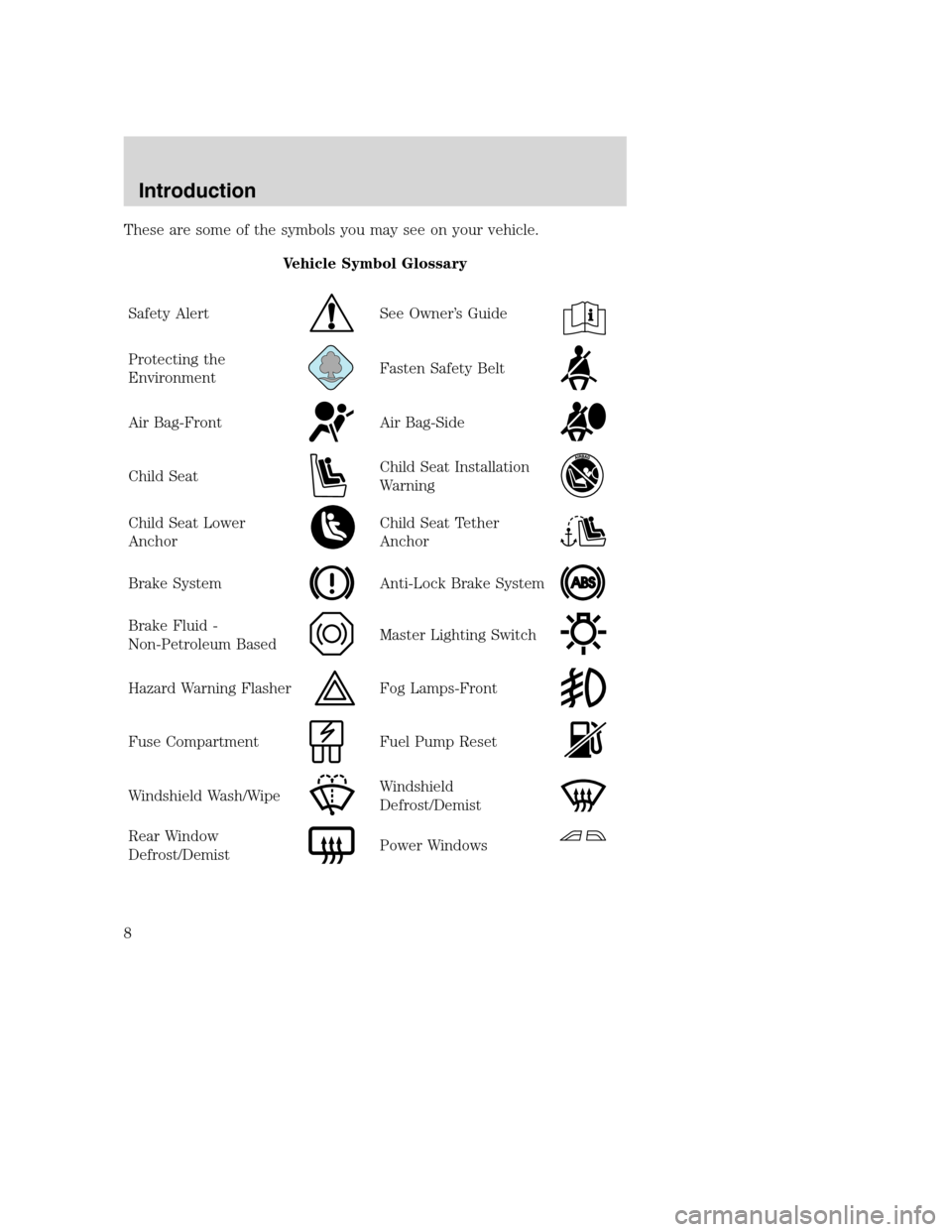
These are some of the symbols you may see on your vehicle.
Vehicle Symbol Glossary
Safety Alert
See Owner’s Guide
Protecting the
EnvironmentFasten Safety Belt
Air Bag-FrontAir Bag-Side
Child SeatChild Seat Installation
Warning
Child Seat Lower
AnchorChild Seat Tether
Anchor
Brake SystemAnti-Lock Brake System
Brake Fluid -
Non-Petroleum BasedMaster Lighting Switch
Hazard Warning FlasherFog Lamps-Front
Fuse CompartmentFuel Pump Reset
Windshield Wash/WipeWindshield
Defrost/Demist
Rear Window
Defrost/DemistPower Windows
REVIEW COPY
2005 Mazda B Series(mbs), Owners Guide (post-2002-fmt)(own2002),
Market:Canadian_French(fr_can)
Introduction
8
Page 13 of 254
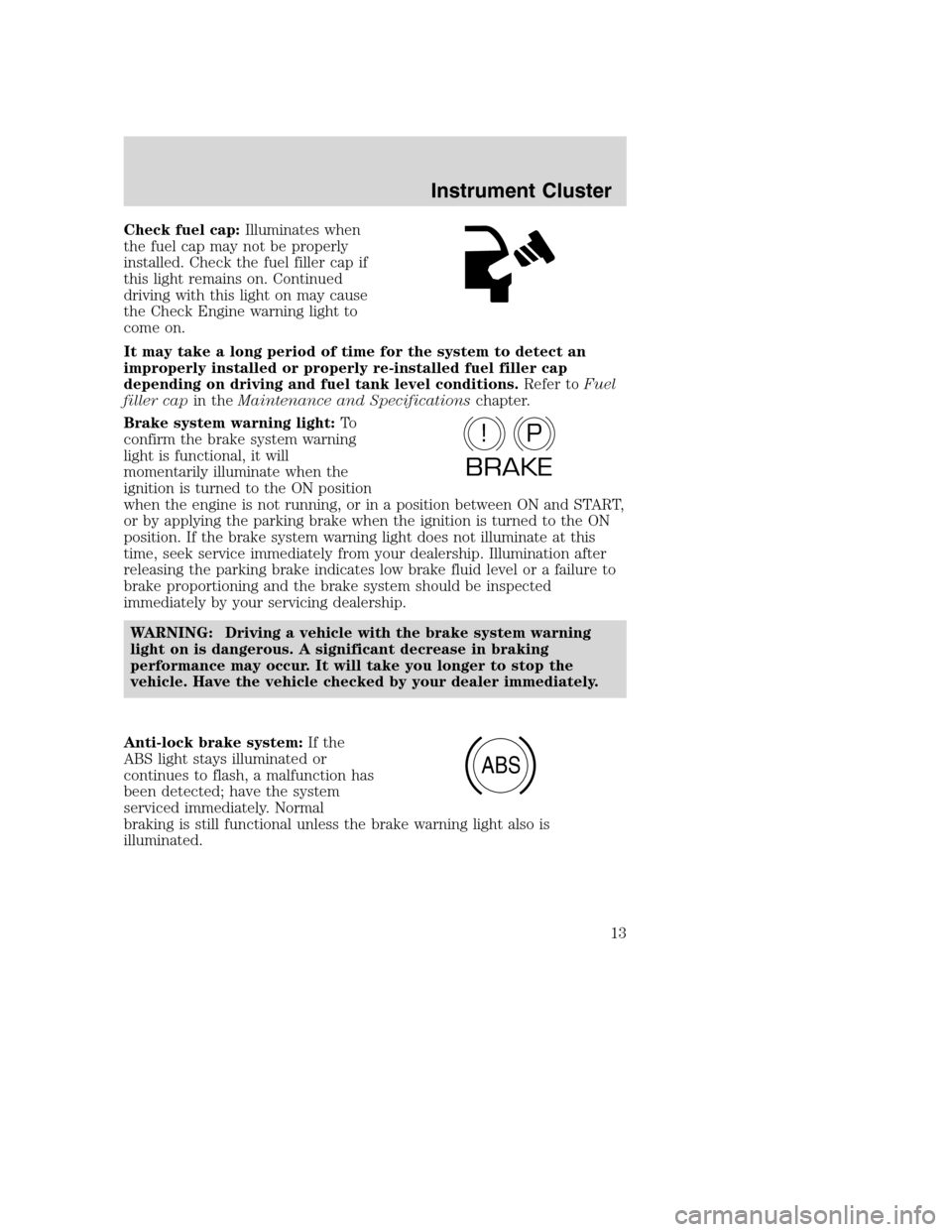
Check fuel cap:Illuminates when
the fuel cap may not be properly
installed. Check the fuel filler cap if
this light remains on. Continued
driving with this light on may cause
the Check Engine warning light to
come on.
It may take a long period of time for the system to detect an
improperly installed or properly re-installed fuel filler cap
depending on driving and fuel tank level conditions.Refer toFuel
filler capin theMaintenance and Specificationschapter.
Brake system warning light:To
confirm the brake system warning
light is functional, it will
momentarily illuminate when the
ignition is turned to the ON position
when the engine is not running, or in a position between ON and START,
or by applying the parking brake when the ignition is turned to the ON
position. If the brake system warning light does not illuminate at this
time, seek service immediately from your dealership. Illumination after
releasing the parking brake indicates low brake fluid level or a failure to
brake proportioning and the brake system should be inspected
immediately by your servicing dealership.
WARNING: Driving a vehicle with the brake system warning
light on is dangerous. A significant decrease in braking
performance may occur. It will take you longer to stop the
vehicle. Have the vehicle checked by your dealer immediately.
Anti-lock brake system:If the
ABS light stays illuminated or
continues to flash, a malfunction has
been detected; have the system
serviced immediately. Normal
braking is still functional unless the brake warning light also is
illuminated.
P!
BRAKE
ABS
REVIEW COPY
2005 Mazda B Series(mbs), Owners Guide (post-2002-fmt)(own2002),
Market:Canadian_French(fr_can)
Instrument Cluster
13
Page 38 of 254
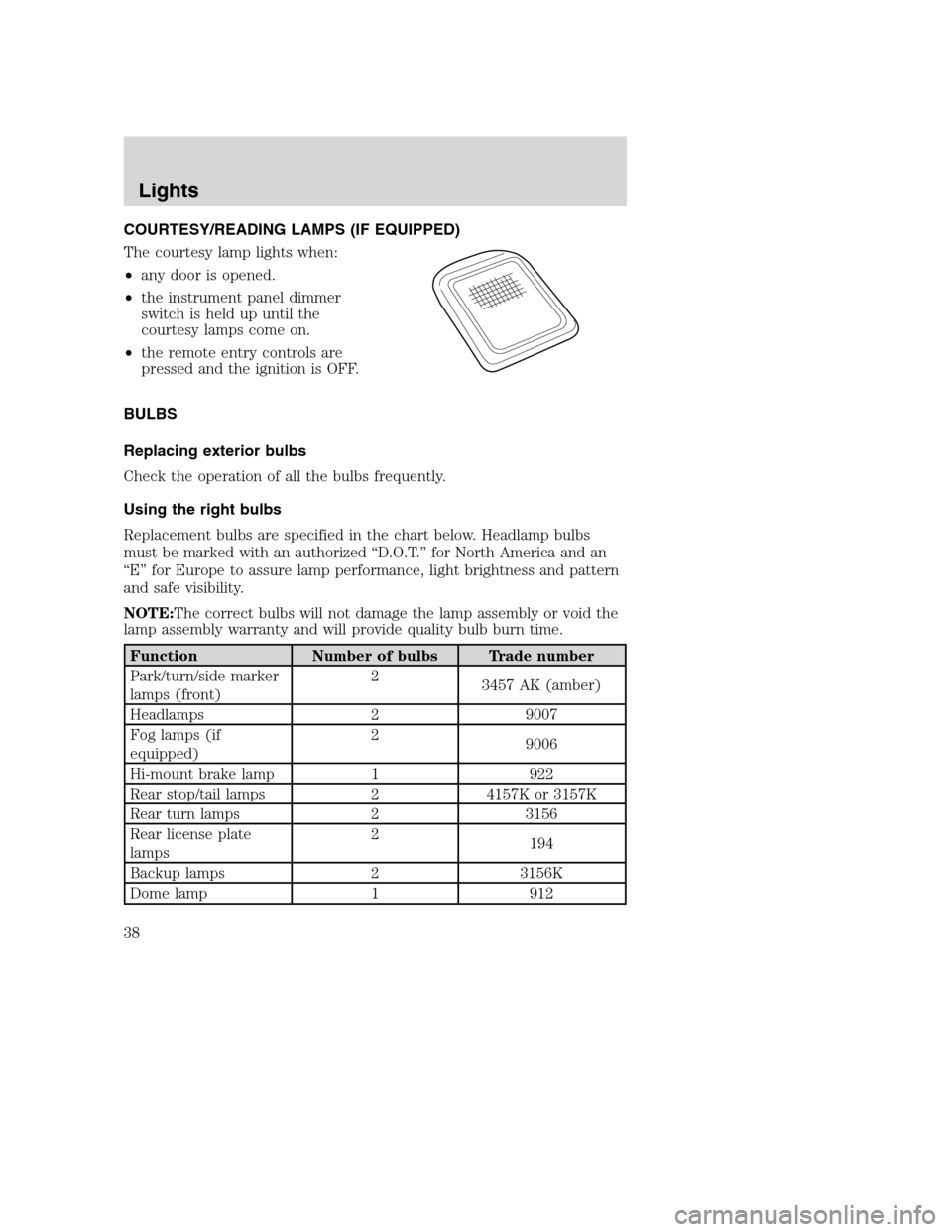
COURTESY/READING LAMPS (IF EQUIPPED)
The courtesy lamp lights when:
•any door is opened.
•the instrument panel dimmer
switch is held up until the
courtesy lamps come on.
•the remote entry controls are
pressed and the ignition is OFF.
BULBS
Replacing exterior bulbs
Check the operation of all the bulbs frequently.
Using the right bulbs
Replacement bulbs are specified in the chart below. Headlamp bulbs
must be marked with an authorized “D.O.T.” for North America and an
“E” for Europe to assure lamp performance, light brightness and pattern
and safe visibility.
NOTE:The correct bulbs will not damage the lamp assembly or void the
lamp assembly warranty and will provide quality bulb burn time.
Function Number of bulbs Trade number
Park/turn/side marker
lamps (front)2
3457 AK (amber)
Headlamps 2 9007
Fog lamps (if
equipped)2
9006
Hi-mount brake lamp 1 922
Rear stop/tail lamps 2 4157K or 3157K
Rear turn lamps 2 3156
Rear license plate
lamps2
194
Backup lamps 2 3156K
Dome lamp 1 912
REVIEW COPY
2005 Mazda B Series(mbs), Owners Guide (post-2002-fmt)(own2002),
Market:Canadian_French(fr_can)
Lights
38
Page 43 of 254
Replacing fog lamp bulbs
WARNING: Handling Halogen Bulbs: When a halogen bulb
breaks, it is dangerous. These bulbs contain pressurized gas. If
one is broken, it will explode and serious injuries could be
caused by the flying glass. If the glass portion of the bulb is
touched with bare hands, body oil could cause the bulb to
overheat and explode when lit. Never touch the glass portion of
the bulb with your bare hands and always wear eye protection
when handling or working around halogen bulbs.
Children and Halogen Bulbs: Playing with a halogen bulb is
dangerous. Serious injuries could be caused by dropping a
halogen bulb or breaking in some other way. Always keep
halogen bulbs out of the reach of children.
NOTE: If the bulb is accidentally touched, it should be cleaned with
rubbing alcohol before being used.
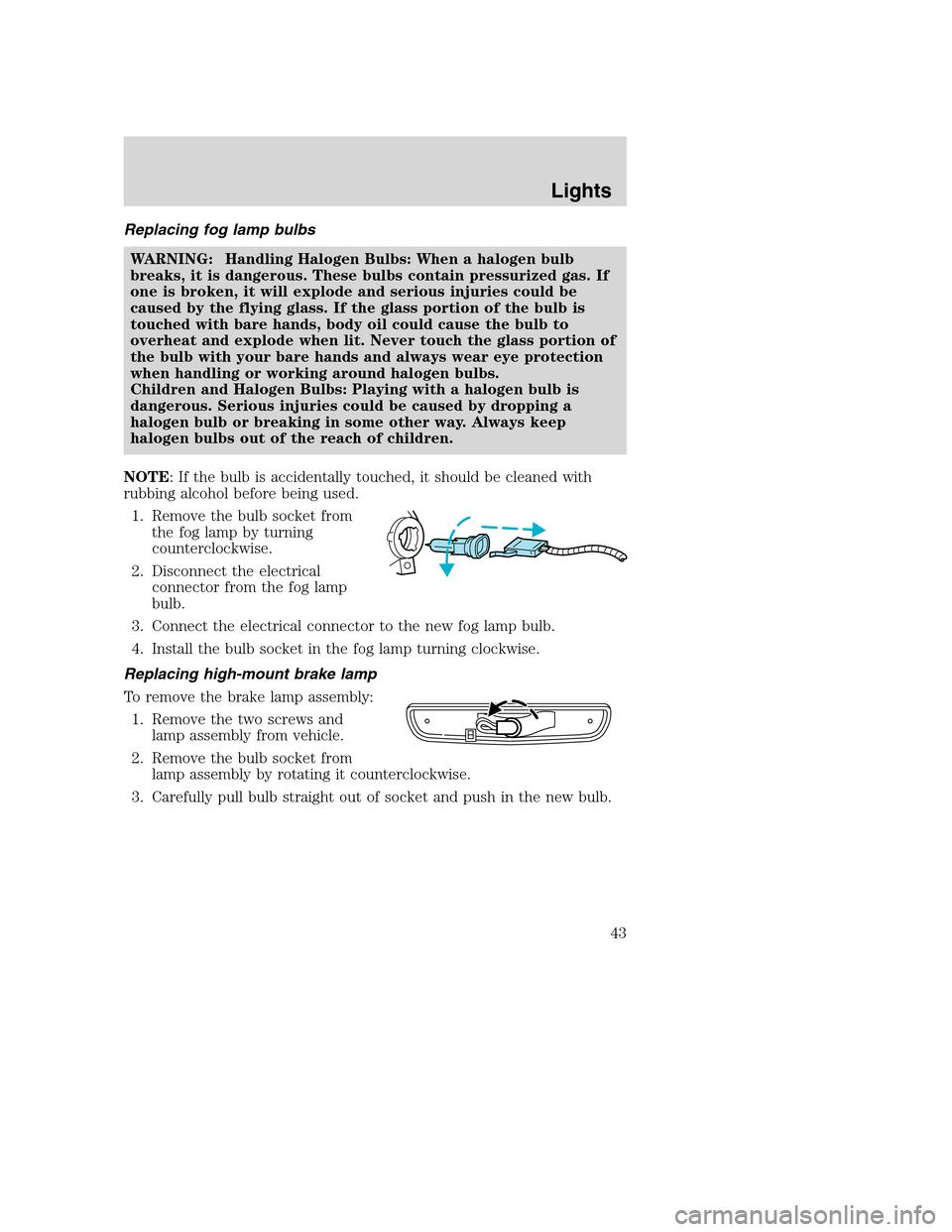
1. Remove the bulb socket from
the fog lamp by turning
counterclockwise.
2. Disconnect the electrical
connector from the fog lamp
bulb.
3. Connect the electrical connector to the new fog lamp bulb.
4. Install the bulb socket in the fog lamp turning clockwise.
Replacing high-mount brake lamp
To remove the brake lamp assembly:
1. Remove the two screws and
lamp assembly from vehicle.
2. Remove the bulb socket from
lamp assembly by rotating it counterclockwise.
3. Carefully pull bulb straight out of socket and push in the new bulb.
REVIEW COPY
2005 Mazda B Series(mbs), Owners Guide (post-2002-fmt)(own2002),
Market:Canadian_French(fr_can)
Lights
43
Page 44 of 254
To install the brake lamp assembly:
1. Install the bulb socket into the lamp assembly by rotating clockwise.
2. Install the lamp assembly on the vehicle and secure with two screws.
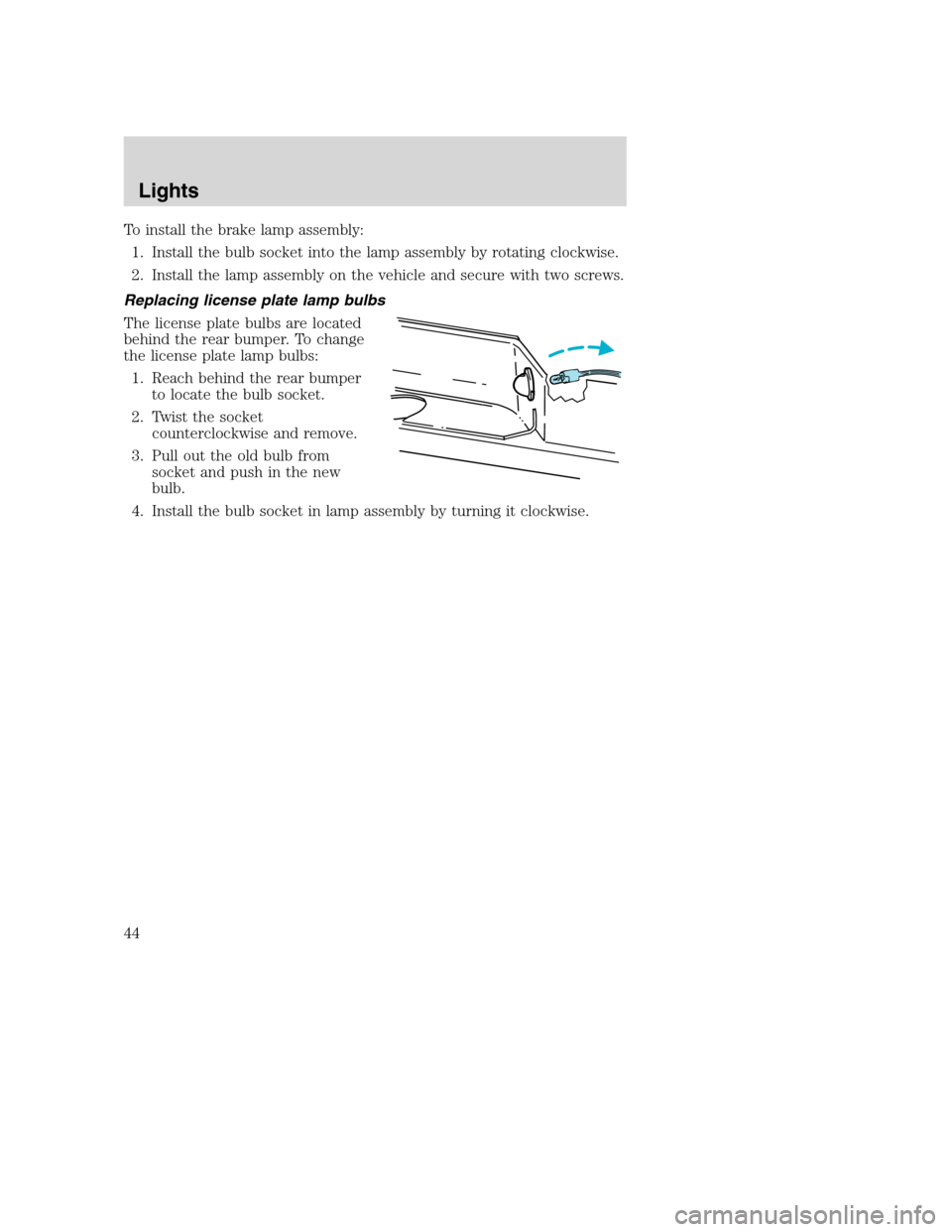
Replacing license plate lamp bulbs
The license plate bulbs are located
behind the rear bumper. To change
the license plate lamp bulbs:
1. Reach behind the rear bumper
to locate the bulb socket.
2. Twist the socket
counterclockwise and remove.
3. Pull out the old bulb from
socket and push in the new
bulb.
4. Install the bulb socket in lamp assembly by turning it clockwise.
REVIEW COPY
2005 Mazda B Series(mbs), Owners Guide (post-2002-fmt)(own2002),
Market:Canadian_French(fr_can)
Lights
44
Page 52 of 254
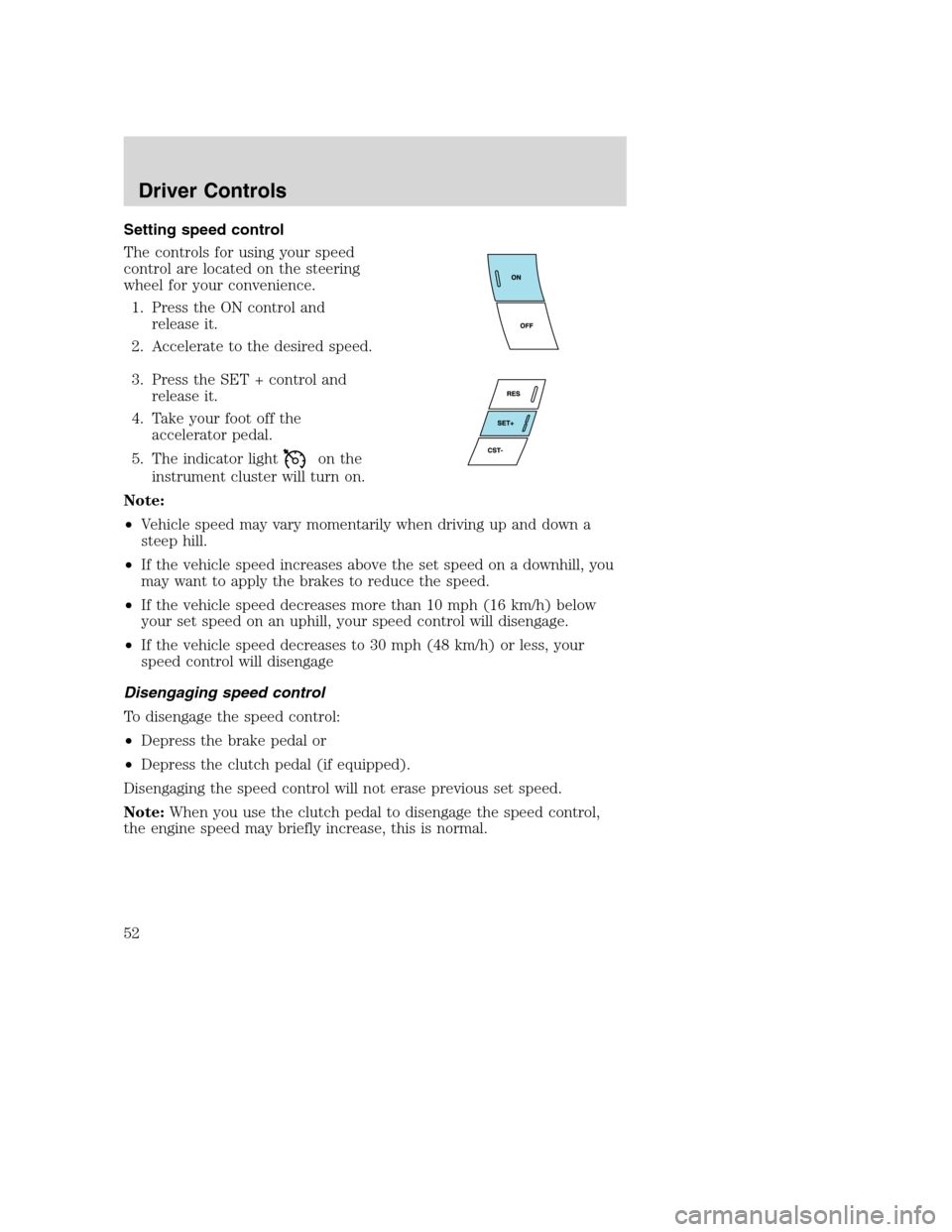
Setting speed control
The controls for using your speed
control are located on the steering
wheel for your convenience.
1. Press the ON control and
release it.
2. Accelerate to the desired speed.
3. Press the SET + control and
release it.
4. Take your foot off the
accelerator pedal.
5. The indicator light
on the
instrument cluster will turn on.
Note:
•Vehicle speed may vary momentarily when driving up and down a
steep hill.
•If the vehicle speed increases above the set speed on a downhill, you
may want to apply the brakes to reduce the speed.
•If the vehicle speed decreases more than 10 mph (16 km/h) below
your set speed on an uphill, your speed control will disengage.
•If the vehicle speed decreases to 30 mph (48 km/h) or less, your
speed control will disengage
Disengaging speed control
To disengage the speed control:
•Depress the brake pedal or
•Depress the clutch pedal (if equipped).
Disengaging the speed control will not erase previous set speed.
Note:When you use the clutch pedal to disengage the speed control,
the engine speed may briefly increase, this is normal.
REVIEW COPY
2005 Mazda B Series(mbs), Owners Guide (post-2002-fmt)(own2002),
Market:Canadian_French(fr_can)
Driver Controls
52
Page 54 of 254

Turning off speed control
There are three ways to turn off the speed control:
•Depress the brake pedal or the clutch pedal (if equipped). This will
not erase your vehicle’s previously set speed.
•Press the speed control OFF
control.
•Turn OFF the ignition.
Note:When you turn off the speed
control or the ignition, your speed
control set speed memory is erased.
Note:Fully depressing the clutch
pedal may cause a flare in engine RPM as the throttle is returned to idle.
This is normal.
OVERDRIVE CONTROL (IF EQUIPPED)
Activating overdrive
(Overdrive) is the normal drive position for the best fuel economy.
The overdrive function allows automatic upshifts and downshifts through
all available gears.
Deactivating overdrive
Press the Transmission Control
Switch (TCS) located on the end of
the gearshift lever. The O/D Off
indicator light will illuminate on the
instrument cluster. The transmission
will operate in all gears except overdrive.
To return to normal overdrive mode, press the Transmission Control
Switch again. The O/D Off indicator light will no longer be illuminated.
When you shut off and re-start your vehicle, the transmission will
automatically return to normal
(Overdrive) mode.
For additional information about the gearshift lever and the transmission
control switch operation refer to theAutomatic Transmission
Operationsection of theDrivingchapter.
O/D
ON/OFF
REVIEW COPY
2005 Mazda B Series(mbs), Owners Guide (post-2002-fmt)(own2002),
Market:Canadian_French(fr_can)
Driver Controls
54
Page 73 of 254
One time disable
Any time the safety belt is buckled and then unbuckled during an
ignition ON cycle, the BeltMinder will be disabled for that ignition cycle
only.
Deactivating/activating the BeltMinder feature
Read steps1-9thoroughly before proceeding with the
deactivation/activation programming procedure.
The BeltMinder feature can be deactivated/activated by performing the
following procedure:
Before following the procedure, ensure that the following conditions are
met:
•The parking brake is set.
•The gearshift is in P (Park) (automatic transmission) or the neutral
position (manual transmission).
•The ignition switch is in the OFF position.
•All vehicle doors are closed.
•The driver’s safety belt is unbuckled.
•The parklamps/headlamps are in OFF position (If vehicle is equipped
with Autolamps, this will not affect the procedure).
WARNING: To reduce the risk of injury, do not
deactivate/activate the BeltMinder feature while driving the
vehicle.
BeltMinder activation and deactivation procedure
1. Turn the ignition switch to the RUN (or ON) position. (DO NOT
START THE ENGINE.)
2. Wait until the safety belt warning light turns off. (Approximately 1–2
minutes.)
•Steps 3–5 must be completed within 60 seconds or the procedure will
have to be repeated.
3. Buckle then unbuckle the safety belt three times, ending with the
safety belt unbuckled. This can be done before or during BeltMinder
warning activation.
4. Turn on the parklamps/headlamps, turn off the
parklamps/headlamps.
REVIEW COPY
2005 Mazda B Series(mbs), Owners Guide (post-2002-fmt)(own2002),
Market:Canadian_French(fr_can)
Seating and Safety Restraints
73
Page 116 of 254
WARNING: When a wheel is installed, always remove any
corrosion, dirt and foreign materials present on the mounting
surfaces of the wheel and the surface of the front disc brake hub
and rotor that contacts the wheel. Installing wheels without
correct metal-to-metal contact at the wheel mounting surfaces
can cause the wheel nuts to loosen and the wheel to come off
while the vehicle is in motion, resulting in loss of control.
Note:If there is corrosion on the area where the wheel contacts the
hub, apply a thin film of grease or anti-seize compound on that area.
INFORMATION CONTAINED ON THE TIRE SIDEWALL
Federal law requires tire manufacturers to place standardized
information on the sidewall of all tires. This information identifies and
describes the fundamental characteristics of the tire and also provides a
U.S. DOT Tire Identification Number for safety standard certification and
in case of a recall.
Information on “P” type tires
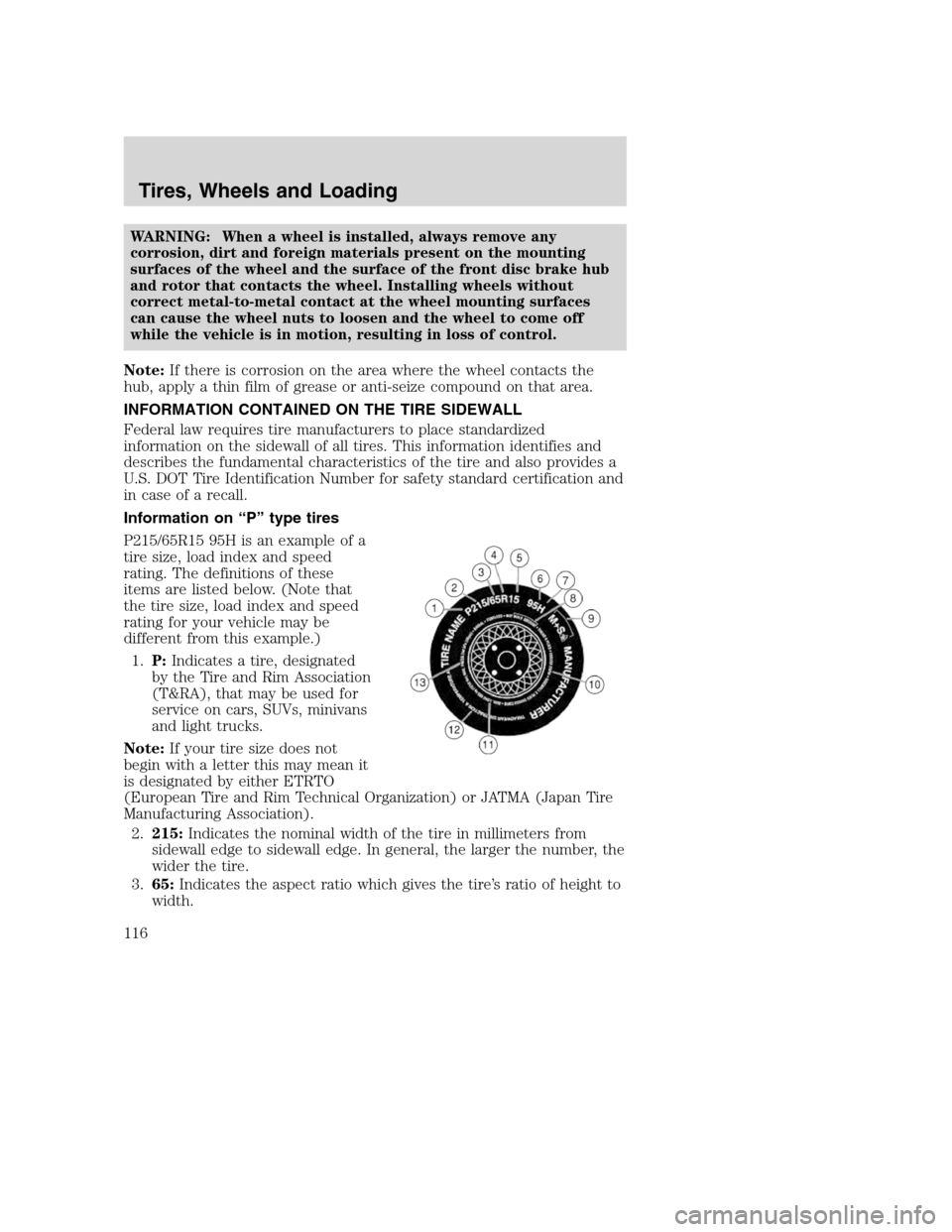
P215/65R15 95H is an example of a
tire size, load index and speed
rating. The definitions of these
items are listed below. (Note that
the tire size, load index and speed
rating for your vehicle may be
different from this example.)
1.P:Indicates a tire, designated
by the Tire and Rim Association
(T&RA), that may be used for
service on cars, SUVs, minivans
and light trucks.
Note:If your tire size does not
begin with a letter this may mean it
is designated by either ETRTO
(European Tire and Rim Technical Organization) or JATMA (Japan Tire
Manufacturing Association).
2.215:Indicates the nominal width of the tire in millimeters from
sidewall edge to sidewall edge. In general, the larger the number, the
wider the tire.
3.65:Indicates the aspect ratio which gives the tire’s ratio of height to
width.
REVIEW COPY
2005 Mazda B Series(mbs), Owners Guide (post-2002-fmt)(own2002),
Market:Canadian_French(fr_can)
Tires, Wheels and Loading
116
Page 135 of 254
underbody structure. Use a frame-mounted weight distributing hitch for
trailers over 2,000 lbs (907 kg).
Do not install a single or multi-clamp type bumper hitch, or a hitch
which attaches to the axle. Underbody mounted hitches are acceptable if
they are installed properly. Follow the towing instructions of a reputable
rental agency.
Whenever a trailer hitch and hardware are removed, make sure all
mounting holes in the underbody are properly sealed to prevent noxious
gases or water from entering.
Safety chains
Always connect the trailer’s safety chains to the frame or hook retainers
of the vehicle hitch. To connect the trailer’s safety chains, cross the
chains under the trailer tongue and allow slack for turning corners.
If you use a rental trailer, follow the instructions that the rental agency
gives to you.
Do not attach safety chains to the bumper.
Trailer brakes
Electric brakes and manual, automatic or surge-type trailer brakes are
safe if installed properly and adjusted to the manufacturer’s
specifications. The trailer brakes must meet local and Federal
regulations.
WARNING: Do not connect a trailer’s hydraulic brake system
directly to your vehicle’s brake system. Your vehicle may not
have enough braking power and your chances of having a
collision greatly increase.
The braking system of the tow vehicle is rated for operation at the
GVWR not GCWR.
Trailer lamps
Trailer lamps are required on most towed vehicles. Make sure all running
lights, brake lights, turn signals and hazard lights are working. See your
dealer or trailer rental agency for proper instructions and equipment for
hooking up trailer lamps.
Using a step bumper
The optional step bumper is equipped with an integral hitch and requires
only a ball with a 3/4 inch (19 mm) shank diameter. The bumper has a
2,000 lb. (907 kg) trailer weight and 200 lb. (91 kg) tongue weight
capability.
REVIEW COPY
2005 Mazda B Series(mbs), Owners Guide (post-2002-fmt)(own2002),
Market:Canadian_French(fr_can)
Tires, Wheels and Loading
135