fuel MAZDA MODEL B3000 4WD 2002 User Guide
[x] Cancel search | Manufacturer: MAZDA, Model Year: 2002, Model line: MODEL B3000 4WD, Model: MAZDA MODEL B3000 4WD 2002Pages: 288, PDF Size: 1.87 MB
Page 82 of 288

WINDSHIELD WIPER/WASHER CONTROLS
Rotate the windshield wiper control
to the desired interval, low or high
speed position.
The bars of varying length are for
intermittent wipers. When in this
position rotate the control upward
for fast intervals and downward for
slow intervals.
Push (tap) the end of the stalk
briefly for a single swipe (no wash).
Push and hold for three swipes with
wash. Push and hold for a longer
wash (up to ten seconds).
Checking the wiper blades
If the wiper blades do not wipe properly, clean both the windshield and
wiper blades using undiluted windshield wiper solution or a mild
detergent. Rinse thoroughly with clean water. To avoid damaging the
blades, do not use fuel, kerosene, paint thinner or other solvents.
Windshield wiper blades
Check the wiper blades for wear at least twice a year or when they seem
less effective. Substances such as tree sap and some hot wax treatments
used by commercial car washes reduce the effectiveness of wiper blades.
Driver Controls
82
Page 93 of 288

To return to a previously set speed
•Press RSM. For RSM to operate,
the vehicle speed must be faster
than 48 km/h (30 mph).
Indicator light
This light comes on when either the
SET ACCEL or RES controls are
pressed. It turns off when the speed
control OFF control is pressed, the
brake or clutch is applied or the ignition is turned to the OFF position.
OVERDRIVE CONTROL (IF EQUIPPED)
Activating overdrive
(Overdrive) is the normal drive position for the best fuel economy.
The overdrive function allows automatic upshifts and downshifts through
all available gears.
Deactivating overdrive
Press the Transmission Control
Switch (TCS) located on the end of
the gearshift lever. The O/D Off
indicator light will illuminate on the
instrument cluster. The transmission
will operate in all gears except overdrive.
RSM
SET
ACC
COAST
SPEED CONT
O/D
ON/OFF
Driver Controls
93
Page 148 of 288
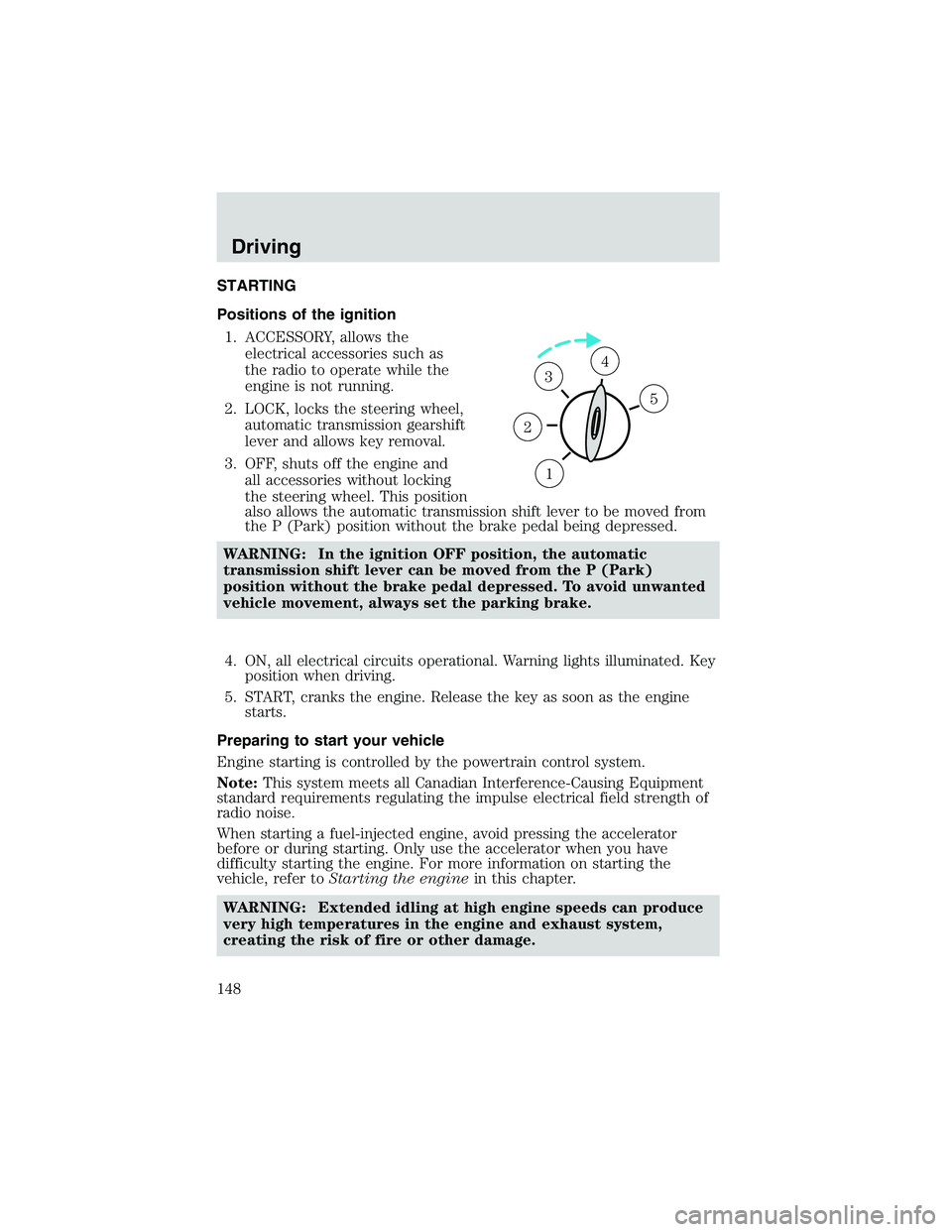
STARTING
Positions of the ignition1. ACCESSORY, allows the electrical accessories such as
the radio to operate while the
engine is not running.
2. LOCK, locks the steering wheel, automatic transmission gearshift
lever and allows key removal.
3. OFF, shuts off the engine and all accessories without locking
the steering wheel. This position
also allows the automatic transmission shift lever to be moved from
the P (Park) position without the brake pedal being depressed.
WARNING: In the ignition OFF position, the automatic
transmission shift lever can be moved from the P (Park)
position without the brake pedal depressed. To avoid unwanted
vehicle movement, always set the parking brake.
4. ON, all electrical circuits operational. Warning lights illuminated. Key position when driving.
5. START, cranks the engine. Release the key as soon as the engine starts.
Preparing to start your vehicle
Engine starting is controlled by the powertrain control system.
Note: This system meets all Canadian Interference-Causing Equipment
standard requirements regulating the impulse electrical field strength of
radio noise.
When starting a fuel-injected engine, avoid pressing the accelerator
before or during starting. Only use the accelerator when you have
difficulty starting the engine. For more information on starting the
vehicle, refer to Starting the engine in this chapter.
WARNING: Extended idling at high engine speeds can produce
very high temperatures in the engine and exhaust system,
creating the risk of fire or other damage.
1
2
34
5
Driving
148
Page 150 of 288

If starting a vehicle with a manual
transmission:
•Make sure the parking brake is
set.
• Push the clutch pedal to the
floor.
3. Turn the key to 4 (ON) without turning the key to 5 (START).
Make sure the corresponding lights illuminate or illuminate briefly. If a
light fails to illuminate, have the vehicle serviced.
• Note: If the driver’s safety belt is fastened, the
light may not
illuminate.
Starting the engine
Note: Whenever you start your vehicle, release the key as soon as the
engine starts. Excessive cranking could damage the starter.
1
2
34
5
C
012
3
4
5
6
RPMx1000
ABS!
BRAKE
CHECK
ENGINE
CHECK FUEL CAP
E FH
H
H
P
RN D 2 1THEFT
SPEED
CONT
4WD
HIGH 4WD
LOW
O/D
OFFL
L
10MPH
20 50
60
70
30 40
80
90
km/h
0 0 0
101
00
1
20
1
0 0 0 0 0 040 60
80
100
120
140
160180
20
DOOR
AJAR
CHECK
GAGE
Driving
150
Page 151 of 288

1. Turn the key to 5 (START)without pressing the accelerator
pedal and release as soon as the
engine starts. The key will
return to 4 (ON).
2. If the temperature is above –12° C (10° F) and the engine does
not start within five seconds on
the first try, turn the key to
OFF, wait 10 seconds and try
again. If the engine does not
start in two attempts, press the accelerator all the way to the floor
and hold. Turn the key to the START position.
3. If the temperature is below -12° C (10° F) and the engine does not start in 15 seconds on the first try, turn the key OFF and wait 10
seconds and try again. If the engine does not start in two attempts,
press the accelerator pedal all the way to floor and hold. Turn the
key to START position.
4. When the engine starts, release the key, then release the accelerator pedal gradually as the engine speeds up.
5. After idling for a few seconds, apply the brake, shift into gear and drive.
Cold weather starting (flexible fuel vehicles only)
As the outside temperature approaches freezing, ethanol fuel distributors
should supply winter grade (E
d85) ethanol (same as with unleaded
gasoline). If summer grade (E
d85) ethanol is used in cold weather
conditions, you may experience increased cranking times, rough idle or
hesitation until the engine has warmed up. Consult your fuel distributor
for the availability of winter grade (E
d85) ethanol.
High-quality blends of winter grade (E
d85) ethanol will produce
satisfactory cold weather starting and driving results. However, fuel
composition varies, and sub-optimal winter grade blends could produce
increased cranking times, rough idle or hesitation at temperatures below
–18 degrees C (0 degrees F). If you experience this condition you may
find that a different brand of winter grade (E
d85) (if available in your
area) improves the performance of your vehicle.
Cold starting performance can also be improved with the use of an
engine block heater. The engine block heater is available as a Mazda
option and can also be obtained from your Mazda dealer. Consult the
engine block heater section for proper use of the engine block heater.
3
2
1
5
4
Driving
151
Page 156 of 288
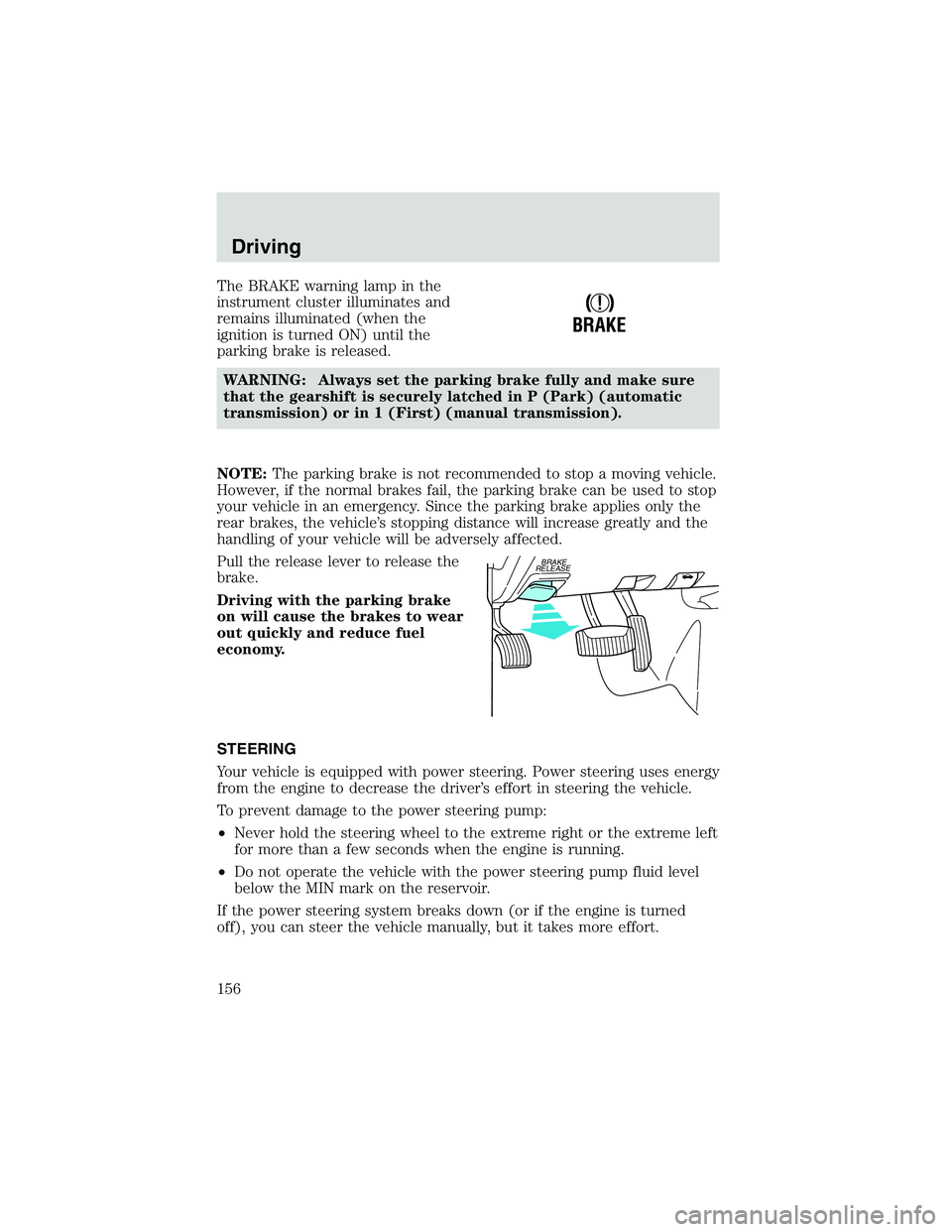
The BRAKE warning lamp in the
instrument cluster illuminates and
remains illuminated (when the
ignition is turned ON) until the
parking brake is released.WARNING: Always set the parking brake fully and make sure
that the gearshift is securely latched in P (Park) (automatic
transmission) or in 1 (First) (manual transmission).
NOTE: The parking brake is not recommended to stop a moving vehicle.
However, if the normal brakes fail, the parking brake can be used to stop
your vehicle in an emergency. Since the parking brake applies only the
rear brakes, the vehicle’s stopping distance will increase greatly and the
handling of your vehicle will be adversely affected.
Pull the release lever to release the
brake.
Driving with the parking brake
on will cause the brakes to wear
out quickly and reduce fuel
economy.
STEERING
Your vehicle is equipped with power steering. Power steering uses energy
from the engine to decrease the driver’s effort in steering the vehicle.
To prevent damage to the power steering pump:
• Never hold the steering wheel to the extreme right or the extreme left
for more than a few seconds when the engine is running.
• Do not operate the vehicle with the power steering pump fluid level
below the MIN mark on the reservoir.
If the power steering system breaks down (or if the engine is turned
off), you can steer the vehicle manually, but it takes more effort.
!
BRAKE
BRAKE
RELEASE
Driving
156
Page 161 of 288
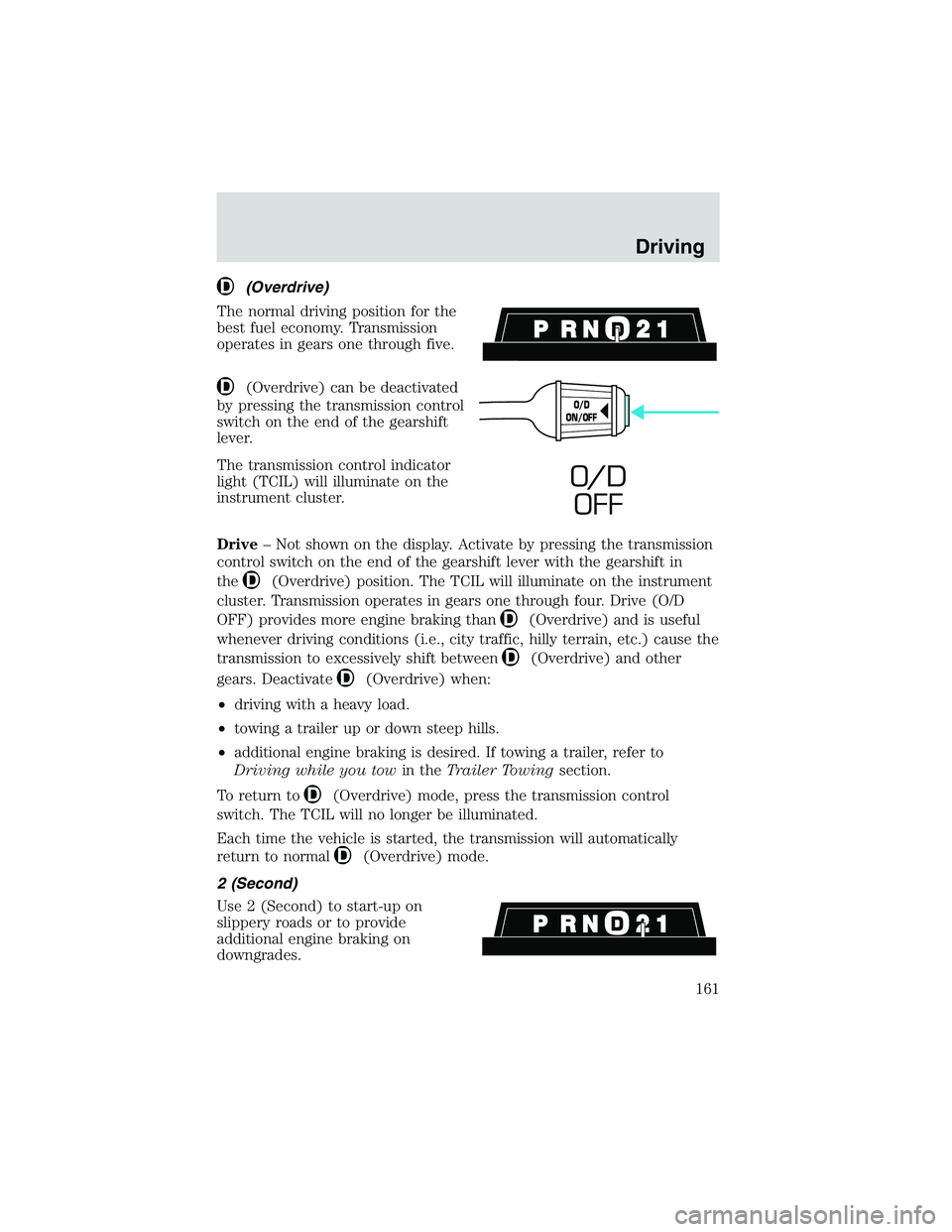
(Overdrive)
The normal driving position for the
best fuel economy. Transmission
operates in gears one through five.
(Overdrive) can be deactivated
by pressing the transmission control
switch on the end of the gearshift
lever.
The transmission control indicator
light (TCIL) will illuminate on the
instrument cluster.
Drive – Not shown on the display. Activate by pressing the transmission
control switch on the end of the gearshift lever with the gearshift in
the
(Overdrive) position. The TCIL will illuminate on the instrument
cluster. Transmission operates in gears one through four. Drive (O/D
OFF) provides more engine braking than
(Overdrive) and is useful
whenever driving conditions (i.e., city traffic, hilly terrain, etc.) cause the
transmission to excessively shift between
(Overdrive) and other
gears. Deactivate
(Overdrive) when:
• driving with a heavy load.
• towing a trailer up or down steep hills.
• additional engine braking is desired. If towing a trailer, refer to
Driving while you tow in theTrailer Towing section.
To return to
(Overdrive) mode, press the transmission control
switch. The TCIL will no longer be illuminated.
Each time the vehicle is started, the transmission will automatically
return to normal
(Overdrive) mode.
2 (Second)
Use 2 (Second) to start-up on
slippery roads or to provide
additional engine braking on
downgrades.
O/D
ON/OFF
O/ D OFF
Driving
161
Page 164 of 288
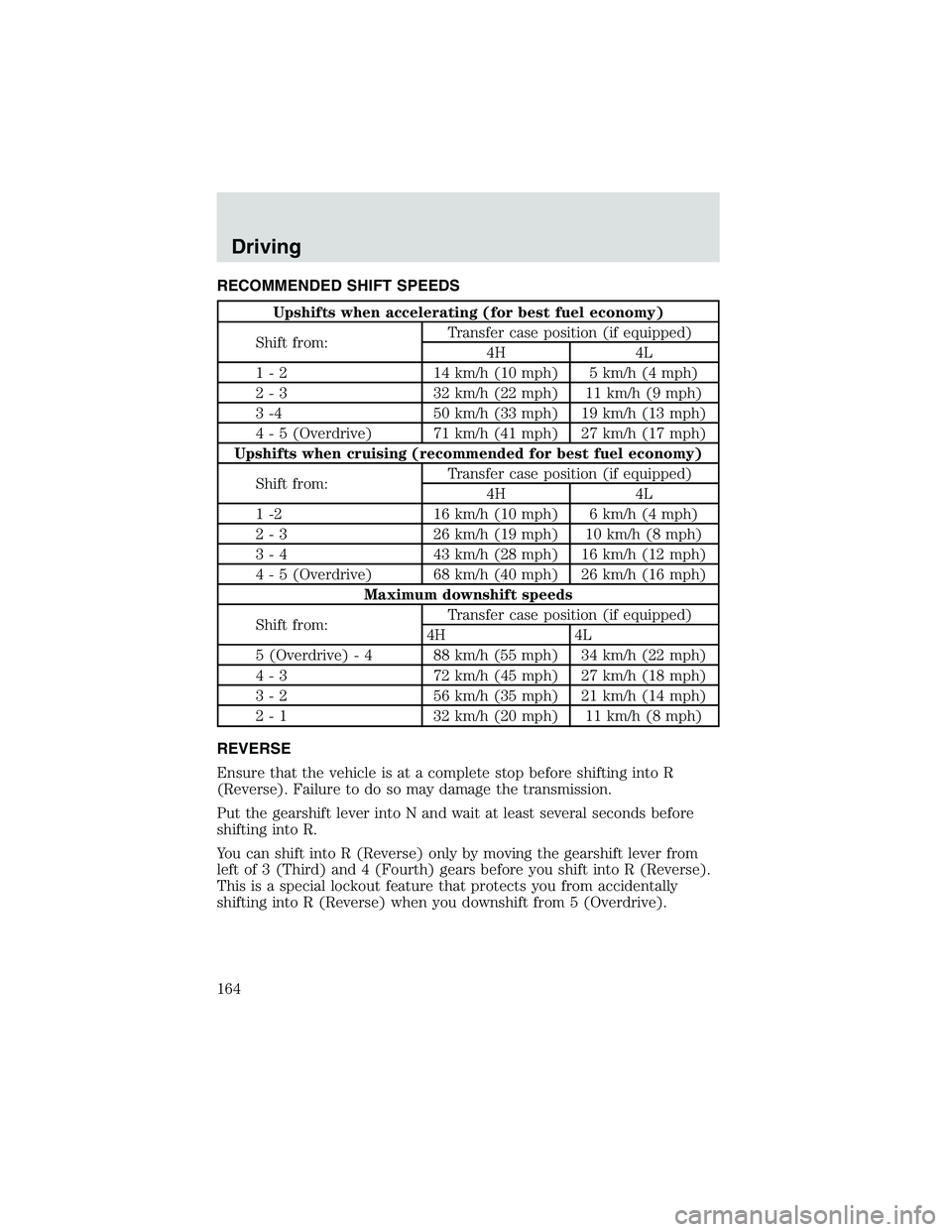
RECOMMENDED SHIFT SPEEDS
Upshifts when accelerating (for best fuel economy)
Shift from: Transfer case position (if equipped)
4H 4L
1 - 2 14 km/h (10 mph) 5 km/h (4 mph)
2 - 3 32 km/h (22 mph) 11 km/h (9 mph)
3 -4 50 km/h (33 mph) 19 km/h (13 mph)
4 - 5 (Overdrive) 71 km/h (41 mph) 27 km/h (17 mph)
Upshifts when cruising (recommended for best fuel economy)
Shift from: Transfer case position (if equipped)
4H 4L
1 -2 16 km/h (10 mph) 6 km/h (4 mph)
2 - 3 26 km/h (19 mph) 10 km/h (8 mph)
3 - 4 43 km/h (28 mph) 16 km/h (12 mph)
4 - 5 (Overdrive) 68 km/h (40 mph) 26 km/h (16 mph) Maximum downshift speeds
Shift from: Transfer case position (if equipped)
4H 4L
5 (Overdrive) - 4 88 km/h (55 mph) 34 km/h (22 mph)
4 - 3 72 km/h (45 mph) 27 km/h (18 mph)
3 - 2 56 km/h (35 mph) 21 km/h (14 mph)
2 - 1 32 km/h (20 mph) 11 km/h (8 mph)
REVERSE
Ensure that the vehicle is at a complete stop before shifting into R
(Reverse). Failure to do so may damage the transmission.
Put the gearshift lever into N and wait at least several seconds before
shifting into R.
You can shift into R (Reverse) only by moving the gearshift lever from
left of 3 (Third) and 4 (Fourth) gears before you shift into R (Reverse).
This is a special lockout feature that protects you from accidentally
shifting into R (Reverse) when you downshift from 5 (Overdrive).
Driving
164
Page 165 of 288

FOUR-WHEEL DRIVE (4WD) OPERATION (IF EQUIPPED)
WARNING: For important information regarding safe operation
of this type of vehicle, see Preparing to drive your vehicle in
this chapter.
When four–wheel drive (4WD) is engaged, power is supplied to all four
wheels through a transfer case. 4WD can be selected when additional
driving power is desired.
If equipped with the Electronic Shift 4WD System, and 4WD Low
is selected while the vehicle is moving, the 4WD system will not
engage. This is normal and should be no reason for concern.
Before 4WD Low can be engaged, the vehicle must be brought to
a complete stop, the brake pedal depressed and the transmission
placed in neutral (or the clutch pedal depressed on manual
transmissions).
4WD operation is not recommended on dry pavement. Doing so could
result in difficult disengagement of the transfer case, increased tire wear
and decreased fuel economy.
4WD system indicator lights
The 4WD system indicator lights illuminate only under the following
conditions. If these lights illuminate when driving in 2WD, contact your
Mazda dealer as soon as possible.
• 4WD -momentarily illuminates
when the vehicle is started.
Illuminates when 4H (4WD High)
is engaged.
• 4WD LOW –momentarily
illuminates when the vehicle is
started. Illuminates when 4L
(4WD Low) is engaged.
Using the electronic shift 4WD system (if equipped)
Positions of the electronic shift system
2WD (2WD High) – Power to rear axle only.
4X4 HIGH (4WD High) – Power delivered to front and rear axles for
increased traction.
4X4 LOW (4WD Low) – Power to front and rear axles at low speeds.
4WD
LOW
Driving
165
Page 181 of 288

GETTING ROADSIDE ASSISTANCE
To fully assist you should you have a vehicle concern, Mazda Motor
Corporation offers a complimentary roadside assistance program. This
program is separate from the New Vehicle Limited Warranty. The service
is available:
•24–hours, seven days a week
• for the New Vehicle Limited Warranty period of three years or 60,000
km (36,000 miles), whichever occurs first on Mazda vehicles, and four
years or 80,000 km (50,000 miles) on Mazda vehicles.
Roadside assistance will cover:
• changing a flat tire
• jump-starts
• lock-out assistance
• limited fuel delivery
• towing of your disabled vehicle to the nearest Mazda Motor
Corporation dealership, or your selling dealer if within 56.3 km (35
miles) of the nearest Mazda Motor Corporation dealership (one tow
per disablement). Even non-warranty related tows, like accidents or
getting stuck in the mud or snow, are covered (some exclusions apply,
such as impound towing or repossession).
Canadian customers refer to your Owner Information Guide for
information on:
• Coverage period
• Exact fuel amounts
• Towing of your disabled vehicle
• Emergency travel expense reimbursement
• Travel planning benefits
USING ROADSIDE ASSISTANCE
Complete the roadside assistance identification card and place it in your
wallet for quick reference. In the United States, this card is found in the
Owner Guide portfolio in the glove compartment. In Canada, the card is
found in the Roadside Assistance book in the glove compartment.
U.S. Mazda vehicle customers who require roadside assistance, call
1–800–241–3673.
Canadian customers who require roadside assistance, call
1–800–665–2006.
Roadside Emergencies
181