service MAZDA MODEL B4000 2003 User Guide
[x] Cancel search | Manufacturer: MAZDA, Model Year: 2003, Model line: MODEL B4000, Model: MAZDA MODEL B4000 2003Pages: 250, PDF Size: 2.85 MB
Page 89 of 250

WARNING: You must turn the passenger air bag Off if you have
a rear facing child seat in the front seat of the pickup (the
center lapbelt on front split seats or the center facing rear
seats do not accommodate child seats). Statistics show that
children under 12 are more likely to suffer minor injuries in the
front passenger seats than adults. If you must have a child in
the front passenger seat, place the largest child in the front
seat, make sure that the child is belted, the vehicle seat is all
the way back, and the passenger airbag is turned OFF. The front
seat center lap belt and the center facing rear seats do not
accommodate child seats; therefore, you may not be able to put
a larger child in the front passenger seat if a child seat is
involved.
WARNING: If the OFF light fails to illuminate when the
passenger air bag switch is in the OFF position and the ignition
switch is in ON, have the passenger air bag switch serviced at
you authorized Mazda dealership.
WARNING: In order to avoid inadvertent activation of the
switch, always remove the ignition key from the passenger air
bag ON/OFF switch.
Turning the passenger air bag back on
The passenger air bag remains OFF until you turn it back ON. 1. Insert the ignition key and turn the switch to ON.
2. The OFF light will briefly illuminate when the ignition is
turned to ON. This indicates
that the passenger air bag is
operational.
ON OFF
OFF
PASSENGER AIRBAG
Seating and Safety Restraints
89
Page 90 of 250

WARNING: If the light is illuminated when the passenger air
bag ON/OFF switch is in the ON position and the ignition switch
is ON, have the passenger air bag ON/OFF switch serviced at
your authorized Mazda dealership immediately.
The passenger side air bag should always be ON (the air bag OFF light
should notbe illuminated) except for certain vulnerable persons. See
guidance on following pages.
WARNING: The safety belts for the driver and right front
passenger seating positions have been specifically designed to
function together with the air bags in certain types of crashes.
When you turn OFF your air bag, you not only lose the
protection of the air bag, you also may reduce the effectiveness
of your safety belt system, which was designed to work with the
air bag. Most vehicles with full back seats do not have cut-off
switches, but NHTSA and Transport Canada will allow a cut-off
switch to be installed on request for a certain category of
persons who must ride up front and there is a concern about
riding there. Please see the guidance below.
WARNING: Always use safety belts and child restraints
properly. If a child in a rear facing infant seat must be
transported in front, the passenger air bag mustbe turned OFF.
This is because the back of the infant seat is too close to the
inflating air bag and the risk of a fatal injury to the infant when
the air bag inflates is substantial.
The vast majority of drivers and passengers over the age of 12 years are
much safer with an air bag than without. To do their job and reduce the
risk of life threatening injuries, air bags must open with great force, and
this force can pose a potentially deadly risk in some situations,
particularly when a front seat occupant is not properly buckled up. The
most effective way to reduce the risk of unnecessary air bag injuries
without reducing the overall safety of the vehicle is to make sure all
occupants are properly restrained in the vehicle, especially in the front
seat. This provides the protection of safety belts and permits the air bags
to provide the additional protection they were designed to provide. If
you choose to deactivate your air bag, you are losing the very significant
risk reducing benefits of the air bag and you are also reducing the
Seating and Safety Restraints
90
Page 113 of 250

•steering wheel is turned when getting in or out of the vehicle
Make sure the corresponding lights illuminate or illuminate briefly. If a
light fails to illuminate, have the vehicle serviced.
• If the driver’s safety belt is fastened, the
light may not illuminate.
Refer to the Instrument Cluster chapter for more information.
Starting the engine
Note: Whenever you start your vehicle, release the key as soon as the
engine starts. Excessive cranking could damage the starter.
1. Turn the key to 4 (ON) without turning the key to 5 (START). If
there is difficulty in turning the
key, rotate the steering wheel
until the key turns freely. This
condition may occur when:
• the front wheels are turned
• a front wheel is against the curb
Turn the key to 5 (START), then
release the key as soon as the
engine starts. Excessive cranking could damage the starter.
Note: If the engine does not start within five seconds on the first try,
turn the key to 3 (OFF), wait 10 seconds and try again.
Cold weather starting (flexible fuel vehicles only)
In cold weather, ethanol fuel distributors should supply winter grade
(E
d85) ethanol. If summer grade (Ed85) ethanol is used in cold weather,
you may experience increased cranking times, rough idle or hesitation
C
012
3
4
5
6
RPMx1000
ABS!
BRAKE
CHECK
ENGINE
CHECK FUEL CAP
E FH
H
H
P
RN D 2 1THEFT
SPEED
CONT
4WD
HIGH 4WD
LOW
O/D
OFFL
L
10MPH
20 50
60
70
30 40
80
90
km/h
0 0 0
101
00
1
20
1
0 0 0 0 0 040 60
80
100
120
140
160180
20
DOOR
AJAR
CHECK
GAGE
3
2
1
5
4
Driving
113
Page 115 of 250

WARNING: If you smell exhaust fumes inside your vehicle,
have your dealer inspect your vehicle immediately. Do not drive
if you smell exhaust fumes.
Important ventilating information
If the engine is idling while the vehicle is stopped for a long period of
time, open the windows at least 2.5 cm (one inch) or adjust the heating
or air conditioning to bring in fresh air.
BRAKES
Occasional brake noise is normal. If a metal-to-metal, continuous grinding
or continuous squeal sound is present, the brake linings may be worn-out
and should be inspected by a qualified service technician. If the vehicle
has continuous vibration or shudder in the steering wheel while braking,
the vehicle should be inspected by a qualified service technician.
Four-wheel anti-lock brake system (ABS)
This vehicle is equipped with an anti-lock braking system (ABS), a noise
from the hydraulic pump motor and pulsation in the pedal may be
observed during ABS braking events. Pedal pulsation coupled with noise
while braking under panic conditions or on loose gravel, bumps, wet or
snowy roads is normal and indicates proper functioning of the vehicle’s
anti-lock brake system.
NOTE: The ABS performs a self-check after you start the engine and
begin to drive away.
A brief mechanical noise may be heard during this test. This is normal. If
a malfunction is found, the ABS warning light will come on. If the vehicle
has continuous vibration or shudder in the steering wheel while braking,
the vehicle should be inspected by an authorized Mazda dealership.
The ABS operates by detecting the
onset of wheel lockup during brake
applications and compensates for
this tendency. The wheels are
prevented from locking even when
the brakes are firmly applied. The
accompanying illustration depicts
the advantage of an ABS equipped
vehicle (on bottom) to a non-ABS
equipped vehicle (on top) during hard braking with loss of front braking
traction.
Driving
115
Page 116 of 250

WARNING: The Anti-Lock system does not decrease the time
necessary to apply the brakes or always reduce stopping
distance. Always leave enough room between your vehicle and
the vehicle in front of you to stop.
Using ABS
When hard braking is required, apply continuous force on the brake
pedal; do not pump the brake pedal since this will reduce the
effectiveness of the ABS and will increase your vehicle’s stopping
distance. The ABS will be activated immediately, allowing you to retain
full steering control during hard braking and on slippery surfaces.
However, the ABS does not decrease stopping distance.
ABS warning lamp
ABS
TheABSlamp in the instrument cluster momentarily illuminates when
the ignition is turned to ON. If the light does not illuminate during start
up, remains on or flashes, the ABS may be disabled and may need to be
serviced.
Even when the ABS is disabled,
normal braking is still effective. (If
your BRAKE warning lamp
illuminates with the parking brake
released, have your brake system
serviced immediately.)
Parking brake
Apply the parking brake whenever
the vehicle is parked. To set the
parking brake, press the parking
brake pedal down until the pedal
stops.
!
BRAKE
BRAKE
RELEASE
Driving
116
Page 136 of 250
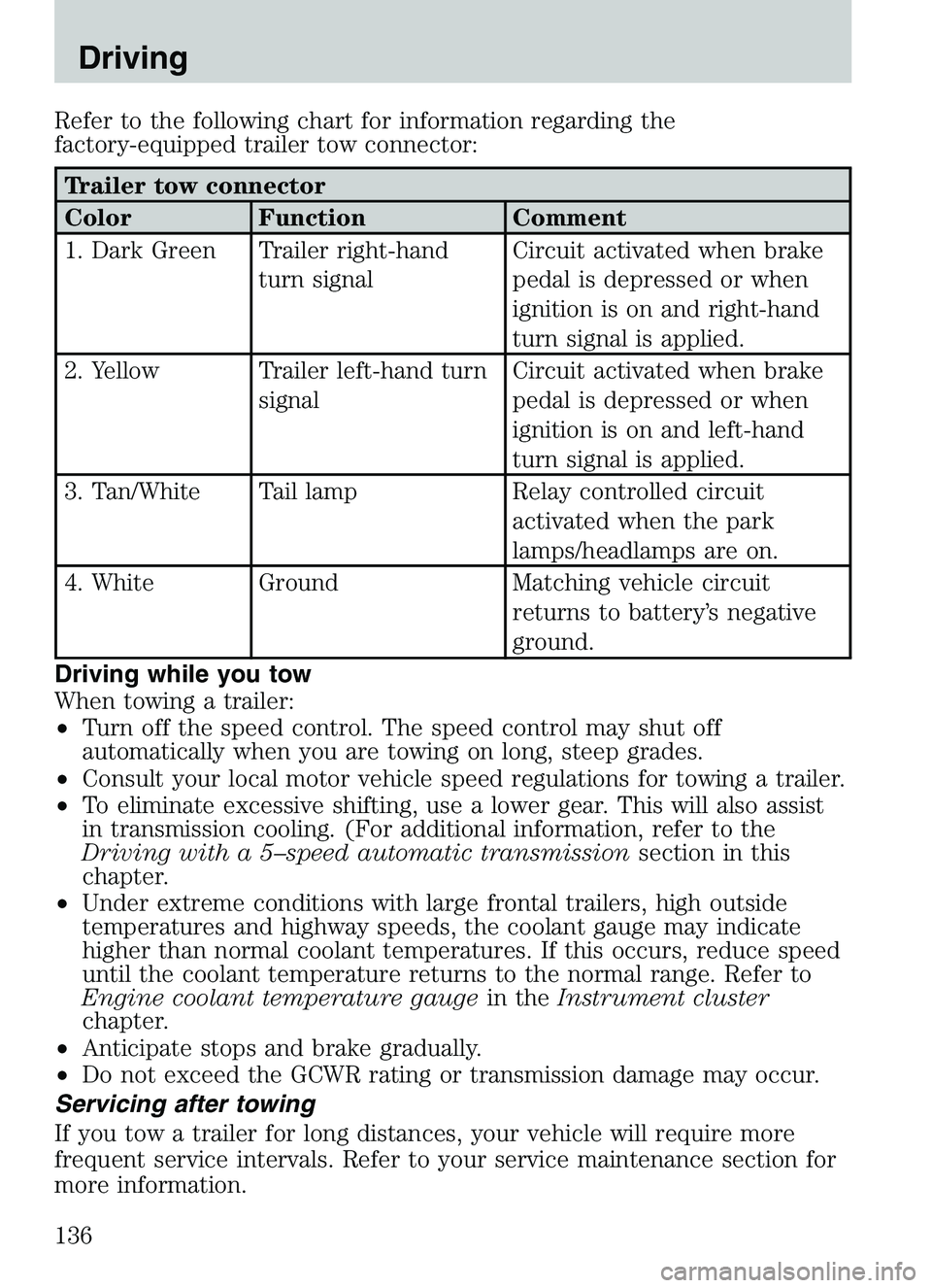
Refer to the following chart for information regarding the
factory-equipped trailer tow connector:
Trailer tow connector
Color Function Comment
1. Dark Green Trailer right-handturn signal Circuit activated when brake
pedal is depressed or when
ignition is on and right-hand
turn signal is applied.
2. Yellow Trailer left-hand turn signal Circuit activated when brake
pedal is depressed or when
ignition is on and left-hand
turn signal is applied.
3. Tan/White Tail lamp Relay controlled circuit activated when the park
lamps/headlamps are on.
4. White Ground Matching vehicle circuit returns to battery’s negative
ground.
Driving while you tow
When towing a trailer:
• Turn off the speed control. The speed control may shut off
automatically when you are towing on long, steep grades.
• Consult your local motor vehicle speed regulations for towing a trailer.
• To eliminate excessive shifting, use a lower gear. This will also assist
in transmission cooling. (For additional information, refer to the
Driving with a 5–speed automatic transmission section in this
chapter.
• Under extreme conditions with large frontal trailers, high outside
temperatures and highway speeds, the coolant gauge may indicate
higher than normal coolant temperatures. If this occurs, reduce speed
until the coolant temperature returns to the normal range. Refer to
Engine coolant temperature gauge in theInstrument cluster
chapter.
• Anticipate stops and brake gradually.
• Do not exceed the GCWR rating or transmission damage may occur.
Servicing after towing
If you tow a trailer for long distances, your vehicle will require more
frequent service intervals. Refer to your service maintenance section for
more information.
Driving
136
Page 158 of 250

10. Remove the jack and fullytighten the lug nuts, in the
order shown, to 135 Nm (100
lb-ft). Note that these tightening
specifications are for nut and
bolt threads that are free of dirt
and rust. Use only Mazda
recommended (1/2–20)
replacement fasteners.
11. Stow the flat tire. Refer to Stowing the spare tire.
12. Stow the jack and lug wrench. Make sure the jack is fastened so it does not rattle when you drive.
13. Unblock the wheels.
Stowing the flat/spare tire 1. Lay the tire on the ground with the valve stem facing up.
2. Slide the wheel partially under the vehicle and install the wire and retainer through the center of the wheel.
3. Turn the jack handle clockwise until the tire is raised to its original position underneath the vehicle. The effort to turn the jack handle
increases significantly as the tire contacts the frame. The spare tire
carrier will ratchet when the tire is in the fully stowed position. The
spare tire carrier has a built-in ratchet feature that will not allow you
to overtighten. If the spare tire carrier ratchets with very little effort,
take the vehicle to your dealer for assistance at your earliest
convenience.
4. Check that the tire lies flat against the frame assembly. Push against the tire to make sure it is tightly sealed under the vehicle. Loosen
and retighten, if necessary. Failure to properly stow the spare tire
may result in failure of the winch cable and loss of the spare tire.
5. Repeat this tightness check procedure when servicing the spare tire pressure (every six months, per service maintenance section), or at
any time that the spare tire is disturbed through service of other
components.
6. Install the spare tire lock (if equipped) into the access hole above the rear bumper with the spare tire lock key (if equipped) and jack
handle.1
4
3
2
5
2003 Mazda B Series (mbs)
New Owners Guide own2002 (own2002)
USA English (fus)
Roadside Emergencies
158
Page 164 of 250

WRECKER TOWING
If you need to have your vehicle towed, contact a professional towing
service or, if you are a member of a roadside assistance program, your
roadside assistance service provider.
It is recommended that your vehicle be towed with a wheel lift or flatbed
equipment. Do not tow with a slingbelt. Mazda has not approved a
slingbelt towing procedure.
On 4x2 vehicles, it is acceptable to tow the vehicle with the front wheels
on the ground and the rear wheels off the ground.
On 4x4 vehicles, it is recommended that your vehicle be towed with a
wheel lift and dollies or flatbed equipment with all the wheels off the
ground.
If the vehicle is towed by other means or incorrectly, vehicle
damage may occur.
Roadside Emergencies
164
Page 165 of 250

CUSTOMER ASSISTANCE (U.S.A.)
Your complete and permanent satisfaction is our business. We are here to
serve you. All Authorized Mazda Dealers have the knowledge and the
tools to keep your Mazda vehicle in top condition.
If you have any questions or recommendations for improvement
regarding the service of your Mazda vehicle or servicing by Mazda Dealer
personnel, we recommend that you take the following steps:
STEP 1: Contact Your Mazda Dealer
Discuss the matter with an Authorized Mazda Dealer. This is the quickest
and best way to address the issue. If your concern has not been resolved
by the CUSTOMER RELATIONS, SALES, SERVICE, or PARTS
MANAGER, then please contact the GENERAL MANAGER of the
dealership or the OWNER.
STEP 2: Call the Mazda National Customer Assistance Center
If for any reason you feel the need for further assistance after contacting
your dealership management, call Mazda North American Operations’
Customer Assistance Center toll-free at:1 (800) 222–5500
In order to serve you efficiently and effectively, please help us by
providing the following information: 1. Your name, address, and telephone number
2. Year and model of vehicle
3. Vehicle Identification Number (17 digits, noted on your registration or title or located on the upper driver’s side corner of the dash)
4. Purchase date and current mileage
5. Your dealer’s name and location
6. Your question(s)
If you would like to write a letter, please address it to the following,
Attn: Customer Assistance.
Mazda North American Operations
7755 Irvine Center Drive
Irvine, CA 92618–2922
P.O. Box 19734
Irvine, CA 92623–9734
This way, we can be sure to respond to you as efficiently as possible.
That is our goal.
If you live outside the U.S.A., please contact your nearest Mazda
Distributor.
Customer Assistance
165
Page 166 of 250

CUSTOMER ASSISTANCE (CANADA)
Your complete and permanent satisfaction is our business. We are here to
serve you. All Authorized Mazda Dealers have the knowledge and the
tools to keep your Mazda vehicle in top condition.
In our experience, any questions, problems or complaints regarding the
operation of your Mazda or any other general service transactions are
most effectively resolved by your dealer. If the cause of your
dissatifaction cannot adequately be addressed by normal dealership
procedures, we recommend that you take the following steps:
STEP 1: Contact Your Mazda Dealer
Discuss the matter with a member of dealership management. If the
Service Manager has already reviewed your concerns, contact the owner
of the dealership or its General Manager
STEP 2: Call the Mazda Regional Office
If you feel that you still require assistance, ask the dealer Service
Manager to arrange for you to meet the local Mazda Service
Representative. If more expedient, contact Mazda Canada Inc. Regional
Office nearest you for such arrangements.
STEP 3: Contact the Mazda Customer Relations Department
If still not substantially satisfied, contact the Customer Relations
Department, Mazda Canada Inc., 305 Milner Avenue, Suite 400
Scarborough, Ontario M1B 3V4 Canada TEL: 1 (800) 263–4680.
Provide the Department with the following information:1. Your name, address, and telephone number
2. Year and model of vehicle
3. Vehicle Identification Number (VIN). Refer to the “Vehicle Identification Labels” page of section 10 of this manual for the
location of the VIN.
4. Purchase date.
5. Present odometer reading.
6. Your dealer’s name and location
7. The nature of your problem and/or cause of dissatisfaction.
The Department, in cooperation with the local Mazda Service
Representative, will review the case to determine if everything possible
has been done to ensure your satisfaction.
Please recognize that the resolution of service problems in most cases
requires the use of your Mazda dealer’s service facilities. personnel and
Customer Assistance
166