AUX MAZDA MODEL CX-3 2021 User Guide
[x] Cancel search | Manufacturer: MAZDA, Model Year: 2021, Model line: MODEL CX-3, Model: MAZDA MODEL CX-3 2021Pages: 618, PDF Size: 64.58 MB
Page 306 of 618

3. Repeat this operation for the otherstations and bands you want to store.
To tune one in the memory, select AM,
FM1, or FM2 and then press its
channel preset button. The station
frequency or the channel number will
be displayed.
Auto memory tuning
This is especially useful when driving in
an area where the local stations are not
known.
Press and hold the auto memory button
(
) for about 2 seconds until a beep
is heard; the system will automatically
scan and temporarily store up to 6 stations
with the strongest frequencies in each
selected band in that area.
After scanning is completed, the station
with the strongest frequency will be tuned
and its frequency displayed. Press and
release the auto memory button (
)
to recall stations from the auto-stored
stations. One stored station will be
selected each time and its frequency and
channel number will be displayed.
NOTE
If no stations can be tuned after scanning
operations, “A” will be displayed.
How to use AUX mode
1. Switch the ignition to ACC or ON.
2. Press the power/volume dial to turn the audio system on.
3. Press the media button (
) of the
audio unit to change to the AUX mode.
NOTE
When the device is not connected to the
auxiliary jack, the mode does not switch
to the AUX mode.
Adjust the audio volume using the
portable audio device or audio unit.
Audio adjustments other than audio
volume can only be done using the
portable audio device.
If the connection plug is pulled out from
the auxiliary jack while in AUX mode,
noise may occur.
Interior Features
Audio Set [Type A (non-touchscreen)]
5-24
CX-3_8JL1-EA-20G_Edition1_old 2020-5-22 15:31:00
Page 328 of 618
Bluetooth® Audio
Applicable Bluetooth® specification
(Recommended)
Ve r . 2 . 0
Response profile
A2DP (Advanced Audio Distribution
Profile) Ver. 1.0
AVRCP (Audio/Video Remote Control
Profile) Ver. 1.0/1.3
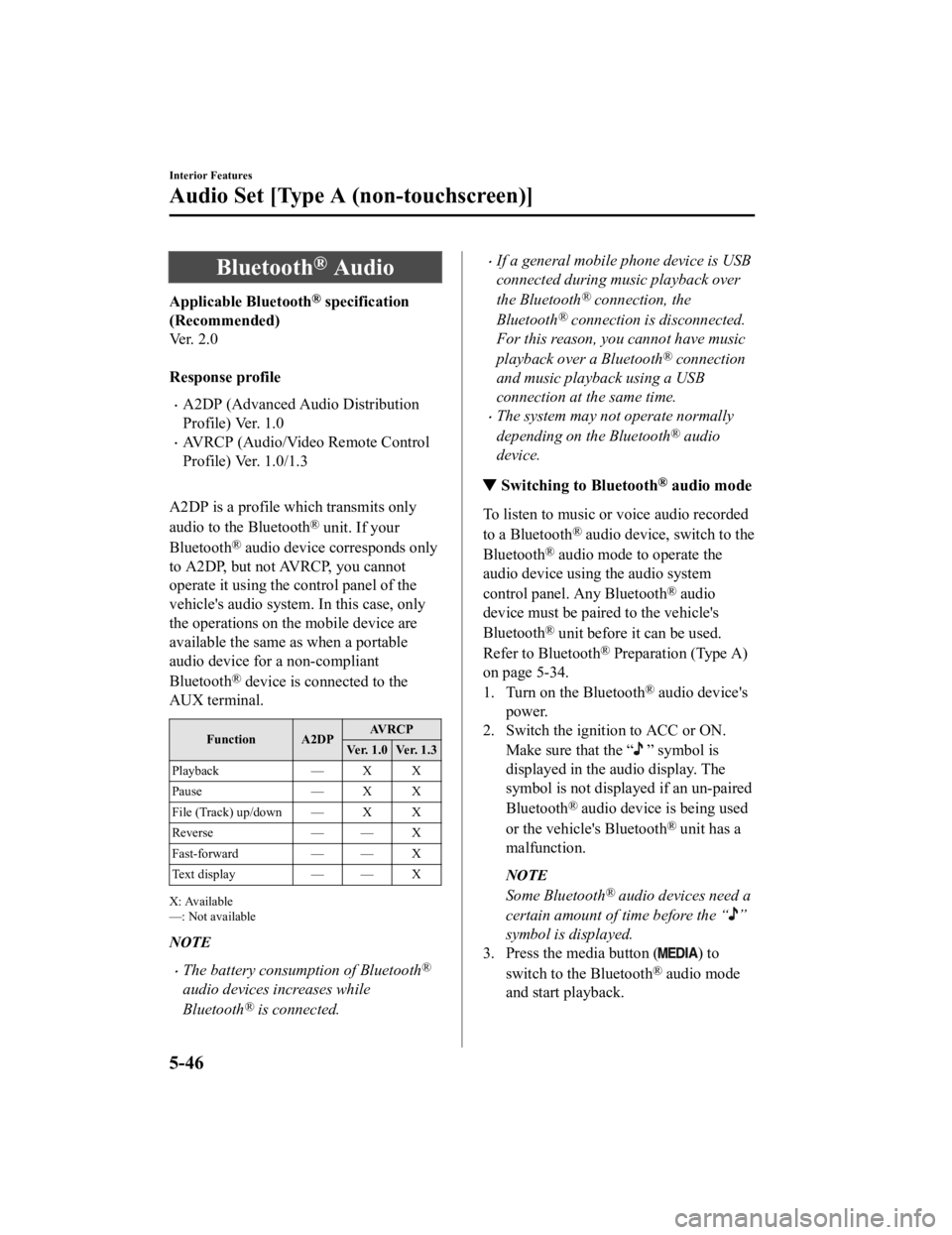
A2DP is a profile which transmits only
audio to the Bluetooth
® unit. If your
Bluetooth
® audio device corresponds only
to A2DP, but not AVRCP, you cannot
operate it using the control panel of the
vehicle's audio system. In this case, only
the operations on the mobile device are
available the same as when a portable
audio device for a non-compliant
Bluetooth
® device is connected to the
AUX terminal.
Function A2DP AV R C P
Ver. 1.0 Ver. 1.3
Playback — X X
Pause — X X
File (Track) up/down — X X
Reverse — — X
Fast-forward — — X
Text display — — X
X: Available
—: Not available
NOTE
The battery consumption of Bluetooth®
audio devices increases while
Bluetooth
® is connected.
If a general mobile phone device is USB
connected during music playback over
the Bluetooth
® connection, the
Bluetooth
® connection is disconnected.
For this reason, you cannot have music
playback over a Bluetooth
® connection
and music playback using a USB
connection at the same time.
The system may not operate normally
depending on the Bluetooth
® audio
device.
▼ Switching to Bluetooth® audio mode
To listen to music or voice audio recorded
to a Bluetooth
® audio device, switch to the
Bluetooth
® audio mode to operate the
audio device using the audio system
control panel. Any Bluetooth
® audio
device must be paired to the vehicle's
Bluetooth
® unit before it can be used.
Refer to Bluetooth
® Preparation (Type A)
on page 5-34.
1. Turn on the Bluetooth
® audio device's
power.
2. Switch the ignition to ACC or ON.
Make sure that the “
” symbol is
displayed in the audio display. The
symbol is not displayed if an un-paired
Bluetooth
® audio device is being used
or the vehicle's Bluetooth
® unit has a
malfunction.
NOTE
Some Bluetooth® audio devices need a
certain amount of time before the “
”
symbol is displayed.
3. Press the media button (
) to
switch to the Bluetooth
® audio mode
and start playback.
Interior Features
Audio Set [Type A (non-touchscreen)]
5-46
CX-3_8JL1-EA-20G_Edition1_old 2020-5-22 15:31:00
Page 361 of 618

How to use AUX mode
▼Playback
1. Select the icon on the home screen to display the Entertainment screen.
2. Select
to switch to the AUX mode. The follow ing icons are displayed in the lower
part of the center display.
Icon Function
Displays the Entertainment menu. Use to switch to a different audio source.
Displays sound settings to adjust audio quality level.
Refer to Volume/Display/Sound Controls on page 5-68.
NOTE
If a device is not connected to the auxiliary jack, the mode does not switch to the AUX
mode.
Adjust the audio volume using the portable audio device, commander switch, or audio
control switch.
Audio adjustments can also be made using the portable audio device's volume setting.
If the connection plug is pulled out from the auxiliary jack while in AUX mode, noise may
occur.
Interior Features
Audio Set [Type B (touchscreen)]
5-79
CX-3_8JL1-EA-20G_Edition1_old 2020-5-22 15:31:00
Page 368 of 618

When using Apple CarPlay™, please avoid distraction and use Apple CarPlay™ responsibly.
Stay fully aware of driving conditions and always obey applicable laws.
NOTE
Apple CarPlay™ is provided by Apple® and its use is subject to your agreement to the
Apple CarPlay™ terms of use, which are included as part of the Apple iOS terms of use.
When using Apple CarPlay™, location, speed, and other vehicle data is transferred to
your iPhone
®. For further details, refer to Apple®’s Privacy Policy.
▼ Switching to Apple CarPlay™
If Apple CarPlay™ does not support wireless connection*
Connect the iPhone® by inserting the Apple®-genuine connector cord to the USB port
indicated by the
mark.
Refer to How to connect USB port/Auxiliary jack on page 5-18.
NOTE
When you switch your iPhone® connection from Bluetooth® to the vehicle's USB port, the
system switches to Apple CarPlay™. The applications which were being used via
Bluetooth
® connection can be used continuously. However, the available functions of the
applications using Bluetooth
® connection and those on Apple CarPlay™ may differ.
If the iPhone® is connected to the USB port not indicated by the mark, the system
operates in USB mode.
If Apple CarPlay™ supports wireless connection
*
(USB connection)
Connect the iPhone
® by inserting the Apple®-genuine connector cord to the USB port
indicated by the
mark.
Refer to How to connect USB port/Auxiliary jack on page 5-18.
NOTE
When you switch your iPhone® connection from Bluetooth® to the vehicle's USB port, the
system switches to Apple CarPlay™. The applications which were being used via
Bluetooth
® connection can be used continuously. However, the available functions of the
applications using Bluetooth
® connection and those on Apple CarPlay™ may differ.
If the iPhone® is connected to the USB port not indicated by the mark, the system
operates in USB mode.
Depending on the iPhone® connection status, a wireless connection may be made. If
Apple CarPlay™ is used with only a USB conn ection, turn off the audio unit Wi-Fi™ or
the Apple CarPlay™ setting for an iPhone
® wireless connection.
Interior Features
Audio Set [Type B (touchscreen)]
5-86*Some models.
CX-3_8JL1-EA-20G_Edition1_old 2020-5-22 15:31:00
Page 374 of 618
When using Android Auto™, please avoid di straction and use Android Auto™ responsibly.
Stay fully aware of driving conditions and always obey applicable laws.
NOTE
Android Auto™ is provided by Google and its use is subject to your agreement to the
Android Auto™ terms of use.
When using Android Auto™, location, speed, and other vehicle data is transferred to your
smart phone. For further details, refer to Google’s Privacy Policy.
▼ How to use the Android Auto™ mode
Insert an Android™ Smartphone-genuine connector cord into the USB port indicated by the
mark to connect the Smartphone.
Refer to How to connect USB port/Auxiliary jack on page 5-18.
NOTE
When an Android™ Smartphone connected to Bluetooth® is connected to the vehicle's
USB port, Bluetooth
® is used by Android Auto™ and the system switches to Android
Auto™ mode.
If the Android™ Smartphone is connected to a USB port with no mark indicated, the
system operates in USB mode.
Display of Android Auto™ Mode Screen
Use any of the following methods to display th e Android Auto™ mode screen in the center
display.
Select on the home screen, and select from the Applications screen.
Select on the home screen.
Press and hold on the commander switch.
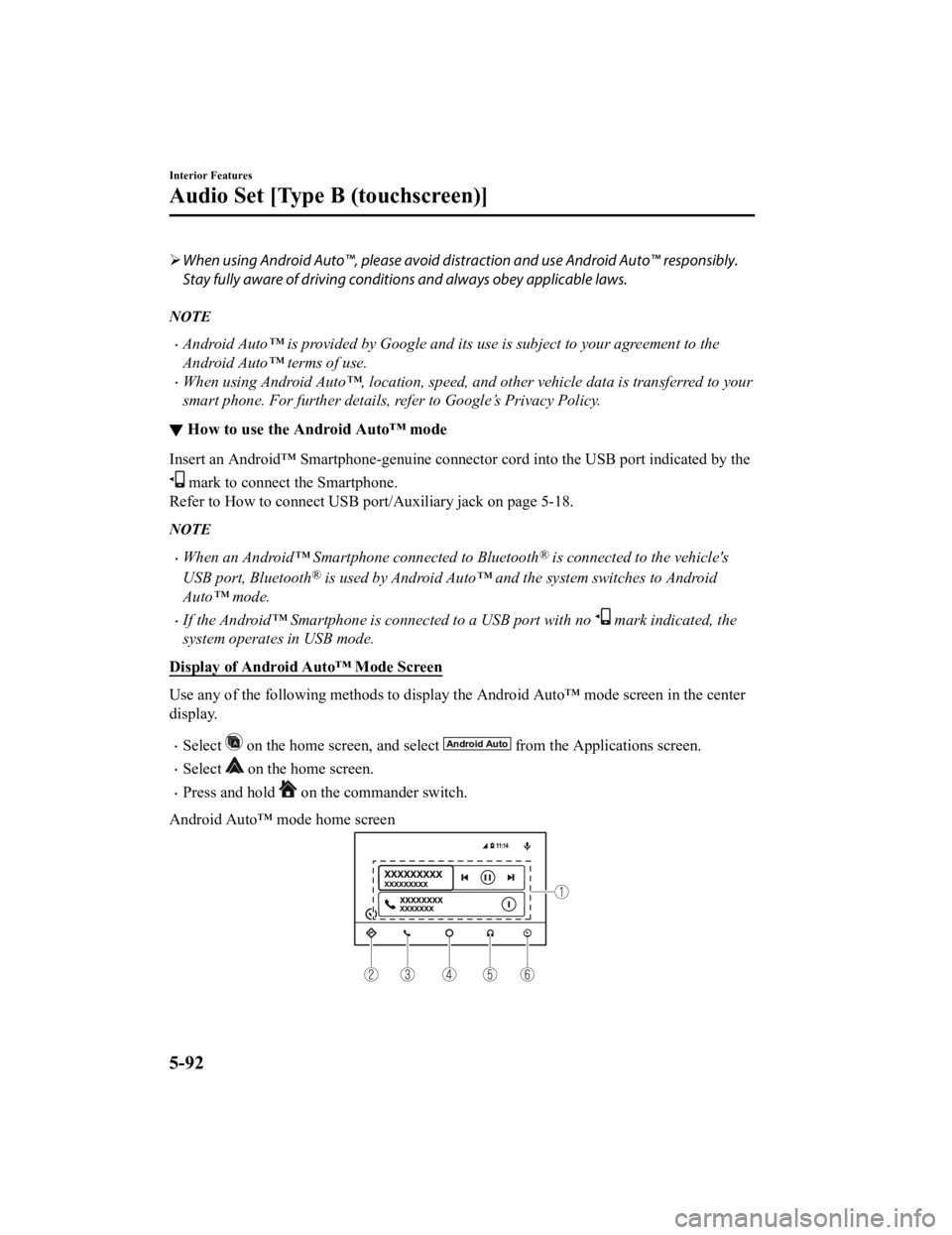
Android Auto™ mode home screen
Interior Features
Audio Set [Type B (touchscreen)]
5-92
CX-3_8JL1-EA-20G_Edition1_old 2020-5-22 15:31:00
Page 383 of 618
Bluetooth® Audio
Applicable Bluetooth® specification
(Recommended)
Ver. 1.1/1.2/2.0
EDR/2.1 EDR/3.0
(conformity)
Response profile
A2DP (Advanced Audio Distribution
Profile) Ver. 1.0/1.2
AVRCP (Audio/Video Remote Control
Profile) Ver. 1.0/1.3/1.4
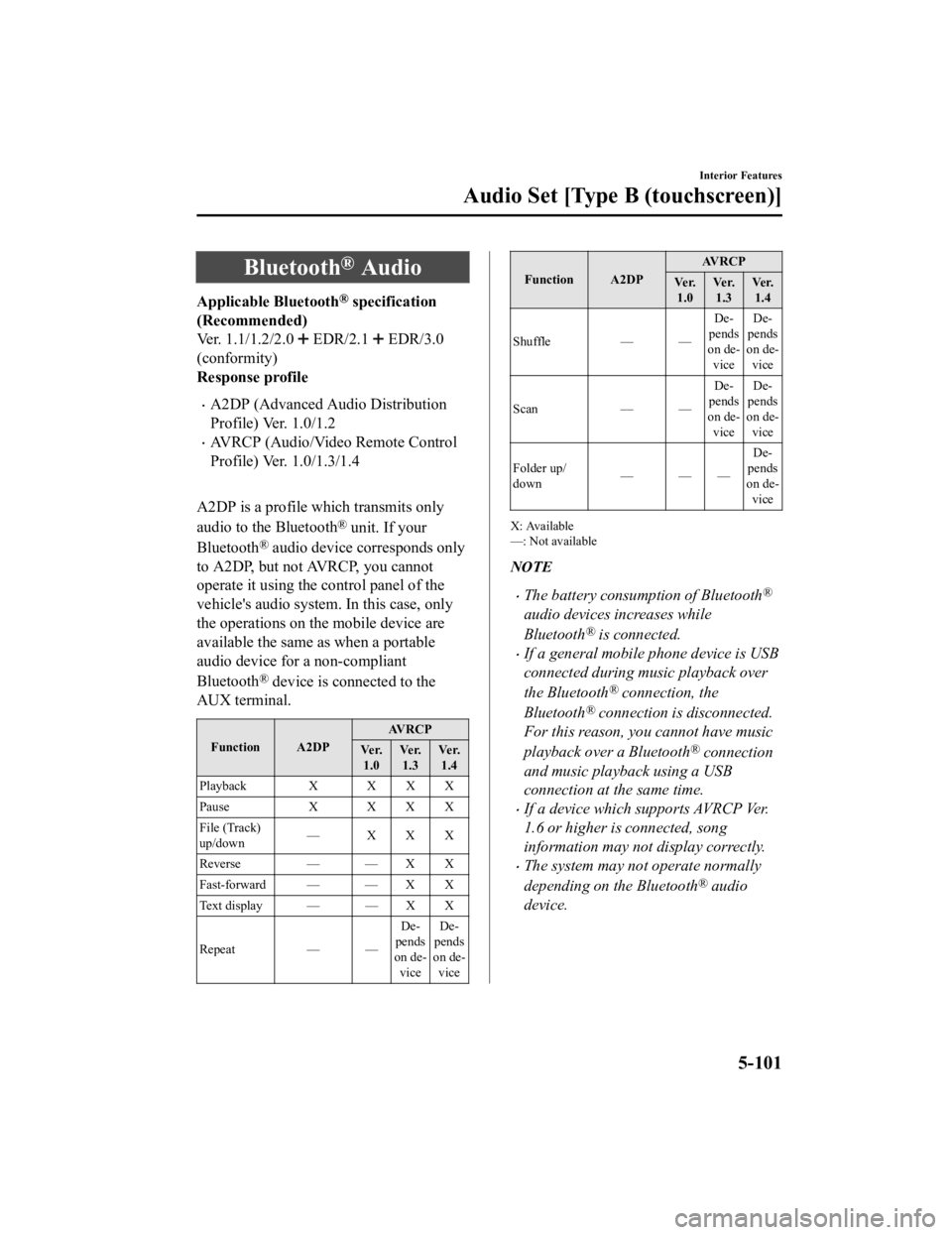
A2DP is a profile which transmits only
audio to the Bluetooth
® unit. If your
Bluetooth
® audio device corresponds only
to A2DP, but not AVRCP, you cannot
operate it using the control panel of the
vehicle's audio system. In this case, only
the operations on the mobile device are
available the same as when a portable
audio device for a non-compliant
Bluetooth
® device is connected to the
AUX terminal.
Function A2DP AVRCP
Ve r. 1.0 Ve r.
1.3 Ve r.
1.4
Playback X X X X
Pause X XXX
File (Track)
up/down — XXX
Reverse — — X X
Fast-forward — — X X
Text display — — X X
Repeat — — De
‐
pends
on de ‐
vice De
‐
pends
on de ‐
vice
Function A2DP AV R C P
Ve r. 1.0 Ve r.
1.3 Ve r.
1.4
Shuffle — — De‐
pends
on de ‐
vice De
‐
pends
on de ‐
vice
Scan — —De‐
pends
on de ‐
vice De
‐
pends
on de ‐
vice
Folder up/
down ——— De
‐
pends
on de ‐
vice
X: Available
—: Not available
NOTE
The battery consumption of Bluetooth®
audio devices increases while
Bluetooth
® is connected.
If a general mobile phone device is USB
connected during music playback over
the Bluetooth
® connection, the
Bluetooth
® connection is disconnected.
For this reason, you cannot have music
playback over a Bluetooth
® connection
and music playback using a USB
connection at the same time.
If a device which supports AVRCP Ver.
1.6 or higher is connected, song
information may not display correctly.
The system may not operate normally
depending on the Bluetooth
® audio
device.
Interior Features
Audio Set [Type B (touchscreen)]
5-101
CX-3_8JL1-EA-20G_Edition1_old 2020-5-22 15:31:00
Page 610 of 618

Index
A
Accessory Socket............................ 5-144
Active Driving Display..................... 4-18
Adaptive Front Lighting System
(AFS)................................................. 4-78
Add-On Non-Genuine Parts and
Accessories........................................ 8-19
Advanced Key
Advanced keyless entry system..... 3-9
Operational range........................ 3-10
Advanced Smart City Brake Support
(Advanced SCBS)........................... 4-116
Collision warning.... .................. 4-118
Smart City Brake Support (SCBS)
Indicator Light (Red)................. 4-118
Stopping the Advanced Smart City
Brake Support (Advanced SCBS)
system operation........................ 4-118
Air Bag Systems............................... 2-51
Air Bag/Front Seat Belt Pretensioner
System Warning Beep....................... 7-42
Ambient Temperature Display.......... 4-15
Antilock Brake System (ABS).......... 4-65
Audio Control Switch
Adjusting the Volume.................. 5-16
Seek Switch................................. 5-16
Audio Set [Type A (non-touchscreen)] AUX.............................................5-24
Bluetooth®.................................. 5-31
Clock............................................5-22
Error Indications.......................... 5-30
iPod mode....................................5-28
Power/Volume/Sound Controls... 5-20
Radio............................................5-23
Troubleshooting.......... ................. 5-59
USB............................................. 5-25
Voice Recognition.... ................... 5-55
Audio Set [Type B (touchscreen)]
Android Auto™........................... 5-91
Apple CarPlay............................. 5-85
Applications............................... 5-126
AUX.............................................5-79
Bluetooth®.................................. 5-95
Radio............................................5-71
Satellite Radio........ ..................... 5-75
Settings...................................... 5-123
Troubleshooting........... .............. 5-127
USB............................................. 5-80
Voice Recognition..................... 5-120
Volume/Display/Sound
Controls....................................... 5-68
Audio System Antenna........................................5-19
Appendix................................... 5-135
Audio Control Switch................. 5-16
Audio Set [Type A (non-
touchscreen)]............................... 5-20
Audio Set [Type B
(touchscreen)].............................. 5-63
AUX/USB mode..........................5-17
Before Using the Audio
System......................................... 5-16
AUTOHOLD..................................... 4-59
AUTOHOLD Warning Beep.............7-44
Automatic Transaxle Active Adaptive Shift (AAS)...... 4-31
Automatic transaxle controls....... 4-29
Direct mode................................. 4-38
Driving tips..................................4-39
Manual shift mode.......................4-32
Shift-lock system...... ................... 4-30
Transaxle ranges.......................... 4-30
B
Battery............................................... 6-32 Maintenance.................................6-34
Replacement................................ 6-34
Specifications.................................9-4
Battery runs out.................................7-17 Jump-Starting...............................7-17
10-2
CX-3_8JL1-EA-20G_Edition1_old 2020-5-22 15:31:00