brake light MAZDA MODEL CX-3 2021 Workshop Manual
[x] Cancel search | Manufacturer: MAZDA, Model Year: 2021, Model line: MODEL CX-3, Model: MAZDA MODEL CX-3 2021Pages: 618, PDF Size: 64.58 MB
Page 257 of 618

Do not disassemble or modify th e Forward Sensing Camera (FSC).
Disassembly or modification of the Forward Sensing Camera (FSC) will cause a malfunction
or mistaken operation. Consequently, each sy stem may not operate normally which could
lead to an unexpected accident.
Heed the following cautions to assure the co rrect operation of the Forward Sensing Camera
(FSC).
Be careful not to scratch the Forward Sensing Camera (FSC) lens or allow it to get dirty.
Do not remove the Forward Sensing Camera (FSC) cover.
Do not place objects on the dashboard which reflect light.
Always keep the windshield glass around th e camera clean by removing dirt or fogging.
Use the windshield defroster to remove fogging on the windshield.
Consult an Authorized Mazda Dealer regardi ng cleaning the interior side of the
windshield around the Forw ard Sensing Camera (FSC).
Consult an Authorized Mazda Dealer before performing repairs around the Forward
Sensing Camera (FSC).
The Forward Sensing Camera (FSC) is installe d to the windshield. Consult an Authorized
Mazda Dealer for windshield repair and replacement.
When cleaning the windshield, do not allow glass cleaners or similar cleaning fluids to
get on the Forward Sensing Camera (FSC) le ns. In addition, do not touch the Forward
Sensing Camera (FSC) lens.
When performing repairs around the rearvi ew mirror, consult an Authorized Mazda
Dealer.
Consult an Authorized Mazda Dealer regarding cleaning of the camera lens.
Do not hit or apply strong force to the Forward Sensing Camera (FSC) or the area around
it. If the Forward Sensing Camera (FSC) is severely hit or if there are cracks or damage
caused by flying gravel or debris in the area around it, stop using the following systems
and consult an Authorized Mazda Dealer.
High Beam Control System (HBC)
Lane Departure Warning System (LDWS)
Traffic Sign Recognition System (TSR)
Advanced Smart City Brake Support (Advanced SCBS)
Smart City Brake Support (SCBS)
Mazda Radar Cruise Control with Stop & Go function (MRCC with Stop & Go function)
Smart Brake Support (SBS)
The direction in which the Forward Sensing Camera (FSC) is pointed has been
finely
adjusted. Do not change the installation position of the Forward Sensing Camera (FSC) or
remove it. Otherwise, it could result in damage or malfunction.
Always use tires for all wheels that are of the specified size, and the same manufacturer,
brand, and tread pattern. In addition, do not use tires with significantly different wear
patterns on the same vehicle as the system may not operate normally.
When Driving
i-ACTIVSENSE
4-127
CX-3_8JL1-EA-20G_Edition1_old 2020-5-22 15:31:00
Page 259 of 618

The surroundings are dark such as during the night, early evening, or early morning, or
in a tunnel or indoor parking lot.
The illumination brightness of the headlights is reduced or the headlight illumination is
weakened due to dirt or a deviated optical axis.
The target object enters the blind spot of the Forward Sensing Camera (FSC).
A person or object bursts onto the road from the shoulder or cuts right in front of you.
You change lanes and approach a vehicle ahead.
When driving extremely close to the target object.
Tire chains or a temporary spare tire is installed.
The vehicle ahead has a special shape. For example, a vehicle towing a trailer house or
a boat, or a vehicle carrier carrying a vehicle with its front pointed rearward.
If the Forward Sensing Camera (FSC) cannot operate normally due to backlight or fog,
the system functions related to the Forward Sensing Camera (FSC) are temporarily
stopped and the following warning lights turn on. However, this does not indicate a
malfunction.
High Beam Control System (HBC) warning light (amber)
Lane Departure Warning System (LDWS) warning light
Mazda Radar Cruise Control with Stop & Go function (MRCC with Stop & Go
function) warning light
Smart Brake Support/Smart City Brake Support (SBS/SCBS) warning light (amber)
If the Forward Sensing Camera (FSC) cannot operate normally due to high temperatures,
the system functions related to the Forward Sensing Camera (FSC) are temporarily
stopped and the following warning lights turn on. However, this does not indicate a
malfunction. Cool down the area around the Forward Sensing Camera (FSC) such as by
turning on the air conditioner.
High Beam Control System (HBC) warning light (amber)
Lane Departure Warning System (LDWS) warning light
Mazda Radar Cruise Control with Stop & Go function (MRCC with Stop & Go
function) warning light
Smart Brake Support/Smart City Brake Support (SBS/SCBS) warning light (amber)
If the Forward Sensing Camera (FSC) detects that the windshield is dirty or foggy, the
system functions related to the Forward Sensing Camera (FSC) are temporarily stopped
and the following warning lights turn on. However, this does not indicate a problem.
Remove the dirt from the windshield or press the defroster switch and defog the
windshield.
High Beam Control System (HBC) warning light (amber)
Lane Departure Warning System (LDWS) warning light
When Driving
i-ACTIVSENSE
4-129
CX-3_8JL1-EA-20G_Edition1_old 2020-5-22 15:31:00
Page 260 of 618

Mazda Radar Cruise Control with Stop & Go function (MRCC with Stop & Go
function) warning light
Smart Brake Support/Smart City Brake Support (SBS/SCBS) warning light (amber)
If there are recognizable cracks or damage caused by flying gravel or debris on the
windshield, always have the windshield replaced. Consult an Authorized Mazda Dealer
for replacement.
(With Advanced Smar t City Brake Support (Advanced SCBS))
The Forward Sensing Camera (FSC) recognizes pedestrians when all of the following
conditions are met:
The height of a pedestrian is about 1 to 2 meters.
An outline such as the head, both shoulders, or the legs can be determined.
In the following cases, the Forward Sensing Camera (FSC) may not be able to detect
target objects correctly:
Multiple pedestrians are walking, or there are groups of people.
A pedestrian is close to a separate object.
A pedestrian is crouching, lying, or slouching.
A pedestrian suddenly jumps into the road right in front of the vehicle.
A pedestrian opens an umbrella, or is carrying large baggage or articles.
A pedestrian is in a dark location such as during the night, or blends into the
background by wearing clothes matching the background color.
When Driving
i-ACTIVSENSE
4-130
CX-3_8JL1-EA-20G_Edition1_old 2020-5-22 15:31:00
Page 261 of 618

Radar Sensor (Front)*
Your vehicle is equipped with a radar sensor (front).
The following systems also use the radar sensor (front).
Distance Recognition Support System (DRSS)
Mazda Radar Cruise Control with Stop & Go function (MRCC with Stop & Go function)
Smart Brake Support (SBS)
The radar sensor (front) functions by detecti ng the radio waves reflected off a vehicle ahead
or an obstruction sent from the radar sensor.
The radar sensor (front) is mo unted behind the front emblem.
Radar sensor (front)
If the Smart Brake Support/Smart City Brake Support (SBS/SCBS) Warning Light (amber)
is illuminated, the area around the radar sens or may be dirty. Refer to “Warning Guidance”
in the center display (Type B audio).
Refer to If a Warning Light Turns On or Flashes on page 7-26.
CAUTION
Heed the following precautions to a ssure correct operation of each system.
Do not adhere stickers (including transparent st ickers) to the surface of the radiator grille
and front emblem in and around the radar sens or (front), and do not replace the radiator
grille and front emblem with any product that is not a genuine product designed for use
with the radar sensor (front).
The radar sensor (front) includes a function fo r detecting soiling of the radar sensor's front
surface and informing the driver, however, depending on the conditions, it may require
time to detect or it may not detect plastic sh opping bags, ice or snow. If this occurs, the
system may not operate correctly, therefore al ways keep the radar sensor (front) clean.
Do not install a grille guard.
If the front part of the vehicle has been dama ged in a vehicle accident, the position of the
radar sensor (front) may have moved. Stop the system immediately and always have the
vehicle inspected at an Authorized Mazda Dealer.
When Driving
i-ACTIVSENSE
*Some models.4-131
CX-3_8JL1-EA-20G_Edition1_old 2020-5-22 15:31:00
Page 263 of 618

If the vehicle is driven on a road with little traffic and few vehicles ahead or obstructions
for the radar sensor (front) to detect, the sensor detects that the radar sensor (front) is
dirty and the Smart Brake Support/Smart City Brake Support (SBS/SCBS) Warning Light
(amber) may be temporarily turned on. Howe ver, it does not indicate a malfunction.
The radar sensors are regulated by the relevant radio wave laws of the country in which
the vehicle is driven. If the vehicle is driven abroad, authorization from the country in
which the vehicle is driven may be required.
When Driving
i-ACTIVSENSE
4-133
CX-3_8JL1-EA-20G_Edition1_old 2020-5-22 15:31:00
Page 268 of 618

▼To Set Speed
1. Activate the cruise control system by
pressing the ON switch. The cruise
main indication (white) is displayed.
2. Accelerate to the desired speed, which
must be more than 25 km/h (16 mph).
3. Set the cruise control by pressing the SET/
switch at the desired speed. The
cruise control is set at the moment the
SET/
switch is pressed. Release the
accelerator pedal simultaneously. The
cruise set indication (white) is
displayed and the cruise set indicator
light (green) turns on.
NOTE
The cruise control speed setting cannot
be performed under the following
conditions:
(Automatic transaxle)
The selector lever is in the P or N
position.
(Manual transaxle)
The shift lever is in the neutral
position.
The parking brake is applied.
Release the SET/ or RES/ switch at
the desired speed, otherwise the speed
will continue increasing while the RES/
switch is pressed and held, and
continue decreasing while the SET/
switch is pressed and held (except when
the accelerator pedal is depressed).
On a steep grade, the vehicle may
momentarily slow down while
ascending, or speed up while
descending.
The cruise control will cancel if the
vehicle speed decreases below 21 km/h
(13 mph) when climbing a steep grade.
The cruise control may cancel at about
15 km/h (9 mph) below the preset speed
such as when climbing a long, steep
grade.
▼ To Increase Cruising Speed
Follow either of these procedures.
To increase speed using cruise control
switch
Press the RES/ switch and hold it. Your
vehicle will accelerate. Release the switch
at the desired speed.
Press the RES/
switch and release it
immediately to adjust the preset speed.
Multiple operations will increase the
preset speed according to the number of
times it is operated.
Increasing speed with a single RES/
switch operation
Instrument cluster display for vehicle
speed indicated in km /h: 1 km/h (0.6 mph)
Instrument cluster display for vehicle
speed indicated in mph: 1 mph (1.6 km/h)
To increase speed using accelerator
pedal
Depress the accelerator pedal to accelerate
to the desired speed. Press the SET/
switch and release it immediately.
NOTE
Accelerate if you want to speed up
temporarily when the cruise control is on.
Greater speed will not interfere with or
change the set speed. Take your foot off
the accelerator to retu rn to the set speed.
When Driving
Cruise Control
4-138
CX-3_8JL1-EA-20G_Edition1_old 2020-5-22 15:31:00
Page 269 of 618

▼To Decrease Cruising Speed
Press the SET/ switch and hold it. The
vehicle will gradually slow.
Release the switch at the desired speed.
Press the SET/
switch and release it
immediately to adjust the preset speed.
Multiple operations will decrease the
preset speed according to the number of
times it is operated.
Decreasing speed with a single SET/
switch operation
Instrument cluster display for vehicle
speed indicated in km/h: 1 km/h (0.6 mph)
Instrument cluster display for vehicle
speed indicated in mph: 1 mph (1.6 km/h)
▼ To Resume Cruising Speed at More
Than 25 km/h (16 mph)
If the cruise control system temporarily
canceled (such as applying the brake
pedal) and the system is still activated, the
most recent set speed will automatically
resume when the RES/
switch is pressed.
If vehicle speed is below 25 km/h (16
mph), increase the vehicle speed up to 25
km/h (16 mph) or more and press the RES/
switch.
▼ To Temporarily Cancel
To temporarily cancel the system, use one
of these methods:
Slightly depress the brake pedal.
(Manual transaxle)
Depress the clutch pedal.
Press the OFF/CAN switch.
If the RES/
switch is pressed when the
vehicle speed is 25 km/h (16 mph) or
higher, the system reverts to the previously
set speed.
NOTE
If any of the following conditions occur,
the cruise control system is temporarily
canceled.
The parking brake is applied.
(Automatic transaxle)
The selector lever is in the P or N
position.
(Manual transaxle)
The shift lever is in the neutral
position.
When the cruise control system is
temporarily canceled by even one of the
applicable cancel conditions, the speed
cannot be re-set.
(Automatic transaxle)
The cruise control cannot be cancelled
while driving in manual mode (selector
lever shifted from D to M position).
Therefore, engine braking will not be
applied even if the transaxle is shifted
down to a lower gear. If deceleration is
required, lower the set speed or depress
the brake pedal.
▼ To Deactivate
When a cruising speed has been set
(cruise set indication (white) is
displayed/cruise set indicator light
(green) turns on)
Long-press the OFF/CA
N switch or press
the OFF/CAN switch 2 times.
When a cruising speed has not been set
(cruise main indication (white) is
displayed)
Press the OFF/CAN switch.
When Driving
Cruise Control
4-139
CX-3_8JL1-EA-20G_Edition1_old 2020-5-22 15:31:00
Page 433 of 618

6Maintenance and Care
How to keep your Mazda in top condition.
Essential Information........................6-2 Introduction.................................. 6-2
Scheduled Maintenance.................... 6-4 Scheduled Maintenance (U.S.A.,
Canada, and Puerto Rico)............. 6-4
Scheduled Maintenance
(Mexico)....................................... 6-9
Maintenance Monitor................. 6-14
Owner Maintenance........................ 6-17 Owner Maintenance
Precautions................................. 6-17
Hood........................................... 6-19
Engine Compartment
Overview.................................... 6-21
Engine Oil...................................6-22
Engine Coolant........................... 6-25
Brake/Clutch Fluid. .................... 6-27
Window Washer Flui d................ 6-27
Body Lubrication...... .................. 6-28
Wiper Blades.............................. 6-29
Battery........................................ 6-32
Key Battery Replacement........... 6-34
Tires............................................ 6-36
Light Bulbs................................. 6-40
Fuses........................................... 6-47
Appearance Care............................. 6-53 Exterior Care.............................. 6-53
Interior Care................................6-59
6-1
CX-3_8JL1-EA-20G_Edition1_old 2020-5-22 15:31:00
Page 436 of 618
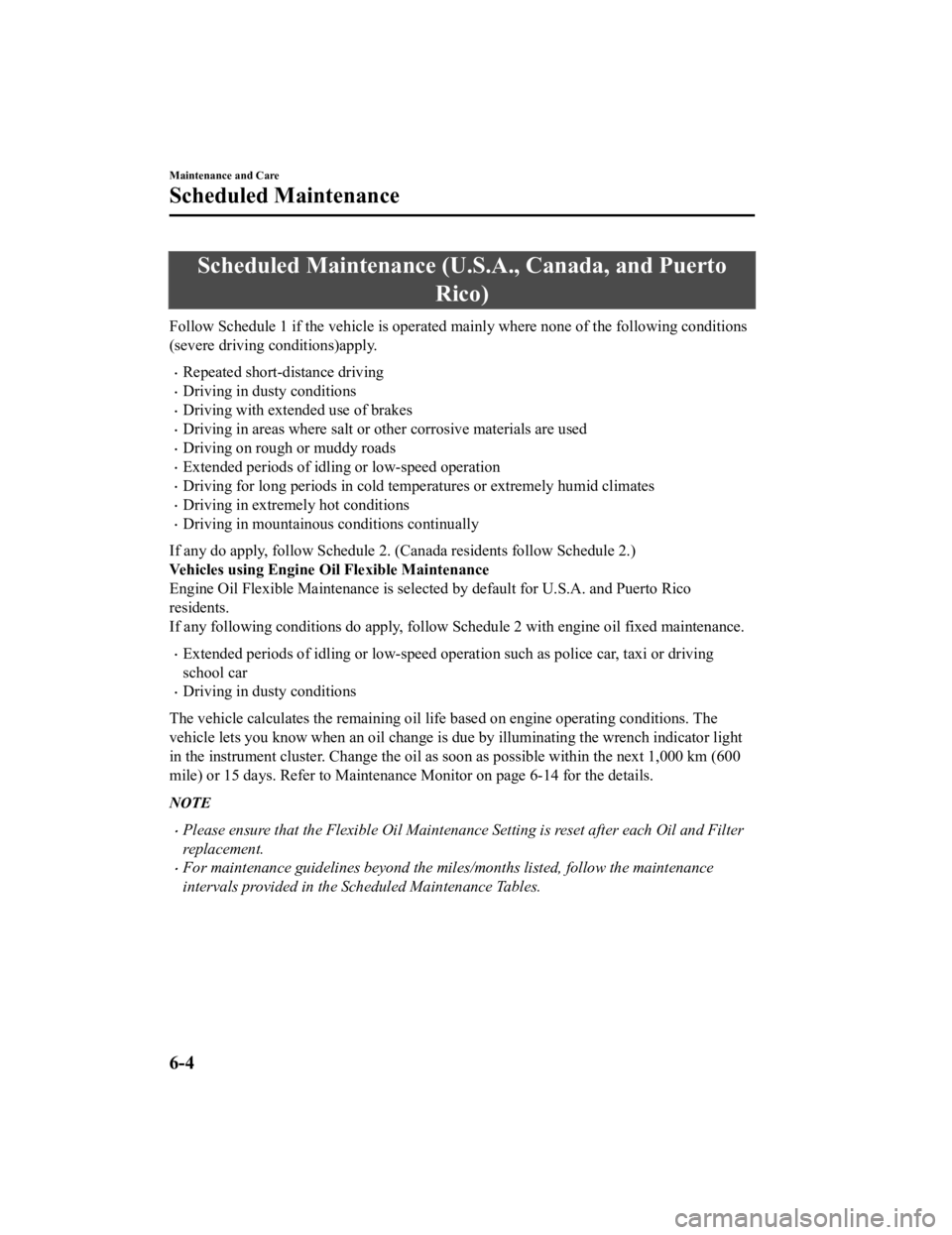
Scheduled Maintenance (U.S.A., Canada, and Puerto
Rico)
Follow Schedule 1 if the vehicle is operated mainly where none of the following conditions
(severe driving conditions)apply.
Repeated short-distance driving
Driving in dusty conditions
Driving with extended use of brakes
Driving in areas where salt or other corrosive materials are used
Driving on rough or muddy roads
Extended periods of idling or low-speed operation
Driving for long periods in cold temperatures or extremely humid climates
Driving in extremely hot conditions
Driving in mountainous conditions continually
If any do apply, follow Schedule 2. (Canada residents follow Schedule 2.)
Vehicles using Engine Oil Flexible Maintenance
Engine Oil Flexible Maintenance is select ed by default for U.S.A. and Puerto Rico
residents.
If any following conditions do apply, follow Schedule 2 with engine oil fixed maintenance.
Extended periods of idling or low-speed opera tion such as police car, taxi or driving
school car
Driving in dusty conditions
The vehicle calculates the remaining oil life based on engine operating conditions. The
vehicle lets you know when an oil change is due by illuminating the wrench indicator light
in the instrument cluster. Change the oil as soon as possible within the next 1,000 km (600
mile) or 15 days. Refer to Maintenance Monitor on page 6-14 for the details.
NOTE
Please ensure that the Flexible Oil Maintenance Setting is reset after each Oil and Filter
replacement.
For maintenance guidelines beyond the miles/months listed, follow the maintenance
intervals provided in the Scheduled Maintenance Tables.
Maintenance and Care
Scheduled Maintenance
6-4
CX-3_8JL1-EA-20G_Edition1_old 2020-5-22 15:31:00
Page 437 of 618
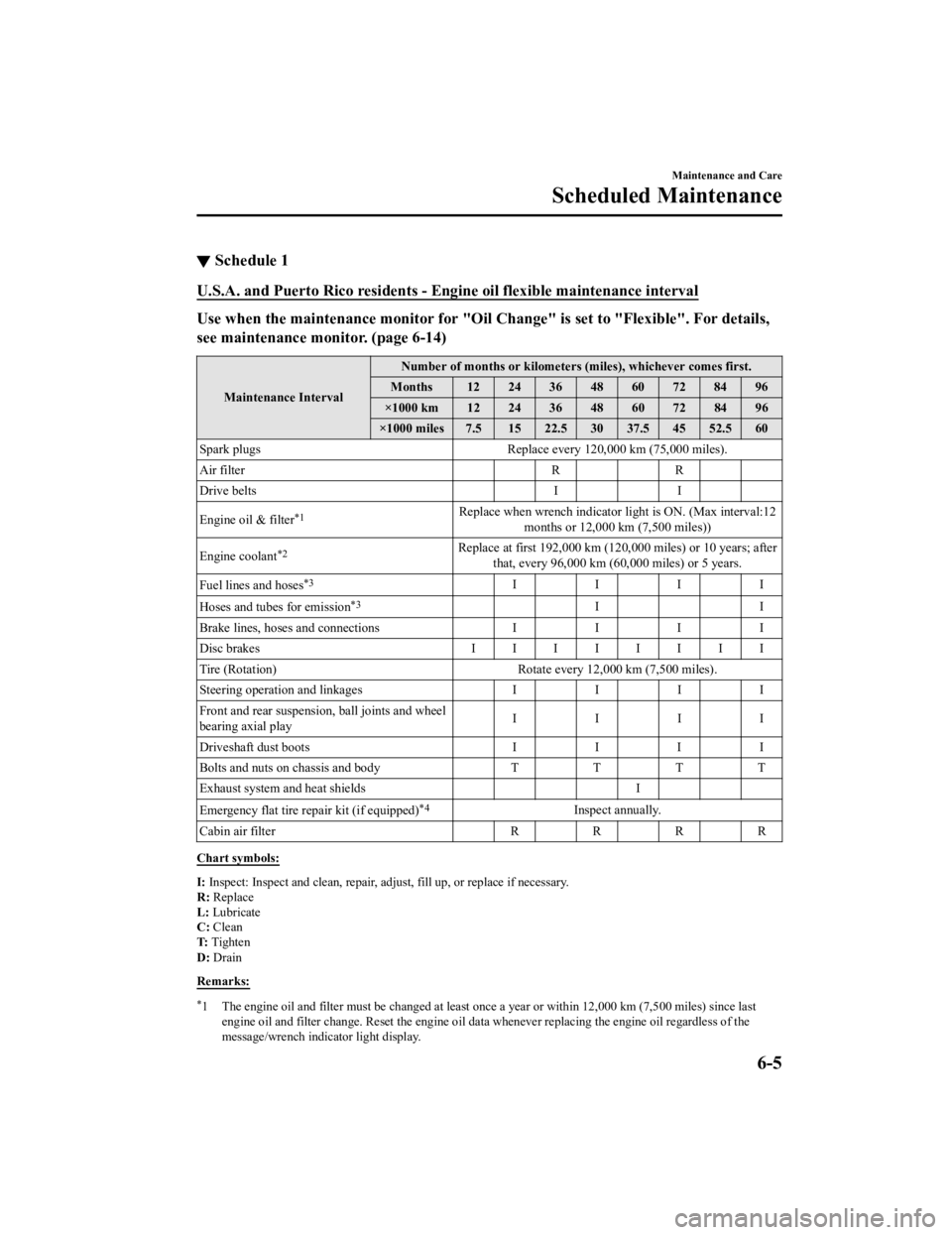
▼Schedule 1
U.S.A. and Puerto Rico residents - En
gine oil flexible maintenance interval
Use when the maintenance monitor for "Oil Change" is set to "Flexible". For details,
see maintenance monitor. (page 6-14)
Maintenance IntervalNumber of months or kilometers (miles), whichever comes first.
Months 12 24 36 48 60 72 84 96
×1000 km 12 24 36 48 60 72 84 96
×1000 miles 7.5 15 22.5 30 37.5 45 52.5 60
Spark plugs Replace every 120,000 km (75,000 miles).
Air filter RR
Drive belts II
Engine oil & filter
*1Replace when wrench indicator lig ht is ON. (Max interval:12
months or 12,000 km (7,500 miles))
Engine coolant
*2Replace at first 192,000 km (120,0 00 miles) or 10 years; after
that, every 96,000 km (60,000 miles) or 5 years.
Fuel lines and hoses
*3IIII
Hoses and tubes for emission
*3II
Brake lines, hoses and connections I I I I
Disc brakes IIIIIIII
Tire (Rotation) Rotate every 12,000 km (7,500 miles).
Steering operation and linkages II II
Front and rear suspensi on, ball joints and wheel
bearing axial play IIII
Driveshaft dust boots II II
Bolts and nuts on chassis and body TTTT
Exhaust system and heat shields I
Emergency flat tire repair kit (if equipped)
*4Inspect annually.
Cabin air filter R R R R
Chart symbols:
I: Inspect: Inspect and clean, repair, adju st, fill up, or replace if necessary.
R: Replace
L: Lubricate
C: Clean
T: Tighten
D: Drain
Remarks:
*1 The engine oil and filter must be ch anged at least once a year or within 12,000 km (7,500 miles) since last
engine oil and filter change. Reset the engine oil data whenever replacing the engine oil regardless of the
message/wrench indicator light display.
Maintenance and Care
Scheduled Maintenance
6-5
CX-3_8JL1-EA-20G_Edition1_old 2020-5-22 15:31:00