wipers MAZDA MODEL CX-30 2019 (in English) User Guide
[x] Cancel search | Manufacturer: MAZDA, Model Year: 2019, Model line: MODEL CX-30, Model: MAZDA MODEL CX-30 2019Pages: 683, PDF Size: 15.21 MB
Page 487 of 683
11.Move the wipers to their initial
positions using the following
procedure.
a) Make sure that the wipers are set
on the windscreen.
b) Switch the ignition ON.
c) Press up the wiper switch to the
MIST position 1 time.
When the procedure is
completed, the wipers operate
and they stop at the initial
positions.
▼Replacing Rear Window Wiper
Blade
When the wiper no longer cleans well,
the blade is probably worn or cracked.
Replace it.
CAUTION
To prevent damage to the wiper arm
and other components, do not move
the wiper by hand.
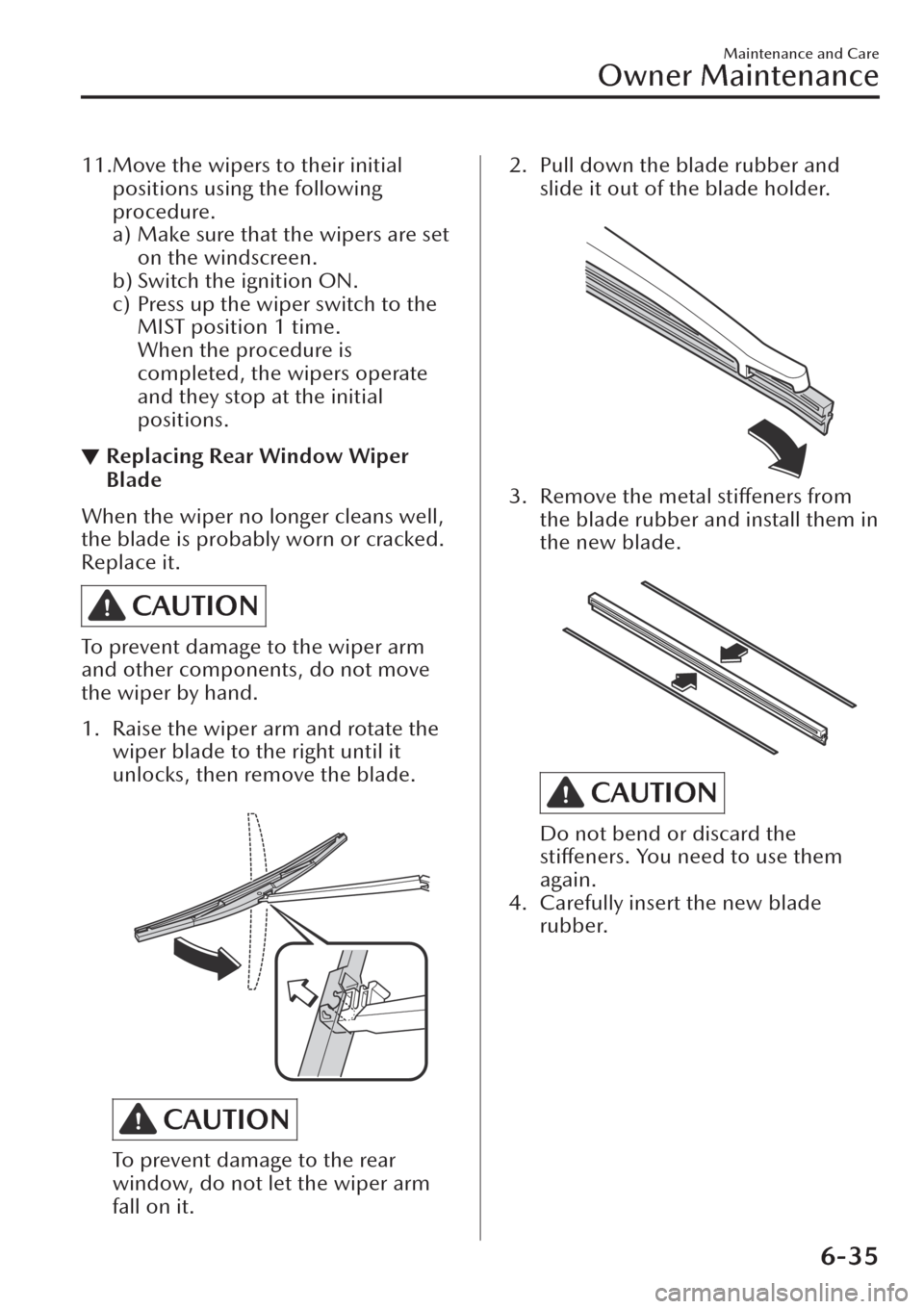
1. Raise the wiper arm and rotate the
wiper blade to the right until it
unlocks, then remove the blade.
CAUTION
To prevent damage to the rear
window, do not let the wiper arm
fall on it.
2. Pull down the blade rubber and
slide it out of the blade holder.
3. Remove the metal stiffeners from
the blade rubber and install them in
the new blade.
CAUTION
Do not bend or discard the
stiffeners. You need to use them
again.
4. Carefully insert the new blade
rubber.
Maintenance and Care
Owner Maintenance
6-35
Page 507 of 683
evaporates, the minerals will
concentrate and harden to form white
rings. The rings can damage your
vehicle's finish.
Prevention
It is necessary to wash and wax your
vehicle to preserve its
finish according
to the instructions in this section.
These steps should be taken
immediately after you find water marks
on your vehicle's finish.
Paint Chipping
Occurrence
Paint chipping occurs when gravel
thrown in the air by another vehicle's
tyres hits your vehicle.
How to avoid paint chipping
Keeping a safe distance between you
and the vehicle ahead reduces the
chances of having your paint chipped
by
flying gravel.
NOTE
xThe paint chipping zone varies with
the speed of the vehicle. For
example, when travelling at 90 km/h
(56 mph), the paint chipping zone is
50 m (164 ft).
xIn low temperatures a vehicle's
finish
hardens. This increases the chance of
paint chipping.
xChipped paint can lead to rust
forming on your Mazda. Before this
happens, repair the damage by using
Mazda touch-up paint according to
the instructions in this section.
Failure to repair the affected area
could lead to serious rusting and
expensive repairs.
Follow all label and container
directions when using a chemical
cleaner or polish. Read all warnings
and cautions.
▼Maintaining the Finish
Washing
CAUTION
¾Before lifting the windscreen wiper
blades off the windscreen, always
follow the procedure for moving the
windscreen wiper blades. Otherwise,
a wiper blade, wiper arm, or the
bonnet could be damaged.
Refer to the Replacing Windscreen
Wiper Blades (page 6-32) section for
the procedure on how to move the
windscreen wiper blades to the
service position.
¾When the wiper lever is in the AUTO
position and the ignition is switched
ON, the wipers may move
automatically in the following cases:
¾If the windscreen above the rain
sensor is touched or wiped with a
cloth.
¾If the windscreen is struck with a
hand or other object from either
outside or inside the vehicle.
Keep hands and scrapers clear of the
windscreen when the wiper lever is
in the AUTO position and the
ignition is switched ON as
fingers
could be pinched or the wipers and
wiper blades damaged when the
wipers activate automatically.
If you are going to clean the
windscreen, be sure the wipers are
turned off completely (when it is
most likely that the engine is left
running) this is particularly important
when clearing ice and snow.
Maintenance and Care
Appearance Care
6-55
Page 515 of 683
7If Trouble Arises
Helpful information on what to do if a problem arises with the
vehicle.
Emergency Call System.............. 7-2
Emergency Call System
*.......... 7-2
Mazda ERA-GLONASS............. 7-12
Mazda ERA-GLONASS
*........ 7-12
Parking in an Emergency.......... 7-23
Parking in an Emergency....... 7-23
Roadside Emergency Triangle
Retaining Strap
*................... 7-23
Flat Tyre................................. 7-24
Spare Tyre and Tool
Storage............................... 7-24
Emergency Flat Tyre Repair Kit
*.....
.......................................... 7-27
Changing a Flat Tyre (With Spare
Tyre)................................... 7-33
Battery Runs Out..................... 7-39
Jump-Starting...................... 7-39
Emergency Starting................. 7-42
Starting a Flooded Engine
(SKYACTIV-G 2.0, SKYACTIV-G
2.5 and
SKYACTIV-X 2.0)..... 7-42
Push-Starting....................... 7-42
Running Out of Fuel (SKYACTIV-D
1.8).................................... 7-43
Overheating........................... 7-44
Overheating........................ 7-44
Emergency Towing.................. 7-46
Towing Description.............. 7-46
Towing Hooks......................7-47
Warning/Indicator Lights and
Warning Sounds..................... 7-49
If a Warning Light Turns On or
Flashes................................ 7-49
Message Indicated on Multi-
information Display............. 7-63
Warning Sound is
Activated.............................7-67
When Liftgate Cannot be
Opened................................. 7-73
When Liftgate Cannot be
Opened.............................. 7-73
Active Driving Display Does Not
Operate................................. 7-74
If the Active Driving Display Does
Not Operate........................ 7-74
Windscreen Wipers Operate at High
Speed.................................... 7-75
Windscreen Wipers Operate at
High Speed......................... 7-75
*Some models.7-1
Page 589 of 683

Windscreen Wipers
Operate at High Speed
▼Windscreen Wipers Operate at
High Speed
The windscreen wipers may operate at
high speed if there is a problem with
the wiper control. If the windscreen
wipers operate at high speed
regardless of the wiper switch
operation, have your vehicle inspected
by an expert repairer (we recommend
an Authorised Mazda Repairer).
If Trouble Arises
Windscreen Wipers Operate at High Speed
7-75
Page 681 of 683
Index
i-stop warning beep............. 7-69
Key left-in-luggage compartment
warning beep (With the advanced
keyless function)................... 7-68
Key left-in-vehicle warning beep
(With the advanced keyless
function).............................. 7-68
Key removed from vehicle warning
beep.................................... 7-68
Lane departure warning
sound.................................. 7-71
Liftgate Door-lock Switch
Inoperable Warning Beep...... 7-68
Lights-on reminder............... 7-67
Low fuel warning beep..........7-69
Mazda Radar Cruise Control with
Stop & Go function (MRCC with
Stop & Go function) system
warnings.............................. 7-71
Mazda Radar Cruise Control
(MRCC) system warnings...... 7-71
Outside temperature warning
beep.................................... 7-70
Power Liftgate Warning
Beep.................................... 7-69
Rear Cross
Tra ffi c Alert (RCTA)
Warning Beep...................... 7-71
Seat belt warning beep......... 7-67
Shift position warning beep... 7-69
Speed limiter warning beep... 7-72
Touch sensor inoperable warning
beep (With the advanced keyless
function).............................. 7-68
Vehicle problem warning
beep.................................... 7-69Vehicle speed alarm............. 7-70
120 km/h warning beep....... 7-71
Warranty
Registering Your Vehicle in A
Foreign Country......................8-2
Windows
Power windows.................... 3-41
Windscreen Washer................... 4-64
Windscreen Wipers................... 4-61
Windscreen Wipers Operate at High
Speed....................................... 7-75
Windscreen Wiper De-icer......... 4-66
Winter Driving...........................3-56
Wiper
Replacing Rear Window Wiper
Blade................................... 6-35
Replacing windscreen wiper
blades..................................6-32
0-9
120 km/h warning beep........... 7-71
360°View Monitor.................. 4-185
How to use the system........ 4-192
Margin of error between road
surface on screen and actual road
surface............................... 4-209
Side view........................... 4-200
Top view/front view............4-195
Top view/front wide view.... 4-198
Top view/rear view............. 4-203
Top view/rear wide view..... 4-207
Types of images displayed on the
screen................................ 4-189
10-11