phone MAZDA MODEL CX-30 2019 Owners Manual (in English)
[x] Cancel search | Manufacturer: MAZDA, Model Year: 2019, Model line: MODEL CX-30, Model: MAZDA MODEL CX-30 2019Pages: 683, PDF Size: 15.21 MB
Page 84 of 683
Keys
▼Keys
WARNING
Do not leave the key in your vehicle
with children and keep them in a
place where your children will not
find or play with them:
Leaving children in a vehicle with the
key is dangerous. This could result in
someone being badly injured or even
killed. Children may find these keys to
be an interesting toy to play with and
could cause the power windows or
other controls to operate, or even
make the vehicle move.
CAUTION
¾Because the key (transmitter) uses
low-intensity radio waves, it may not
function correctly under the
following conditions:
¾The key (transmitter) is carried with
communication devices such as
cellular phones.
¾The key (transmitter) contacts or is
covered by a metal object.
¾The key (transmitter) is near
electronic devices such as personal
computers.
¾Non-Mazda genuine electronic
equipment is installed in the
vehicle.
¾There is equipment which
discharges radio waves near the
vehicle.
¾The key (transmitter) may consume
battery power excessively if it
receives high-intensity radio waves.
Do not place the key (transmitter)
near electronic devices such as
televisions or personal computers.
¾To avoid damage to the key
(transmitter), DO NOT:
¾Drop the key (transmitter).
¾Get the key (transmitter) wet.
¾Disassemble the key (transmitter).
¾Expose the key (transmitter) to
high temperatures on places such
as the instrument panel or bonnet,
under direct sunlight.
¾Expose the key (transmitter) to any
kind of magnetic field.
¾Place heavy objects on the key
(transmitter).
¾Put the key (transmitter) in an
ultrasonic cleaner.
¾Put any magnetized objects close
to the key (transmitter).
NOTE
The driver must carry the key
(transmitter) to ensure the system
functions properly.
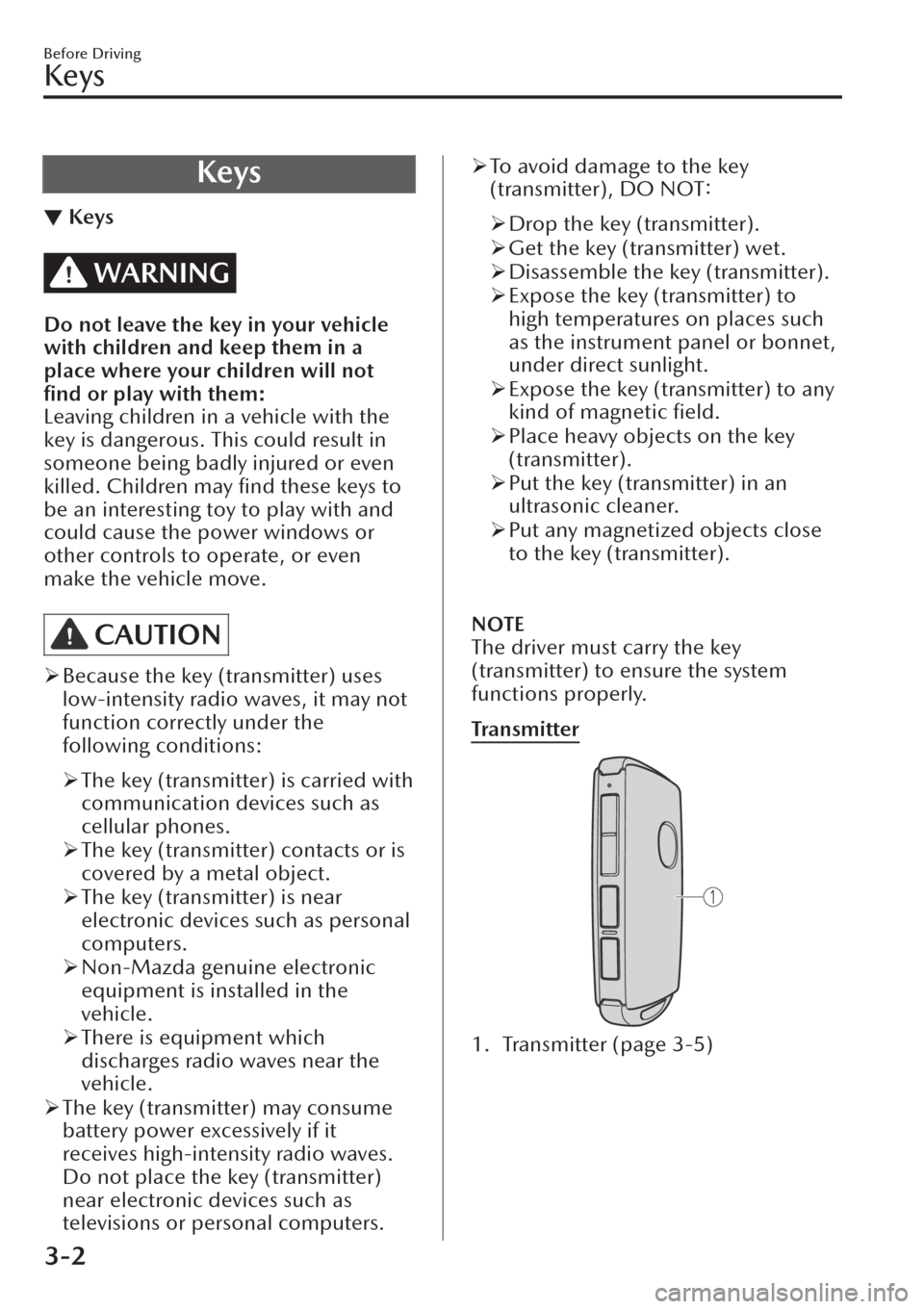
Tra n s m i t te r
1. Transmitter (page 3-5)
Before Driving
Keys
3-2
Page 92 of 683
Operational Range
▼Operational Range
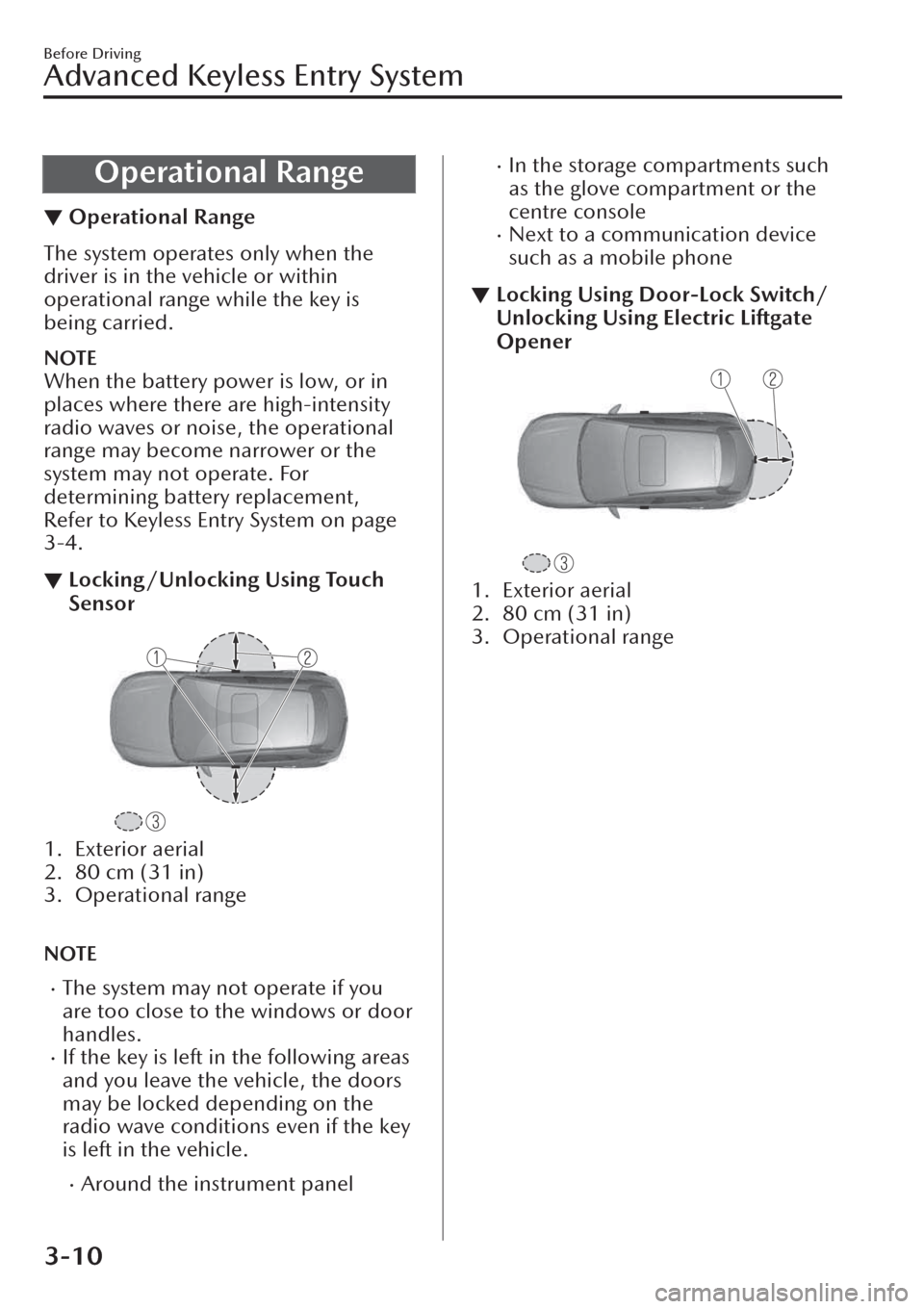
The system operates only when the
driver is in the vehicle or within
operational range while the key is
being carried.
NOTE
When the battery power is low, or in
places where there are high-intensity
radio waves or noise, the operational
range may become narrower or the
system may not operate. For
determining battery replacement,
Refer to Keyless Entry System on page
3-4.
▼Locking/Unlocking Using Touch
Sensor
1. Exterior aerial
2. 80 cm (31 in)
3. Operational range
NOTE
xThe system may not operate if you
are too close to the windows or door
handles.
xIf the key is left in the following areas
and you leave the vehicle, the doors
may be locked depending on the
radio wave conditions even if the key
is left in the vehicle.
xAround the instrument panel
xIn the storage compartments such
as the glove compartment or the
centre console
xNext to a communication device
such as a mobile phone
▼Locking Using Door-Lock Switch/
Unlocking Using Electric Liftgate
Opener
1. Exterior aerial
2. 80 cm (31 in)
3. Operational range
Before Driving
Advanced Keyless Entry System
3-10
Page 93 of 683
Door Locks
▼Door Locks
WARNING
Always take all children and pets with
you or leave a responsible person
with them:
Leaving a child or a pet unattended in
a parked vehicle is dangerous. In hot
weather, temperatures inside a vehicle
can become high enough to cause
brain damage or even death.
Do not leave the key in your vehicle
with children and keep them in a
place where your children will not
find or play with them:
Leaving children in a vehicle with the
key is dangerous. This could result in
someone being badly injured or even
killed.
Always close all the windows and
sunroof, lock the doors, fuel-filler
flap, and liftgate and take the key with
you when leaving your vehicle
unattended:
Leaving your vehicle unlocked is
dangerous as children could lock
themselves in a hot vehicle, which
could result in death. Also, a vehicle
left unlocked becomes an easy target
for thieves and intruders.
After closing the doors and the
liftgate, always verify that they are
securely closed:
Doors and the liftgate not securely
closed are dangerous, if the vehicle is
driven with a door and the liftgate not
securely closed, the door and the
liftgate could open unexpectedly
resulting in an accident.
Always confirm the safety around the
vehicle before opening a door and the
liftgate:
Suddenly opening a door and the
liftgate is dangerous. A passing vehicle
or a pedestrian could be hit and cause
an accident.
CAUTION
¾Always confirm the conditions
around the vehicle before opening/
closing the doors and the liftgate and
use caution during strong winds or
when parked on an incline. Not
being aware of the conditions
around the vehicle is dangerous
because fingers could get caught in
the door and the liftgate or a passing
pedestrian could be hit, resulting in
an unexpected accident or injury.
NOTE
xAlways stop the engine and lock the
doors. In addition, to prevent theft of
valuables, do not leave them inside
the cabin.
xIf the key is left in the following areas
and you leave the vehicle, the doors
may be locked depending on the
radio wave conditions even if the key
is left in the vehicle.
xAround the instrument panelxIn the storage compartments such
as the glove compartment or the
centre console
xNext to a communication device
such as a mobile phone
xWhen the ignition is switched to
ACC or ON, the vehicle lock-out
prevention feature prevents you from
locking yourself out of the vehicle.
Before Driving
Doors and Locks
3-11
Page 130 of 683
NOTE
xThe keys carry a unique electronic
code. For this reason, and to assure
your safety, obtaining a replacement
key requires some waiting time. They
are only available through an
Authorised Mazda Repairer.
xAlways keep a spare key in case one
is lost. If a key is lost, consult an
Authorised Mazda Repairer as soon
as possible.
xIf you lose a key, an Authorised
Mazda Repairer will reset the
electronic codes of your remaining
keys and immobilizer system. Bring
all the remaining keys to an
Authorised Mazda Repairer to reset.
Starting the vehicle with a key that
has not been reset is not possible.
▼Operation
NOTE
xThe engine may not start and security
indicator light may illuminate or flash
if the key is placed in an area where
it is difficult for the system to detect
the signal, such as on the instrument
panel or in the glove compartment.
Move the key to a location within
the signal range, switch the ignition
off, and then restart the engine.
xSignals from a TV or radio station, or
from a transceiver or mobile
telephone could interfere with your
immobilizer system. If you are using
the proper key and the engine fails to
start, check the security indicator
light.
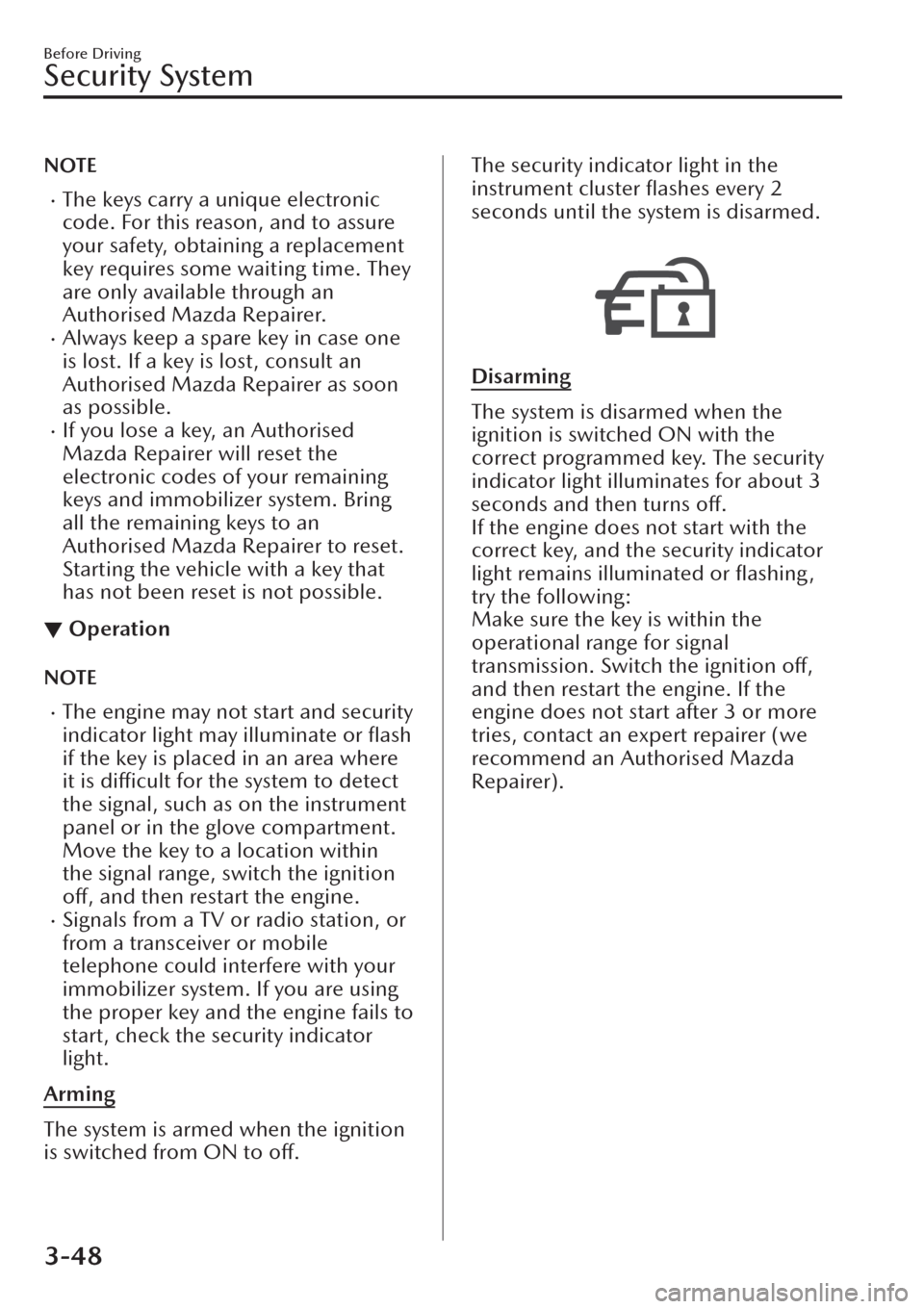
Arming
The system is armed when the ignition
is switched from ON to off.
The security indicator light in the
instrument cluster flashes every 2
seconds until the system is disarmed.
Disarming
The system is disarmed when the
ignition is switched ON with the
correct programmed key. The security
indicator light illuminates for about 3
seconds and then turns
off.
If the engine does not start with the
correct key, and the security indicator
light remains illuminated or flashing ,
try the following:
Make sure the key is within the
operational range for signal
transmission. Switch the ignition
off,
and then restart the engine. If the
engine does not start after 3 or more
tries, contact an expert repairer (we
recommend an Authorised Mazda
Repairer).
Before Driving
Security System
3-48
Page 424 of 683
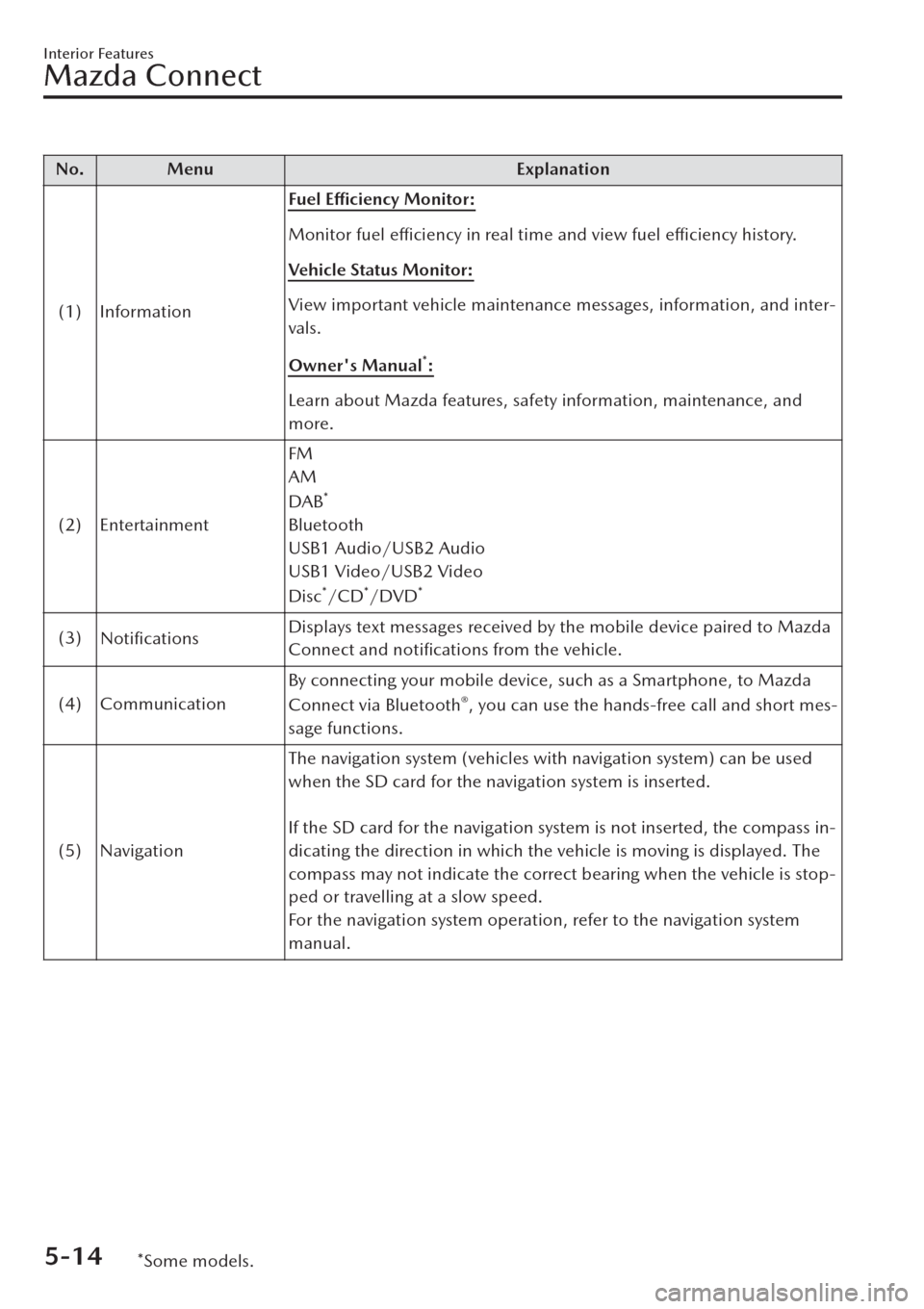
No. Menu Explanation
(1) InformationFuel Efficiency Monitor:
Monitor fuel
efficiency in real time and view fuel
efficiency history.
Vehicle Status Monitor:
View important vehicle maintenance messages, information, and inter-
vals.
Owner's Manual
*:
Learn about Mazda features, safety information, maintenance, and
more.
(2) EntertainmentFM
AM
DAB
*
Bluetooth
USB1 Audio/USB2 Audio
USB1 Video/USB2 Video
Disc
*/CD*/DVD*
(3)
NotificationsDisplays text messages received by the mobile device paired to Mazda
Connect and notifications from the vehicle.
(4) CommunicationBy connecting your mobile device, such as a Smartphone, to Mazda
Connect via Bluetooth
®, you can use the hands-free call and short mes-
sage functions.
(5) NavigationThe navigation system (vehicles with navigation system) can be used
when the SD card for the navigation system is inserted.
If the SD card for the navigation system is not inserted, the compass in-
dicating the direction in which the vehicle is moving is displayed. The
compass may not indicate the correct bearing when the vehicle is stop-
ped or travelling at a slow speed.
For the navigation system operation, refer to the navigation system
manual.
Interior Features
Mazda Connect
5-14*Some models.
Page 425 of 683
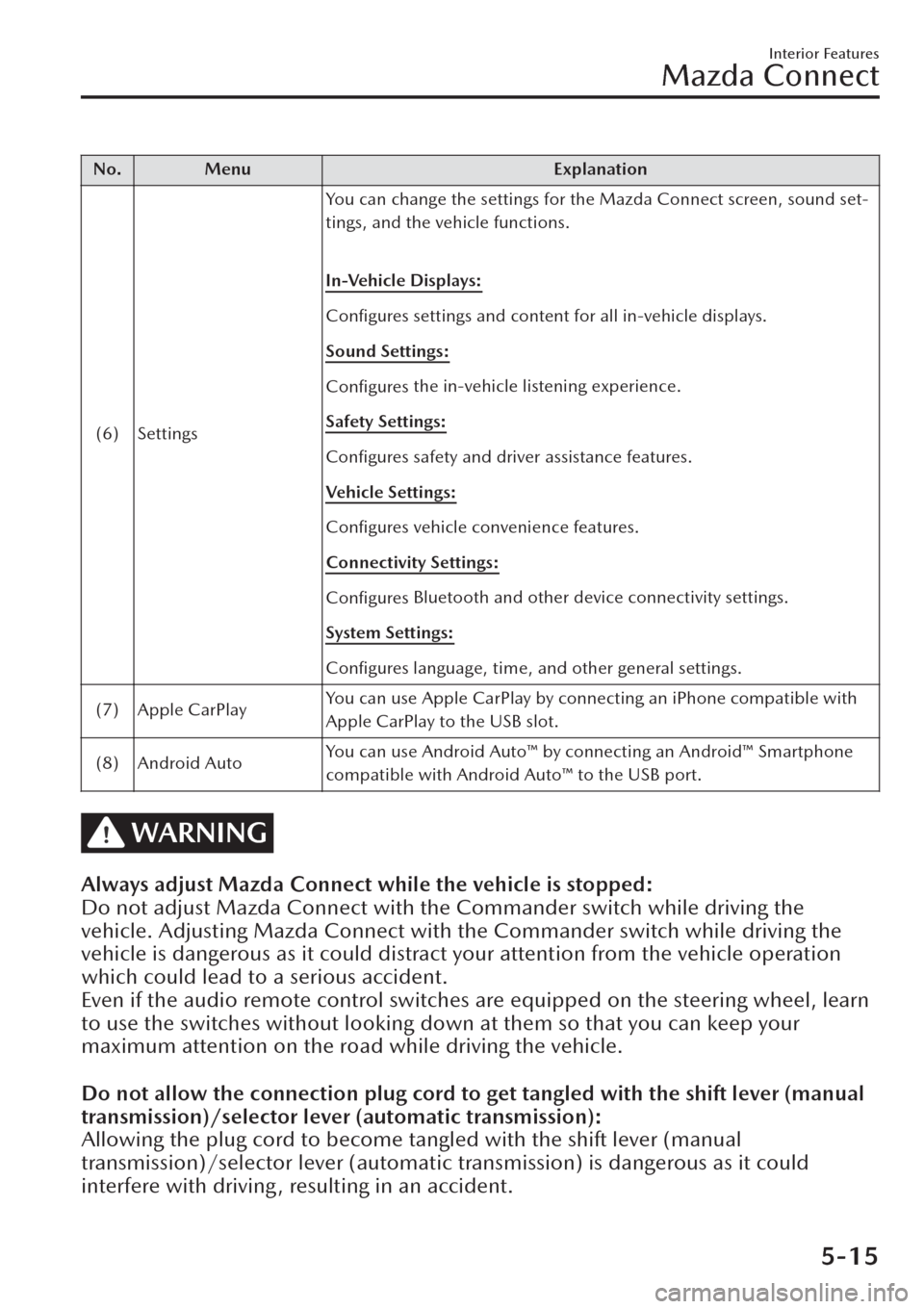
No. Menu Explanation
(6) SettingsYou can change the settings for the Mazda Connect screen, sound set-
tings, and the vehicle functions.
In-Vehicle Displays:
Configures settings and content for all in-vehicle displays.
Sound Settings:
Configures the in-vehicle listening experience.
Safety Settings:
Configures safety and driver assistance features.
Vehicle Settings:
Configures vehicle convenience features.
Connectivity Settings:
Configures Bluetooth and other device connectivity settings.
System Settings:
Configures language, time, and other general settings.
(7) Apple CarPlayYou can use Apple CarPlay by connecting an iPhone compatible with
Apple CarPlay to the USB slot.
(8) Android AutoYou can use Android Auto™ by connecting an Android™ Smartphone
compatible with Android Auto™ to the USB port.
WARNING
Always adjust Mazda Connect while the vehicle is stopped:
Do not adjust Mazda Connect with the Commander switch while driving the
vehicle. Adjusting Mazda Connect with the Commander switch while driving the
vehicle is dangerous as it could distract your attention from the vehicle operation
which could lead to a serious accident.
Even if the audio remote control switches are equipped on the steering wheel, learn
to use the switches without looking down at them so that you can keep your
maximum attention on the road while driving the vehicle.
Do not allow the connection plug cord to get tangled with the shift lever (manual
transmission)/selector lever (automatic transmission):
Allowing the plug cord to become tangled with the shift lever (manual
transmission)/selector lever (automatic transmission) is dangerous as it could
interfere with driving, resulting in an accident.
Interior Features
Mazda Connect
5-15
Page 426 of 683
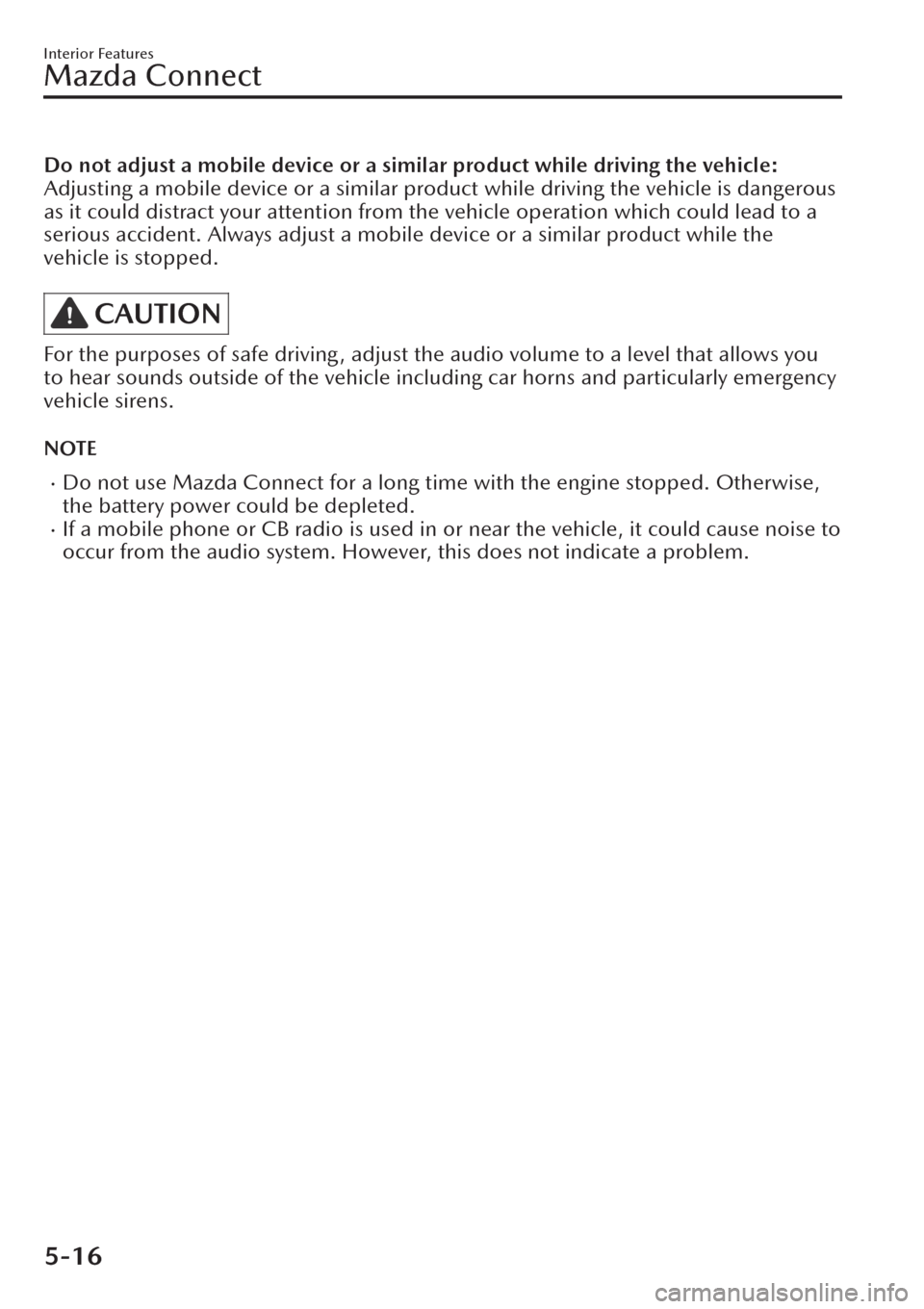
Do not adjust a mobile device or a similar product while driving the vehicle:
Adjusting a mobile device or a similar product while driving the vehicle is dangerous
as it could distract your attention from the vehicle operation which could lead to a
serious accident. Always adjust a mobile device or a similar product while the
vehicle is stopped.
CAUTION
For the purposes of safe driving, adjust the audio volume to a level that allows you
to hear sounds outside of the vehicle including car horns and particularly emergency
vehicle sirens.
NOTE
xDo not use Mazda Connect for a long time with the engine stopped. Otherwise,
the battery power could be depleted.
xIf a mobile phone or CB radio is used in or near the vehicle, it could cause noise to
occur from the audio system. However, this does not indicate a problem.
Interior Features
Mazda Connect
5-16
Page 431 of 683
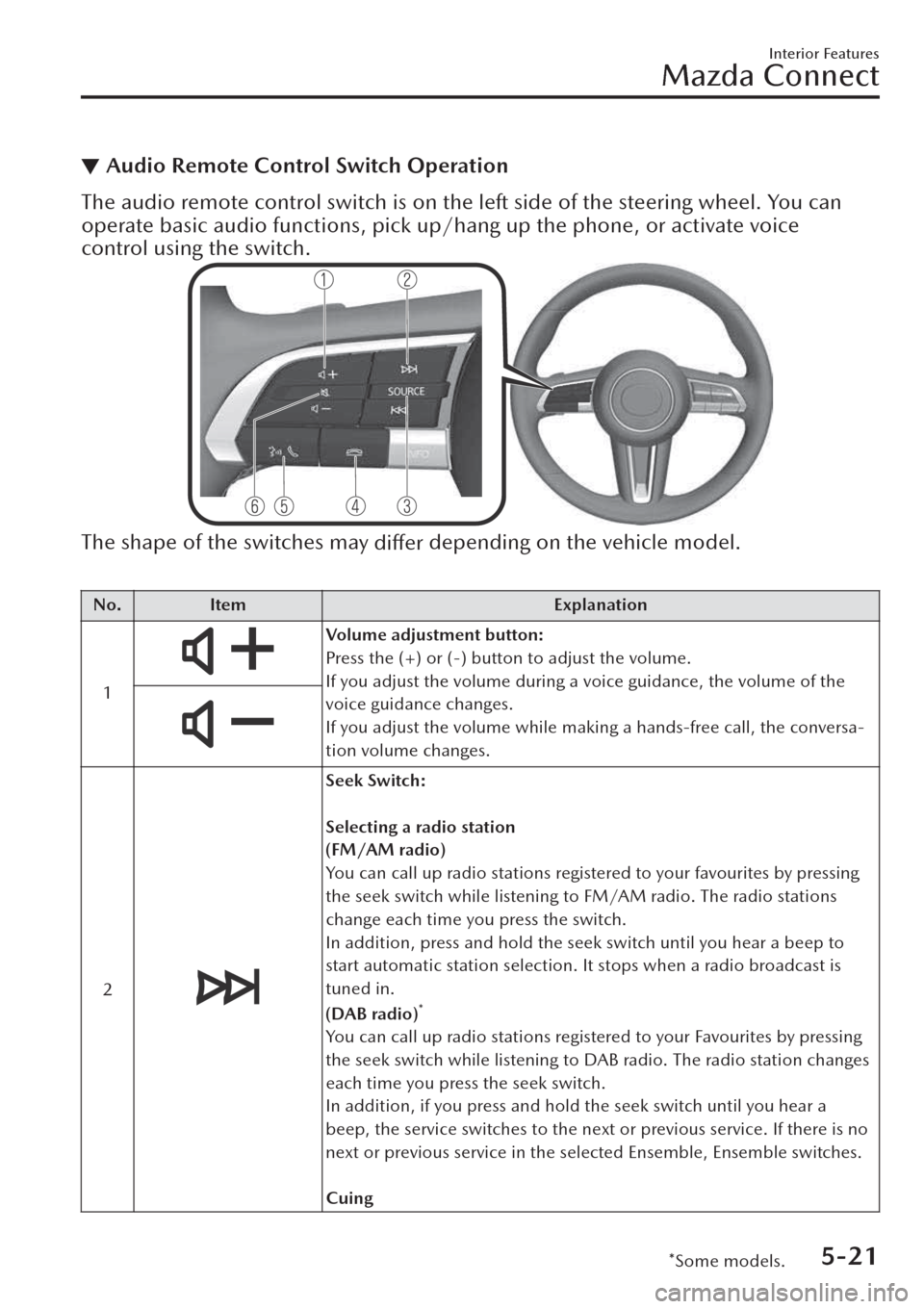
▼Audio Remote Control Switch Operation
The audio remote control switch is on the left side of the steering wheel. You can
operate basic audio functions, pick up/hang up the phone, or activate voice
control using the switch.
The shape of the switches may
differ depending on the vehicle model.
No. Item Explanation
1
Volume adjustment button:
Press the (+) or (-) button to adjust the volume.
If you adjust the volume during a voice guidance, the volume of the
voice guidance changes.
If you adjust the volume while making a hands-free call, the conversa-
tion volume changes.
2
Seek Switch:
Selecting a radio station
(FM/AM radio)
You can call up radio stations registered to your favourites by pressing
the seek switch while listening to FM/AM radio. The radio stations
change each time you press the switch.
In addition, press and hold the seek switch until you hear a beep to
start automatic station selection. It stops when a radio broadcast is
tuned in.
(DAB radio)
*
You can call up radio stations registered to your Favourites by pressing
the seek switch while listening to DAB radio. The radio station changes
each time you press the seek switch.
In addition, if you press and hold the seek switch until you hear a
beep, the service switches to the next or previous service. If there is no
next or previous service in the selected Ensemble, Ensemble switches.
Cuing
Interior Features
Mazda Connect
*Some models.5-21
Page 433 of 683
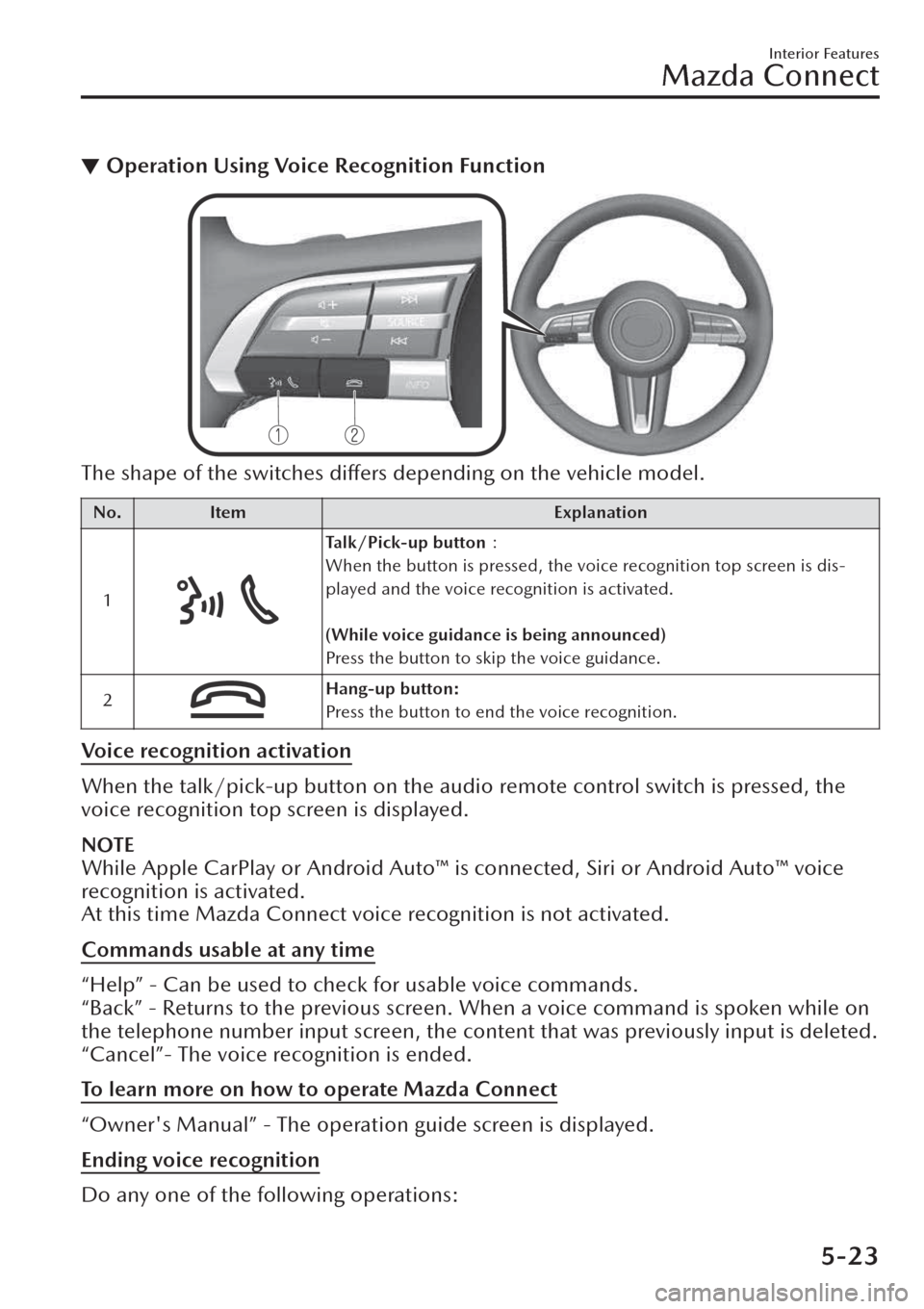
▼Operation Using Voice Recognition Function
The shape of the switches differs depending on the vehicle model.
No. Item Explanation
1
Talk/Pick-up button>8
When the button is pressed, the voice recognition top screen is dis-
played and the voice recognition is activated.
(While voice guidance is being announced)
Press the button to skip the voice guidance.
2
Hang-up button:
Press the button to end the voice recognition.
Voice recognition activation
When the talk/pick-up button on the audio remote control switch is pressed, the
voice recognition top screen is displayed.
NOTE
While Apple CarPlay or Android Auto™ is connected, Siri or Android Auto™ voice
recognition is activated.
At this time Mazda Connect voice recognition is not activated.
Commands usable at any time
“Help” - Can be used to check for usable voice commands.
“Back” - Returns to the previous screen. When a voice command is spoken while on
the telephone number input screen, the content that was previously input is deleted.
“Cancel”- The voice recognition is ended.
To learn more on how to operate Mazda Connect
“Owner's Manual” - The operation guide screen is displayed.
Ending voice recognition
Do any one of the following operations:
Interior Features
Mazda Connect
5-23
Page 434 of 683

xPress the hang-up button.xPress and hold the talk/Pick-up button.xSay the word, “Cancel”.
Convenient operating tips for using the voice recognition function
Examples of effective voice commands in various categories are displayed on top
screen of the voice recognition.
It would be convenient to know these usable voice commands in advance.
NOTE
xThe voice commands indicated in this manual are some examples of usable voice
commands. Some voice commands may be unusable depending on the vehicle
model.
xWhen the Barge-In setting is on, voice commands can be made even while the
voice guidance is being announced. For details on Barge-In, refer to the Settings
section in the Mazda Connect Owner's Manual.
xFor details on voice commands which can be used on the navigation screen, refer
to the navigation system manual.
To prevent mistaken voice recognition, be aware of the following points:
xWhen you are using a mobile phone connected via Bluetooth®, the commands
relevant to the mobile phone can be used. Connect your mobile phone to
Bluetooth
® before operating the mobile phone using voice recognition.xSpeaking in a slightly louder voice will improve voice recognition, but an
excessively loud voice is unnecessary. Try to speak in a slightly louder voice than
when talking to other passengers in the vehicle.
xYou do not need to speak slowly. Speak at a normal speed.xWhen calling a person in the device's phone book, the recognition rate increases
the longer the name is. Errors may occur with names that are short such as
“Mama”, “Home”, or “wife”.
xSpeak clearly, without pausing between words or numbers.xVoice commands other than those
specified, cannot be recognised. Speak in the
wording specified by the voice commands.
xIt is not necessary to face the microphone or approach it. Speak the voice
commands while maintaining a safe driving position.
Interior Features
Mazda Connect
5-24