belt MAZDA MODEL CX-30 2020 Workshop Manual
[x] Cancel search | Manufacturer: MAZDA, Model Year: 2020, Model line: MODEL CX-30, Model: MAZDA MODEL CX-30 2020Pages: 562, PDF Size: 83 MB
Page 142 of 562
This is for improved exhaust gaspurification and does not indicate
any parts defect.
Engine-starting is controlled by the
spark ignition system.
This system meets all Canadian
Interference-Causing Equipment
Standard requirements regulating the
impulse electrical field strength of
radio noise.
1. Make sure you are carrying the key.
2. Occupants should fasten their seat belts.
3. Make sure the parking brake is on.
4. Continue to depress the brake pedal firmly until the engine has
completely started.
5. (Manual transmission)
Continue to depress the clutch
pedal firmly until the engine has
completely started.
(Automatic transmission)
Put the vehicle in park (P). If you
must restart the engine while the
vehicle is moving, shift into neutral
(N).
NOTE
(Manual transmission)
The starter will not operate if the
clutch pedal is not depressed
sufficiently.
(Automatic transmission)
The starter will not operate if the
selector lever is not in P or N
position and the brake pedal is
not depressed sufficiently.
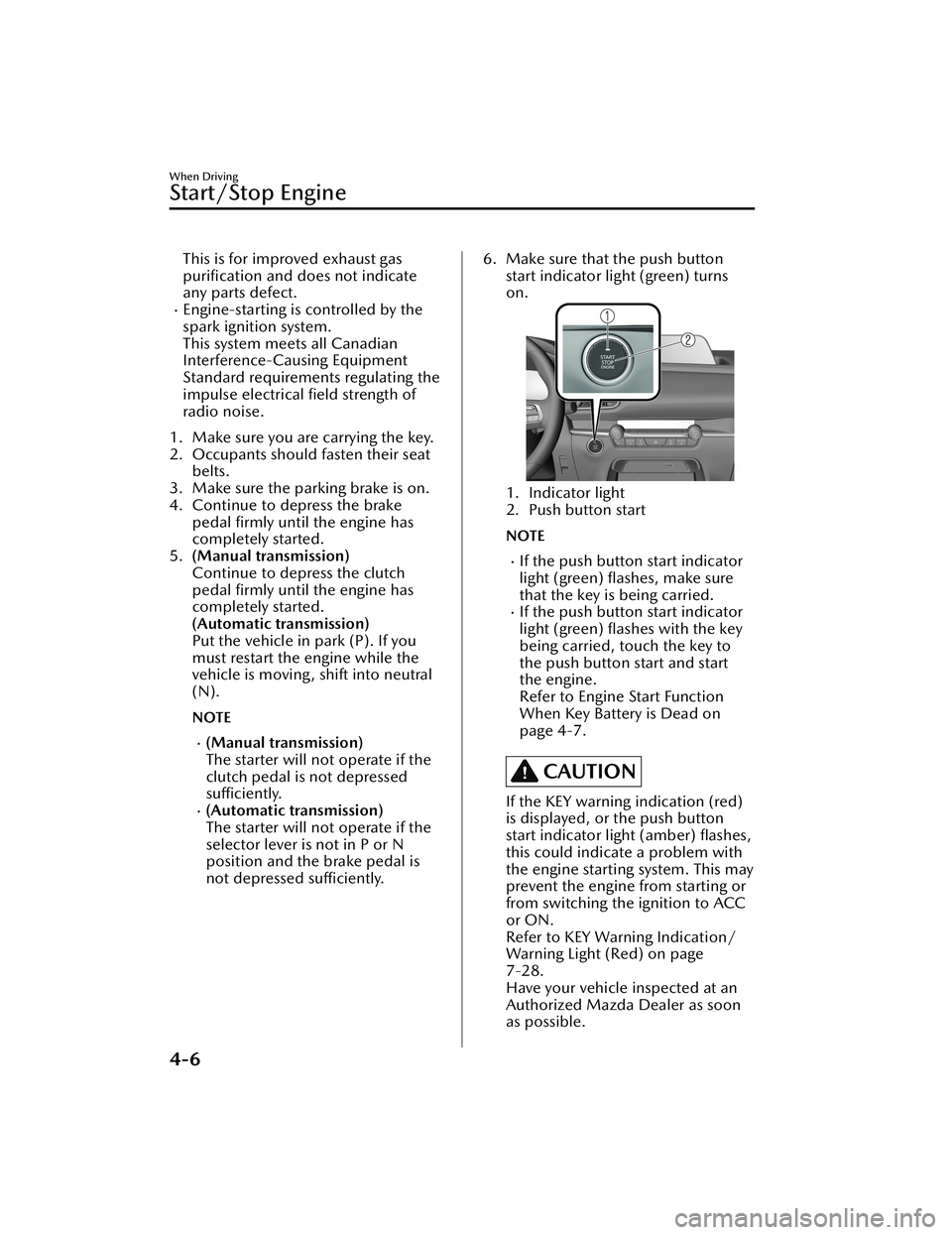
6. Make sure that the push button
start indicator light (green) turns
on.
1. Indicator light
2. Push button start
NOTE
If the push button start indicator
light (green) flashes, make sure
that the key is being carried.
If the push button start indicator
light (green) flashes with the key
being carried, touch the key to
the push button start and start
the engine.
Refer to Engine Start Function
When Key Battery is Dead on
page 4-7.
CAUTION
If the KEY warning indication (red)
is displayed, or the push button
start indicator light (amber) flashes,
this could indicate a problem with
the engine starting system. This may
prevent the engine from starting or
from switching the ignition to ACC
or ON.
Refer to KEY Warning Indication/
Warning Light (Red) on page
7-28.
Have your vehicle inspected at an
Authorized Mazda Dealer as soon
as possible.
When Driving
Start/Stop Engine
4-6
CX-30_8HG6-EA-19I_Edition1_new 2019-6-13 18:45:11
Page 158 of 562
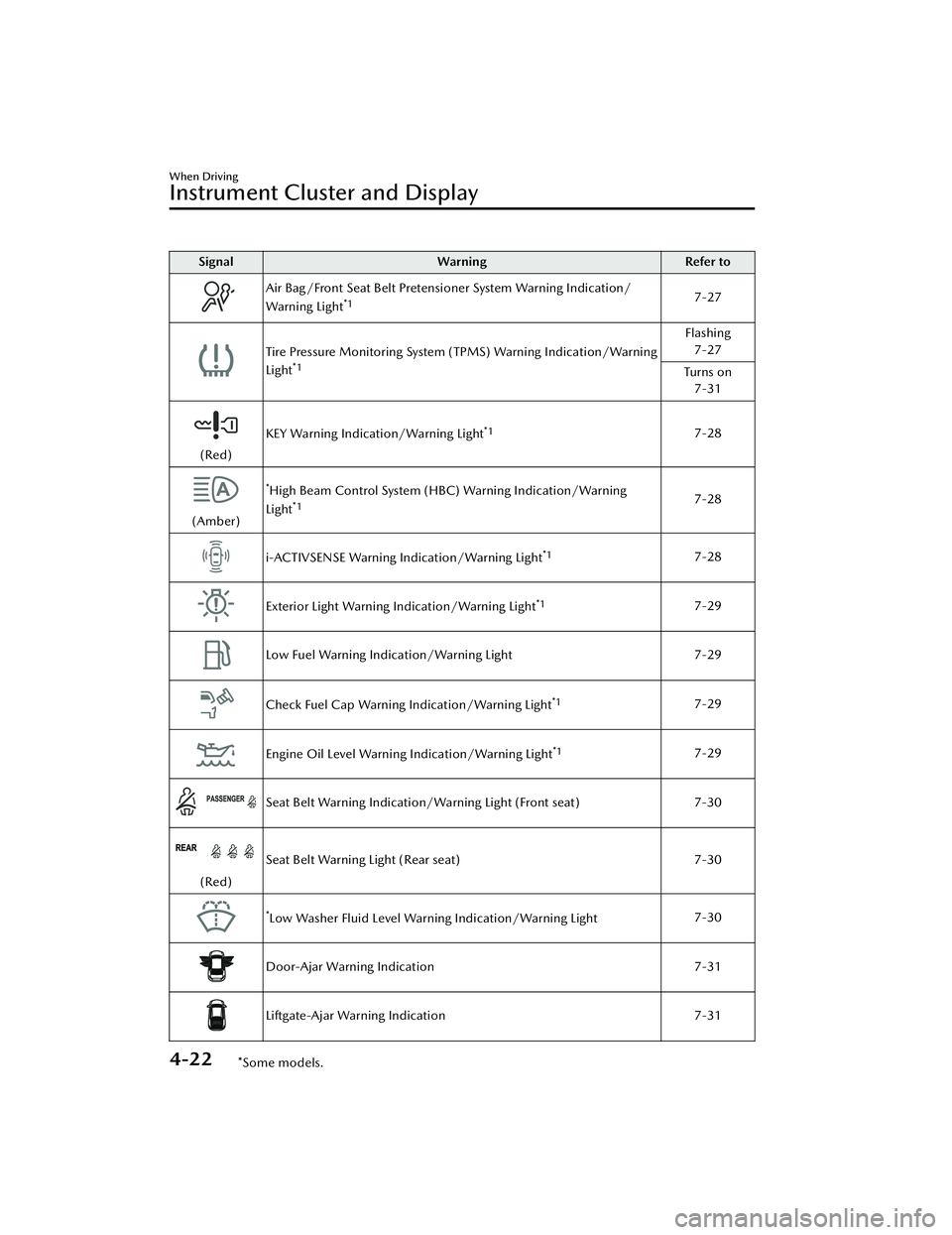
SignalWarning Refer to
Air Bag/Front Seat Belt Pretensioner System Warning Indication/
Warning Light*17-27
Tire Pressure Monitoring System (TPMS) Warning Indication/Warning
Light*1
Flashing
7-27
Tu r n s o n 7-31
(Red) KEY Warning Indication/Warning Light
*17-28
(Amber)
*High Beam Control System (HBC) Warning Indication/Warning
Light*17-28
i-ACTIVSENSE Warning Indication/Warning Light*17-28
Exterior Light Warning Indication/Warning Light*17-29
Low Fuel Warning Indication/Warning Light 7-29
Check Fuel Cap Warning Indication/Warning Light*17-29
Engine Oil Level Warning Indication/Warning Light*17-29
Seat Belt Warning Indication/Warning Light (Front seat) 7-30
(Red)Seat Belt Warning Light (Rear seat)
7-30
*Low Washer Fluid Level Warning Indication/Warning Light7-30
Door-Ajar Warning Indication
7-31
Liftgate-Ajar Warning Indication7-31
When Driving
Instrument Cluster and Display
4-22*Some models.
CX-30_8HG6-EA-19I_Edition1_new 2019-6-13 18:45:11
Page 159 of 562

SignalWarning Refer to
Door-Ajar Warning Light 7-31
*1 The light turns on when the ignition is switched on for an operation check, and turns off a few
seconds later or when the engine is started. If the light does not turn on or remains turned on, have
the vehicle inspected at an Authorized Mazda Dealer.
▼Indication/Indicator Lights
These lights turn on or flash to notify th
e user of the system operation status or a
system malfunction.
Signal Indicator Refer to
(Green)Seat Belt Indicator Light (Rear seat)
2-24
*Front Passenger Air Bag Deactivation Indicator Light2-64
Security Indicator Light
3-44
(Green)KEY Indicator Light
4-5
Wrench Indication/Indicator Light*14-26
*Shift Position Indication4-34
Lights-On Indicator Light
4-42
Headlight High-Beam Indicator LightHeadlight
High-Low
Beam4-45
Flashing the Headlights
4-45
When Driving
Instrument Cluster and Display
*Some models.4-23
CX-30_8HG6-EA-19I_Edition1_new 2019-6-13 18:45:11
Page 199 of 562
parking brake is released automatically.
When the parking brake is released,
the EPB indicator light in the
instrument cluster and the EPB switch
indicator light turn off.
The engine is running.The driver's door is closed.The driver's seat belt is fastened.(Manual transmission vehicle)
The shift lever is in a position other
than neutral.
The clutch pedal is depressed
halfway.
(Automatic transmission vehicle)
The selector lever is in the D, M, or R
position.
NOTE
If something such as the driver's foot
contacts the accelerator pedal with the
engine running and the parking brake
applied, the parking brake might be
released automatically. If you do not
intend to start driving the vehicle
immediately, shift the shift lever to the
neutral position for a manual
transmission, or shift the selector lever
to the P or N position for an automatic
transmission.
Canceling the parking brake
automatic operation
The parking brake automatic operation
can be canceled by doing any of the
following after switching the ignition
from ON to OFF.
Auto operation cancel method 1
1. Switch the ignition ON.
2. Turn off the AUTOHOLD.
3. Press the EPB switch continuouslyfor 2 seconds or longer (until a
sound is activated).
4. Release the EPB switch and switchthe ignition OFF within 5 seconds
after the sound was activated.
After the auto operation is
canceled, a sound is activated one
time, and the EPB switch indicator
light switches from illumination to
flashing, and then turns off after 3
seconds.
Auto operation cancel method 2
1. Switch the ignition ON.
2. Turn off the AUTOHOLD.
3. Switch the ignition OFF with the EPB switch pressed.
When the auto operation is
canceled, a sound is activated one
time, and the EPB switch indicator
light from normal flashing to faster
flashing, and then turns
off after 3
seconds.
NOTE
When canceling the parking brake
auto operation and parking the
vehicle, shift the shift lever to the 1st
gear or the R position for a manual
transmission, or shift the selector
lever to the P position for an
automatic transmission, and then
use wheel blocks.
The auto operation may not cancel if
the vehicle is parked on a steep
slope.
When the ignition is switched ON, the
parking brake auto operation is
restored.
▼ Warning Light
The warning light turns on when the
system has a malfunction.
Refer to Brake System Warning
Indication/Warning Light on page
7-22.
When Driving
Brake
4-63
CX-30_8HG6-EA-19I_Edition1_new
2019-6-13 18:45:11
Page 203 of 562

▼AUTOHOLD System is Turned On
Press the AUTOHOLD switch and
when the AUTOHOLD standby
indicator light turns on, the
AUTOHOLD function turns on.
1. AUTOHOLD standby indicator light
NOTE
When all of the following conditions
are met, the AUTOHOLD standby
indicator light turns on when the
AUTOHOLD switch is pressed and the
AUTOHOLD function turns on.
The ignition is switched ON (engine
is running).
The driver's seat belt is fastened.The driver's door is closed.There is no problem with the
AUTOHOLD function.
To operate AUTOHOLD and hold the
brakes
1. Depress the brake pedal and bring the vehicle to a complete stop.
2. The AUTOHOLD active indicator light in the instrument cluster turns
on and the brakes are held.
3. The vehicle is held in its stoppedposition even with the brake pedal
released.
NOTE
When all of the following conditions
are met, the AUTOHOLD operates and
the brakes are held.
The ignition is switched ON (engine
is running).
The vehicle is stopped.The brake pedal is being depressed.The AUTOHOLD active indicator
light turns on.
The accelerator pedal is not
depressed.
The driver's seat belt is fastened.The driver's door is closed.There is no problem with the
AUTOHOLD function.
The parking brake is released.There is no problem with the Electric
Parking Brake (EPB) function.
(Automatic transmission vehicle)
The selector lever is in a position
other than R position or the vehicle
tilts forward with the selector lever in
the R position.
To release AUTOHOLD and start
driving the vehicle
If you do any of the following actions
to resume driving the vehicle, the
brakes will be released automatically
and the AUTOHOLD active indicator
light turns off.
(Manual transmission vehicle)
You start to release the clutch pedal
with the shift lever shifted to a
position other than the neutral
position
(Automatic transmission vehicle)
The accelerator pedal is depressed.The vehicle tilts rearward or the
selector lever is shifted to the R
position on level ground.
When Driving
Brake
4-67
CX-30_8HG6-EA-19I_Edition1_new 2019-6-13 18:45:11
Page 204 of 562

NOTE
If the Electric Parking Brake (EPB)
switch is pulled while the
AUTOHOLD is operating, the
parking brake is applied and the
AUTOHOLD is released. In addition,
if the parking brake is released under
this condition, the AUTOHOLD
operates to hold the brakes.
Under the following conditions, the
parking brake is automatically
applied and the AUTOHOLD is
released. The AUTOHOLD is
re-enabled when the conditions
before the AUTOHOLD is released
are restored.
The driver’s seat belt is unfastened.The driver’s door is opened.When about 10 minutes or longer
have passed since the AUTOHOLD
operation started, the parking brake
is automatically applied. Because the
AUTOHOLD is restored when
releasing the parking brake, the hold
on the brakes by AUTOHOLD
function resumes.
(Manual transmission vehicle)
When starting to drive the vehicle
forward or in reverse on a down
slope, depress the clutch pedal and
shift the shift lever to the appropriate
position for driving in the desired
direction, and then depress the
accelerator pedal to release the
AUTOHOLD.
The AUTOHOLD can be canceled
forcibly by fully depressing the
accelerator pedal for 1 second or
longer while the AUTOHOLD is
operating. Forcibly cancel the
AUTOHOLD only when the
AUTOHOLD cannot be canceled due
to a system malfunction or it is
necessary to cancel the AUTOHOLD
in an emergency.
▼AUTOHOLD System is Turned Off
Depress the brake pedal and press the
AUTOHOLD switch. The AUTOHOLD
is turned off and the AUTOHOLD
standby indicator light turns off.
1. AUTOHOLD standby indicator light
NOTE
When the brakes are not held such
as while driving the vehicle, the
AUTOHOLD can be turned off only
by pressing the AUTOHOLD switch.
If the AUTOHOLD switch is pressed
without depressing the brake pedal
while AUTOHOLD is operating
(AUTOHOLD active indicator light in
instrument cluster is turned on), the
message “Depress Brake Pedal and
Operate Switch to Release” is
indicated on the multi-information
display to notify the driver to depress
the brake pedal.
If any of the following conditions
occurs while the AUTOHOLD
function is operating (AUTOHOLD
active indicator light is turned on),
the parking brake is applied
automatically and the AUTOHOLD
function turns off. For the Electric
Parking Brake (EPB) operation, refer
to the Electric Parking Brake (EPB) on
page 4-60.
The ignition is switched OFF.
When Driving
Brake
4-68
CX-30_8HG6-EA-19I_Edition1_new
2019-6-13 18:45:11
Page 254 of 562

▼Setting the System
The MRCC system operates when all of the following conditions are met.
Vehicle speed is 30 km/h (
19 mph) to 145 km/h (90 mph)The MRCC is turned on.The brake pedal is not depressed.The parking brake is released (Electric Parking Brake (EPB) indicator light is turned
off).
There is no problem with the DSC.All the doors are closed.The driver's seat belt is fastened.The shift lever is in a position other than reverse (R) or neutral (N).The clutch pedal is not depressed.
NOTE
When the MRCC is operating, Distance & Speed Alert (DSA), and Smart Brake
Support (SBS) also turns on automatically.
Turning on the system
1. CANCEL switch
2. RES switch
3. MRCC switch
When the MRCC switch is pressed once, the MRCC system turns on, and the MRCC
standby indication (white) turns on and the vehicle speed and the distance between
the vehicles while in headway control can be set.
In addition, the MRCC system display indication is displayed on the
multi-information display and the active driving display at the same time.
NOTE
If the ignition is switched off while the MRCC system is operating, the system will be
operable when the ignition is switched ON the next time.
When Driving
i-ACTIVSENSE
4-118
CX-30_8HG6-EA-19I_Edition1_new 2019-6-13 18:45:11
Page 257 of 562

(To increase speed using accelerator
pedal)
Depress the accelerator pedal and
press the RES switch up (SET+) or
down (SET-) at the desired speed. If
the switch is not operated, the system
returns to the set speed after you
release your foot from the accelerator
pedal.
NOTE
The warnings and brake control do
not operate while the accelerator
pedal is depressed.
Canceling the system
When the following operations are
performed, the MRCC system is
canceled, and the MRCC set indication
(green) switches to the MRCC standby
indication (white) at the same time.
The CANCEL switch is pressed.The brake pedal is depressed.The shift lever is in the reverse (R)
position.
Under the following conditions, the
MRCC cancel indication is displayed in
the multi-information display and a
single beep sound is heard.
The DSC has operated.The Smart Brake Support (SBS) has
operated.
When traveling on a downslope for a
long period of time.
There is a problem with the system.The vehicle speed decreases to less
than 25 km (16 mph).
The shift lever is shifted to neutral
(N) for a certain period of time.
The clutch is depressed for a certain
period of time.
The engine stalls.
The front radar sensor cannot detect
target objects (during rain, fog , snow
or other inclement weather
conditions, or when the radiator
grille is dirty).
The parking brake is applied.Any of the doors is opened.The driver's seat belt is unfastened.The operation frequency of the
braking by the MRCC control is high.
Resuming control
If the MRCC system is canceled, you
can resume control at the previously
set speed by pressing the RES switch
and after all of the operation
conditions have been met.
NOTE
If the set speed is not indicated in the
display, the control does not resume
even if the RES switch is pressed.
Tu r n i n g off the system
When the MRCC switch is pressed
while the MRCC is operating, the
MRCC turns off.
▼Shift-up/Shift-down Request
Display
The shift-up or shift-down request
display might be displayed while the
MRCC is operating. When this occurs,
shift gears because the gear position is
not appropriate.
Request Indication on display
Shift up Shift Up to a Higher Gear
Shift down Shift Down to a Lower Gear
When Driving
i-ACTIVSENSE
4-121
CX-30_8HG6-EA-19I_Edition1_new 2019-6-13 18:45:11
Page 263 of 562

▼Setting the System
The MRCC with Stop & Go function system operates when all of the following
conditions are met.
Vehicle speed is 0 km/h (0 mph) to 145 km/h (90 mph)The MRCC with Stop & Go function is turned on.The brake pedal is not depressed.The parking brake is released (Electric Parking Brake (EPB) indicator light is turned
off).
There is no problem with the DSC.All the doors are closed.The driver's seat belt is fastened.The selector lever is in the drive (D) position or manual (M) position (manual
mode).
NOTE
In the following cases, the MRCC with Stop & Go function system is canceled
when the vehicle is traveling at 30 km/h (20 mph) or less and “Mazda Radar
Cruise Control Disabled Under 30 km/h (20mph)” is displayed in the
multi-information display.
The Forward Sensing Camera (FSC) canno
t detect target objects (There is
problem with the Forward Sensing Camera (FSC) or windshield is dirty).
There is a problem with the stop hold control function.There is a problem with the Electric Parking Brake (EPB).When the MRCC with Stop & Go function system is operating, Distance & Speed
Alert (DSA), and Smart Brake Support (SBS) also turns on automatically.
It may not be possible to set the MRCC with Stop & Go function system directly
after starting the engine, while the DSC operation is being checked.
Turning on the system
1. CANCEL switch
2. RES switch
3. MRCC switch
When the MRCC switch is pressed once, the MRCC with Stop & Go function system
turns on, and the MRCC with Stop & Go function standby indication (white) turns
When Driving
i-ACTIVSENSE
4-127
CX-30_8HG6-EA-19I_Edition1_new 2019-6-13 18:45:11
Page 267 of 562

There is a problem with the system.The parking brake is automatically
applied during stop hold control.
The front radar sensor cannot detect
target objects (during rain, fog , snow
or other inclement weather
conditions, or when the radiator
grille is dirty).
The parking brake is applied.Any of the doors is opened.The driver's seat belt is unfastened.The operation frequency of the
braking by the MRCC with Stop &
Go function control is high.
Resuming control
If the MRCC with Stop & Go function
system is canceled, you can resume
control at the previously set speed by
pressing the RES switch and after all of
the operation conditions have been
met.
NOTE
If the set speed is not indicated in the
display, the control does not resume
even if the RES switch is pressed.
Tu r n i n g off the system
When the MRCC switch is pressed
while the MRCC is operating, the
MRCC turns off.
▼Stop Hold Control
While in headway control using the
MRCC with Stop & Go function
system, your vehicle will stop when a
vehicle ahead stops. When the vehicle
is stopped and the stop hold control
operates, the MRCC with Stop & Go
function indicator light turns on.
NOTE
If the MRCC with Stop & Go
function system is canceled during
stop hold control, the vehicle is held
in its stopped position.
The parking brake is automatically
applied and the vehicle is held in its
stopped position when 10 minutes
have elapsed since the stop hold
control operated. At this time, the
MRCC with Stop & Go function
system is canceled.
The brake lights turn on during stop
hold control.
To resume driving
After the vehicle ahead starts moving
while your vehicle is stopped under
stop hold control, press the RES switch
or depress the accelerator pedal to
cancel the stop hold control and
resume driving.
NOTE
When you resume driving by pressing
the RES switch, your vehicle does not
start moving until the distance
between your vehicle and the vehicle
ahead lengthens to the specified
distance or farther.
If the MRCC with Stop & Go
function is temporarily canceled
during stop hold control, you cannot
resume driving by pressing the RES
switch when there are no vehicles in
front of your vehicle. Depress the
accelerator pedal and resume driving
the vehicle.
If the vehicle ahead starts moving
within 3 seconds after your vehicle is
stopped by the stop hold control,
headway control will resume even if
you do not resume driving your
vehicle, such as by depressing the
accelerator pedal.
When Driving
i-ACTIVSENSE
4-131
CX-30_8HG6-EA-19I_Edition1_new 2019-6-13 18:45:11