phone MAZDA MODEL CX-30 2020 Owners Manual
[x] Cancel search | Manufacturer: MAZDA, Model Year: 2020, Model line: MODEL CX-30, Model: MAZDA MODEL CX-30 2020Pages: 562, PDF Size: 83 MB
Page 84 of 562
Keys
▼Keys
WARNING
Do not leave the key in your vehicle
with children and keep them in a
place where your children will not
find or play with them:
Leaving children in a vehicle with the
key is dangerous. This could result in
someone being badly injured or even
killed. Children may find these keys to
be an interesting toy to play with and
could cause the power windows or
other controls to operate, or even
make the vehicle move.
CAUTION
Because the key (transmitter) uses
low-intensity radio waves, it may not
function correctly under the
following conditions:
The key (transmitter) is carried with
communication devices such as
cellular phones.
The key (transmitter) contacts or is
covered by a metal object.
The key (transmitter) is near
electronic devices such as personal
computers.
Non-Mazda genuine electronic
equipment is installed in the
vehicle.
There is equipment which
discharges radio waves near the
vehicle.
The key (transmitter) may consume
battery power excessively if it
receives high-intensity radio waves.
Do not place the key (transmitter)
near electronic devices such as
televisions or personal computers.
To avoid damage to the key
(transmitter), DO NOT:
Drop the key (transmitter).
Get the key (transmitter) wet.
Disassemble the key (transmitter).
Expose the key (transmitter) to
high temperatures on places such
as the dashboard or hood, under
direct sunlight.
Expose the key (transmitter) to any
kind of magnetic field.
Place heavy objects on the key
(transmitter).
Put the key (transmitter) in an
ultrasonic cleaner.
Put any magnetized objects close
to the key (transmitter).
NOTE
The driver must carry the key
(transmitter) to ensure the system
functions properly.
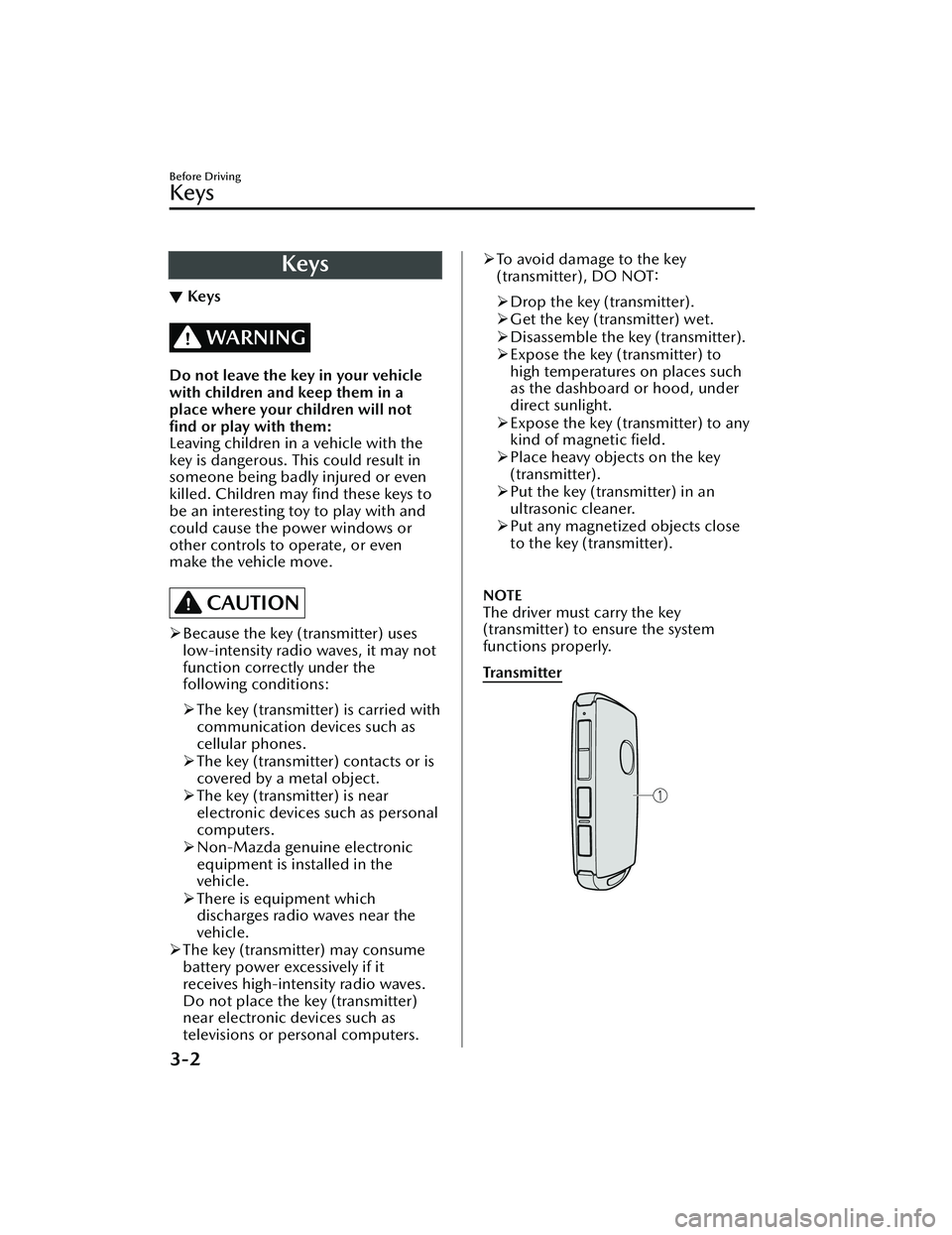
Tra n s m i t te r
Before Driving
Keys
3-2
CX-30_8HG6-EA-19I_Edition1_new 2019-6-13 18:45:11
Page 92 of 562

Operational Range
▼Operational Range
The system operates only when the
driver is in the vehicle or within
operational range while the key is
being carried.
NOTE
When the battery power is low, or in
places where there are high-intensity
radio waves or noise, the operational
range may become narrower or the
system may not operate. For
determining battery replacement,
Refer to Keyless Entry System on page
3-4.
▼Locking/Unlocking Using Touch
Sensor
1. Exterior antenna
2. 80 cm (31 in)
3. Operational range
NOTE
The system may not operate if you
are too close to the windows or door
handles.
If the key is left in the following areas
and you leave the vehicle, the doors
may be locked depending on the
radio wave conditions even if the key
is left in the vehicle.
Around the dashboard
In the storage compartments such
as the glove compartment or the
center console
Next to a communication device
such as a mobile phone
▼
Locking Using Door-Lock Switch/
Unlocking Using Electric Liftgate
Opener
1. Exterior antenna
2. 80 cm (31 in)
3. Operational range
Before Driving
Advanced Keyless Entry System
3-10
CX-30_8HG6-EA-19I_Edition1_new
2019-6-13 18:45:11
Page 94 of 562

In the storage compartments such
as the glove compartment or the
center console
Next to a communication device
such as a mobile phone
When the ignition is switched to
ACC or ON, the vehicle lock-out
prevention feature prevents you from
locking yourself out of the vehicle.
All doors, fuel-filler lid, and liftgate
will automatically unlock if they are
locked using the power door locks
with any door or the liftgate open.
The vehicle lock-out prevention
feature does not operate while the
ignition is switched off.
When all doors, fuel-filler lid, and
liftgate are locked using the power
door lock with any door or the
liftgate open, the closed doors,fuel-filler lid, and liftgate are locked.
After that, when all doors and the
liftgate are closed, all doors and the
liftgate are locked. However, if the
key is inside the vehicle, all doors, fuel-filler lid, and liftgate are
automatically unlocked.
(With the advanced keyless
function)
The beep sound is heard for about
10 seconds to notify the driver that
the key has been left in the vehicle.
(Without the advanced keyless
function)
The horn sound is heard twice to
notify the driver that the key has
been left in the vehicle.
(Door unlock (control) system with
collision detection)
This system automatically unlocks the
doors, fuel-filler lid, and liftgate in
the event the vehicle is involved in an
accident to allow passengers to get
out of the vehicle immediately and
prevent being trapped inside. While
the ignition is switched ON and in
the event the vehicle receives an
impact strong enough to inflate the
air bags, all the doors, fuel-filler lid,
and liftgate are automatically
unlocked after about 6 seconds have
elapsed from the time of the
accident.
The doors, fuel-filler lid, and liftgate
may not unlock depending on how
an impact is applied, the force of the
impact, and other conditions of the
accident.
If door-related systems or the battery
is malfunctioning, the doors, fuel-filler lid, and liftgate will not
unlock.
▼ Unlocking with Auxiliary Key
Only the driver's door can be unlocked
using the auxiliary key.
Refer to Keys on page 3-2.
Insert the auxiliary key while the
driver's door handle is pulled and turn
the key to the unlock side. Turn the
auxiliary key back to its original
position before removing it.
Before Driving
Doors and Locks
3-12
CX-30_8HG6-EA-19I_Edition1_new
2019-6-13 18:45:11
Page 126 of 562

NOTE
The keys carry a unique electronic
code. For this reason, and to assure
your safety, obtaining a replacement
key requires some waiting time. They
are only available through an
Authorized Mazda Dealer.
Always keep a spare key in case one
is lost. If a key is lost, consult an
Authorized Mazda Dealer as soon as
possible.
If you lose a key, an Authorized
Mazda Dealer will reset the
electronic codes of your remaining
keys and immobilizer system. Bring
all the remaining keys to an
Authorized Mazda Dealer to reset.
Starting the vehicle with a key that
has not been reset is not possible.
▼Operation
NOTE
The engine may not start and security
indicator light may illuminate or flash
if the key is placed in an area where
it is difficult for the system to detect
the signal, such as on the dashboard
or in the glove compartment. Move
the key to a location within the signal
range, switch the ignition
off, and
then restart the engine.
Signals from a TV or radio station, or
from a transceiver or mobile
telephone could interfere with your
immobilizer system. If you are using
the proper key and the engine fails to
start, check the security indicator
light.
Arming
The system is armed when the ignition
is switched from ON to off.
The security indicator light in the
instrument cluster flashes every 2
seconds until the system is disarmed.
Disarming
The system is disarmed when the
ignition is switched ON with the
correct programmed key. The security
indicator light illuminates for about 3
seconds and then turns off.
If the engine does not start with the
correct key, and the security indicator
light remains illuminated or flashing,
try the following:
Make sure the key is within the
operational range for signal
transmission. Switch the ignition off,
and then restart the engine. If the
engine does not start after 3 or more
tries, contact an Authorized Mazda
Dealer.
Before Driving
Security System
3-44
CX-30_8HG6-EA-19I_Edition1_new 2019-6-13 18:45:11
Page 193 of 562

If the indicator light flashes
rapidly in green, firmly press and
hold the Homelink button and
release it after two seconds have
passed. Repeat this process up to
three times to complete the
programming. The device
becomes operational and
programming is complete. If the
device does not operate, go to
the next step.
5. At the garage door opener receiver (motor-head unit) in the garage,
locate the “learn” or “smart” button.
This can usually be found where the
hanging antenna wire is attached to
the motor-head unit.
6. Firmly press and release the “learn” or “smart” button. (The name and
color of the button may vary by
manufacturer.)
NOTE
Complete the programming within
30 seconds.
7. Return to the vehicle and firmly press and hold the Homelink
button, and then release it after
two seconds have passed. Repeat
the “ press/hold/release” sequence
a second time, and, depending on
the brand of the garage door
opener (or other rolling code
equipped device), repeat this
sequence a third time to complete
the programming process.
Press the programmed HomeLink
button and make sure that the
HomeLink System operates.
8. If the status indicator arrows are flashing , refer to Garage Door
Two-Way Communication.
1. Indicator light
NOTE
To program the remaining two
HomeLink buttons, go back to Step 1
of Programming the HomeLink System
and repeat the procedure.
For questions or comments, please
contact HomeLink at
www.homelink.com or
www.youtube.com/
HomeLinkGentex , or the HomeLink
toll-free hotline at 1-800-355-3515
(for calls placed outside of the USA,
Canada, and Puerto Rico, international
rates will apply and may differ based
on landline or mobile phone).
▼ Gate operator/Canadian
Programming
Canadian radio-frequency laws require
transmitter signals to “time-out” (or
quit) after several seconds of
transmission
― which may not be long
enough for HomeLink to pick up the
signal during programming. Similar to
this Canadian law, some U.S. gate
operators are designed to “time-out”
in the same manner.
If you live in Canada or are having
difficulties programming a gate
operator by using the programming
procedures (regardless of where you
live), replace Step 3 of Programming
When Driving
Switches and Controls
4-57
CX-30_8HG6-EA-19I_Edition1_new 2019-6-13 18:45:11
Page 380 of 562
No. MenuExplanation
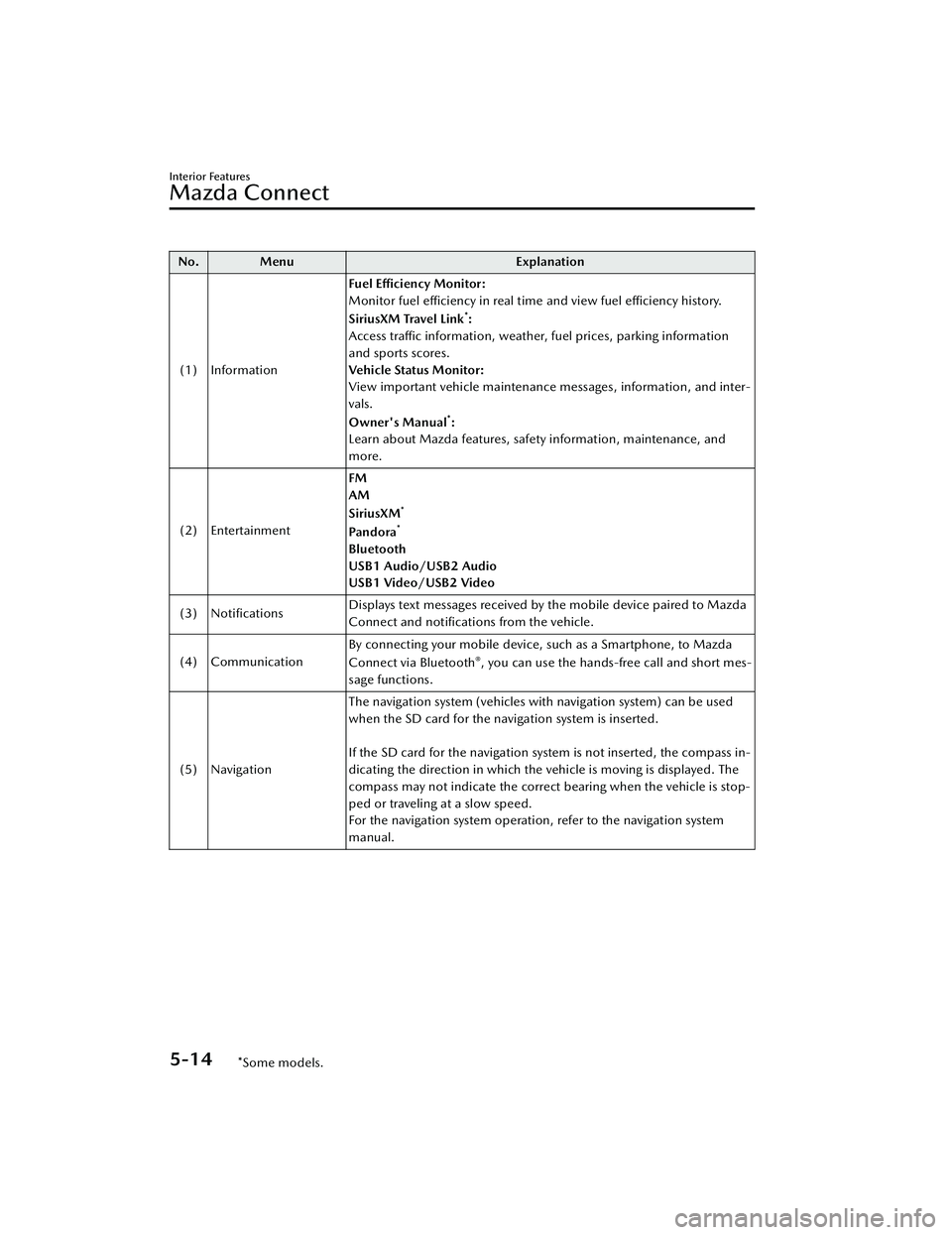
(1) Information Fuel Efficiency Monitor:
Monitor fuel efficiency in real time and view fuel efficiency history.
SiriusXM Travel Link
*:
Access traffic information, weather, fuel prices, parking information
and sports scores.
Vehicle Status Monitor:
View important vehicle maintenance messages, information, and inter-
vals.
Owner's Manual
*:
Learn about Mazda features, safety information, maintenance, and
more.
(2) Entertainment FM
AM
SiriusXM
*
Pa n d o ra*
Bluetooth
USB1 Audio/USB2 Audio
USB1 Video/USB2 Video
(3) Notifications Displays text messages received by the mobile device paired to Mazda
Connect and
notifications from the vehicle.
(4) Communication By connecting your mobile device, such as a Smartphone, to Mazda
Connect via Bluetooth
®, you can use the hands-free call and short mes-
sage functions.
(5) Navigation The navigation system (vehicles with navigation system) can be used
when the SD card for the navigation system is inserted.
If the SD card for the navigation system is not inserted, the compass in-
dicating the direction in which the vehicle is moving is displayed. The
compass may not indicate the correct bearing when the vehicle is stop-
ped or traveling at a slow speed.
For the navigation system operation, refer to the navigation system
manual.
Interior Features
Mazda Connect
5-14*Some models.
CX-30_8HG6-EA-19I_Edition1_new
2019-6-13 18:45:11
Page 381 of 562
No. MenuExplanation
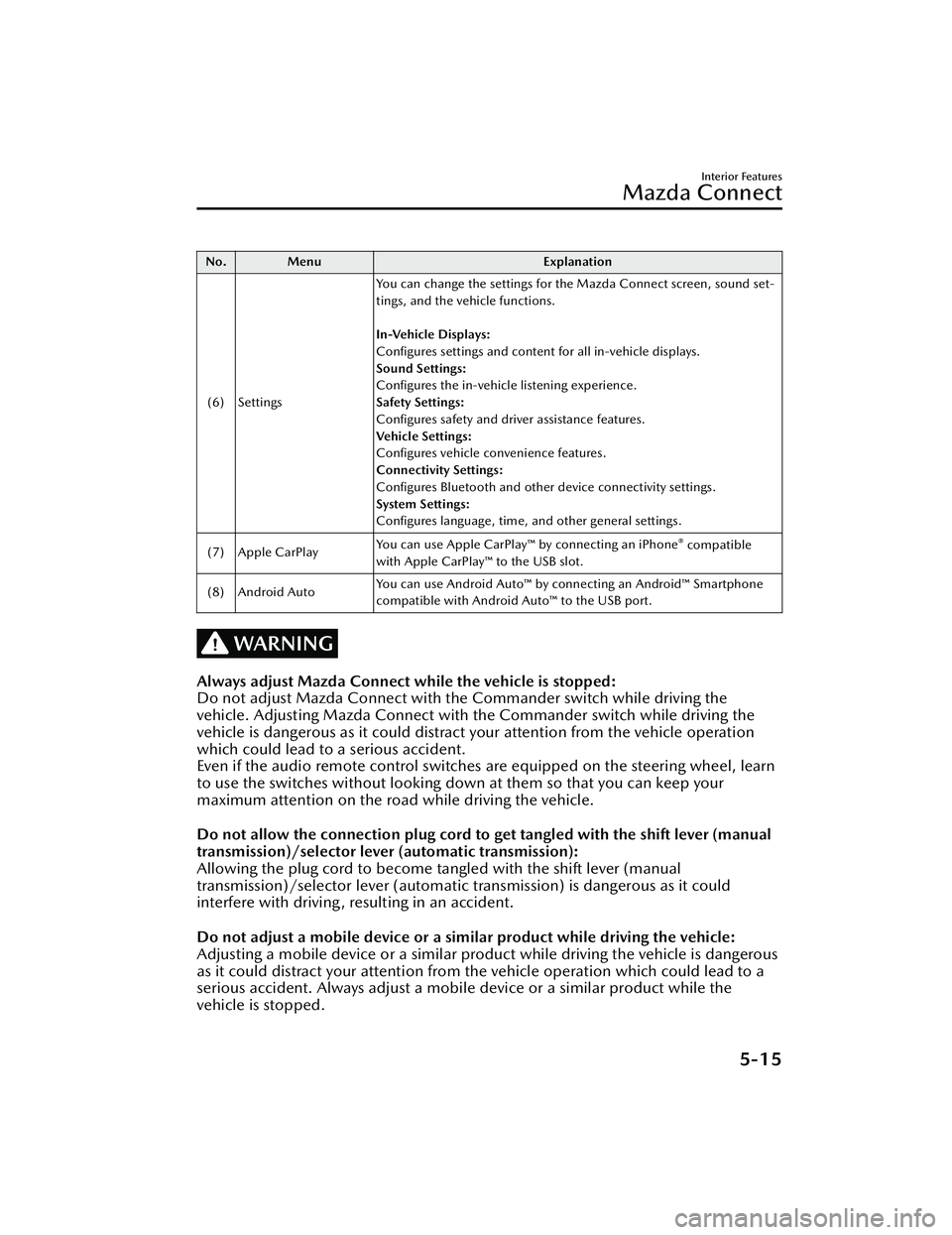
(6) Settings You can change the settings for the Mazda Connect screen, sound set-
tings, and the vehicle functions.
In-Vehicle Displays:
Configures settings and content for all in-vehicle displays.
Sound Settings:
Configures the in-vehicle listening experience.
Safety Settings:
Configures safety and driver assistance features.
Ve h i c l e S e t t i n g s :
Configures vehicle convenience features.
Connectivity Settings:
Configures Bluetooth and other device connectivity settings.
System Settings:
Configures language, time, and other general settings.
(7) Apple CarPlay You can use Apple CarPlay™ by connecting an iPhone
® compatible
with Apple CarPlay™ to the USB slot.
(8) Android Auto You can use Android Auto™ by connecting an Android™ Smartphone
compatible with Android Auto™ to the USB port.
WARNING
Always adjust Mazda Connect while the vehicle is stopped:
Do not adjust Mazda Connect with th
e Commander switch while driving the
vehicle. Adjusting Mazda Connect with the Commander switch while driving the
vehicle is dangerous as it could distract your attention from the vehicle operation
which could lead to a serious accident.
Even if the audio remote control switches are equipped on the steering wheel, learn
to use the switches without looking down at them so that you can keep your
maximum attention on the road while driving the vehicle.
Do not allow the connection plug cord to get tangled with the shift lever (manual
transmission)/selector leve r (automatic transmission):
Allowing the plug cord to become tangled with the shift lever (manual
transmission)/selector lever (automatic transmission) is dangerous as it could
interfere with driving, resulting in an accident.
Do not adjust a mobile device or a similar product while driving the vehicle:
Adjusting a mobile device or a similar product while driving the vehicle is dangerous
as it could distract your attention from the vehicle operation which could lead to a
serious accident. Always adjust a mobile device or a similar product while the
vehicle is stopped.
Interior Features
Mazda Connect
5-15
CX-30_8HG6-EA-19I_Edition1_new 2019-6-13 18:45:11
Page 382 of 562
CAUTION
For the purposes of safe driving, adjust the audio volume to a level that allows you
to hear sounds outside of the vehicle including car horns and particularly emergency
vehicle sirens.
NOTE
Do not use Mazda Connect for a long time with the engine stopped. Otherwise,
the battery power could be depleted.
If a mobile phone or CB radio is used in or near the vehicle, it could cause noise to
occur from the audio system. However, this does not indicate a problem.
Interior Features
Mazda Connect
5-16
CX-30_8HG6-EA-19I_Edition1_new 2019-6-13 18:45:11
Page 386 of 562
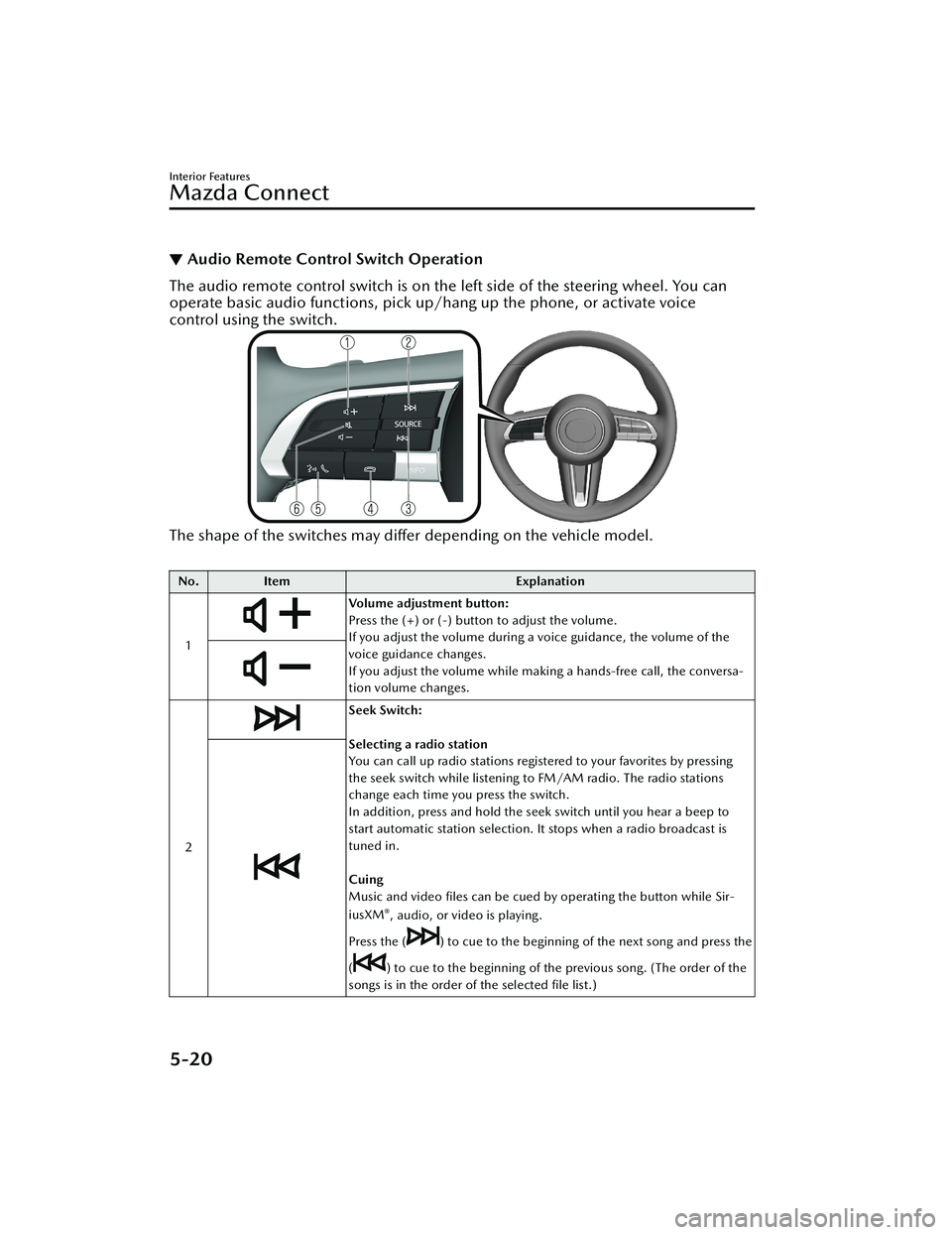
▼Audio Remote Control Switch Operation
The audio remote control switch is on the left side of the steering wheel. You can
operate basic audio functions, pick up/hang up the phone, or activate voice
control using the switch.
The shape of the switches may
differ depending on the vehicle model.
No. Item Explanation
1
Volume adjustment button:
Press the (+) or (-) button to adjust the volume.
If you adjust the volume during a voice guidance, the volume of the
voice guidance changes.
If you adjust the volume while making a hands-free call, the conversa-
tion volume changes.
2
Seek Switch:
Selecting a radio station
You can call up radio stations registered to your favorites by pressing
the seek switch while listening to FM/AM radio. The radio stations
change each time you press the switch.
In addition, press and hold the seek switch until you hear a beep to
start automatic station selection. It stops when a radio broadcast is
tuned in.
Cuing
Music and video files can be cued by operating the button while Sir-
iusXM
®, audio, or video is playing.
Press the (
) to cue to the beginning of the next song and press the
(
) to cue to the beginning of the previous song. (The order of the
songs is in the order of the selected file list.)
Interior Features
Mazda Connect
5-20
CX-30_8HG6-EA-19I_Edition1_new 2019-6-13 18:45:11
Page 388 of 562
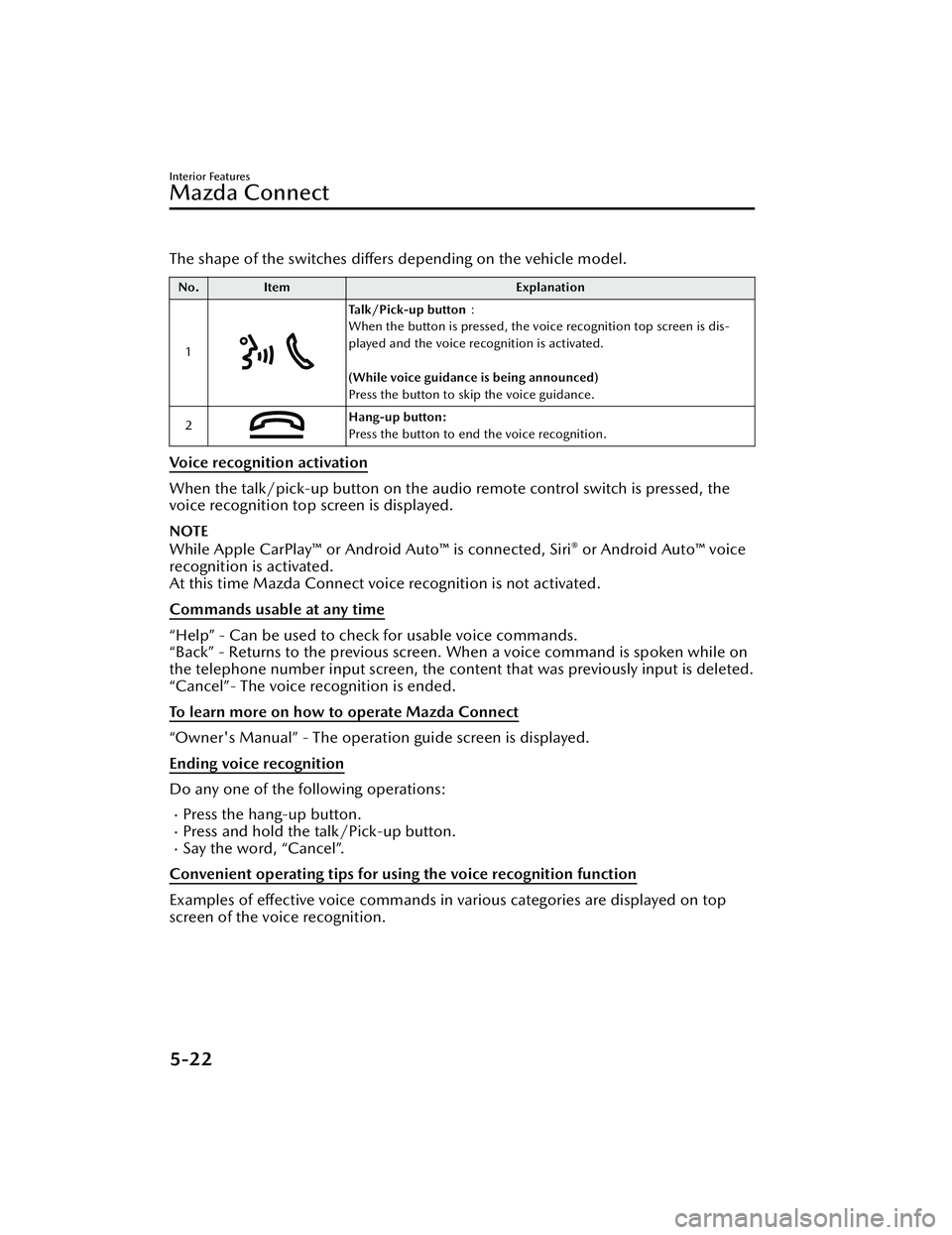
The shape of the switches differs depending on the vehicle model.
No.Item Explanation
1
Talk/Pick-up button :
When the button is pressed, the voice recognition top screen is dis-
played and the voice recognition is activated.
(While voice guidance is being announced)
Press the button to skip the voice guidance.
2
Hang-up button:
Press the button to end the voice recognition.
Voice recognition activation
When the talk/pick-up button on the audio remote control switch is pressed, the
voice recognition top screen is displayed.
NOTE
While Apple CarPlay™ or Android Auto™ is connected, Siri® or Android Auto™ voice
recognition is activated.
At this time Mazda Connect voice recognition is not activated.
Commands usable at any time
“Help” - Can be used to check for usable voice commands.
“Back” - Returns to the previous screen. When a voice command is spoken while on
the telephone number input screen, the cont ent that was previously input is deleted.
“Cancel”- The voice recognition is ended.
To learn more on how to operate Mazda Connect
“Owner's Manual” - The operation guide screen is displayed.
Ending voice recognition
Do any one of the following operations:
Press the hang-up button.Press and hold the talk/Pick-up button.Say the word, “Cancel”.
Convenient operating tips for using the voice recognition function
Examples of effective voice commands in various categories are displayed on top
screen of the voice recognition.
Interior Features
Mazda Connect
5-22
CX-30_8HG6-EA-19I_Edition1_new 2019-6-13 18:45:11