phone MAZDA MODEL CX-30 2020 User Guide
[x] Cancel search | Manufacturer: MAZDA, Model Year: 2020, Model line: MODEL CX-30, Model: MAZDA MODEL CX-30 2020Pages: 562, PDF Size: 83 MB
Page 389 of 562
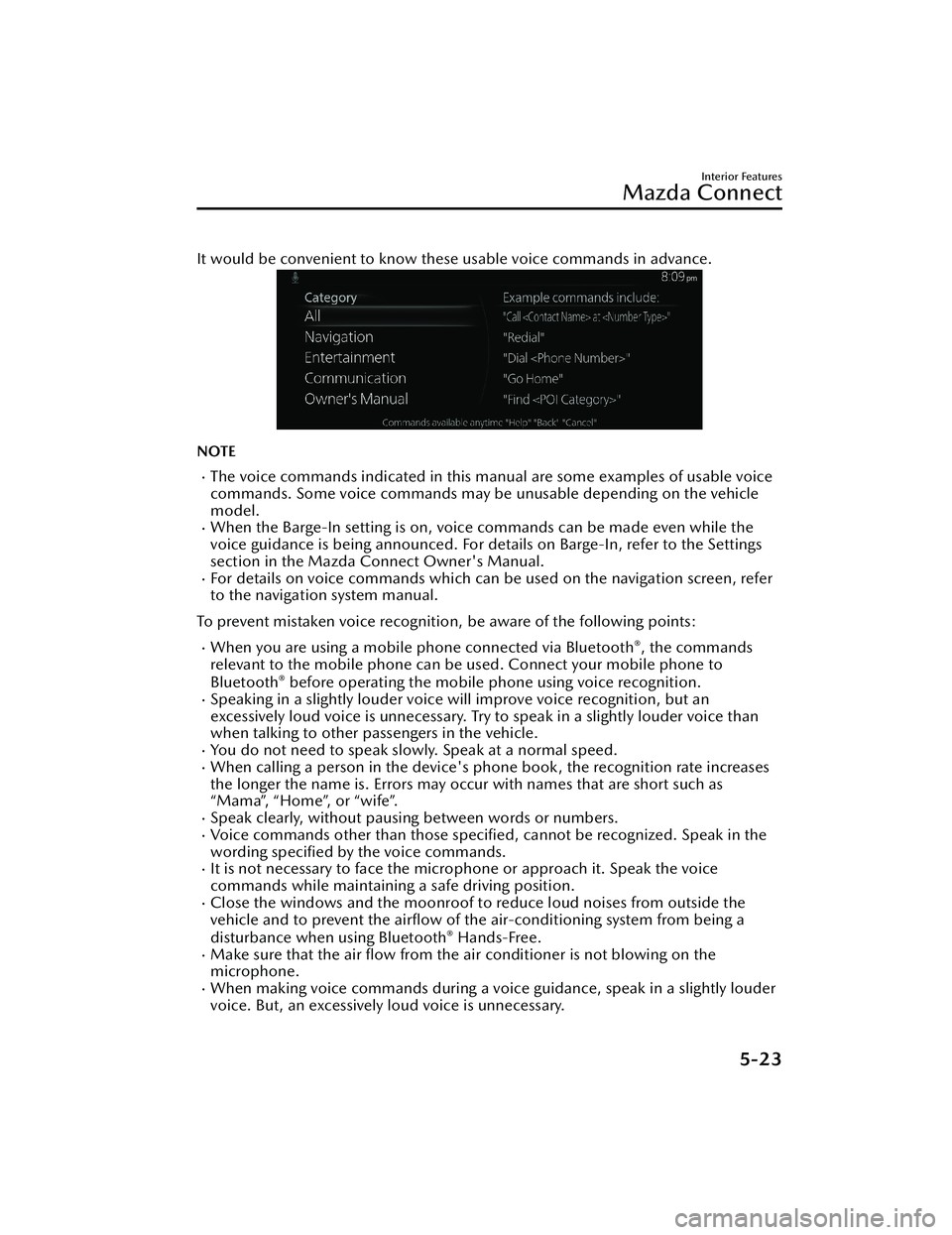
It would be convenient to know these usable voice commands in advance.
NOTE
The voice commands indicated in this ma nual are some examples of usable voice
commands. Some voice commands may be unusable depending on the vehicle
model.
When the Barge-In setting is on, voice commands can be made even while the
voice guidance is being announced. For details on Barge-In, refer to the Settings
section in the Mazda Connect Owner's Manual.
For details on voice commands which can be used on the navigation screen, refer
to the navigation system manual.
To prevent mistaken voice recognition, be aware of the following points:
When you are using a mobile phone connected via Bluetooth®, the commands
relevant to the mobile phone can be used. Connect your mobile phone to
Bluetooth
® before operating the mobile phone using voice recognition.Speaking in a slightly louder voice will improve voice recognition, but an
excessively loud voice is unnecessary. Try to speak in a slightly louder voice than
when talking to other passengers in the vehicle.
You do not need to speak slowly. Speak at a normal speed.When calling a person in the device's phone book, the recognition rate increases
the longer the name is. Errors may oc cur with names that are short such as
“Mama”, “Home”, or “wife”.
Speak clearly, without pausing between words or numbers.Voice commands other than those specified , cannot be recognized. Speak in the
wording specified by the voice commands.
It is not necessary to face the microphone or approach it. Speak the voice
commands while maintaining a safe driving position.
Close the windows and the moonroof to reduce loud noises from outside the
vehicle and to prevent the airflow of the air-conditioning system from being a
disturbance when using Bluetooth
® Hands-Free.Make sure that the air flow from the air conditioner is not blowing on the
microphone.
When making voice commands during a voic e guidance, speak in a slightly louder
voice. But, an excessively loud voice is unnecessary.
Interior Features
Mazda Connect
5-23
CX-30_8HG6-EA-19I_Edition1_new 2019-6-13 18:45:11
Page 391 of 562
Audio OFF (You can also use “Change Source to Audio OFF”.)
Phone
Dial Phone Number (You can al so use “Dial {Phone Number}”.)Call HistoryCall a Contact (You can also use “Call {Contact Name}” and “Call {Contact Name}
at {Number Type}”.)
Redial
*1 : Audio source names other than “USB” can also be used as follows:
Bluetooth/AM/FM/SiriusXM/Pandora/U SB1 Audio/USB2 Audio/USB1 Video/
USB2 Video
NOTE
Some commands may not be usable depending on the region and equipment.Some commands cannot be used depending on the device connection conditions
and the use conditions.
▼ Appendix
Gracenote® Database
When connecting a USB audio device or Bluetooth® audio device to
this unit and
playing audio, the unit searches the database stored in the vehicle for the album art.
If there is a match in the vehicle's database compilation to the music being played,
the album art is displayed. The database information stored in this device uses
database information in the Gracenote
® music recognitions service.
SiriusXM Travel Link
®*
CAUTION
ADVISORY ONLY
The weather information is subject to service interruptions and may contain errors or
inaccuracies and consequently should not be relied upon exclusively. You are urged
to check alternate weather information sources prior to making safety related
decisions. You acknowledge and agree that you shall be solely responsible for use of
the information and all decisions taken with respect thereto. By using this weather
service, you release and waive any claims against Sirius XM Radio Inc. and Mazda
Motor Corporation and all of their respective affiliates with regard to this service.
SiriusXM
® Satellite Radio*
Products/applications shall display “Call [Appropriate Phone Number] to Enable
Services” for any unsubscribed SiriusXM Data Service(s).
Interior Features
Mazda Connect
*Some models.5-25
CX-30_8HG6-EA-19I_Edition1_new 2019-6-13 18:45:11
Page 392 of 562

This shall be shown on the same screen as the Radio ID and the service subscription
status:
Contact your SiriusXM Representative for the appropriate call center phone number.
U.S.A.: 1-877-447-0011Canada: 1-877-438-9677
SiriusXM
® All Access Subscription
Hopefully, you're already loving SiriusXM in your new Mazda. But don't stop there
— you can also listen on the app and online. All Access is the very best subscription
package – with the most channels and the most flexibility. With All Access, you get
every channel available on your vehicle, plus you can listen on the app, online, and
in your home on a variety of connecte d devices. — so you can enjoy SiriusXM
wherever you are. Here's what's included:
Over 150 satellite channels to enjoy in your car, coast-to-coast, 24/7.All kinds of commercial-free music, plus every major sport, world-class news and
the biggest names in talk & entertainment.
All of our premium programming, including Howard Stern, every NFL, MLB®, and
NBA game, NHL® games, every NASCAR® race, 24/7 talk channels dedicated to
the biggest leagues, and much more.
All SiriusXM services require a subscription, sold separately or as a package by
SiriusXM Radio Inc. (or, in Canada, SiriusXM Canada Inc.), after any trial
subscription which may be included with your vehicle purchase or lease. To
subscribe after your trial subscrip tion, call 1-877-447-0011 (U.S.A.) or
1-877-438-9677 (Canada).
CAUTION
It is prohibited to copy, decompile, disassemble, reverse engineer, hack,
manipulate, or otherwise make available any technology or software incorporated in
receivers compatible with the SiriusXM satellite radio service or that support the
SiriusXM website, the online service or any of its content. Furthermore, the AMBE
®
voice compression software included in this product is protected by intellectual
property rights including patent rights, co pyrights, and trade secrets of Digital Voice
Systems, Inc. The SiriusXM Service may include traffic, weather and other content
and emergency alert information and data. Such information and data is not for
“safety for life”, but is merely supplemental and advisory in nature and, therefore,
cannot be relied upon as safety critical. Neither SiriusXM nor Mazda is responsible
for any errors in accuracies in the SiriusXM data services or its use in applications.
The SiriusXM content is subject to change without notice.
NOTE
SiriusXM Satellite Radio Service is available in the 48 contiguous United States and
the District of Columbia. The service is not available in Alaska, Hawaii or Puerto
Rico.
Interior Features
Mazda Connect
5-26
CX-30_8HG6-EA-19I_Edition1_new 2019-6-13 18:45:11
Page 394 of 562

AS EXAMPLES, AND WITHOUT LIMITATION, MAZDA DISCLAIMS ANY
WARRANTY REGARDING THE ACCURACY OF DATA PROVIDED BY THE
APPLICATION, SUCH AS THE ACCURACY OF DIRECTIONS, ESTIMATED TRAVEL
TIME, SPEED LIMITS, ROAD CONDITIONS, NEWS, WEATHER, TRAFFIC, OR
OTHER CONTENT PROVIDED BY APPLE, ITS AFFILIATES, OR THIRD PARTY
PROVIDERS; MAZDA DOES NOT GUARANTEE AGAINST LOSS OF APPLICATION
DATA, WHICH MAY BE LOST AT ANY TIME; MAZDA DOES NOT GUARANTEE
THAT THE APPLICATION OR ANY SERVICES PROVIDED THROUGH THEM WILL
BE PROVIDED AT ALL TIMES OR THAT ANY OR ALL SERVICES WILL BE AVAILABLE
AT ANY PARTICULAR TIME OR LOCATION. FOR EXAMPLE, SERVICES MAY BE
SUSPENDED OR INTERRUPTED WITHOUT NOTICE FOR REPAIR, MAINTENANCE,
SECURITY FIXES, UPDATES, ETC., SERVICES MAY BE UNAVAILABLE IN YOUR AREA
OR LOCATION, ETC.
IN ADDITION, YOU UNDERSTAND THAT CHANGES IN THIRD PARTY
TECHNOLOGY OR GOVERNMENT REGULATION MAY RENDER THE SERVICES
AND/OR APPLICATIONS OBSOLETE AND/OR UNUSABLE. TO THE EXTENT NOT
PROHIBITED BY LAW, IN NO EVENT SHALL MAZDA OR ITS AFFILIATES BE LIABLE
FOR PERSONAL INJURY, OR ANY INCIDENTAL, SPECIAL, INDIRECT OR
CONSEQUENTIAL DAMAGES WHATSOEVER, INCLUDING, WITHOUT
LIMITATION, DAMAGES FOR LOSS OF PROFITS, CORRUPTION OR LOSS OF
DATA, FAILURE TO TRANSMIT OR RECEIVE ANY DATA, BUSINESS INTERRUPTION
OR ANY OTHER COMMERCIAL DAMAGES OR LOSSES, ARISING OUT OF OR
RELATED TO THE APPLICATION OR YOUR USE OF OR INABILITY TO USE THE
APPLICATION OR INFORMATION ON THE APPLICATION.
When using Apple CarPlay™, please avoid distraction and use Apple CarPlay™
responsibly.
Stay fully aware of driving conditions and always obey applicable laws.
NOTE
Apple CarPlay™ is provided by Apple® and its use is subject to your agreement to
the Apple CarPlay™ terms of use, which are included as part of the Apple iOS
terms of use.
When using Apple CarPlay™, location, speed, and other vehicle data is transferred
to your iPhone®. For further details, refer to Apple®’s Privacy Policy.
Interior Features
Mazda Connect
5-28
CX-30_8HG6-EA-19I_Edition1_new 2019-6-13 18:45:11
Page 396 of 562
NOTE
Android Auto™ is provided by Google and its use is subject to your agreement to
the Android Auto™ terms of use.
When using Android Auto™, location, speed, and other vehicle data is transferred
to your smart phone. For further details, refer to Google Privacy Policy.
Trademark
Pa n d o ra®, the Pandora® logo, and the Pandora® trade dress are trademarks or
registered trademarks of Pandora Media, Inc., used with permission.
HD Radio™ and the HD, HD Radio, and “Arc” logos are proprietary trademarks of
iBiquity Digital Corp.
iPhone, iPod touch, iPod nano, Siri and Apple Music are registered trademarks of
Apple Inc.
Apple CarPlay is trademarks of Apple Inc.iOS is a trademark or registered trademark of Cisco in the U.S. and other countries
and is used under license.
“Made for iPhone” and “Made for iPod” mean that an accessory has been
designed to connect specific ally to iPhone or iPod, and has been certified by the
developer to meet Apple performance standards. Apple is not responsible for the
operation of this device or its compliance with safety and regulatory standards.
Please note that the use of this accessory with iPhone or iPod may affect wireless
performance.
Made for
iPhone 7 Plus
iPhone 7
iPhone SE
iPhone 6s Plus
iPhone 6s
iPhone 6 Plus
iPhone 6
iPhone 5s
iPhone 5c
iPhone 5
iPhone 4s
iPod touch (6th generation)
iPod touch (5th generation)
Interior Features
Mazda Connect
5-30
CX-30_8HG6-EA-19I_Edition1_new 2019-6-13 18:45:11
Page 399 of 562
Connected Service (U.S.A. only)
▼Connected Service Overview
There are several types of connected services available via Mazda Connect. Some
services may require you to download the MyMazda app to your smartphone and
subscribe to the services, while others may require you to pair your smartphone to
the vehicle via Bluetooth
®. In addition, on a regular basis and unless you opt-out,
your vehicle will automatically transmit certain geo-location, driving behavior data,
and vehicle health information to Mazda for product quality, data analysis, research,
and product development. Using the QR codes or URLs below, refer to the
Connected Service Owner's Manual and Privacy Policy for more details and opt-out
options.
Connected Service Owner's Manual
https://www.mazdausa.com/static/manuals/mazda-connected-service/
index.html
Privacy
Mazda maintains a Privacy Statement which describes how we collect, use, share,
store and secure data from your vehicle equipped with connected services.
We provide you with connected services by collecting and using your personal
information and vehicle location, health and driving data.
To learn more about our Privacy Statement, please visit: https://
www.mazdausa.com/site/privacy-connectedservices
Interior Features
Mazda Connect
5-33
CX-30_8HG6-EA-19I_Edition1_new 2019-6-13 18:45:11
Page 503 of 562

8
Customer Information and Reporting
Safety Defects
Important consumer information including warranties and add-
on equipment.
Customer Assistance................. 8-2 Customer Assistance
(U.S.A.).................................8-2
Customer Assistance
(Canada).............................. 8-6
Customer Assistance (Puerto
Rico).....................................8-8
Customer Assistance
(Mexico)............................... 8-9
Mazda Importer/Distributors ..........
............................................ 8-11 Importer/Distributor............8-11
Reporting Safety Defects.......... 8-12 Reporting Safety Defects
(U.S.A.)...............................8-12
Reporting Safety Defects
(Canada)............................ 8-13
Warranty................................8-14 Warranties for Your Mazda ..........
.......................................... 8-14
Outside the United States/
Canada............................... 8-14
Registering Your Vehicle in A
Foreign Country (Except United
States and Canada).............. 8-15
Add-On Non-Genuine Parts and
Accessories......................... 8-16
Cell Phones............................ 8-17Cell Phones Warning............ 8-17
Event Data Recorder................ 8-18 Event Data Recorder (U.S.A. and
Canada)..............................8-18
Recording of Vehicle Data........ 8-19 Recording of Vehicle Data.... 8-19
Uniform Tire Quality Grading System
(UTQGS)................................ 8-20 Uniform Tire Quality Grading
System (UTQGS).................. 8-20
Tire Information (U.S.A.).......... 8-22 Tire Labeling........................ 8-22
Location of the Tire Label
(Placard)............................. 8-25
Tire Maintenance................. 8-27
Vehicle Loading................... 8-29
Steps for Determining the Correct
Load Limit........................... 8-32
Declaration of Conformity....... 8-33 Declaration of Conformity ...........
.......................................... 8-33
8-1
CX-30_8HG6-EA-19I_Edition1_new 2019-6-13 18:45:11
Page 504 of 562

Customer Assistance(U.S.A.)
▼Customer Assistance
Your complete and permanent
satisfaction is our business. We are
here to serve you. All Authorized
Mazda Dealers have the knowledge
and the tools to keep your Mazda
vehicle in top condition.
If you have any questions or
recommendations for improvement
regarding the service of your Mazda
vehicle or servicing by Mazda Dealer
personnel, we recommend that you
take the following steps:
NOTE
If it becomes necessary to have the
components or wiring system for the
supplementary restraint system
modified to accommodate a person
with certain medical conditions in
accordance with a certified physician,
contact an Authorized Mazda Dealer.
For more informatio
n, go to NHTSA
website www.safercar.gov (VEHICLE
SHOPPERS > Air Bags > Air Bag FAQs >
Air Bag Deactivation).
▼ STEP 1: Contact Your Mazda
Dealer
Discuss the matter with an Authorized
Mazda Dealer. This is the quickest and
best way to address the issue.
If your concern has not been
resolved by the CUSTOMER
RELATIONS, SALES, SERVICE, or
PA RT S M A N AG E R , t h e n p l ea s e
contact the GENERAL MANAGER of
the dealership or the OWNER.
If it becomes necessary to have the
components or wiring system for the
supplementary restraint system
modified to accommodate a person
with certain medical conditions in
accordance with a certified
physician, go to STEP 2.
▼ STEP 2: Contact Mazda North
American Operations
If for any reason you feel the need for
further assistance after contacting your
dealership management or it becomes
necessary to have the components or
wiring system for the supplementary
restraint system modified to
accommodate a person with certain
medical conditions in accordance with
a certified physician, you can reach
Mazda North American Operations by
one of the following ways.
Log on: at www.MazdaUSA.com
Answers to many questions, including
how to locate or contact a local Mazda
dealership in the U.S., can be found
here.
E-mail: click on “Contact Us” located
on the bottom of the page at
www.mazdausa.com under “Help”
By phone at: 1 (800) 222-5500
By letter at:
ATTN: Customer Experience Center
Mazda North American Operations
200 Spectrum Center Drive Suite 100
Irvine, California 92618
P.O. Box 19734
Irvine, CA 92623-9734
In order to serve you
efficiently and
effectively, please help us by providing
the following information:
1. Your name, address, and telephone number
2. Year and model of vehicle
Customer Information and Reporting Safety Defects
Customer Assistance
8-2
CX-30_8HG6-EA-19I_Edition1_new 2019-6-13 18:45:11
Page 508 of 562

Customer Assistance(Canada)
▼Satisfaction Review Process
Your complete and permanent
satisfaction is of primary concern to
Mazda. All Authorized Mazda Dealers
have both the knowledge and tools to
keep your Mazda in top condition. In
our experience, any questions,
problems, or complaints regarding the
operation of your Mazda or any other
general service transactions are most
effectively
resolved by your dealer. If
the cause of your dissatisfaction
cannot adequately be addressed by
normal dealership procedures, we
recommend that you take the
following steps:
▼ STEP 1: Contact the Mazda Dealer
Discuss the matter with a member of
dealership management. If the Service
Manager has already reviewed your
concerns, contact the owner of the
dealership or its General Manager.
▼STEP 2: Contact the Mazda
Regional Office
If you feel that you still require
assistance, ask the dealer Service
Manager to arrange for you to meet
the local Mazda Service
Representative. If more expedient,
contact Mazda Canada Inc. Regional
Office nearest you for such
arrangements. Regional Office address
and phone numbers are shown (page
8-7).
▼STEP 3: Contact the Mazda
Customer Relations Department
If still not substantially satisfied,
contact the Customer Relations
Department, Mazda Canada Inc., 55
Vogell Road, Richmond Hill, Ontario,
L4B 3K5 Canada TEL: 1 (800)
263-4680.
Provide the Department with the
following information:
1. Your name, address and telephone
number
2. Year and model of vehicle
3. Vehicle Identification Number (VIN). Refer to the Vehicle
Identification Number on page
9-2 for the location of the VIN.
4. Purchase date
5. Present odometer reading
6. Your dealer's name and location
7. The nature of your problem and/or cause of dissatisfaction
The Department, in cooperation with
the local Mazda Service
Representative, will review the case to
determine if everything possible has
been done to ensure your satisfaction.
Please recognize that the resolution of
service problems in most cases
requires the use of your Mazda
dealer's service facilities, personnel
and equipment. We urge you to follow
the above three steps in sequence for
most effective results.
▼ Mediation/Arbitration Program
Occasionally a customer concern
cannot be resolved through Mazda's
Customer Satisfaction Program. If after
exhausting the procedures in this
manual your concern is still not
resolved, you have another option.
Mazda Canada Inc. participates in an
arbitration program administered by
the Canadian Motor Vehicle
Arbitration Plan (CAMVAP). CAMVAP
will advise you about how your
Customer Information and Reporting Safety Defects
Customer Assistance
8-6
CX-30_8HG6-EA-19I_Edition1_new
2019-6-13 18:45:11
Page 510 of 562

REGIONAL OFFICES COVERING AREASMAZDA CANADA INC.
QUEBEC REGION
6111 ROUTE TRANS- CANADIENNE
POINTE CLAIRE, QUE-
BEC
H9R 5A5
(514) 694-6390 QUEBECCustomer Assistance
(Puerto Rico)
▼Customer Assistance
Your complete and permanent
satisfaction is our business. That is why
all Authorized Mazda Dealers have the
knowledge and the tools to keep your
Mazda vehicle in top condition.
If you have any questions or
recommendations for improvement
regarding the service of your Mazda
vehicle or servicing by Mazda Dealer
personnel, we re
commend that you
take the following steps:
▼ STEP 1
Discuss the matter with an Authorized
Mazda Dealer. This is the quickest and
best way to address the issue. If your
concern has not been resolved by the
CUSTOMER RELATIONS, SALES,
SERVICE, or PARTS MANAGER, then
please contact the GENERAL
MANAGER of the dealership or the
OWNER.
▼STEP 2
If, after following STEP 1, you feel the
need for further assistance, please
contact your area's Mazda
representative.
Refer to PUERTO RICO/U.S. Virgin
Island on page 8-11.
Please help us by providing the
following information:
1. Your name, address, and telephone
number
2. Year and model of vehicle
3. Vehicle Identification Number (17 digits, noted on your registration or
title or located on the upper
driver's side corner of the dash)
Customer Information and Reporting Safety Defects
Customer Assistance
8-8
CX-30_8HG6-EA-19I_Edition1_new 2019-6-13 18:45:11