usb format MAZDA MODEL CX-30 2020 Owners Manual
[x] Cancel search | Manufacturer: MAZDA, Model Year: 2020, Model line: MODEL CX-30, Model: MAZDA MODEL CX-30 2020Pages: 562, PDF Size: 83 MB
Page 379 of 562
What is Mazda Connect ?
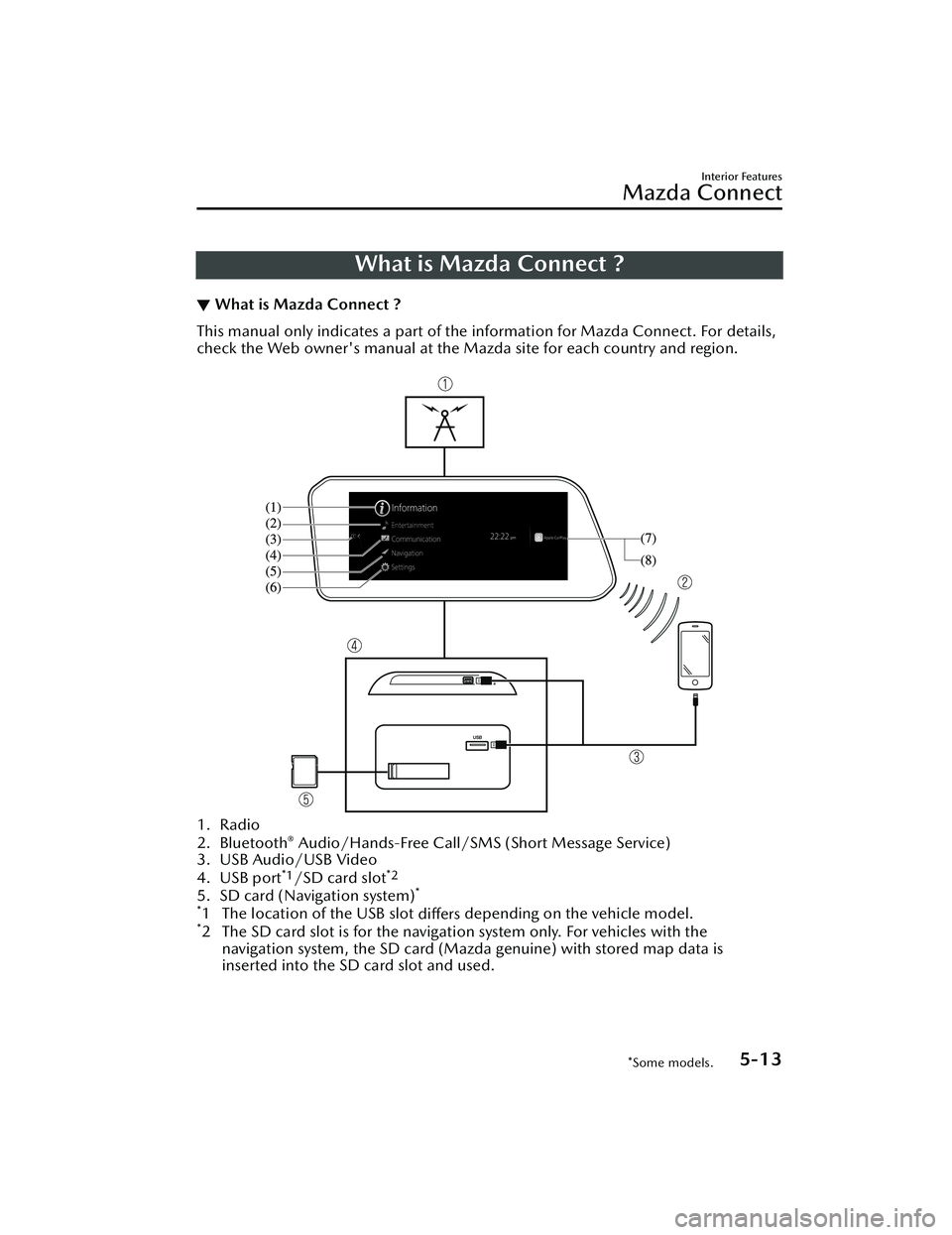
▼What is Mazda Connect ?
This manual only indicates a part of the information for Mazda Connect. For details,
check the Web owner's manual at the Mazda site for each country and region.
1. Radio
2. Bluetooth® Audio/Hands-Free Call/SMS
(Short Message Service)
3. USB Audio/USB Video
4. USB port
*1/SD card slot*2
5. SD card (Navigation system)*
*
1 The location of the USB slot differs depending on the vehicle model.*2 The SD card slot is for the navigati
on system only. For vehicles with the
navigation system, the SD card (Mazda genuine) with stored map data is
inserted into the SD card slot and used.
Interior Features
Mazda Connect
*Some models.5-13
CX-30_8HG6-EA-19I_Edition1_new 2019-6-13 18:45:11
Page 380 of 562
No. MenuExplanation
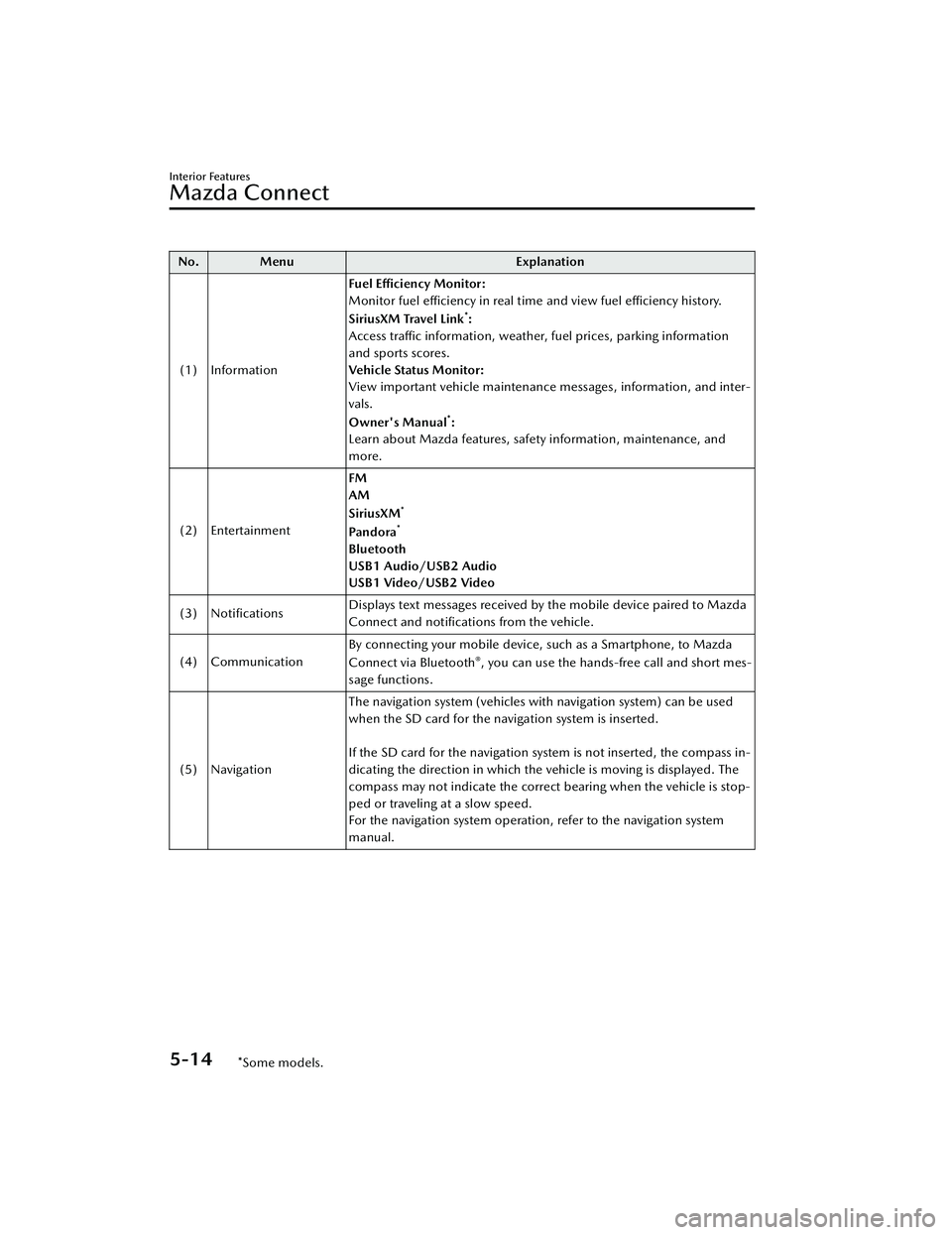
(1) Information Fuel Efficiency Monitor:
Monitor fuel efficiency in real time and view fuel efficiency history.
SiriusXM Travel Link
*:
Access traffic information, weather, fuel prices, parking information
and sports scores.
Vehicle Status Monitor:
View important vehicle maintenance messages, information, and inter-
vals.
Owner's Manual
*:
Learn about Mazda features, safety information, maintenance, and
more.
(2) Entertainment FM
AM
SiriusXM
*
Pa n d o ra*
Bluetooth
USB1 Audio/USB2 Audio
USB1 Video/USB2 Video
(3) Notifications Displays text messages received by the mobile device paired to Mazda
Connect and
notifications from the vehicle.
(4) Communication By connecting your mobile device, such as a Smartphone, to Mazda
Connect via Bluetooth
®, you can use the hands-free call and short mes-
sage functions.
(5) Navigation The navigation system (vehicles with navigation system) can be used
when the SD card for the navigation system is inserted.
If the SD card for the navigation system is not inserted, the compass in-
dicating the direction in which the vehicle is moving is displayed. The
compass may not indicate the correct bearing when the vehicle is stop-
ped or traveling at a slow speed.
For the navigation system operation, refer to the navigation system
manual.
Interior Features
Mazda Connect
5-14*Some models.
CX-30_8HG6-EA-19I_Edition1_new
2019-6-13 18:45:11
Page 391 of 562
Audio OFF (You can also use “Change Source to Audio OFF”.)
Phone
Dial Phone Number (You can al so use “Dial {Phone Number}”.)Call HistoryCall a Contact (You can also use “Call {Contact Name}” and “Call {Contact Name}
at {Number Type}”.)
Redial
*1 : Audio source names other than “USB” can also be used as follows:
Bluetooth/AM/FM/SiriusXM/Pandora/U SB1 Audio/USB2 Audio/USB1 Video/
USB2 Video
NOTE
Some commands may not be usable depending on the region and equipment.Some commands cannot be used depending on the device connection conditions
and the use conditions.
▼ Appendix
Gracenote® Database
When connecting a USB audio device or Bluetooth® audio device to
this unit and
playing audio, the unit searches the database stored in the vehicle for the album art.
If there is a match in the vehicle's database compilation to the music being played,
the album art is displayed. The database information stored in this device uses
database information in the Gracenote
® music recognitions service.
SiriusXM Travel Link
®*
CAUTION
ADVISORY ONLY
The weather information is subject to service interruptions and may contain errors or
inaccuracies and consequently should not be relied upon exclusively. You are urged
to check alternate weather information sources prior to making safety related
decisions. You acknowledge and agree that you shall be solely responsible for use of
the information and all decisions taken with respect thereto. By using this weather
service, you release and waive any claims against Sirius XM Radio Inc. and Mazda
Motor Corporation and all of their respective affiliates with regard to this service.
SiriusXM
® Satellite Radio*
Products/applications shall display “Call [Appropriate Phone Number] to Enable
Services” for any unsubscribed SiriusXM Data Service(s).
Interior Features
Mazda Connect
*Some models.5-25
CX-30_8HG6-EA-19I_Edition1_new 2019-6-13 18:45:11