i stop MAZDA MODEL CX-30 2021 Owners Manual
[x] Cancel search | Manufacturer: MAZDA, Model Year: 2021, Model line: MODEL CX-30, Model: MAZDA MODEL CX-30 2021Pages: 594, PDF Size: 83.37 MB
Page 401 of 594
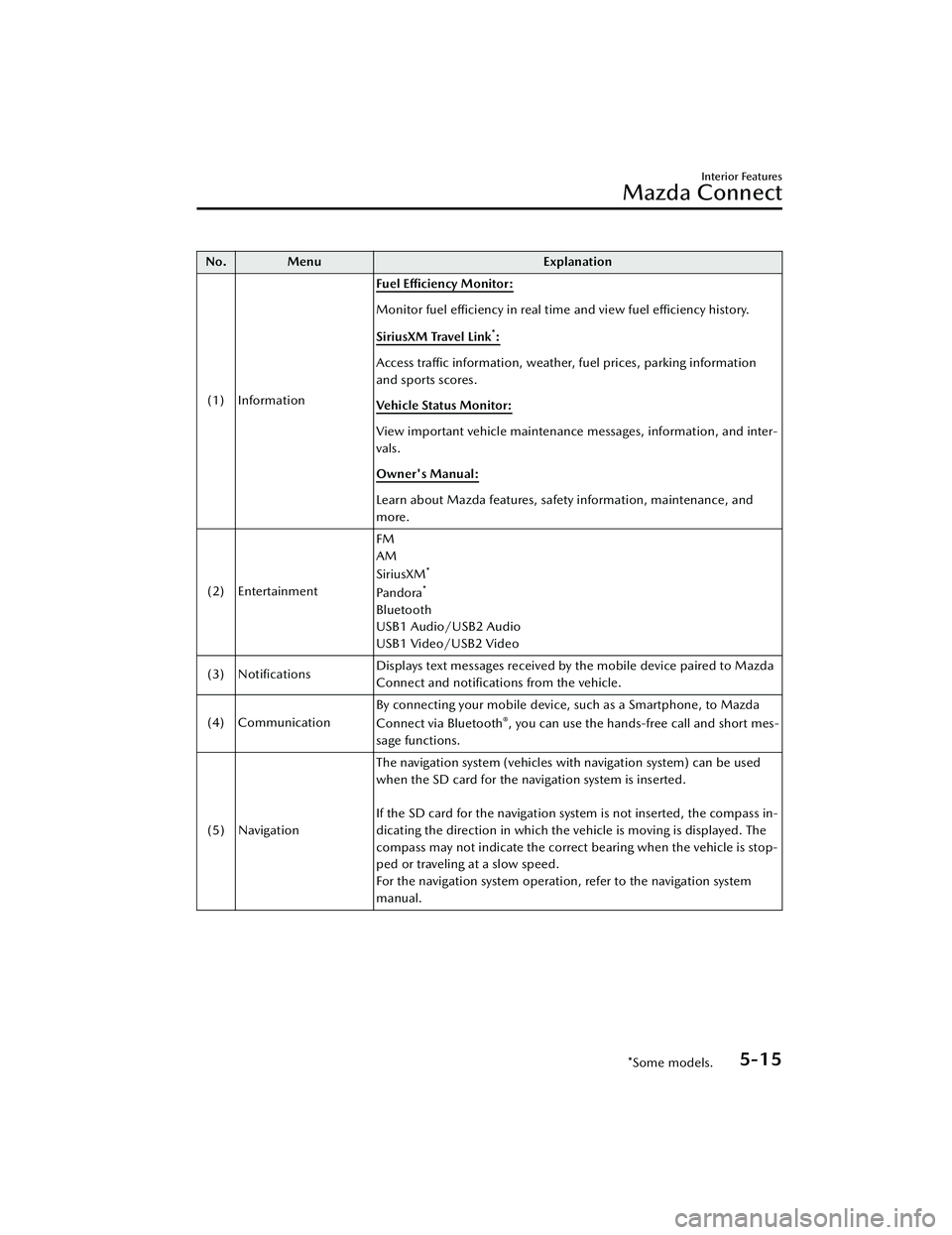
No. MenuExplanation
(1) Information Fuel Efficiency Monitor:
Monitor fuel
efficiency in real time and view fuel
efficiency history.
SiriusXM Travel Link
*:
Access traffic information, weather, fuel prices, parking information
and sports scores.
Vehicle Status Monitor:
View important vehicle maintenance messages, information, and inter-
vals.
Owner's Manual:
Learn about Mazda features, safety information, maintenance, and
more.
(2) Entertainment FM
AM
SiriusXM
*
Pa n d o ra*
Bluetooth
USB1 Audio/USB2 Audio
USB1 Video/USB2 Video
(3) Notifications Displays text messages received by the mobile device paired to Mazda
Connect and notifications from the vehicle.
(4) Communication By connecting your mobile device, such as a Smartphone, to Mazda
Connect via Bluetooth
®, you can use the hands-free call and short mes-
sage functions.
(5) Navigation The navigation system (vehicles with navigation system) can be used
when the SD card for the navigation system is inserted.
If the SD card for the navigation system is not inserted, the compass in-
dicating the direction in which the vehicle is moving is displayed. The
compass may not indicate the correct bearing when the vehicle is stop-
ped or traveling at a slow speed.
For the navigation system operation, refer to the navigation system
manual.
Interior Features
Mazda Connect
*Some models.5-15
CX-30_8JP5-EA-20K_Edition1_new
2020-7-22 15:50:09
Page 402 of 594
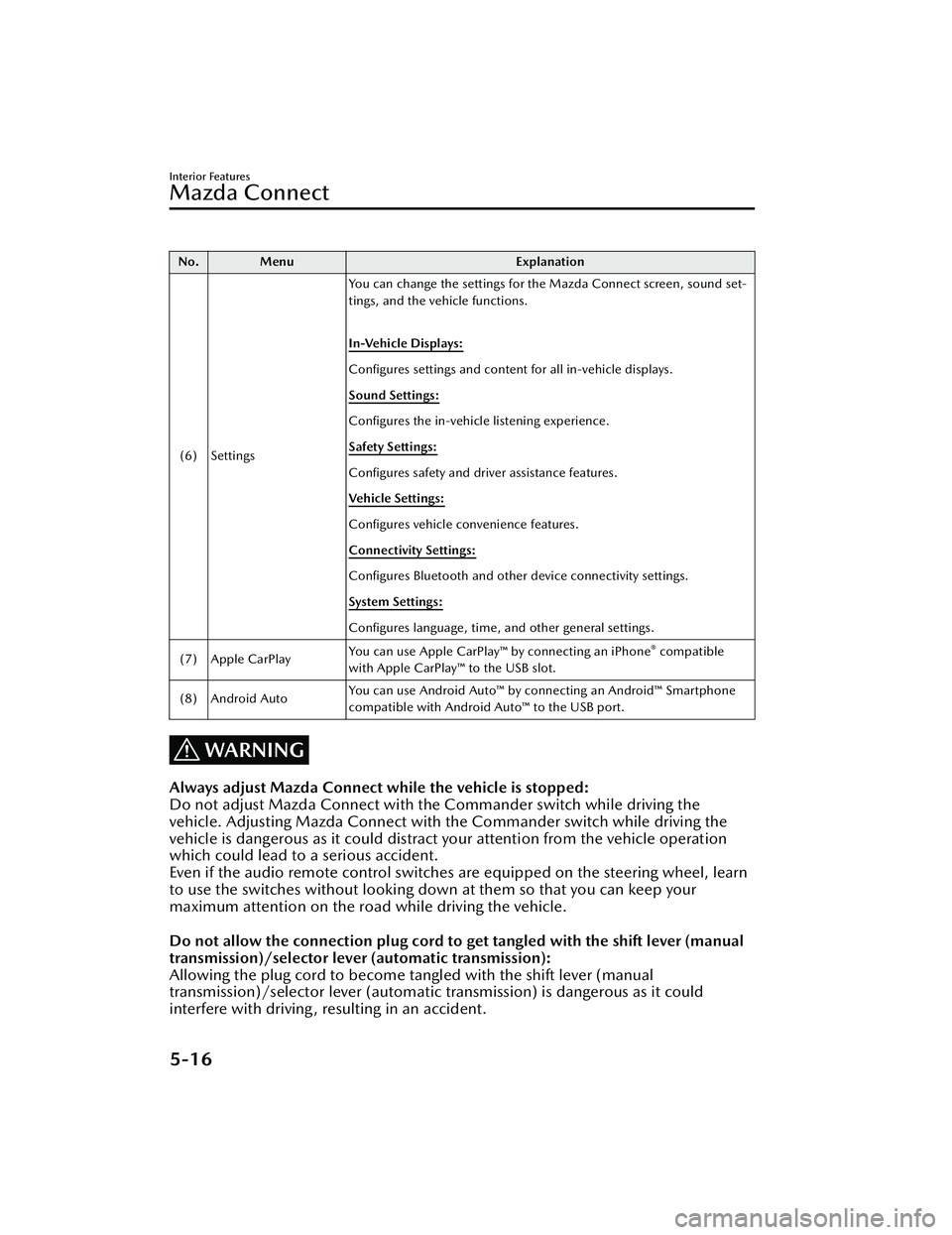
No. MenuExplanation
(6) Settings You can change the settings for the Mazda Connect screen, sound set-
tings, and the vehicle functions.
In-Vehicle Displays:
Configures settings and content for all in-vehicle displays.
Sound Settings:
Configures
the in-vehicle listening experience.
Safety Settings:
Configures safety and driver assistance features.
Ve h i c l e S e t t i n g s :
Configures vehicle convenience features.
Connectivity Settings:
Configures Bluetooth and other device connectivity settings.
System Settings:
Configures language, time, and other general settings.
(7) Apple CarPlay You can use Apple CarPlay™ by connecting an iPhone
® compatible
with Apple CarPlay™ to the USB slot.
(8) Android Auto You can use Android Auto™ by connecting an Android™ Smartphone
compatible with Android Auto™ to the USB port.
WARNING
Always adjust Mazda Connect while the vehicle is stopped:
Do not adjust Mazda Connect with th
e Commander switch while driving the
vehicle. Adjusting Mazda Connect with the Commander switch while driving the
vehicle is dangerous as it could distract your attention from the vehicle operation
which could lead to a serious accident.
Even if the audio remote control switches are equipped on the steering wheel, learn
to use the switches without looking down at them so that you can keep your
maximum attention on the road while driving the vehicle.
Do not allow the connection plug cord to get tangled with the shift lever (manual
transmission)/selector lever (automatic transmission):
Allowing the plug cord to become tangled with the shift lever (manual
transmission)/selector lever (automatic transmission) is dangerous as it could
interfere with driving , resulting in an accident.
Interior Features
Mazda Connect
5-16
CX-30_8JP5-EA-20K_Edition1_new 2020-7-22 15:50:09
Page 403 of 594
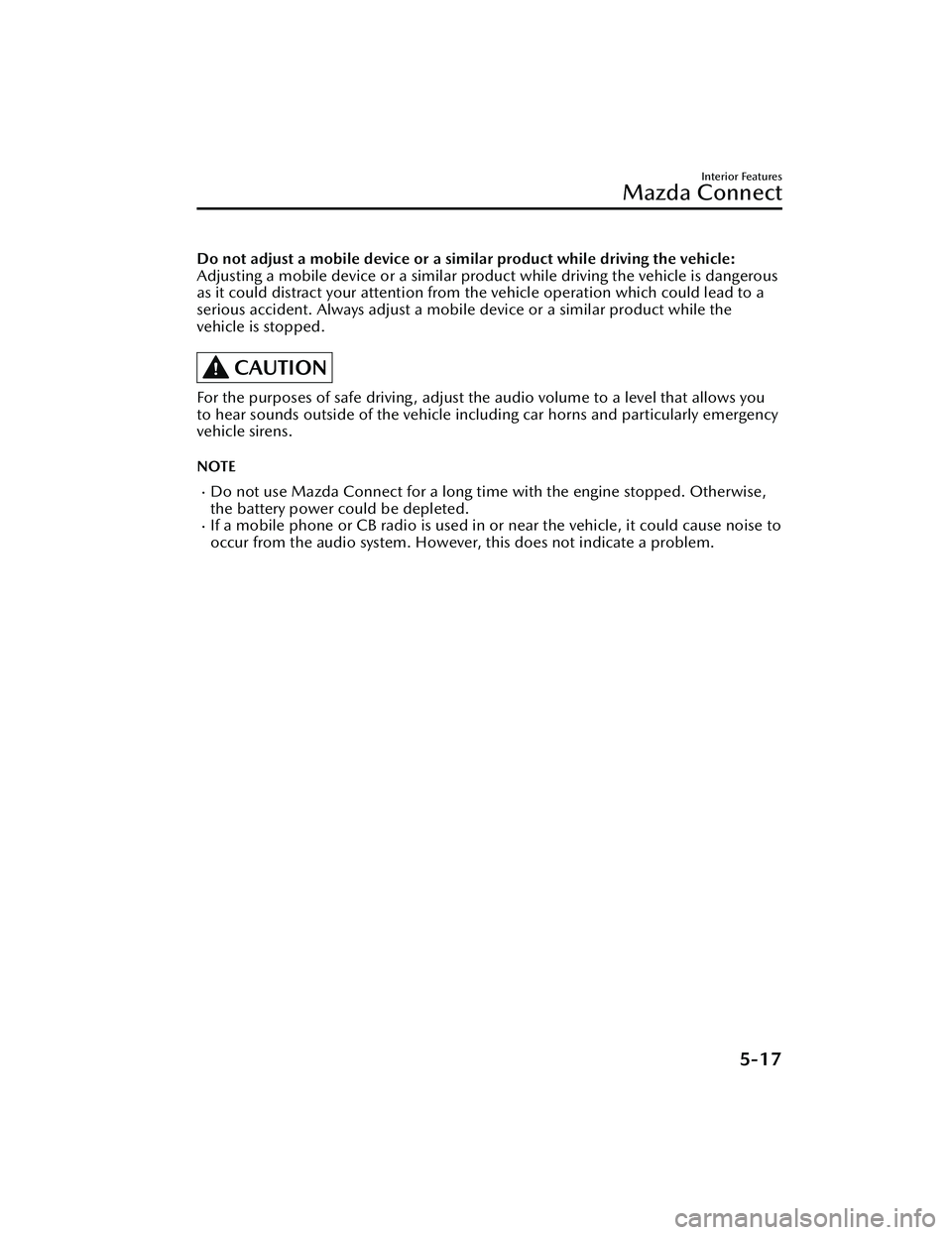
Do not adjust a mobile device or a similar product while driving the vehicle:
Adjusting a mobile device or a similar product while driving the vehicle is dangerous
as it could distract your attention from the vehicle operation which could lead to a
serious accident. Always adjust a mobile device or a similar product while the
vehicle is stopped.
CAUTION
For the purposes of safe driving , adjust the audio volume to a level that allows you
to hear sounds outside of the vehicle incl uding car horns and particularly emergency
vehicle sirens.
NOTE
Do not use Mazda Connect for a long time with the engine stopped. Otherwise,
the battery power could be depleted.
If a mobile phone or CB radio is used in or near the vehicle, it could cause noise to
occur from the audio system. However, this does not indicate a problem.
Interior Features
Mazda Connect
5-17
CX-30_8JP5-EA-20K_Edition1_new 2020-7-22 15:50:09
Page 414 of 594
![MAZDA MODEL CX-30 2021 Owners Manual SiriusXM® Satellite Radio*
Products/applications shall display “Call [Appropriate Phone Number] to Enable
Services” for any unsubscribed SiriusXM Data Service(s).
This shall be shown on the same](/img/28/40980/w960_40980-413.png "MAZDA MODEL CX-30 2021 Owners Manual SiriusXM® Satellite Radio*
Products/applications shall display “Call [Appropriate Phone Number] to Enable
Services” for any unsubscribed SiriusXM Data Service(s).
This shall be shown on the same")
SiriusXM® Satellite Radio*
Products/applications shall display “Call [Appropriate Phone Number] to Enable
Services” for any unsubscribed SiriusXM Data Service(s).
This shall be shown on the same screen as the Radio ID and the service subscription
status:
Contact your SiriusXM Representative for the appropriate call center phone number.
U.S.A.: 1-877-447-0011Canada: 1-877-438-9677
SiriusXM
® All Access Subscription
Hopefully, you're already loving SiriusXM in your new Mazda. But don't stop there
— you can also listen on the app and online. All Access is the very best subscription
package – with the most channels and the most flexibility. With All Access, you get
every channel available on your vehicle, plus you can listen on the app, online, and
in your home on a variety of connecte d devices. — so you can enjoy SiriusXM
wherever you are. Here's what's included:
Over 150 satellite channels to enjoy in your car, coast-to-coast, 24/7.All kinds of commercial-free music, plus every major sport, world-class news and
the biggest names in talk & entertainment.
All of our premium programming, including Howard Stern, every NFL, MLB®, and
NBA game, NHL® games, every NASCAR® race, 24/7 talk channels dedicated to
the biggest leagues, and much more.
All SiriusXM services require a subscription, sold separately or as a package by
SiriusXM Radio Inc. (or, in Canada, SiriusXM Canada Inc.), after any trial
subscription which may be included with your vehicle purchase or lease. To
subscribe after your trial subscrip tion, call 1-877-447-0011 (U.S.A.) or
1-877-438-9677 (Canada).
Interior Features
Mazda Connect
5-28*Some models.
CX-30_8JP5-EA-20K_Edition1_new 2020-7-22 15:50:09
Page 429 of 594

Storage Compartments
▼Storage Compartments
WARNING
Keep storage boxes closed when
driving:
Driving with the storage boxes open is
dangerous. To reduce the possibility of
injury in an accident or a sudden stop,
keep the storage boxes closed when
driving.
When loading cargo, make sure that it
is completely secured:
If the cargo is not completely secured,
it may move or collapse while driving
or during sudden braking, resulting in
injury or an accident.
Do not put articles in storage spaces
with no lid:
Putting articles in storage spaces with
no lid is dangerous as they could be
thrown around the cabin during
sudden braking , maneuvering , or
acceleration and cause an accident
depending on how the article is stored.
CAUTION
Do not leave lighters or eyeglasses in
the storage boxes while parked under
the sun. A lighter could explode or the
plastic material in eyeglasses could
deform and crack from high
temperature.
▼
Overhead Console*
This console box is designed to store
eyeglasses or other accessories.
Push and release to open.
▼Storage Pocket
To use, open the lid.
▼
Glove Compartment
To open the glove compartment, pull
the knob toward you.
To close the glove compartment, firmly
press in the center of the glove
compartment lid.
Interior Features
Interior Equipment
*Some models.5-43
CX-30_8JP5-EA-20K_Edition1_new
2020-7-22 15:50:09
Page 443 of 594

If you must run the engine while
working under the hood, make
certain that you remove all jewelry
(especially rings, bracelets, watches,
and necklaces) and all neckties,
scarves, and similar loose clothing
before getting near the engine or
cooling fan which may turn on
unexpectedly:
Working under the hood with the
engine running is dangerous. It
becomes even more dangerous when
you wear jewelry, loose clothing or
have long hair or a long beard.
Either can become entangled in
moving parts and result in injury.
Pull over to a safe location, then
switch the ignition off and make sure
the fan is not running before
attempting to work near the cooling
fan:
Working near the cooling fan when it is
running is dangerous. The fan could
continue running indefinitely even if
the engine has stopped and the engine
compartment temperature is high. You
could be hit by the fan and seriously
injured.
Do not leave items in the engine
compartment:
After you have finished checking or
doing servicing in the engine
compartment, do not forget and leave
items such as tools or rags in the
engine compartment.
Tools or other items left in the engine
compartment could cause engine
damage or a fire leading to an
unexpected accident.
Hood
▼ Hood
WARNING
Always check that the hood is closed
and securely locked:
A hood that is not closed and securely
locked is dangerous as it could fly open
while the vehicle is moving and block
the driver's vision which could result in
a serious accident.
▼
Opening the Hood
1. With the vehicle parked, pull the
release handle to unlock the hood.
2. Insert your hand into the hoodopening , slide the latch lever in the
direction of the allow as shown in
the illustration, and lift up the
hood.
Maintenance and Care
Owner Maintenance
6-13
CX-30_8JP5-EA-20K_Edition1_new 2020-7-22 15:50:09
Page 449 of 594
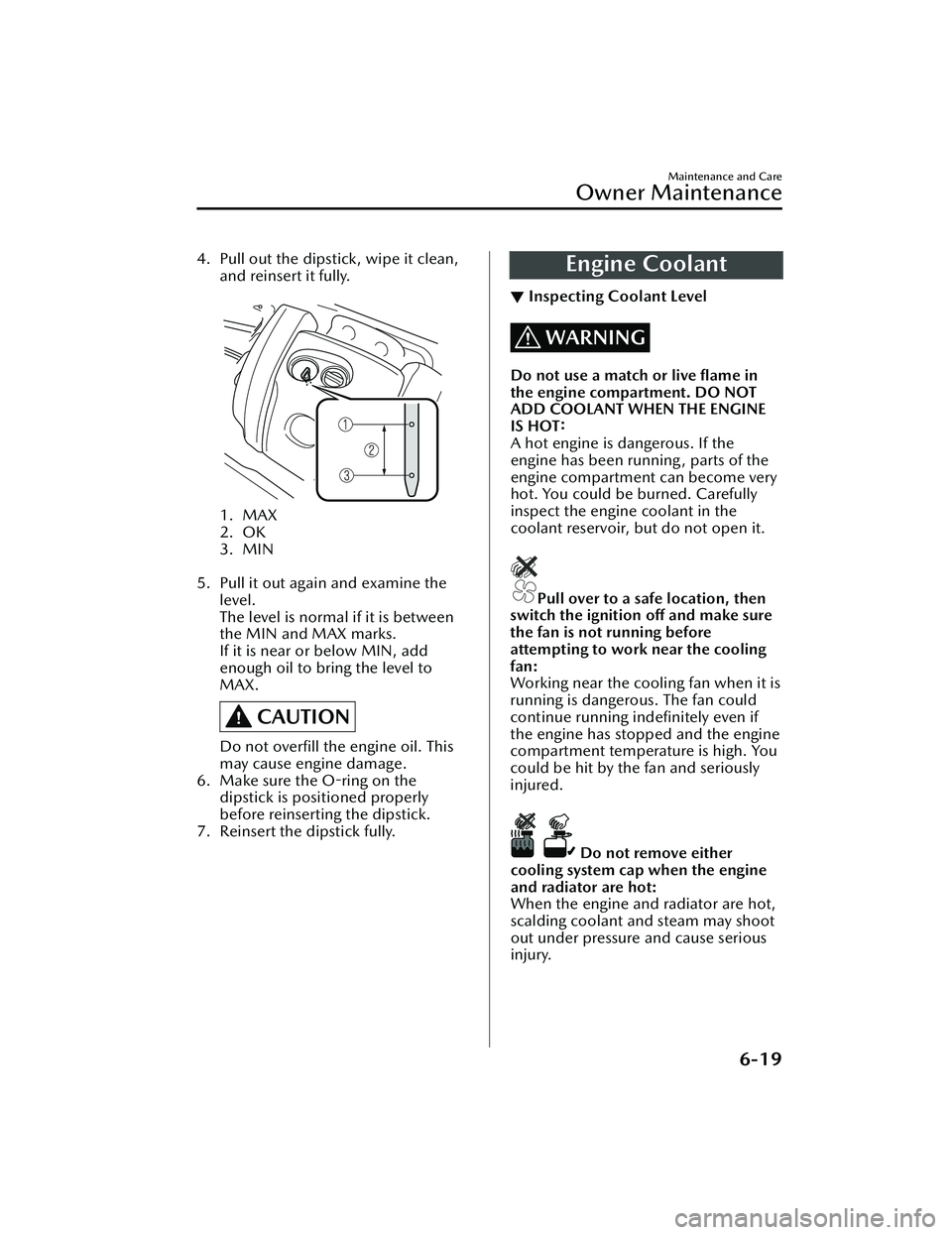
4. Pull out the dipstick, wipe it clean,and reinsert it fully.
1. MAX
2. OK
3. MIN
5. Pull it out again and examine the level.
The level is normal if it is between
the MIN and MAX marks.
If it is near or below MIN, add
enough oil to bring the level to
MAX.
CAUTION
Do not overfill the engine oil. This
may cause engine damage.
6. Make sure the O-ring on the dipstick is positioned properly
before reinserting the dipstick.
7. Reinsert the dipstick fully.
Engine Coolant
▼ Inspecting Coolant Level
WARNING
Do not use a match or live flame in
the engine compartment. DO NOT
ADD COOLANT WHEN THE ENGINE
IS HOT:
A hot engine is dangerous. If the
engine has been running , parts of the
engine compartment can become very
hot. You could be burned. Carefully
inspect the engine coolant in the
coolant reservoir, but do not open it.
Pull over to a safe location, then
switch the ignition off and make sure
the fan is not running before
attempting to work near the cooling
fan:
Working near the cooling fan when it is
running is dangerous. The fan could
continue running indefinitely even if
the engine has stopped and the engine
compartment temperature is high. You
could be hit by the fan and seriously
injured.
Do not remove either
cooling system cap when the engine
and radiator are hot:
When the engine and radiator are hot,
scalding coolant and steam may shoot
out under pressure and cause serious
injury.
Maintenance and Care
Owner Maintenance
6-19
CX-30_8JP5-EA-20K_Edition1_new 2020-7-22 15:50:09
Page 454 of 594

Do not bend the blade rubber
unnecessarily when replacing it.
Otherwise, the metal stiffener in the
blade may deform and the
windshield wiper operation may be
adversely affected.
Do not hold a wiper blade by its end
when raising the wiper arm.
Otherwise, the part may deform and
the wiping performance may lower.
NOTE
You can replace the wiper blades
yourself, however you cannot replace
the wiper arms.
If you want to replace the wiper
arms, consult an Authorized Mazda
Dealer.
Forcefully lowering the wiper arms
could damage the wiper arm and
blade, and may scratch or crack the
windshield.
Replace the wiper blades using the
following procedure.
1. Move the wipers to the service positions using the following
procedure.
a) Switch the ignition ON.
b) Switch the ignition OFF.
c) Press up the wiper switch to theMIST position 2 times within 30
seconds after switching the
ignition OFF.
When the procedure is
completed, the wipers operate
and they stop at the service
positions.
2. Raise the wiper arms.
CAUTION
To prevent damage to the
windshield let the wiper arm down
easily, do not let it slap down on
the windshield.
3. Slide the blade component in the direction of the arrow while
pressing the wiper arm tab to
remove the blade component from
the wiper arm.
4. Pull the blade rubber in thedirection of the arrow and slide it
to a position where the blade
holder groove can be checked.
Maintenance and Care
Owner Maintenance
6-24
CX-30_8JP5-EA-20K_Edition1_new 2020-7-22 15:50:09
Page 456 of 594

7. After pulling the blade rubber in thedirection of the arrow and sliding
the blade rubber to a position to
check the blade holder groove,
slide the blade rubber end in the
opposite direction.
8. Make sure that the blade rubber iscorrectly installed to the blade
holder.
9. Slide the blade component and install it to the wiper arm.
10.Slowly lower the wiper arms ontothe windshield.
11.Move the wipers to their initial positions using the following
procedure.
a) Make sure that the wipers are set
on the windshield.
b) Switch the ignition ON.
c) Press up the wiper switch to the MIST position 1 time.
When the procedure is
completed, the wipers operate
and they stop at the initial
positions.
▼Replacing Rear Window Wiper
Blade
When the wiper no longer cleans well,
the blade is probably worn or cracked.
Replace it.
CAUTION
To prevent damage to the wiper arm
and other components, do not move
the wiper by hand.
Maintenance and Care
Owner Maintenance
6-26
CX-30_8JP5-EA-20K_Edition1_new
2020-7-22 15:50:09
Page 457 of 594

1. Remove the cover.
2. Remove the stopper and raise thewiper arm.
3. Firmly rotate the wiper blade to theright until it unlocks, then remove
the blade.
CAUTION
To prevent damage to the rear
window, do not let the wiper arm
fall on it.
4. Pull down the blade rubber andslide it out of the blade holder.
5. Remove the metal stiffeners fromthe blade rubber and install them in
the new blade.
CAUTION
Do not bend or discard the
stiffeners. You need to use them
again.
6. Carefully insert the new blade
rubber.
Then install the blade assembly in
the reverse order of removal.
Maintenance and Care
Owner Maintenance
6-27
CX-30_8JP5-EA-20K_Edition1_new 2020-7-22 15:50:09